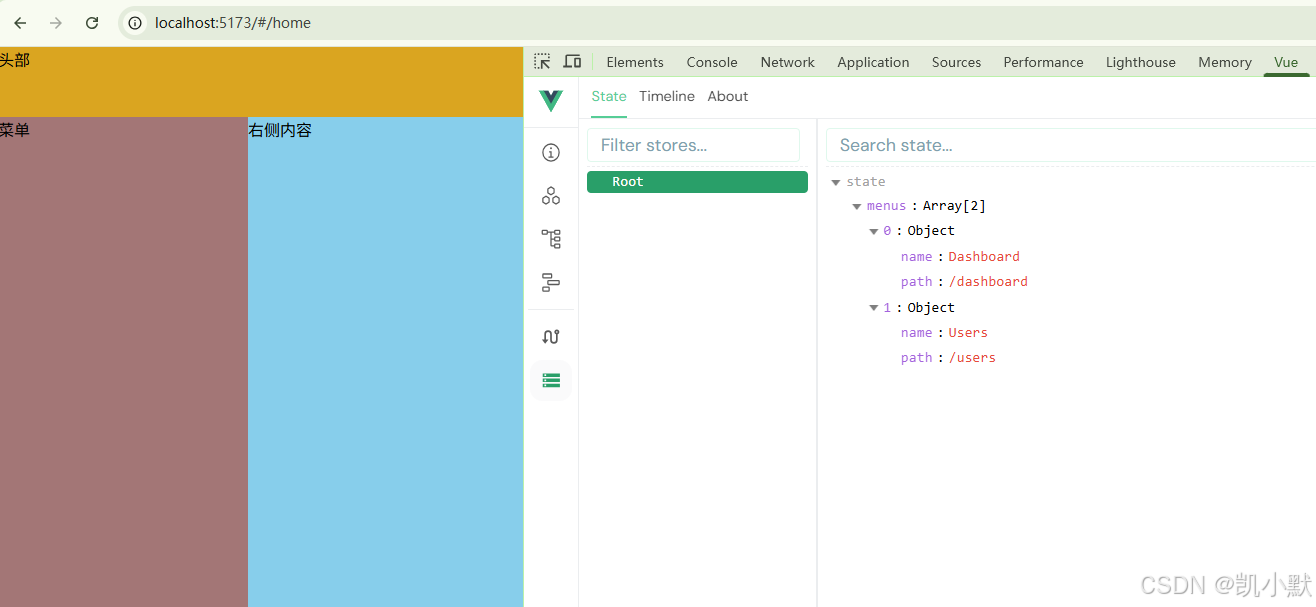
引入 vuex
在 src 文件夹下面新建 store/index.ts
ts
import { createStore } from 'vuex'
import { type App } from 'vue'

const store = createStore<{ menus: {}[] }>({
    state() {
        return {
            menus: []
        }
    },
    getters: {},
    mutations: {
        updateMenus(state, menus) {
            console.log('updateMenus--->', state, menus)
            state.menus = menus
        }
    },
    actions: {},
    modules: {}
})

export const initStore = (app: App<Element>) => {
    app.use(store)
}
报错
如果引入vuex ts报错,请参考这个
使用
main.ts
ts
import { createApp } from 'vue'
import App from './App.vue'
import { initRouter } from './router'
import { initStore } from './store'
// 导入 Element Plus 样式
import 'element-plus/dist/index.css'

const app = createApp(App);
// 初始化路由
initRouter(app);
// 初始化vuex
initStore(app);
app.mount('#app')
在 login.vue 登录后,将用户信息存储到vuex
html
<template>
    <div class="login-rule-form">
        <div class="content">
            <div class="title">商品管理系统</div>
            <el-form ref="ruleFormRef" :model="ruleForm" status-icon :rules="rules" label-width="60px">
                <el-form-item prop="username" label="账号">
                    <el-input v-model="ruleForm.username" type="text" placeholder="请输入账号"/>
                </el-form-item>
                <el-form-item prop="pwd" label="密码">
                    <el-input v-model="ruleForm.pwd" type="password" placeholder="请输入密码"/>
                </el-form-item>
                <el-form-item>
                    <el-button type="primary" @click="loginFn()">登录</el-button>
                </el-form-item>
            </el-form>
        </div>
    </div>
</template>

<script lang='ts' setup>
import { onMounted, reactive, ref } from 'vue'
import { adminLoginApi, getAdminInfoApi } from '@/api/login'
import Cookie from 'js-cookie'
import { ElMessage } from 'element-plus'
import { useRouter } from 'vue-router'
import { useStore } from 'vuex'

let ruleForm = reactive({
    username: "",
    pwd: ""
})
// 自定义密码校验规则(_variable - 未使用的变量 ts不校验)
const validatePwd = (_rule: unknown, value: string | undefined, callback: (msg?: string) => void) => {
    if(!value) {
        callback('密码不能为空')
    } else {
        callback()
    }
}
// 校验规则
let rules = reactive({
    username: [
        {
            required: true,
            message: '用户名不能为空',
            trigger: 'blur'
        }
    ],
    pwd: [
        {
            required: true,
            validator: validatePwd,
            trigger: 'blur'
        }
    ]
})

// 获取el-form组件对象
let ruleFormRef = ref()
// 获取项目路由对象
let router = useRouter()
// 获取当前项目的vuex对象
let store = useStore()

onMounted(() => {
    // console.log('组件实例:', ruleFormRef.value)
    // console.log('DOM 元素:', ruleFormRef.value?.$el)
})

// 点击登录
const loginFn = () => {
    ruleFormRef.value.validate().then(() => {
        adminLoginApi({
            username: ruleForm.username,
            password: ruleForm.pwd
        }).then((res) => {
            if(res.code === 200) {
                // 储存cookie
                Cookie.set('token', res.data.token, { expires: 7 })
                ElMessage.success('登录成功')
                // 获取用户信息
                getAdminInfoApi().then((res) => {
                    if(res.code === 200) {
                        // 用户信息存储到vuex
                        store.commit('updateMenus', res.data.menus)
                        // 跳转home页面
                        router.push('/home')
                    }
                })
            } else {
                ElMessage.error('登录报错')
            }
        })
    }).catch(() => {
        console.log('校验不通过')
    })
}

</script>

<style lang='less' scoped>
.login-rule-form {
    width: 100%;
    height: 100vh;
    display: flex;
    justify-content: center;
    align-items: center;
    background-color: #f5f5f5;
    overflow: hidden;
    box-sizing: border-box;
    margin: 0;
    padding: 0;
    .content {
        width: 420px;
        padding: 40px;
        background-color: #fff;
        border-radius: 8px;
        box-shadow: 0 2px 12px rgba(0, 0, 0, 0.1);
        box-sizing: border-box;
        .title {
            font-size: 28px;
            font-weight: bold;
            text-align: center;
            margin-bottom: 30px;
        }
    }

    :deep(.el-form) {
        .el-form-item {
            margin-bottom: 20px;
            &:last-child {
                margin-bottom: 0;
            }
        }
        .el-button {
            width: 100%;
        }
    }
}
</style>
另外将 menu 改成 menus