中药可视化系统开发实践:知识图谱与AI智能问答的完美结合
编号: M003
视频: https://www.bilibili.com/video/BV1QxZkBmEWC/
本文详细介绍基于 Vue 3 + Flask + Neo4j 的中药可视化系统开发全过程,涵盖系统架构设计、知识图谱构建、前后端实现等核心内容。
关注B站:麦麦大数据
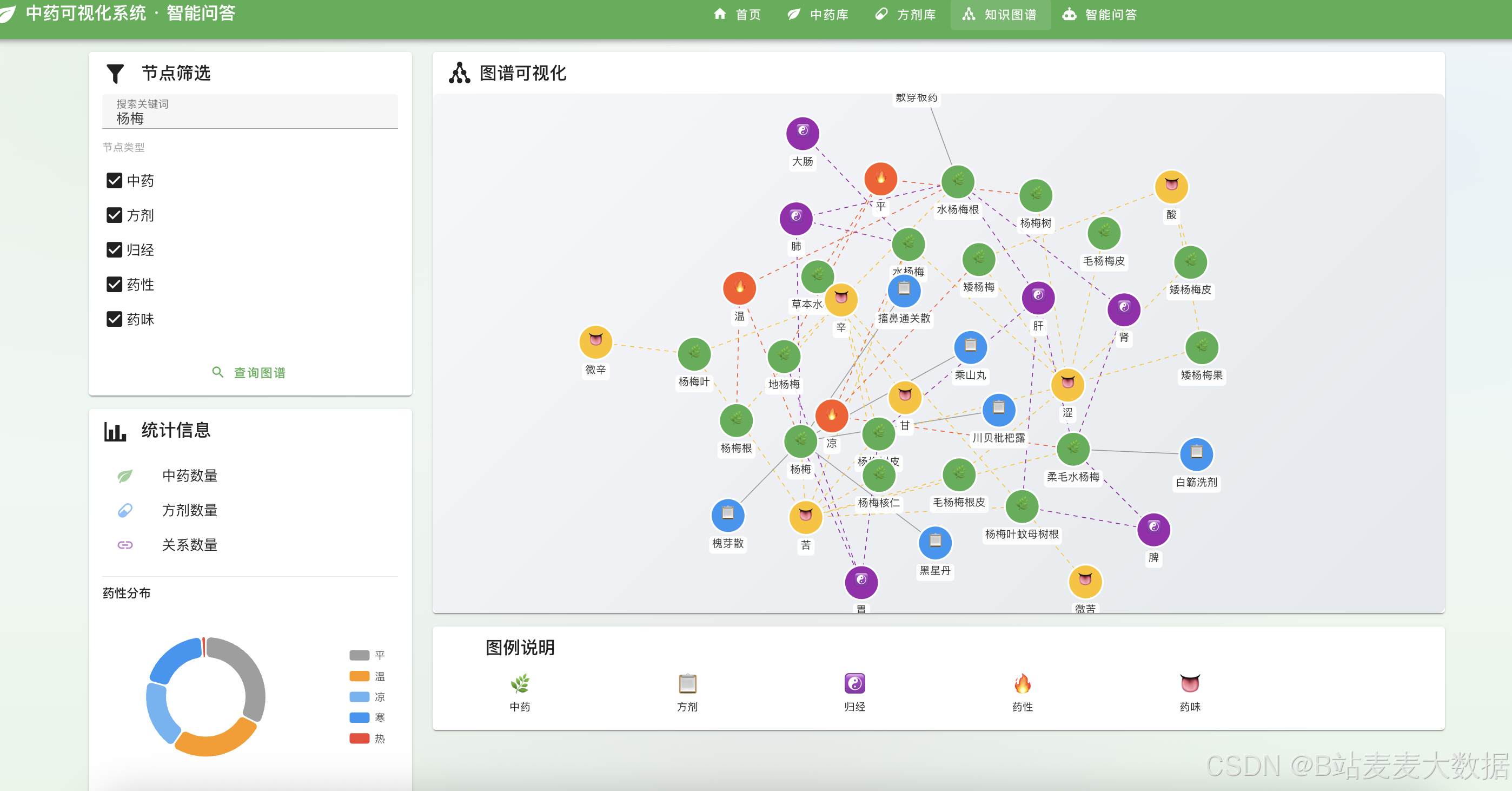
1.1 项目背景
中医药是中华民族的瑰宝,拥有数千年的历史沉淀。然而,传统的中药数据管理方式存在以下问题:
- 数据分散:中药、方剂、药性、归经等信息散落在不同数据源
- 关联缺失:中药与方剂、中药与归经、方剂与功效等关系难以直观展示
- 可视化不足:传统表格形式难以发现数据间的潜在联系
1.2 项目目标
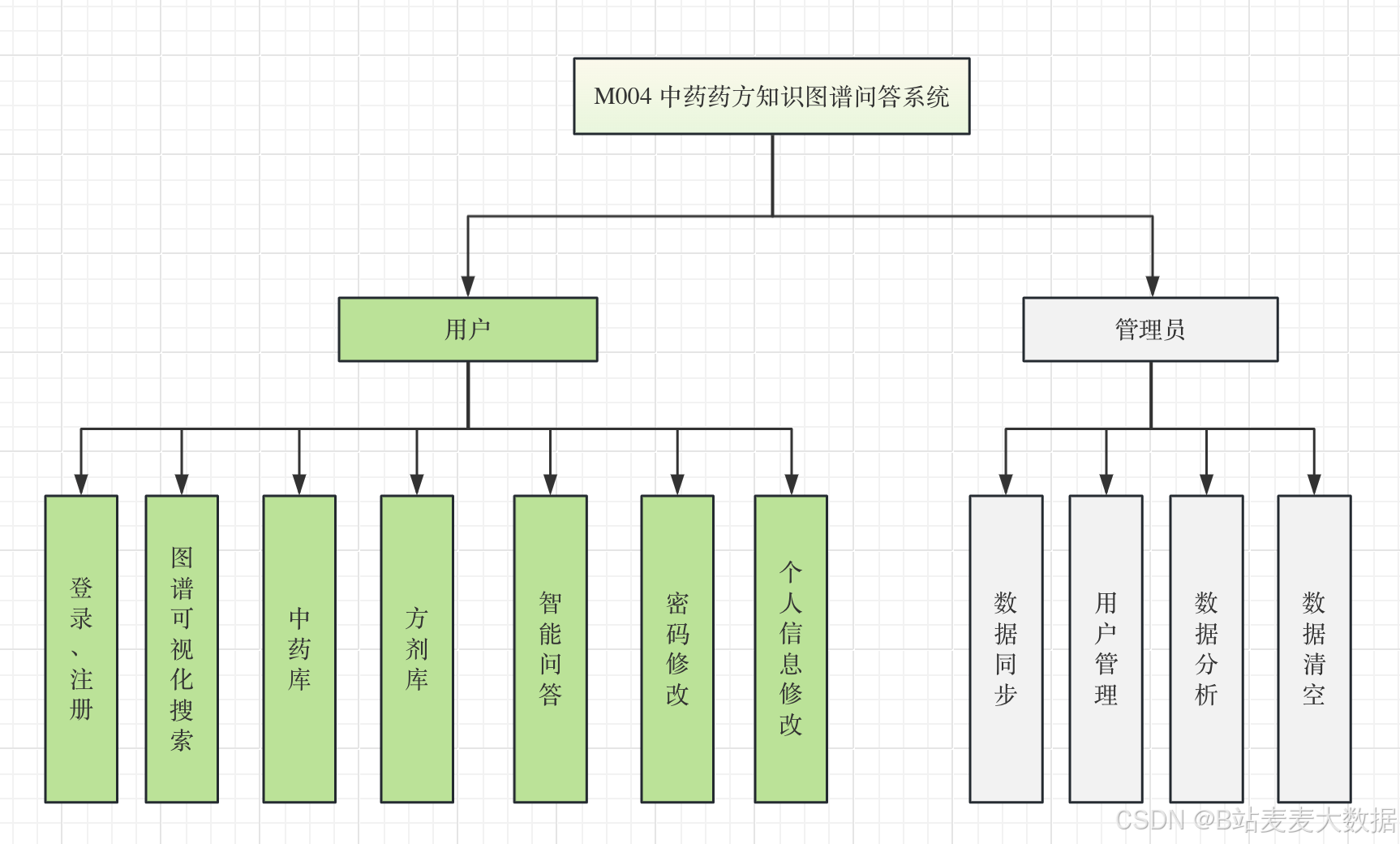
本项目旨在构建一个中药知识图谱可视化系统,实现:
┌─────────────────────────────────────────────────────────────┐
│                    中药可视化系统核心目标                      │
├─────────────────────────────────────────────────────────────┤
│  ✅ 知识图谱可视化 - 中药、方剂、归经、药性等实体关系直观展示  │
│  ✅ 多维数据筛选 - 支持按药性、药味、归经等多维度筛选           │
│  ✅ 交互式探索 - 点击节点查看详情,支持关键词搜索               │
│  ✅ 响应式界面 - 适配桌面端和移动端                           │
└─────────────────────────────────────────────────────────────┘
二、系统架构设计
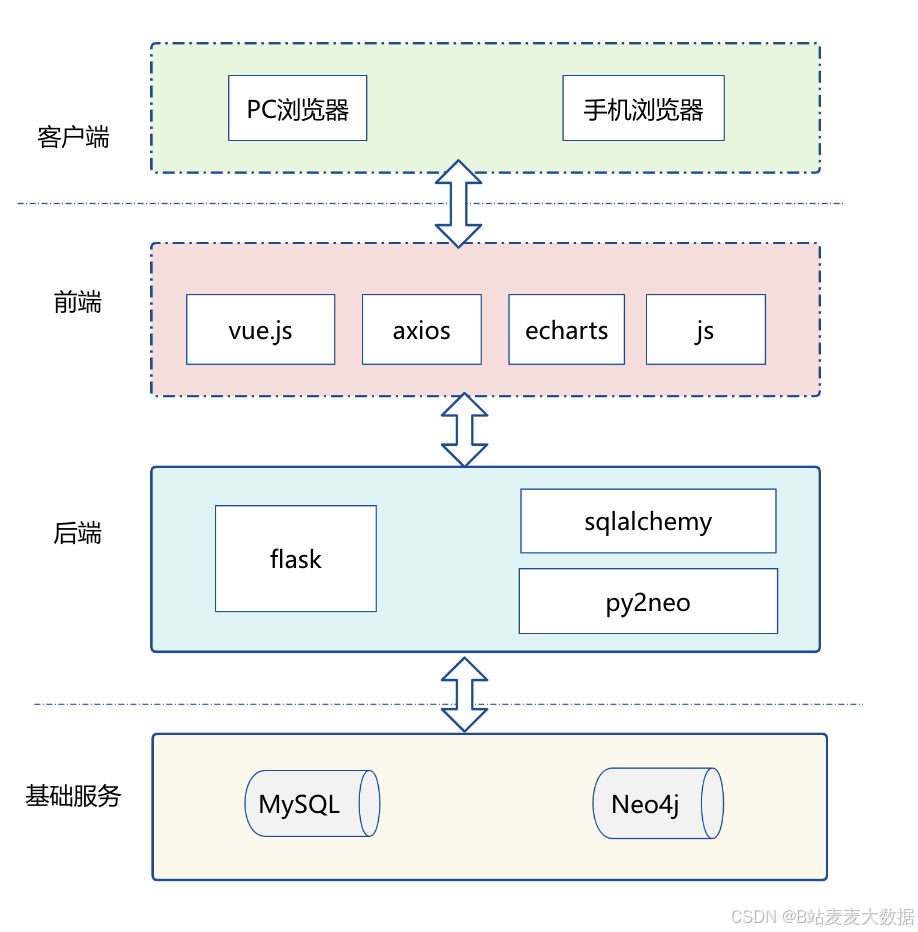
2.1 整体架构图
┌─────────────────────────────────────────────────────────────────────────┐
│                           应用层 (Browser)                                │
│  ┌─────────────────────────────────────────────────────────────────┐   │
│  │                     Vue 3 Frontend                               │   │
│  │  ┌───────────┬───────────┬───────────┬───────────┬───────────┐ │   │
│  │  │ 知识图谱  │  药材百科 │  方剂分析 │  用户中心 │  数据管理 │ │   │
│  │  │  可视化  │          │   可视化  │           │           │ │   │
│  │  └───────────┴───────────┴───────────┴───────────┴───────────┘ │   │
│  │              Vue 3 + TypeScript + Pinia + Vuetify                │
│  └─────────────────────────────────────────────────────────────────┘   │
│                                    │                                    │
│                         RESTful API / WebSocket                         │
│                                    ▼                                    │
┌─────────────────────────────────────────────────────────────────────────┐
│                           服务层 (Backend)                               │
│  ┌─────────────────────────────────────────────────────────────────┐   │
│  │                     Flask Application                            │   │
│  │  ┌─────────────┬─────────────┬─────────────┬─────────────────┐ │   │
│  │  │  知识图谱API │  药材API    │  方剂API    │   用户认证API    │ │   │
│  │  │ (Neo4j驱动) │ (MySQL)    │ (MySQL)    │  (JWT)         │ │   │
│  │  └─────────────┴─────────────┴─────────────┴─────────────────┘ │   │
│  │              Flask + Flask-JWT-Extended + SQLAlchemy             │
│  └─────────────────────────────────────────────────────────────────┘   │
│                                    │                                    │
│              ┌─────────────────────┴─────────────────────┐             │
│              ▼                                           ▼             │
│  ┌─────────────────────────┐           ┌─────────────────────────┐    │
│  │      Neo4j 图数据库     │           │      MySQL 关系数据库    │    │
│  │  • 实体关系存储         │           │  • 中药基本信息          │    │
│  │  • 图谱查询支持         │           │  • 方剂信息              │    │
│  │  • 路径计算            │           │  • 用户数据              │    │
│  └─────────────────────────┘           └─────────────────────────┘    │
└─────────────────────────────────────────────────────────────────────────┘
2.2 技术栈选型
| 层级 | 技术 | 版本 | 用途 |
|---|---|---|---|
| 前端框架 | Vue 3 | 3.4+ | 响应式UI框架 |
| UI组件库 | Vuetify 3 | 3.x | Material Design风格 |
| 状态管理 | Pinia | 2.x | Vue状态管理 |
| 可视化 | D3.js | 7.x | 知识图谱力导向图 |
| 图表 | ECharts | 5.x | 统计图表 |
| 后端框架 | Flask | 2.x | Python Web框架 |
| API认证 | Flask-JWT-Extended | 4.x | JWT认证 |
| ORM | SQLAlchemy | 2.x | 数据库ORM |
| 图数据库 | Neo4j | 3.5/5.x | 知识图谱存储 |
| 关系数据库 | MySQL | 8.x | 结构化数据存储 |
三、数据库设计
3.1 MySQL 表结构设计
3.1.1 中药表 (tb_cmedicine)
sql
CREATE TABLE `tb_cmedicine` (
  `id` int NOT NULL AUTO_INCREMENT,
  `title` varchar(100) NOT NULL COMMENT '中药名',
  `pinyin` varchar(100) NOT NULL COMMENT '拼音',
  `alias` varchar(255) DEFAULT NULL COMMENT '别名',
  `source` text DEFAULT NULL COMMENT '来源(文献典籍)',
  `english_name` varchar(255) DEFAULT NULL COMMENT '英文名',
  `habitat` text DEFAULT NULL COMMENT '产地/生境',
  `flavor` text DEFAULT NULL COMMENT '性味',
  `functional_indications` text DEFAULT NULL COMMENT '功能主治',
  `usage` text DEFAULT NULL COMMENT '用法用量',
  `excerpt` text DEFAULT NULL COMMENT '摘录',
  `provenance` text DEFAULT NULL COMMENT '典籍出处',
  `shape_properties` text DEFAULT NULL COMMENT '性状',
  `attribution` text DEFAULT NULL COMMENT '归经',
  `prototype` text DEFAULT NULL COMMENT '原植物形态',
  `discuss` text DEFAULT NULL COMMENT '论述',
  `chemical_composition` text DEFAULT NULL COMMENT '化学成分',
  PRIMARY KEY (`id`),
  KEY `idx_title` (`title`),
  KEY `idx_pinyin` (`pinyin`)
) ENGINE=InnoDB DEFAULT CHARSET=utf8mb3;
3.1.2 方剂表 (tb_prescription)
sql
CREATE TABLE `tb_prescription` (
  `id` int NOT NULL AUTO_INCREMENT,
  `title` varchar(100) NOT NULL COMMENT '方名',
  `prescription` text COMMENT '处方组成',
  `making` text COMMENT '制法',
  `functional_indications` text COMMENT '功效主治',
  `usage` text COMMENT '用法',
  `excerpt` text COMMENT '来源摘录',
  `care` text COMMENT '注意事项',
  `fangji` text COMMENT '方剂药材(逗号分隔)',
  PRIMARY KEY (`id`),
  KEY `idx_title` (`title`)
) ENGINE=InnoDB DEFAULT CHARSET=utf8mb3;
3.1.3 用户表 (tb_user)
sql
CREATE TABLE `tb_user` (
  `id` int NOT NULL AUTO_INCREMENT,
  `realname` varchar(255) DEFAULT NULL COMMENT '真实姓名',
  `username` varchar(255) DEFAULT NULL COMMENT '用户名',
  `password` varchar(255) DEFAULT NULL COMMENT '密码(加密存储)',
  `avatar` varchar(255) DEFAULT NULL COMMENT '头像URL',
  `phone` varchar(255) DEFAULT NULL COMMENT '电话',
  `email` varchar(255) DEFAULT NULL COMMENT '邮箱',
  `intro` varchar(255) DEFAULT NULL COMMENT '简介',
  PRIMARY KEY (`id`)
) ENGINE=InnoDB DEFAULT CHARSET=utf8mb3;
3.2 Neo4j 图谱模型设计
3.2.1 节点类型
cypher
// 中药节点
(:Herb {
  id: string,                    // MySQL中的id
  name: string,                  // 中药名
  pinyin: string,                // 拼音
  nature: string,                // 药性:寒/热/温/凉/平
  flavors: string[],             // 药味:甘/苦/辛/咸/酸/涩
  meridians: string[],           // 归经数组
  effects: string,               // 功能主治
  habitat: string,               // 产地
  excerpt: string                // 摘录
})

// 方剂节点
(:Formula {
  id: string,
  name: string,
  effects: string,
  source: string
})

// 经络节点
(:Meridian { name: string, category: string })

// 药性节点
(:Nature { name: string })

// 药味节点
(:Flavor { name: string })
3.2.2 关系类型
cypher
// 中药-方剂:组成关系
(herbs:Herb)-[:INCLUDED_IN]->(formula:Formula)

// 中药-归经:归经关系
(herb:Herb)-[:ENTERS]->(meridian:Meridian)

// 中药-药性
(herb:Herb)-[:HAS_NATURE]->(nature:Nature)

// 中药-药味
(herb:Herb)-[:HAS_FLAVOR]->(flavor:Flavor)
四、前端实现详解
4.1 项目结构
frontend/
├── src/
│   ├── components/
│   │   ├── common/           # 公共组件
│   │   │   ├── AppHeader.vue
│   │   │   ├── AppSidebar.vue
│   │   │   └── SearchBox.vue
│   │   ├── graph/           # 知识图谱组件
│   │   │   ├── GraphContainer.vue    # D3.js图谱容器
│   │   │   ├── GraphNode.vue         # 节点组件
│   │   │   └── GraphEdge.vue         # 边组件
│   │   ├── herb/            # 中药组件
│   │   │   ├── HerbCard.vue
│   │   │   └── HerbDetail.vue
│   │   └── prescription/    # 方剂组件
│   │       ├── PrescriptionCard.vue
│   │       └── PrescriptionDetail.vue
│   ├── views/               # 页面视图
│   │   ├── HomeView.vue
│   │   ├── herbs/HerbListView.vue
│   │   ├── prescriptions/PrescriptionListView.vue
│   │   └── graph/GraphExplorerView.vue
│   ├── stores/              # Pinia状态管理
│   │   ├── auth.ts
│   │   ├── herb.ts
│   │   ├── prescription.ts
│   │   └── graph.ts
│   ├── api/                 # API接口
│   │   ├── client.ts
│   │   ├── herbs.ts
│   │   ├── prescriptions.ts
│   │   └── graph.ts
│   ├── types/               # TypeScript类型
│   │   ├── herb.ts
│   │   ├── prescription.ts
│   │   └── graph.ts
│   └── router/index.ts
├── App.vue
└── main.ts
4.2 核心类型定义
typescript
// graph.ts - 知识图谱类型
export interface GraphNode {
  id: string
  label: 'Herb' | 'Formula' | 'Meridian' | 'Nature' | 'Flavor' | 'Effect'
  name: string
  properties: Record<string, unknown>
  x?: number
  y?: number
}

export interface GraphEdge {
  id: string
  source: string
  target: string
  label: string
}

export interface GraphData {
  nodes: GraphNode[]
  edges: GraphEdge[]
}

// 节点样式配置
export const nodeStyles: Record<string, { color: string; radius: number; icon: string }> = {
  Herb: { color: '#4CAF50', radius: 20, icon: '🌿' },
  Formula: { color: '#2196F3', radius: 20, icon: '📋' },
  Meridian: { color: '#9C27B0', radius: 18, icon: '☯️' },
  Nature: { color: '#FF5722', radius: 16, icon: '🔥' },
  Flavor: { color: '#FFC107', radius: 16, icon: '👅' }
}
4.3 D3.js 知识图谱实现
vue
<!-- GraphContainer.vue -->
<script setup lang="ts">
import { ref, onMounted, watch } from 'vue'
import * as d3 from 'd3'
import type { GraphNode, GraphEdge, GraphData } from '@/types'

const props = defineProps<{
  data: GraphData
  width?: number
  height?: number
}>()

const emit = defineEmits<{
  (e: 'node-click', node: GraphNode): void
}>()

const containerRef = ref<HTMLDivElement | null>(null)
const NODE_RADIUS = 20

// 力导向图仿真
function initGraph() {
  if (!containerRef.value || !props.data.nodes.length) return

  const width = props.width || 800
  const height = props.height || 600

  const svg = d3.select(containerRef.value)
    .append('svg')
    .attr('width', width)
    .attr('height', height)

  const g = svg.append('g')

  // 缩放功能
  const zoom = d3.zoom<SVGSVGElement, unknown>()
    .scaleExtent([0.1, 4])
    .on('zoom', (event) => {
      g.attr('transform', event.transform)
    })

  svg.call(zoom)

  // 创建节点和边的数据
  const nodes = props.data.nodes.map(d => ({ ...d }))
  const edges = props.data.edges.map(d => ({ ...d }))

  // 力导向仿真
  const simulation = d3.forceSimulation<GraphNode>(nodes)
    .force('link', d3.forceLink<GraphNode, GraphEdge>(edges)
      .id(d => d.id)
      .distance(120))
    .force('charge', d3.forceManyBody().strength(-150))
    .force('center', d3.forceCenter(width / 2, height / 2))
    .force('collide', d3.forceCollide().radius(NODE_RADIUS + 30))

  // 绘制边
  const link = g.append('g')
    .selectAll('line')
    .data(edges)
    .join('line')
    .attr('stroke', '#999')
    .attr('stroke-width', 1.5)
    .attr('opacity', 0.6)

  // 绘制节点
  const node = g.append('g')
    .selectAll<SVGGElement, GraphNode>('g')
    .data(nodes)
    .join('g')
    .attr('cursor', 'pointer')
    .call(d3.drag<SVGGElement, GraphNode>()
      .on('start', (event, d) => {
        if (!event.active) simulation.alphaTarget(0.3).restart()
        d.fx = d.x
        d.fy = d.y
      })
      .on('drag', (event, d) => {
        d.fx = event.x
        d.fy = event.y
      })
      .on('end', (event, d) => {
        if (!event.active) simulation.alphaTarget(0)
        d.fx = null
        d.fy = null
      }))

  // 节点圆形
  node.append('circle')
    .attr('r', NODE_RADIUS)
    .attr('fill', d => getNodeColor(d.label))
    .attr('stroke', '#fff')
    .attr('stroke-width', 2)

  // 节点图标
  node.append('text')
    .text(d => getNodeIcon(d.label))
    .attr('text-anchor', 'middle')
    .attr('dominant-baseline', 'central')
    .attr('font-size', '16px')

  // 节点标签
  node.append('text')
    .text(d => d.name)
    .attr('text-anchor', 'middle')
    .attr('dy', NODE_RADIUS + 16)
    .attr('font-size', '12px')

  // 点击事件
  node.on('click', (event, d) => {
    emit('node-click', d)
  })

  // 动画更新
  simulation.on('tick', () => {
    link
      .attr('x1', d => (d.source as unknown as GraphNode).x || 0)
      .attr('y1', d => (d.source as unknown as GraphNode).y || 0)
      .attr('x2', d => (d.target as unknown as GraphNode).x || 0)
      .attr('y2', d => (d.target as unknown as GraphNode).y || 0)

    node.attr('transform', d => `translate(${d.x || 0},${d.y || 0})`)
  })
}

function getNodeColor(label: string): string {
  const colors: Record<string, string> = {
    Herb: '#4CAF50',
    Formula: '#2196F3',
    Meridian: '#9C27B0',
    Nature: '#FF5722',
    Flavor: '#FFC107'
  }
  return colors[label] || '#999'
}

function getNodeIcon(label: string): string {
  const icons: Record<string, string> = {
    Herb: '🌿',
    Formula: '📋',
    Meridian: '☯️',
    Nature: '🔥',
    Flavor: '👅'
  }
  return icons[label] || '●'
}

watch(() => props.data, () => initGraph(), { deep: true })

onMounted(() => {
  initGraph()
})
</script>

<template>
  <div class="graph-container" ref="containerRef" />
</template>

<style scoped>
.graph-container {
  width: 100%;
  height: 100%;
  min-height: 500px;
  background: linear-gradient(135deg, #f5f7fa 0%, #e4e8ec 100%);
  border-radius: 8px;
}
</style>
4.4 方剂卡片组件
vue
<!-- PrescriptionCard.vue -->
<script setup lang="ts">
import { computed } from 'vue'
import type { Prescription } from '@/types'

const props = defineProps<{
  prescription: Prescription
}>()

const herbCount = computed(() => {
  return props.prescription.herbs?.length ||
    (props.prescription.fangji ? props.prescription.fangji.split(',').length : 0)
})

const displayHerbs = computed(() => {
  if (props.prescription.herbs?.length) {
    return props.prescription.herbs.join('、')
  }
  if (props.prescription.fangji) {
    return props.prescription.fangji.replace(/,/g, '、')
  }
  return '暂无组成信息'
})
</script>

<template>
  <v-card class="prescription-card" hover>
    <v-card-title class="d-flex align-center pb-0">
      <v-icon color="blue" class="mr-2">mdi-pill</v-icon>
      <span class="text-truncate">{{ prescription.title }}</span>
    </v-card-title>

    <v-card-text class="card-content">
      <v-chip size="x-small" color="info" class="mr-1 mb-2">
        <v-icon start size="small">mdi-counter</v-icon>
        {{ herbCount }}味药
      </v-chip>

      <v-divider class="my-2" />

      <div class="mb-2">
        <span class="text-caption text-grey">组成:</span>
        <span class="text-body-2">{{ displayHerbs.slice(0, 60) }}{{ displayHerbs.length > 60 ? '...' : '' }}</span>
      </div>

      <div v-if="prescription.functional_indications" class="mt-2">
        <span class="text-caption text-grey">功效:</span>
        <span class="text-body-2">{{ prescription.functional_indications.slice(0, 100) }}...</span>
      </div>
    </v-card-text>

    <v-card-actions class="mt-auto">
      <v-btn variant="text" color="primary" size="small">
        查看详情
        <v-icon end>mdi-arrow-right</v-icon>
      </v-btn>
    </v-card-actions>
  </v-card>
</template>

<style scoped>
.prescription-card {
  height: 100%;
  display: flex;
  flex-direction: column;
}

.card-content {
  flex: 1;
}
</style>
五、后端实现详解
5.1 Flask 应用结构
backend/
├── app/
│   ├── __init__.py           # Flask应用工厂
│   ├── api/
│   │   ├── __init__.py
│   │   ├── auth.py           # 认证API
│   │   ├── herbs.py          # 中药API
│   │   ├── prescriptions.py  # 方剂API
│   │   ├── graph.py          # 知识图谱API
│   │   └── admin.py          # 管理API
│   ├── models/
│   │   ├── __init__.py
│   │   └── user.py           # 用户模型
│   ├── services/
│   │   ├── __init__.py
│   │   └── neo4j_service.py   # Neo4j服务
│   └── utils/
│       ├── __init__.py
│       └── response.py        # 响应封装
├── migrations/               # Flask-Migrate
├── requirements.txt
└── .env
5.2 知识图谱搜索服务
python
# services/neo4j_service.py
from neo4j import GraphDatabase
import os

class Neo4jService:
    def __init__(self):
        uri = os.getenv("NEO4J_URI", "bolt://localhost:7687")
        user = os.getenv("NEO4J_USER", "neo4j")
        password = os.getenv("NEO4J_PASSWORD", "password")
        self._driver = GraphDatabase.driver(uri, auth=(user, password))

    def search_graph(self, keyword: str, node_types: list, max_nodes: int = 100):
        """搜索图谱数据(BFS广度优先搜索)"""
        with self.get_session() as session:
            valid_types = [t for t in node_types if t in
                          ["Herb", "Formula", "Meridian", "Nature", "Flavor", "Effect"]]

            all_nodes = []
            all_neo_ids = set()

            if keyword and keyword.strip():
                # 关键词搜索
                for ntype in valid_types:
                    query = f"""
                        MATCH (n:{ntype})
                        WHERE n.name CONTAINS $keyword OR n.pinyin CONTAINS $keyword
                        RETURN id(n) as neo_id, n, labels(n)[0] as label
                    """
                    result = session.run(query, {"keyword": keyword})
                    for record in result:
                        neo_id = record["neo_id"]
                        all_neo_ids.add(neo_id)
                        all_nodes.append(record)
            else:
                # 无关键词,返回各类别默认节点
                per_type = max_nodes // len(valid_types)
                for ntype in valid_types:
                    query = f"""
                        MATCH (n:{ntype})
                        RETURN id(n) as neo_id, n, labels(n)[0] as label
                        LIMIT $limit
                    """
                    result = session.run(query, {"limit": per_type})
                    for record in result:
                        neo_id = record["neo_id"]
                        all_neo_ids.add(neo_id)
                        all_nodes.append(record)

            if not all_neo_ids:
                return {"nodes": [], "edges": []}

            # 获取关联关系
            all_neo_ids_list = list(all_neo_ids)
            all_neo_ids_str = ",".join(str(nid) for nid in all_neo_ids_list)

            related_neo_ids = set()
            edges_query = f"""
                MATCH (n)-[r]->(m)
                WHERE id(n) IN [{all_neo_ids_str}]
                RETURN id(n) as source_neo_id, id(m) as target_neo_id, type(r) as rel_type
            """
            edges_result = session.run(edges_query)

            edges = []
            edge_ids = set()
            for record in edges_result:
                source_neo_id = str(record["source_neo_id"])
                target_neo_id = str(record["target_neo_id"])
                rel_type = record["rel_type"]

                if target_neo_id not in all_neo_ids:
                    related_neo_ids.add(target_neo_id)

                edge_id = f"{source_neo_id}-{target_neo_id}"
                if edge_id not in edge_ids:
                    edge_ids.add(edge_id)
                    edges.append({
                        "id": edge_id,
                        "source": source_neo_id,
                        "target": target_neo_id,
                        "label": rel_type,
                    })

            # 构建最终节点列表
            final_neo_ids = list(all_neo_ids)
            if related_neo_ids:
                remaining = max(0, max_nodes - len(all_neo_ids))
                if remaining > 0:
                    final_neo_ids.extend(list(related_neo_ids)[:remaining])

            final_neo_ids_str = ",".join(str(nid) for nid in final_neo_ids)

            nodes_query = f"""
                MATCH (n)
                WHERE id(n) IN [{final_neo_ids_str}]
                RETURN id(n) as neo_id, n, labels(n)[0] as label
            """
            nodes_result = session.run(nodes_query)

            nodes = []
            neo_id_to_display = {}
            for record in nodes_result:
                node = record["n"]
                neo_id = record["neo_id"]
                label = record["label"]
                neo_id_str = str(neo_id)
                display_id = str(node.get("id") or node.get("name") or neo_id_str)
                neo_id_to_display[neo_id_str] = display_id
                nodes.append({
                    "id": display_id,
                    "neo_id": neo_id_str,
                    "label": label,
                    "name": node.get("name", display_id),
                    "properties": dict(node),
                })

            # 过滤边,只保留两端都在最终节点集合中的边
            final_edges = []
            for edge in edges:
                source_neo_id = str(edge["source"])
                target_neo_id = str(edge["target"])
                source_display = neo_id_to_display.get(source_neo_id, source_neo_id)
                target_display = neo_id_to_display.get(target_neo_id, target_neo_id)

                if (source_display in neo_id_to_display.values() and
                    target_display in neo_id_to_display.values()):
                    final_edges.append({
                        "id": f"{source_display}-{target_display}",
                        "source": source_display,
                        "target": target_display,
                        "label": edge["label"],
                    })

            return {"nodes": nodes, "edges": final_edges}

neo4j_service = Neo4jService()
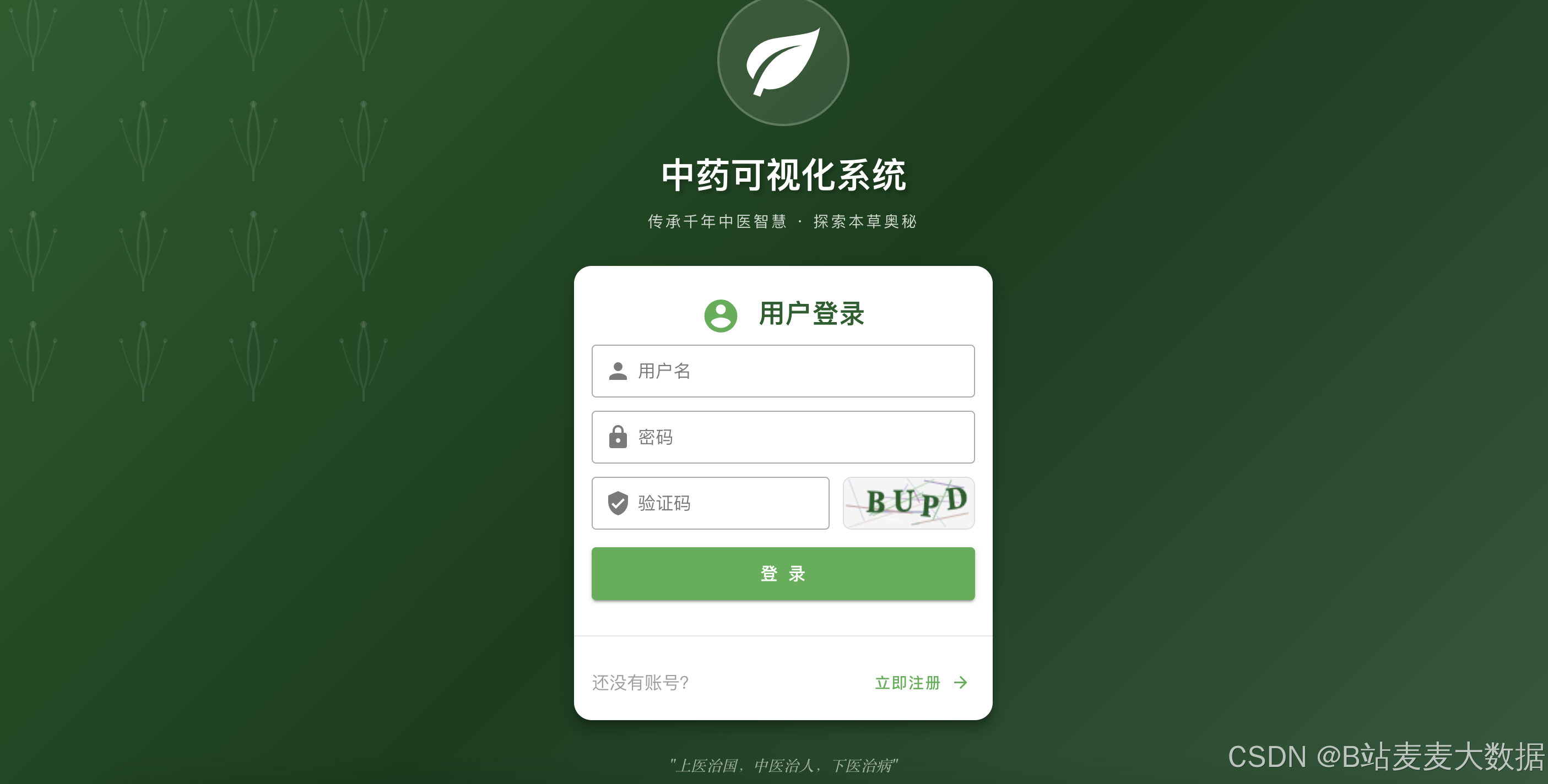
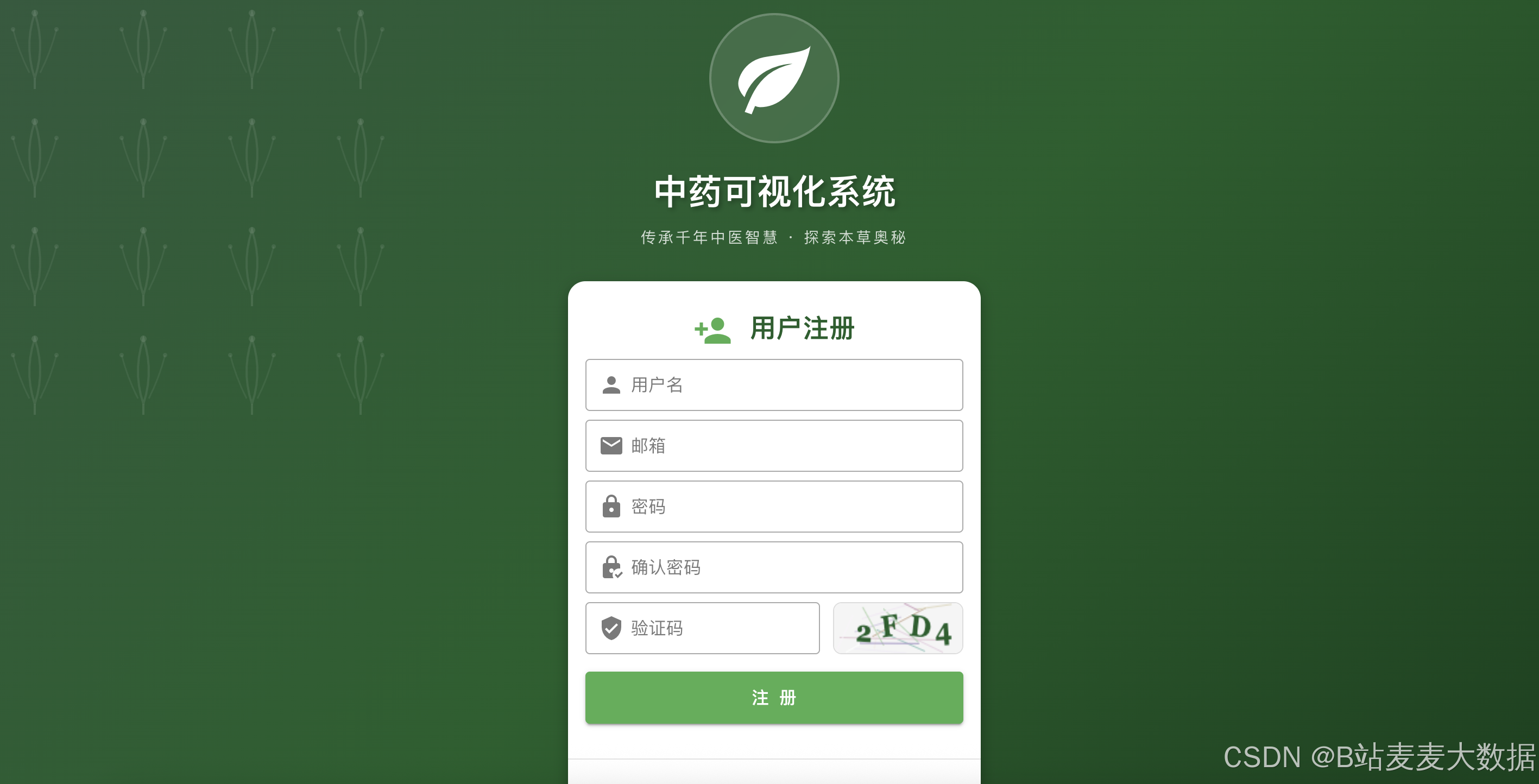
5.3 认证API实现
python
# api/auth.py
from flask import Blueprint, request
from flask_jwt_extended import create_access_token, jwt_required, get_jwt_identity
from app.models import User
from app import db
from app.utils.response import success_response, error_response

auth_bp = Blueprint('auth', __name__)

@auth_bp.route('/register', methods=['POST'])
def register():
    """用户注册"""
    try:
        data = request.get_json()
        username = data.get('username')
        password = data.get('password')

        if not username or not password:
            return error_response(message='用户名和密码不能为空', code=400)

        # 检查用户名是否已存在
        existing_user = User.query.filter_by(username=username).first()
        if existing_user:
            return error_response(message='用户名已存在', code=409)

        # 创建新用户
        user = User(
            username=username,
            realname=data.get('realname'),
            email=data.get('email')
        )
        user.set_password(password)

        db.session.add(user)
        db.session.commit()

        # 生成JWT
        access_token = create_access_token(identity=str(user.id))

        return success_response(data={
            'user': user.to_dict(),
            'access_token': access_token
        }, message='注册成功')

    except Exception as e:
        db.session.rollback()
        return error_response(message=str(e), code=500)

@auth_bp.route('/login', methods=['POST'])
def login():
    """用户登录"""
    try:
        data = request.get_json()
        username = data.get('username')
        password = data.get('password')

        if not username or not password:
            return error_response(message='用户名和密码不能为空', code=400)

        user = User.query.filter_by(username=username).first()
        if not user or not user.check_password(password):
            return error_response(message='用户名或密码错误', code=401)

        access_token = create_access_token(identity=str(user.id))

        return success_response(
            data={"user": user.to_dict(), "access_token": access_token},
            message="登录成功",
        )

    except Exception as e:
        return error_response(message=str(e), code=500)

@auth_bp.route("/me", methods=["GET"])
@jwt_required()
def get_current_user():
    """获取当前用户信息"""
    try:
        user_id = int(get_jwt_identity())
        user = User.query.get(user_id)

        if not user:
            return error_response(message="用户不存在", code=404)

        return success_response(data=user.to_dict())

    except Exception as e:
        return error_response(message=str(e), code=500)
六、系统功能展示
6.1 首页系统首页](截图仪表盘
![/1-系统首页.png)
┌─────────────────────────────────────────────────────────────────┐
│  🌿 中药可视化系统                                               │
├─────────────────────────────────────────────────────────────────┤
│                                                                 │
│  ┌──────────────────┐  ┌──────────────────┐  ┌────────────────┐ │
│  │     📊 统计概览   │  │   📈 分布图表    │  │  🔍 快速搜索   │ │
│  │                  │  │                  │  │                │ │
│  │  中药: 800+      │  │  药性分布        │  │  [输入关键词...]│ │
│  │  方剂: 200+      │  │  归经分布        │  │  [搜索]        │ │
│  │  关系: 5000+     │  │  药味分布        │  │                │ │
│  └──────────────────┘  └──────────────────┘  └────────────────┘ │
│                                                                 │
│  ┌──────────────────────────────────────────────────────────┐  │
│  │                    快捷入口                               │  │
│  │  [🌿 中药库]  [📋 方剂库]  [🕸️ 知识图谱]  [👤 个人中心] │  │
│  └──────────────────────────────────────────────────────────┘  │
└─────────────────────────────────────────────────────────────────┘
6.2 知识图谱探索页面
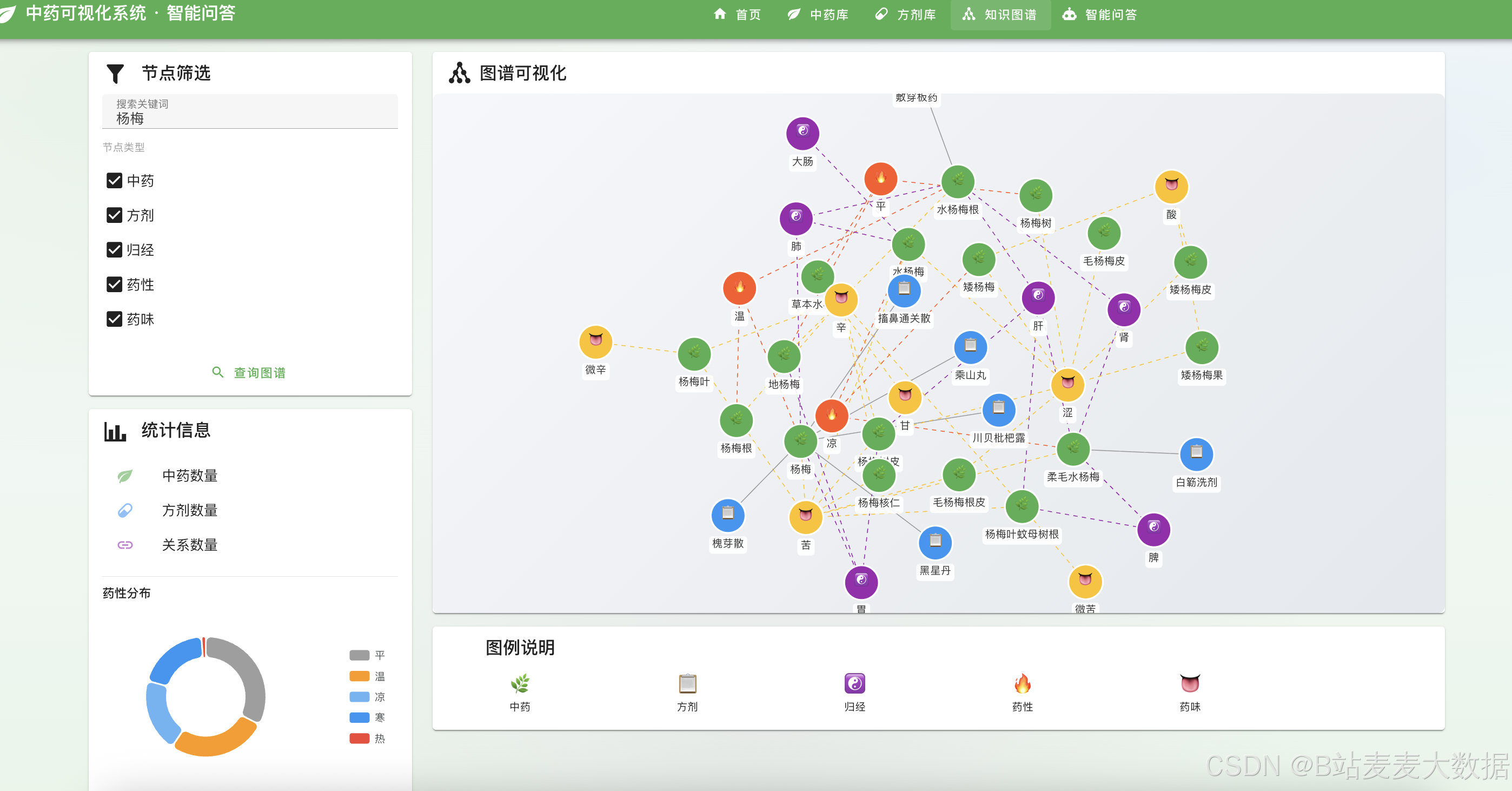
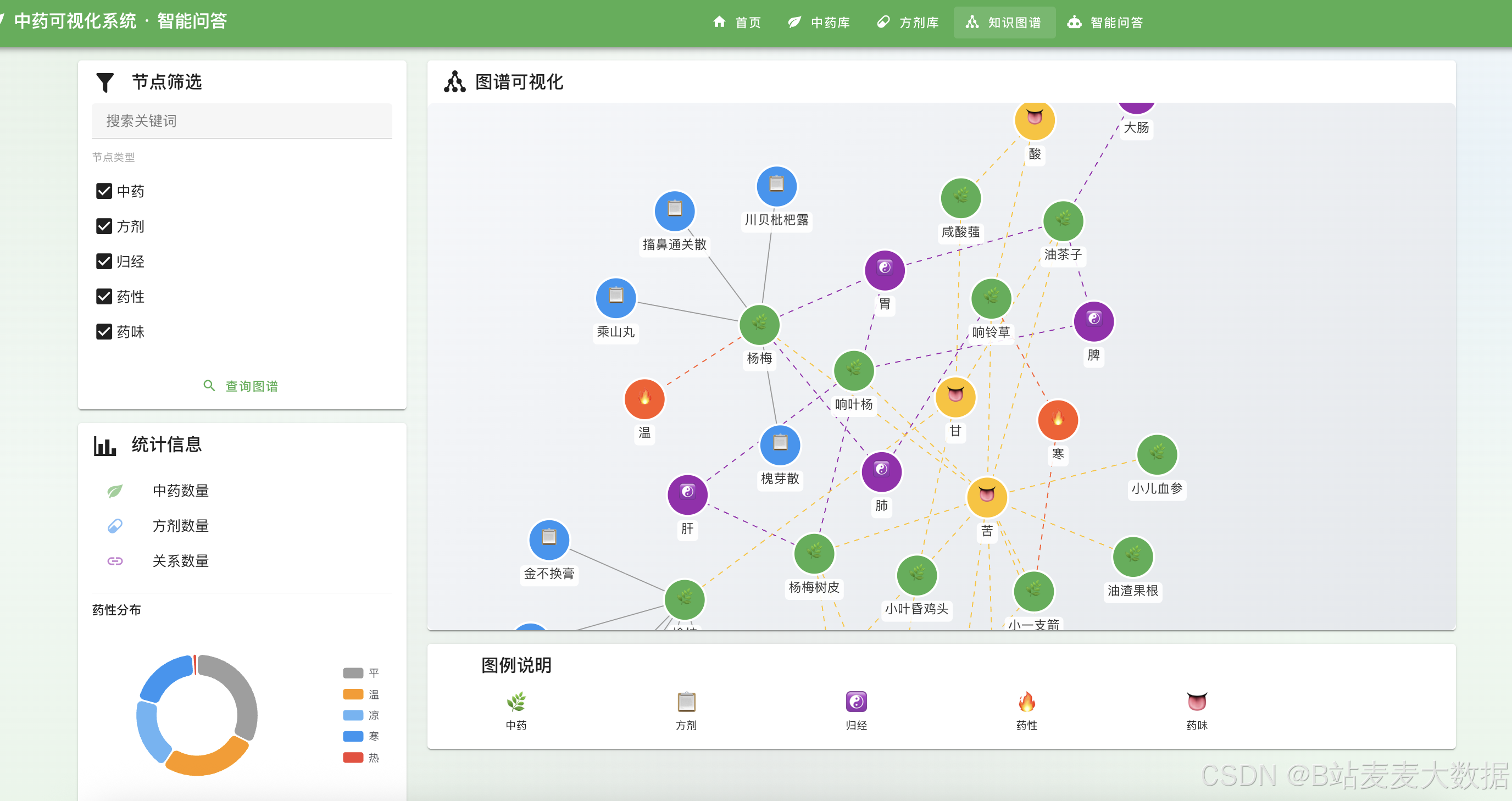
┌─────────────────────────────────────────────────────────────────────────┐
│  🕸️ 知识图谱探索                                              [admin] │
├─────────────────────────────────────────────────────────────────────────┤
│                                                                         │
│  ┌────────────────────────┐  ┌────────────────────────────────────┐    │
│  │ 🔍 节点筛选            │  │                                    │    │
│  │                        │  │     🌿 青蒿                          │    │
│  │ [✓] 中药 (Herb)       │  │        │                             │    │
│  │ [✓] 方剂 (Formula)    │  │        ▼                             │    │
│  │ [✓] 归经 (Meridian)   │  │    📋 青蒿鳖甲汤                      │    │
│  │ [✓] 药性 (Nature)     │  │        │                             │    │
│  │ [✓] 药味 (Flavor)     │  │        ▼                             │    │
│  │                        │  │    ☯️ 肝经                           │    │
│  │ ┌──────────────────┐  │  │        │                             │    │
│  │ │ [搜索关键词...]   │  │  │        ▼                             │    │
│  │ │ [🔍 查询图谱]     │  │  │    🔥 寒性                           │    │
│  │ └──────────────────┘  │  │                                    │    │
│  └────────────────────────┘  └────────────────────────────────────┘    │
│                                                                         │
│  ┌────────────────────────────────────────────────────────────────┐     │
│  │ 📊 图例说明                                                      │     │
│  │  🌿 中药  📋 方剂  ☯️ 归经  🔥 药性  👅 药味                       │     │
│  └────────────────────────────────────────────────────────────────┘     │
└─────────────────────────────────────────────────────────────────────────┘
6.3 中药库页面
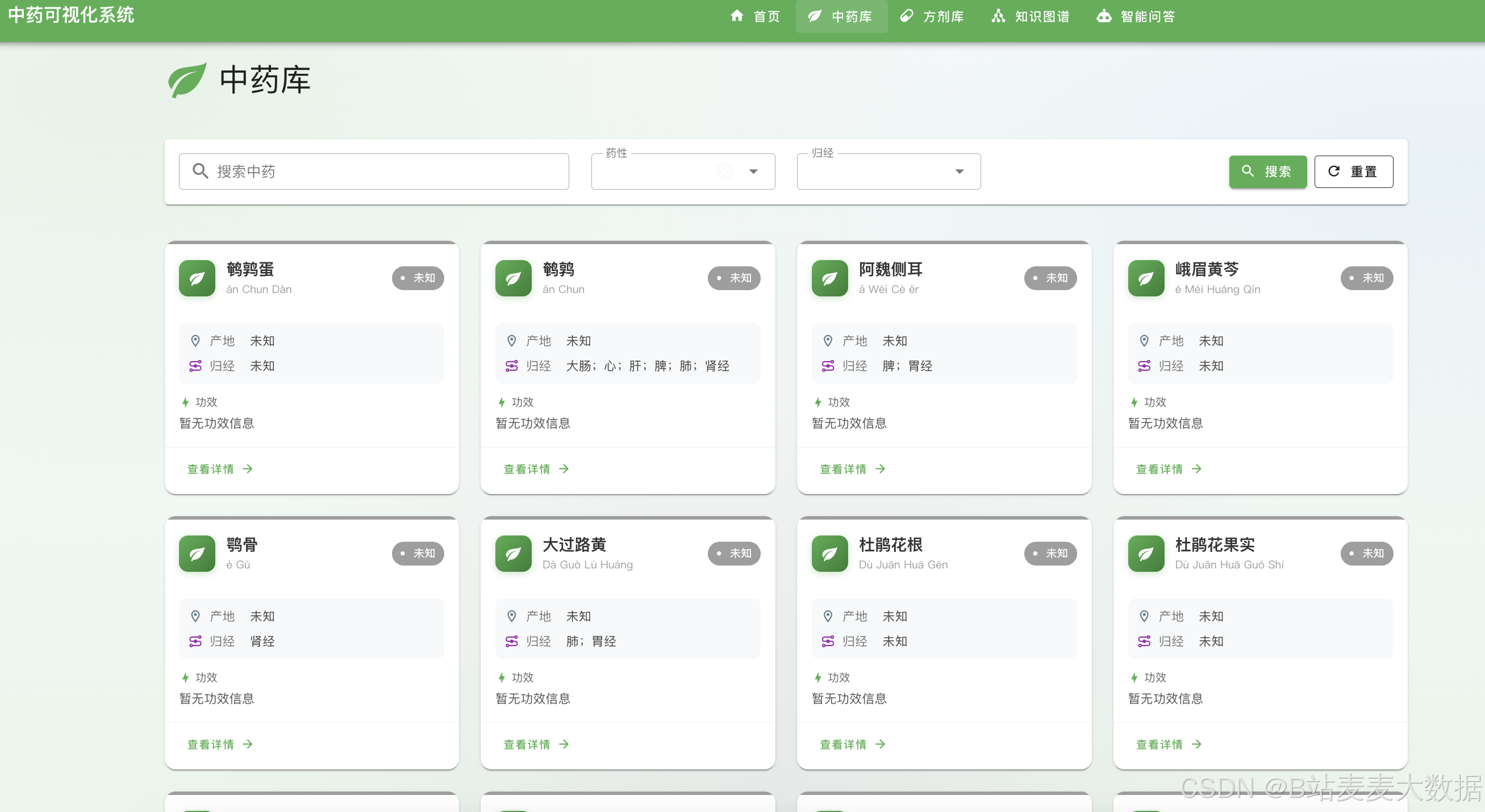
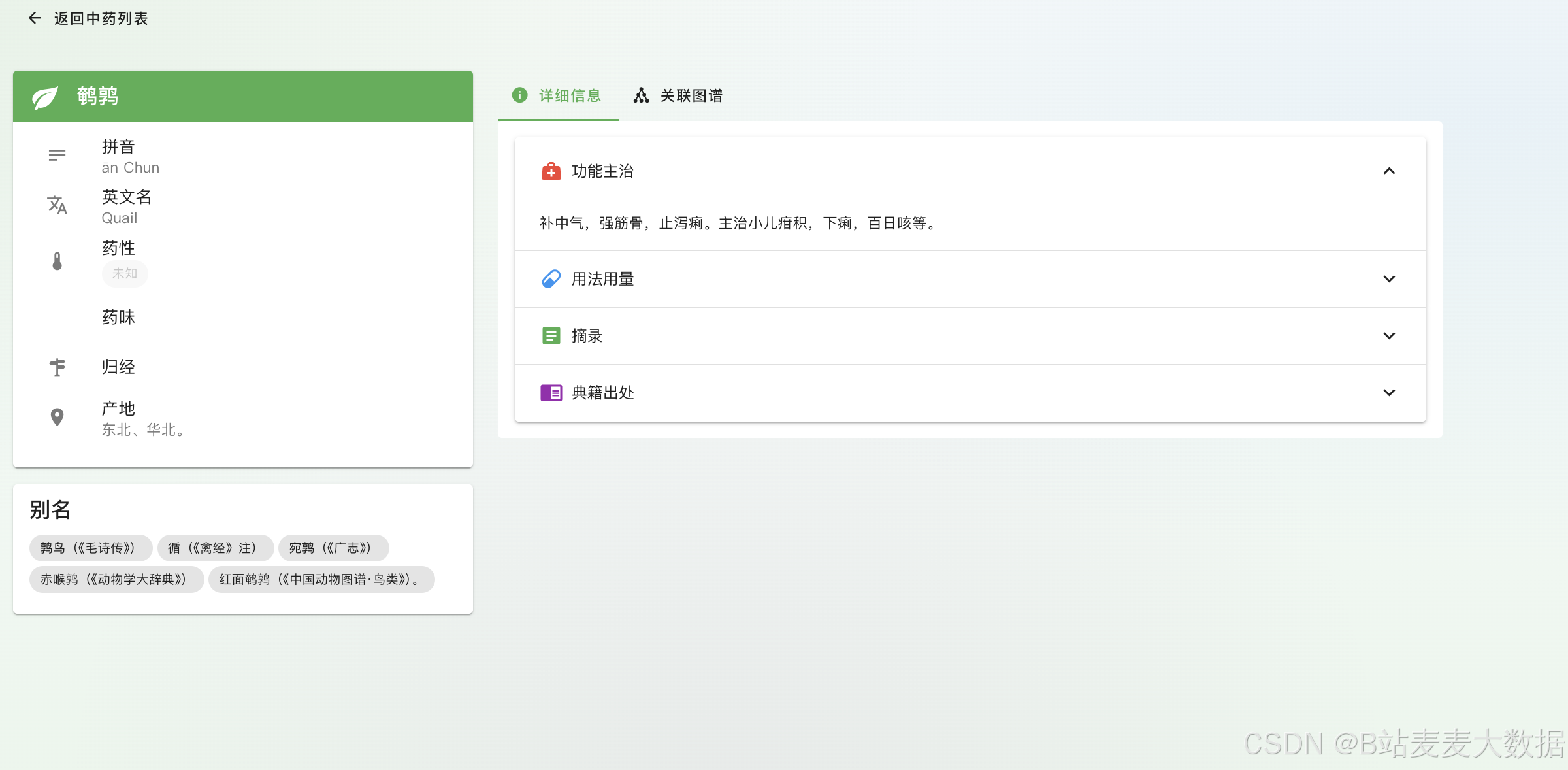
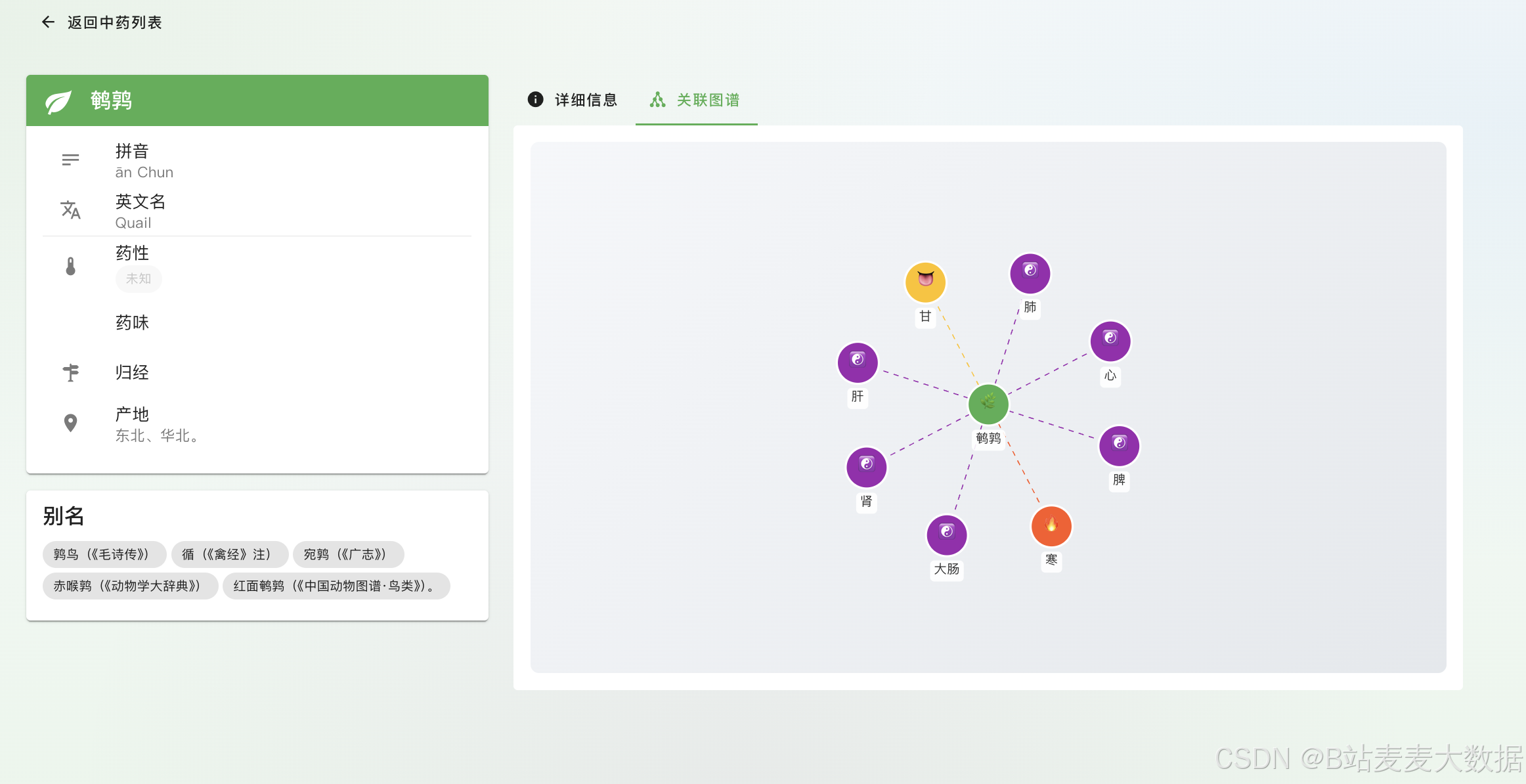
┌─────────────────────────────────────────────────────────────────────────┐
│  🌿 中药库                                                        [admin] │
├─────────────────────────────────────────────────────────────────────────┤
│                                                                         │
│  ┌─────────────────────────────────────────────────────────────────┐    │
│  │ 🔍 搜索: [输入中药名...]                     [搜索] [重置]      │    │
│  └─────────────────────────────────────────────────────────────────┘    │
│                                                                         │
│  ┌──────────────────┐  ┌──────────────────┐  ┌──────────────────┐      │
│  │ 🌿 青蒿          │  │ 🌿 黄芪          │  │ 🌿 当归          │      │
│  │ 💊 苦、辛,寒    │  │ 💊 甘,微温      │  │ 💊 甘、辛,温    │      │
│  │ ☯️ 肝、胆、膀胱经 │  │ ☯️ 脾、肺经      │  │ ☯️ 肝、心、脾经  │      │
│  │                  │  │                  │  │                  │      │
│  │ 清热解暑         │  │ 补气升阳         │  │ 补血活血         │      │
│  │ [查看详情 →]    │  │ [查看详情 →]    │  │ [查看详情 →]    │      │
│  └──────────────────┘  └──────────────────┘  └──────────────────┘      │
│                                                                         │
│  共 800+ 条记录  |  第 1 页 / 27 页  |  [<] [1] [2] ... [27] [>]        │
└─────────────────────────────────────────────────────────────────────────┘
6.4 方剂库页面
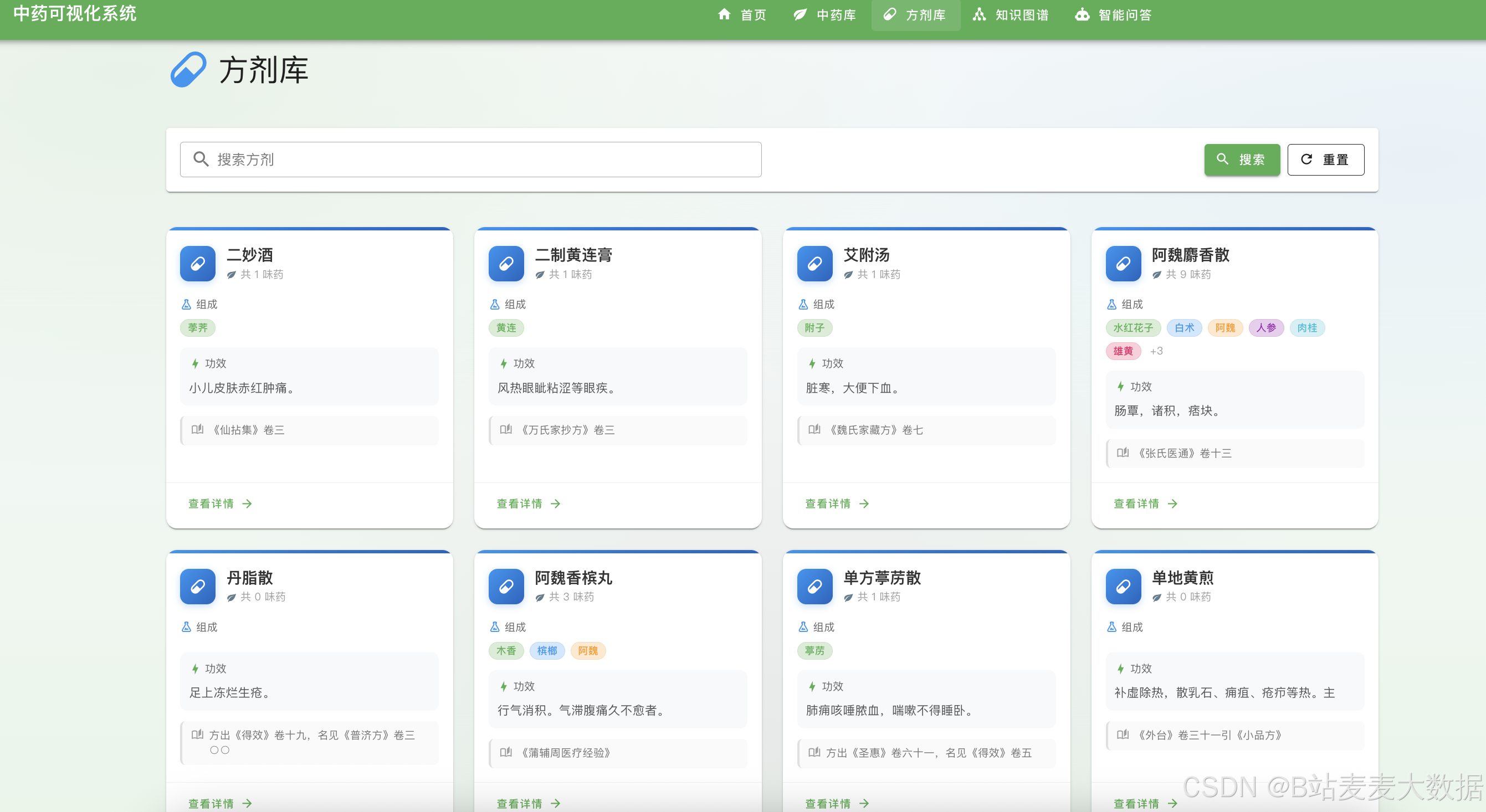
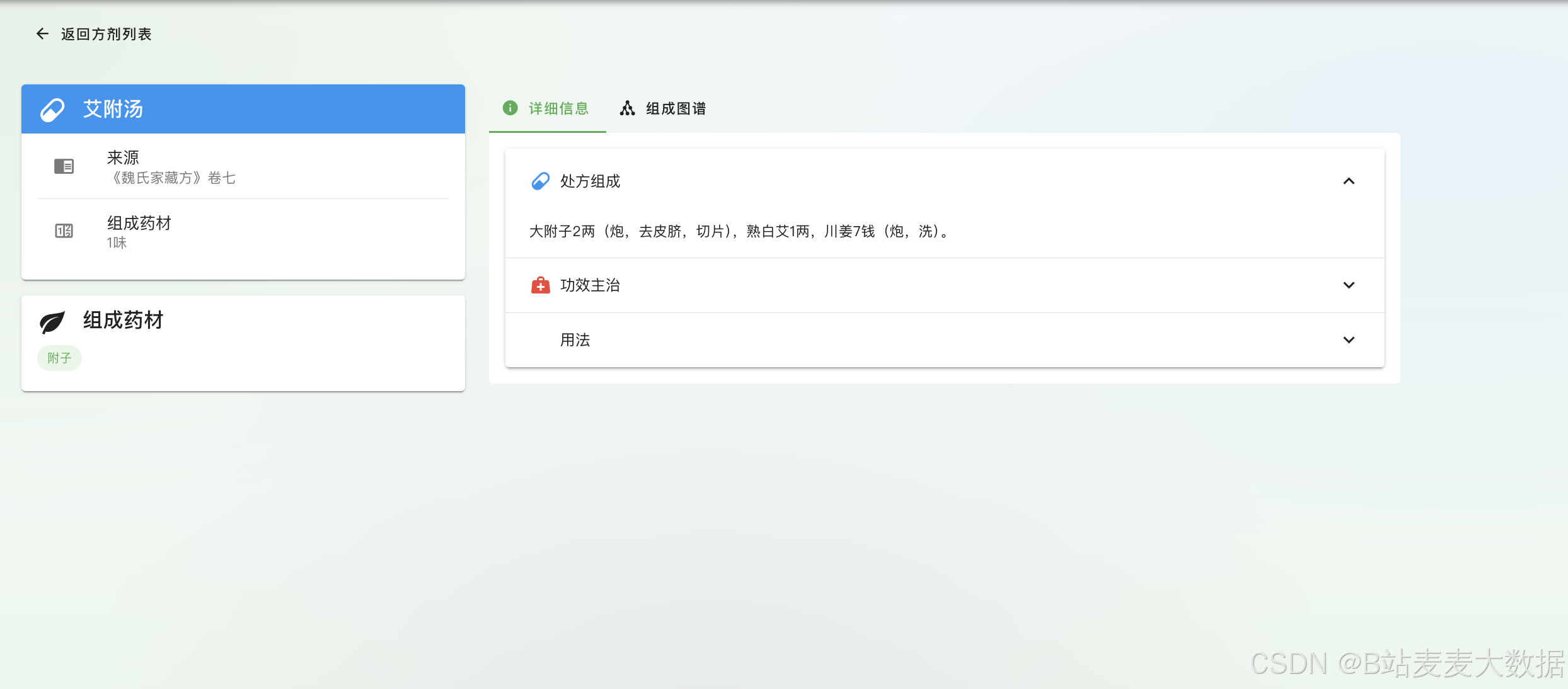
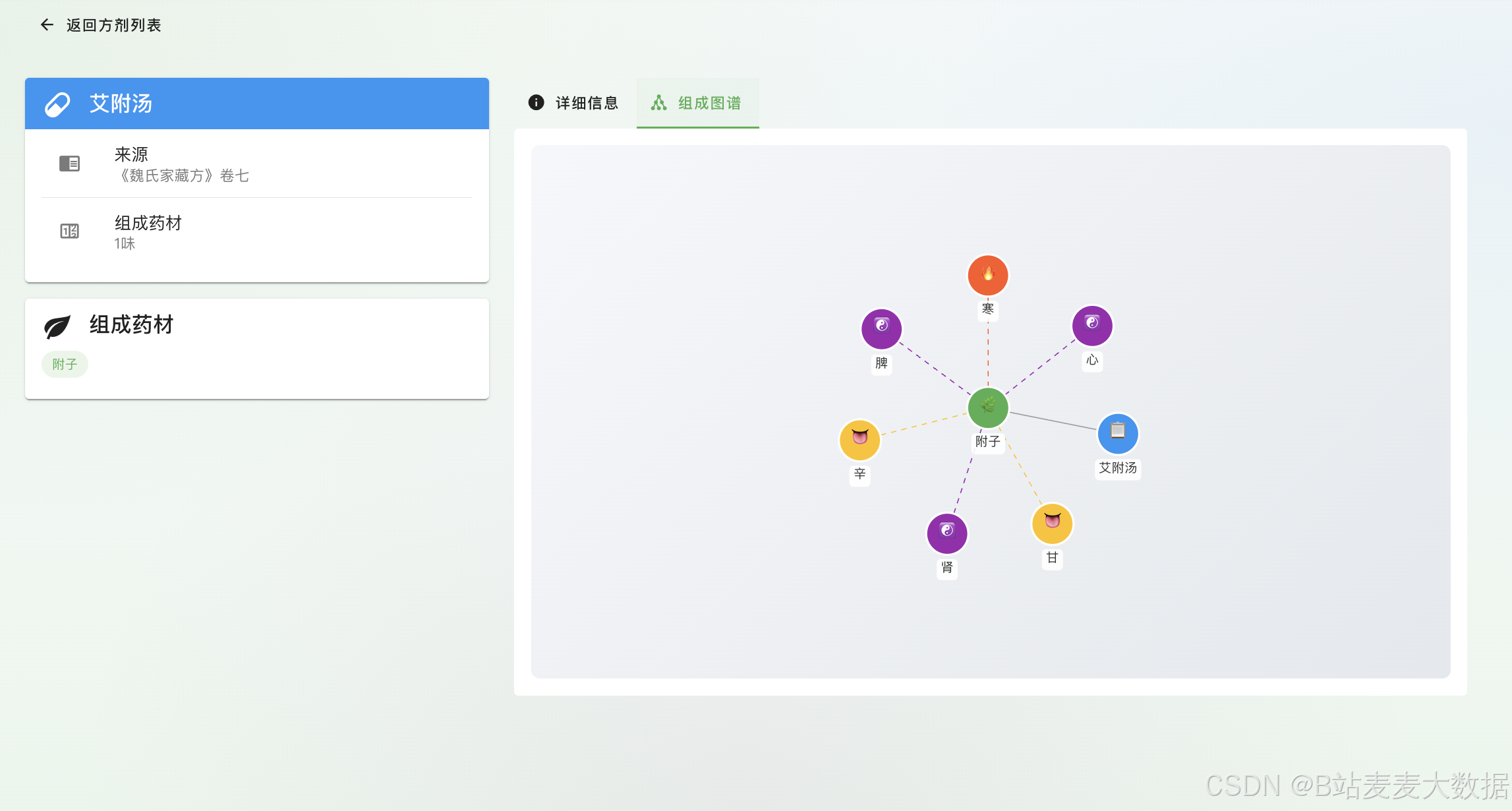
┌─────────────────────────────────────────────────────────────────────────┐
│  📋 方剂库                                                        [admin] │
├─────────────────────────────────────────────────────────────────────────┤
│                                                                         │
│  ┌─────────────────────────────────────────────────────────────────┐    │
│  │ 🔍 搜索: [输入方剂名...]                     [搜索] [重置]        │    │
│  └─────────────────────────────────────────────────────────────────┘    │
│                                                                         │
│  ┌─────────────────────────────┐  ┌─────────────────────────────┐      │
│  │ 📋 四君子汤                 │  │ 📋 八珍汤                    │      │
│  │ 💊 4味药                    │  │ 💊 8味药                     │      │
│  │ ─────────────────────────  │  │ ─────────────────────────   │      │
│  │ 组成:人参、白术、茯苓、甘草 │  │ 组成:四君子汤+四物汤        │      │
│  │                             │  │                             │      │
│  │ 功效:益气健脾              │  │ 功效:益气补血               │      │
│  │ 来源:《太平惠民和剂局方》   │  │ 来源:《丹溪心法》           │      │
│  │                             │  │                             │      │
│  │ [查看详情 →]               │  │ [查看详情 →]                │      │
│  └─────────────────────────────┘  └─────────────────────────────┘      │
│                                                                         │
│  ┌─────────────────────────────┐  ┌─────────────────────────────┐      │
│  │ 📋 逍遥散                   │  │ 📋 归脾汤                    │      │
│  │ ...                        │  │ ...                        │      │
│  └─────────────────────────────┘  └─────────────────────────────┘      │
└─────────────────────────────────────────────────────────────────────────┘
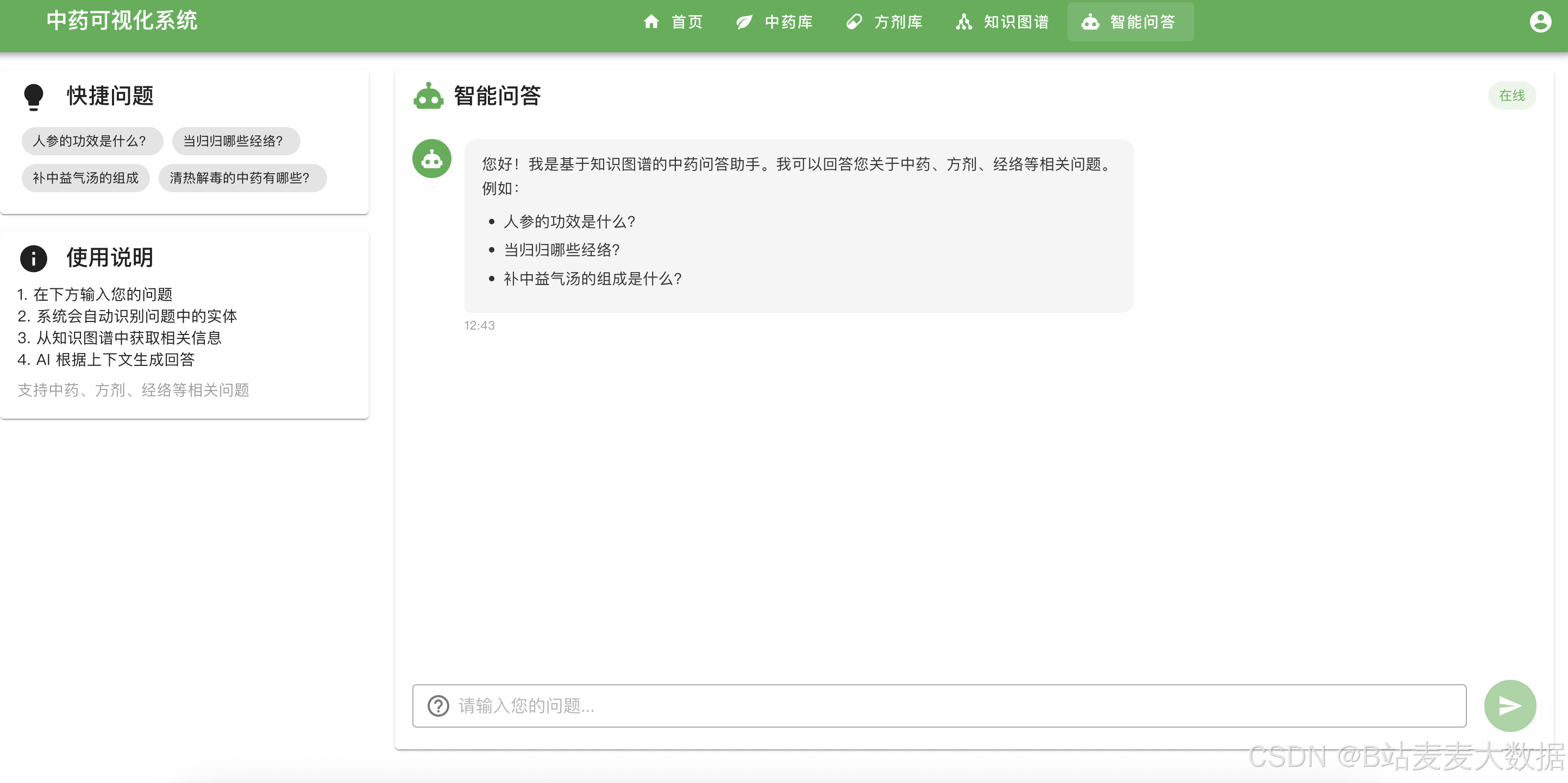
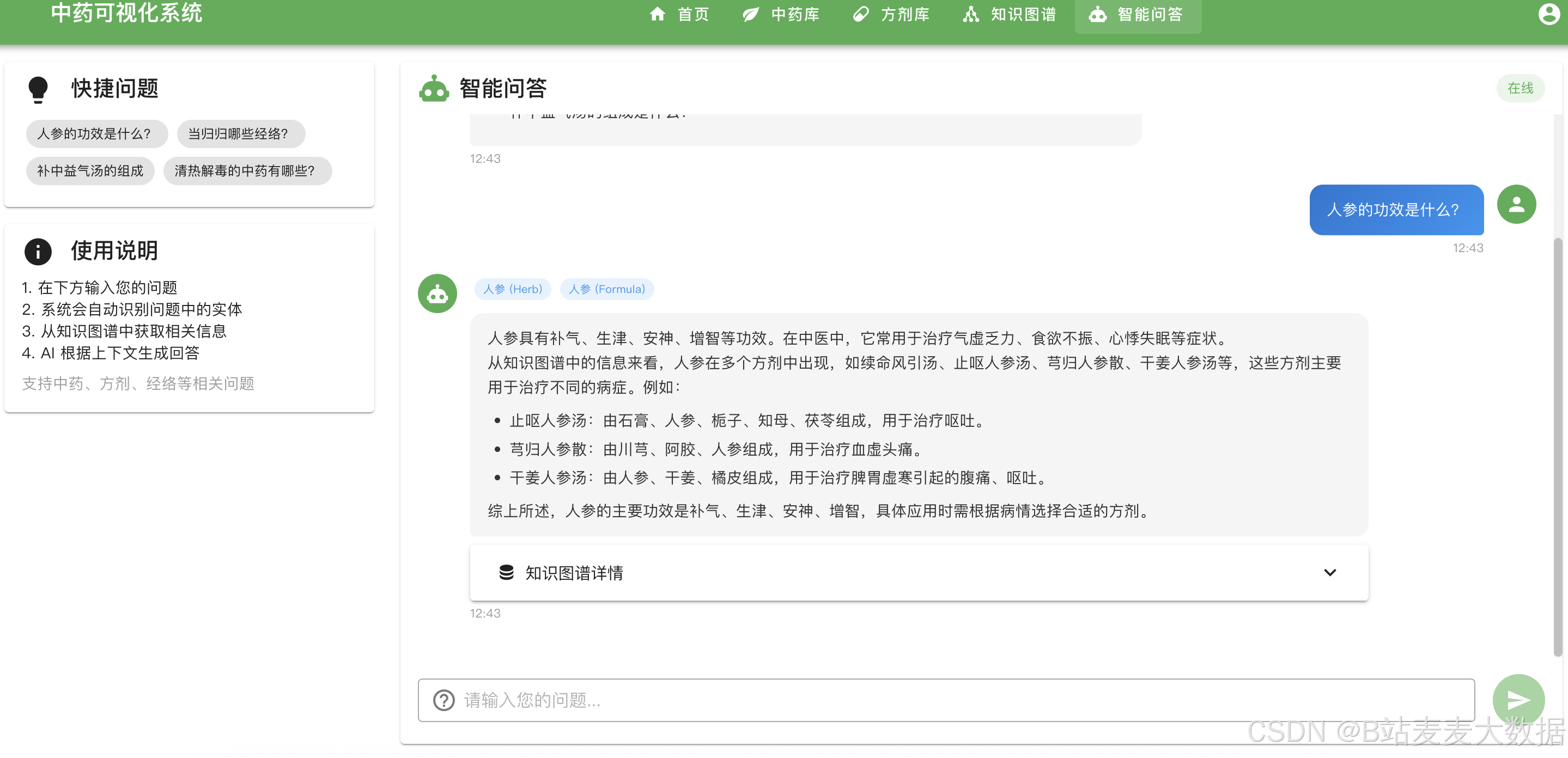
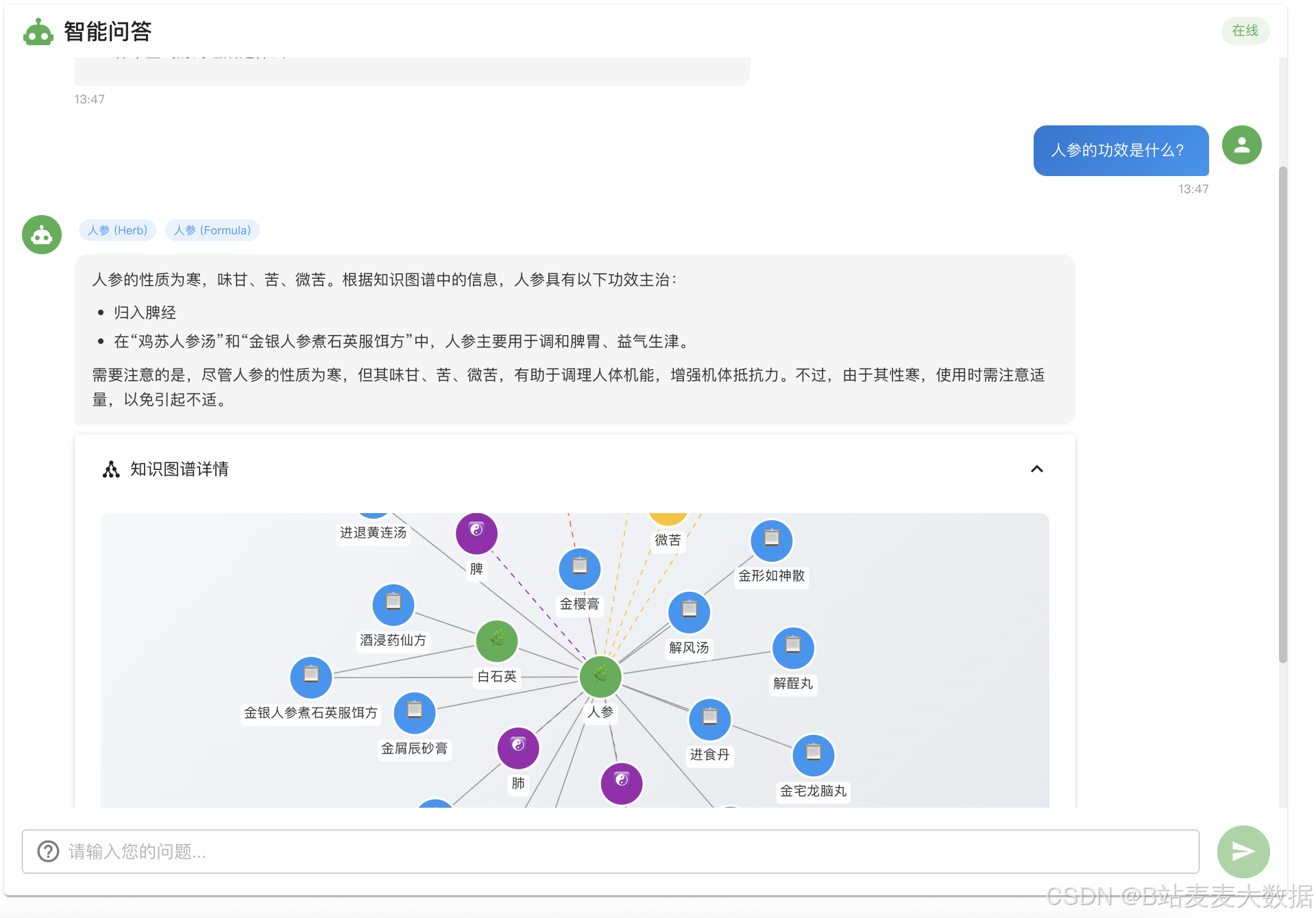
6.5 智能问答功能
七、后台管理系统
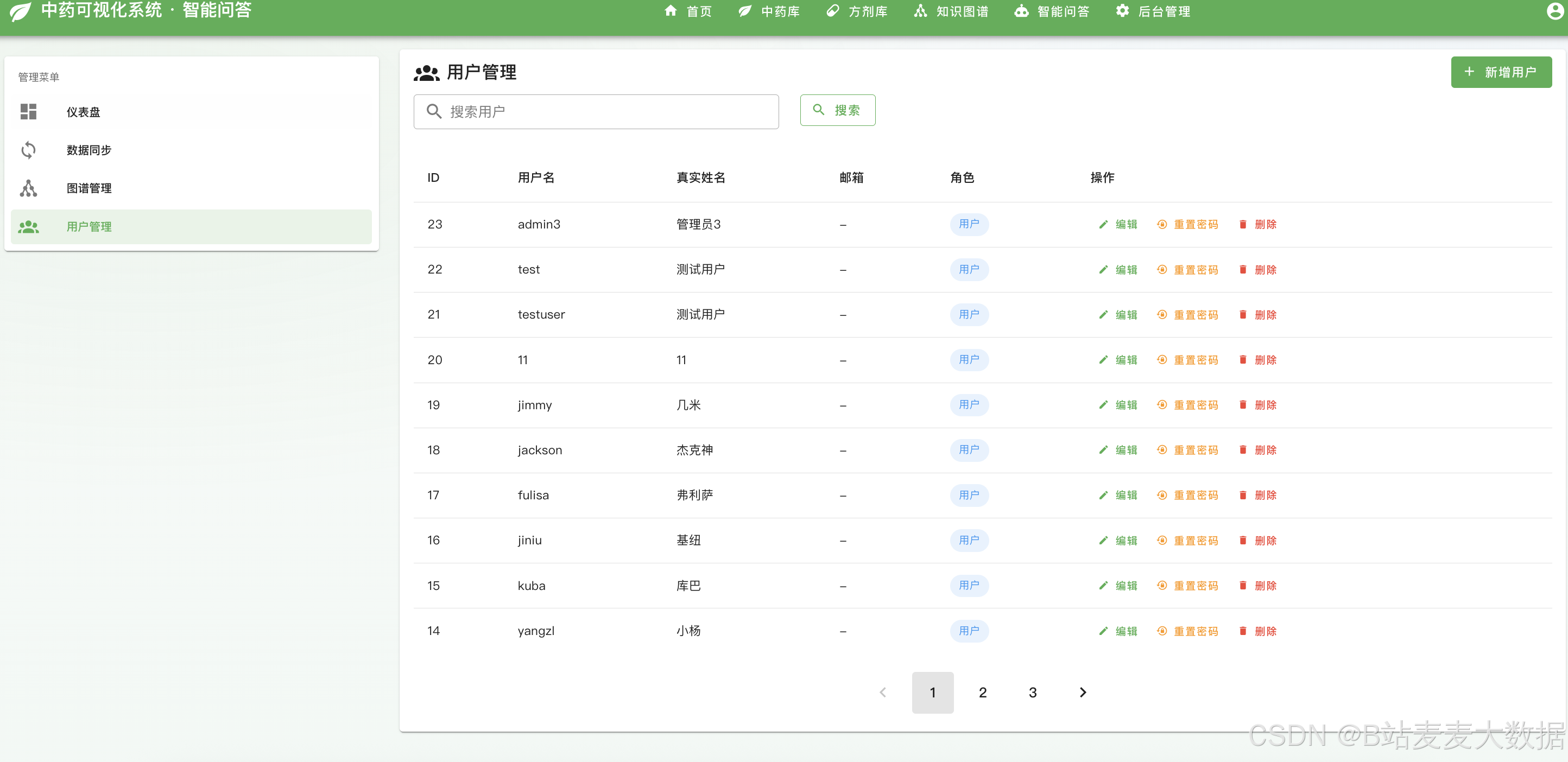
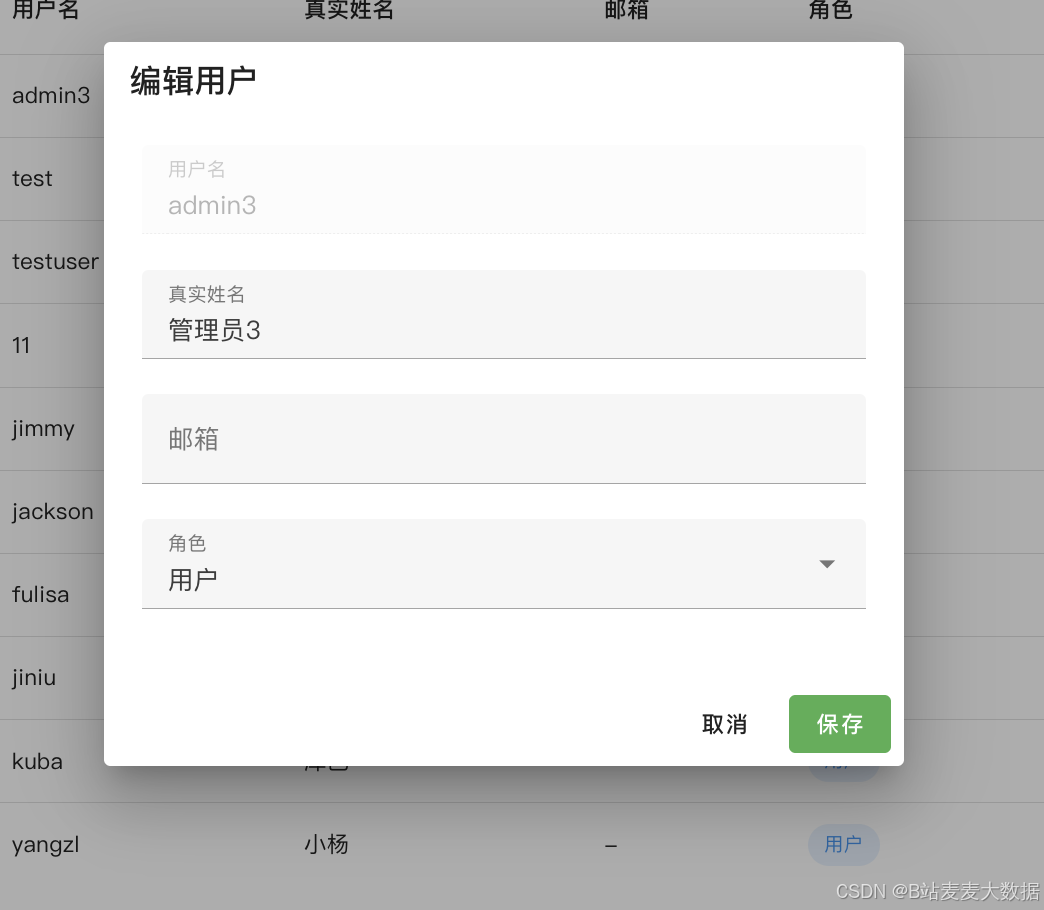
7.1 用户管理
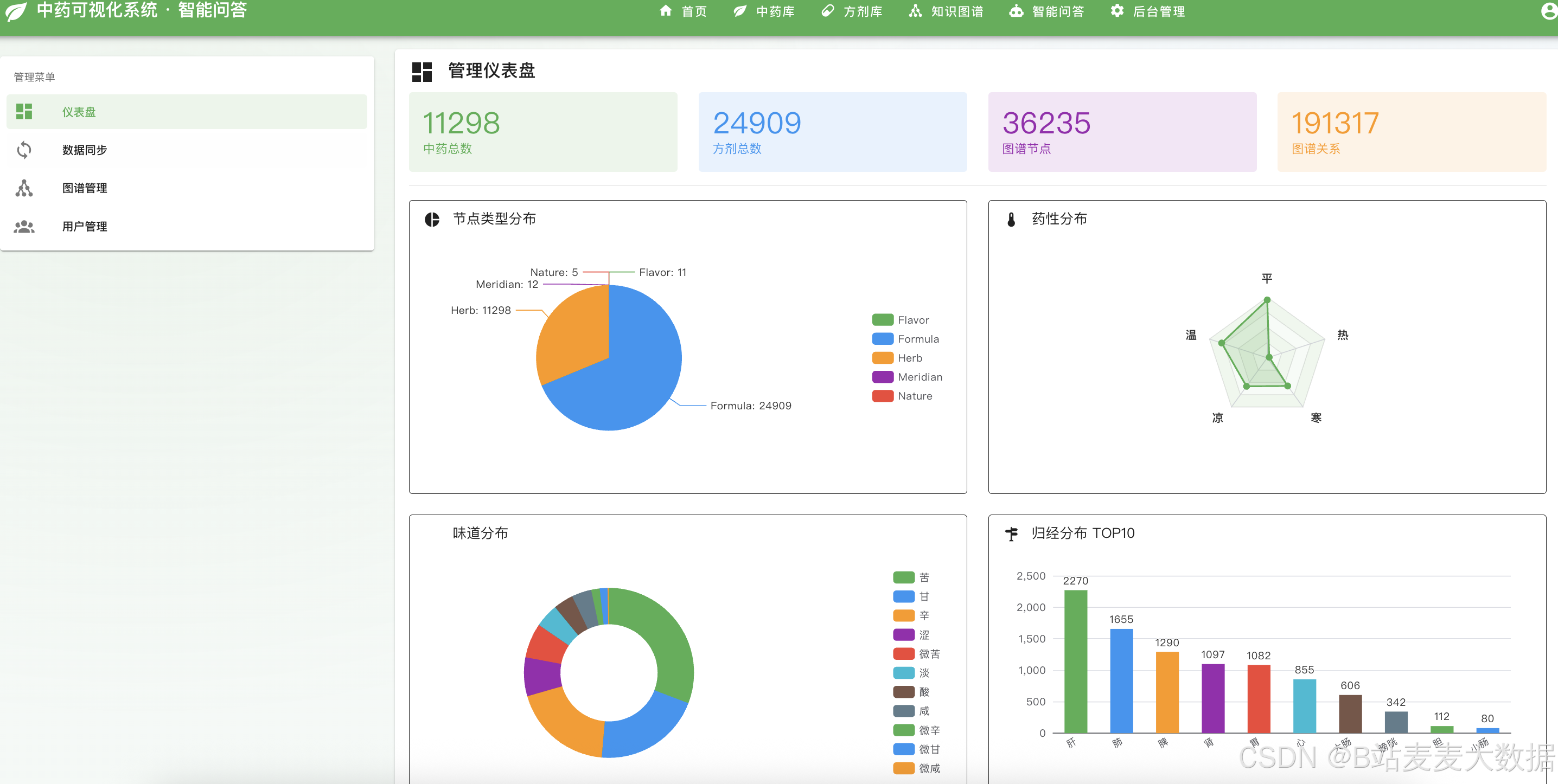
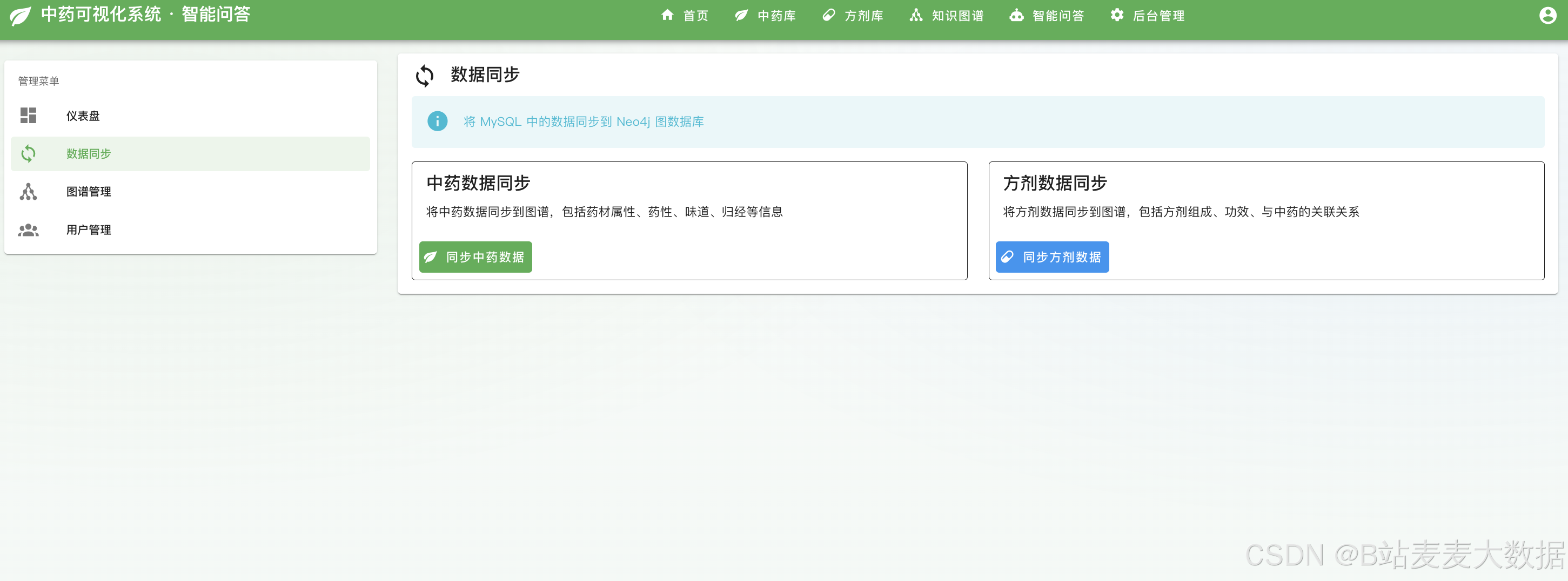
7.2 数据同步与分析
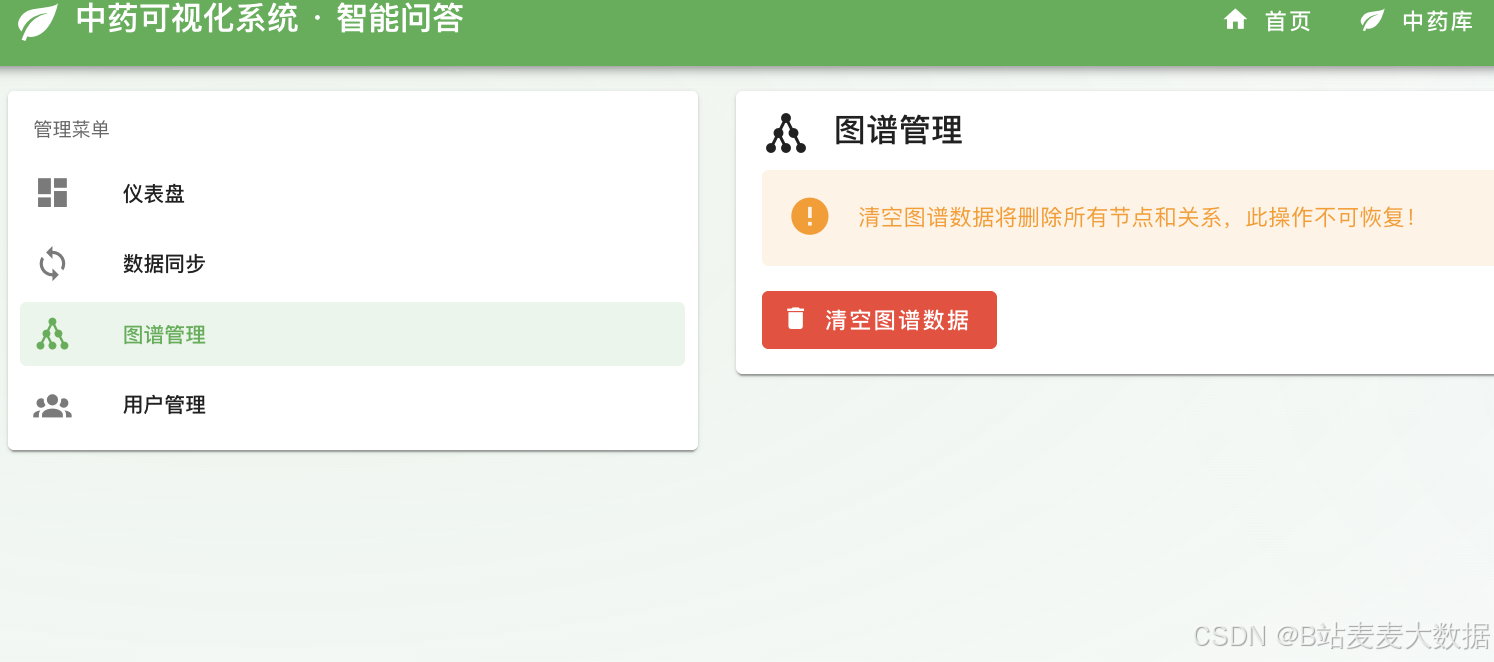
7.3 图谱管理
八、总结与展望
8.1 项目亮点
- 混合数据库架构:结合 MySQL 的结构化数据存储和 Neo4j 的图关系查询
- 交互式可视化:基于 D3.js 的力导向图,支持拖拽、缩放、搜索
- 现代化前端技术:Vue 3 + TypeScript + Pinia + Vuetify
- 完善的认证体系:JWT 安全认证,支持用户注册登录
- 智能问答系统:基于 LLM 的中药知识智能问答
8.2 后续优化方向
┌─────────────────────────────────────────────────────────┐
│                   后续优化方向                           │
├─────────────────────────────────────────────────────────┤
│  ✅ 移动端适配优化                                      │
│  ✅ 图谱数据导出功能(PNG/SVG)                         │
│  ✅ 高级搜索(多条件组合筛选)                           │
│  ✅ 图谱路径分析(两点间最短路径)                       │
│  ✅ 推荐系统(相似中药/方剂推荐)                       │
│  ✅ 数据同步(MySQL与Neo4j数据自动同步)                │
└─────────────────────────────────────────────────────────┘
📋 源码获取
如需获取本项目完整源码,请联系 麦麦大数据 获取。
技术交流
如果你对本项目有任何问题或建议,欢迎在评论区交流讨论!
参考资源:
- Vue 3 官方文档: https://vuejs.org/
- D3.js 官方文档: https://d3js.org/
- Neo4j 官方文档: https://neo4j.com/docs/
- Flask 官方文档: https://flask.palletsprojects.com/
💡 提示:本文为技术分享文章,实际开发中请根据业务需求调整技术方案。
关注B站:麦麦大数据