macOS中使用cJSON解析库解析JSON
cJSON是一个用 ANSI C 编写的超轻量级 JSON 解析器,其Github仓库源码地址为:https://github.com/DaveGamble/cJSON
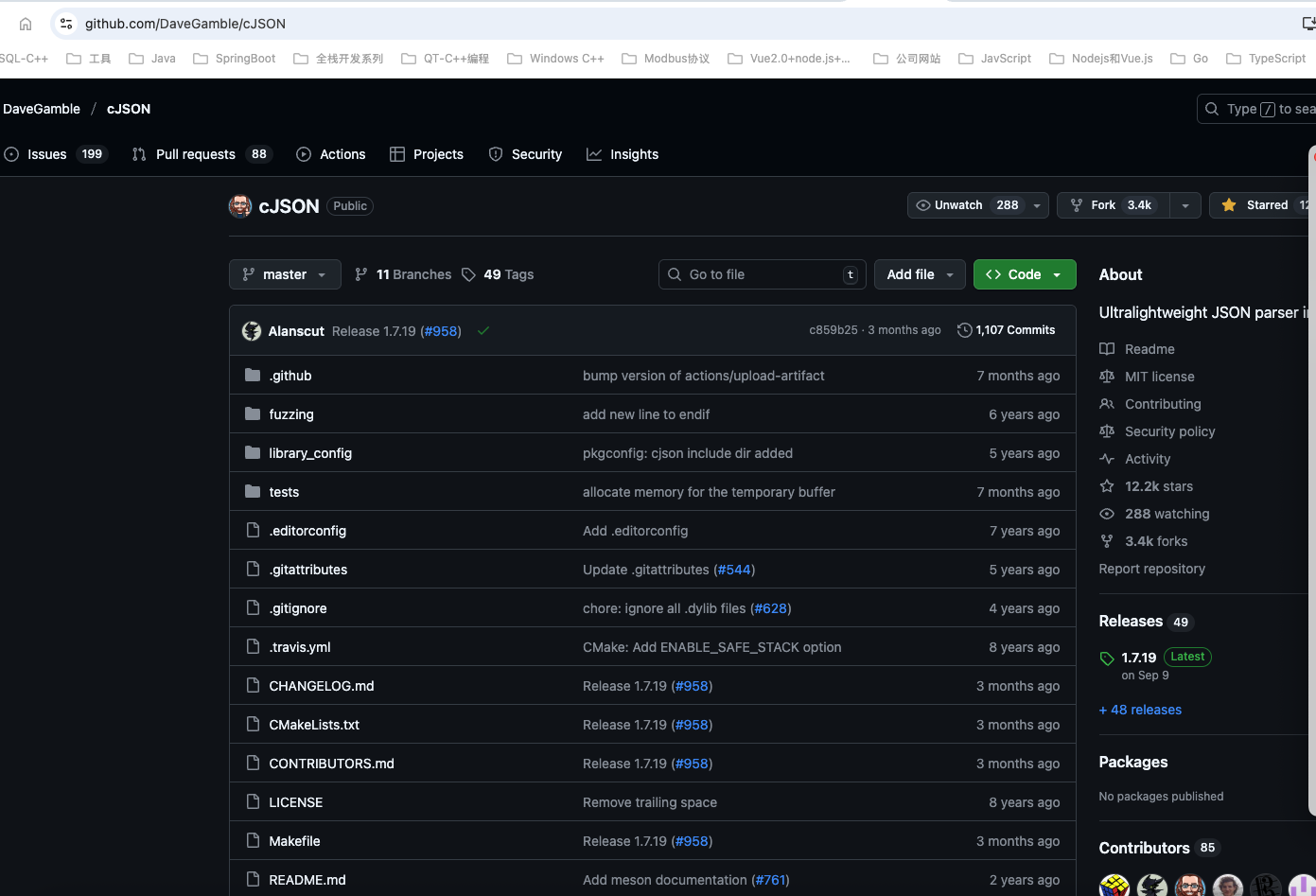
具有超轻便,可移植,单文件的特点,使用MIT开源协议。
在MacOS C++项目中使用cJSON
在C++项目中使用cJSON有两种方式,一种是下载并编译cJSON源代码,生成得到对应的头文件和库文件后,在C++项目中引入对应的依赖;另一种是直接拷贝其cJSON.h和cJSON.c这两个文件到项目中,直接使用即可。
方法1.下载编译cJSON源代码,通过头文件和库的形式引入
1. MacOS中安装pkg-config
brew install pkg-config如果是Ubuntu系统可以使用sudo apt install pkg-config,类似于CentOS系统可以使用sudo yum install pkg-config
2.下载cJSON源代码
git clone https://github.com/DaveGamble/cJSON.git3.使用CMake编译cJSON源代码
$ git clone https://github.com/DaveGamble/cJSON.git
$ cd cJSON
$ mkdir build
$ cd build
$ cmake .. -DCMAKE_POLICY_VERSION_MINIMUM=3.5 DBUILD_SHARED_AND_STATIC_LIBS -DENABLE_CJSON_UTILS=On
$ sudo make install
编译结果如下:
cpp
$ cmake .. -DCMAKE_POLICY_VERSION_MINIMUM=3.5 DBUILD_SHARED_AND_STATIC_LIBS -DENABLE_CJSON_UTILS=On
CMake Warning:
  Ignoring extra path from command line:

   "DBUILD_SHARED_AND_STATIC_LIBS"


CMake Deprecation Warning at CMakeLists.txt:2 (cmake_minimum_required):
  Compatibility with CMake < 3.10 will be removed from a future version of
  CMake.

  Update the VERSION argument <min> value.  Or, use the <min>...<max> syntax
  to tell CMake that the project requires at least <min> but has been updated
  to work with policies introduced by <max> or earlier.


-- The C compiler identification is AppleClang 17.0.0.17000013
-- Detecting C compiler ABI info
-- Detecting C compiler ABI info - done
-- Check for working C compiler: /usr/bin/cc - skipped
-- Detecting C compile features
-- Detecting C compile features - done
-- Performing Test FLAG_SUPPORTED_fvisibilityhidden
-- Performing Test FLAG_SUPPORTED_fvisibilityhidden - Success
-- Configuring done (0.5s)
-- Generating done (0.1s)
-- Build files have been written to: /Users/havealex/WorkSpace/CppProjects/cJSON/build
192:build havealex$ make
[  1%] Building C object CMakeFiles/cjson.dir/cJSON.c.o
[  3%] Linking C shared library libcjson.dylib
[  3%] Built target cjson
[  5%] Building C object CMakeFiles/cjson_utils.dir/cJSON_Utils.c.o
[  7%] Linking C shared library libcjson_utils.dylib
[  7%] Built target cjson_utils
[  9%] Building C object CMakeFiles/cJSON_test.dir/test.c.o
[ 11%] Linking C executable cJSON_test
[ 11%] Built target cJSON_test
[ 13%] Building C object tests/CMakeFiles/unity.dir/unity/src/unity.c.o
[ 15%] Linking C static library libunity.a
[ 15%] Built target unity
[ 16%] Building C object tests/CMakeFiles/parse_examples.dir/parse_examples.c.o
[ 18%] Linking C executable parse_examples
[ 18%] Built target parse_examples
[ 20%] Building C object tests/CMakeFiles/parse_number.dir/parse_number.c.o
[ 22%] Linking C executable parse_number
[ 22%] Built target parse_number
[ 24%] Building C object tests/CMakeFiles/parse_hex4.dir/parse_hex4.c.o
[ 26%] Linking C executable parse_hex4
[ 26%] Built target parse_hex4
[ 28%] Building C object tests/CMakeFiles/parse_string.dir/parse_string.c.o
[ 30%] Linking C executable parse_string
[ 30%] Built target parse_string
[ 32%] Building C object tests/CMakeFiles/parse_array.dir/parse_array.c.o
[ 33%] Linking C executable parse_array
[ 33%] Built target parse_array
[ 35%] Building C object tests/CMakeFiles/parse_object.dir/parse_object.c.o
[ 37%] Linking C executable parse_object
[ 37%] Built target parse_object
[ 39%] Building C object tests/CMakeFiles/parse_value.dir/parse_value.c.o
[ 41%] Linking C executable parse_value
[ 41%] Built target parse_value
[ 43%] Building C object tests/CMakeFiles/print_string.dir/print_string.c.o
[ 45%] Linking C executable print_string
[ 45%] Built target print_string
[ 47%] Building C object tests/CMakeFiles/print_number.dir/print_number.c.o
[ 49%] Linking C executable print_number
[ 49%] Built target print_number
[ 50%] Building C object tests/CMakeFiles/print_array.dir/print_array.c.o
[ 52%] Linking C executable print_array
[ 52%] Built target print_array
[ 54%] Building C object tests/CMakeFiles/print_object.dir/print_object.c.o
[ 56%] Linking C executable print_object
[ 56%] Built target print_object
[ 58%] Building C object tests/CMakeFiles/print_value.dir/print_value.c.o
[ 60%] Linking C executable print_value
[ 60%] Built target print_value
[ 62%] Building C object tests/CMakeFiles/misc_tests.dir/misc_tests.c.o
[ 64%] Linking C executable misc_tests
[ 64%] Built target misc_tests
[ 66%] Building C object tests/CMakeFiles/parse_with_opts.dir/parse_with_opts.c.o
[ 67%] Linking C executable parse_with_opts
[ 67%] Built target parse_with_opts
[ 69%] Building C object tests/CMakeFiles/compare_tests.dir/compare_tests.c.o
[ 71%] Linking C executable compare_tests
[ 71%] Built target compare_tests
[ 73%] Building C object tests/CMakeFiles/cjson_add.dir/cjson_add.c.o
[ 75%] Linking C executable cjson_add
[ 75%] Built target cjson_add
[ 77%] Building C object tests/CMakeFiles/readme_examples.dir/readme_examples.c.o
[ 79%] Linking C executable readme_examples
[ 79%] Built target readme_examples
[ 81%] Building C object tests/CMakeFiles/minify_tests.dir/minify_tests.c.o
[ 83%] Linking C executable minify_tests
[ 83%] Built target minify_tests
[ 84%] Building C object tests/CMakeFiles/json_patch_tests.dir/json_patch_tests.c.o
[ 86%] Linking C executable json_patch_tests
[ 86%] Built target json_patch_tests
[ 88%] Building C object tests/CMakeFiles/old_utils_tests.dir/old_utils_tests.c.o
[ 90%] Linking C executable old_utils_tests
[ 90%] Built target old_utils_tests
[ 92%] Building C object tests/CMakeFiles/misc_utils_tests.dir/misc_utils_tests.c.o
[ 94%] Linking C executable misc_utils_tests
[ 94%] Built target misc_utils_tests
[ 96%] Building C object fuzzing/CMakeFiles/fuzz_main.dir/fuzz_main.c.o
[ 98%] Building C object fuzzing/CMakeFiles/fuzz_main.dir/cjson_read_fuzzer.c.o
[100%] Linking C executable fuzz_main
[100%] Built target fuzz_main
bash
build havealex$ sudo make install
Password:
Sorry, try again.
Password:
[  3%] Built target cjson
[  7%] Built target cjson_utils
[ 11%] Built target cJSON_test
[ 15%] Built target unity
[ 18%] Built target parse_examples
[ 22%] Built target parse_number
[ 26%] Built target parse_hex4
[ 30%] Built target parse_string
[ 33%] Built target parse_array
[ 37%] Built target parse_object
[ 41%] Built target parse_value
[ 45%] Built target print_string
[ 49%] Built target print_number
[ 52%] Built target print_array
[ 56%] Built target print_object
[ 60%] Built target print_value
[ 64%] Built target misc_tests
[ 67%] Built target parse_with_opts
[ 71%] Built target compare_tests
[ 75%] Built target cjson_add
[ 79%] Built target readme_examples
[ 83%] Built target minify_tests
[ 86%] Built target json_patch_tests
[ 90%] Built target old_utils_tests
[ 94%] Built target misc_utils_tests
[100%] Built target fuzz_main
Install the project...
-- Install configuration: ""
-- Installing: /usr/local/include/cjson/cJSON.h
-- Installing: /usr/local/lib/pkgconfig/libcjson.pc
-- Installing: /usr/local/lib/libcjson.1.7.19.dylib
-- Installing: /usr/local/lib/libcjson.1.dylib
-- Up-to-date: /usr/local/lib/libcjson.dylib
-- Installing: /usr/local/lib/cmake/cJSON/cjson.cmake
-- Installing: /usr/local/lib/cmake/cJSON/cjson-noconfig.cmake
-- Installing: /usr/local/lib/libcjson_utils.1.7.19.dylib
-- Installing: /usr/local/lib/libcjson_utils.1.dylib
-- Installing: /usr/local/lib/libcjson_utils.dylib
-- Installing: /usr/local/include/cjson/cJSON_Utils.h
-- Installing: /usr/local/lib/pkgconfig/libcjson_utils.pc
-- Installing: /usr/local/lib/cmake/cJSON/cjson_utils.cmake
-- Installing: /usr/local/lib/cmake/cJSON/cjson_utils-noconfig.cmake
-- Installing: /usr/local/lib/cmake/cJSON/cJSONConfig.cmake
-- Installing: /usr/local/lib/cmake/cJSON/cJSONConfigVersion.cmake
192:build havealex$ ls
cJSON_test                      CMakeFiles                      libcjson_utils.1.dylib          libcjson.dylib
cJSONConfig.cmake               CTestTestfile.cmake             libcjson_utils.dylib            libcjson.pc
cJSONConfigVersion.cmake        fuzzing                         libcjson_utils.pc               Makefile
cmake_install.cmake             install_manifest.txt            libcjson.1.7.19.dylib           tests
CMakeCache.txt                  libcjson_utils.1.7.19.dylib     libcjson.1.dylib
192:build havealex$ pkg-config --libs --cflags libcjson
-I/opt/homebrew/Cellar/cjson/1.7.18/include -I/opt/homebrew/Cellar/cjson/1.7.18/include/cjson -L/opt/homebrew/Cellar/cjson/1.7.18/lib -lcjson
192:build havealex$ pkg-config --libs --cflags libcjson_utils
-I/opt/homebrew/Cellar/cjson/1.7.18/include -I/opt/homebrew/Cellar/cjson/1.7.18/include/cjson -L/opt/homebrew/Cellar/cjson/1.7.18/lib -lcjson_utils -lcjson
至此cJSON在MacOS中安装完成。
我们可以通过pkg-config工具查看cJSON的头文件和库文件路径,其/usr/local/lib/pkgconfig/libcjson.pc文件内容如下:
bash
libdir=/usr/local/lib
includedir=/usr/local/include

Name: libcjson
Version: 1.7.19
Description: Ultralightweight JSON parser in ANSI C
URL: https://github.com/DaveGamble/cJSON
Libs: -L${libdir} -lcjson
Libs.private: -lm
Cflags: -I${includedir} -I${includedir}/cjson
也就是说我们把cJSON安装到电脑上面的/usr/local默认安装路径下,lib库文件路径为:/usr/local/lib,头文件路径为:/usr/local/include
192:build havealex$ pkg-config --libs --cflags libcjson
-I/opt/homebrew/Cellar/cjson/1.7.18/include -I/opt/homebrew/Cellar/cjson/1.7.18/include/cjson -L/opt/homebrew/Cellar/cjson/1.7.18/lib -lcjson
192:build havealex$ pkg-config --libs libcjson
-L/opt/homebrew/Cellar/cjson/1.7.18/lib -lcjson
192:build havealex$ ls /usr/local/lib/libcjson.*
/usr/local/lib/libcjson.1.7.18.dylib /usr/local/lib/libcjson.1.7.19.dylib /usr/local/lib/libcjson.1.dylib /usr/local/lib/libcjson.dylib
192:build havealex$ ls /usr/local/include/cjson/cJSON*
/usr/local/include/cjson/cJSON_Utils.h /usr/local/include/cjson/cJSON.h
4. 创建C++项目,并在CMakeLists.txt文件中通过pkg-config引入cJSON依赖
创建一个cJSONExamples目录,然后创建如下文件结构
- CMaKeLists.txt
- src/cJSONDemo01.cpp
src目录下的cJSONDemo01.cpp内容如下:
cpp
#include <cjson/cJSON.h>
#include <iostream>
#include <string>
#include <cstdlib>
#include <vector>

// {
//     "name": "Awesome 4K",
//     "resolutions": [
//         {
//             "width": 1280,
//             "height": 720
//         },
//         {
//             "width": 1920,
//             "height": 1080
//         },
//         {
//             "width": 3840,
//             "height": 2160
//         }
//     ]
// }

// Ultralightweight JSON parser in ANSI C
// https://github.com/DaveGamble/cJSON

// Let's build the above JSON and print it to a string:
// create a monitor with a list of supported resolutions
// NOTE: Returns a heap allocated string, you are required to free it after use.
char *create_monitor(void)
{
    const unsigned int resolution_numbers[3][2] = {
        {1280, 720},
        {1920, 1080},
        {3840, 2160}
    };
    char *string = NULL;
    cJSON *name = NULL;
    cJSON *resolutions = NULL;
    cJSON *resolution = NULL;
    cJSON *width = NULL;
    cJSON *height = NULL;
    size_t index = 0;

    cJSON *monitor = cJSON_CreateObject();
    if (monitor == NULL)
    {
        goto end;
    }

    name = cJSON_CreateString("Awesome 4K");
    if (name == NULL)
    {
        goto end;
    }
    /* after creation was successful, immediately add it to the monitor,
     * thereby transferring ownership of the pointer to it */
    cJSON_AddItemToObject(monitor, "name", name);

    resolutions = cJSON_CreateArray();
    if (resolutions == NULL)
    {
        goto end;
    }
    cJSON_AddItemToObject(monitor, "resolutions", resolutions);

    for (index = 0; index < (sizeof(resolution_numbers) / (2 * sizeof(int))); ++index)
    {
        resolution = cJSON_CreateObject();
        if (resolution == NULL)
        {
            goto end;
        }
        cJSON_AddItemToArray(resolutions, resolution);

        width = cJSON_CreateNumber(resolution_numbers[index][0]);
        if (width == NULL)
        {
            goto end;
        }
        cJSON_AddItemToObject(resolution, "width", width);

        height = cJSON_CreateNumber(resolution_numbers[index][1]);
        if (height == NULL)
        {
            goto end;
        }
        cJSON_AddItemToObject(resolution, "height", height);
    }

    string = cJSON_Print(monitor);
    if (string == NULL)
    {
        fprintf(stderr, "Failed to print monitor.\n");
    }

end:
    cJSON_Delete(monitor);
    return string;
}


// Alternatively we can use the cJSON_Add...ToObject helper functions
// to make our lives a little easier:
//NOTE: Returns a heap allocated string, you are required to free it after use.
char *create_monitor_with_helpers(void)
{
    const unsigned int resolution_numbers[3][2] = {
        {1280, 720},
        {1920, 1080},
        {3840, 2160}
    };
    char *string = NULL;
    cJSON *resolutions = NULL;
    size_t index = 0;

    cJSON *monitor = cJSON_CreateObject();

    if (cJSON_AddStringToObject(monitor, "name", "Awesome 4K") == NULL)
    {
        goto end;
    }

    resolutions = cJSON_AddArrayToObject(monitor, "resolutions");
    if (resolutions == NULL)
    {
        goto end;
    }

    for (index = 0; index < (sizeof(resolution_numbers) / (2 * sizeof(int))); ++index)
    {
        cJSON *resolution = cJSON_CreateObject();

        if (cJSON_AddNumberToObject(resolution, "width", resolution_numbers[index][0]) == NULL)
        {
            goto end;
        }

        if (cJSON_AddNumberToObject(resolution, "height", resolution_numbers[index][1]) == NULL)
        {
            goto end;
        }

        cJSON_AddItemToArray(resolutions, resolution);
    }

    string = cJSON_Print(monitor);
    if (string == NULL)
    {
        fprintf(stderr, "Failed to print monitor.\n");
    }

end:
    cJSON_Delete(monitor);
    return string;
}

// In this example we will parse a JSON in the above format and check if the monitor supports a Full HD resolution while printing some diagnostic output:
/* return 1 if the monitor supports full hd, 0 otherwise */
int supports_full_hd(const char * const monitor)
{
    const cJSON *resolution = NULL;
    const cJSON *resolutions = NULL;
    const cJSON *name = NULL;
    int status = 0;
    cJSON *monitor_json = cJSON_Parse(monitor);
    if (monitor_json == NULL)
    {
        const char *error_ptr = cJSON_GetErrorPtr();
        if (error_ptr != NULL)
        {
            fprintf(stderr, "Error before: %s\n", error_ptr);
        }
        status = 0;
        goto end;
    }

    name = cJSON_GetObjectItemCaseSensitive(monitor_json, "name");
    if (cJSON_IsString(name) && (name->valuestring != NULL))
    {
        printf("Checking monitor \"%s\"\n", name->valuestring);
    }

    resolutions = cJSON_GetObjectItemCaseSensitive(monitor_json, "resolutions");
    cJSON_ArrayForEach(resolution, resolutions)
    {
        cJSON *width = cJSON_GetObjectItemCaseSensitive(resolution, "width");
        cJSON *height = cJSON_GetObjectItemCaseSensitive(resolution, "height");

        if (!cJSON_IsNumber(width) || !cJSON_IsNumber(height))
        {
            status = 0;
            goto end;
        }

        if ((width->valuedouble == 1920) && (height->valuedouble == 1080))
        {
            status = 1;
            goto end;
        }
    }

end:
    cJSON_Delete(monitor_json);
    return status;
}

int main()
{
    char *str1 = create_monitor();
    if (str1 != NULL) {
        std::cout << "Monitor created with standard functions:\n" << str1 << std::endl;
        if (supports_full_hd(str1)) {
            std::cout << "This monitor supports Full HD resolution." << std::endl;
        } else {
            std::cout << "This monitor does not support Full HD resolution." << std::endl;
        }
    }

    char *str2 = create_monitor_with_helpers();
    if (str2 != NULL) {
        std::cout << "Monitor created with helper functions:\n" << str2 << std::endl;
        if (supports_full_hd(str2)) {
            std::cout << "This monitor supports Full HD resolution." << std::endl;
        } else {
            std::cout << "This monitor does not support Full HD resolution." << std::endl;

        }
    }

    return 0;
}
CMaKeLists.txt 构建文件内容如下:
bash
# CMake 最低版本要求
CMAKE_MINIMUM_REQUIRED(VERSION 3.10)
# 项目名称
PROJECT(cJSONExamples)

# 设置 C++11 标准
SET(CMAKE_CXX_STANDARD 11)
SET(CMAKE_CXX_STANDARD_REQUIRED ON)
SET(CMAKE_CXX_EXTENSIONS OFF)

# 查找 pkg-config 工具
find_package(PkgConfig REQUIRED)
# 查找 cJSON 库
pkg_check_modules(CJSON REQUIRED libcjson)
# 检查是否找到 cJSON 库
if (CJSON_FOUND)
    message(STATUS "cJSON found")
    message(STATUS "cJSON include dirs: ${CJSON_INCLUDE_DIRS}")
    message(STATUS "cJSON libraries: ${CJSON_LIBRARIES}")

    # 创建可执行文件并链接 cJSON 库
    ADD_EXECUTABLE(cJSONDemo01 ./src/cJSONDemo01.cpp)
    # 链接 cJSON 库到可执行文件
    TARGET_LINK_LIBRARIES(cJSONDemo01 ${CJSON_LIBRARIES})
    # 设定包含目录
    INCLUDE_DIRECTORIES(cJSONDemo01 ${CJSON_INCLUDE_DIRS})
    # 设定库目录
    LINK_DIRECTORIES(cJSONDemo01 ${CJSON_LIBRARY_DIRS})
# 找不到 cJSON 库时的处理
else()
    message(FATAL_ERROR "cJSON not found")
endif()当然,简单的项目中,也可以直接使用如下命令编译cJSONDemo01.cpp源文件,生成cJSONDemo01可执行程序:
bash
g++ cJSONDemo01.cpp -o cJSONDemo01 `pkg-config --libs --cflags libcjson`5.编译运行cJSON示例项目
在第4步的cJSONExamples目录下分别执行如下命令:
bash
mkdir build
build
make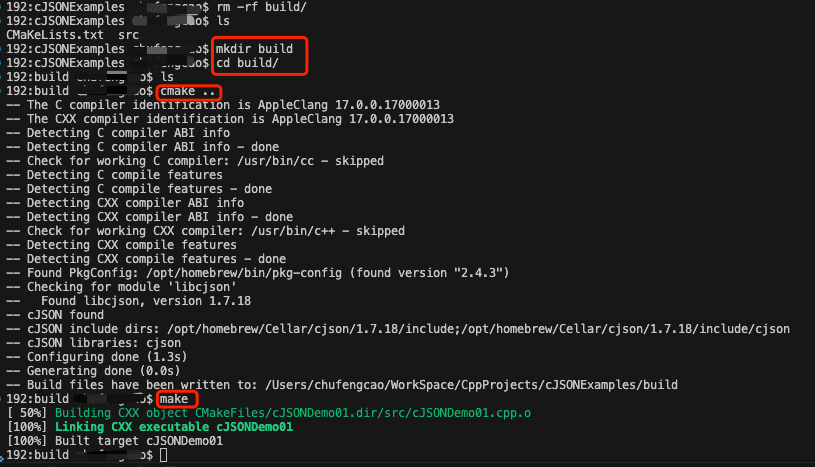
如上图所示,生成了cJSONDemo01可执行程序后,执行./cJSONDemo01得到如下的运行结果:
bash
build havealex$ ./cJSONDemo01
Monitor created with standard functions:
{
        "name": "Awesome 4K",
        "resolutions":  [{
                        "width":        1280,
                        "height":       720
                }, {
                        "width":        1920,
                        "height":       1080
                }, {
                        "width":        3840,
                        "height":       2160
                }]
}
Checking monitor "Awesome 4K"
This monitor supports Full HD resolution.
Monitor created with helper functions:
{
        "name": "Awesome 4K",
        "resolutions":  [{
                        "width":        1280,
                        "height":       720
                }, {
                        "width":        1920,
                        "height":       1080
                }, {
                        "width":        3840,
                        "height":       2160
                }]
}
Checking monitor "Awesome 4K"
This monitor supports Full HD resolution.
方法2.直接把头文件和源文件拷贝引入到C++项目中
从Github拉取cJSON源码后,文件非常多,但是其中cJSON的源码文件只有两个:
cJSON.h
cJSON.c
使用的时候,只需要将这两个文件复制到工程目录,然后包含头文件cJSON.h即可,如下:
cpp
#include <cJSON.h>然后编写对应的cJSON示例程序,编译运行即可。