1 目前机子显卡驱动和cuda 版本目前看来有些旧了,需要升级,
cat /etc/os-release
PRETTY_NAME="Ubuntu 22.04.5 LTS"
NAME="Ubuntu"
VERSION_ID="22.04"
VERSION="22.04.5 LTS (Jammy Jellyfish)"
VERSION_CODENAME=jammy
ID=ubuntu
ID_LIKE=debian
HOME_URL="https://www.ubuntu.com/"
SUPPORT_URL="https://help.ubuntu.com/"
BUG_REPORT_URL="https://bugs.launchpad.net/ubuntu/"
PRIVACY_POLICY_URL="https://www.ubuntu.com/legal/terms-and-policies/privacy-policy"
UBUNTU_CODENAME=jammy
uname -a
Linux ubuntu-workstation 6.8.0-54-generic #56~22.04.1-Ubuntu SMP PREEMPT_DYNAMIC Sat Feb 8 11:41:24 UTC 2 x86_64 x86_64 x86_64 GNU/Linux
#nvidia-smi
hu Dec 11 18:02:27 2025
+---------------------------------------------------------------------------------------+
| NVIDIA-SMI 535.171.04 Driver Version: 535.171.04 CUDA Version: 12.2 |
|-----------------------------------------+----------------------+----------------------+
| GPU Name Persistence-M | Bus-Id Disp.A | Volatile Uncorr. ECC |
| Fan Temp Perf Pwr:Usage/Cap | Memory-Usage | GPU-Util Compute M. |
| | | MIG M. |
|=========================================+======================+======================|
| 0 NVIDIA GeForce RTX 4090 Off | 00000000:04:00.0 On | Off |
| 0% 35C P8 14W / 450W | 1529MiB / 24564MiB | 3% Default |
| | | N/A |
+-----------------------------------------+----------------------+----------------------+
nvcc -v
nvcc: NVIDIA (R) Cuda compiler driver
Copyright (c) 2005-2022 NVIDIA Corporation
Built on Wed_Sep_21_10:33:58_PDT_2022
Cuda compilation tools, release 11.8, V11.8.89
Build cuda_11.8.r11.8/compiler.31833905_0
可以看出显卡驱动535.171.04,nvcc 版本 11.8
准备升级显卡驱动,cuda 版本升级至12.6
1 下载并安装驱动
我的是消费级显卡,4090,
目前按照链接https://docs.nvidia.com/cuda/cuda-toolkit-release-notes/
给的参考资料,cuda 12.6的驱动版本要大于等于560.28.03
在以下链接中https://www.nvidia.cn/geforce/drivers/
搜索驱动程序,并最终选择570.195.03这个版本驱动程序,一是这个版本驱动程序,可以兼容cuda 12.8,同时驱动程序版本不是太高,此处没有选择最新的590的驱动程序
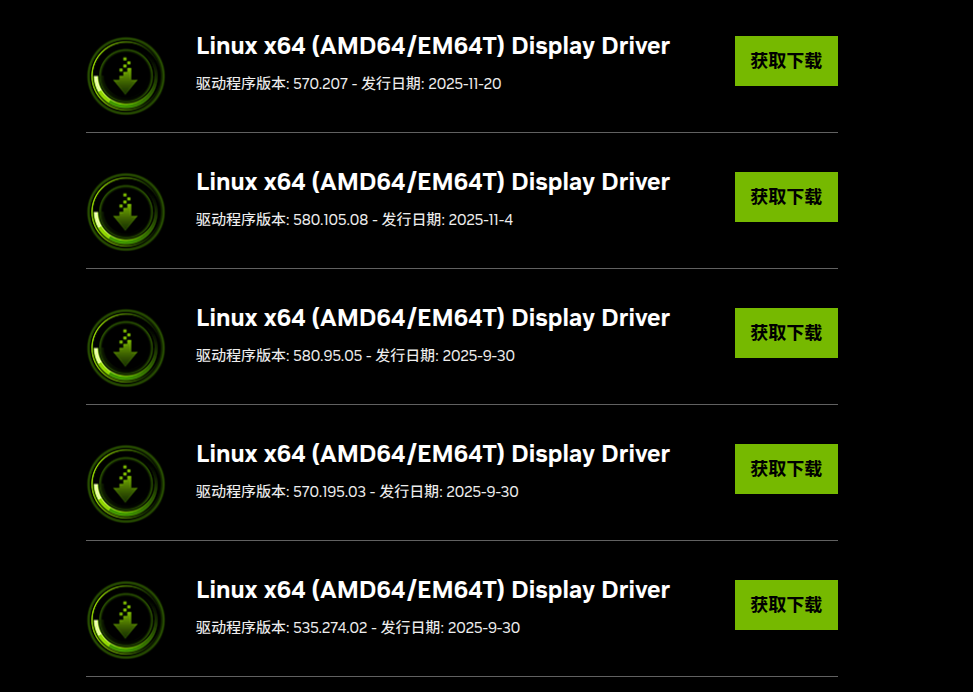
下一步是安装驱动程序,安装驱动可能导致机子重启,重要的服务请做好处理
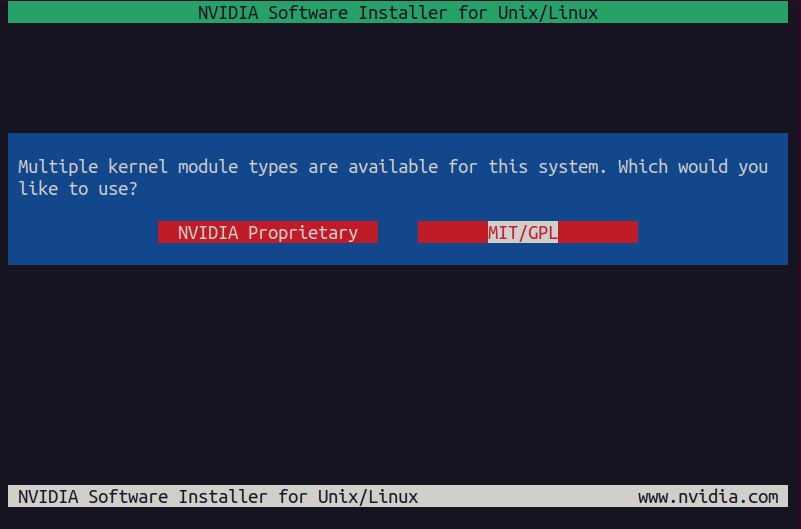
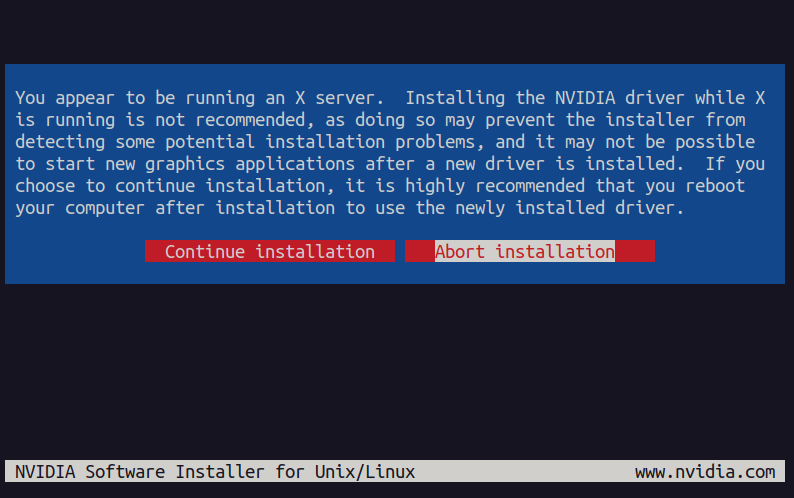
需要关闭X server,ctrl+alt+F1 切换至命令行,然后sudo init 3 关闭X server,然后正常执行驱动安装,这个提示就不会有了,升级前,使用显卡的驱动程序要提前关掉。
There appears to already be a driver installed on you system(version:535.171.04).As part of installing this driver (version:535.1271.04),the existing driver will be uninstalled ,Are you sure you want to continue ? yes (默认)
An alternate method of installing the NVIDIA driver was detected.(This is usually a package provided by your distributor.)A driver installed via that method may intergrate better with your systemthan a driver installed by nvidia-istaller.Please review the message provided by the maintainer of this alternate installation method and decide how to process: Continue Installation (默认) The NVIDIA driver by Ubuntu can be installed by Lanching the "Software &Update" application ,and by selecting the NVIDIA driver from "Additional Drivers" tab
Install NVIDIA's 32-bit compatiibility libraries ? yes(默认)
Would you like to register the kernel module sources with DKMS? This will allow DKMS to automatically build a new module,if you kernel changes later Yes(默认)
Would you like to run the nvidia-xconfig utility to automatically update you X configuration file so that the NVIDIA X driverw will be userd when you restart X7 Any pre-existing X configuration file will be backed up No(默认)
Installation of NVIDIA Accelerated Graphics Driver for linux-X86_64(version 570.195.03 is now complete).Please update your xorg.conf file as appropriate;see the file /use/share/doc/NVIFDIA_GLX-1.0/README.txt for deatils
安装成功, sudo init 5 返回图形界面,查看驱动
Thu Dec 11 18:48:17 2025
+-----------------------------------------------------------------------------------------+
| NVIDIA-SMI 570.195.03 Driver Version: 570.195.03 CUDA Version: 12.8 |
|-----------------------------------------+------------------------+----------------------+
| GPU Name Persistence-M | Bus-Id Disp.A | Volatile Uncorr. ECC |
| Fan Temp Perf Pwr:Usage/Cap | Memory-Usage | GPU-Util Compute M. |
| | | MIG M. |
|=========================================+========================+======================|
| 0 NVIDIA GeForce RTX 4090 Off | 00000000:04:00.0 On | Off |
| 0% 32C P2 69W / 450W | 597MiB / 24564MiB | 0% Default |
| | | N/A |
+-----------------------------------------+------------------------+----------------------+
+-----------------------------------------------------------------------------------------+
| Processes: |
| GPU GI CI PID Type Process name GPU Memory |
| ID ID Usage |
|=========================================================================================|
2 更新cuda
先删除之前安装的cuda
sudo apt purge nvidia-cuda-toolkit cuda*
sudo apt autoremove
下载安装文件,此处选择是runfile(local)按照下面的教程
wget https://developer.download.nvidia.com/compute/cuda/12.6.3/local_installers/cuda_12.6.3_560.35.05_linux.runsudo
sh cuda_12.6.3_560.35.05_linux.run
安装过程中:
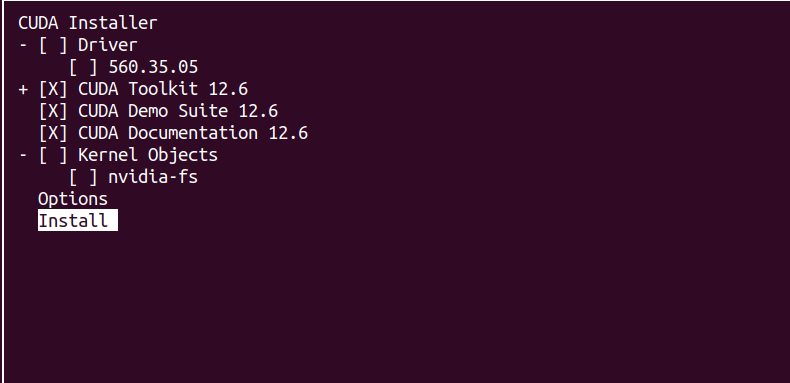
驱动取消勾选,然后选择Install,回车,
Existing installation of CUDA Toolkit 12.6 found: │
│ Upgrade all │
│ Choose components to upgrade │
│ No, abort installation
选择第一个即可,安装后出现如下提示
===========
= Summary =
===========
Driver: Not Selected
Toolkit: Installed in /usr/local/cuda-12.6/
Please make sure that
-
PATH includes /usr/local/cuda-12.6/bin
-
LD_LIBRARY_PATH includes /usr/local/cuda-12.6/lib64, or, add /usr/local/cuda-12.6/lib64 to /etc/ld.so.conf and run ldconfig as root
To uninstall the CUDA Toolkit, run cuda-uninstaller in /usr/local/cuda-12.6/bin
***WARNING: Incomplete installation! This installation did not install the CUDA Driver. A driver of version at least 560.00 is required for CUDA 12.6 functionality to work.
To install the driver using this installer, run the following command, replacing <CudaInstaller> with the name of this run file:
sudo <CudaInstaller>.run --silent --driver
Logfile is /var/log/cuda-installer.log
代表已经安装成功,只是没有安装驱动
更新环境变量 cuda ->/usr/local/cuda-12.6,source ~/.bashrc
查看nvcc --version
nvcc: NVIDIA (R) Cuda compiler driver
Copyright (c) 2005-2024 NVIDIA Corporation
Built on Tue_Oct_29_23:50:19_PDT_2024
Cuda compilation tools, release 12.6, V12.6.85
Build cuda_12.6.r12.6/compiler.35059454_0
然后进行测试,一般目录是
/usr/local/cuda/extras/demo_suite/deviceQuery,执行这个可执行文件,得到如下输出
/extras/demo_suite/deviceQuery Starting...
CUDA Device Query (Runtime API) version (CUDART static linking)
Detected 1 CUDA Capable device(s)
Device 0: "NVIDIA GeForce RTX 4090"
CUDA Driver Version / Runtime Version 12.8 / 12.6
CUDA Capability Major/Minor version number: 8.9
Total amount of global memory: 24082 MBytes (25251676160 bytes)
MapSMtoCores for SM 8.9 is undefined. Default to use 128 Cores/SM
MapSMtoCores for SM 8.9 is undefined. Default to use 128 Cores/SM
(128) Multiprocessors, (128) CUDA Cores/MP: 16384 CUDA Cores
***
Result = PASS
看到 Result = PASS,基本上cuda 已经安装好了
3 更新cudnn
这里有2种安装方式:deb 安装包和复制源文件,这里选的复制源文件
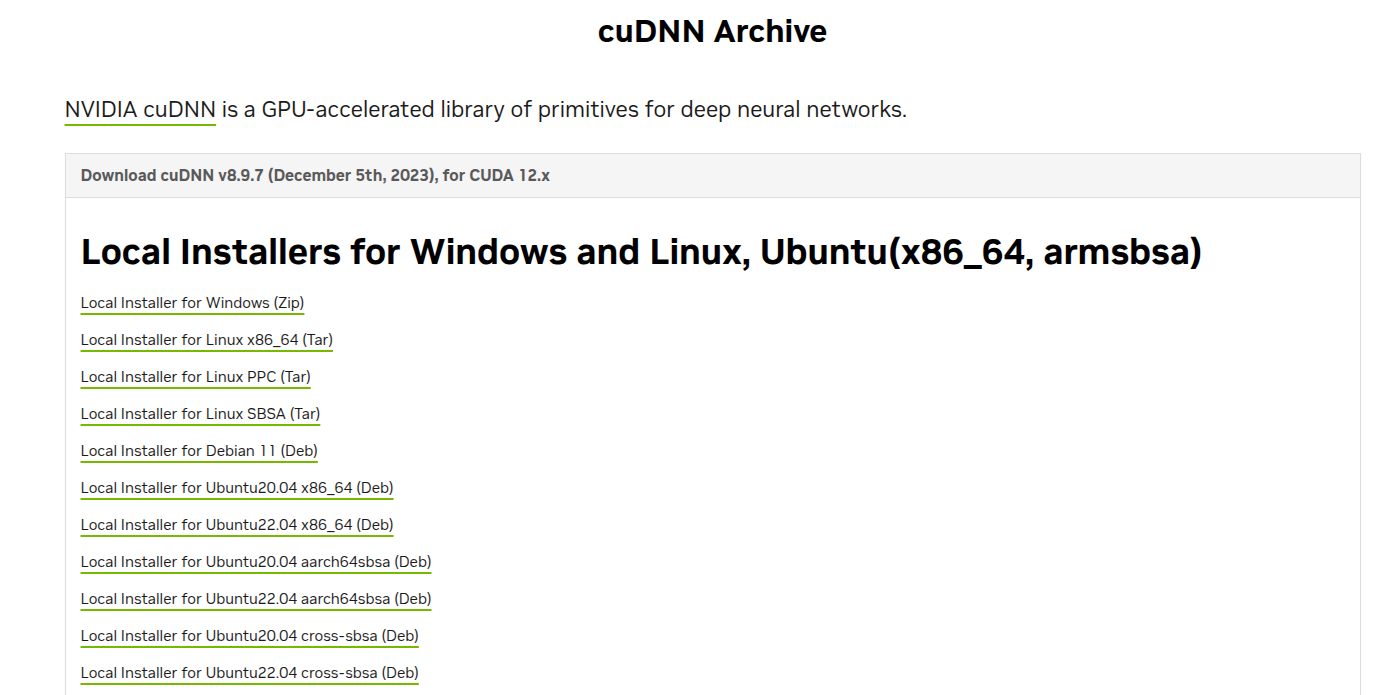
下载cudnn 需要注册帐号登陆,这里cudnn 和 这里选择的local Installer for linux x86_64(Tar),下载后cudnn-linux-x86_64-8.9.7.29_cuda12-archive,将里面的include、lib 复制到/usr/local/cuda
sudo cp include/cudnn*.h /usr/local/cuda-12.6/include
sudo cp lib/libcudnn* /usr/local/cuda-12.6/lib64
sudo chmod a+r /usr/local/cuda-12.6/include/cudnn*.h /usr/local/cuda-12.6/lib64/libcudnn*
参考资料:
1 https://blog.csdn.net/u013172930/article/details/148241511
2
NVIDIA 驱动程序下载【最新版本】:
https://www.nvidia.cn/Download/index.aspx?lang=cn
NVIDIA驱动程序下载【历史版本】
https://www.nvidia.com/en-us/drivers/results/
CUDA历史版本下载地址:
https://developer.nvidia.com/cuda-toolkit-archive
cuDNN历史版本下载地址:
https://developer.nvidia.com/rdp/cudnn-archive
3 https://blog.csdn.net/w946612410/article/details/131786512