要改为仅仅扣动扳机,而不是必须按到底:
修改:
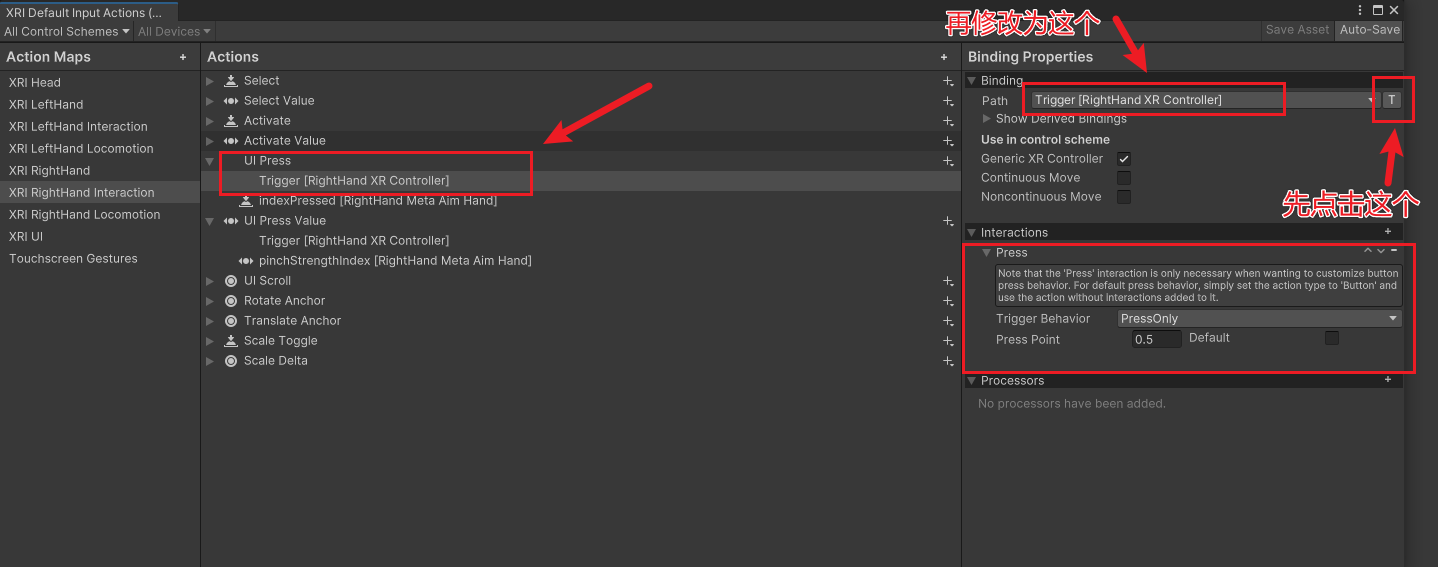
为什么TriggerButton 「必须按到底才生效」?
🔴 核心原因:TriggerButton 本身就是"数字按钮"
你现在的 Binding 是:
Path: TriggerButton [RightHand XR Controller] Action Type: Button Interaction: Press (Press Point = 0.1)
❗ 但问题在于:
TriggerButton 在 OpenXR / XR Controller 里是:
-
已经阈值化过的 bool
-
本质是:
false / true -
Unity 拿到它时 已经是"按下 or 没按"
👉 所以:
Press Interaction 根本没有"模拟值"可判断
👉
Press Point被直接忽略
🧠 官方语义(非常重要)
| 控件 | 类型 |
|---|---|
Trigger |
Axis(0~1) |
TriggerButton |
Button(bool) |
Press Interaction 只对「Axis → Button」转换有意义
二、怎么改才能真的"调低阈值"?
✅ 正确方案(你现在这个场景必须这样)
👉 UI Press 用 Trigger,不是 TriggerButton
修改方式:
1️⃣ 把 Binding 从:
TriggerButton [RightHand XR Controller]
改成
Trigger [RightHand XR Controller]
2️⃣ Action 配置保持这样(这是正确的)
Action Type: Button Interaction: Press Press Point: 0.1 Trigger Behavior: PressOnly
这样 Unity 的流程才是:
Trigger (0~1) ↓ Press Interaction (0.1) ↓ Button Action
👉 这时阈值才真的生效
🔁 对比一下你现在 vs 正确配置
❌ 你现在的实际效果
TriggerButton (bool) ↓ Press (无效) ↓ Button
✅ 正确生效路径
Trigger (float 0~1) ↓ Press (PressPoint = 0.1) ↓ Button
三、为什么 XRI Default Input Actions 默认用 TriggerButton?
这是 XRI 的"保守默认":
-
保证:
-
不误触
-
UI 稳定
-
-
代价:
- 扳机要压比较深才生效
👉 但一旦你想调灵敏度,就必须换成 Axis
四、UI 相关的额外关键检查(别漏)
🔍 1️⃣ XR UI Input Module 用的是哪个 Action?
在场景里检查:
EventSystem └─ XR UI Input Module ├─ Point Action ├─ Click Action ← 必须是 UI Press
👉 确保它引用的是你改过的 UI Press
🔍 2️⃣ 保存 + 重新加载(很多人卡这)
修改后请务必:
-
✅ Save Asset
-
✅ 重新 Play
-
⚠️ 有时需要重新打开 Scene / Unity(XRI 缓存)