Android16 EDLA 认证BTS测试Failed解决总结
文章目录
- [Android16 EDLA 认证BTS测试Failed解决总结](#Android16 EDLA 认证BTS测试Failed解决总结)
一、前言
Android EDLA 认证测试的主要内容是 CTS、GTS、VTS 、BTS,还有一些其他的。
Android EDLA 认证项中BTS的Failed数量一般不是很多的,几十到上百个Failed。
BTS报错内容如下:
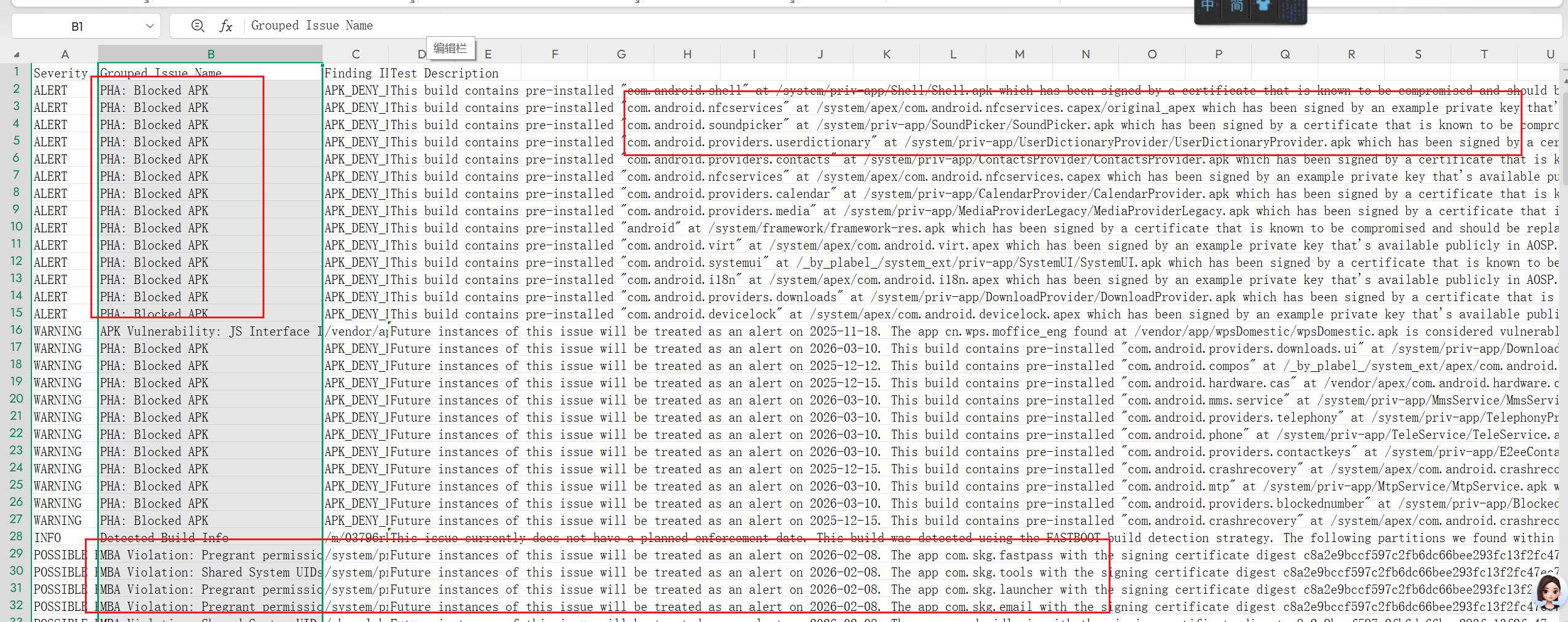
前面有报错类型,后面有报错的具体信息。
BTS报错类型主要是三种:ALERT、WARNING、POSSIBLE。
这三种报错类型都是需要必解的,
ALERT 主要是和系统签名有关;WARNING 和应用签名有关;POSSIBLE和应用权限有关。
本文主要是帮助分析解决BTS报错内容。
二、解决思路
1、系统签名文件和应用签名文件替换
无论是系统签名文件还是应用签名文件,都是需要在源码中重新生成后,在对应目录进行替换的。
目录:
//系统签名文件目录
release/build/make/target/product/security

//应用签名文件目录,主要在下面不同的模块,也有些另外的目录的。
release/packages/modules
从供应商拿到源码后,系统签名文件都是需要替换一遍的;
应用签名文件大部分也是需要替换一遍的;
命令:
1、development/tools/make_key keyName 'XXX'
2、openssl genrsa -out keyName.pem 4096
3、external/avb/avbtool.py  extract_public_key --key keyName.pem --output keyName.avbpubkey
参考Android16 EDLA 签名文件替换总结:https://blog.csdn.net/wenzhi20102321/article/details/155282584
比如ALERT报错:
This build contains pre-installed "com.android.shell" at /system/priv-app/Shell/Shell.apk which has been signed by a certificate that is known to be compromised and should be replaced. It is also using a shared user id that can have higher privileges. If you believe this finding is incorrect please reach out to your TAM and provide details that help us to validate inaccuracies and improve detection.上面的Shell 应用是单独的模块签名的,但是却报了签名问题,这种就是系统签名不匹配导致的;
同样framework_res.apk报了签名问题,也是系统签名不匹配导致的。
比如 WARNING 报错:
Future instances of this issue will be treated as an alert on 2025-12-12. This build contains pre-installed "com.android.compos" at /_by_plabel_/system_ext/apex/com.android.compos.apex which has been signed by an example private key that's available publicly in AOSP. Find more information at https://docs.partner.android.com/security/advisories/2023/advisory-2023-11 If you believe this finding is incorrect please reach out to your TAM and provide details that help us to validate inaccuracies and improve detection.com.android.compos 应用是有模块的签名文件的,这个是需要重新生成签名文件,并进行替换解决的。
可以使用 find . -name XXX包名.pk8 找到模块签名文件:
寻找 com.android.compos 应用的签名文件位置:
release/packages/modules$ find . -name  com.android.compos.pk8
./Virtualization/build/compos/com.android.compos.pk8
需要替换该目录下的四个签名文件。
2、应用权限修改
报错内容示例1:
//相关权限:
/system/priv-app/SkgMeetingAid/SkgMeetingAid.apk:android.permission.FORCE_STOP_PACKAGES

具体报错:
Future instances of this issue will be treated as an alert on 2026-02-08. The app com.skg.meeting.aid with the signing certificate digest c8a2e9bccf597c2fb6dc66bee293fc13f2fc47ec77bc6b2b0d52c11f51192ab8 is in violation of the "Shared System UIDs policy" and does not have the proper permissions. The app uses the following sensitive permission(s) which need to be declared in the manifest: android.permission.FORCE_STOP_PACKAGES. If you believe this finding is incorrect please reach out to your TAM and provide details that help us to validate inaccuracies and improve detection. See more information at https://docs.partner.android.com/gms/policies/domains/mba#shared-system-uids-policy and exemption details at https://docs.partner.android.com/gms/policies/overview/amsterdam5. ~HIDDEN~ In use permission: android.permission.FORCE_STOP_PACKAGES Usage info API: Landroid/app/ActivityManager;->forceStopPackage Caller class Declaring class: Lcom/skg/meeting/aid/widget/ZoomAppWidget; Method name: stopAppByForce Entry point Declaring class: Lcom/skg/meeting/aid/widget/ZoomAppWidget; Method name: onReceive Method descriptor: (Landroid/content/Context;Landroid/content/Intent;)V ~HIDDENEND~
报错内容示例2:
//相关权限:
/system/priv-app/SkgCamera/SkgCamera.apk:android.permission.RECORD_AUDIO

具体报错:
Future instances of this issue will be treated as an alert on 2026-02-08. The app com.skg.camera with the signing certificate digest c8a2e9bccf597c2fb6dc66bee293fc13f2fc47ec77bc6b2b0d52c11f51192ab8 is in violation of the "Pregrant permissions policy" and does not have the proper permissions. The app declares the following sensitive permissions which need to be reviewed and allowlisted: android.permission.RECORD_AUDIO. To address this finding you will need to take one of the following actions: 1. Remove the sensitive permission if the app does not require it. 2. If the app requires this permission(s) follow the below steps to file a Pregrant permissions policy allowlisting bug. 3. If you have previously filed a bug to Google to be allowlisted make sure: (a) The permission(s) in the findings message are the same as what have been allowlisted. (b) The SHA256 of the signing certificate of the app is the same as what's previously reviewed and allowlisted. If you believe this finding is incorrect please reach out to your TAM and provide details that help us to validate inaccuracies and improve detection. See more information at https://docs.partner.android.com/gms/policies/domains/mba#mba-pregrant-permissions and exemption details at https://docs.partner.android.com/gms/policies/overview/pregrant-exemptions. ~HIDDEN~ ~HIDDENEND~
这部分我看不太懂,但是别人总结下来主要是说检测到权限多余,需要删除。
解决方式是:
在应用的AndroidManifest.xml文件删除该应用对应的权限,
然后在 privapp-permissions-platform.xml 添加该权限就可以。
比如第二个报错的解决就需要添加下面的代码:
frameworks/base/data/etc/privapp-permissions-platform.xml
	<privapp-permissions package="com.skg.camera">
+        <permission name="android.permission.RECORD_AUDIO"/>
        <permission name="android.permission.WRITE_EXTERNAL_STORAGE"/>
    </privapp-permissions>
这种情况一般是报哪个权限就把哪个权限移植。
还有些情况比较特殊,即使删除AndroidManifest也不行,需要另外声明的。
根本原因可能是检测到代码未实际使用到该权限的,但是有可能代码间接调用需要该权限,也是要声明的;
但是认证不允许啊,所以修改成在 privapp-permissions-platform.xml 里面声明,这样也不影响正常使用。
应用的修改,除了签名问题、权限问题,
还有个版本号的问题,比如Android16 的系统,APK声明的版本必须大于等于35;否则也会有Failed项。
三、其他
1、BTS修改小结
BTS 问题的修改主要是修改系统文件、修改应用模块签名、移植应用权限代码。
也就是说BTS问题的出现基本是因为签名问题或者权限问题。
参考Android16 EDLA 签名文件替换总结:https://blog.csdn.net/wenzhi20102321/article/details/155282584
2、BTS 检测过程
BTS的检测主要是从系统源码生成文件包,上传到Google网址后,等几个小时就可以获得结果。
具体了解:https://blog.csdn.net/wenzhi20102321/article/details/156061528
3、CTS检测过程
Android EDLA 认证测试的主要内容是 CTS、GTS、VTS ,还有一些其他的。
Android EDLA 认证项中CTS是数量最多的,因为很多framework或者系统应用的修改都会可能导致报错。
https://blog.csdn.net/wenzhi20102321/article/details/155891248
4、 CTS修改总结
Android16 的CTS的测试项有900多个模块,总共有两百九十多万项需要测试。
其中有个测试模块 CtsDeqpTestCases ,包含了两百八十多万项,这个模块基本不会报错;
剩下的九百多个模块,有的有上千项的,有的只有几十或者几项的;
https://blog.csdn.net/wenzhi20102321/article/details/155891415