前置:配置好初始系统环境,参考 centos7系统配置
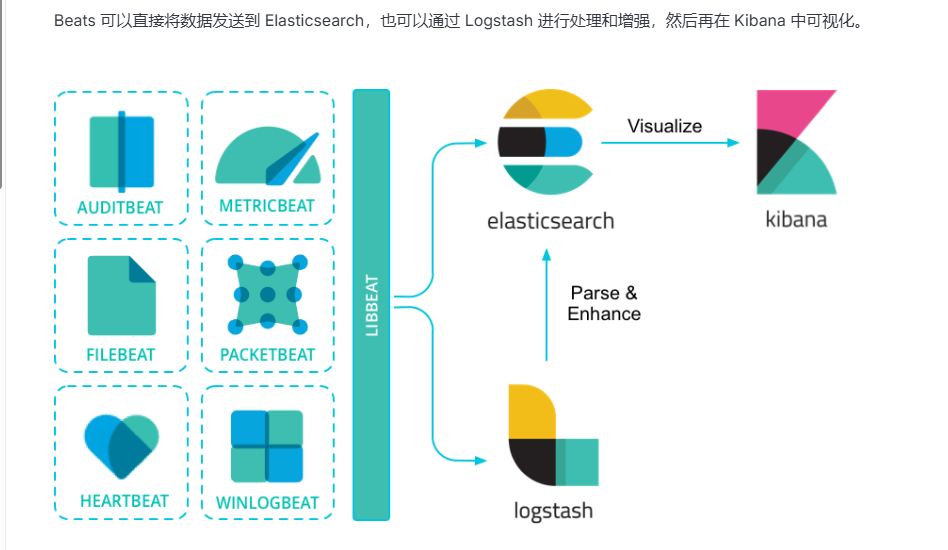
单节点配置
bash
root@elk150:~ # mkdir es
root@elk150:~ # cd es
root@elk150:~/es # ll
总用量 0
root@elk150:~/es # wget https://artifacts.elastic.co/downloads/elasticsearch/elasticsearch-7.17.3-x86_64.rpm
--2025-12-19 09:07:56--  https://artifacts.elastic.co/downloads/elasticsearch/elasticsearch-7.17.3-x86_64.rpm
正在解析主机 artifacts.elastic.co (artifacts.elastic.co)... \34.120.127.130, 2600:1901:0:1d7::
正在连接 artifacts.elastic.co (artifacts.elastic.co)|34.120.127.130|:443... 已连接。
已发出 HTTP 请求,正在等待回应... 200 OK
长度:311873551 (297M) [binary/octet-stream]
正在保存至: "elasticsearch-7.17.3-x86_64.rpm"

100%[==================================================================================>] 311,873,551 11.2MB/s 用时 30s

2025-12-19 09:08:26 (10.0 MB/s) - 已保存 "elasticsearch-7.17.3-x86_64.rpm" [311873551/311873551])

root@elk150:~/es # ll
总用量 304568
-rw-r--r-- 1 root root 311873551 4月  20 2022 elasticsearch-7.17.3-x86_64.rpm
root@elk150:~/es # yum -y localinstall elasticsearch-7.17.3-x86_64.rpm
已加载插件:fastestmirror
正在检查 elasticsearch-7.17.3-x86_64.rpm: elasticsearch-7.17.3-1.x86_64
elasticsearch-7.17.3-x86_64.rpm 将被安装
正在解决依赖关系
--> 正在检查事务
---> 软件包 elasticsearch.x86_64.0.7.17.3-1 将被 安装
--> 解决依赖关系完成

依赖关系解决

============================================================================================================================
Package                     架构                 版本                     源                                          大小
============================================================================================================================
正在安装:
elasticsearch               x86_64               7.17.3-1                 /elasticsearch-7.17.3-x86_64               494 M

事务概要
============================================================================================================================
安装  1 软件包

总计:494 M
安装大小:494 M
Downloading packages:
Running transaction check
Running transaction test
Transaction test succeeded
Running transaction
Creating elasticsearch group... OK
Creating elasticsearch user... OK
  正在安装    : elasticsearch-7.17.3-1.x86_64                                                                           1/1
### NOT starting on installation, please execute the following statements to configure elasticsearch service to start automatically using systemd
sudo systemctl daemon-reload
sudo systemctl enable elasticsearch.service
### You can start elasticsearch service by executing
sudo systemctl start elasticsearch.service
Created elasticsearch keystore in /etc/elasticsearch/elasticsearch.keystore
  验证中      : elasticsearch-7.17.3-1.x86_64                                                                           1/1

已安装:
  elasticsearch.x86_64 0:7.17.3-1

完毕!
root@elk150:~/es # systemctl cat elasticsearch
# /usr/lib/systemd/system/elasticsearch.service
[Unit]
Description=Elasticsearch
Documentation=https://www.elastic.co
Wants=network-online.target
After=network-online.target

[Service]
Type=notify
RuntimeDirectory=elasticsearch
PrivateTmp=true
Environment=ES_HOME=/usr/share/elasticsearch
Environment=ES_PATH_CONF=/etc/elasticsearch
Environment=PID_DIR=/var/run/elasticsearch
Environment=ES_SD_NOTIFY=true
EnvironmentFile=-/etc/sysconfig/elasticsearch

WorkingDirectory=/usr/share/elasticsearch

User=elasticsearch
Group=elasticsearch

ExecStart=/usr/share/elasticsearch/bin/systemd-entrypoint -p ${PID_DIR}/elasticsearch.pid --quiet

# StandardOutput is configured to redirect to journalctl since
# some error messages may be logged in standard output before
# elasticsearch logging system is initialized. Elasticsearch
# stores its logs in /var/log/elasticsearch and does not use
# journalctl by default. If you also want to enable journalctl
# logging, you can simply remove the "quiet" option from ExecStart.
StandardOutput=journal
StandardError=inherit

root@elk150:/usr/share/elasticsearch # ll
总用量 636
drwxr-xr-x  2 root root   4096 12月 19 09:10 bin
drwxr-xr-x  9 root root    121 12月 19 09:10 jdk
drwxr-xr-x  3 root root   4096 12月 19 09:10 lib
-rw-r--r--  1 root root   3860 4月  19 2022 LICENSE.txt
drwxr-xr-x 62 root root   4096 12月 19 09:10 modules
-rw-rw-r--  1 root root 627787 4月  19 2022 NOTICE.txt
drwxr-xr-x  2 root root      6 4月  19 2022 plugins
-rw-r--r--  1 root root   2710 4月  19 2022 README.asciidoc
root@elk150:/usr/share/elasticsearch # cd jdk/
root@elk150:/usr/share/elasticsearch/jdk # cd bin/
root@elk150:/usr/share/elasticsearch/jdk/bin # java
-bash: java: 未找到命令
root@elk150:/usr/share/elasticsearch/jdk/bin # ll
总用量 468
-rwxr-xr-x 1 root root 16336 4月  19 2022 jar
-rwxr-xr-x 1 root root 16336 4月  19 2022 jarsigner
-rwxr-xr-x 1 root root 16320 4月  19 2022 java
-rwxr-xr-x 1 root root 16368 4月  19 2022 javac
-rwxr-xr-x 1 root root 16368 4月  19 2022 javadoc
-rwxr-xr-x 1 root root 16336 4月  19 2022 javap
-rwxr-xr-x 1 root root 16336 4月  19 2022 jcmd
-rwxr-xr-x 1 root root 16400 4月  19 2022 jconsole
-rwxr-xr-x 1 root root 16336 4月  19 2022 jdb
-rwxr-xr-x 1 root root 16336 4月  19 2022 jdeprscan
-rwxr-xr-x 1 root root 16336 4月  19 2022 jdeps
-rwxr-xr-x 1 root root 16336 4月  19 2022 jfr
-rwxr-xr-x 1 root root 16336 4月  19 2022 jhsdb
-rwxr-xr-x 1 root root 16336 4月  19 2022 jimage
-rwxr-xr-x 1 root root 16368 4月  19 2022 jinfo
-rwxr-xr-x 1 root root 16368 4月  19 2022 jlink
-rwxr-xr-x 1 root root 16368 4月  19 2022 jmap
-rwxr-xr-x 1 root root 16336 4月  19 2022 jmod
-rwxr-xr-x 1 root root 16336 4月  19 2022 jpackage
-rwxr-xr-x 1 root root 16336 4月  19 2022 jps
-rwxr-xr-x 1 root root 16376 4月  19 2022 jrunscript
-rwxr-xr-x 1 root root 16336 4月  19 2022 jshell
-rwxr-xr-x 1 root root 16368 4月  19 2022 jstack
-rwxr-xr-x 1 root root 16336 4月  19 2022 jstat
-rwxr-xr-x 1 root root 16360 4月  19 2022 jstatd
-rwxr-xr-x 1 root root 16344 4月  19 2022 jwebserver
-rwxr-xr-x 1 root root 16336 4月  19 2022 keytool
-rwxr-xr-x 1 root root 16368 4月  19 2022 rmiregistry
-rwxr-xr-x 1 root root 16336 4月  19 2022 serialver
root@elk150:/usr/share/elasticsearch/jdk/bin # /usr/share/elasticsearch/jdk/bin/java -version
openjdk version "18" 2022-03-22
OpenJDK Runtime Environment Temurin-18+36 (build 18+36)
OpenJDK 64-Bit Server VM Temurin-18+36 (build 18+36, mixed mode, sharing)

root@elk150:/usr/share/elasticsearch/jdk/bin # sudo systemctl start elasticsearch.service
root@elk150:/usr/share/elasticsearch/jdk/bin # sudo systemctl status elasticsearch.service
● elasticsearch.service - Elasticsearch
   Loaded: loaded (/usr/lib/systemd/system/elasticsearch.service; disabled; vendor preset: disabled)
   Active: active (running) since 五 2025-12-19 09:28:16 CST; 9s ago
     Docs: https://www.elastic.co
Main PID: 89773 (java)
   CGroup: /system.slice/elasticsearch.service
           ├─89773 /usr/share/elasticsearch/jdk/bin/java -Xshare:auto -Des.networkaddress.cache.ttl=60 -Des.networkaddres...
           └─90048 /usr/share/elasticsearch/modules/x-pack-ml/platform/linux-x86_64/bin/controller

12月 19 09:28:06 elk150 systemd[1]: Starting Elasticsearch...
12月 19 09:28:16 elk150 systemd[1]: Started Elasticsearch.
root@elk150:/usr/share/elasticsearch/jdk/bin # ss ntl
Error: an inet prefix is expected rather than "ntl".
Cannot parse dst/src address.
root@elk150:/usr/share/elasticsearch/jdk/bin # ss -ntl
State      Recv-Q Send-Q                 Local Address:Port                                Peer Address:Port
LISTEN     0      128                                *:22                                             *:*
LISTEN     0      100                        127.0.0.1:25                                             *:*
LISTEN     0      128                 ::ffff:127.0.0.1:9200                                          :::*
LISTEN     0      128                              ::1:9200                                          :::*
LISTEN     0      128                 ::ffff:127.0.0.1:9300                                          :::*
LISTEN     0      128                              ::1:9300                                          :::*
LISTEN     0      128                               :::22                                            :::*
LISTEN     0      100                              ::1:25                                            :::*
root@elk150:/usr/share/elasticsearch/jdk/bin # journalctl -u elasticsearch.service
-- Logs begin at 五 2025-12-19 08:38:16 CST, end at 五 2025-12-19 09:28:26 CST. --
12月 19 09:28:06 elk150 systemd[1]: Starting Elasticsearch...
12月 19 09:28:16 elk150 systemd[1]: Started Elasticsearch.


root@elk151:~ # curl http://10.0.0.150:9200
{
  "name" : "elk150",
  "cluster_name" : "elk150x",
  "cluster_uuid" : "oSyVPG3JQNi7HuyUwHILGw",
  "version" : {
    "number" : "7.17.3",
    "build_flavor" : "default",
    "build_type" : "rpm",
    "build_hash" : "5ad023604c8d7416c9eb6c0eadb62b14e766caff",
    "build_date" : "2022-04-19T08:11:19.070913226Z",
    "build_snapshot" : false,
    "lucene_version" : "8.11.1",
    "minimum_wire_compatibility_version" : "6.8.0",
    "minimum_index_compatibility_version" : "6.0.0-beta1"
  },
  "tagline" : "You Know, for Search"
}
root@elk150:/usr/share/elasticsearch/jdk/bin # ll /var/log/elasticsearch/
总用量 464
-rw-r--r-- 1 elasticsearch elasticsearch     0 12月 19 09:28 elasticsearch_audit.json
-rw-r--r-- 1 elasticsearch elasticsearch   797 12月 19 09:28 elasticsearch_deprecation.json
-rw-r--r-- 1 elasticsearch elasticsearch   509 12月 19 09:28 elasticsearch_deprecation.log
-rw-r--r-- 1 elasticsearch elasticsearch     0 12月 19 09:28 elasticsearch_index_indexing_slowlog.json
-rw-r--r-- 1 elasticsearch elasticsearch     0 12月 19 09:28 elasticsearch_index_indexing_slowlog.log
-rw-r--r-- 1 elasticsearch elasticsearch     0 12月 19 09:28 elasticsearch_index_search_slowlog.json
-rw-r--r-- 1 elasticsearch elasticsearch     0 12月 19 09:28 elasticsearch_index_search_slowlog.log
-rw-r--r-- 1 elasticsearch elasticsearch 33411 12月 19 10:32 elasticsearch.log
-rw-r--r-- 1 elasticsearch elasticsearch 58907 12月 19 10:32 elasticsearch_server.json
-rw-r--r-- 1 elasticsearch elasticsearch     0 12月 19 10:32 elk150x_audit.json
-rw-r--r-- 1 elasticsearch elasticsearch  1582 12月 19 10:33 elk150x_deprecation.json
-rw-r--r-- 1 elasticsearch elasticsearch  1018 12月 19 10:33 elk150x_deprecation.log
-rw-r--r-- 1 elasticsearch elasticsearch     0 12月 19 10:32 elk150x_index_indexing_slowlog.json
-rw-r--r-- 1 elasticsearch elasticsearch     0 12月 19 10:32 elk150x_index_indexing_slowlog.log
-rw-r--r-- 1 elasticsearch elasticsearch     0 12月 19 10:32 elk150x_index_search_slowlog.json
-rw-r--r-- 1 elasticsearch elasticsearch     0 12月 19 10:32 elk150x_index_search_slowlog.log
-rw-r--r-- 1 elasticsearch elasticsearch 47144 12月 19 10:33 elk150x.log
-rw-r--r-- 1 elasticsearch elasticsearch 73229 12月 19 10:33 elk150x_server.json
-rw-r--r-- 1 elasticsearch elasticsearch 44734 12月 19 10:35 gc.log
-rw-r--r-- 1 elasticsearch elasticsearch  2111 12月 19 09:28 gc.log.00
-rw-r--r-- 1 elasticsearch elasticsearch 75569 12月 19 10:32 gc.log.01
-rw-r--r-- 1 elasticsearch elasticsearch  2136 12月 19 10:32 gc.log.02
-rw-r--r-- 1 elasticsearch elasticsearch 42443 12月 19 10:33 gc.log.03
-rw-r--r-- 1 elasticsearch elasticsearch  2136 12月 19 10:33 gc.log.04

root@elk150:/etc/elasticsearch # systemctl restart elasticsearch
root@elk150:/etc/elasticsearch # systemctl restart elasticsearch
root@elk150:/etc/elasticsearch # journalctl -u elasticsearch.service -f
-- Logs begin at 五 2025-12-19 08:38:16 CST. --
12月 19 09:28:06 elk150 systemd[1]: Starting Elasticsearch...

# cat /var/log/elasticsearch/elk150x.log
[2025-12-19T10:32:07,154][INFO ][o.e.n.Node               ] [elk150] version[7.17.3], pid[110112], build[default/rpm/5ad023604c8d7416c9eb6c0eadb62b14e766caff/2022-04-19T08:11:19.070913226Z], OS[Linux/3.10.0-957.el7.x86_64/amd64], JVM[Eclipse Adoptium/OpenJDK 64-Bit Server VM/18/18+36]
[2025-12-19T10:32:07,156][INFO ][o.e.n.Node               ] [elk150] JVM home [/usr/share/elasticsearch/jdk], using bundled JDK [true]
[2025-12-19T10:32:07,157][INFO ][o.e.n.Node               ] [elk150] JVM arguments [-Xshare:auto, -Des.networkaddress.cache.ttl=60, -Des.networkaddress.cache.negative.ttl=10, -XX:+AlwaysPreTouch, -Xss1m, -Djava.awt.headless=true, -Dfile.encoding=UTF-8, -Djna.nosys=true, -XX:-OmitStackTraceInFastThrow, -XX:+ShowC

sudo tail -f /var/log/elasticsearch/elasticsearch.log
集群配置
elasticsearch.yml配置文件
bash
# ======================== Elasticsearch Configuration =========================
#
# NOTE: Elasticsearch comes with reasonable defaults for most settings.
#       Before you set out to tweak and tune the configuration, make sure you
#       understand what are you trying to accomplish and the consequences.
#
# The primary way of configuring a node is via this file. This template lists
# the most important settings you may want to configure for a production cluster.
#
# Please consult the documentation for further information on configuration options:
# https://www.elastic.co/guide/en/elasticsearch/reference/index.html
#
# ---------------------------------- Cluster -----------------------------------
#
# Use a descriptive name for your cluster:
#
#cluster.name: my-application
cluster.name: elk150x
#
# ------------------------------------ Node ------------------------------------
#
# Use a descriptive name for the node:
#
#node.name: node-1
node.name: elk150
#
# Add custom attributes to the node:
#
#node.attr.rack: r1
#
# ----------------------------------- Paths ------------------------------------
#
# Path to directory where to store the data (separate multiple locations by comma):
#
path.data: /var/lib/elasticsearch
#
# Path to log files:
#
path.logs: /var/log/elasticsearch
#
# ----------------------------------- Memory -----------------------------------
#
# Lock the memory on startup:
#
#bootstrap.memory_lock: true
#
# Make sure that the heap size is set to about half the memory available
# on the system and that the owner of the process is allowed to use this
# limit.
#
# Elasticsearch performs poorly when the system is swapping the memory.
#
# ---------------------------------- Network -----------------------------------
#
# By default Elasticsearch is only accessible on localhost. Set a different
# address here to expose this node on the network:
#
#network.host: 192.168.0.1
network.host: 0.0.0.0
#
# By default Elasticsearch listens for HTTP traffic on the first free port it
# finds starting at 9200. Set a specific HTTP port here:
#
#http.port: 9200
#
# For more information, consult the network module documentation.
#
# --------------------------------- Discovery ----------------------------------
#
# Pass an initial list of hosts to perform discovery when this node is started:
# The default list of hosts is ["127.0.0.1", "[::1]"]
#
#discovery.seed_hosts: ["host1", "host2"]
discovery.seed_hosts: [ "10.0.0.150","10.0.0.151","10.0.0.152"]
#
# Bootstrap the cluster using an initial set of master-eligible nodes:
#
#cluster.initial_master_nodes: ["node-1", "node-2"]
cluster.initial_master_nodes: ["10.0.0.150","10.0.0.151","10.0.0.152"]
#
# For more information, consult the discovery and cluster formation module documentation.
#
# ---------------------------------- Various -----------------------------------
#
# Require explicit names when deleting indices:
#
#action.destructive_requires_name: true
#
# ---------------------------------- Security ----------------------------------
#
#                                 *** WARNING ***
#
# Elasticsearch security features are not enabled by default.
# These features are free, but require configuration changes to enable them.
# This means that users don't have to provide credentials and can get full access
# to the cluster. Network connections are also not encrypted.
#
# To protect your data, we strongly encourage you to enable the Elasticsearch security features.
# Refer to the following documentation for instructions.
#
# https://www.elastic.co/guide/en/elasticsearch/reference/7.16/configuring-stack-security.html
流程
bash
root@elk150:/etc/elasticsearch # data_rsync.sh /etc/elasticsearch/elasticsearch.yml
=== rsyncing elk150: elasticsearch.yml ===
命令执行成功!
=== rsyncing elk151: elasticsearch.yml ===
命令执行成功!
=== rsyncing elk152: elasticsearch.yml ===
命令执行成功!
root@elk150:/etc/elasticsearch # systemctl stop elasticsearch
root@elk150:/etc/elasticsearch # rm -rf /var/lib/elasticsearch/*
root@elk150:/etc/elasticsearch # rm -rf /var/log/elasticsearch/*
root@elk150:/etc/elasticsearch # ^C
root@elk150:/etc/elasticsearch #  systemctl restart elasticsearch


root@elk150:/etc/elasticsearch # tail -100f /var/log/elasticsearch/elk150x.log
[2025-12-19T11:10:28,191][INFO ][o.e.p.PluginsService     ] [elk150] loaded module [constant-keyword]
[2025-12-19T11:10:28,191][INFO ][o.e.p.PluginsService     ] [elk150] loaded module [frozen-indices]
[2025-12-19T11:10:28,191][INFO ][o.e.p.PluginsService     ] [elk150] loaded module [ingest-common]
2025-12-19T11:16:52,183][WARN ][o.e.c.c.ClusterFormationFailureHelper] [elk150] master not discovered yet, this node has not previously joined a bootstrapped (v7+) cluster, and [cluster.initial_master_nodes] is empty on this node: have discovered [{elk150}{jav2EtAVRSmfHu64kLCo1g}{2VXfWrPvSb2TIwbAoBsc3w}{10.0.0.150}{10.0.0.150:9300}{cdfhilmrstw}, {elk151}{mpHCNg8ST5CFImDFbKkj3Q}{oElkdZW_TSqyuxYTWsH2Pg}{10.0.0.151}{10.0.0.151:9300}{cdfhilmrstw}, {elk152}{r2RlhZ-rT3mbKK15TKsh3w}{tTF9rGcFS3iRF8CVvEb9pQ}{10.0.0.152}{10.0.0.152:9300}{cdfhilmrstw}]; discovery will continue using [10.0.0.151:9300, 10.0.0.152:9300] from hosts providers and [{elk150}{jav2EtAVRSmfHu64kLCo1g}{2VXfWrPvSb2TIwbAoBsc3w}{10.0.0.150}{10.0.0.150:9300}{cdfhilmrstw}] from last-known cluster state; node term 0, last-accepted version 0 in term 0


root@elk150:/usr/share/elasticsearch/jdk/bin # ss -ntl
State      Recv-Q Send-Q                            Local Address:Port                                           Peer Address:Port
LISTEN     0      128                                           *:22                                                        *:*
LISTEN     0      100                                   127.0.0.1:25                                                        *:*
LISTEN     0      128                                          :::9200                                                     :::*
LISTEN     0      128                                          :::9300                                                     :::*
LISTEN     0      128                                          :::22                                                       :::*
LISTEN     0      100                                         ::1:25                                                       :::*
root@elk150:/usr/share/elasticsearch/jdk/bin # getenforce
Disabled
root@elk150:/usr/share/elasticsearch/jdk/bin # systemctl status firewalld
● firewalld.service - firewalld - dynamic firewall daemon
   Loaded: loaded (/usr/lib/systemd/system/firewalld.service; disabled; vendor preset: enabled)
   Active: inactive (dead)
     Docs: man:firewalld(1)
root@elk150:/usr/share/elasticsearch/jdk/bin # egrep -v "^#|^$" /etc/elasticsearch/elasticsearch.yml
cluster.name: elk150x
node.name: elk150
path.data: /var/lib/elasticsearch
path.logs: /var/log/elasticsearch
network.host: 0.0.0.0
discovery.seed_hosts: [ "10.0.0.150","10.0.0.151","10.0.0.152"]
cluster.initial_master_nodes: ["10.0.0.150","10.0.0.151","10.0.0.152"]

root@elk151:~ # cd /etc/elasticsearch/
root@elk151:/etc/elasticsearch # systemctl restart elasticsearch.service
root@elk151:/etc/elasticsearch # curl http://10.0.0.150:9200
{
  "name" : "elk150",
  "cluster_name" : "elk150x",
  "cluster_uuid" : "_na_",
  "version" : {
    "number" : "7.17.3",
    "build_flavor" : "default",
    "build_type" : "rpm",
    "build_hash" : "5ad023604c8d7416c9eb6c0eadb62b14e766caff",
    "build_date" : "2022-04-19T08:11:19.070913226Z",
    "build_snapshot" : false,
    "lucene_version" : "8.11.1",
    "minimum_wire_compatibility_version" : "6.8.0",
    "minimum_index_compatibility_version" : "6.0.0-beta1"
  },
  "tagline" : "You Know, for Search"
}
root@elk151:/etc/elasticsearch # curl http://10.0.0.150:9200/_cat/nodes
^C
root@elk151:/etc/elasticsearch # ^C
root@elk151:/etc/elasticsearch # systemctl stop elasticsearch
root@elk151:/etc/elasticsearch #  rm -rf /var/lib/elasticsearch/*
root@elk151:/etc/elasticsearch #  rm -rf /var/log/elasticsearch/*
root@elk151:/etc/elasticsearch #  systemctl restart elasticsearch
root@elk151:/etc/elasticsearch #  systemctl ststus elasticsearch
Unknown operation 'ststus'.
root@elk151:/etc/elasticsearch #  systemctl status elasticsearch
● elasticsearch.service - Elasticsearch
   Loaded: loaded (/usr/lib/systemd/system/elasticsearch.service; disabled; vendor preset: disabled)
   Active: active (running) since 五 2025-12-19 11:20:06 CST; 53s ago
     Docs: https://www.elastic.co
Main PID: 75103 (java)
   CGroup: /system.slice/elasticsearch.service
           ├─75103 /usr/share/elasticsearch/jdk/bin/java -Xshare:auto -Des.networkaddress.cache.ttl=60 -Des.networkaddress.cache.negative.ttl=1...
           └─75319 /usr/share/elasticsearch/modules/x-pack-ml/platform/linux-x86_64/bin/controller

12月 19 11:19:59 elk151 systemd[1]: Starting Elasticsearch...
12月 19 11:20:06 elk151 systemd[1]: Started Elasticsearch.
root@elk151:/etc/elasticsearch # systemctl stop elasticsearch
root@elk151:/etc/elasticsearch # systemctl restart elasticsearch
root@elk151:/etc/elasticsearch # curl http://10.0.0.150:9200
{
  "name" : "elk150",
  "cluster_name" : "elk150x",
  "cluster_uuid" : "KtG60csKTu-j5qGY7jykow",
  "version" : {
    "number" : "7.17.3",
    "build_flavor" : "default",
    "build_type" : "rpm",
    "build_hash" : "5ad023604c8d7416c9eb6c0eadb62b14e766caff",
    "build_date" : "2022-04-19T08:11:19.070913226Z",
    "build_snapshot" : false,
    "lucene_version" : "8.11.1",
    "minimum_wire_compatibility_version" : "6.8.0",
    "minimum_index_compatibility_version" : "6.0.0-beta1"
  },
  "tagline" : "You Know, for Search"
}
root@elk151:/etc/elasticsearch # curl http://10.0.0.150:9200/_cat/nodes
10.0.0.152 13 96 5 0.14 0.10 0.06 cdfhilmrstw - elk152
10.0.0.150 11 96 6 0.23 0.15 0.09 cdfhilmrstw - elk150
10.0.0.151 19 96 5 0.21 0.17 0.10 cdfhilmrstw * elk151
root@elk151:/etc/elasticsearch # ll /tmp/
总用量 4
drwxr-xr-x  2 root root   6 12月 19 11:01 hsperfdata_root
-rwx------. 1 root root 836 12月 17 21:50 ks-script-pBPg1C
drwx------. 3 root root  17 12月 18 10:56 systemd-private-450fd7d28d8c4d06b0183003062ea079-chronyd.service-SXMvxL
drwx------. 3 root root  17 12月 18 14:03 systemd-private-5a68eece4bc1440db19fcf08865570c3-chronyd.service-uq5ZWC
drwx------. 3 root root  17 12月 18 16:35 systemd-private-84deddeb62454551a53682880022e16f-chronyd.service-91cViA
drwx------. 3 root root  17 12月 17 22:08 systemd-private-954a80bba181439786d0ee513fa5a419-chronyd.service-1e193a
drwx------  3 root root  17 12月 18 22:40 systemd-private-9944e6b840674bf7b832ef50623d80ce-chronyd.service-cTmbqA
drwx------  3 root root  17 12月 19 08:38 systemd-private-bc499045f33f47ce8c10d308a7369337-chronyd.service-s0ht3G
drwx------  3 root root  17 12月 19 11:22 systemd-private-bc499045f33f47ce8c10d308a7369337-elasticsearch.service-ux9WsK
drwx------. 2 root root   6 12月 18 16:32 vmware-root_6141-1992174633
drwx------  2 root root   6 12月 19 08:38 vmware-root_6142-969455221
drwx------. 2 root root   6 12月 18 14:03 vmware-root_6148-961265649
drwx------. 2 root root   6 12月 18 10:56 vmware-root_6151-1983718829
drwx------. 2 root root   6 12月 18 16:35 vmware-root_6153-1950163876
drwx------  2 root root   6 12月 18 22:29 vmware-root_6156-994687487
drwx------. 2 root root   6 12月 17 22:08 vmware-root_6181-1991517207
-rw-------. 1 root root   0 12月 17 21:45 yum.log
root@elk151:/etc/elasticsearch #
kibana
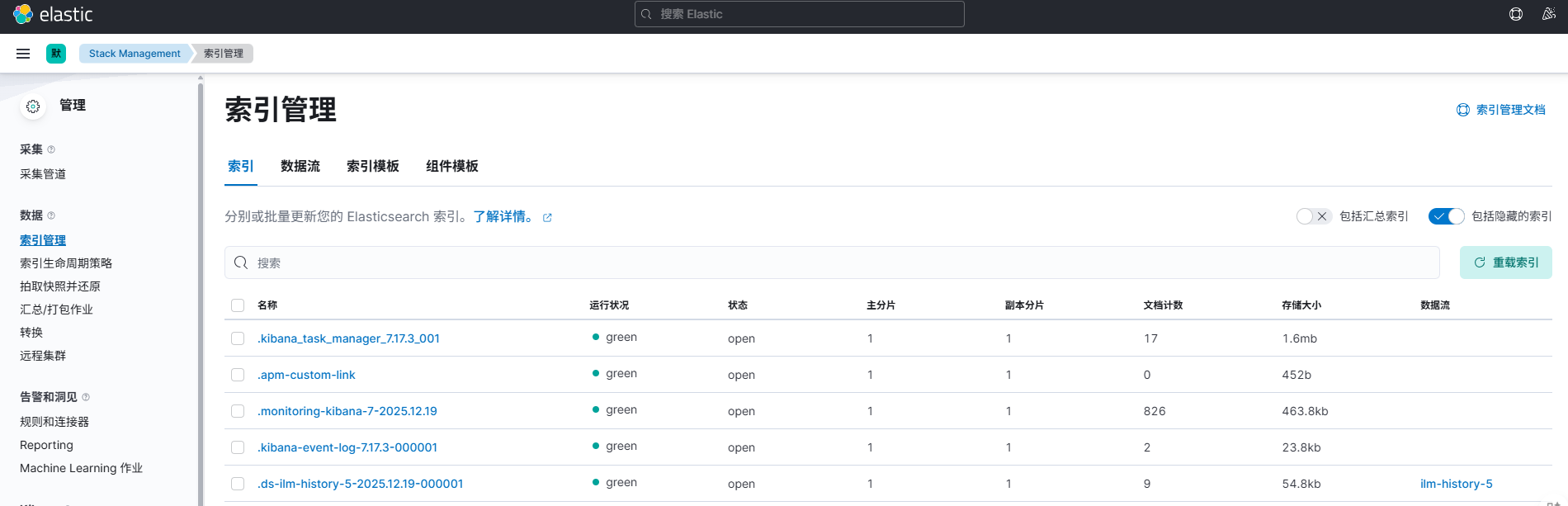
bash
root@elk150:~ # yum -y localinstall kibana-7.17.3-x86_64.rpm
已加载插件:fastestmirror
正在检查 kibana-7.17.3-x86_64.rpm: kibana-7.17.3-1.x86_64
kibana-7.17.3-x86_64.rpm 将被安装
正在解决依赖关系
--> 正在检查事务
---> 软件包 kibana.x86_64.0.7.17.3-1 将被 安装
--> 解决依赖关系完成

依赖关系解决

==================================================================================================================================================
Package                       架构                          版本                              源                                            大小
==================================================================================================================================================
正在安装:
kibana                        x86_64                        7.17.3-1                          /kibana-7.17.3-x86_64                        646 M

事务概要
==================================================================================================================================================
安装  1 软件包

总计:646 M
安装大小:646 M
Downloading packages:
Running transaction check
Running transaction test
Transaction test succeeded
Running transaction
  正在安装    : kibana-7.17.3-1.x86_64                                                                                                        1/1
Creating kibana group... OK
Creating kibana user... OK
Created Kibana keystore in /etc/kibana/kibana.keystore
  验证中      : kibana-7.17.3-1.x86_64                                                                                                        1/1

已安装:
  kibana.x86_64 0:7.17.3-1

完毕!
root@elk150:~ # ll /etc/kibana/
总用量 16
-rw-rw---- 1 root kibana  130 12月 19 13:46 kibana.keystore
-rw-rw---- 1 root kibana 5243 4月  19 2022 kibana.yml
-rw-r--r-- 1 root kibana  305 4月  19 2022 node.options
root@elk150:~ # cd /etc/kibana/
root@elk150:/etc/kibana # ll
总用量 16
-rw-rw---- 1 root kibana  130 12月 19 13:46 kibana.keystore
-rw-rw---- 1 root kibana 5243 4月  19 2022 kibana.yml
-rw-r--r-- 1 root kibana  305 4月  19 2022 node.options
root@elk150:/etc/kibana # cd ..
root@elk150:/etc # cd kibana/
root@elk150:/etc/kibana # ll
总用量 16
-rw-rw---- 1 root kibana  130 12月 19 13:46 kibana.keystore
-rw-rw---- 1 root kibana 5243 4月  19 2022 kibana.yml
-rw-r--r-- 1 root kibana  305 4月  19 2022 node.options
root@elk150:/etc/kibana # egrep -v "^#|^$" kibana.yml
server.host: "0.0.0.0"
server.name: "elk150-kibana"
elasticsearch.hosts: ["http://10.0.0.150:9200","http://10.0.0.151:9200","http://10.0.0.152:9200"]
i18n.locale: "zh-CN"
root@elk150:/etc/kibana # egrep -v "^#|^$" kibana.yml
server.host: "0.0.0.0"
server.name: "elk150x-kibana"
elasticsearch.hosts: ["http://10.0.0.150:9200","http://10.0.0.151:9200","http://10.0.0.152:9200"]
i18n.locale: "zh-CN"
root@elk150:/etc/kibana # systemctl st
start   status  stop
root@elk150:/etc/kibana # systemctl start kibana
root@elk150:/etc/kibana # systemctl status  kibana
● kibana.service - Kibana
   Loaded: loaded (/etc/systemd/system/kibana.service; disabled; vendor preset: disabled)
   Active: active (running) since 五 2025-12-19 14:12:57 CST; 7s ago
     Docs: https://www.elastic.co
Main PID: 67282 (node)
   CGroup: /system.slice/kibana.service
           └─67282 /usr/share/kibana/bin/../node/bin/node /usr/share/kibana/bin/../src/cli/dist --logging.dest="/var/log/kibana/kibana.log" --p...

12月 19 14:12:57 elk150 systemd[1]: Started Kibana.
root@elk150:/etc/kibana # journalctl -u kinbana
-- No entries --
root@elk150:/etc/kibana # journalctl -u kibana
-- Logs begin at 五 2025-12-19 08:38:16 CST, end at 五 2025-12-19 14:12:57 CST. --
12月 19 14:12:57 elk150 systemd[1]: Started Kibana.


root@elk150:/etc/kibana # ss -nlt
State      Recv-Q Send-Q                            Local Address:Port                                           Peer Address:Port
LISTEN     0      128                                           *:22                                                        *:*
LISTEN     0      100                                   127.0.0.1:25                                                        *:*
LISTEN     0      128                                           *:5601                                                      *:*
LISTEN     0      128                                          :::9200                                                     :::*
LISTEN     0      128                                          :::9300                                                     :::*
LISTEN     0      128                                          :::22                                                       :::*
LISTEN     0      100                                         ::1:25                                                       :::*

root@elk150:/etc/kibana # tail -n100 /var/log/kibana/kibana.log -f
{"type":"log","@timestamp":"2025-12-19T14:13:03+08:00","tags":["info","plugins-service"],"pid":67282,"message":"Plugin \"metricsEntities\" is disabled."}
{"type":"log","@timestamp":"2025-12-19T14:

# http://10.0.0.150:9200/_cat/nodes?v
# http://10.0.0.150:9200/
# http://10.0.0.150:9200/_cat/nodes
# ip         heap.percent ram.percent cpu load_1m load_5m load_15m node.role   master name
# 10.0.0.152           33          95   1    0.02    0.05     0.05 cdfhilmrstw -      elk152
# 10.0.0.150           25          96   3    0.23    0.10     0.12 cdfhilmrstw -      elk150
# 10.0.0.151           36          96   1    0.05    0.07     0.05 cdfhilmrstw *      elk151

# p节点 IP 地址(有时也可能是主机名)
# heap.percentJVM 堆内存使用百分比(关键指标)
# ram.percent系统物理内存使用百分比
# cpuCPU 使用率(近似值,非精确百分比)
# load_1m/5m/15m系统负载(1分钟、5分钟、15分钟平均)
# node.role节点角色(由字母组合表示)
# master是否为当前主节点:* 表示是,- 表示否
# name节点名称

root@elk150:/usr/share/elasticsearch/jdk/bin # cat /proc/meminfo | grep -E "MemTotal|MemFree|Cached|Buffers"
MemTotal:        2006612 kB
MemFree:           75860 kB
Buffers:               0 kB
Cached:           122528 kB
SwapCached:        30620 kB


# root@elk150:/usr/share/elasticsearch/jdk/bin # cat /proc/meminfo | grep -E "MemTotal|MemFree|Cached|Buffers"
# MemTotal:        2006612 kB
# MemFree:           75860 kB
# Buffers:               0 kB
# Cached:           122528 kB
# SwapCached:        30620 kB
# MemTotal2,006,612 kB≈ 1959 MB总物理内存(约 2GB)
# MemFree75,860 kB≈ 74 MB完全空闲内存
# Buffers0 kB0 MB块设备缓冲区(通常很小)
# Cached122,528 kB≈ 120 MBPageCache(文件缓存)
# SwapCached30,620 kB≈ 30 MB已换出又被换回、仍保留在 swap 中的内存

root@elk150:/usr/share/elasticsearch/jdk/bin # ps aux --sort=-%mem | head -n 10
USER        PID %CPU %MEM    VSZ   RSS TTY      STAT START   TIME COMMAND
elastic+ 129406  1.0 62.9 4934460 1263884 ?     Ssl  11:22   1:58 /usr/share/elasticsearch/jdk/bin/java -Xshare:auto -Des.networkaddress.cache.ttl=60 -Des.networkaddress.cache.negative.ttl=10 -XX:+AlwaysPreTouch -Xss1m -Djava.awt.headless=true -Dfile.encoding=UTF-8 -Djna.nosys=true -XX:-OmitStackTraceInFastThrow -XX:+ShowCodeDetailsInExceptionMessages -Dio.netty.noUnsafe=true -Dio.netty.noKeySetOptimization=true -Dio.netty.recycler.maxCapacityPerThread=0 -Dio.netty.allocator.numDirectArenas=0 -Dlog4j.shutdownHookEnabled=false -Dlog4j2.disable.jmx=true -Dlog4j2.formatMsgNoLookups=true -Djava.locale.providers=SPI,COMPAT --add-opens=java.base/java.io=ALL-UNNAMED -Djava.security.manager=allow -XX:+UseG1GC -Djava.io.tmpdir=/tmp/elasticsearch-17316220251743133782 -XX:+HeapDumpOnOutOfMemoryError -XX:+ExitOnOutOfMemoryError -XX:HeapDumpPath=/var/lib/elasticsearch -XX:ErrorFile=/var/log/elasticsearch/hs_err_pid%p.log -Xlog:gc*,gc+age=trace,safepoint:file=/var/log/elasticsearch/gc.log:utctime,pid,tags:filecount=32,filesize=64m -Xms979m -Xmx979m -XX:MaxDirectMemorySize=513802240 -XX:G1HeapRegionSize=4m -XX:InitiatingHeapOccupancyPercent=30 -XX:G1ReservePercent=15 -Des.path.home=/usr/share/elasticsearch -Des.path.conf=/etc/elasticsearch -Des.distribution.flavor=default -Des.distribution.type=rpm -Des.bundled_jdk=true -cp /usr/share/elasticsearch/lib/* org.elasticsearch.bootstrap.Elasticsearch -p /var/run/elasticsearch/elasticsearch.pid --quiet
kibana    67282  2.5 15.0 1174496 301680 ?      Ssl  14:12   0:31 /usr/share/kibana/bin/../node/bin/node /usr/share/kibana/bin/../src/cli/dist --logging.dest="/var/log/kibana/kibana.log" --pid.file="/run/kibana/kibana.pid" --deprecation.skip_deprecated_settings[0]="logging.dest"
root       6164  0.0  0.1 473968  3136 ?        Ssl  08:38   0:00 /usr/sbin/NetworkManager --no-daemon
root      36124  0.0  0.1 116192  2092 pts/4    Ss+  10:56   0:00 -bash
root      57760  0.1  0.1 162948  2024 pts/3    S+   09:14   0:26 top
root      36308  0.1  0.0 162948  2000 pts/5    S+   10:56   0:19 top
root       7300  0.0  0.0 155496  1976 pts/2    R+   14:33   0:00 ps aux --sort=-%mem
root      16265  0.1  0.0 162948  1800 pts/1    S+   08:38   0:30 top
root          1  0.0  0.0 191000  1752 ?        Ss   08:38   0:01 /usr/lib/systemd/systemd --switched-root --system --deserialize 22
root@elk150:/usr/share/elasticsearch/jdk/bin # free -h
              total        used        free      shared  buff/cache   available
Mem:           1.9G        1.6G         67M        1.1M        247M         90M
Swap:          2.0G        121M        1.9G
root@elk150:/usr/share/elasticsearch/jdk/bin # cat /etc/elasticsearch/jvm.options
################################################################
##
## JVM configuration
kibana.yml配置
bash
# Kibana is served by a back end server. This setting specifies the port to use.
#server.port: 5601

# Specifies the address to which the Kibana server will bind. IP addresses and host names are both valid values.
# The default is 'localhost', which usually means remote machines will not be able to connect.
# To allow connections from remote users, set this parameter to a non-loopback address.
#server.host: "localhost"
server.host: "0.0.0.0"
# Enables you to specify a path to mount Kibana at if you are running behind a proxy.
# Use the `server.rewriteBasePath` setting to tell Kibana if it should remove the basePath
# from requests it receives, and to prevent a deprecation warning at startup.
# This setting cannot end in a slash.
#server.basePath: ""

# Specifies whether Kibana should rewrite requests that are prefixed with
# `server.basePath` or require that they are rewritten by your reverse proxy.
# This setting was effectively always `false` before Kibana 6.3 and will
# default to `true` starting in Kibana 7.0.
#server.rewriteBasePath: false

# Specifies the public URL at which Kibana is available for end users. If
# `server.basePath` is configured this URL should end with the same basePath.
#server.publicBaseUrl: ""

# The maximum payload size in bytes for incoming server requests.
#server.maxPayload: 1048576

# The Kibana server's name.  This is used for display purposes.
#server.name: "your-hostname"
server.name: "elk150x-kibana"
# The URLs of the Elasticsearch instances to use for all your queries.
elasticsearch.hosts: ["http://10.0.0.150:9200","http://10.0.0.151:9200","http://10.0.0.152:9200"]

# Kibana uses an index in Elasticsearch to store saved searches, visualizations and
# dashboards. Kibana creates a new index if the index doesn't already exist.
#kibana.index: ".kibana"

# The default application to load.
#kibana.defaultAppId: "home"

# If your Elasticsearch is protected with basic authentication, these settings provide
# the username and password that the Kibana server uses to perform maintenance on the Kibana
# index at startup. Your Kibana users still need to authenticate with Elasticsearch, which
# is proxied through the Kibana server.
#elasticsearch.username: "kibana_system"
#elasticsearch.password: "pass"

# Kibana can also authenticate to Elasticsearch via "service account tokens".
# If may use this token instead of a username/password.
# elasticsearch.serviceAccountToken: "my_token"

# Enables SSL and paths to the PEM-format SSL certificate and SSL key files, respectively.
# These settings enable SSL for outgoing requests from the Kibana server to the browser.
#server.ssl.enabled: false
#server.ssl.certificate: /path/to/your/server.crt
#server.ssl.key: /path/to/your/server.key

# Optional settings that provide the paths to the PEM-format SSL certificate and key files.
# These files are used to verify the identity of Kibana to Elasticsearch and are required when
# xpack.security.http.ssl.client_authentication in Elasticsearch is set to required.
#elasticsearch.ssl.certificate: /path/to/your/client.crt
#elasticsearch.ssl.key: /path/to/your/client.key

# Optional setting that enables you to specify a path to the PEM file for the certificate
# authority for your Elasticsearch instance.
#elasticsearch.ssl.certificateAuthorities: [ "/path/to/your/CA.pem" ]

# To disregard the validity of SSL certificates, change this setting's value to 'none'.
#elasticsearch.ssl.verificationMode: full

# Time in milliseconds to wait for Elasticsearch to respond to pings. Defaults to the value of
# the elasticsearch.requestTimeout setting.
#elasticsearch.pingTimeout: 1500

# Time in milliseconds to wait for responses from the back end or Elasticsearch. This value
# must be a positive integer.
#elasticsearch.requestTimeout: 30000

# List of Kibana client-side headers to send to Elasticsearch. To send *no* client-side
# headers, set this value to [] (an empty list).
#elasticsearch.requestHeadersWhitelist: [ authorization ]

# Header names and values that are sent to Elasticsearch. Any custom headers cannot be overwritten
# by client-side headers, regardless of the elasticsearch.requestHeadersWhitelist configuration.
#elasticsearch.customHeaders: {}

# Time in milliseconds for Elasticsearch to wait for responses from shards. Set to 0 to disable.
#elasticsearch.shardTimeout: 30000

# Logs queries sent to Elasticsearch. Requires logging.verbose set to true.
#elasticsearch.logQueries: false

# Specifies the path where Kibana creates the process ID file.
#pid.file: /run/kibana/kibana.pid

# Enables you to specify a file where Kibana stores log output.
#logging.dest: stdout

# Set the value of this setting to true to suppress all logging output.
#logging.silent: false

# Set the value of this setting to true to suppress all logging output other than error messages.
#logging.quiet: false

# Set the value of this setting to true to log all events, including system usage information
# and all requests.
#logging.verbose: false

# Set the interval in milliseconds to sample system and process performance
# metrics. Minimum is 100ms. Defaults to 5000.
#ops.interval: 5000

# Specifies locale to be used for all localizable strings, dates and number formats.
# Supported languages are the following: English - en , by default , Chinese - zh-CN .
#i18n.locale: "en"
i18n.locale: "zh-CN"
nginx
bash
# 1. 导入 nginx 官方仓库(CentOS 7 专用)
rpm -ivh http://nginx.org/packages/centos/7/noarch/RPMS/nginx-release-centos-7-0.el7.ngx.noarch.rpm
pm -ivh:本地或远程安装 rpm 包,-i 安装,-v 显示过程,-h 打印进度条
# 2. 再安装
yum install -y nginx


# 版本差异
# EPEL 里的 nginx 是 Red Hat 维护的"重构版",版本号通常比 nginx.org 滞后一两个小版本。
# 配置目录/编译参数也稍有不同(例如默认 /etc/nginx/conf.d/*.conf 会被主动 include,模块集合与官方 rpm 不完全一致)。
# 仓库来源
# yum install -y epel-release 会把 Fedora EPEL 仓库 装到 /etc/yum.repos.d/epel.repo。
# 再执行 yum install -y nginx 时,yum 会从 EPEL 里拉取 rpm 并自动解决依赖


nginx -t
systemctl enable --now nginx

# 如果已经误装 EPEL 版,先卸掉
yum remove -y nginx

# 加官方源
rpm -ivh http://nginx.org/packages/centos/7/noarch/RPMS/nginx-release-centos-7-0.el7.ngx.noarch.rpm

# 再装官方版
yum install -y nginx

nginx.conf 社区
bash
# For more information on configuration, see:
#   * Official English Documentation: http://nginx.org/en/docs/
#   * Official Russian Documentation: http://nginx.org/ru/docs/

user nginx;
worker_processes auto;
error_log /var/log/nginx/error.log;
pid /run/nginx.pid;

# Load dynamic modules. See /usr/share/doc/nginx/README.dynamic.
include /usr/share/nginx/modules/*.conf;

events {
    worker_connections 1024;
}

http {
    log_format  main  '$remote_addr - $remote_user [$time_local] "$request" '
                      '$status $body_bytes_sent "$http_referer" '
                      '"$http_user_agent" "$http_x_forwarded_for"';

    access_log  /var/log/nginx/access.log  main;

    sendfile            on;
    tcp_nopush          on;
    tcp_nodelay         on;
    keepalive_timeout   65;
    types_hash_max_size 4096;

    include             /etc/nginx/mime.types;
    default_type        application/octet-stream;

    # Load modular configuration files from the /etc/nginx/conf.d directory.
    # See http://nginx.org/en/docs/ngx_core_module.html#include
    # for more information.
    include /etc/nginx/conf.d/*.conf;

    server {
        listen       80;
        listen       [::]:80;
        server_name  _;
        root         /usr/share/nginx/html;

        # Load configuration files for the default server block.
        include /etc/nginx/default.d/*.conf;

        error_page 404 /404.html;
        location = /404.html {
        }

        error_page 500 502 503 504 /50x.html;
        location = /50x.html {
        }
    }

# Settings for a TLS enabled server.
#
#    server {
#        listen       443 ssl http2;
#        listen       [::]:443 ssl http2;
#        server_name  _;
#        root         /usr/share/nginx/html;
#
#        ssl_certificate "/etc/pki/nginx/server.crt";
#        ssl_certificate_key "/etc/pki/nginx/private/server.key";
#        ssl_session_cache shared:SSL:1m;
#        ssl_session_timeout  10m;
#        ssl_ciphers HIGH:!aNULL:!MD5;
#        ssl_prefer_server_ciphers on;
#
#        # Load configuration files for the default server block.
#        include /etc/nginx/default.d/*.conf;
#
#        error_page 404 /404.html;
#            location = /40x.html {
#        }
#
#        error_page 500 502 503 504 /50x.html;
#            location = /50x.html {
#        }
#    }

}
nginx.conf 官方配置
bash
user  nginx;
worker_processes  auto;

error_log  /var/log/nginx/error.log notice;
pid        /var/run/nginx.pid;


events {
    worker_connections  1024;
}


http {
    include       /etc/nginx/mime.types;
    default_type  application/octet-stream;

    log_format  main  '$remote_addr - $remote_user [$time_local] "$request" '
                      '$status $body_bytes_sent "$http_referer" '
                      '"$http_user_agent" "$http_x_forwarded_for"';

    access_log  /var/log/nginx/access.log  main;

    sendfile        on;
    #tcp_nopush     on;

    keepalive_timeout  65;

    #gzip  on;

    include /etc/nginx/conf.d/*.conf;
}
filebeat
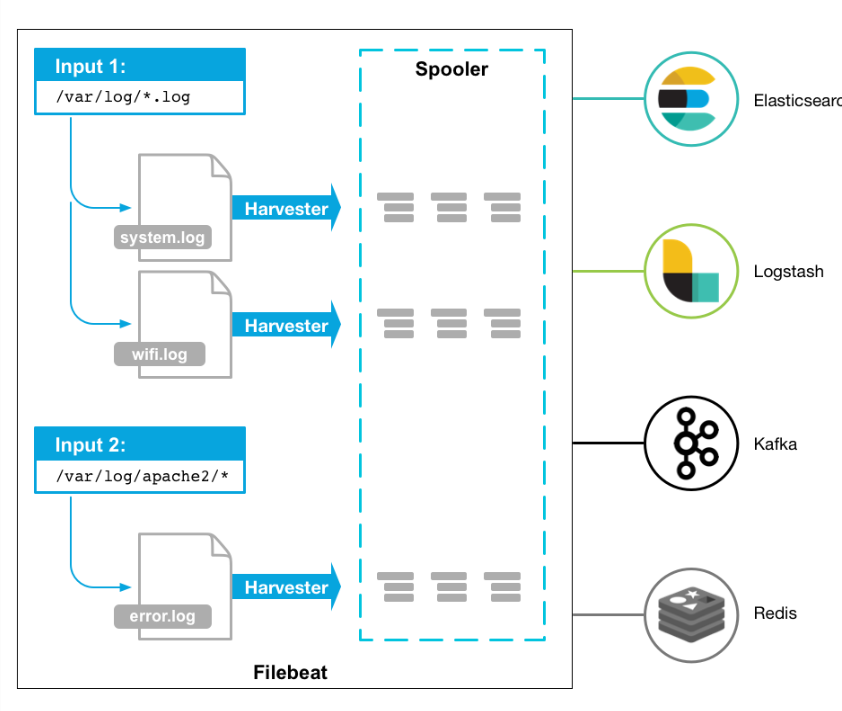
bash
142  wget https://artifacts.elastic.co/downloads/beats/filebeat/filebeat-7.17.3-x86_64.rpm
146  history | tail -n 10
yum -y localinstall filebeat-7.17.3-x86_64.rpm
filebeat -V
root@elk153:~ # systemctl cat filebeat
# /usr/lib/systemd/system/filebeat.service
[Unit]
Description=Filebeat sends log files to Logstash or directly to Elasticsearch.
Documentation=https://www.elastic.co/beats/filebeat
Wants=network-online.target
After=network-online.target

[Service]

Environment="GODEBUG='madvdontneed=1'"
Environment="BEAT_LOG_OPTS="
Environment="BEAT_CONFIG_OPTS=-c /etc/filebeat/filebeat.yml"
Environment="BEAT_PATH_OPTS=--path.home /usr/share/filebeat --path.config /etc/filebeat --path.data /var/lib/filebeat --path.logs /var/log/filebea
ExecStart=/usr/share/filebeat/bin/filebeat --environment systemd $BEAT_LOG_OPTS $BEAT_CONFIG_OPTS $BEAT_PATH_OPTS
Restart=always

[Install]
WantedBy=multi-user.target
重启策略
Restart=always ------ 只要 filebeat 异常退出,systemd 会立即重新拉起。
依赖
After=network-online.target 保证网络就绪后再启动,避免启动阶段找不到 Elasticsearch/Logstash。
环境变量
GODEBUG='madvdontneed=1' 减少内存占用;其余 BEAT_*_OPTS 供用户通过 drop-in 覆盖。


cp /etc/filebeat/filebeat.yml /etc/filebeat/filebeat.yml-$(date +%F)

root@elk153:/etc/filebeat # filebeat -e -c /etc/filebeat/filebeat.yml
2025-12-19T17:12:33.060+0800    INFO    instance/beat.go:685    Home path: [/usr/share/filebeat] Config path: [/etc/filebeat] Data path: [/var/lib/filebeat] Logs path: [/var/log/filebeat] Hostfs Path: [/]

2025-12-19T17:12:33.063+0800    INFO    [stdin.harvester]       log/harvester.go:309    Harvester started for paths: [] {"harvester_id": "a021ed23-b5d7-4fdd-a90c-ea71805d8a46"}
333
{"@timestamp":"2025-12-19T09:12:36.272Z","@metadata":{"beat":"filebeat","type":"_doc","version":"7.17.3"},"host":{"name":"elk153"},"agent":{"type":"filebeat","version":"7.17.3","hostname":"elk153","ephemeral_id":"7b0b93e4-965b-4afe-ac03-0bef4d88d345","id":"98a1691c-8b8d-4762-80ac-4114bb8cedbf","name":"elk153"},"ecs":{"version":"1.12.0"},"log":{"offset":0,"file":{"path":""}},"message":"333","input":{"type":"stdin"}}

2025-12-19T17:12:39.195+0800    INFO    instance/beat.go:497    filebeat stopped.
filebeat.yml type: stdin
bash
filebeat.inputs:
- type: stdin
  enabled: true
#output.elasticsearch:
  #hosts: ["https://myEShost:9200"]
output.console:
  preety: true
filebeat.yml type: log
bash
filebeat.inputs:
- type: log
  paths:
    - /tmp/text.txt
output.console:
  preety: true
重新消费记录位置
root@elk153:/tmp # ll /var/lib/filebeat/registry/filebeat
总用量 8
-rw------- 1 root root 2584 12月 19 17:43 log.json
-rw------- 1 root root 15 12月 19 16:29 meta.json
bash
root@elk153:/tmp # ll '/var/lib/filebeat/registry/filebeat
> ^C
root@elk153:/tmp # ll /var/lib/filebeat/registry/filebeat
总用量 8
-rw------- 1 root root 2584 12月 19 17:43 log.json
-rw------- 1 root root   15 12月 19 16:29 meta.json
root@elk153:/tmp # echo 222 >text.txt
root@elk153:/tmp # echo 222 >>text.txt
root@elk153:/tmp #

root@elk153:/etc/filebeat # cp filebeat.yml filebeat-log.yml
root@elk153:/etc/filebeat # ll
总用量 3892
-rw-r--r-- 1 root root 3780088 4月  19 2022 fields.yml
-rw-r--r-- 1 root root     139 12月 19 17:37 filebeat-log.yml
-rw-r--r-- 1 root root  170239 4月  19 2022 filebeat.reference.yml
-rw-r--r-- 1 root root     139 12月 19 17:12 filebeat.yml
-rw------- 1 root root    8273 4月  19 2022 filebeat.yml-2025-12-19
-rw-r--r-- 1 root root     139 12月 19 17:13 filebeat.yml-22025-12-19
drwxr-xr-x 2 root root    4096 12月 19 15:59 modules.d
root@elk153:/etc/filebeat # filebeat -e -c /etc/filebeat/filebeat-log.yml
2025-12-19T17:42:02.996+0800    INFO    instance/beat.go:685    Home path: [/usr/share/filebeat] Config path: [/etc/filebeat] Data path: [/var/lib/filebeat] Logs path: [/var/
2025-12-19T17:42:02.999+0800    INFO    memlog/store.go:119     Loading data file of '/var/lib/filebeat/registry/filebeat' succeeded. Active transaction id=0
2025-12-19T17:42:02.999+0800    INFO    memlog/store.go:124     Finished loading transaction log file for '/var/lib/filebeat/registry/filebeat'. Active transaction id=7

{"@timestamp":"2025-12-19T09:43:33.005Z","@metadata":{"beat":"filebeat","type":"_doc","version":"7.17.3"},"input":{"type":"log"},"host":{"name":"elk153"},"agent":{"version":"7.17.3","hostname":"elk153","ephemeral_id":"d383ca65-744c-4aaa-8a94-6cc31d98b827","id":"98a1691c-8b8d-4762-80ac-4114bb8cedbf","name":"elk153","type":"filebeat"},"ecs":{"version":"1.12.0"},"log":{"offset":0,"file":{"path":"/tmp/text.txt"}},"message":"111"}

{"@timestamp":"2025-12-19T09:48:08.029Z","@metadata":{"beat":"filebeat","type":"_doc","version":"7.17.3"},"log":{"offset":4,"file":{"path":"/tmp/text.txt"}},"message":"222","input":{"type":"log"},"ecs":{"version":"1.12.0"},"host":{"name":"elk153"},"agent":{"id":"98a1691c-8b8d-4762-80ac-4114bb8cedbf","name":"elk153","type":"filebeat","version":"7.17.3","hostname":"elk153","ephemeral_id":"d383ca65-744c-4aaa-8a94-6cc31d98b827"}}


root@elk153:/tmp # rm -rf  /var/lib/filebeat/*