1. 引言
cpp-httplib 是一个用 C++11 编写的轻量级、跨平台的 HTTP/HTTPS 服务器和客户端库。它由 yhirose 开发并维护,项目托管在 GitHub 上。在 C/C++ 生态中,笔者不能说 cpp-httplib 是最好的,但一定是最易于使用的 HTTP 服务器组件------它是基于头文件的库,只需要引入 httplib.h 这个头文件能实现所有基于 http/https 协议的功能。
2. 实例
2.1 返回文本
首先写一个最简单的 Hello World :
cpp
#include <httplib.h>

using namespace std;

int main() {
  httplib::Server svr;

  svr.Get("/hi", [](const httplib::Request &, httplib::Response &res) {
    res.set_content("Hello World!", "text/plain");
  });

  svr.listen("0.0.0.0", 8080);

  return 0;
}
这段代码的意思很简单,启动一个 HTTP 服务器,然后监听 URL 为 /hi 、端口号为8080 的 Get 请求,并且返回一个 Hello World! 的文本。运行这个程序之后,在浏览器中输入http://127.0.0.1:8080/hi,即可看到这个文本。
2.2 返回页面
返回文本的 Hello World 太简单了,服务器能传输多种 MIME 类型(MIME Type)的数据到浏览器端显示,例如返回一个 HTML 页面:
cpp
#include "HttpServer.h"

#include <httplib.h>

using namespace std;

int main() {
  httplib::Server svr;

  svr.Get("/hi", [](const httplib::Request &, httplib::Response &res) {
    std::string html = R"(
<!DOCTYPE html>
<html>
<head>
    <meta charset="utf-8">
    <title>Hello</title>
</head>
<body>
    <h1>Hello World!</h1>
    <p>这是由 cpp-httplib 提供的 HTML 页面。</p>
</body>
</html>
   )";

    res.set_content(html, "text/html");
  });

  std::cout << "Server listening on http://0.0.0.0:8080/hi\n";

  svr.listen("0.0.0.0", 8080);

  return 0;
}
2.3 返回JSON
在现代前后端分离的项目绝大多数都使用 JSON(JavaScript Object Notation)作为数据传输格式。这是当前 Web 开发的事实标准,RESTful API 也推荐使用 JSON 作为请求/响应体格式。那么这里笔者就实现一个 监听 Post 请求,返回 JSON 数据的例子:
cpp
#include <httplib.h>

#include <iostream>
#include <nlohmann/json.hpp>
#include <string>

using namespace std;
using namespace nlohmann;

int main() {
  httplib::Server svr;

  svr.Post("/hi", [](const httplib::Request& req, httplib::Response& res) {
    try {
      // 检查 Content-Type 是否为 application/json
      auto content_type = req.get_header_value("Content-Type");
      if (content_type.find("application/json") == std::string::npos) {
        res.status = 400;
        res.set_content(R"({"error": "Content-Type must be application/json"})",
                        "application/json");
        return;
      }

      // 解析请求体为 JSON
      json request_data = json::parse(req.body);

      // 示例:读取字段(假设客户端发送了 {"name": "Alice"})
      std::string name = request_data.value("name", "Anonymous");

      // 构造响应 JSON
      json response_data;
      response_data["greeting"] = "Hello, " + name + "!";
      response_data["original_request"] = request_data;
      response_data["status"] = "success";

      // 设置响应
      res.set_content(response_data.dump(), "application/json");

    } catch (const json::parse_error& e) {
      // JSON 解析失败
      res.status = 400;
      json err;
      err["error"] = "Invalid JSON";
      err["message"] = e.what();
      res.set_content(err.dump(), "application/json");
    } catch (const std::exception& e) {
      // 其他异常
      res.status = 500;
      json err;
      err["error"] = "Internal server error";
      res.set_content(err.dump(), "application/json");
    }
  });

  std::cout << "Server listening on http://0.0.0.0:8080/hi (POST with JSON)\n";
  svr.listen("0.0.0.0", 8080);

  return 0;
}
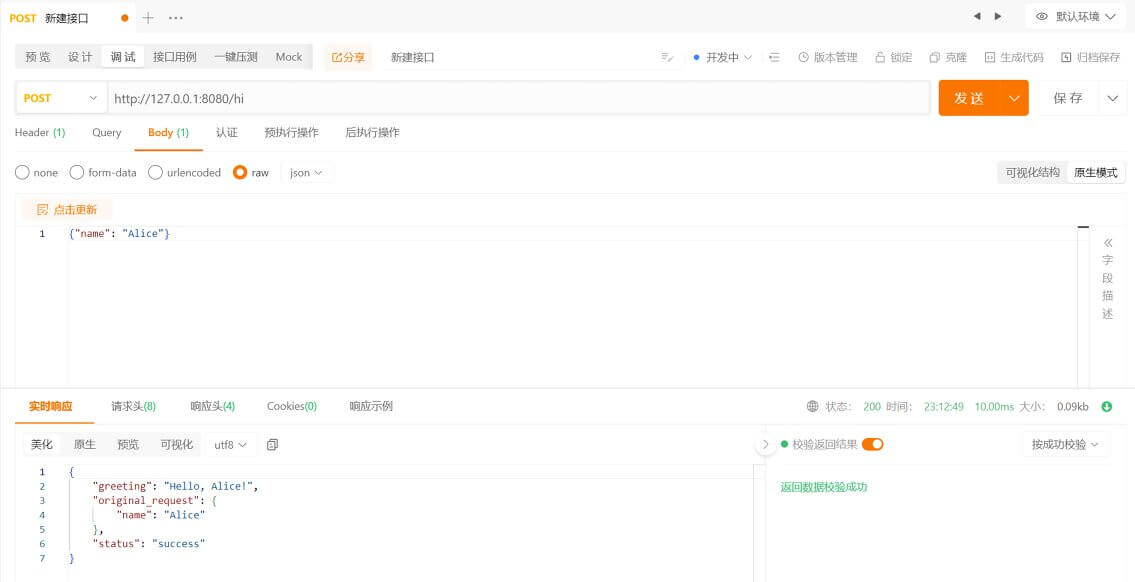
在这里,服务器接受的 HTTP 请求头中 Content-Type 字段的值是 application/json ,表明请求体是一个 JSON 数据。因此通过 nlohmann-json 库解析并装载到新的 nlohmann::json 对象中,最终返回这个 nlohmann::json 对象,并设置返回类型(set_content)也是 application/json。
由于 Post 请求不能直接在浏览器通过 URL 访问到,在前后端分离的现代开发流程中,一般使用 Postman、ApiPost 等工具进行 API 的开发、测试与调试。使用 ApiPost 访问上述 API 的结果如下图所示: