NoSQL非关系型数据库
特性:
非结构化,无关联,非SQL,BASE,无事务
存储方式:内存
扩展性:水平
使用场景:数据结构不固定 对一致性,安全性要求不高,对性能要求
特征:
键值型 value支持多种不同数据结构,功能丰富
单线程,每个命令具备原子性,安全的,不会出现命令执行到一半其他命令插进来的情况。
低延迟,速度快(为什么,他是基于内存存储速度快,与电脑性能有关系,使用io多路复用,良好的编码基于c语言编写)
MYSQL是磁盘存储,内存速度比磁盘快很多。
支持数据持久化(解决电脑关机数据消失的情况)
支持主从集群(从节点可以备份主节点数据防止一台服务器挂了,数据全部丢失)同时又支持读写分离大大提高查询效率。
分片集群,可数据差分,将大数据拆分成多篇给多个节点一起存储,提高存储效率。
多语言客户端
Redis数据结构介绍
基础类型五种String Hash哈希表 List集合(链表) Set无序集合 SortedSet有序集合 特殊类型GEO BitMap HyperLog
通用命令
help @数据类型 该数据的帮助文档
KEYS 查看符合模板的所有key
如KEYS * 查询所有key
查询以a开头的 KEYS a * 不建议在生产环境设备上使用 redis单线程当数据量过大的时候,模糊查询会很久,单线程会阻塞。
DEL key key .....删除指定的key支持删除多个key
EXISTS key key ..... 查询一个或者多个key存不存在
EXPIRE key seconds秒 给一个key设置有效期 ,有效期到期key会自动删除
EXPIRE age 60
TTL key 查看key的剩余有效期
String类型
不管哪种格式底层都是字节数组形式存储,只不过是编码方式不同。字符串类型的最大空间不能超过512m
String的常见命令有:
●SET:set k v 添加或者修改已经存在的一个String类型的键值对,k存在则修改,不存在则添加
●GET:get k 根据key获取String类型的value
●MSET:set k v k1 v1 k2 v2 批量添加多个String类型的键值对
●MGET:MGETk1 k2 k3 根据多个key获取多个String类型的value
INCR:INCR k 让一个整型的key自增1
●INCRBY:让一个整型的key自增并指定步长,例如:incrby num 2让num值自增2
●INCRBYFLOAT:让一个浮点类型的数字自增并指定步长
●SETNX:添加一个String类型的键值对,前提是这个key不存在,否则不执行
●SETEX:setex name 10 jack添加一个String类型的键值对,并且指定有效期
SETEX组合命令set与expire set name jack ex 10
如何区分不同类型的key
·例如,需要存储用户、商品信息到redis,有一个用户
id是1,有一个商品id恰好也是1
key的结构
Redis的key允许有多个单词形成层级结构,多个单词之间用''隔开,格式如下:
项目名:业务名:类型:id
这个格式并非固定,也可以根据自己的需求来删除或添加词条。
例如我们的项目名称叫heima,有user和product两种不同类型的数据,我们可以这样定义key
user相关的key:
heima:user:1
product相关的key:
heima:product:1
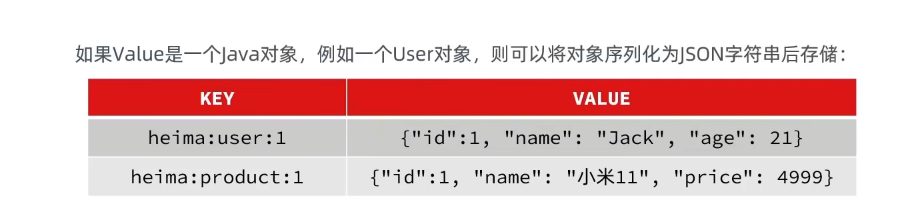
set jjt:user:1 '{"id":1,"name":"jack","age":21}'
缺点。String结构是将对象序列化为JSON字符串后存储,当需要修改对象某个字段时很不方
Hash类型
Hash类型,也叫散列,其value是一个无序字典,类似于java中的HashMap结构。
特点value也是键值对
Hash结构可以将对象中的每个字段独立存储,可以针对单个字段做操作:
Hash类型的常见命令
Hash的常见命令有:
●HSET key field value:添加或者修改hash类型key的field的值
HGET key field:获取一个hash类型key的field的值
●HMSET:HMSET key field value field value field value批量添加多个hash类型key的field的值
●HMGET:批量获取多个hash类型key的field的值
●HGETALL:获取一个hash类型的key中的所有的field和value
●HKEYS:获取一个hash类型的key中的所有的field
●HVALS:获取一个hash类型的key中的所有的value
●HINCRBY:让一个hash类型key的字段值自增并指定步长
●HSETNX:添加一个hash类型的key的field值,前提是这个field不存在,否则不执行
List类型
Redis中的List类型与Java中的LinkedList类似,可以看做是一个双向链表结构。既可以支持正向检索和也可以支持反向检索。
特征也与LinkedList类似:
有序
元素可以重复
插入和删除快
查询速度一般
保存一些对顺序有要求的数据,如朋友圈的点赞。
List类型的常见命令
List的常见命令有:
●LPUSH keyelement..:向列表左侧插入一个或多个元素
●LPOPkey:移除并返回列表左侧的第一个元素,没有则返回nil
RPUSH keyelement...:向列表右侧插入一个或多个元素
●RPOP key:移除并返回列表右侧的第一个元素
●LRANGE key star end:LRANGE users 1 2返回一段角标范围内的所有元素
●BLPOP和BRPOP:与LPOP和RPOP类似,只不过在没有元素时 等待指定时间,而不是直接返回nil
BLPOP users2 100等待时间,单位秒
Set类型
Set类型
Redis的Set结构与Java中的HashSet类似,可以看做是一个value为null的HashMap。因为也是一个hash表,因此具备
与HashSet类似的特征:
●无序
元素不可重复
●查找快
●支持交集、并集、差集等功能
Set类型的常见命令
String的常见命令有:
●SADD key member ..:向set中添加一个或多个元素
●SREM key member...:移除set中的指定元素
●SCARD key:返回set中元素的个数
●SISMEMBER key member:判断一个元素是否存在于set中
●SMEMBERS:获取set中的所有元素
●SINTER key1 key2...:求key1与key2的交集
●SDIFF key1 key2...:求key1与key2的差集
● SUNION key1 key2..:求key1和key2的并集
SortedSet类型
Redis的Sortedset是一个可排序的set集合,与Java中的TreeSet有些类似,但底层数据结构却差别很大。SortedSet中
的每一个元素都带有一个score属性,可以基于score属性对元素排序,底层的实现是一个跳表(SkipList)加 hash表。
SortedSet具备下列特性:
●可排序
●元素不重复
●查询速度快
因为SortedSet的可排序特性,经常被用来实现排行榜这样的功能。
SortedSet类型的常见命令
SortedSet的常见命令有:
●ZADD key score member:添加一个或多个元素到sorted set,如果已经存在则更新其score值
●ZREM key member:删除sorted set中的一个指定元素
●ZSCORE key member:获取sortedset中的指定元素的score值
●ZRANK key member:获取sorted set 中的指定元素的排名
●ZCARD key:获取sorted set中的元素个数
●ZCOUNT key min max:统计score值在给定范围内的所有元素的个数
●ZINCRBY key increment member:让sorted set中的指定元素自增,步长为指定的increment值
●ZRANGE key min max:按照score排序后,获取指定排名范围内的元素
●ZRANGEBYSCORE key min max:按照score排序后,获取指定score范围内的元素
●ZDIFF、ZINTER、ZUNION:求差集、交集、并集
注意:所有的排名默认都是升序,如果要降序则在命令的Z后面添加REV即可
Redis的java客户端,使用redis的方法
Jedis
以Redis命令作为方法名称,学习成本低,简单实用。
但是Jedis实例是线程不安全的,多线程环境下需要基
于连接池来使用。
使用步骤:
1.引入依赖
2.建立Jedis对象,建立连接
private Jedis jedis;
建立连接
jedis = new Jedis("redis地址192.168.150.101",端口);
设置密码
jedis.auth("123456");
选择库
jedis.select(0);
使用,方法名就是redis的基础命令
插入数据
String result = jedis.set("name","张三");
记住一定要释放资源
id(jedis!=null){
jedis.close();
}
jedis连接池
import redis.clients.jedis.Jedis;
import redis.clients.jedis.JedisPool;
import redis.clients.jedis.JedisPoolConfig;
import org.slf4j.Logger;
import org.slf4j.LoggerFactory;

import java.time.Duration;

/**
 * Jedis连接池工具类
 * 单例模式确保整个应用只有一个连接池实例
 */
public class JedisPoolUtil {

    private static final Logger logger = LoggerFactory.getLogger(JedisPoolUtil.class);

    // Jedis连接池实例
    private static volatile JedisPool jedisPool = null;

    // Redis服务器配置
    private static final String REDIS_HOST = "localhost";  // Redis服务器地址
    private static final int REDIS_PORT = 6379;            // Redis端口
    private static final int REDIS_TIMEOUT = 2000;         // 连接超时时间(毫秒)
    private static final String REDIS_PASSWORD = null;     // 密码(无密码设为null)
    private static final int REDIS_DATABASE = 0;           // 数据库索引(0-15)

    // 连接池配置
    private static final int MAX_TOTAL = 100;              // 最大连接数
    private static final int MAX_IDLE = 10;                // 最大空闲连接数
    private static final int MIN_IDLE = 5;                 // 最小空闲连接数
    private static final long MAX_WAIT_MILLIS = 1000;      // 获取连接时的最大等待时间(毫秒)
    private static final boolean TEST_ON_BORROW = true;    // 获取连接时是否测试连接的有效性
    private static final boolean TEST_ON_RETURN = false;   // 归还连接时是否测试连接的有效性
    private static final boolean TEST_WHILE_IDLE = true;   // 空闲时是否测试连接的有效性
    private static final long TIME_BETWEEN_EVICTION_RUNS = 30000; // 空闲连接检查周期(毫秒)

    /**
     * 私有构造方法,防止外部实例化
     */
    private JedisPoolUtil() {
    }

    /**
     * 初始化Jedis连接池(双检锁单例模式)
     * @return JedisPool实例
     */
    public static JedisPool getJedisPool() {
        if (jedisPool == null) {
            synchronized (JedisPoolUtil.class) {
                if (jedisPool == null) {
                    initJedisPool();
                }
            }
        }
        return jedisPool;
    }

    /**
     * 初始化连接池配置
     */
    private static void initJedisPool() {
        try {
            // 创建连接池配置对象
            JedisPoolConfig poolConfig = new JedisPoolConfig();

            // 设置连接池参数

            // 1. 连接数量配置
            poolConfig.setMaxTotal(MAX_TOTAL);              // 最大连接数
            poolConfig.setMaxIdle(MAX_IDLE);                // 最大空闲连接数
            poolConfig.setMinIdle(MIN_IDLE);                // 最小空闲连接数

            // 2. 等待时间配置
            poolConfig.setMaxWait(Duration.ofMillis(MAX_WAIT_MILLIS)); // 获取连接的最大等待时间

            // 3. 连接有效性测试配置
            poolConfig.setTestOnBorrow(TEST_ON_BORROW);     // 借用连接时进行有效性检测
            poolConfig.setTestOnReturn(TEST_ON_RETURN);     // 归还连接时进行有效性检测
            poolConfig.setTestWhileIdle(TEST_WHILE_IDLE);   // 空闲时定期检查连接有效性

            // 4. 空闲连接清理配置
            poolConfig.setTimeBetweenEvictionRuns(Duration.ofMillis(TIME_BETWEEN_EVICTION_RUNS));
            poolConfig.setNumTestsPerEvictionRun(-1);       // 每次检查所有连接

            // 5. 连接保活配置
            poolConfig.setMinEvictableIdleTime(Duration.ofMinutes(5)); // 连接最小空闲时间
            poolConfig.setSoftMinEvictableIdleTime(Duration.ofMinutes(3)); // 软性最小空闲时间

            // 6. 连接耗尽时的行为
            poolConfig.setBlockWhenExhausted(true);         // 连接耗尽时阻塞等待

            // 创建Jedis连接池
            jedisPool = new JedisPool(
                poolConfig,
                REDIS_HOST,
                REDIS_PORT,
                REDIS_TIMEOUT,
                REDIS_PASSWORD,
                REDIS_DATABASE,
                null  // 客户端名称(可选)
            );

            logger.info("Jedis连接池初始化成功,参数配置:maxTotal={}, maxIdle={}, minIdle={}",
                MAX_TOTAL, MAX_IDLE, MIN_IDLE);

            // 添加JVM关闭钩子,确保连接池正确关闭
            Runtime.getRuntime().addShutdownHook(new Thread(() -> {
                if (jedisPool != null && !jedisPool.isClosed()) {
                    jedisPool.close();
                    logger.info("Jedis连接池已关闭");
                }
            }));

        } catch (Exception e) {
            logger.error("Jedis连接池初始化失败", e);
            throw new RuntimeException("Jedis连接池初始化失败", e);
        }
    }

    /**
     * 获取Jedis连接
     * @return Jedis连接实例
     */
    public static Jedis getJedis() {
        JedisPool pool = getJedisPool();
        try {
            Jedis jedis = pool.getResource();
            logger.debug("成功获取Jedis连接,活动连接数:{}", pool.getNumActive());
            return jedis;
        } catch (Exception e) {
            logger.error("获取Jedis连接失败", e);
            throw new RuntimeException("获取Jedis连接失败", e);
        }
    }

    /**
     * 安全关闭Jedis连接(将连接归还给连接池)
     * @param jedis Jedis连接实例
     */
    public static void close(Jedis jedis) {
        if (jedis != null) {
            try {
                jedis.close(); // Jedis 3.x之后,close()方法会判断连接是否正常,正常则归还,异常则关闭
                logger.debug("Jedis连接已归还连接池");
            } catch (Exception e) {
                logger.error("关闭Jedis连接时发生异常", e);
            }
        }
    }

    /**
     * 获取连接池状态信息
     * @return 连接池状态字符串
     */
    public static String getPoolStatus() {
        if (jedisPool == null || jedisPool.isClosed()) {
            return "连接池未初始化或已关闭";
        }

        return String.format(
            "Jedis连接池状态: 活动连接=%d, 空闲连接=%d, 等待获取连接的线程数=%d, 总连接数=%d",
            jedisPool.getNumActive(),
            jedisPool.getNumIdle(),
            jedisPool.getNumWaiters(),
            jedisPool.getNumActive() + jedisPool.getNumIdle()
        );
    }

    /**
     * 关闭连接池(通常在应用关闭时调用)
     */
    public static void closePool() {
        if (jedisPool != null && !jedisPool.isClosed()) {
            jedisPool.close();
            logger.info("Jedis连接池已关闭");
        }
    }
}
高级连接池
import redis.clients.jedis.Jedis;
import redis.clients.jedis.JedisPool;
import redis.clients.jedis.JedisPoolConfig;
import org.slf4j.Logger;
import org.slf4j.LoggerFactory;

import java.time.Duration;
import java.util.Properties;
import java.util.concurrent.Executors;
import java.util.concurrent.ScheduledExecutorService;
import java.util.concurrent.TimeUnit;

/**
 * 高级Jedis连接池工具类
 * 支持动态配置、连接池监控、自动重连等功能
 */
public class AdvancedJedisPool {

    private static final Logger logger = LoggerFactory.getLogger(AdvancedJedisPool.class);

    private static volatile AdvancedJedisPool instance;
    private JedisPool jedisPool;
    private final ScheduledExecutorService monitorExecutor;
    private Properties config;

    /**
     * 连接池配置参数类
     */
    public static class PoolConfig {
        private String host = "localhost";
        private int port = 6379;
        private String password = null;
        private int database = 0;
        private int timeout = 2000;

        // 连接池参数
        private int maxTotal = 100;
        private int maxIdle = 10;
        private int minIdle = 5;
        private long maxWaitMillis = 1000;
        private boolean testOnBorrow = true;
        private boolean testWhileIdle = true;

        // 构造器
        public PoolConfig() {}

        // Builder模式设置参数
        public PoolConfig setHost(String host) {
            this.host = host;
            return this;
        }

        public PoolConfig setPort(int port) {
            this.port = port;
            return this;
        }

        public PoolConfig setPassword(String password) {
            this.password = password;
            return this;
        }

        // ... 其他setter方法

        public JedisPoolConfig buildJedisPoolConfig() {
            JedisPoolConfig poolConfig = new JedisPoolConfig();
            poolConfig.setMaxTotal(this.maxTotal);
            poolConfig.setMaxIdle(this.maxIdle);
            poolConfig.setMinIdle(this.minIdle);
            poolConfig.setMaxWait(Duration.ofMillis(this.maxWaitMillis));
            poolConfig.setTestOnBorrow(this.testOnBorrow);
            poolConfig.setTestWhileIdle(this.testWhileIdle);
            poolConfig.setTimeBetweenEvictionRuns(Duration.ofMillis(30000));
            return poolConfig;
        }
    }

    /**
     * 私有构造方法
     */
    private AdvancedJedisPool(PoolConfig poolConfig) {
        this.config = loadConfig();
        this.monitorExecutor = Executors.newSingleThreadScheduledExecutor();
        initPool(poolConfig);
        startMonitor();
    }

    /**
     * 获取单例实例
     */
    public static AdvancedJedisPool getInstance(PoolConfig poolConfig) {
        if (instance == null) {
            synchronized (AdvancedJedisPool.class) {
                if (instance == null) {
                    instance = new AdvancedJedisPool(poolConfig);
                }
            }
        }
        return instance;
    }

    /**
     * 初始化连接池
     */
    private void initPool(PoolConfig poolConfig) {
        try {
            JedisPoolConfig jedisPoolConfig = poolConfig.buildJedisPoolConfig();

            jedisPool = new JedisPool(
                jedisPoolConfig,
                poolConfig.host,
                poolConfig.port,
                poolConfig.timeout,
                poolConfig.password,
                poolConfig.database,
                "MyRedisClient"
            );

            // 测试连接是否可用
            try (Jedis jedis = jedisPool.getResource()) {
                String pong = jedis.ping();
                if ("PONG".equals(pong)) {
                    logger.info("Redis连接测试成功,连接池初始化完成");
                }
            }

        } catch (Exception e) {
            logger.error("初始化Redis连接池失败", e);
            throw new RuntimeException("初始化Redis连接池失败", e);
        }
    }

    /**
     * 执行Redis操作(模板方法,自动管理资源)
     * @param action Redis操作
     * @param <T> 返回值类型
     * @return 操作结果
     */
    public <T> T execute(JedisAction<T> action) {
        Jedis jedis = null;
        try {
            jedis = jedisPool.getResource();
            return action.execute(jedis);
        } catch (Exception e) {
            logger.error("执行Redis操作失败", e);
            throw new RuntimeException("执行Redis操作失败", e);
        } finally {
            if (jedis != null) {
                jedis.close();
            }
        }
    }

    /**
     * Redis操作接口(函数式接口)
     */
    @FunctionalInterface
    public interface JedisAction<T> {
        T execute(Jedis jedis);
    }

    /**
     * 加载配置文件
     */
    private Properties loadConfig() {
        Properties props = new Properties();
        try {
            // 可以从配置文件加载
            // props.load(new FileInputStream("redis.properties"));
            props.setProperty("redis.monitor.enabled", "true");
            props.setProperty("redis.monitor.interval", "60");
        } catch (Exception e) {
            logger.warn("加载Redis配置文件失败,使用默认配置", e);
        }
        return props;
    }

    /**
     * 启动连接池监控
     */
    private void startMonitor() {
        if ("true".equals(config.getProperty("redis.monitor.enabled", "false"))) {
            int interval = Integer.parseInt(config.getProperty("redis.monitor.interval", "60"));

            monitorExecutor.scheduleAtFixedRate(() -> {
                try {
                    monitorPoolStatus();
                } catch (Exception e) {
                    logger.error("监控连接池状态时发生异常", e);
                }
            }, interval, interval, TimeUnit.SECONDS);

            logger.info("Redis连接池监控已启动,监控间隔:{}秒", interval);
        }
    }

    /**
     * 监控连接池状态
     */
    private void monitorPoolStatus() {
        if (jedisPool != null && !jedisPool.isClosed()) {
            int active = jedisPool.getNumActive();
            int idle = jedisPool.getNumIdle();
            int waiters = jedisPool.getNumWaiters();

            logger.info("连接池监控 - 活动连接: {}, 空闲连接: {}, 等待线程: {}",
                active, idle, waiters);

            // 预警:活动连接接近最大连接数
            JedisPoolConfig poolConfig = (JedisPoolConfig) jedisPool.getPoolConfig();
            if (active > poolConfig.getMaxTotal() * 0.8) {
                logger.warn("警告:活动连接数已达到最大连接数的80%!");
            }

            // 预警:有线程在等待获取连接
            if (waiters > 0) {
                logger.warn("警告:有{}个线程正在等待获取Redis连接", waiters);
            }
        }
    }

    /**
     * 获取连接池实例
     */
    public JedisPool getJedisPool() {
        return jedisPool;
    }

    /**
     * 销毁连接池
     */
    public void destroy() {
        if (monitorExecutor != null && !monitorExecutor.isShutdown()) {
            monitorExecutor.shutdown();
        }

        if (jedisPool != null && !jedisPool.isClosed()) {
            jedisPool.close();
            logger.info("高级Jedis连接池已销毁");
        }
    }
}
使用方法
import redis.clients.jedis.Jedis;
import redis.clients.jedis.params.SetParams;

/**
 * Jedis连接池使用示例
 */
public class JedisExample {

    public static void main(String[] args) {
        // ============ 基本使用示例 ============
        System.out.println("=== 基本使用示例 ===");
        basicUsage();

        // ============ 高级工具类使用示例 ============
        System.out.println("\n=== 高级工具类使用示例 ===");
        advancedUsage();

        // ============ 批量操作示例 ============
        System.out.println("\n=== 批量操作示例 ===");
        batchOperations();
    }

    /**
     * 基本工具类使用
     */
    private static void basicUsage() {
        Jedis jedis = null;
        try {
            // 获取Jedis连接
            jedis = JedisPoolUtil.getJedis();

            // 1. 字符串操作
            jedis.set("name", "张三");
            String name = jedis.get("name");
            System.out.println("获取name的值: " + name);

            // 2. 设置过期时间
            jedis.setex("token", 3600, "abc123");

            // 3. Hash操作
            jedis.hset("user:1001", "name", "李四");
            jedis.hset("user:1001", "age", "25");
            String userName = jedis.hget("user:1001", "name");
            System.out.println("用户姓名: " + userName);

            // 4. 查看连接池状态
            System.out.println(JedisPoolUtil.getPoolStatus());

        } catch (Exception e) {
            e.printStackTrace();
        } finally {
            // 必须关闭连接,归还到连接池
            JedisPoolUtil.close(jedis);
        }
    }

    /**
     * 高级工具类使用
     */
    private static void advancedUsage() {
        // 创建配置
        AdvancedJedisPool.PoolConfig poolConfig = new AdvancedJedisPool.PoolConfig()
            .setHost("localhost")
            .setPort(6379)
            .setPassword(null)
            .setDatabase(0);

        // 获取连接池实例
        AdvancedJedisPool redisPool = AdvancedJedisPool.getInstance(poolConfig);

        // 使用模板方法执行操作(推荐方式)
        String result = redisPool.execute(jedis -> {
            // 设置带参数的值
            SetParams params = SetParams.setParams()
                .ex(60)  // 60秒过期
                .nx();   // 仅当key不存在时设置

            String setResult = jedis.set("counter", "100", params);

            // 原子递增
            Long incrResult = jedis.incr("counter");

            // 返回多个结果
            return "set结果: " + setResult + ", incr结果: " + incrResult;
        });

        System.out.println("执行结果: " + result);

        // 批量操作
        redisPool.execute(jedis -> {
            // 开启事务
            var transaction = jedis.multi();
            transaction.set("key1", "value1");
            transaction.set("key2", "value2");
            transaction.expire("key1", 300);
            transaction.exec();
            return null;
        });
    }

    /**
     * 批量操作示例
     */
    private static void batchOperations() {
        try (Jedis jedis = JedisPoolUtil.getJedis()) {
            // 1. 管道操作(Pipeline)批量执行命令
            var pipeline = jedis.pipelined();
            for (int i = 0; i < 100; i++) {
                pipeline.set("key" + i, "value" + i);
            }
            pipeline.sync();  // 同步执行

            // 2. 使用Lua脚本
            String luaScript =
                "local current = redis.call('GET', KEYS[1]) or 0\n" +
                "local newValue = current + ARGV[1]\n" +
                "redis.call('SET', KEYS[1], newValue)\n" +
                "return newValue";

            Object evalResult = jedis.eval(
                luaScript,
                1,           // KEYS数量
                "counter",   // KEYS[1]
                "10"         // ARGV[1]
            );

            System.out.println("Lua脚本执行结果: " + evalResult);

        } catch (Exception e) {
            e.printStackTrace();
        }
    }

    /**
     * 实际应用场景:缓存用户信息
     */
    public class UserService {

        public User getUserById(String userId) {
            String cacheKey = "user:" + userId;

            // 先从缓存获取
            String userJson = JedisPoolUtil.getJedis().get(cacheKey);
            if (userJson != null) {
                // 缓存命中,反序列化返回
                return deserializeUser(userJson);
            }

            // 缓存未命中,从数据库查询
            User user = queryUserFromDB(userId);
            if (user != null) {
                // 写入缓存,设置30分钟过期
                try (Jedis jedis = JedisPoolUtil.getJedis()) {
                    jedis.setex(cacheKey, 1800, serializeUser(user));
                }
            }

            return user;
        }

        private User deserializeUser(String json) {
            // JSON反序列化逻辑
            return new User();
        }

        private String serializeUser(User user) {
            // JSON序列化逻辑
            return "{}";
        }

        private User queryUserFromDB(String userId) {
            // 数据库查询逻辑
            return new User();
        }
    }

    class User {
        // 用户类
    }
}
配置参数说明
核心参数说明:
-
连接数量相关
-
maxTotal: 最大连接数,根据并发量调整 -
maxIdle: 最大空闲连接数 -
minIdle: 最小空闲连接数,保持一定空闲连接提高性能
-
-
等待时间相关
maxWaitMillis: 获取连接最大等待时间,避免长时间阻塞
-
连接测试相关
-
testOnBorrow: 借出连接时测试,确保连接可用 -
testWhileIdle: 空闲时定期测试,清理无效连接
-
-
清理策略相关
-
timeBetweenEvictionRunsMillis: 空闲连接检查周期 -
minEvictableIdleTimeMillis: 连接最小空闲时间
-
最佳实践建议
-
连接数配置:
-
生产环境建议:
maxTotal=100-500,maxIdle=20-50 -
根据实际QPS调整:每个连接处理约1000-5000 QPS
-
-
异常处理:
-
获取连接失败时要有重试机制
-
操作失败时考虑连接是否已失效
-
-
资源管理:
-
使用try-with-resources或finally块确保连接关闭
-
避免在循环中频繁获取/关闭连接
-
-
监控:
-
定期监控连接池状态
-
设置合理的预警阈值
-
lettuce
Lettuce是基于Netty实现的,支持同步、异步和响
应式编程方式,并且是线程安全的。支持Redis的哨兵
模式、集群模式和管道模式。
Redisson
Redisson是一个基于Redis实现的分布式、可伸缩的
Java数据结构集合。包含了诸如Map、Queue、Lock、
Semaphore、AtomicLong等强大功能
Spring Data Redis整合Jedis 和lettuce
简单使用
使用自动装配引入
@Autowired
private RedisTemplate redisTemplate;
@Test
void testString(){
//插入一条String数据opsForValue()
redisTemplate.opsForValue().set("name","李四");
读取一条String类型数据
Object name = redisTemplate.opsForValue.get("name");
获取值用opsFor...,可以进行查询opsFor这个方法。
java
// opsFor 方法的整体架构
public class RedisTemplate<K, V> extends RedisAccessor implements RedisOperations<K, V> {

    // 获取 String 类型操作接口
    @Override
    public ValueOperations<K, V> opsForValue() {
        // ...
    }

    // 获取 Hash 类型操作接口
    @Override
    public HashOperations<K, HK, HV> opsForHash() {
        // ...
    }

    // 获取 List 类型操作接口
    @Override
    public ListOperations<K, V> opsForList() {
        // ...
    }

    // 获取 Set 类型操作接口
    @Override
    public SetOperations<K, V> opsForSet() {
        // ...
    }

    // 获取 ZSet(有序集合)类型操作接口
    @Override
    public ZSetOperations<K, V> opsForZSet() {
        // ...
    }

    // 获取 Geo(地理位置)操作接口
    @Override
    public GeoOperations<K, V> opsForGeo() {
        // ...
    }

    // 获取 HyperLogLog 操作接口
    @Override
    public HyperLogLogOperations<K, V> opsForHyperLogLog() {
        // ...
    }

    // 获取 Stream 操作接口
    @Override
    public StreamOperations<K, HK, HV> opsForStream() {
        // ...
    }

    // 获取 Cluster 操作接口
    @Override
    public ClusterOperations<K, V> opsForCluster() {
        // ...
    }
}
java
┌─────────────────────────────────────────────────────────┐
│                    RedisTemplate<K, V>                   │
├─────────────────────────────────────────────────────────┤
│ + opsForValue(): ValueOperations<K, V>                  │
│ + opsForHash(): HashOperations<K, HK, HV>               │
│ + opsForList(): ListOperations<K, V>                    │
│ + opsForSet(): SetOperations<K, V>                      │
│ + opsForZSet(): ZSetOperations<K, V>                    │
│ + opsForGeo(): GeoOperations<K, V>                      │
│ + opsForHyperLogLog(): HyperLogLogOperations<K, V>      │
│ + opsForStream(): StreamOperations<K, HK, HV>           │
└─────────────────────────────────────────────────────────┘
                              │
        ┌─────────────────────┼─────────────────────┐
        │                     │                     │
        ▼                     ▼                     ▼
┌─────────────────┐ ┌─────────────────┐ ┌─────────────────┐
│ValueOperations  │ │HashOperations   │ │ListOperations   │
├─────────────────┤ ├─────────────────┤ ├─────────────────┤
│+ set()         │ │+ put()          │ │+ leftPush()     │
│+ get()         │ │+ get()          │ │+ rightPush()    │
│+ increment()   │ │+ entries()      │ │+ leftPop()      │
│+ decrement()   │ │+ keys()         │ │+ rightPop()     │
│+ getAndSet()   │ │+ values()       │ │+ range()        │
│+ multiSet()    │ │+ delete()       │ │+ size()         │
│+ multiGet()    │ │+ hasKey()       │ │+ index()        │
└─────────────────┘ └─────────────────┘ └─────────────────┘
Spring Data Redis 中的 opsFor 方法详解-CSDN博客
java
@Autowired
private RedisTemplate<String, Object> redisTemplate;

// 字符串操作
redisTemplate.opsForValue().set("key", "value");
Object value = redisTemplate.opsForValue().get("key");

// 哈希操作
redisTemplate.opsForHash().put("hashKey", "field", "value");
Object hashValue = redisTemplate.opsForHash().get("hashKey", "field");

// 列表操作
redisTemplate.opsForList().leftPush("listKey", "value1");
List<Object> list = redisTemplate.opsForList().range("listKey", 0, -1);
设置几种数据结构的序列化
默认的 JdkSerializationRedisSerializer 会导致二进制存储,可读性差,内存占用较大,建议修改为 StringRedisSerializer:
字符串key一般使用StringRedisSerializer,value一般使用GenericJackson2JsonRedisSerializer序列化的方式,因为可能是值可能是对象。
java
@Bean
public RedisTemplate<String, Object> redisTemplate(RedisConnectionFactory factory)throw UnknownHostException {
    //创建Template
    RedisTemplate<String, Object> template = new RedisTemplate<>();
    //连接工厂
    template.setConnectionFactory(factory);
    //设置序列化工具
    //key 和hashkey采用string序列化
    //value和hashvalue采用JSON序列化
    template.setKeySerializer(new StringRedisSerializer());
    template.setValueSerializer(new GenericJackson2JsonRedisSerializer());

    template.setHashKeySerializer(new StringRedisSerializer());
    template.setHashValueSerializer(new GenericJackson2JsonRedisSerializer());

    return template;
}
这样做的结果就是,我们存什么,取的时候就是什么。
有个注意事项,为了在反序列化时知道对象的类型,JSON 序列化器会将类的 class 类型写入 json 结果中,存入 Redis, 会带来额外的内存开销。
如果想要节省内存,可以统一使用String序列化器,
为了节省内存空间,我们并不会使用jSON序列化器来处理value,而是统一使用String序列化器,要求只能存储String
类型的key和value。当需要存储ava对象时,手动完成对象的序列化和反序列化。
Spring默认提供了一个StringRedisTemplate类,它的key和value的序列化方式默认就是String方式。省去了我们自定
义RedisTemplate的过程:
@Autowired
privateStringRedisTemplate stringRedisTemplate;
private static final ObjectMapper mapper =new ObjectMapper();
@Test
void testStringTemplate() throws JsonProcessingException{
//准备对象
User_user =newUser("虎哥",18);
//手动序列化
Stringjson =mapper.writeValueAsString(user);
//写入一条数据到redis
stringRedisTemplate.opsForValue().set("user:100",json);
川读取数据
String val =stringRedisTemplate.opsForValue().get("user:100");
川反序列化
User userl =mapper.readvalue(val,User.class);
System.out.println("user1 =" + userl);
}
这些东西一般都封装成工具类。