基于Seedance1.5 Pro的零门槛创作影视级音视频体验-灵曦星灿视频助手
-
- 一、项目展示
-
- [1 文生视频](#1 文生视频)
- [2 图生视频](#2 图生视频)
-
- [2.1 基于首帧](#2.1 基于首帧)
- [2.2 基于首尾帧](#2.2 基于首尾帧)
- [2.3 基于参考图](#2.3 基于参考图)
- 二、模型介绍
-
- [1 模型概况:从发布到落地,加速覆盖全用户群体](#1 模型概况:从发布到落地,加速覆盖全用户群体)
- [2 核心功能:三大维度突破,重构音视频创作逻辑](#2 核心功能:三大维度突破,重构音视频创作逻辑)
-
- [2.1 原生音画同步:毫秒级对齐,告别 "音画脱节"](#2.1 原生音画同步:毫秒级对齐,告别 “音画脱节”)
- [2.2 电影级镜头与画质:小白也能玩转运镜](#2.2 电影级镜头与画质:小白也能玩转运镜)
- [2.3 高效创作与叙事:降低成本,提升连贯性](#2.3 高效创作与叙事:降低成本,提升连贯性)
- [3 应用场景:从个人创作到企业生产,全领域覆盖](#3 应用场景:从个人创作到企业生产,全领域覆盖)
- [4 快速体验:3 步生成有声视频,操作零门槛](#4 快速体验:3 步生成有声视频,操作零门槛)
- [5 行业影响:重新定义 AI 音视频创作范式](#5 行业影响:重新定义 AI 音视频创作范式)
- [6 多维度评测](#6 多维度评测)
- 三、体验地址
- 四、开发调用
-
- [1 API-Key获取](#1 API-Key获取)
- [2 模型服务开通](#2 模型服务开通)
- [3 使用体验](#3 使用体验)
-
- [3.1 文生视频](#3.1 文生视频)
- [3.2 图生视频](#3.2 图生视频)
-
- [3.2.1 基于首帧](#3.2.1 基于首帧)
- [3.2.2 基于首尾帧](#3.2.2 基于首尾帧)
- [3.2.3 基于参考图](#3.2.3 基于参考图)
在 AI 内容创作飞速发展的当下,字节跳动 Seed 团队于 2025 年 12 月推出的 Seedance 1.5 Pro 音视频创作模型,无疑为行业注入了一剂强心针。这款集 "原生音画同步""电影级质感""多场景适配" 于一身的新一代模型,不仅打破了传统音视频创作的技术壁垒,更让普通用户和企业都能轻松开启 "零门槛做有声视频" 的全新体验。
一、项目展示
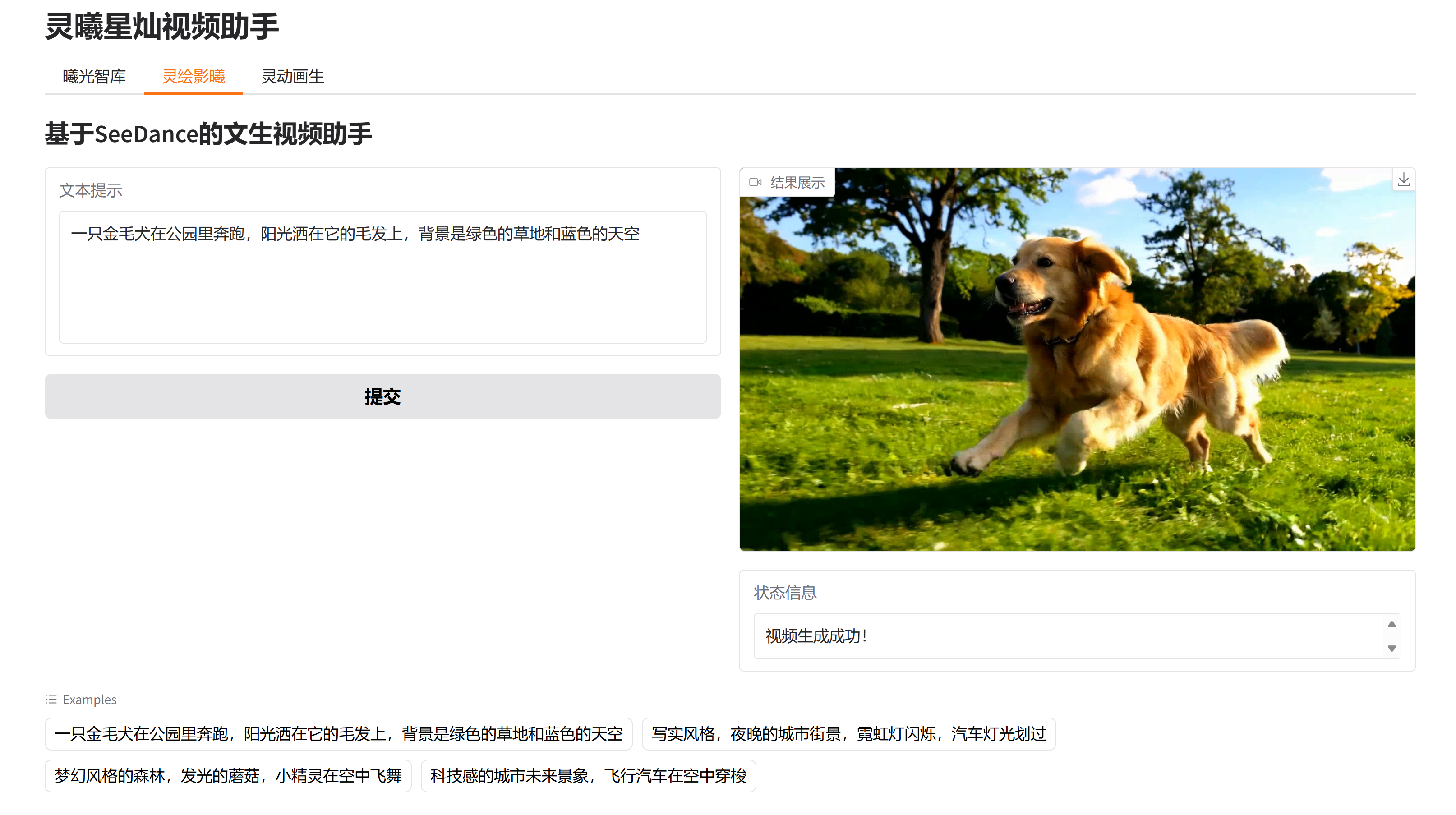
1 文生视频
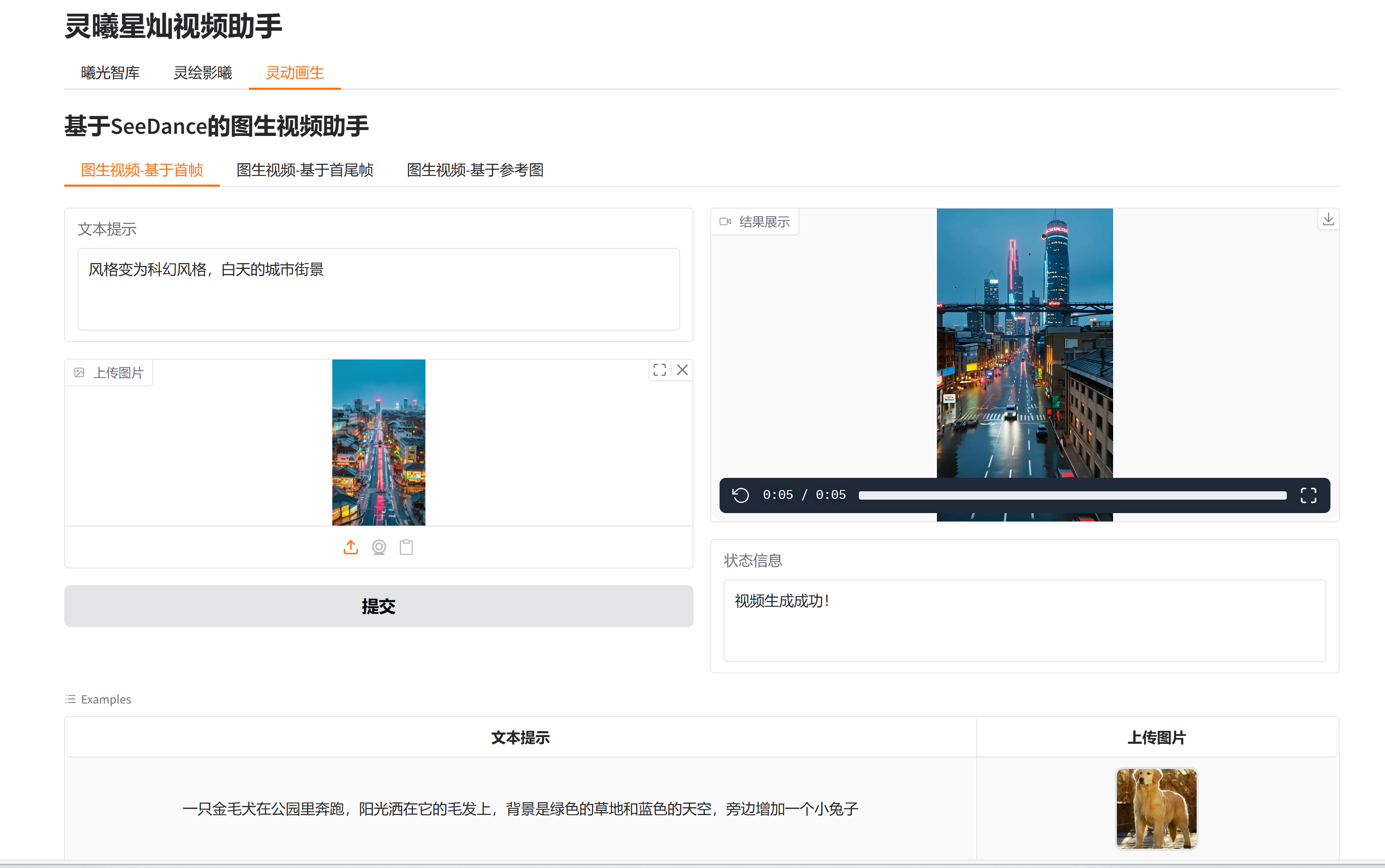
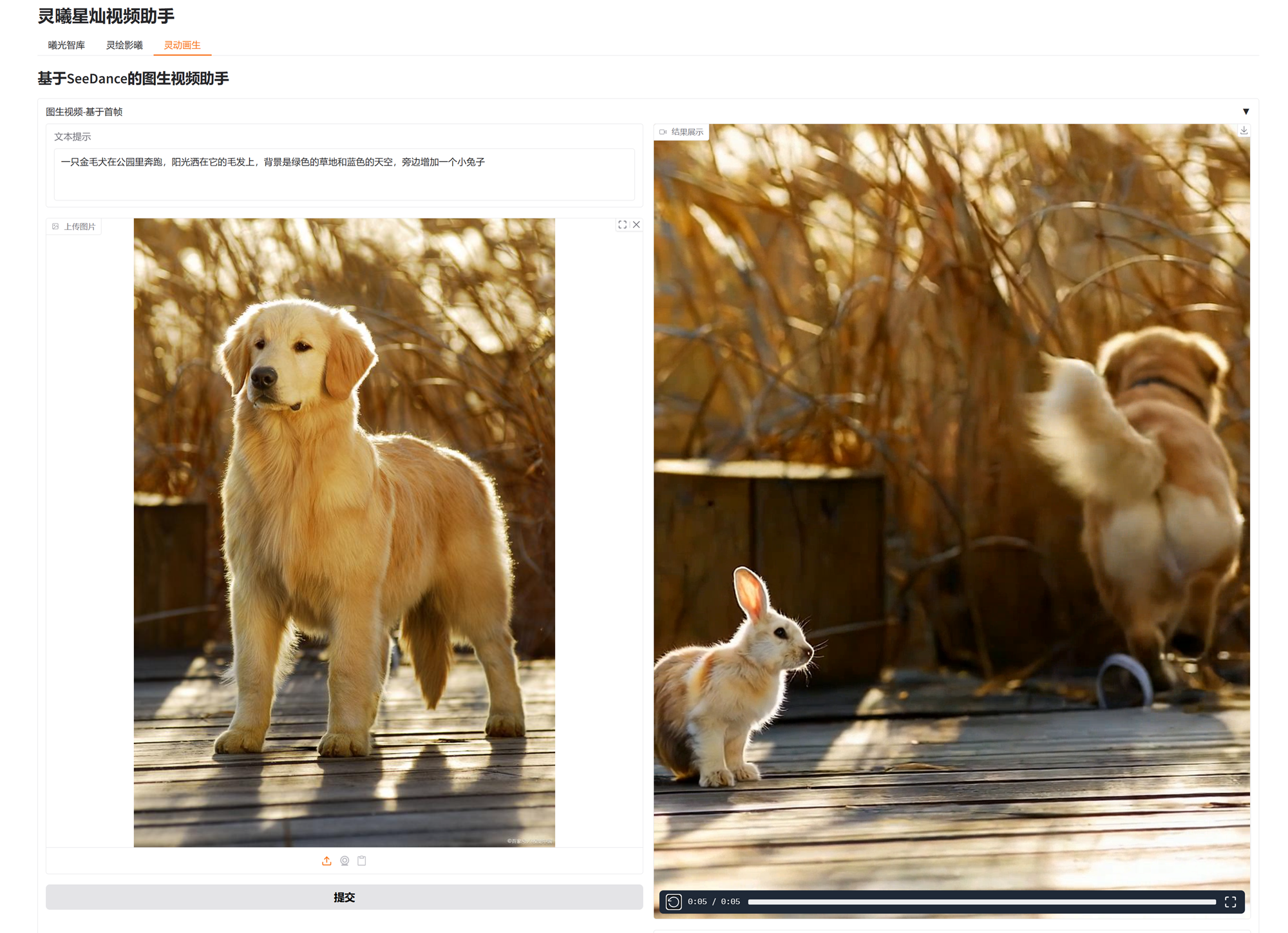
2 图生视频
2.1 基于首帧
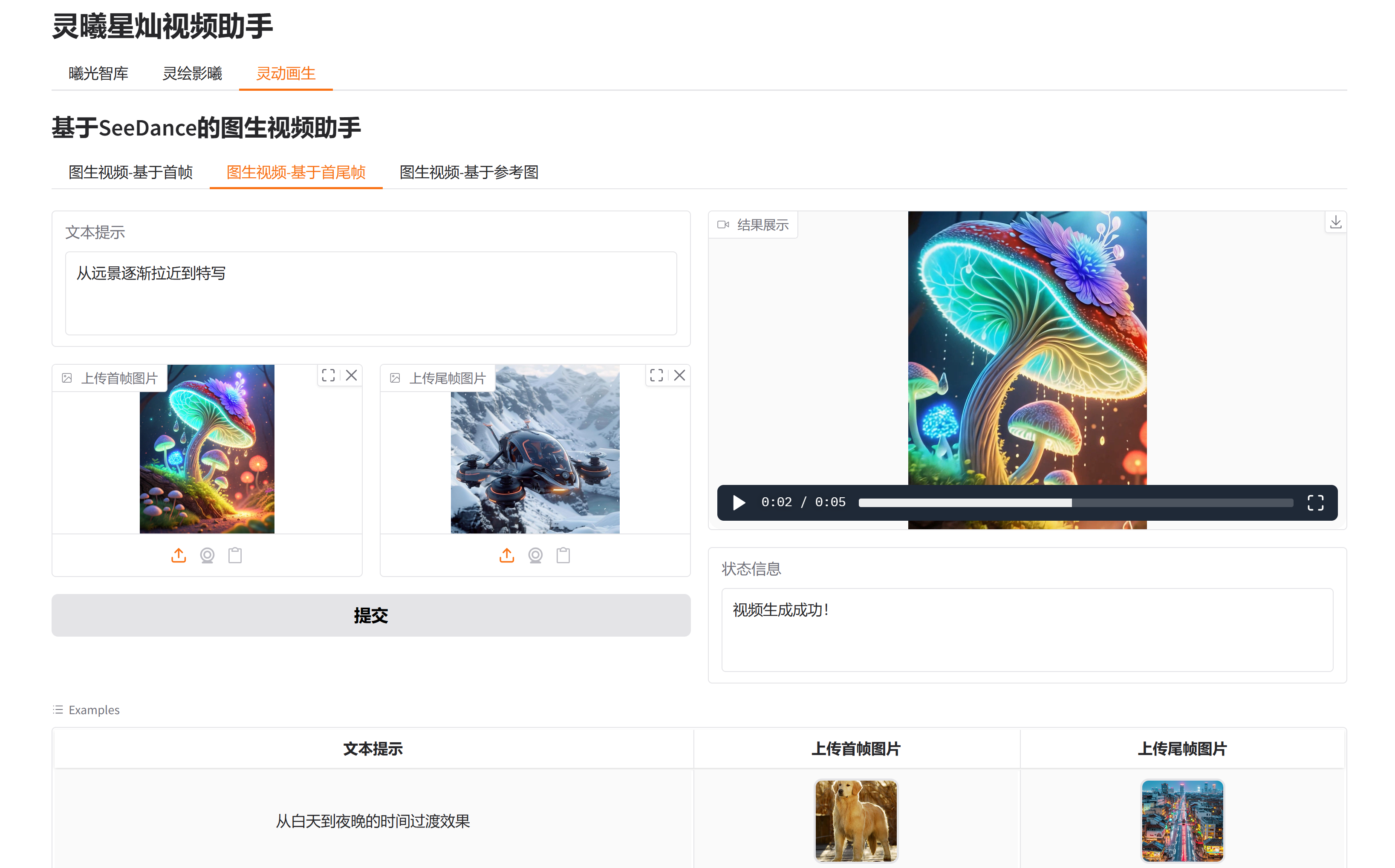
2.2 基于首尾帧
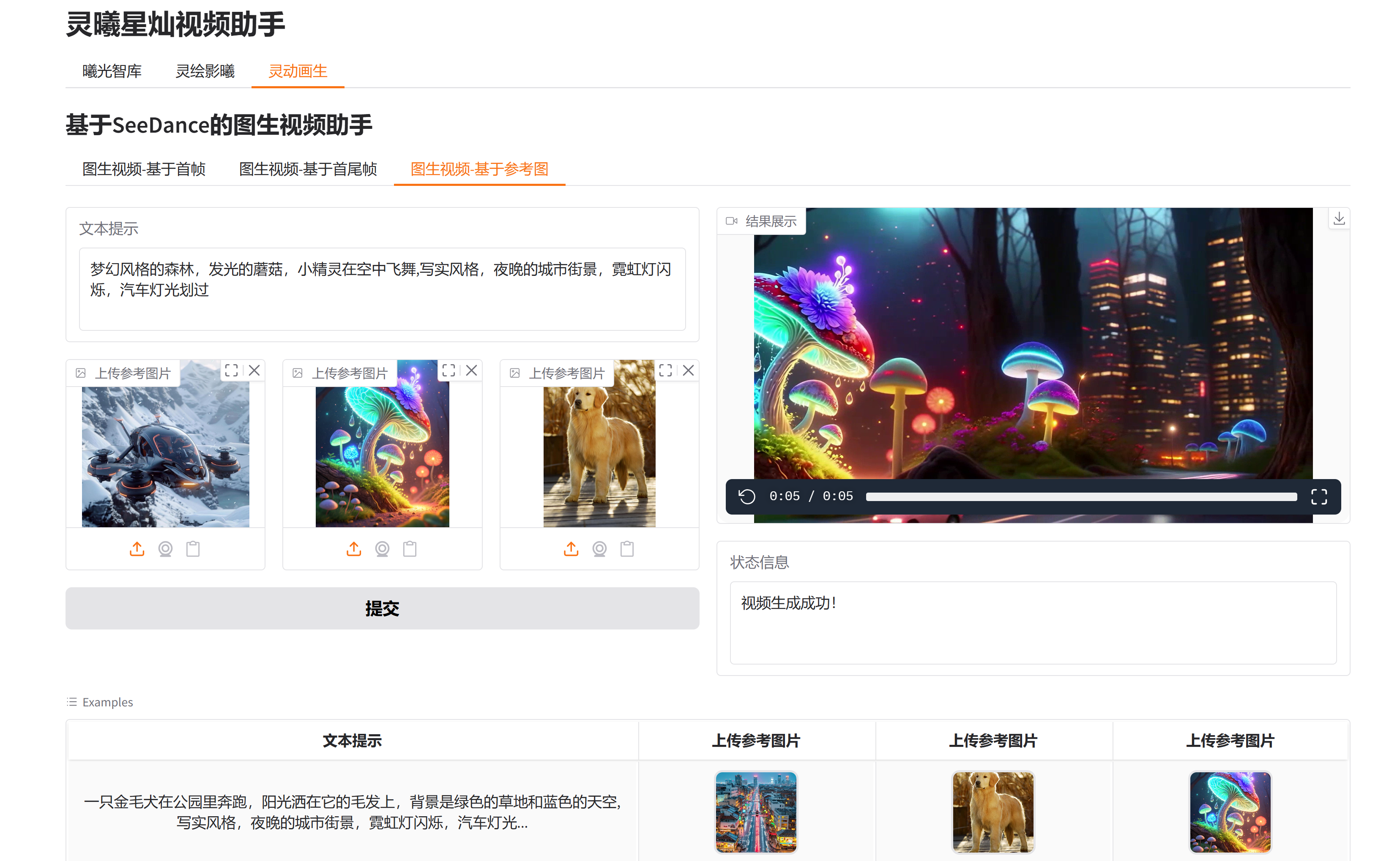
2.3 基于参考图
二、模型介绍
1 模型概况:从发布到落地,加速覆盖全用户群体
Seedance 1.5 Pro 的发布节奏清晰且高效,从技术亮相到用户可及仅用数日,充分体现了字节跳动在 AI 落地能力上的优势:
- 发布时间线:2025 年 12 月 16 日,字节跳动在北京举办发布会,首次公开 Seedance 1.5 Pro;12 月 18 日,火山引擎在 FORCE 原动力大会上正式发布该模型,并同步开放个人用户体验通道;12 月 19 日,模型全面登陆豆包、即梦 AI 等 C 端平台;12 月 23 日起,企业用户可通过火山引擎 API 接入服务,实现 "个人尝鲜 - 企业落地" 的无缝衔接。
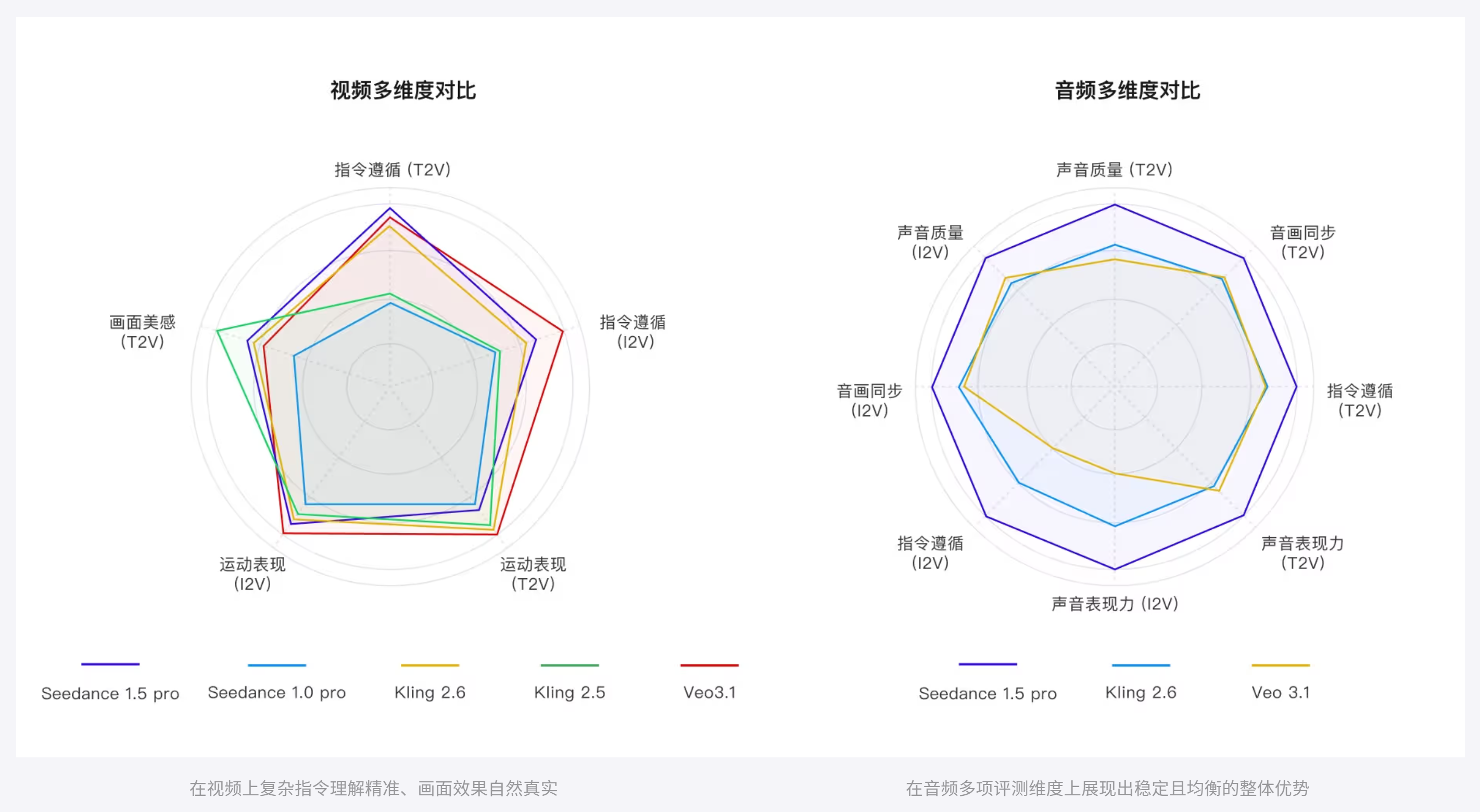
- 核心定位:作为字节跳动 Seed 团队的迭代升级之作,Seedance 1.5 Pro 以 "音视频联合生成" 为核心,相比 1.0 版本大幅提升视觉冲击力与运动效果,在综合评测中多项关键能力位居业界前列,尤其在音画同步、多语言对话等技术上实现突破性进展。
2 核心功能:三大维度突破,重构音视频创作逻辑
Seedance 1.5 Pro 的功能设计围绕 "精准、高效、专业" 三大目标,从音画协同、镜头控制到叙事表达,全方位满足不同创作需求:
2.1 原生音画同步:毫秒级对齐,告别 "音画脱节"
作为模型的核心亮点,Seedance 1.5 Pro 采用创新的 "原生音视频联合生成架构",彻底改变传统 "先做画面再配音频" 的割裂模式:
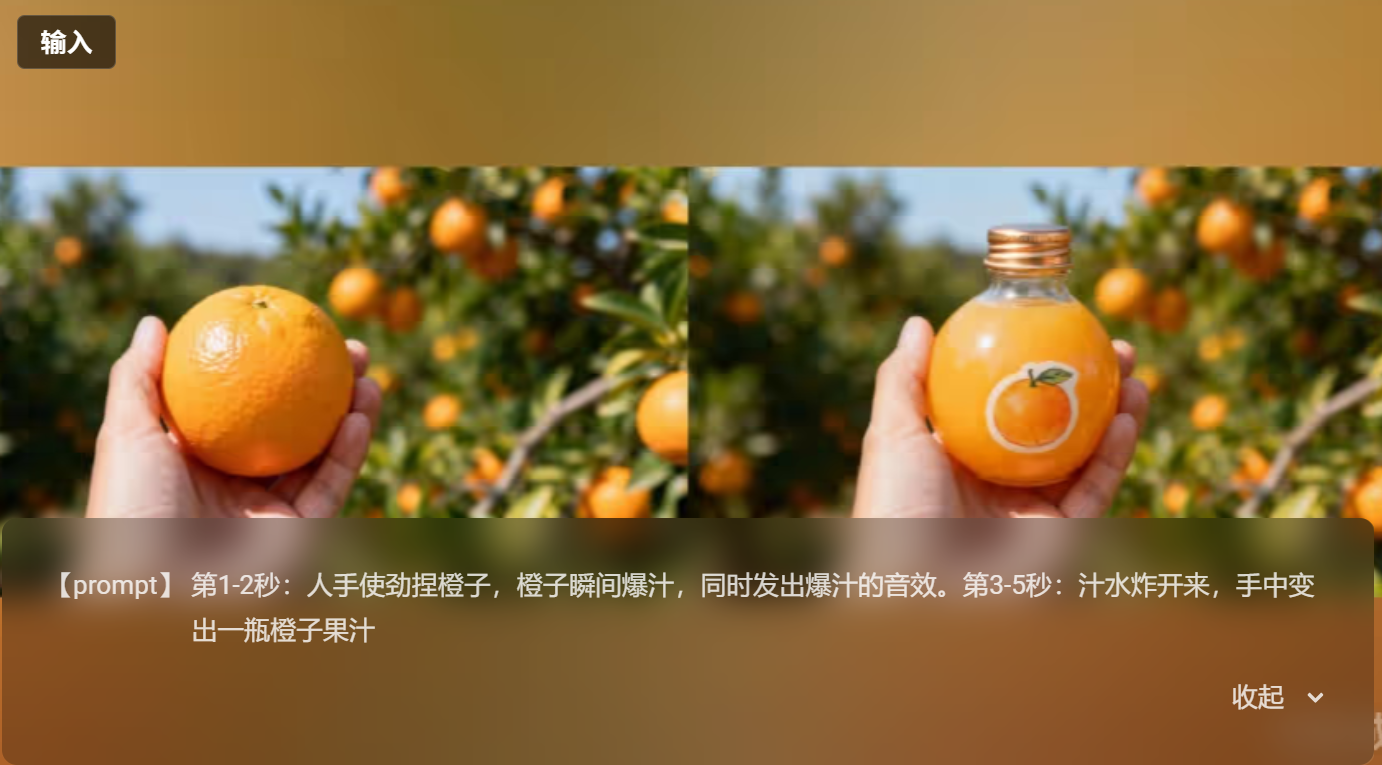
- 多元素覆盖:可同步生成环境音(如雨声、街道嘈杂声)、动作音(如开门、敲击键盘)、背景音乐及人声,且音质清晰、空间感稳定,能与画面节奏、情绪变化深度协同。
|-------------------------------------------------------------------------------|---|
|  | |
| |
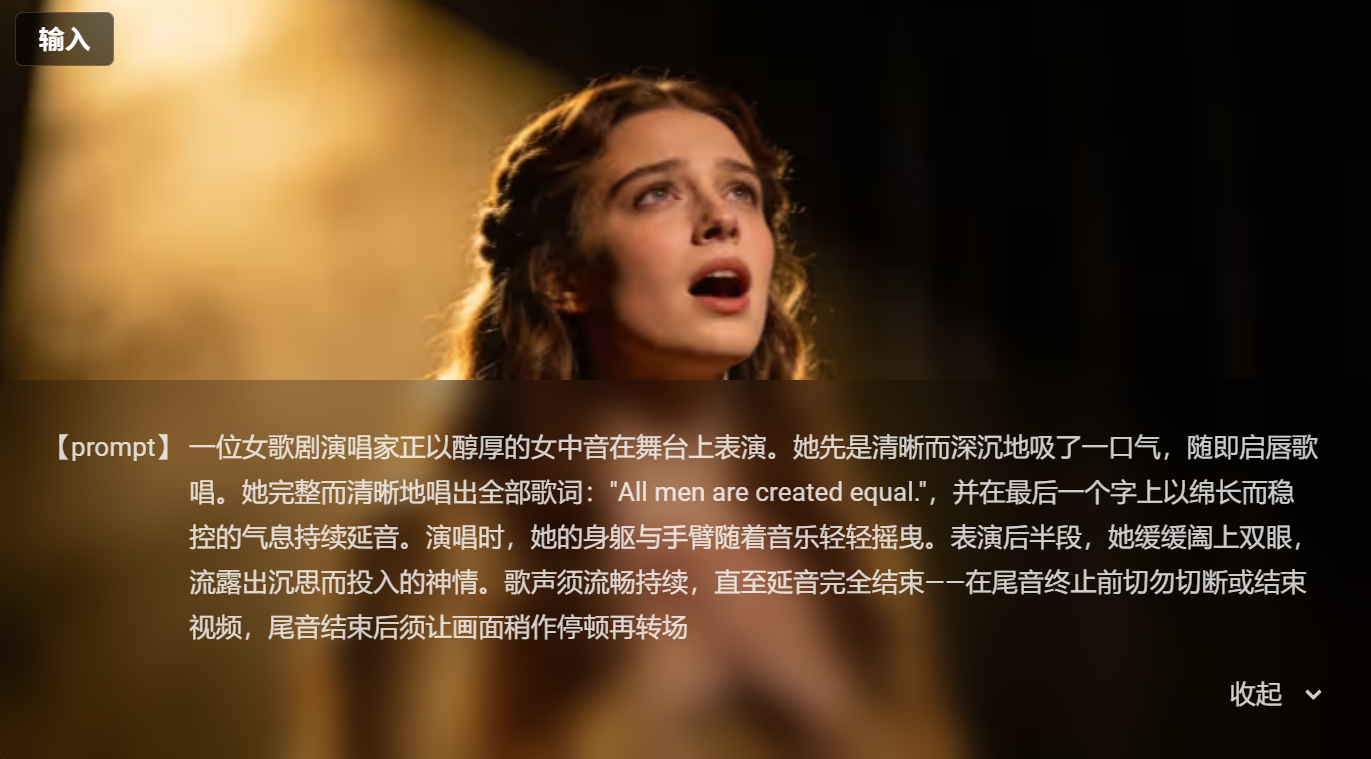
- 精准对齐能力:支持毫秒级口型对齐,无论是单人独白还是多人对话,人物唇形、肢体动作都能与语音完美匹配;同时覆盖中文(含四川话、粤语等方言)、英文及小语种,语音韵律与情感张力贴近真人表达,解决了多语言创作的 "违和感" 难题。
|-------------------------------------------------------------------------------|---|
|  | |
| |
2.2 电影级镜头与画质:小白也能玩转运镜
模型将专业影视制作的 "镜头语言" 融入 AI 生成逻辑,让普通用户无需专业知识也能创作出有质感的视频:
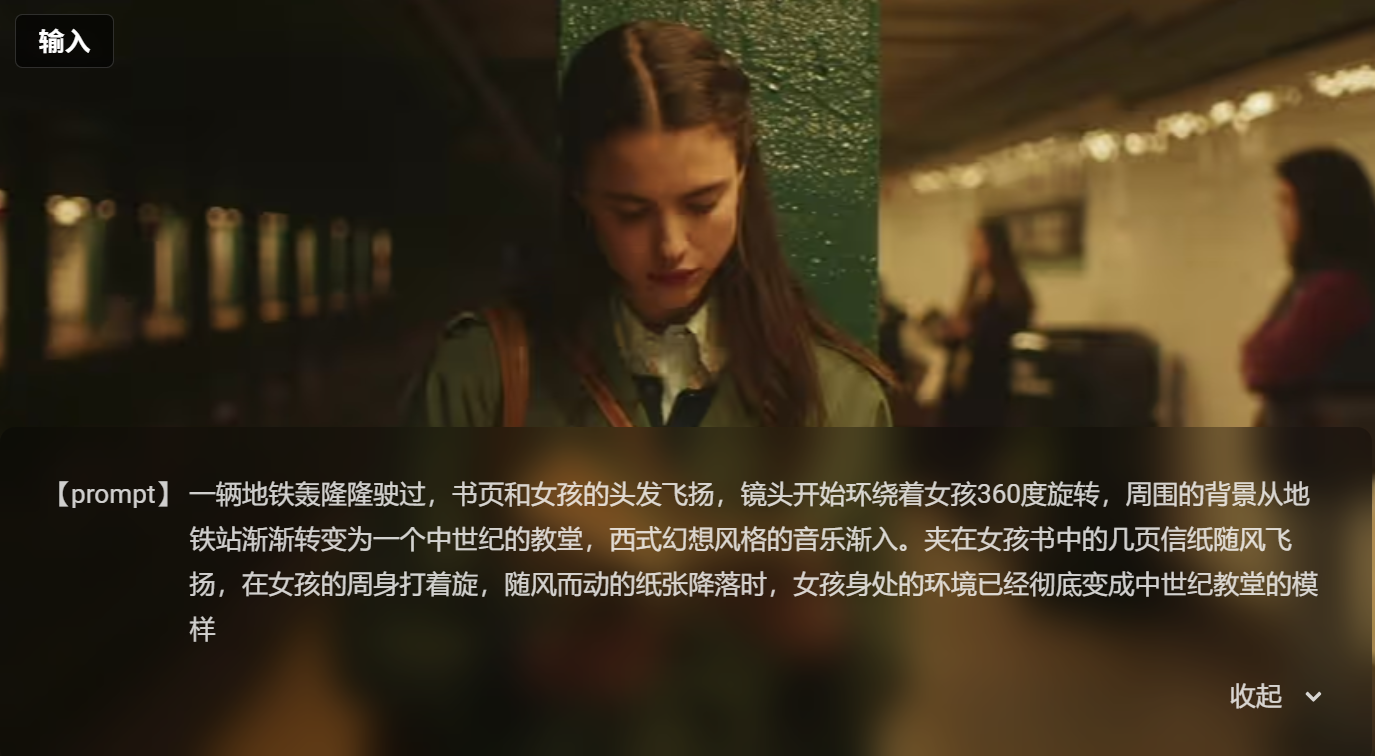
- 丰富运镜效果:支持动态手持拍摄、景深控制、变焦、平移等复杂运镜,画面自带景别切换(如从全景切至特写)与专业转场,甚至能精准捕捉人物肢体互动等复杂动作。
- 高清画质输出:最高支持 1080P 分辨率、60fps 帧率,画面细节(如纹理、光影)、构图与氛围呈现自然协调的影视美学,特写镜头中人物细微表情(如皱眉、微笑)的情绪延续性尤为突出。
|-------------------------------------------------------------------------------|---|
|  | |
| |
2.3 高效创作与叙事:降低成本,提升连贯性
针对创作效率与内容质量的平衡,模型设计了多项实用功能:
- Draft 样片预览:即将上线的 "低分辨率样片" 功能,可快速生成关键要素与成片一致的预览版,减少 60% 无效创作成本,整体效率提升 65%,尤其适合企业批量创作(如广告、培训视频)。
- 强语义理解:能深度解析文本提示词的叙事意图,自动构建基础叙事结构,确保声音、画面、氛围的一致性。例如输入 "一个女孩在图书馆安静看书,突然接到朋友电话后开心起身",模型会生成 "翻书动作 + 图书馆环境音→手机铃声→女孩微笑接电话 + 轻快背景音乐" 的连贯场景,避免 "逻辑断裂"。
3 应用场景:从个人创作到企业生产,全领域覆盖
Seedance 1.5 Pro 的灵活性使其能适配不同行业需求,无论是个人用户的 "社交爆款",还是企业的 "工业化生产",都能找到对应解决方案:
| 用户类型 | 典型场景 | 核心价值 |
|---|---|---|
| 个人创作者 | 抖音 / 小红书短视频、朋友圈有声动态、个人 vlog | 零门槛操作(上传图片 + 输入提示词即可生成),快速产出高质量内容,降低创作时间成本 |
| MCN 机构 / 自媒体 | 短剧片段、知识科普视频、产品测评 | 支持批量生成,多语言 / 方言适配助力内容出海,镜头质感提升用户留存率 |
| 企业用户 | 品牌广告(如产品演示)、员工培训课程、影视工业化预演(将剧本转化为分镜) | 通过 API 快速集成至现有工作流,减少专业制作团队依赖,缩短项目周期(如广告从策划到产出时间减半) |
| 教育领域 | 互动式教学动画、语言学习视频(如方言教学) | 音画同步强化知识吸收,多语言支持适配不同地区学生需求 |
4 快速体验:3 步生成有声视频,操作零门槛
对于个人用户,Seedance 1.5 Pro 在豆包等平台的操作流程极为简单,无需下载专业软件:
- 选择功能:打开豆包 App,在对话框中点击 "照片动起来",选择 "1.5 Pro" 模型;
- 输入指令:上传一张参考图(如自己的照片、风景图),并输入文本提示词(如 "一个穿着汉服的女孩在樱花树下散步,背景有鸟鸣声");
- 生成视频:等待数分钟,即可获得包含同步音频、运镜效果的完整有声视频,可直接保存或分享至社交平台。
5 行业影响:重新定义 AI 音视频创作范式
Seedance 1.5 Pro 的推出,不仅是技术层面的升级,更在改变音视频创作的 "生态逻辑":
- 降低行业门槛:让中小商家、个人创作者无需高昂设备与专业团队,就能参与 "专业级创作",推动内容生产的 "平民化";
- 提升企业效率:对广告、影视、教育等行业而言,模型可替代部分重复性工作(如基础分镜制作、简单培训视频),释放专业人员的创意精力;
- 推动多模态融合:其 "原生音视频联合生成" 架构,为 AI 多模态创作(如结合文本、图像、音频的综合内容)提供了新方向,未来或可拓展至 VR/AR 等更复杂场景。
无论是想快速制作社交短视频的普通人,还是需要批量产出专业内容的企业,Seedance 1.5 Pro 都提供了 "从想法到成品" 的一站式解决方案。随着后续功能的迭代(如更长视频时长支持、更多平台集成),这款模型或许将成为 AI 音视频创作的 "新标杆",让更多人感受到 "创意无界" 的可能性。
6 多维度评测
三、体验地址
- 豆包APP
- 火山引擎:火山方舟视觉模型Seedance体验地址
- API接入:火山方舟视觉模型Seedance-API接入
四、开发调用
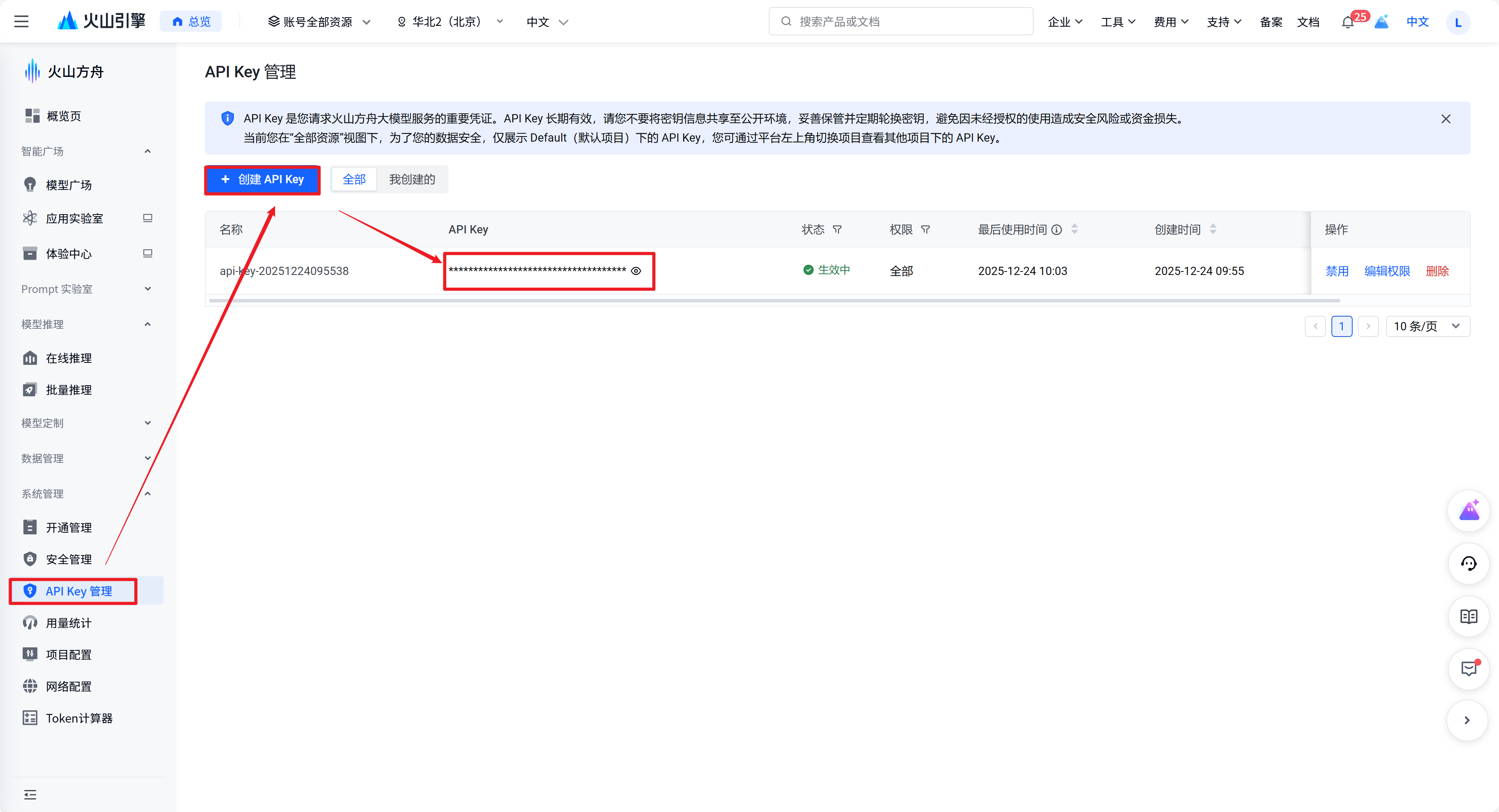
1 API-Key获取
访问地址:https://console.volcengine.com/ark/region:ark+cn-beijing/apiKey?
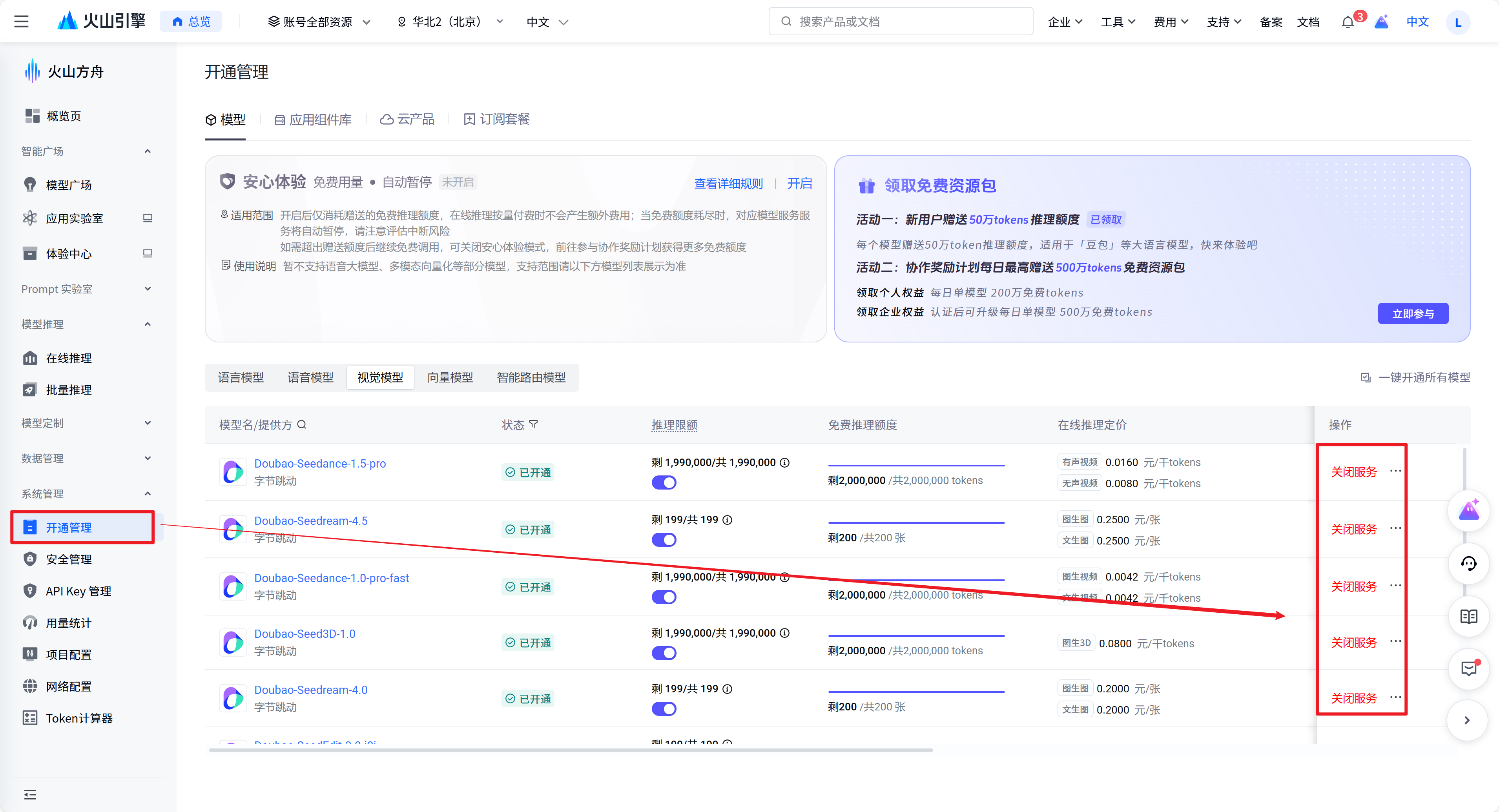
2 模型服务开通
【控制台】->【开通管理】->【开通服务】
访问地址: https://console.volcengine.com/ark/region:ark+cn-beijing/openManagement?
3 使用体验
开源仓库: leezhao415/Lingxi-StarBright-VideoAssistant-SeeDance: 基于字节跳动SeeDance1.5Pro的音画同步影视级视频生成系统
3.1 文生视频
- Python调用
python
import os
import time
# Install SDK:  pip install 'volcengine-python-sdk[ark]'
from volcenginesdkarkruntime import Ark
from dotenv import load_dotenv
load_dotenv()

# Make sure that you have stored the API Key in the environment variable ARK_API_KEY
# Initialize the Ark client to read your API Key from an environment variable
client = Ark(
    # This is the default path. You can configure it based on the service location
    base_url="https://ark.cn-beijing.volces.com/api/v3",
    # Get API Key:https://console.volcengine.com/ark/region:ark+cn-beijing/apikey
    api_key=os.getenv("ARK_API_KEY"),
)

if __name__ == "__main__":
    print("----- create request -----")
    create_result = client.content_generation.tasks.create(
        model="doubao-seedance-1-5-pro-251215", # Replace with Model ID
        content=[
            {
                # Combination of text prompt and parameters
                "type": "text",
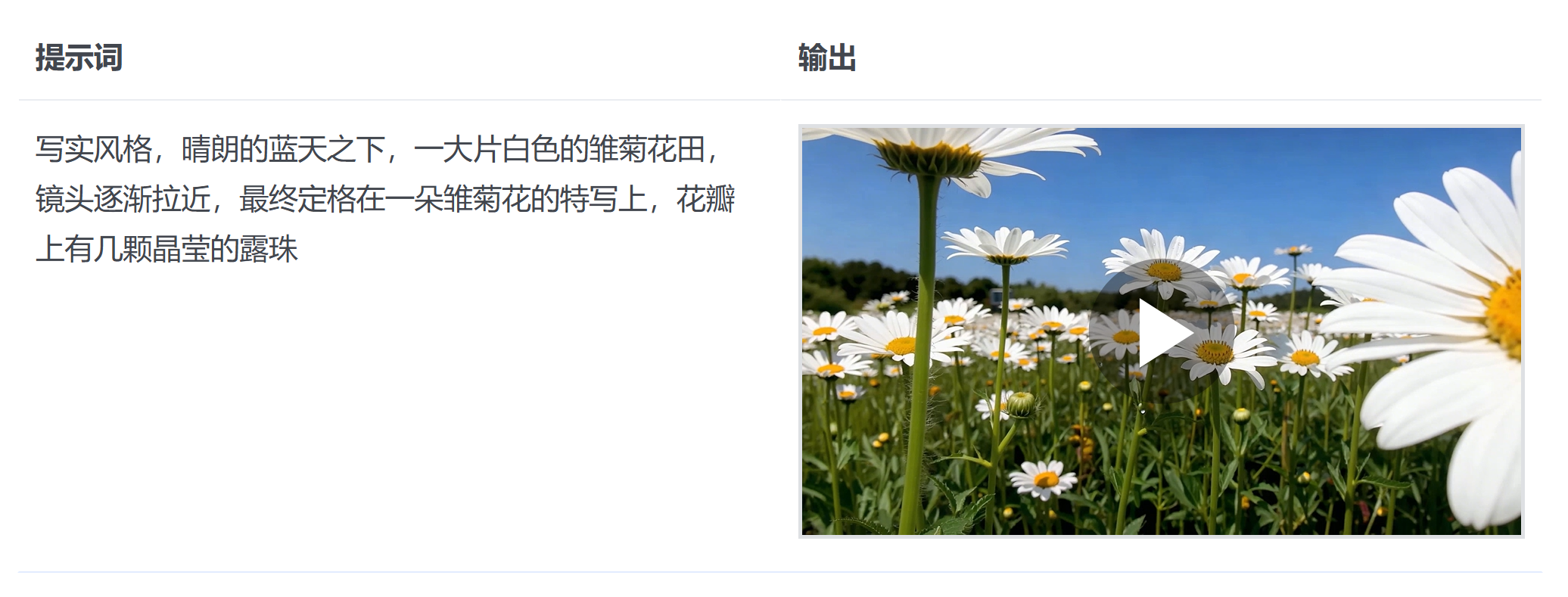
                "text": "写实风格,晴朗的蓝天之下,一大片白色的雏菊花田,镜头逐渐拉近,最终定格在一朵雏菊花的特写上,花瓣上有几颗晶莹的露珠"
            }
        ]
    )
    print(create_result)

    # Polling query section
    print("----- polling task status -----")
    task_id = create_result.id
    while True:
        get_result = client.content_generation.tasks.get(task_id=task_id)
        status = get_result.status
        if status == "succeeded":
            print("----- task succeeded -----")
            print(get_result)
            break
        elif status == "failed":
            print("----- task failed -----")
            print(f"Error: {get_result.error}")
            break
        else:
            print(f"Current status: {status}, Retrying after 10 seconds...")
time.sleep(10)- Java调用
java
package com.ark.sample;

import com.volcengine.ark.runtime.model.content.generation.*;
import com.volcengine.ark.runtime.model.content.generation.CreateContentGenerationTaskRequest.Content;
import com.volcengine.ark.runtime.service.ArkService;
import okhttp3.ConnectionPool;
import okhttp3.Dispatcher;

import java.util.ArrayList;
import java.util.List;
import java.util.concurrent.TimeUnit;

public class ContentGenerationTaskExample {
    // Make sure that you have stored the API Key in the environment variable ARK_API_KEY
    // Initialize the Ark client to read your API Key from an environment variable
    static String apiKey = System.getenv("ARK_API_KEY");
    static ConnectionPool connectionPool = new ConnectionPool(5, 1, TimeUnit.SECONDS);
    static Dispatcher dispatcher = new Dispatcher();
    static ArkService service = ArkService.builder()
           .baseUrl("https://ark.cn-beijing.volces.com/api/v3") // The base URL for model invocation
           .dispatcher(dispatcher)
           .connectionPool(connectionPool)
           .apiKey(apiKey)
           .build();

    public static void main(String[] args) {
        String model = "doubao-seedance-1-5-pro-251215"; // Replace with Model ID

        System.out.println("----- create request -----");
        List<Content> contents = new ArrayList<>();

        // Combination of text prompt and parameters
        contents.add(Content.builder()
                .type("text")
                .text("写实风格,晴朗的蓝天之下,一大片白色的雏菊花田,镜头逐渐拉近,最终定格在一朵雏菊花的特写上,花瓣上有几颗晶莹的露珠")
                .build());

        // Create a video generation task
        CreateContentGenerationTaskRequest createRequest = CreateContentGenerationTaskRequest.builder()
                .model(model)
                .content(contents)
                .build();

        CreateContentGenerationTaskResult createResult = service.createContentGenerationTask(createRequest);
        System.out.println(createResult);

        // Get the details of the task
        String taskId = createResult.getId();
        GetContentGenerationTaskRequest getRequest = GetContentGenerationTaskRequest.builder()
                .taskId(taskId)
                .build();

        // Polling query section
        System.out.println("----- polling task status -----");
        while (true) {
            try {
                GetContentGenerationTaskResponse getResponse = service.getContentGenerationTask(getRequest);
                String status = getResponse.getStatus();
                if ("succeeded".equalsIgnoreCase(status)) {
                    System.out.println("----- task succeeded -----");
                    System.out.println(getResponse);
                    break;
                } else if ("failed".equalsIgnoreCase(status)) {
                    System.out.println("----- task failed -----");
                    System.out.println("Error: " + getResponse.getStatus());
                    break;
                } else {
                    System.out.printf("Current status: %s, Retrying in 10 seconds...", status);
                    TimeUnit.SECONDS.sleep(10);
                }
            } catch (InterruptedException ie) {
                Thread.currentThread().interrupt();
                System.err.println("Polling interrupted");
                break;
            }
        }
    }
}
3.2 图生视频
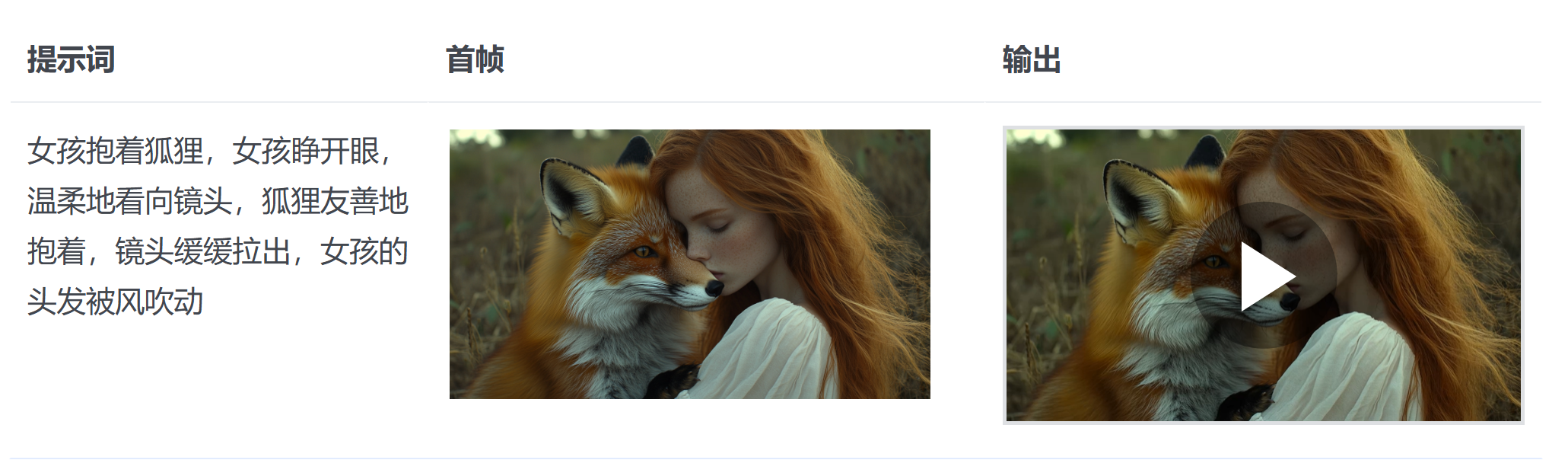
3.2.1 基于首帧
- Python调用
python
import os
import time
# Install SDK:  pip install 'volcengine-python-sdk[ark]'
from volcenginesdkarkruntime import Ark
from dotenv import load_dotenv
load_dotenv()

# Make sure that you have stored the API Key in the environment variable ARK_API_KEY
# Initialize the Ark client to read your API Key from an environment variable
client = Ark(
    # This is the default path. You can configure it based on the service location
    base_url="https://ark.cn-beijing.volces.com/api/v3",
    # Get API Key:https://console.volcengine.com/ark/region:ark+cn-beijing/apikey
    api_key=os.getenv("ARK_API_KEY"),
)

if __name__ == "__main__":
    print("----- create request -----")
    create_result = client.content_generation.tasks.create(
        model="doubao-seedance-1-5-pro-251215", # Replace with Model ID
        content=[
            {
                # Combination of text prompt and parameters
                "type": "text",
                "text": "女孩抱着狐狸,女孩睁开眼,温柔地看向镜头,狐狸友善地抱着,镜头缓缓拉出,女孩的头发被风吹动  --ratio adaptive  --dur 5"
            },
            {
                # The URL of the first frame image
                "type": "image_url",
                "image_url": {
                    "url": "https://ark-project.tos-cn-beijing.volces.com/doc_image/i2v_foxrgirl.png"
                }
            }
        ]
    )
    print(create_result)

    # Polling query section
    print("----- polling task status -----")
    task_id = create_result.id
    while True:
        get_result = client.content_generation.tasks.get(task_id=task_id)
        status = get_result.status
        if status == "succeeded":
            print("----- task succeeded -----")
            print(get_result)
            break
        elif status == "failed":
            print("----- task failed -----")
            print(f"Error: {get_result.error}")
            break
        else:
            print(f"Current status: {status}, Retrying after 10 seconds...")
time.sleep(10)- Java调用
java
package com.ark.sample;

import com.volcengine.ark.runtime.model.content.generation.*;
import com.volcengine.ark.runtime.model.content.generation.CreateContentGenerationTaskRequest.Content;
import com.volcengine.ark.runtime.service.ArkService;
import okhttp3.ConnectionPool;
import okhttp3.Dispatcher;

import java.util.ArrayList;
import java.util.List;
import java.util.concurrent.TimeUnit;

public class ContentGenerationTaskExample {
    // Make sure that you have stored the API Key in the environment variable ARK_API_KEY
    // Initialize the Ark client to read your API Key from an environment variable
    static String apiKey = System.getenv("ARK_API_KEY");
    static ConnectionPool connectionPool = new ConnectionPool(5, 1, TimeUnit.SECONDS);
    static Dispatcher dispatcher = new Dispatcher();
    static ArkService service = ArkService.builder()
           .baseUrl("https://ark.cn-beijing.volces.com/api/v3") // The base URL for model invocation
           .dispatcher(dispatcher)
           .connectionPool(connectionPool)
           .apiKey(apiKey)
           .build();

    public static void main(String[] args) {
        String model = "doubao-seedance-1-5-pro-251215"; // Replace with Model ID

        System.out.println("----- create request -----");
        List<Content> contents = new ArrayList<>();

        // Combination of text prompt and parameters
        contents.add(Content.builder()
                .type("text")
                .text("女孩抱着狐狸,女孩睁开眼,温柔地看向镜头,狐狸友善地抱着,镜头缓缓拉出,女孩的头发被风吹动  --ratio adaptive  --dur 5")
                .build());
        // The URL of the first frame image
        contents.add(Content.builder()
                .type("image_url")
                .imageUrl(CreateContentGenerationTaskRequest.ImageUrl.builder()
                        .url("https://ark-project.tos-cn-beijing.volces.com/doc_image/i2v_foxrgirl.png")
                        .build())
                .build());

        // Create a video generation task
        CreateContentGenerationTaskRequest createRequest = CreateContentGenerationTaskRequest.builder()
                .model(model)
                .content(contents)
                .build();

        CreateContentGenerationTaskResult createResult = service.createContentGenerationTask(createRequest);
        System.out.println(createResult);

        // Get the details of the task
        String taskId = createResult.getId();
        GetContentGenerationTaskRequest getRequest = GetContentGenerationTaskRequest.builder()
                .taskId(taskId)
                .build();

        // Polling query section
        System.out.println("----- polling task status -----");
        while (true) {
            try {
                GetContentGenerationTaskResponse getResponse = service.getContentGenerationTask(getRequest);
                String status = getResponse.getStatus();
                if ("succeeded".equalsIgnoreCase(status)) {
                    System.out.println("----- task succeeded -----");
                    System.out.println(getResponse);
                    break;
                } else if ("failed".equalsIgnoreCase(status)) {
                    System.out.println("----- task failed -----");
                    System.out.println("Error: " + getResponse.getStatus());
                    break;
                } else {
                    System.out.printf("Current status: %s, Retrying in 10 seconds...", status);
                    TimeUnit.SECONDS.sleep(10);
                }
            } catch (InterruptedException ie) {
                Thread.currentThread().interrupt();
                System.err.println("Polling interrupted");
                break;
            }
        }
    }
}
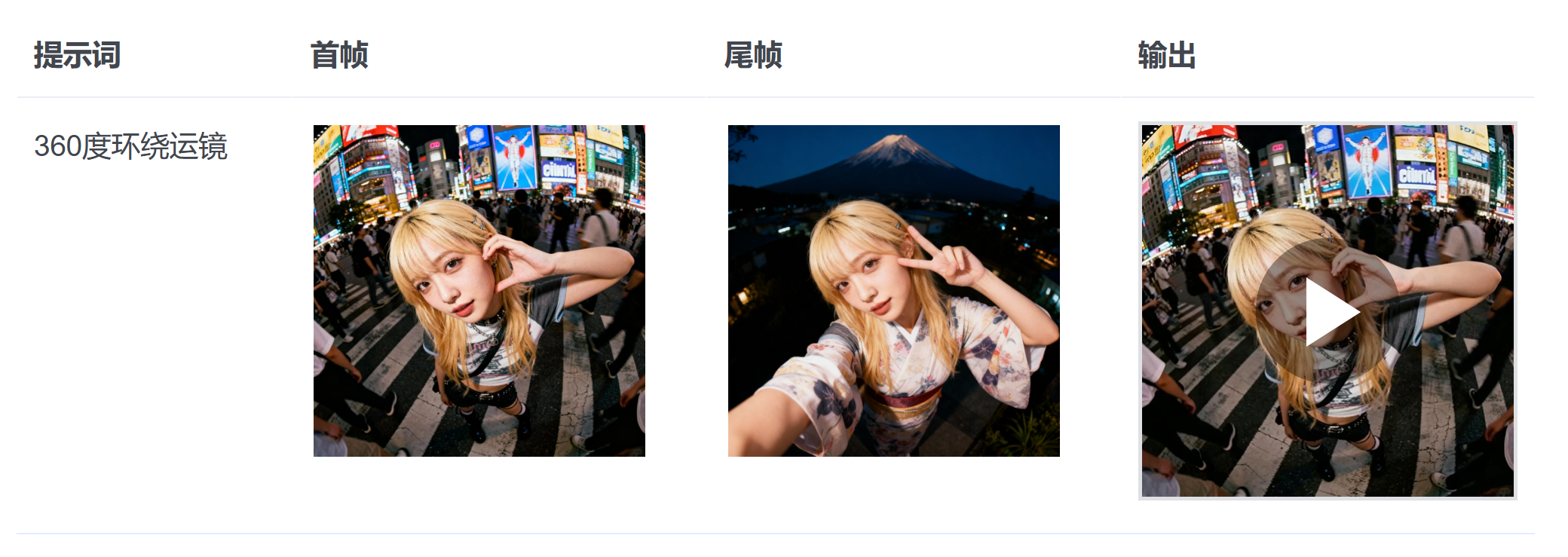
3.2.2 基于首尾帧
- Python调用
python
import os
import time
# Install SDK:  pip install 'volcengine-python-sdk[ark]'
from volcenginesdkarkruntime import Ark
from dotenv import load_dotenv
load_dotenv()

client = Ark(
    # This is the default path. You can configure it based on the service location
    base_url="https://ark.cn-beijing.volces.com/api/v3",
    # Get API Key:https://console.volcengine.com/ark/region:ark+cn-beijing/apikey
    api_key=os.getenv("ARK_API_KEY"),
)

if __name__ == "__main__":
    print("----- create request -----")
    create_result = client.content_generation.tasks.create(
        model="doubao-seedance-1-5-pro-251215",  # Replace with Model ID
        content=[
            {
                # Combination of text prompt and parameters
                "type": "text",
                "text": "360度环绕运镜"
            },
            {
                # The URL of the first frame image
                "type": "image_url",
                "image_url": {
                    "url": "https://ark-project.tos-cn-beijing.volces.com/doc_image/seepro_first_frame.jpeg"
                },
                "role": "first_frame"
    },
    {
        # The URL of the last frame image
        "type": "image_url",
        "image_url": {
            "url": "https://ark-project.tos-cn-beijing.volces.com/doc_image/seepro_last_frame.jpeg"
        },
        "role": "last_frame"
    }
    ]
    )
    print(create_result)

    # Polling query section
    print("----- polling task status -----")
    task_id = create_result.id
    while True:
        get_result = client.content_generation.tasks.get(task_id=task_id)
        status = get_result.status
        if status == "succeeded":
            print("----- task succeeded -----")
            print(get_result)
            break
        elif status == "failed":
            print("----- task failed -----")
            print(f"Error: {get_result.error}")
            break
        else:
            print(f"Current status: {status}, Retrying after 10 seconds...")
time.sleep(10)- Java调用
java
package com.ark.sample;

import com.volcengine.ark.runtime.model.content.generation.*;
import com.volcengine.ark.runtime.model.content.generation.CreateContentGenerationTaskRequest.Content;
import com.volcengine.ark.runtime.service.ArkService;
import okhttp3.ConnectionPool;
import okhttp3.Dispatcher;

import java.util.ArrayList;
import java.util.List;
import java.util.concurrent.TimeUnit;

public class ContentGenerationTaskExample {
    // Make sure that you have stored the API Key in the environment variable ARK_API_KEY
    // Initialize the Ark client to read your API Key from an environment variable
    static String apiKey = System.getenv("ARK_API_KEY");
    static ConnectionPool connectionPool = new ConnectionPool(5, 1, TimeUnit.SECONDS);
    static Dispatcher dispatcher = new Dispatcher();
    static ArkService service = ArkService.builder()
           .baseUrl("https://ark.cn-beijing.volces.com/api/v3") // The base URL for model invocation
           .dispatcher(dispatcher)
           .connectionPool(connectionPool)
           .apiKey(apiKey)
           .build();

    public static void main(String[] args) {
        String model = "doubao-seedance-1-5-pro-251215"; // Replace with Model ID

        System.out.println("----- create request -----");
        List<Content> contents = new ArrayList<>();

        // Combination of text prompt and parameters
        contents.add(Content.builder()
                .type("text")
                .text("360度环绕运镜")
                .build());
         // The URL of the first frame image
        contents.add(Content.builder()
                .type("image_url")
                .imageUrl(CreateContentGenerationTaskRequest.ImageUrl.builder()
                        .url("https://ark-project.tos-cn-beijing.volces.com/doc_image/seepro_first_frame.jpeg")
                        .build())
                .role("first_frame")
                .build());

        // The URL of the last frame image
        contents.add(Content.builder()
                .type("image_url")
                .imageUrl(CreateContentGenerationTaskRequest.ImageUrl.builder()
                        .url("https://ark-project.tos-cn-beijing.volces.com/doc_image/seepro_last_frame.jpeg")
                        .build())
                .role("last_frame")
                .build());

        // Create a video generation task
        CreateContentGenerationTaskRequest createRequest = CreateContentGenerationTaskRequest.builder()
                .model(model)
                .content(contents)
                .build();

        CreateContentGenerationTaskResult createResult = service.createContentGenerationTask(createRequest);
        System.out.println(createResult);

        // Get the details of the task
        String taskId = createResult.getId();
        GetContentGenerationTaskRequest getRequest = GetContentGenerationTaskRequest.builder()
                .taskId(taskId)
                .build();

        // Polling query section
        System.out.println("----- polling task status -----");
        while (true) {
            try {
                GetContentGenerationTaskResponse getResponse = service.getContentGenerationTask(getRequest);
                String status = getResponse.getStatus();
                if ("succeeded".equalsIgnoreCase(status)) {
                    System.out.println("----- task succeeded -----");
                    System.out.println(getResponse);
                    break;
                } else if ("failed".equalsIgnoreCase(status)) {
                    System.out.println("----- task failed -----");
                    System.out.println("Error: " + getResponse.getStatus());
                    break;
                } else {
                    System.out.printf("Current status: %s, Retrying in 10 seconds...", status);
                    TimeUnit.SECONDS.sleep(10);
                }
            } catch (InterruptedException ie) {
                Thread.currentThread().interrupt();
                System.err.println("Polling interrupted");
                break;
            }
        }
    }
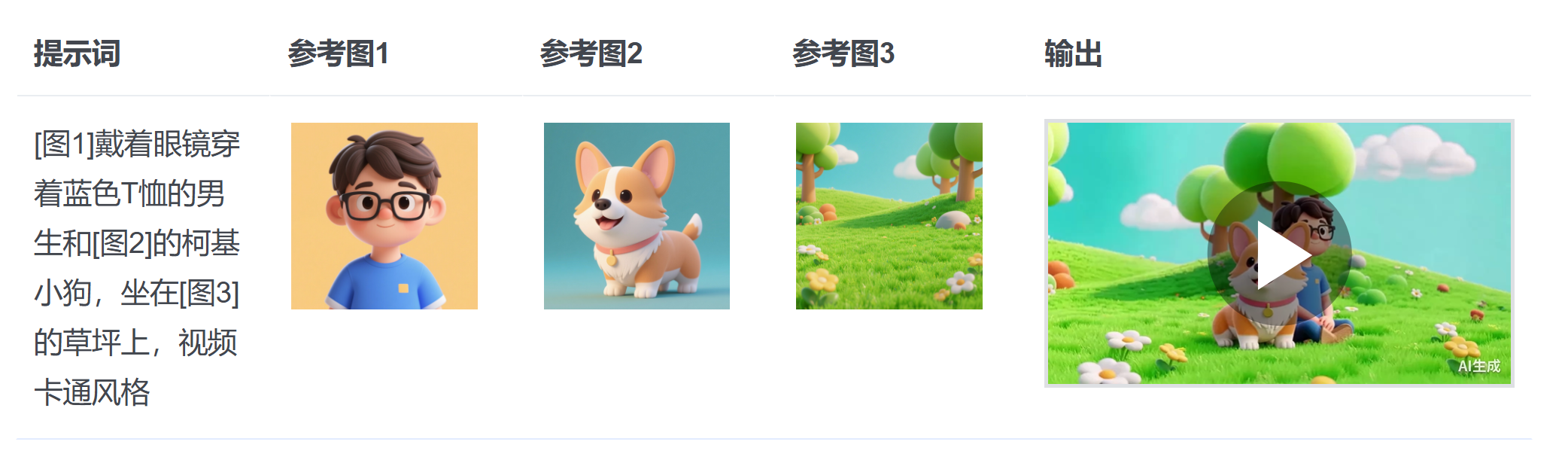
3.2.3 基于参考图
- Python调用
python
import os
import time
# Install SDK:  pip install 'volcengine-python-sdk[ark]'
from volcenginesdkarkruntime import Ark
from dotenv import load_dotenv
load_dotenv()


# Make sure that you have stored the API Key in the environment variable ARK_API_KEY
# Initialize the Ark client to read your API Key from an environment variable
client = Ark(
    # This is the default path. You can configure it based on the service location
    base_url="https://ark.cn-beijing.volces.com/api/v3",
    # Get API Key:https://console.volcengine.com/ark/region:ark+cn-beijing/apikey
    api_key=os.getenv("ARK_API_KEY"),
)

if __name__ == "__main__":
    print("----- create request -----")
    try:
        create_result = client.content_generation.tasks.create(
            model="doubao-seedance-1-0-lite-i2v-250428",  # Replace with Model ID
            content=[
                {
                    # Combination of text prompt and parameters
                    "type": "text",
                    "text": "[图1]戴着眼镜穿着蓝色T恤的男生和[图2]的柯基小狗,坐在[图3]的草坪上,视频卡通风格"
                },
                {
                    # The URL of the first reference image
                    # 1-4 reference images need to be provided
                    "type": "image_url",
                    "image_url": {
                        "url": "https://ark-project.tos-cn-beijing.volces.com/doc_image/seelite_ref_1.png"
                    },
                    "role": "reference_image"
                },
                {
                    # The URL of the second reference image
                    "type": "image_url",
                    "image_url": {
                        "url": "https://ark-project.tos-cn-beijing.volces.com/doc_image/seelite_ref_2.png"
                    },
                    "role": "reference_image"
                },
                {
                    # The URL of the third reference image
                    "type": "image_url",
                    "image_url": {
                        "url": "https://ark-project.tos-cn-beijing.volces.com/doc_image/seelite_ref_3.png"
                    },
                    "role": "reference_image"
                }
            ]
        )
        print(create_result)

        # Polling query section
        print("----- polling task status -----")
        task_id = create_result.id
        while True:
            get_result = client.content_generation.tasks.get(task_id=task_id)
            status = get_result.status
            if status == "succeeded":
                print("----- task succeeded -----")
                print(get_result)
                break
            elif status == "failed":
                print("----- task failed -----")
                print(f"Error: {get_result.error}")
                break
            else:
                print(f"Current status: {status}, Retrying after 10 seconds...")
                time.sleep(10)
    except Exception as e:
print(f"An error occurred: {e}")- Java调用
java
package com.ark.sample;

import com.volcengine.ark.runtime.model.content.generation.*;
import com.volcengine.ark.runtime.model.content.generation.CreateContentGenerationTaskRequest.Content;
import com.volcengine.ark.runtime.service.ArkService;
import okhttp3.ConnectionPool;
import okhttp3.Dispatcher;

import java.util.ArrayList;
import java.util.List;
import java.util.concurrent.TimeUnit;


public class ContentGenerationTaskExample {
    // Make sure that you have stored the API Key in the environment variable ARK_API_KEY
    // Initialize the Ark client to read your API Key from an environment variable
    static String apiKey = System.getenv("ARK_API_KEY");
    static ConnectionPool connectionPool = new ConnectionPool(5, 1, TimeUnit.SECONDS);
    static Dispatcher dispatcher = new Dispatcher();
    static ArkService service = ArkService.builder()
           .baseUrl("https://ark.cn-beijing.volces.com/api/v3") // The base URL for model invocation
           .dispatcher(dispatcher)
           .connectionPool(connectionPool)
           .apiKey(apiKey)
           .build();

    public static void main(String[] args) {
        String model = "doubao-seedance-1-0-lite-i2v-250428"; // Replace with Model ID

        System.out.println("----- create request -----");
        List<Content> contents = new ArrayList<>();

        // Combination of text prompt and parameters
        contents.add(Content.builder()
                .type("text")
                .text("[图1]戴着眼镜穿着蓝色T恤的男生和[图2]的柯基小狗,坐在[图3]的草坪上,视频卡通风格")
                .build());
        // The URL of the first reference image
        contents.add(Content.builder()
                .type("image_url")
                .imageUrl(CreateContentGenerationTaskRequest.ImageUrl.builder()
                        .url("https://ark-project.tos-cn-beijing.volces.com/doc_image/seelite_ref_1.png")
                        .build())
                .role("reference_image")
                .build());
        // The URL of the second reference image
        contents.add(Content.builder()
                .type("image_url")
                .imageUrl(CreateContentGenerationTaskRequest.ImageUrl.builder()
                        .url("https://ark-project.tos-cn-beijing.volces.com/doc_image/seelite_ref_2.png")
                        .build())
                .role("reference_image")
                .build());
        // The URL of the third reference image
        contents.add(Content.builder()
                .type("image_url")
                .imageUrl(CreateContentGenerationTaskRequest.ImageUrl.builder()
                        .url("https://ark-project.tos-cn-beijing.volces.com/doc_image/seelite_ref_3.png")
                        .build())
                .role("reference_image")
                .build());

        // Create a video generation task
        CreateContentGenerationTaskRequest createRequest = CreateContentGenerationTaskRequest.builder()
                .model(model)
                .content(contents)
                .build();

        CreateContentGenerationTaskResult createResult = service.createContentGenerationTask(createRequest);
        System.out.println(createResult);

        // Get the details of the task
        String taskId = createResult.getId();
        GetContentGenerationTaskRequest getRequest = GetContentGenerationTaskRequest.builder()
                .taskId(taskId)
                .build();

        // Polling query section
        System.out.println("----- polling task status -----");
        while (true) {
            try {
                GetContentGenerationTaskResponse getResponse = service.getContentGenerationTask(getRequest);
                String status = getResponse.getStatus();
                if ("succeeded".equalsIgnoreCase(status)) {
                    System.out.println("----- task succeeded -----");
                    System.out.println(getResponse);
                    break;
                } else if ("failed".equalsIgnoreCase(status)) {
                    System.out.println("----- task failed -----");
                    System.out.println("Error: " + getResponse.getStatus());
                    break;
                } else {
                    System.out.printf("Current status: %s, Retrying in 10 seconds...", status);
                    TimeUnit.SECONDS.sleep(10);
                }
            } catch (InterruptedException ie) {
                Thread.currentThread().interrupt();
                System.err.println("Polling interrupted");
                break;
            }
        }
    }
}