java 实现常见加解密算法
1. 创建 Maven 项目

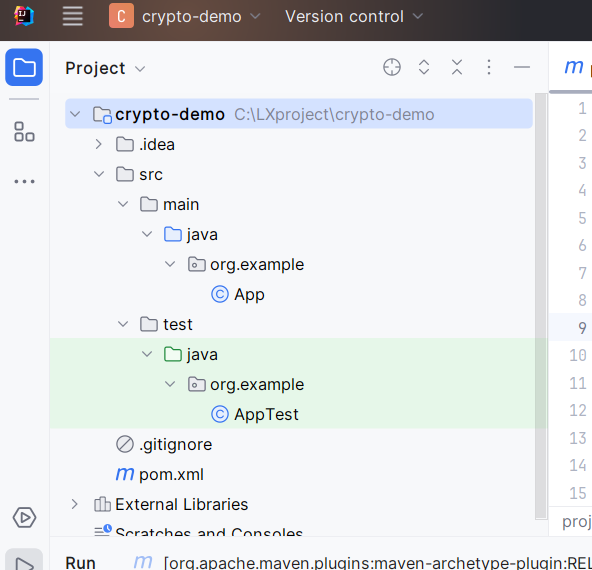
2. 项目结构
创建后的项目结构如下:
3. 添加依赖
这里主要使用 Java 内置的加密库,pom.xml不需要添加额外依赖
4. 实现常见加解密算法
修改 src/main/java/com/example/App.java 文件,实现多种加解密算法:
java
package org.example;

import javax.crypto.Cipher;
import javax.crypto.KeyGenerator;
import javax.crypto.SecretKey;
import javax.crypto.spec.SecretKeySpec;
import java.nio.charset.StandardCharsets;
import java.security.*;
import java.util.Base64;

import static java.util.Base64.*;

public class App {

    public static void main(String[] args) throws Exception {
        String originalText = "这是一段需要加密的文本";

        System.out.println("原始文本: " + originalText);
        System.out.println("----------------------------------");

        // 1. AES 对称加密
        String aesEncrypted = aesEncrypt(originalText, "1234567890123456");
        System.out.println("AES加密后: " + aesEncrypted);
        System.out.println("AES解密后: " + aesDecrypt(aesEncrypted, "1234567890123456"));
        System.out.println("----------------------------------");

        // 2. DES 对称加密
        String desEncrypted = desEncrypt(originalText, "12345678");
        System.out.println("DES加密后: " + desEncrypted);
        System.out.println("DES解密后: " + desDecrypt(desEncrypted, "12345678"));
        System.out.println("----------------------------------");

        // 3. RSA 非对称加密
        KeyPair keyPair = generateRSAKeyPair();
        String rsaEncrypted = rsaEncrypt(originalText, keyPair.getPublic());
        System.out.println("RSA加密后: " + rsaEncrypted);
        System.out.println("RSA解密后: " + rsaDecrypt(rsaEncrypted, keyPair.getPrivate()));
        System.out.println("----------------------------------");

        // 4. MD5 哈希 (不可逆)
        String md5Hash = md5Hash(originalText);
        System.out.println("MD5哈希: " + md5Hash);
        System.out.println("----------------------------------");

        // 5. SHA-256 哈希 (不可逆)
        String sha256Hash = sha256Hash(originalText);
        System.out.println("SHA-256哈希: " + sha256Hash);
    }

    // AES 加密
    public static String aesEncrypt(String data, String key) throws Exception {
        SecretKeySpec secretKey = new SecretKeySpec(key.getBytes(StandardCharsets.UTF_8), "AES");
        Cipher cipher = Cipher.getInstance("AES");
        cipher.init(Cipher.ENCRYPT_MODE, secretKey);
        byte[] encryptedBytes = cipher.doFinal(data.getBytes(StandardCharsets.UTF_8));
        return getEncoder().encodeToString(encryptedBytes);
    }

    // AES 解密
    public static String aesDecrypt(String encryptedData, String key) throws Exception {
        SecretKeySpec secretKey = new SecretKeySpec(key.getBytes(StandardCharsets.UTF_8), "AES");
        Cipher cipher = Cipher.getInstance("AES");
        cipher.init(Cipher.DECRYPT_MODE, secretKey);
        byte[] decodedBytes = getDecoder().decode(encryptedData);
        byte[] decryptedBytes = cipher.doFinal(decodedBytes);
        return new String(decryptedBytes, StandardCharsets.UTF_8);
    }

    // DES 加密
    public static String desEncrypt(String data, String key) throws Exception {
        SecretKeySpec secretKey = new SecretKeySpec(key.getBytes(StandardCharsets.UTF_8), "DES");
        Cipher cipher = Cipher.getInstance("DES");
        cipher.init(Cipher.ENCRYPT_MODE, secretKey);
        byte[] encryptedBytes = cipher.doFinal(data.getBytes(StandardCharsets.UTF_8));
        return getEncoder().encodeToString(encryptedBytes);
    }

    // DES 解密
    public static String desDecrypt(String encryptedData, String key) throws Exception {
        SecretKeySpec secretKey = new SecretKeySpec(key.getBytes(StandardCharsets.UTF_8), "DES");
        Cipher cipher = Cipher.getInstance("DES");
        cipher.init(Cipher.DECRYPT_MODE, secretKey);
        byte[] decodedBytes = getDecoder().decode(encryptedData);
        byte[] decryptedBytes = cipher.doFinal(decodedBytes);
        return new String(decryptedBytes, StandardCharsets.UTF_8);
    }

    // 生成RSA密钥对
    public static KeyPair generateRSAKeyPair() throws Exception {
        KeyPairGenerator keyPairGenerator = KeyPairGenerator.getInstance("RSA");
        keyPairGenerator.initialize(2048); // 密钥长度
        return keyPairGenerator.generateKeyPair();
    }

    // RSA 加密
    public static String rsaEncrypt(String data, PublicKey publicKey) throws Exception {
        Cipher cipher = Cipher.getInstance("RSA");
        cipher.init(Cipher.ENCRYPT_MODE, publicKey);
        byte[] encryptedBytes = cipher.doFinal(data.getBytes(StandardCharsets.UTF_8));
        return getEncoder().encodeToString(encryptedBytes);
    }

    // RSA 解密
    public static String rsaDecrypt(String encryptedData, PrivateKey privateKey) throws Exception {
        Cipher cipher = Cipher.getInstance("RSA");
        cipher.init(Cipher.DECRYPT_MODE, privateKey);
        byte[] decodedBytes = getDecoder().decode(encryptedData);
        byte[] decryptedBytes = cipher.doFinal(decodedBytes);
        return new String(decryptedBytes, StandardCharsets.UTF_8);
    }

    // MD5 哈希
    public static String md5Hash(String data) throws Exception {
        MessageDigest md = MessageDigest.getInstance("MD5");
        byte[] hashBytes = md.digest(data.getBytes(StandardCharsets.UTF_8));
        return bytesToHex(hashBytes);
    }

    // SHA-256 哈希
    public static String sha256Hash(String data) throws Exception {
        MessageDigest md = MessageDigest.getInstance("SHA-256");
        byte[] hashBytes = md.digest(data.getBytes(StandardCharsets.UTF_8));
        return bytesToHex(hashBytes);
    }

    // 字节数组转十六进制字符串
    private static String bytesToHex(byte[] bytes) {
        StringBuilder hexString = new StringBuilder();
        for (byte b : bytes) {
            String hex = Integer.toHexString(0xff & b);
            if (hex.length() == 1) {
                hexString.append('0');
            }
            hexString.append(hex);
        }
        return hexString.toString();
    }
}
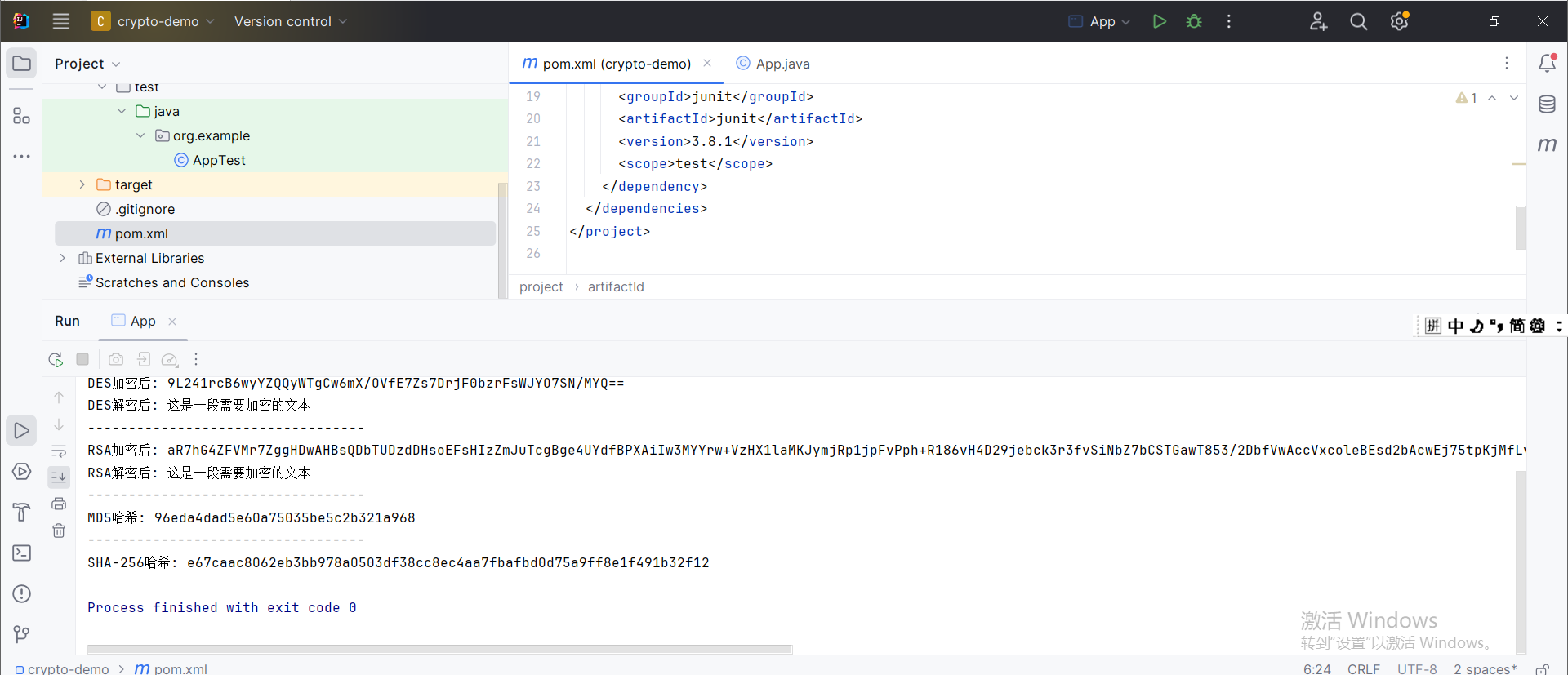
5. 运行项目
编译并运行项目:
6. 加解密算法说明
对称加密算法
-
AES (Advanced Encryption Standard)
- 密钥长度:128、192或256位(示例中使用16字节=128位)
- 安全高效,推荐使用
-
DES (Data Encryption Standard)
- 密钥长度:56位(示例中使用8字节,其中每位实际有效)
- 已被认为不够安全,不建议在新系统中使用
非对称加密算法
- RSA
- 使用公钥加密,私钥解密
- 适用于少量数据加密或密钥交换
- 示例中生成2048位密钥对
哈希算法(不可逆)
-
MD5
- 生成128位哈希值
- 已被认为不够安全,不应用于密码存储
-
SHA-256
- 生成256位哈希值
- 比MD5更安全,推荐使用
7. 注意事项
- 密钥管理:实际应用中,密钥需要安全存储,不能硬编码在代码中
- 加密模式:示例中使用默认模式,实际应用可能需要指定模式(如AES/CBC/PKCS5Padding)
- 异常处理:示例中简化了异常处理,实际应用需要更完善的错误处理
- 性能考虑:非对称加密(如RSA)比对称加密慢,通常用于加密对称密钥
- 盐值:哈希时建议使用盐值防止彩虹表攻击
8. 扩展建议
- 对于密码存储,建议使用加盐的哈希算法如PBKDF2、bcrypt或scrypt
- 考虑使用更现代的加密库如Google Tink或Bouncy Castle
- 对于大量数据加密,考虑使用对称加密加密数据,非对称加密加密对称密钥