1、打开docx文件,点击选项-自定义功能区-勾选开发工具
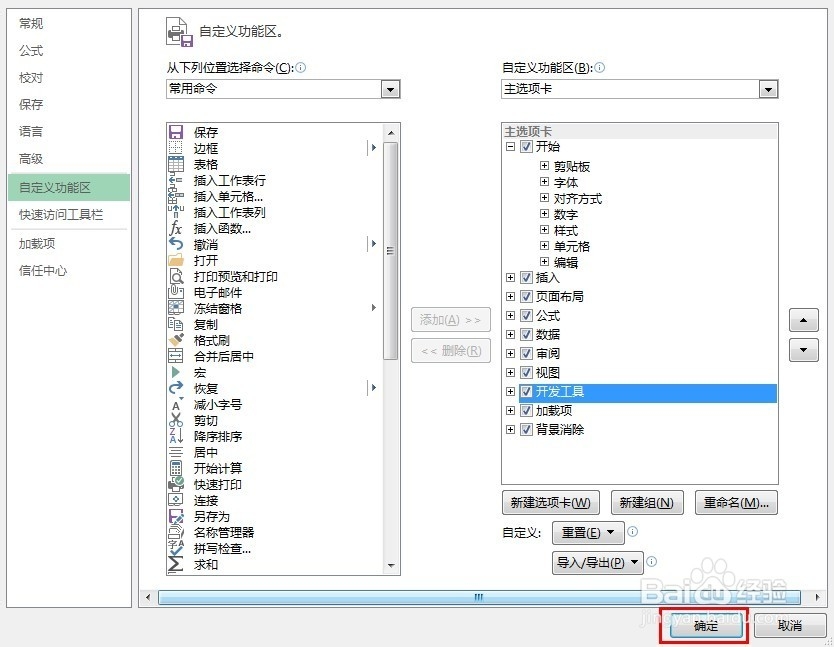
2、开发工具-新建宏-新建模块,输入代码
vbscript
Option Explicit ' 强制变量声明,避免类型错误

' 定义全局变量:存储根源文件夹路径,供递归函数调用
Dim g_rootSourcePath As String

Sub BatchConvertToPDF_Recursive_ToSpecifiedPath()
    Dim rootTargetPath As String

    ' 获取源文件夹(存放docx的根目录)和目标文件夹(保存PDF的根目录)
    g_rootSourcePath = InputBox("请输入存放docx文件的根文件夹路径", "源路径输入")
    If g_rootSourcePath = "" Then Exit Sub
    rootTargetPath = InputBox("请输入保存PDF的目标文件夹路径", "目标路径输入")
    If rootTargetPath = "" Then Exit Sub

    ' 确保路径末尾带反斜杠
    If Right(g_rootSourcePath, 1) <> "\" Then g_rootSourcePath = g_rootSourcePath & "\"
    If Right(rootTargetPath, 1) <> "\" Then rootTargetPath = rootTargetPath & "\"

    ' 调用递归函数处理所有文件
    Call ConvertFilesInFolder_ToSpecifiedPath(g_rootSourcePath, rootTargetPath)

    MsgBox "所有嵌套文件夹的文档已转换完成,PDF已保存到指定路径!", vbInformation
End Sub

' 递归遍历文件夹及子文件夹,并将PDF输出到指定路径(保持层级)
' sourcePath: 当前处理的源文件夹路径
' targetRootPath: PDF保存的根目标路径
Sub ConvertFilesInFolder_ToSpecifiedPath(sourcePath As String, targetRootPath As String)
    Dim wordFile As String
    Dim doc As Document, fso As Object, folder As Object, subFolders As Object
    Dim subFolder As Object
    Dim relativePath As String, targetFolderPath As String

    ' 创建文件系统对象
    Set fso = CreateObject("Scripting.FileSystemObject")

    ' 【修正1】正确计算相对路径:基于全局的根源文件夹路径
    relativePath = Mid(sourcePath, Len(g_rootSourcePath) + 1)
    ' 拼接当前文件夹对应的目标路径
    targetFolderPath = targetRootPath & relativePath

    ' 【修正2】若目标文件夹不存在,则创建(包括嵌套子文件夹)
    If Not fso.FolderExists(targetFolderPath) Then
        ' CreateFolder只能创建单级文件夹,嵌套需用BuildPath递归创建(兼容深层文件夹)
        fso.CreateFolder targetFolderPath
    End If

    ' 处理当前文件夹的docx文件
    wordFile = Dir(sourcePath & "*.docx")
    Do While wordFile <> ""
        ' 打开源文档(忽略只读文件,避免报错)
        On Error Resume Next ' 遇到无法打开的文件时跳过
        Set doc = Documents.Open(FileName:=sourcePath & wordFile, ReadOnly:=True)
        On Error GoTo 0
        If Not doc Is Nothing Then
            ' 导出PDF到目标文件夹(保持原文件名)
            doc.ExportAsFixedFormat _
                OutputFileName:=targetFolderPath & "\" & Replace(wordFile, ".docx", ".pdf"), _
                ExportFormat:=wdExportFormatPDF, _
                OpenAfterExport:=False, _
                OptimizeFor:=wdExportOptimizeForPrint
            ' 关闭文档不保存修改
            doc.Close SaveChanges:=False
            Set doc = Nothing
        End If
        ' 获取下一个docx文件
        wordFile = Dir()
    Loop

    ' 遍历子文件夹并递归处理
    Set folder = fso.GetFolder(sourcePath)
    Set subFolders = folder.SubFolders
    For Each subFolder In subFolders
        Call ConvertFilesInFolder_ToSpecifiedPath(subFolder.Path & "\", targetRootPath)
    Next subFolder

    ' 释放对象变量,避免内存泄漏
    Set fso = Nothing
    Set folder = Nothing
    Set subFolders = Nothing
    Set subFolder = Nothing
    Set doc = Nothing
End Sub
3、运行即可
再输入要批量转换的文件路径和之后的文件路径