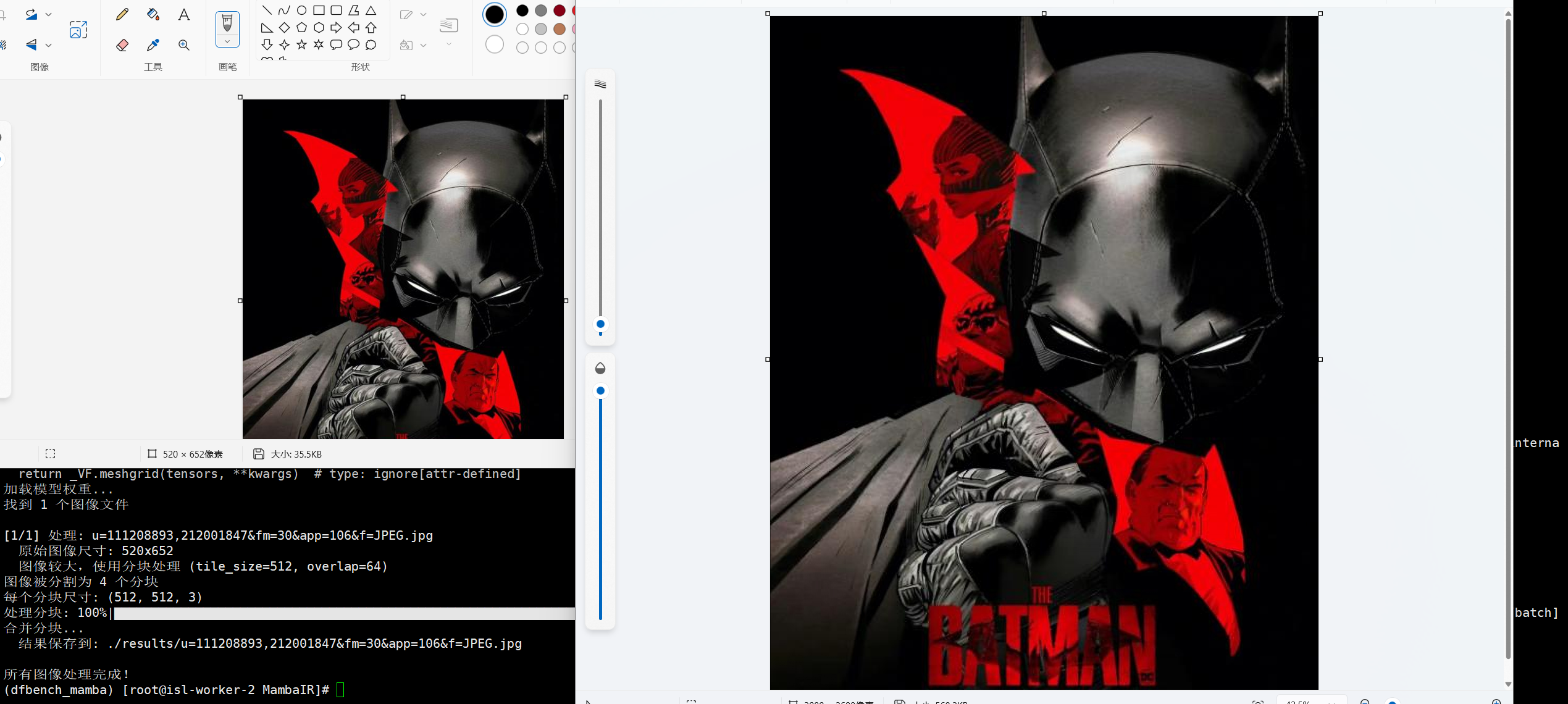
针对大尺寸的图像进行超分容易爆显存,可以通过预估显卡显存,选择合适的尺寸先分块再拼接的方式处理,针对拼接边缘容易存在的分割线条,通过线性渐变加权重叠区域缓解拼接痕迹。
推理脚本
本文提供一个基于MambaIRv2模型的在线推理脚本,对大尺寸图像进行分块超分处理的辅助脚本,方便设备显存有限的同学推理本地图像使用。
MambaIR源代码仓库地址
Mamba环境安装
以BaseSR为例:
python
import torch
import torch.nn as nn
import os
import numpy as np
from tqdm import tqdm
from PIL import Image
from analysis.model_zoo.mambairv2 import buildMambaIRv2Base
from basicsr.utils import FileClient, imfrombytes, img2tensor, tensor2img, imwrite
import cv2
from typing import Tuple

def split_image(img: np.ndarray, tile_size: int = 512, overlap: int = 64) -> Tuple[list, list]:
    """
    将大图像分割成重叠的小块

    Args:
        img: 输入图像 (H, W, C)
        tile_size: 分块大小
        overlap: 重叠区域大小

    Returns:
        tiles: 分块列表
        positions: 每个分块在原图中的位置 (x_start, y_start, x_end, y_end)
    """
    h, w = img.shape[:2]
    tiles = []
    positions = []

    stride = tile_size - overlap

    y_steps = max(1, (h - overlap) // stride + (1 if (h - overlap) % stride > 0 else 0))      # 计算需要多少个分块
    x_steps = max(1, (w - overlap) // stride + (1 if (w - overlap) % stride > 0 else 0))

    for y in range(y_steps):
        for x in range(x_steps):

            y_start = max(0, y * stride)	# 计算分块位置
            x_start = max(0, x * stride)
            y_end = min(h, y_start + tile_size)
            x_end = min(w, x_start + tile_size)

            if y_end - y_start < tile_size:	# 调整起始位置确保分块大小一致
                y_start = max(0, y_end - tile_size)
            if x_end - x_start < tile_size:
                x_start = max(0, x_end - tile_size)

            tile = img[y_start:y_end, x_start:x_end]	# 提取分块
            tiles.append(tile)
            positions.append((x_start, y_start, x_end, y_end))

    return tiles, positions

def merge_tiles(tiles: list, positions: list, original_shape: Tuple[int, int],
                overlap: int = 64) -> np.ndarray:
    """
    将处理后的分块合并回原图,使用加权融合消除接缝

    Args:
        tiles: 处理后的分块列表
        positions: 每个分块在原图中的位置
        original_shape: 原图尺寸 (H, W, C)
        overlap: 重叠区域大小

    Returns:
        merged_img: 合并后的图像
    """
    h, w = original_shape[:2]
    c = tiles[0].shape[2] if len(tiles[0].shape) == 3 else 1

    if c == 1:
        result = np.zeros((h, w), dtype=np.float32)
        weight = np.zeros((h, w), dtype=np.float32)
    else:
        result = np.zeros((h, w, c), dtype=np.float32)
        weight = np.zeros((h, w, c), dtype=np.float32)

    def create_weight_mask(size: int, overlap: int) -> np.ndarray:
        mask = np.ones((size, size), dtype=np.float32)          # 创建权重掩码,中心权重高,边缘权重低

        # 为重叠区域创建线性渐变权重
        if overlap > 0:
            for i in range(overlap):
                weight_val = i / overlap
                mask[i, :] *= weight_val
                mask[-(i+1), :] *= weight_val
                mask[:, i] *= weight_val
                mask[:, -(i+1)] *= weight_val
        return mask

    for tile, (x_start, y_start, x_end, y_end) in zip(tiles, positions):
        tile_h, tile_w = tile.shape[:2]

        weight_mask = create_weight_mask(tile_h, overlap)

        if c > 1:
            weight_mask = np.repeat(weight_mask[:, :, np.newaxis], c, axis=2)

        result[y_start:y_end, x_start:x_start+tile_w] += tile * weight_mask  # 将分块和权重添加到结果中
        weight[y_start:y_end, x_start:x_start+tile_w] += weight_mask

    weight[weight == 0] = 1
    merged_img = result / weight
    merged_img = np.clip(merged_img * 255, 0, 255).astype(np.uint8)

    return merged_img

def process_large_image(model, img: np.ndarray, tile_size: int = 512,
                        overlap: int = 64, batch_size: int = 1) -> np.ndarray:
    """
    处理大图像的分块推理

    Args:
        model: 推理模型
        img: 输入图像 (H, W, C) [0-255]
        tile_size: 分块大小
        overlap: 重叠区域大小
        batch_size: 批处理大小

    Returns:
        output_img: 超分辨率后的图像
    """

    img_float = img.astype(np.float32) / 255.0
    tiles, positions = split_image(img_float, tile_size, overlap)       # 分割图像

    print(f"图像被分割为 {len(tiles)} 个分块")
    print(f"每个分块尺寸: {tiles[0].shape}")

    processed_tiles = []

    with torch.no_grad():
        # 使用tqdm显示处理进度
        for i in tqdm(range(0, len(tiles), batch_size), desc="处理分块", unit="batch"):
            batch_tiles = tiles[i:i+batch_size]

            batch_tensors = []
            for tile in batch_tiles:
                # 转换为tensor
                tensor = img2tensor(tile, bgr2rgb=True, float32=True)
                tensor = tensor.unsqueeze(0).cuda()
                batch_tensors.append(tensor)

            batch_tensor = torch.cat(batch_tensors, dim=0)
            outputs = model(batch_tensor)

            for j in range(outputs.shape[0]):
                output_tensor = outputs[j:j+1]
                output_img = tensor2img([output_tensor.detach().cpu()])
                processed_tiles.append(output_img)

    upscale = 4  # 根据模型设置
    original_h, original_w = img.shape[:2]
    sr_h, sr_w = original_h * upscale, original_w * upscale

    sr_positions = []
    for (x_start, y_start, x_end, y_end) in positions:
        sr_positions.append((
            x_start * upscale,
            y_start * upscale,
            x_end * upscale,
            y_end * upscale
        ))

    sr_tiles = []
    for tile in processed_tiles:
        sr_tiles.append(tile.astype(np.float32) / 255.0)

    print("合并分块...")
    merged_img = merge_tiles(sr_tiles, sr_positions, (sr_h, sr_w, 3), overlap * upscale)

    return merged_img

if __name__ == "__main__":
    model = buildMambaIRv2Base(upscale=4).cuda()
    ckpt_path = './experiments/pretrained_models/mambairv2_classicSR_Base_x4.pth'
    upload_folder = '/root/dn_sr_pics/test_pics/'
    result_folder = './results'

    print("加载模型权重...")
    checkpoint = torch.load(ckpt_path)
    if 'params' in checkpoint:
        model.load_state_dict(checkpoint['params'])
    else:
        model.load_state_dict(checkpoint)
    model.eval()

    os.makedirs(result_folder, exist_ok=True)

    file_list = [f for f in os.listdir(upload_folder)
                 if f.lower().endswith(('.png', '.jpg', '.jpeg', '.bmp', '.tiff'))]

    if not file_list:
        print(f"在 {upload_folder} 中没有找到图像文件")
    else:
        print(f"找到 {len(file_list)} 个图像文件")

    for file_idx, file_name in enumerate(file_list, 1):
        file_path = os.path.join(upload_folder, file_name)
        print(f"\n[{file_idx}/{len(file_list)}] 处理: {file_name}")

        img = cv2.imread(file_path)
        if img is None:
            print(f"  无法读取图像: {file_path}")
            continue

        h, w = img.shape[:2]
        print(f"  原始图像尺寸: {w}x{h}")

        gpu_memory = torch.cuda.get_device_properties(0).total_memory / 1024**3  # GB
        current_memory = torch.cuda.memory_allocated() / 1024**3  # GB

        if gpu_memory < 8:  # 小于8GB显存
            tile_size = 256
            overlap = 32
        elif gpu_memory < 12:  # 小于12GB显存
            tile_size = 384
            overlap = 48
        else:  # 12GB以上显存
            tile_size = 512
            overlap = 64

        max_dim = max(h, w)
        if max_dim > tile_size:
            print(f"  图像较大,使用分块处理 (tile_size={tile_size}, overlap={overlap})")

            # 分块处理
            output_img = process_large_image(
                model, img,
                tile_size=tile_size,
                overlap=overlap,
                batch_size=1  # 根据显存调整
            )
        else:
            print("  图像较小,直接处理")

            img_float = img.astype(np.float32) / 255.
            img_tensor = img2tensor(img_float, bgr2rgb=True, float32=True)
            img_tensor = img_tensor.unsqueeze(0).cuda()

            with torch.no_grad():
                output = model(img_tensor)

            output_img = tensor2img([output.detach().cpu()])

        save_path = os.path.join(result_folder, file_name)
        cv2.imwrite(save_path, output_img)
        print(f"  结果保存到: {save_path}")

        torch.cuda.empty_cache()

    print("\n所有图像处理完成!")
MambaIRv2 超分x4倍处理效果: