玩家控制脚本:PlayerController.cs
csharp
using UnityEngine;

/// <summary>
/// 通用角色移动控制器 - 挂载到【2D精灵】或【3D胶囊体/物体】上
/// 一键切换2D/3D模式,自动适配刚体组件,摇杆控制移动
/// </summary>
public class PlayerController : MonoBehaviour
{
    [Header("===== 通用移动配置 =====")]
    [Tooltip("移动速度,2D/3D通用,数值越大越快")]
    public float moveSpeed = 8f;

    [Header("===== 模式切换【一键切换,不用改代码】 =====")]
    [Tooltip("勾选 = 2D模式(精灵移动) | 取消勾选 = 3D模式(胶囊体移动)")]
    public bool is2DMode = false;

    // 组件缓存
    private Rigidbody rb3D;       // 3D刚体组件
    private Rigidbody2D rb2D;     // 2D刚体组件

    private void Awake()
    {
        // 自动识别并获取对应刚体组件,无需手动赋值
        if (is2DMode)
        {
            rb2D = GetComponent<Rigidbody2D>();
        }
        else
        {
            rb3D = GetComponent<Rigidbody>();
        }
    }

    // 物理移动固定写在FixedUpdate,帧率稳定无抖动,2D/3D通用
    private void FixedUpdate()
    {
        if (is2DMode)
        {
            MovePlayer2D(); // 2D精灵移动逻辑
        }
        else
        {
            MovePlayer3D(); // 3D物体移动逻辑
        }
    }

    /// <summary>
    /// 3D物体移动逻辑 - 胶囊体/立方体等,X-Z平面水平移动,Y轴高度不变
    /// </summary>
    private void MovePlayer3D()
    {
        if (rb3D == null) return;

        // 摇杆方向转3D世界坐标:X→X轴,Y→Z轴,Y轴=0 不浮空不下陷
        Vector3 moveVec = new Vector3(UIController.moveDirection.x, 0, UIController.moveDirection.y);
        // 平滑移动,归一化保证斜向速度一致
        Vector3 targetPos = transform.position + moveVec.normalized * moveSpeed * Time.fixedDeltaTime;
        rb3D.MovePosition(targetPos);
    }

    /// <summary>
    /// 2D精灵移动逻辑 - Sprite,X-Y平面移动,2D游戏标准逻辑
    /// </summary>
    private void MovePlayer2D()
    {
        if (rb2D == null) return;

        // 摇杆方向直接转2D世界坐标:X→X轴,Y→Y轴,完美适配2D平面
        Vector2 moveVec = UIController.moveDirection;
        // 平滑移动,归一化保证斜向速度一致
        Vector2 targetPos = (Vector2)transform.position + moveVec.normalized * moveSpeed * Time.fixedDeltaTime;
        rb2D.MovePosition(targetPos);
    }
}
轮盘控制脚本:UIController
csharp
using UnityEngine;

public class UIController : MonoBehaviour
{
    [Header("摇杆对象 → 拖拽赋值即可(和之前一致)")]
    [SerializeField] private GameObject joystickRoot;
    [SerializeField] private RectTransform fixedBg;
    [SerializeField] private RectTransform moveBtn;

    private float joystickMaxRadius;
    private bool isTouching = false;
    private RectTransform canvasRect;

    public static Vector2 moveDirection;

    private void Start()
    {
        if (joystickRoot != null) joystickRoot.SetActive(false);
        if (fixedBg != null) joystickMaxRadius = fixedBg.sizeDelta.x / 2;
        canvasRect = GetComponent<RectTransform>();
    }

    private void Update()
    {
        // 电脑鼠标 + 手机触摸 双兼容
        if (Input.touchCount > 0)
        {
            Touch touch = Input.GetTouch(0);
            HandleTouch(touch.position, touch.phase);
        }
        else
        {
            if (Input.GetMouseButtonDown(0)) HandleTouch(Input.mousePosition, TouchPhase.Began);
            else if (Input.GetMouseButton(0)) HandleTouch(Input.mousePosition, TouchPhase.Moved);
            else if (Input.GetMouseButtonUp(0)) HandleTouch(Input.mousePosition, TouchPhase.Ended);
        }
    }

    private void HandleTouch(Vector2 screenPos, TouchPhase phase)
    {
        if (joystickRoot == null || fixedBg == null || moveBtn == null || canvasRect == null) return;

        switch (phase)
        {
            case TouchPhase.Began:
                isTouching = true;
                joystickRoot.SetActive(true);
                // 零误差坐标转换,摇杆精准贴合点击位置
                RectTransformUtility.ScreenPointToLocalPointInRectangle(canvasRect, screenPos, null, out Vector2 joystickPos);
                joystickRoot.GetComponent<RectTransform>().anchoredPosition = joystickPos;
                moveBtn.anchoredPosition = Vector2.zero;
                moveDirection = Vector2.zero;
                break;

            case TouchPhase.Moved:
                if (isTouching)
                {
                    RectTransformUtility.ScreenPointToLocalPointInRectangle(fixedBg, screenPos, null, out Vector2 offsetPos);
                    offsetPos = LimitJoystickMove(offsetPos);
                    moveBtn.anchoredPosition = offsetPos;
                    moveDirection = offsetPos.normalized;
                }
                break;

            case TouchPhase.Ended:
            case TouchPhase.Canceled:
                isTouching = false;
                joystickRoot.SetActive(false);
                moveBtn.anchoredPosition = Vector2.zero;
                moveDirection = Vector2.zero;
                break;
        }
    }

    // 限制内圆不超外圆边界
    private Vector2 LimitJoystickMove(Vector2 targetPos)
    {
        float distance = Vector2.Distance(targetPos, Vector2.zero);
        if (distance > joystickMaxRadius)
        {
            targetPos = targetPos.normalized * joystickMaxRadius;
        }
        return targetPos;
    }
}
Unity中的赋值操作和UI构建
-
3D玩家的创建(无需勾选脚本上的Is2D Mode!!! ):
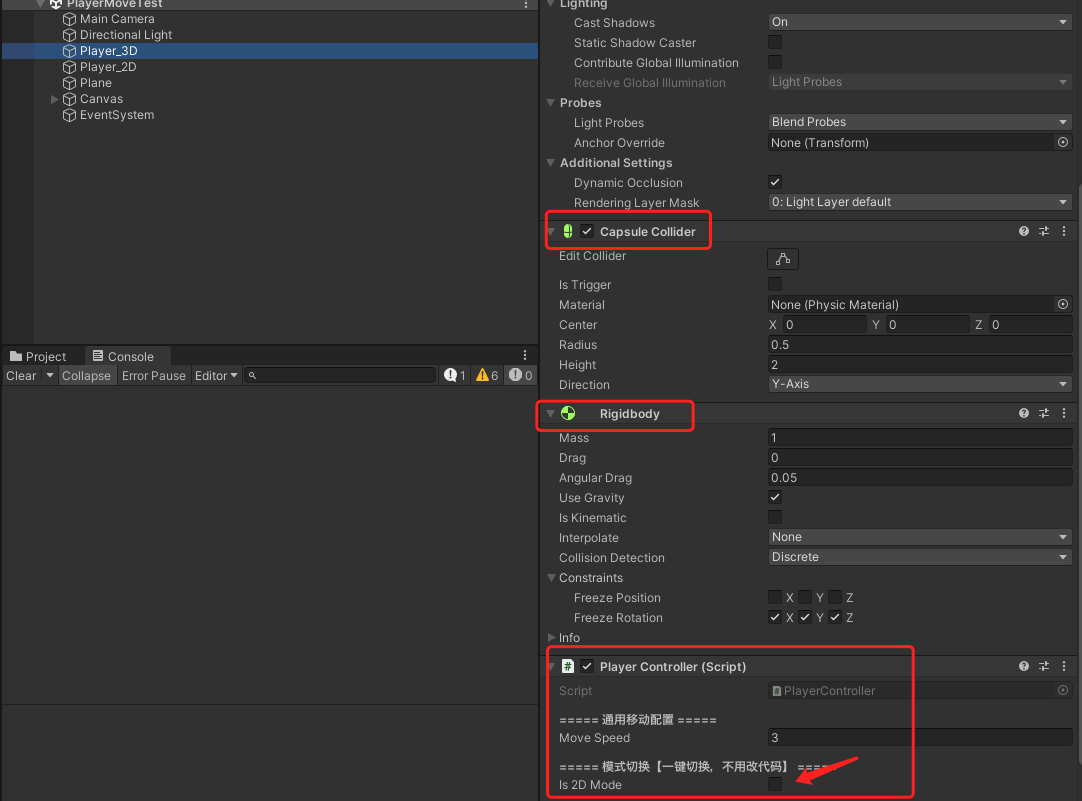
-
2D玩家的创建(需要在脚本上勾选Is2DMode!!!! )
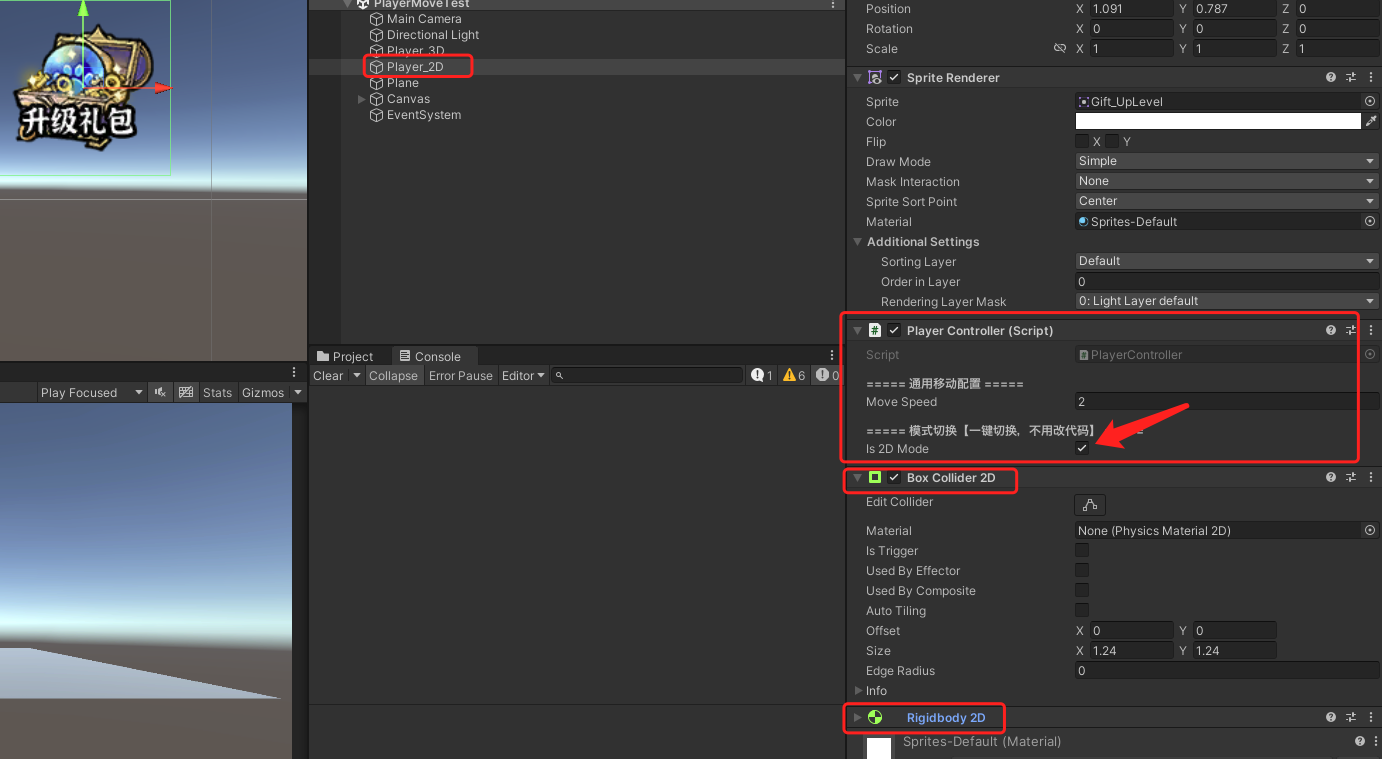
-
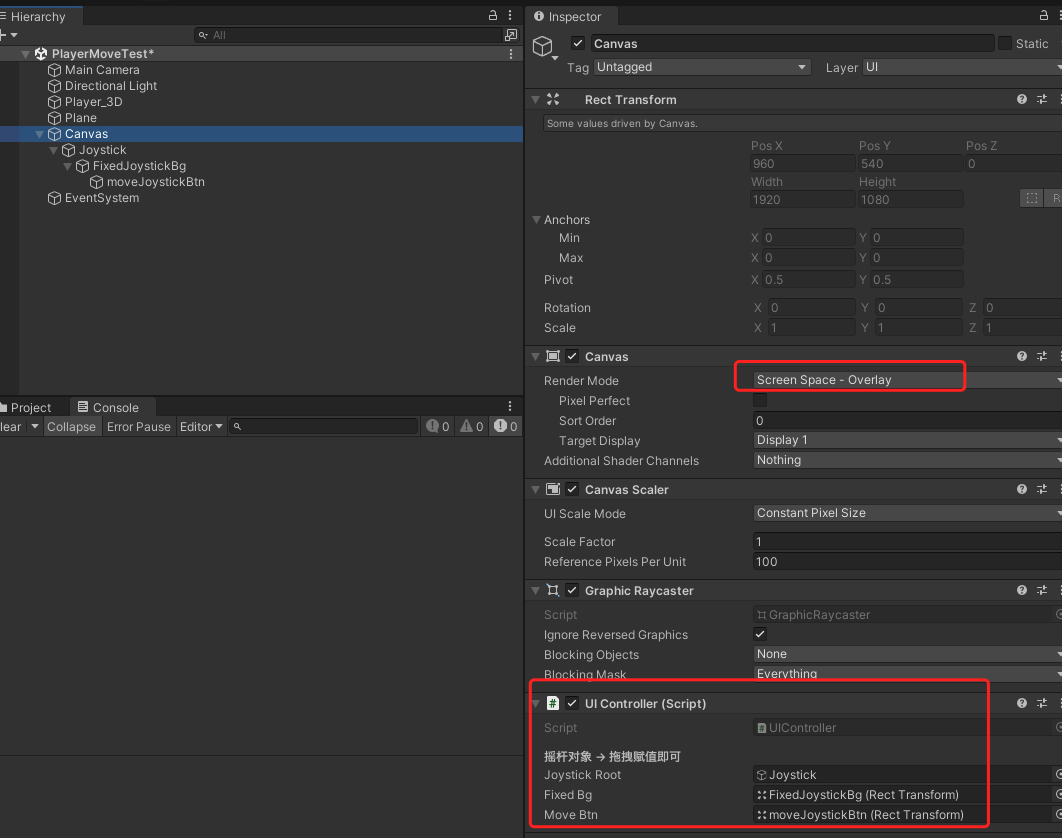
轮盘UI的创建
- 画布挂载脚本拖拽赋值(也可以挂载在JoyStick上)
- JoyStick配置
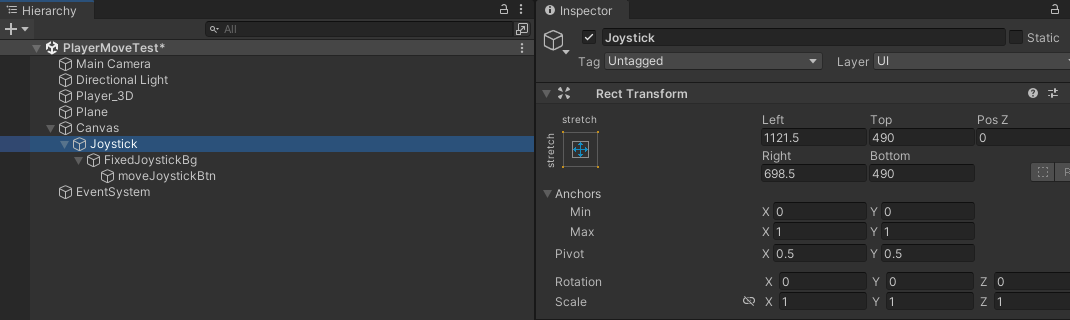
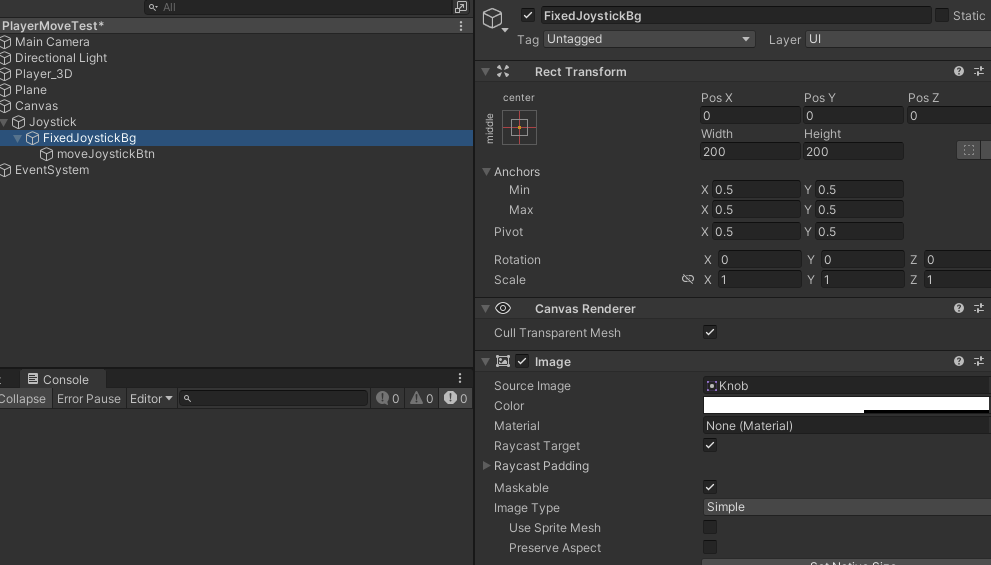
- FixedJoystickBg(移动轮盘边界)
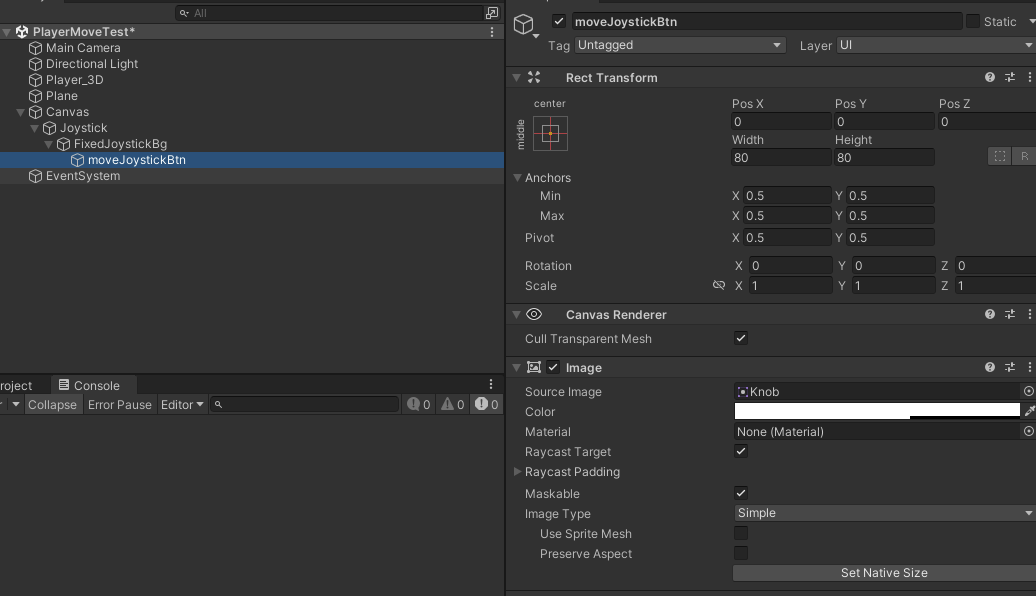
- moveJoystickBtn(玩家操作轮盘指向器)
- 画布挂载脚本拖拽赋值(也可以挂载在JoyStick上)