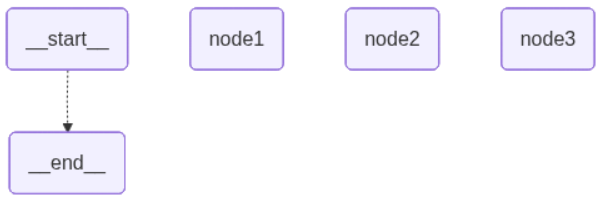
LangGraph的核心主要是Graph ,它是⼀个有向⽆环图,⽤于描述任务之间的依赖关系。
主要包含三个基本元素:
· State:一种数据结构
· Node:处理数据的节点,LangGraph中通常是一个python函数,以State为输入,经过一些操作处理后,返回更新后的State
· Edge:在LangGraph中通常也是一个python函数,作用是把两个Node连接起来,形成逻辑处理路线。
举个简单示例,看下Graph的基本用法。
先安装对应包:
bash
pip install langgraph代码:
python
from typing import TypedDict
from langgraph.constants import END, START
from langgraph.graph import StateGraph

class InputState(TypedDict):
    user_input: str

class OutputState(TypedDict):
    graph_output: str

class GraphState(TypedDict):
    user_input: str
    graph_output: str

def node1(state: InputState) -> OutputState:
    return {"graph_output": state["user_input"] + "这个是节点1"}

# 构件图
builder = StateGraph(GraphState)

# 1. 添加节点到状态图(指定节点名称和对应的处理函数)
builder.add_node("node1", node1)

# 2. 添加起始节点到node1的边(START -> node1)
builder.add_edge(START, "node1")

# 3. 添加node1到结束节点的边(node1 -> END)
builder.add_edge("node1", END)

# 4. 编译状态图,生成可运行的图实例
graph = builder.compile()

if __name__ == "__main__":
    initial_state = {"user_input": "测试输入:"}

    # 运行图(两种方式:stream流式输出 / invoke直接获取最终结果)
    # 方式1:invoke直接获取最终状态
    final_state = graph.invoke(initial_state)
    print(f"final_state的值:{final_state}")

    # 方式2:stream流式遍历执行过程
    for step in graph.stream(initial_state):
        for node_name, node_output in step.items():
            print(f"节点名称:{node_name}, 节点输出:{node_output}")
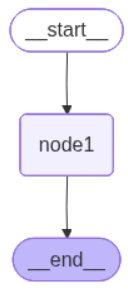
构建出来的图是这样的:
自己想测验也可以在代码后边加这一段生成然后查看:
python
graph_structure = graph.get_graph()

png_data = graph_structure.draw_mermaid_png()
# 保存到本地文件
with open("langgraph_flow.png", "wb") as f:
    f.write(png_data)
这个是Graph的简单流程,下边我们展开详细讲解下。
State
State是所有节点共享的状态,它是⼀个字典,可以是TypedDict字典,也可以是Pydantic中的⼀个BaseModel。
例如:
python
from typing import TypedDict
from pydantic import BaseModel

class InputState1(TypedDict):
    user_input: str

class InputState2(BaseModel):
    user_input: str
这两种都可以实现定义State。
State中也可以定义一些操作来指定更新,比如:
python
from typing import TypedDict, Annotated
from operator import add


class InputState(TypedDict):
    user_input: str
    list_input: Annotated[list[int], add]    # Annotated:为原始类型附加任意元数据,不改变类型本身的本质
这里如果node中有返回InputState中更新的值,(用list_input举例)那对应的值会发生变化,比如:
python
from typing import TypedDict, Annotated
from operator import add
from langgraph.graph import StateGraph
from langgraph.constants import END, START


class InputState(TypedDict):
    user_input: str
    list_input: Annotated[list[int], add]    # Annotated:为原始类型附加任意元数据,不改变类型本身的本质

def node1(state: InputState):
    return {"list_input": [123], "user_input": "node1"}

def node2(state: InputState):
    return {"user_input": "node2"}

graph = (StateGraph(InputState)
        .add_node("node1", node1)    # 添加节点1
        .add_node("node2", node2)    # 添加节点2
        .add_edge(START, "node1")    # 补充:起始节点 -> node1
        .add_edge("node1", "node2")    # node1 -> node2
        .add_edge("node2", END)    # node2 -> 结束节点
        .compile()    # 编译状态图
)
if __name__ == "__main__":
    initial_state = {"user_input": "测试输入:", "list_input": [1, 2, ]}

    final_state = graph.invoke(initial_state)
    print(f"final_state的值:{final_state}")
	# final_state的值:{'user_input': 'node2', 'list_input': [1, 2, 123]}
可以看到list_input在node1中有进行操作,打印出来的结果有变化。
在LangGraph中,State应用场景可以用于保存聊天消息(比如我们在豆包中一个对话中往上滑看见的上一条问题)
Node
State中定义的属性,通常不指定默认值,而是在Node中进行指定,并且Node通常是一个Python函数,它接受⼀个State对象作为输⼊,返回⼀个State对象作为输出。
在具体实现时,通常包含两个具体的参数,第⼀个是State,这个是必选的。第⼆个是⼀个可选的配置项config。并且LangGraph对每个Node提供了缓存机制。只要Node的传⼊参数相同,LangGraph就会优先从缓存当中获取Node的执⾏结果。从⽽提升Node的运⾏速度。
示例:
python
from typing import TypedDict
from langchain_core.runnables import RunnableConfig
from langgraph.graph import StateGraph
from langgraph.constants import END, START
from langgraph.types import CachePolicy
from langgraph.cache.memory import InMemoryCache #是langgraph中的,⽽不是langchain中的。


class InputState(TypedDict):
    user_id: str
    number: int

def node1(state: InputState, config: RunnableConfig) -> InputState:
    user_id = config["configurable"]["user_id"]
    return {"number":state["number"] + 1, "user_id":user_id}

graph = (StateGraph(InputState)
        .add_node("node1", node1, cache_policy=CachePolicy(ttl=5))    # 添加节点1,Node缓存5秒
        .add_edge(START, "node1")    # 补充:起始节点 -> node1
        .add_edge("node1", END)    # node1 -> 结束节点
        .compile(cache=InMemoryCache())    # 编译状态图
)
if __name__ == "__main__":
    initial_state = {"user_id": "user_01", "number": 5}

    final_state = graph.invoke(
        input=initial_state,
        config={"configurable": {"user_id": "user_02"}})
    print(f"final_state的值:{final_state}")
    # final_state的值:{'user_id': 'user_02', 'number': 6}
Edge
在Graph图中,通过Edge(边)把Node(节点)连接起来,从⽽决定State应该如何在Graph中传递。类似于工作流中的箭头指向线。
LangGraph中提供了两个默认的Node,START和END,⽤来作为Graph的⼊⼝和出⼝。
(上边有普通Edge代码示例,这里讲一下另一个操作set_entry_point)
python
from typing import TypedDict, Annotated
from operator import add
from langgraph.graph import StateGraph


class InputState(TypedDict):
    user_input: str
    list_input: Annotated[list[int], add]    # Annotated:为原始类型附加任意元数据,不改变类型本身的本质

def node1(state: InputState):
    return {"list_input": [123], "user_input": "node1"}

def node2(state: InputState):
    return {"user_input": "node2"}

graph = (StateGraph(InputState)
        .add_node("node1", node1)    # 添加节点1
        .add_node("node2", node2)    # 添加节点2
        .set_entry_point("node1")
        .add_edge("node1", "node2")
        .compile()    # 编译状态图
)
if __name__ == "__main__":
    initial_state = {"user_input": "测试输入:", "list_input": [1, 2, ]}

    final_state = graph.invoke(initial_state)
    print(f"final_state的值:{final_state}")

    graph_structure = graph.get_graph()

    png_data = graph_structure.draw_mermaid_png()
    # 保存到本地文件
    with open("langgraph_flow3.png", "wb") as f:
        f.write(png_data)
图片:
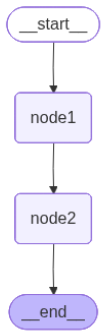
set_entry_point是 LangGraph中用于修改/指定图执行入口节点的方法,但是比add_edge优先级更高,若同时使用 add_edge(START, "node1")和set_entry_point("node2"),最终入口为 node2。
如果遇到条件走不同节点怎么办?
可以写动态路由:
python
from typing import TypedDict, Annotated
from operator import add
from langgraph.graph import StateGraph
from langgraph.constants import END, START


class InputState(TypedDict):
    user_input: str
    list_input: Annotated[list[int], add]    # Annotated:为原始类型附加任意元数据,不改变类型本身的本质

def node1(state: InputState):
    return {"list_input": [123], "user_input": "This is node1"}

def node2(state: InputState):
    return {"user_input": "This is node2"}

def node3(state: InputState):
    return {"user_input": "This is node3"}

def routing_func(state: InputState):
    if state["user_input"] == '111':
        return "node1"
    elif state["user_input"] == '222':
        return "node2"
    elif state["user_input"] == '333':
        return "node3"
    else:
        return END

graph = (StateGraph(InputState)
        .add_node("node1", node1)    # 添加节点1
        .add_node("node2", node2)    # 添加节点2
        .add_node("node3", node3)    # 添加节点3
        .add_conditional_edges(START,routing_func)
        .compile()    # 编译状态图
)
if __name__ == "__main__":
    initial_state = {"user_input": "111", "list_input": [1, 2, ]}

    final_state = graph.invoke(initial_state)
    print(f"final_state的值:{final_state}")

    graph_structure = graph.get_graph()

    png_data = graph_structure.draw_mermaid_png()
    # 保存到本地文件
    with open("langgraph_flow4.png", "wb") as f:
        f.write(png_data)
路线: