前言
最近一个 地方的需求
需要再 单元格中 输出带换行回车的内容
然后 找了一下 相关 demo, 基本上是 使用 \r\n 或者 <br> 或者 <w:br/> 来进行处理
但是 测试了一通 之后, 发现 都不行
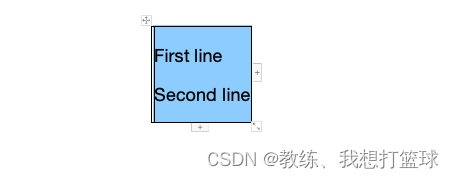
来自于网上的 demo 不可用
/**
 * Test18WordBreakDemo
 *
 * @author Jerry.X.He <970655147@qq.com>
 * @version 1.0
 * @date 2024-05-14 09:07
 */
public class Test18WordBreakDemo {

    public static void main(String[] args) throws Exception {
        XWPFDocument document = new XWPFDocument();
        XWPFTable table = document.createTable();
        XWPFTableRow row = table.getRow(0);
        XWPFTableCell cell = row.createCell();

        String contentWithBreak = "First line<br>Second line";
        // 替换HTML的<br>为对应的Unicode换行符也可以,但推荐使用POI对HTML的支持
        // String contentWithBreak = "First line\nSecond line";

        cell.getParagraphs().get(0).setAlignment(ParagraphAlignment.LEFT);
        cell.getParagraphs().get(0).setSpacingBefore(200);
        cell.getParagraphs().get(0).setSpacingAfter(200);
        cell.setVerticalAlignment(XWPFTableCell.XWPFVertAlign.CENTER);
        CTShd ctshd = cell.getCTTc().addNewTcPr().addNewShd();
        ctshd.setColor("auto");
        ctshd.setFill("99CCFF");
        cell.getParagraphs().get(0).setStyle("TableContents");

        cell.setText(contentWithBreak);
        cell.getParagraphs().get(0).setStyle("YourCustomStyle");

        FileOutputStream out = new FileOutputStream("Test18WordBreakDemo.docx");
        document.write(out);
        out.close();
    }

}
<br/> 输出结果如下

或者 \r\n 输出如下, 但是 不是期望的效果
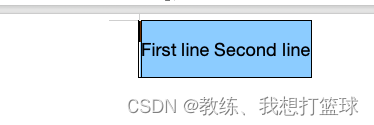
正确实现效果的 demo
后面看了一下 正确的结构, 仿写 代码如下
/**
 * Test18WordBreakDemo
 *
 * @author Jerry.X.He <970655147@qq.com>
 * @version 1.0
 * @date 2024-05-14 09:07
 */
public class Test18WordBreakDemo {

    public static void main(String[] args) throws Exception {
        // 创建Word文档对象
        XWPFDocument document = new XWPFDocument();

        // 创建表格
        XWPFTable table = document.createTable();

        // 添加行
        XWPFTableRow row = table.getRow(0);

        // 添加单元格
        XWPFTableCell cell = row.createCell();

        setTextInCell(cell, Arrays.asList("第一行", "第二行", "第三行"));

        // 保存文档
        FileOutputStream out = new FileOutputStream("./WordTableExample.docx");
        document.write(out);
        out.close();
    }

    public static void setTextInCell(XWPFTableCell cell, List<String> textList) {
        for (String text : textList) {
            XWPFParagraph paragraph = cell.addParagraph();
            paragraph.setAlignment(ParagraphAlignment.CENTER);
            XWPFRun run = paragraph.createRun();
            run.setText(text);
        }
    }

}
输出结果如下

完