PyCharm - Install Plugin from Disk 从本地磁盘加载插件

Install Plugin from Disk 从本地磁盘加载插件

  • 在 PyCharm 中,如果插件下载速度慢,可以使用 【Install Plugin from Disk】 从本地磁盘加载插件
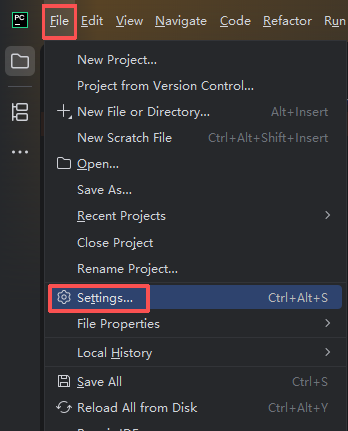
  1. 点击 【File】 -> 点击 【Settings】
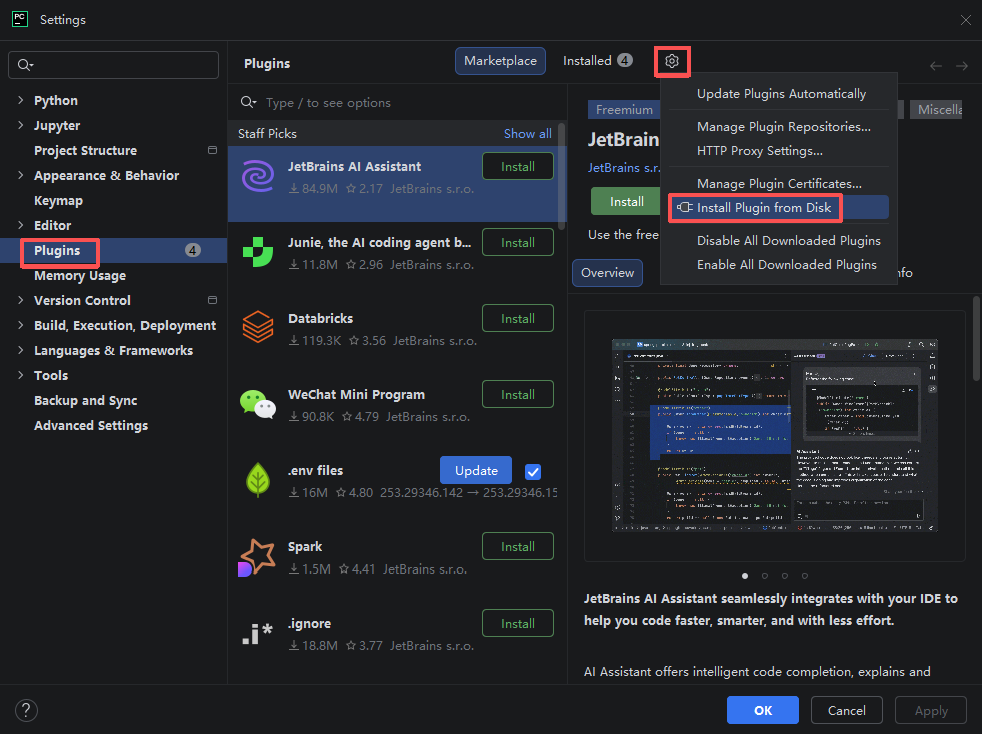
  1. 点击 【Plugin】 -> 点击小齿轮图标 -> 点击 【Install Plugin from Disk】 -> 从本地磁盘选择插件加载
相关推荐
曲幽1 天前
我用FastAPI接ollama大模型,差点被asyncio整崩溃(附对话窗口实战)
python·fastapi·web·async·httpx·asyncio·ollama
Sinclair1 天前
简单几步,安卓手机秒变服务器,安装 CMS 程序
android·服务器
两万五千个小时1 天前
落地实现 Anthropic Multi-Agent Research System
人工智能·python·架构
哈里谢顿1 天前
Python 高并发服务限流终极方案:从原理到生产落地(2026 实战指南)
python
用户8356290780512 天前
无需 Office:Python 批量转换 PPT 为图片
后端·python
markfeng82 天前
Python+Django+H5+MySQL项目搭建
python·django
GinoWi2 天前
Chapter 2 - Python中的变量和简单的数据类型
python
JordanHaidee2 天前
Python 中 `if x:` 到底在判断什么?
后端·python
ServBay2 天前
10分钟彻底终结冗长代码,Python f-string 让你重获编程自由
后端·python
闲云一鹤2 天前
Python 入门(二)- 使用 FastAPI 快速生成后端 API 接口
python·fastapi