LCEL(LangChain Expression Language)是在runnalbe上封装的,如:RunnableSequence,RunnablePararllel
前三个是等价的,都是串行执行
python
chain = runnalbe1 | runnable2
chain = runnable1.pipe(runnable2) #例子:chain = (prompt.pipe(llm).pipe(StrOutputParser()))
chain = RunnableSequence([runnable1, runnable2])RunnableSequence是串行的,也可以并行使用RunnablePararllel,除了这两个Runnable还有很多方法,可以在这里查到:https://reference.langchain.com/python/langchain_core/
LCEL满足大部分需求,如果是复杂的,比如分支,循环,多个智能体等,推荐使用LangGraph。
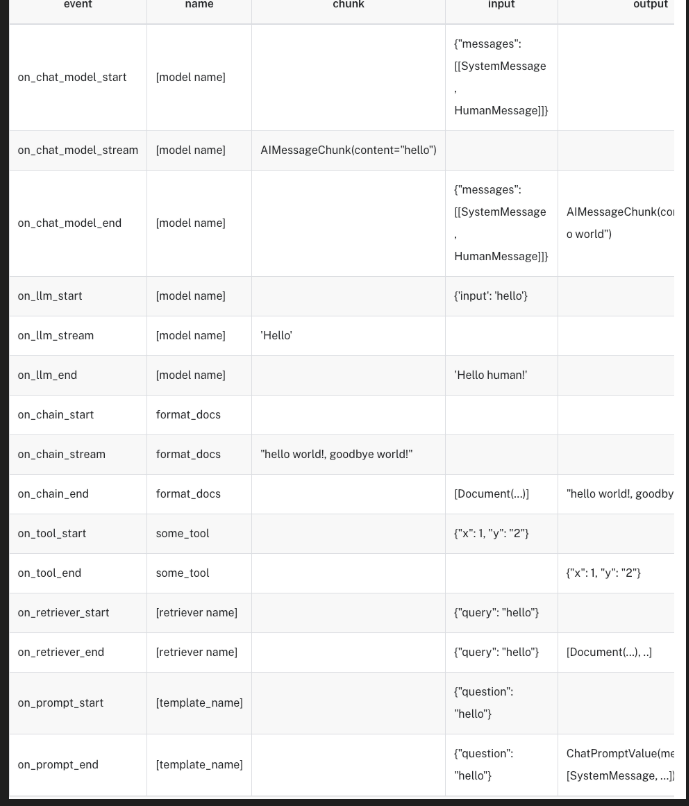
事件流
- 这是一个测试事件
- 可以将流的过程进行分解,从而事件更细颗粒度的控制
- langchain-core >= 0.2
- 事件流的颗粒度:
python
# 注意对于版本langchain-core<0.3.37,需要显式地指定事件流版本
events = []
async for event in llm.astream_events("hello",version="v2"):
    events.append(event)
事件过滤方式
1.按name来过滤
python
chain = llm.with_config({"run_name": "model"}) | JsonOutputParser().with_config(
    {"run_name": "my_parser"}
)

max_events = 0
async for event in chain.astream_events(
    "output a list of the countries france, spain and japan and their populations in JSON format. "
    'Use a dict with an outer key of "countries" which contains a list of countries. '
    "Each country should have the key `name` and `population`",
    include_names=["my_parser"],version="v2"
):
    print(event)
    max_events += 1
    if max_events > 10:
        # Truncate output
        print("...")
        break
2.按tags来过滤
python
chain = (llm | JsonOutputParser()).with_config({"tags": ["my_chain"]})

max_events = 0
async for event in chain.astream_events(
    'output a list of the countries france, spain and japan and their populations in JSON format. Use a dict with an outer key of "countries" which contains a list of countries. Each country should have the key `name` and `population`',
    include_tags=["my_chain"],version="v2"
):
    print(event)
    max_events += 1
    if max_events > 10:
        # Truncate output
        print("...")
        break
3.按事件阶段来过滤
python
num_events = 0

async for event in chain.astream_events(
    "output a list of the countries france, spain and japan and their populations in JSON format. "
    'Use a dict with an outer key of "countries" which contains a list of countries. '
    "Each country should have the key `name` and `population`",version="v2"
):
    kind = event["event"]
    if kind == "on_chat_model_stream":
        print(
            f"Chat model chunk: {repr(event['data']['chunk'].content)}",
            flush=True,
        )
    if kind == "on_parser_stream":
        print(f"Parser chunk: {event['data']['chunk']}", flush=True)
    num_events += 1
    if num_events > 30:
        # Truncate the output
        print("...")
        break
链的并行使用
python
from langchain_core.prompts import ChatPromptTemplate
from langchain_core.runnables import RunnableParallel

joke_chain = ChatPromptTemplate.from_template("给我讲一个关于{topic}的笑话") | llm
poem_chain = (
    ChatPromptTemplate.from_template("给我写一首关于{topic}的绝句") | llm
)

map_chain = RunnableParallel(joke=joke_chain, poem=poem_chain)

map_chain.invoke({"topic": "程序员"})
使用以下方式可以把链的graph打印出来
pip install grandalf
python
map_chain.get_graph().print_ascii()
#以下是用节点的方式表示,不是画图了
map_chain.get_graph()
链的高级使用
1.使用@chain自定义Runnable函数
python
# 导入DeepSeek聊天模型
from langchain_deepseek import ChatDeepSeek
# 导入字符串输出解析器
from langchain_core.output_parsers import StrOutputParser
# 导入chain装饰器,用于创建自定义链
from langchain_core.runnables import chain
from langchain_core.prompts import ChatPromptTemplate

# 初始化DeepSeek大语言模型
llm = ChatDeepSeek(
    model="Pro/deepseek-ai/DeepSeek-V3",  # 使用DeepSeek模型
    temperature=0,  # 设置温度为0,使输出更确定性
    api_key=os.environ.get("DEEPSEEK_API_KEY"),  # 从环境变量获取API密钥
    api_base=os.environ.get("DEEPSEEK_API_BASE"),  # 从环境变量获取API基础URL
)

# 创建第一个提示模板:请求关于特定主题的笑话
prompt1 = ChatPromptTemplate.from_template("Tell me a joke about {topic}")
# 创建第二个提示模板:询问笑话的主题是什么
prompt2 = ChatPromptTemplate.from_template("What is the subject of this joke: {joke}")


# 使用@chain装饰器定义一个自定义链
@chain
def custom_chain(text):
    # 步骤1: 将输入文本填充到第一个提示模板中
    prompt_val1 = prompt1.invoke({"topic": text})
    # 步骤2: 使用DS模型生成关于指定主题的笑话
    output1 = llm.invoke(prompt_val1)
    # 步骤3: 将模型输出解析为字符串
    parsed_output1 = StrOutputParser().invoke(output1)

    # 步骤4: 创建第二个处理链,用于分析笑话主题
    # 这个链将提示模板、DS模型和字符串解析器串联起来
    chain2 = prompt2 | llm | StrOutputParser()

    # 步骤5: 将第一步生成的笑话作为输入,让第二个链分析其主题
    return chain2.invoke({"joke": parsed_output1})


# 调用自定义链,输入主题"bears"(熊)
# 整个过程:
# 1. 先生成一个关于熊的笑话
# 2. 然后分析这个笑话的主题是什么
# 3. 返回分析结果
custom_chain.invoke("bears")
2.RunnableLambda
在链中使用函数
python
from operator import itemgetter  # 导入itemgetter函数,用于从字典中提取值

from langchain_core.prompts import ChatPromptTemplate  # 导入聊天提示模板
from langchain_core.runnables import RunnableLambda  # 导入可运行的Lambda函数包装器
from langchain_deepseek import ChatDeepSeek  # 导入DeepSeek聊天模型
import os  # 导入os模块,用于从环境变量获取API密钥

# 初始化DeepSeek大语言模型
model = ChatDeepSeek(
    model="Pro/deepseek-ai/DeepSeek-R1",  # 使用DeepSeek-R1模型
    temperature=0,  # 设置温度为0,使输出更确定性
    api_key=os.environ.get("DEEPSEEK_API_KEY"),  # 从环境变量获取API密钥
    api_base=os.environ.get("DEEPSEEK_API_BASE"),  # 从环境变量获取API基础URL
)


def length_function(text):
    return len(text)


def _multiple_length_function(text1, text2):
    return len(text1) * len(text2)


def multiple_length_function(_dict):
    return _multiple_length_function(_dict["text1"], _dict["text2"])


# 创建一个简单的聊天提示模板,询问a和b的和
prompt = ChatPromptTemplate.from_template("what is {a} + {b}")

# 构建一个复杂的处理链
chain = (
    {
        # 处理"a"参数:
        # 1. 从输入字典中提取"foo"键的值
        # 2. 将提取的值传递给length_function函数(假设这个函数计算字符串长度)
        "a": itemgetter("foo") | RunnableLambda(length_function),

        # 处理"b"参数:
        # 1. 创建一个包含两个键值对的字典:
        #    - "text1": 从输入字典中提取"foo"键的值
        #    - "text2": 从输入字典中提取"bar"键的值
        # 2. 将这个字典传递给multiple_length_function函数
        #    (假设这个函数计算两个文本的总长度)
        "b": {"text1": itemgetter("foo"), "text2": itemgetter("bar")}
        | RunnableLambda(multiple_length_function),
    }
    | prompt  # 将处理后的"a"和"b"值填入提示模板
    | model  # 将填充后的提示发送给DeepSeek模型生成回答
)

# 调用链处理流程,输入一个包含"foo"和"bar"键的字典
# 整个过程:
# 1. 计算"bar"字符串的长度作为a的值
# 2. 计算"bar"和"gah"字符串的总长度作为b的值
# 3. 将这些值填入提示"what is {a} + {b}"
# 4. 让DeepSeek模型回答这个问题
chain.invoke({"foo": "bar", "bar": "gah"})
#输出
python
AIMessage(content='The sum of 3 and 9 is calculated as follows:\n\n3 + 9 = 12\n\n**Answer:** 12', additional_kwargs={'refusal': None, 'reasoning_content': "Okay, so I need to figure out what 3 plus 9 is. Let me start by recalling how addition works. Addition is combining two numbers to get their total sum. So if I have 3 of something and then add 9 more, how many do I have in total?\n\nLet me count on my fingers. Starting with 3, if I add 9 more, I can count up 9 numbers from 3. So 3... then 4, 5, 6, 7, 8, 9, 10, 11, 12. That's 9 numbers added, so 3 + 9 should be 12. Wait, let me check that again to make sure I didn't skip a number. Starting at 3, adding 1 gets me to 4 (that's 1), then 5 (2), 6 (3), 7 (4), 8 (5), 9 (6), 10 (7), 11 (8), 12 (9). Yep, that's 9 steps, so 3 + 9 equals 12.\n\nAlternatively, I know that 9 is one less than 10. So maybe breaking it down: 3 + 9 is the same as 3 + (10 - 1). That would be 3 + 10 = 13, then subtract 1 to get 12. That also gives me 12. Hmm, same answer.\n\nOr maybe using the commutative property, since addition is commutative. So 3 + 9 is the same as 9 + 3. If I have 9 and add 3, that's easier for some people. Starting at 9, add 1 to get 10, then 2 more to get 12. So 9 + 3 = 12. Yep, still 12.\n\nAnother way: using number bonds. If I know that 9 and 1 make 10, then maybe take 1 from the 3 to make 10. So 3 is 2 + 1. Then 9 + 1 = 10, and 10 + 2 = 12. That's another method called making a ten, which is helpful for mental math. So again, 12.\n\nWait, maybe I can visualize it with objects. Imagine 3 apples and someone gives me 9 more apples. How many apples do I have? Let's count: 3 apples plus 9 apples. If I line them up, 3 + 9 would be 12 apples in total. That makes sense.\n\nI could also use a number line. Starting at 3, move 9 units to the right. Each jump is 1 unit. So from 3, jumping to 4 (1), 5 (2), 6 (3), 7 (4), 8 (5), 9 (6), 10 (7), 11 (8), 12 (9). Land on 12. So that's 3 + 9 = 12.\n\nAlternatively, using basic addition facts. If I memorize that 3 + 9 is 12, but since I might not have that memorized, I can check with subtraction. If 12 - 9 = 3, then that confirms that 3 + 9 = 12. Similarly, 12 - 3 = 9, which also checks out.\n\nI think all these methods point to the same answer. Let me just make sure I didn't make a mistake in any of the steps. For example, when I broke down 3 into 2 + 1 to add to 9, that's correct because 9 + 1 = 10, and 10 + 2 = 12. No errors there. When I used the number line, each step was counted correctly. Starting at 3 and moving 9 steps lands on 12. The commutative property also holds, so 9 + 3 is indeed the same as 3 + 9. All the different approaches confirm that the sum is 12. I don't see any mistakes in my reasoning, so I'm confident the answer is 12."}, response_metadata={'token_usage': {'completion_tokens': 901, 'prompt_tokens': 12, 'total_tokens': 913, 'completion_tokens_details': None, 'prompt_tokens_details': None}, 'model_name': 'Pro/deepseek-ai/DeepSeek-R1', 'system_fingerprint': '', 'finish_reason': 'stop', 'logprobs': None}, id='run-81da5dd1-267d-4aba-8d2a-026d61620ab2-0', usage_metadata={'input_tokens': 12, 'output_tokens': 901, 'total_tokens': 913, 'input_token_details': {}, 'output_token_details': {}})定义支持流式输出的函数
python
# 这是一个自定义解析器,将LLM输出的标记迭代器
# 按逗号分隔转换为字符串列表
def split_into_list(input: Iterator[str]) -> Iterator[List[str]]:
    # 保存部分输入直到遇到逗号
    buffer = ""
    for chunk in input:
        # 将当前块添加到缓冲区
        buffer += chunk
        # 当缓冲区中有逗号时
        while "," in buffer:
            # 在逗号处分割缓冲区
            comma_index = buffer.index(",")
            # 输出逗号之前的所有内容
            yield [buffer[:comma_index].strip()]
            # 保存剩余部分用于下一次迭代
            buffer = buffer[comma_index + 1 :]
    # 输出最后一块
    yield [buffer.strip()]


list_chain = str_chain | split_into_list

for chunk in list_chain.stream({"animal": "熊"}):
    print(chunk, flush=True)
在LCEL中,如果是一个函数,比如str_chain | split_into_list,会自动这样处理:str_chain | RunnableLambda(split_into_list)
使用RunnablePassthrough来传递值
python
from langchain_core.runnables import RunnableParallel, RunnablePassthrough

# 创建一个可并行运行的处理流程
runnable = RunnableParallel(
    passed=RunnablePassthrough(),  # 第一个处理器:直接传递输入,不做修改
    modified=lambda x: x["num"] + 1,  # 第二个处理器:取出输入中的"num"值并加1
)

# 执行这个处理流程,输入是一个包含"num"字段的字典
runnable.invoke({"num": 1})
# 运行结果:{'passed': {'num': 1}, 'modified': 2}
LCEl支持在运行时候对链进行配置
动态改写模型的温度
动态切换提示词
python
from langchain_core.prompts import PromptTemplate
from langchain_core.runnables import ConfigurableField
from langchain_openai import ChatOpenAI
import os


llm = ChatOpenAI(
    model="gpt-4",
    temperature=0,
    api_key=os.environ.get("OPENAI_API_KEY"),
    base_url=os.environ.get("OPENAI_API_BASE"),
    ).configurable_fields(
    temperature=ConfigurableField(
        id="llm_temperature",
        name="LLM Temperature",
        description="The temperature of the LLM",
    )
)

llm.invoke("随意挑选一个随机数,输出为一个整数")
为链增加记忆能力
InMemoryHistory
根据session_id来标记为同一个人,来记住它的对话。
python
from typing import List  # 导入List类型提示
from pydantic import BaseModel, Field  # 导入Pydantic的BaseModel和Field
from langchain_core.chat_history import BaseChatMessageHistory  # 导入聊天历史基类

from langchain_core.messages import BaseMessage, AIMessage  # 导入消息基类和AI消息类


class InMemoryHistory(BaseChatMessageHistory, BaseModel):
    """内存中实现的聊天消息历史记录。"""

    messages: List[BaseMessage] = Field(default_factory=list)  # 使用空列表作为默认值存储消息

    def add_messages(self, messages: List[BaseMessage]) -> None:
        """添加一组消息到存储中"""
        self.messages.extend(messages)

    def clear(self) -> None:
        """清空所有消息"""
        self.messages = []

# 这里我们使用全局变量来存储聊天消息历史。
# 这样可以更容易地检查它以查看底层结果。
store = {}  # 创建空字典用于存储不同会话的历史记录

def get_by_session_id(session_id: str) -> BaseChatMessageHistory:
    """根据会话ID获取历史记录,如果不存在则创建新的"""
    if session_id not in store:
        store[session_id] = InMemoryHistory()  # 为新会话创建新的历史记录对象
    return store[session_id]


# 获取会话ID为"1"的历史记录
history = get_by_session_id("1")
# 添加一条AI消息到历史记录
history.add_message(AIMessage(content="你好"))  # 修改为中文消息
# 打印存储的所有历史记录
print(store)  # 将输出包含会话"1"的历史记录,其中有一条"你好"的AI消息
输出:
python
{'1': InMemoryHistory(messages=[AIMessage(content='你好', additional_kwargs={}, response_metadata={})])}在链中增加短时记忆
python
from langchain_core.prompts import ChatPromptTemplate, MessagesPlaceholder  # 导入聊天提示模板和消息占位符
from langchain_core.runnables.history import RunnableWithMessageHistory  # 导入带历史记录的可运行组件
from langchain_deepseek import ChatDeepSeek
import os

llm = ChatDeepSeek(
    model="Pro/deepseek-ai/DeepSeek-V3",
    temperature=0,
    api_key=os.environ.get("DEEPSEEK_API_KEY"),
    api_base=os.environ.get("DEEPSEEK_API_BASE"),
)

# 创建聊天提示模板,包含系统提示、历史记录和用户问题
prompt = ChatPromptTemplate.from_messages([
    ("system", "你是一个擅长{ability}的助手"),  # 系统角色提示,使用ability变量定义助手专长
    MessagesPlaceholder(variable_name="history"),  # 放置历史消息的占位符
    ("human", "{question}"),  # 用户问题的占位符
])

# 将提示模板与DS模型连接成一个链
chain = prompt | llm

# 创建带有消息历史功能的可运行链
chain_with_history = RunnableWithMessageHistory(
    chain,  # 基础链
    # 使用上一个示例中定义的get_by_session_id函数获取历史记录
    get_by_session_id,
    input_messages_key="question",  # 指定输入消息的键名
    history_messages_key="history",  # 指定历史消息的键名
)

# 首次调用链,询问余弦的含义
print(chain_with_history.invoke(  # noqa: T201
    {"ability": "math", "question": "余弦函数是什么意思?"},  # 输入参数
    config={"configurable": {"session_id": "foo"}}  # 配置会话ID为"foo"
))

# 打印存储中的历史记录
# 此时应包含第一次对话的问题和回答
print(store)
输出:
python
content='余弦函数(通常记作 \\(\\cos\\))是三角函数的一种,用于描述直角三角形中一个锐角的邻边与斜边的比值,或者在单位圆中表示横坐标与半径的关系。以下是余弦函数的详细解释:\n\n### 1. **直角三角形中的定义**\n在直角三角形中,余弦值定义为:\n\\[\n\\cos \\theta = \\frac{\\text{邻边}}{\\text{斜边}}\n\\]\n其中:\n- \\(\\theta\\) 是一个锐角,\n- **邻边** 是该角相邻的直角边,\n- **斜边** 是直角三角形的斜边(最长边)。\n\n**例子**:若一个角 \\(\\theta\\) 的邻边长为 3,斜边为 5,则 \\(\\cos \\theta = \\frac{3}{5}\\)。\n\n---\n\n### 2. **单位圆中的定义**\n在直角坐标系中,以原点为中心、半径为 1 的单位圆上,余弦值等于角度 \\(\\theta\\) 的终边与圆交点的 **横坐标(x 坐标)**:\n\\[\n\\cos \\theta = x\n\\]\n- 当 \\(\\theta\\) 从 \\(0\\) 增加到 \\(2\\pi\\)(360°)时,余弦值从 1 递减到 -1,再回到 1,呈现周期性变化。\n\n---\n\n### 3. **余弦函数的性质**\n- **周期性**:余弦函数的周期为 \\(2\\pi\\)(或 360°),即 \\(\\cos(\\theta + 2\\pi) = \\cos \\theta\\)。\n- **取值范围**:值域为 \\([-1, 1]\\)。\n- **偶函数**:满足 \\(\\cos(-\\theta) = \\cos \\theta\\),图像关于 y 轴对称。\n- **与正弦函数的关系**:\\(\\cos \\theta = \\sin\\left(\\theta + \\frac{\\pi}{2}\\right)\\)。\n\n---\n\n### 4. **图像特征**\n余弦函数的图像(波形图)特点:\n- **起点**:\\(\\cos 0 = 1\\)。\n- **零点**:在 \\(\\theta = \\frac{\\pi}{2}, \\frac{3\\pi}{2}, \\ldots\\) 处值为 0。\n- **极值点**:在 \\(\\theta = 0, \\pi, 2\\pi, \\ldots\\) 处取得最大值 1 或最小值 -1。\n\n---\n\n### 5. **应用场景**\n- **几何**:计算角度或边长。\n- **物理**:描述简谐振动(如弹簧运动、交流电)。\n- **工程**:信号处理、傅里叶分析等。\n\n---\n\n### 示例计算\n**问题**:求 \\(\\cos 60^\\circ\\) 的值。  \n**解**:  \n在单位圆中,\\(60^\\circ\\) 对应的坐标为 \\(\\left(\\frac{1}{2}, \\frac{\\sqrt{3}}{2}\\right)\\),因此:\n\\[\n\\cos 60^\\circ = \\frac{1}{2}\n\\]\n\n---\n\n通过上述定义和性质,余弦函数成为数学和科学中分析周期性现象的重要工具。如果需要进一步探讨其公式(如余弦定理)或其他扩展内容,可以继续提问!' additional_kwargs={'refusal': None} response_metadata={'token_usage': {'completion_tokens': 651, 'prompt_tokens': 13, 'total_tokens': 664, 'completion_tokens_details': None, 'prompt_tokens_details': None}, 'model_name': 'Pro/deepseek-ai/DeepSeek-V3', 'system_fingerprint': '', 'id': '0195d2a9a43046e1ecabf1b587b24599', 'finish_reason': 'stop', 'logprobs': None} id='run-d92a68be-61cf-4619-8fa3-dd7ff8285b31-0' usage_metadata={'input_tokens': 13, 'output_tokens': 651, 'total_tokens': 664, 'input_token_details': {}, 'output_token_details': {}}
{'1': InMemoryHistory(messages=[AIMessage(content='你好', additional_kwargs={}, response_metadata={})]), 'foo': InMemoryHistory(messages=[HumanMessage(content='余弦函数是什么意思?', additional_kwargs={}, response_metadata={}), AIMessage(content='余弦函数(通常记作 \\(\\cos\\))是三角函数的一种,用于描述直角三角形中一个锐角的邻边与斜边的比值,或者在单位圆中表示横坐标与半径的关系。以下是余弦函数的详细解释:\n\n### 1. **直角三角形中的定义**\n在直角三角形中,余弦值定义为:\n\\[\n\\cos \\theta = \\frac{\\text{邻边}}{\\text{斜边}}\n\\]\n其中:\n- \\(\\theta\\) 是一个锐角,\n- **邻边** 是该角相邻的直角边,\n- **斜边** 是直角三角形的斜边(最长边)。\n\n**例子**:若一个角 \\(\\theta\\) 的邻边长为 3,斜边为 5,则 \\(\\cos \\theta = \\frac{3}{5}\\)。\n\n---\n\n### 2. **单位圆中的定义**\n在直角坐标系中,以原点为中心、半径为 1 的单位圆上,余弦值等于角度 \\(\\theta\\) 的终边与圆交点的 **横坐标(x 坐标)**:\n\\[\n\\cos \\theta = x\n\\]\n- 当 \\(\\theta\\) 从 \\(0\\) 增加到 \\(2\\pi\\)(360°)时,余弦值从 1 递减到 -1,再回到 1,呈现周期性变化。\n\n---\n\n### 3. **余弦函数的性质**\n- **周期性**:余弦函数的周期为 \\(2\\pi\\)(或 360°),即 \\(\\cos(\\theta + 2\\pi) = \\cos \\theta\\)。\n- **取值范围**:值域为 \\([-1, 1]\\)。\n- **偶函数**:满足 \\(\\cos(-\\theta) = \\cos \\theta\\),图像关于 y 轴对称。\n- **与正弦函数的关系**:\\(\\cos \\theta = \\sin\\left(\\theta + \\frac{\\pi}{2}\\right)\\)。\n\n---\n\n### 4. **图像特征**\n余弦函数的图像(波形图)特点:\n- **起点**:\\(\\cos 0 = 1\\)。\n- **零点**:在 \\(\\theta = \\frac{\\pi}{2}, \\frac{3\\pi}{2}, \\ldots\\) 处值为 0。\n- **极值点**:在 \\(\\theta = 0, \\pi, 2\\pi, \\ldots\\) 处取得最大值 1 或最小值 -1。\n\n---\n\n### 5. **应用场景**\n- **几何**:计算角度或边长。\n- **物理**:描述简谐振动(如弹簧运动、交流电)。\n- **工程**:信号处理、傅里叶分析等。\n\n---\n\n### 示例计算\n**问题**:求 \\(\\cos 60^\\circ\\) 的值。  \n**解**:  \n在单位圆中,\\(60^\\circ\\) 对应的坐标为 \\(\\left(\\frac{1}{2}, \\frac{\\sqrt{3}}{2}\\right)\\),因此:\n\\[\n\\cos 60^\\circ = \\frac{1}{2}\n\\]\n\n---\n\n通过上述定义和性质,余弦函数成为数学和科学中分析周期性现象的重要工具。如果需要进一步探讨其公式(如余弦定理)或其他扩展内容,可以继续提问!', additional_kwargs={'refusal': None}, response_metadata={'token_usage': {'completion_tokens': 651, 'prompt_tokens': 13, 'total_tokens': 664, 'completion_tokens_details': None, 'prompt_tokens_details': None}, 'model_name': 'Pro/deepseek-ai/DeepSeek-V3', 'system_fingerprint': '', 'id': '0195d2a9a43046e1ecabf1b587b24599', 'finish_reason': 'stop', 'logprobs': None}, id='run-d92a68be-61cf-4619-8fa3-dd7ff8285b31-0', usage_metadata={'input_tokens': 13, 'output_tokens': 651, 'total_tokens': 664, 'input_token_details': {}, 'output_token_details': {}})])}
第二次调用链,询问余弦的反函数
python
# 第二次调用链,询问余弦的反函数
# 由于使用相同的会话ID,模型可以参考前一次对话的上下文
print(chain_with_history.invoke(
    {"ability": "math", "question": "它的反函数是什么?"},  # 输入参数
    config={"configurable": {"session_id": "foo"}}  # 使用相同的会话ID
))
# 再次打印存储中的历史记录
# 此时应包含两次对话的完整历史
print(store)
增加用户与对话ID,精准控制记忆
python
from langchain_deepseek import ChatDeepSeek
from langchain_core.runnables import (
    ConfigurableFieldSpec,
)
import os

llm = ChatDeepSeek(
    model="Pro/deepseek-ai/DeepSeek-V3",
    temperature=0,
    api_key=os.environ.get("DEEPSEEK_API_KEY"),
    api_base=os.environ.get("DEEPSEEK_API_BASE"),
)

store = {}  # 创建空字典用于存储不同用户和对话的历史记录

def get_session_history(
    user_id: str, conversation_id: str
) -> BaseChatMessageHistory:
    """
    根据用户ID和对话ID获取聊天历史记录
    如果不存在则创建新的历史记录对象

    参数:
        user_id: 用户的唯一标识符
        conversation_id: 对话的唯一标识符

    返回:
        对应的聊天历史记录对象
    """
    if (user_id, conversation_id) not in store:
        store[(user_id, conversation_id)] = InMemoryHistory()
    return store[(user_id, conversation_id)]

# 创建聊天提示模板,包含系统提示、历史记录和用户问题
prompt = ChatPromptTemplate.from_messages([
    ("system", "你是一个擅长{ability}的助手"),  # 系统角色提示
    MessagesPlaceholder(variable_name="history"),  # 历史消息占位符
    ("human", "{question}"),  # 用户问题占位符
])

# 将提示模板与DS模型连接成一个链
chain = prompt | llm

# 创建带有消息历史功能的可运行链,支持用户ID和对话ID配置
with_message_history = RunnableWithMessageHistory(
    chain,  # 基础链
    get_session_history=get_session_history,  # 获取历史记录的函数
    input_messages_key="question",  # 输入消息的键名
    history_messages_key="history",  # 历史消息的键名
    history_factory_config=[  # 历史记录工厂配置
        ConfigurableFieldSpec(
            id="user_id",  # 配置字段ID
            annotation=str,  # 类型注解
            name="用户ID",  # 字段名称
            description="用户的唯一标识符",  # 字段描述
            default="",  # 默认值
            is_shared=True,  # 是否在多个调用间共享
        ),
        ConfigurableFieldSpec(
            id="conversation_id",  # 配置字段ID
            annotation=str,  # 类型注解
            name="对话ID",  # 字段名称
            description="对话的唯一标识符",  # 字段描述
            default="",  # 默认值
            is_shared=True,  # 是否在多个调用间共享
        ),
    ],
)

# 调用链,询问余弦的含义
# 指定用户ID为"123",对话ID为"1"
with_message_history.invoke(
    {"ability": "数学", "question": "李白的老婆叫什么?"},  # 输入参数
    config={"configurable": {"user_id": "123", "conversation_id": "2"}}  # 配置参数
)
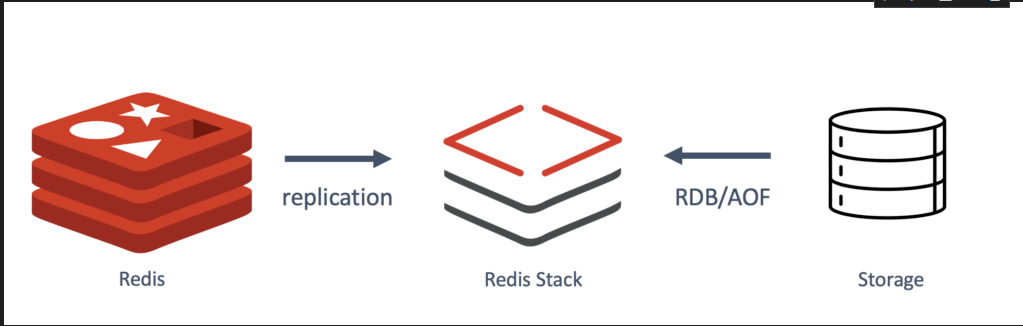
长时记忆
! pip install -qU langchain-redis langchain-openai redis
python
import os

# Use the environment variable if set, otherwise default to localhost
REDIS_URL = "redis://redis:6379"
print(f"Connecting to Redis at: {REDIS_URL}")
python
from langchain_core.chat_history import BaseChatMessageHistory
from langchain_core.messages import AIMessage, HumanMessage
from langchain_core.prompts import ChatPromptTemplate, MessagesPlaceholder
from langchain_core.runnables.history import RunnableWithMessageHistory
from langchain_redis import RedisChatMessageHistory
from langchain_deepseek import ChatDeepSeek
import os


llm = ChatDeepSeek(
    model="Pro/deepseek-ai/DeepSeek-V3",
    temperature=0,
    api_key=os.environ.get("DEEPSEEK_API_KEY"),
    api_base=os.environ.get("DEEPSEEK_API_BASE"),
)


# 初始化 Redis 聊天消息历史记录
# 使用 Redis 存储聊天历史,需要提供会话 ID 和 Redis 连接 URL
#它会默认链接6379端口
history = RedisChatMessageHistory(session_id="user_123", redis_url=REDIS_URL)
#history.clear()  # 首先清空历史记录
# 向历史记录中添加消息
history.add_user_message("你好,AI助手!2222")  # 添加用户消息
history.add_ai_message("你好!我今天能为你提供什么帮助?222")  # 添加AI回复消息

# 检索并显示历史消息
print("聊天历史:")
for message in history.messages:
    # 打印每条消息的类型和内容
    print(f"{type(message).__name__}: {message.content}")
输出
python
聊天历史:
HumanMessage: 你好,AI助手!2222
AIMessage: 你好!我今天能为你提供什么帮助?222
LCEL自定义路由
python
# 导入必要的库
from langchain_core.output_parsers import StrOutputParser  # 导入字符串输出解析器
from langchain_core.prompts import PromptTemplate  # 导入提示模板
import os  # 导入os库
from langchain_deepseek import ChatDeepSeek
# 导入RunnableLambda用于创建可运行的函数链
from langchain_core.runnables import RunnableLambda


claudeLLM = ChatDeepSeek(
    model="Pro/deepseek-ai/DeepSeek-V3",
    temperature=0,
    api_key=os.environ.get("DEEPSEEK_API_KEY"),
    api_base=os.environ.get("DEEPSEEK_API_BASE"),
)

# 创建分类链 - 用于确定问题类型
chain = (
    # 创建提示模板,要求模型将问题分类为LangChain、Anthropic或Other
    PromptTemplate.from_template(
        """根据下面的用户问题,将其分类为 `LangChain`、`Anthropic` 或 `Other`。

请只回复一个词作为答案。

<question>
{question}
</question>

分类结果:"""
    )
    | claudeLLM  # 将提示发送给Claude模型
    | StrOutputParser()  # 解析模型的输出为纯文本
)

# 创建LangChain专家链 - 模拟Harrison Chase(LangChain创始人)的回答风格
langchain_chain = PromptTemplate.from_template(
    """你将扮演一位LangChain专家。请以他的视角回答问题。 \
你的回答必须以"正如Harrison Chase告诉我的"开头,否则你会受到惩罚。 \
请回答以下问题:

问题: {question}
回答:"""
) | claudeLLM  # 将提示发送给


# 创建Anthropic专家链 - 模拟Dario Amodei(Anthropic创始人)的回答风格
anthropic_chain = PromptTemplate.from_template(
    """你将扮演一位一位Anthropic专家。请以他的视角回答问题。 \
你的回答必须以"正如Dario Amodei告诉我的"开头,否则你会受到惩罚。 \
请回答以下问题:

问题: {question}
回答:"""
) | claudeLLM

# 创建通用回答链 - 用于处理其他类型的问题
general_chain = PromptTemplate.from_template(
    """请回答以下问题:

问题: {question}
回答:"""
) | claudeLLM

# 自定义路由函数 - 根据问题分类结果选择合适的回答链
def route(info):
    print(info)   # 打印分类结果
    # 根据分类结果选择相应的专家链
    if "anthropic" in info["topic"].lower():  # 如果问题与Anthropic相关
        print("claude")
        return anthropic_chain  # 使用Anthropic专家链
    elif "langchain" in info["topic"].lower():  # 如果问题与LangChain相关
        print("langchain")
        return langchain_chain  # 使用LangChain专家链
    else:  # 其他类型的问题
        print("general")
        return general_chain # 使用通用回答链


# 创建完整的处理链
# 1. 首先将问题分类并保留原始问题
# 2. 然后根据分类结果路由到相应的专家链处理
full_chain = {"topic": chain, "question": lambda x: x["question"]} | RunnableLambda(route)

# 调用完整链处理用户问题
# 这个问题会被分类为Anthropic相关,然后由anthropic_chain处理
full_chain.invoke({"question": "我该如何使用langchain?"})
回退机制
当调用失败时切换大模型
python
# 导入必要的库
from unittest.mock import patch  # 导入mock库,用于模拟函数行为
from langchain_anthropic import ChatAnthropic  # 导入Anthropic的语言模型接口
from langchain_openai import ChatOpenAI  # 导入OpenAI的语言模型接口
import httpx  # HTTP客户端库
from openai import RateLimitError  # OpenAI的速率限制错误类

# 创建模拟HTTP请求和响应对象,用于构造模拟的API错误
request = httpx.Request("GET", "/")  # 创建一个GET请求
response = httpx.Response(200, request=request)  # 创建一个状态码为200的响应
# 创建一个OpenAI速率限制错误对象,用于模拟API调用超出速率限制的情况
error = RateLimitError("rate limit", response=response, body="")

# 初始化OpenAI模型
# 注意:设置max_retries = 0是为了避免在遇到速率限制等错误时自动重试
openai_llm = ChatOpenAI(
    model="gpt-4",  # 使用GPT-4模型
    temperature=0,  # 设置温度为0,使输出更确定性
    api_key=os.environ.get("OPENAI_API_KEY"),  # 从环境变量获取API密钥
    base_url=os.environ.get("OPENAI_API_BASE"),  # 从环境变量获取基础URL
)

# 初始化Anthropic模型作为备用选项
anthropic_llm = ChatAnthropic(
    model='claude-3-5-sonnet-latest',  # 使用Claude 3.5 Sonnet模型
    api_key=os.environ.get("ANTHROPIC_API_KEY"),  # 从环境变量获取API密钥
    base_url=os.environ.get("ANTHROPIC_BASE_URL"),  # 从环境变量获取基础URL
)

# 创建带有备用选项的语言模型
# 如果主模型(OpenAI)失败,将自动尝试使用备用模型(Anthropic)
llm = openai_llm.with_fallbacks([anthropic_llm]) #这里甚至可以设置多个大模型

# 如果不设置回退机制,当API调用超量就会直接报错
# with patch("openai.resources.chat.completions.Completions.create", side_effect=error):
#    try:
#        print(llm.invoke("Why did the chicken cross the road?"))
#    except RateLimitError:
#        print("Hit error")

# 测试备用机制 - 使用中文问题
# 使用patch模拟OpenAI API调用失败(抛出速率限制错误)
with patch("openai.resources.chat.completions.Completions.create", side_effect=error):
    try:
        # 尝试调用语言模型回答中文问题
        # 由于OpenAI被模拟为失败,应该自动切换到Anthropic模型
        print(llm.invoke("为什么程序员需要学会python?"))
    except RateLimitError:
        # 如果仍然遇到错误(备用机制失败),则打印错误信息
        print("Hit error")