windows 环境下安装 Milvus: https://blog.csdn.net/u010548003/article/details/152000409
先按装docker ,milvus,attu
JDK 下载:https://www.oracle.com/java/technologies/javase/jdk21-archive-downloads.html
这里需要jdk21.
LLM-阿里百练embedding向量生成:https://blog.csdn.net/liuc0317/article/details/156311395
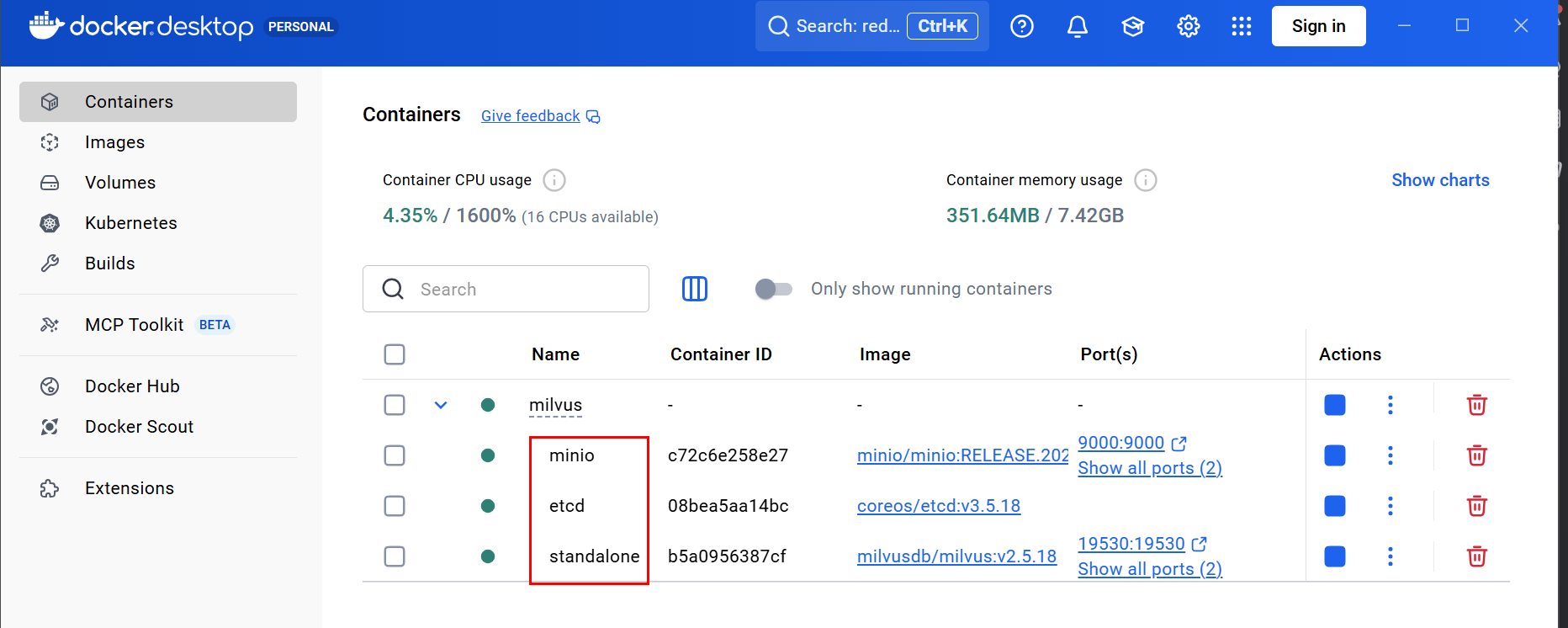
在docker 中安装完Milvus 会显示 如下:
三个节点都需要起动。
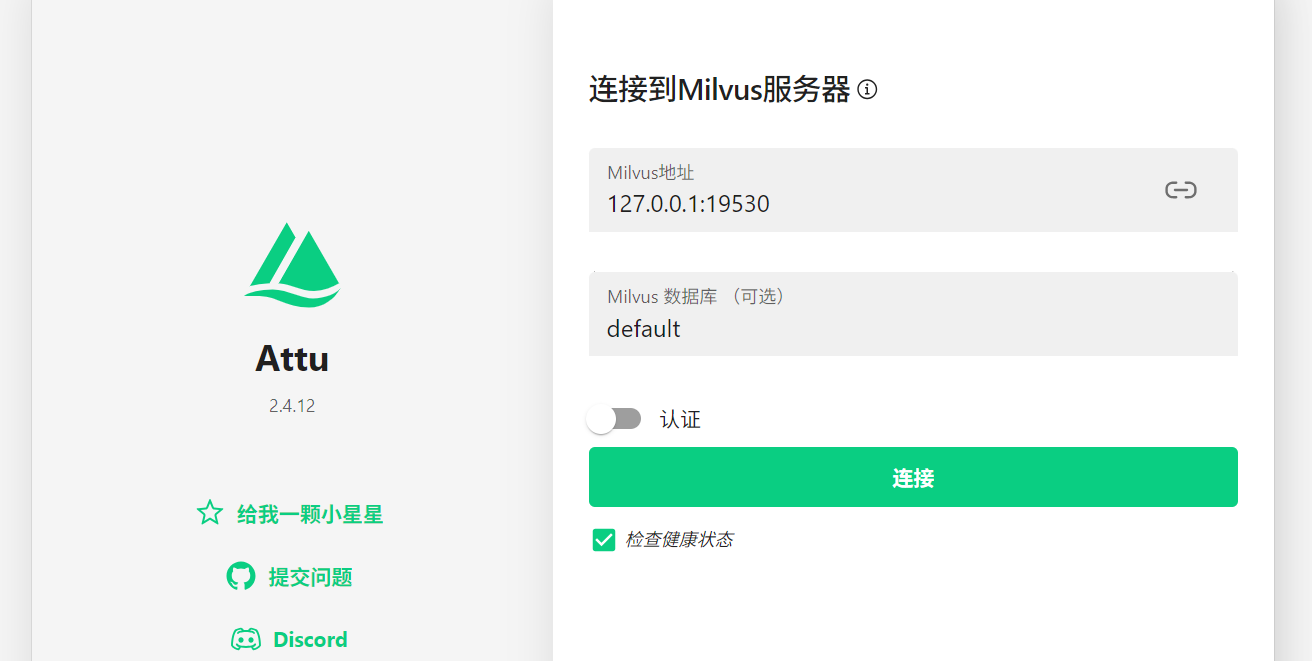
Attu 是 milvus 的可视化界面,
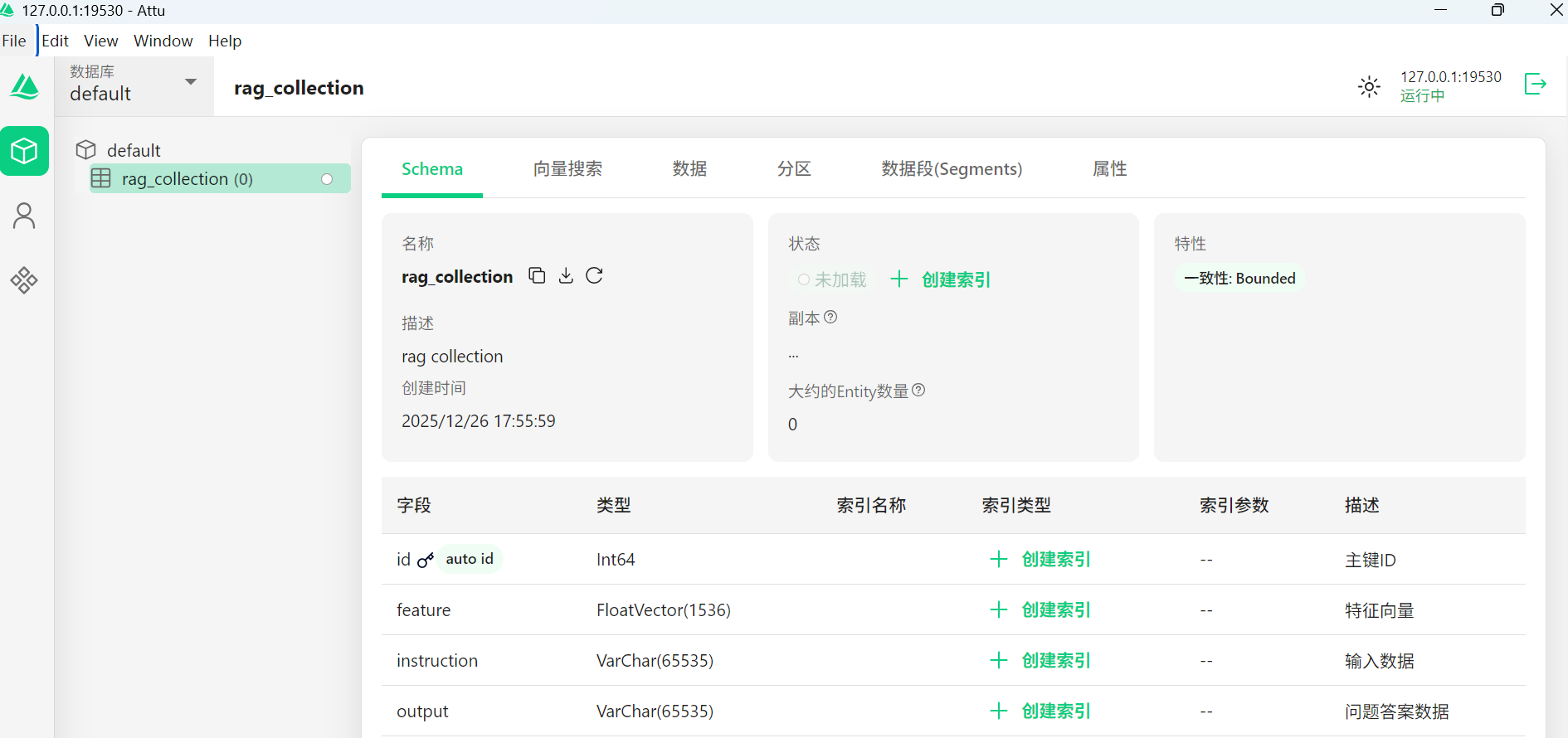
第一步:操作milvus 的工具类
java
package com.example.llm04;


import io.milvus.client.MilvusServiceClient;
import io.milvus.grpc.DataType;
import io.milvus.grpc.SearchResults;
import io.milvus.param.ConnectParam;
import io.milvus.param.IndexType;
import io.milvus.param.MetricType;
import io.milvus.param.collection.CreateCollectionParam;
import io.milvus.param.collection.FieldType;
import io.milvus.param.dml.InsertParam;
import io.milvus.param.dml.SearchParam;
import io.milvus.param.index.CreateIndexParam;
import io.milvus.response.SearchResultsWrapper;

import java.util.ArrayList;
import java.util.Arrays;
import java.util.Collections;
import java.util.List;

/**
 * Milvus 向量数据库的公共方法
 */
public class MilvusLLMUtils2 {


    private MilvusServiceClient client ;

    public MilvusLLMUtils2() {
        ConnectParam connectParam = ConnectParam.newBuilder()
                .withHost("localhost")
                .withPort(19530)
                .build();
        client = new MilvusServiceClient(connectParam);

    }


    /**
     * 创建集合
     * @throws Exception
     */
    public void createCollection() throws Exception {

        List<FieldType> fieldTypes = Arrays.asList(
                FieldType.newBuilder()
                        .withName(MilvusEntity.Field.ID)
                        .withDescription("主键ID")
                        .withDataType(DataType.Int64)
                        .withPrimaryKey(true)
                        .withAutoID(true)
                        .build(),
                FieldType.newBuilder()
                        .withName(MilvusEntity.Field.FEATURE)
                        .withDescription("特征向量")
                        .withDataType(DataType.FloatVector)
                        .withDimension(MilvusEntity.FEATURE_DIM) // 设置向量维度
                        .build(),
                FieldType.newBuilder()
                        .withName(MilvusEntity.Field.INSTRUCTION)
                        .withDescription("输入数据")
                        .withDataType(DataType.VarChar)
                        .withTypeParams(Collections.singletonMap("max_length", "65535"))
                        .build(),
                FieldType.newBuilder()
                        .withName(MilvusEntity.Field.OUTPUT)
                        .withDescription("问题答案数据")
                        .withDataType(DataType.VarChar)
                        .withTypeParams(Collections.singletonMap("max_length", "65535"))
                        .build());

        CreateCollectionParam createCollectionReq = CreateCollectionParam.newBuilder()
                .withCollectionName(MilvusEntity.COLLECTION_NAME)
                .withDescription("rag collection")
                .withShardsNum(MilvusEntity.SHARDS_NUM)
                .withFieldTypes(fieldTypes)
                .build();
        client.createCollection(createCollectionReq);
        // 同时给向量创建对应的索引
        CreateIndexParam createIndexParam = CreateIndexParam.newBuilder()
                .withCollectionName(MilvusEntity.COLLECTION_NAME)
                .withFieldName(MilvusEntity.Field.FEATURE) // 向量字段名
                .withIndexType(IndexType.IVF_FLAT) // 使用IVF_FLAT索引类型
                .withMetricType(MetricType.L2) // 指定度量类型,如L2距离
                .withExtraParam("{\"nlist\":128}") // 根据索引类型提供额外参数,比如nlist
                .build();

        client.createIndex(createIndexParam);
    }

    /**
     * 插入数据到向量数据库
     * @param vectorParam 向量数据(问题内容对应的向量数据)
     * @param instruction 问题内容
     * @param output      问题内容对应的回答内容
     * @throws Exception
     */
    public void insertVectoryData(List<Float> vectorParam,String instruction,String output) throws Exception {

        createCollection();
        List<List<Float>> floats = new ArrayList<>();
        floats.add(vectorParam);
        List<InsertParam.Field> fields = new ArrayList<>();
        fields.add(new InsertParam.Field(MilvusEntity.Field.FEATURE, floats));
        fields.add(new InsertParam.Field(MilvusEntity.Field.INSTRUCTION, Arrays.asList(instruction)));
        fields.add(new InsertParam.Field(MilvusEntity.Field.OUTPUT, Arrays.asList(output)));


        InsertParam insertParam = InsertParam.newBuilder()
                .withCollectionName(MilvusEntity.COLLECTION_NAME)
                .withFields(fields)
                .build();
        client.insert(insertParam);
    }


    /**
     * 根据向量检索信息
     * @param searchVectors
     * @return
     * @throws Exception
     */
    public SearchResultsWrapper search(List<Float> searchVectors) throws Exception {
        List<List<Float>> floats = new ArrayList<>();
        floats.add(searchVectors);

        SearchParam searchParam = SearchParam.newBuilder()
                .withCollectionName(MilvusEntity.COLLECTION_NAME)
                .withMetricType(MetricType.L2)// 使用 L2 距离作为相似度度量
                .withTopK(3) // 返回最接近的前3个结果
                .withVectors(floats)
                .withVectorFieldName(MilvusEntity.Field.FEATURE) // 向量字段名
                .withOutFields(Arrays.asList(MilvusEntity.Field.ID,MilvusEntity.Field.OUTPUT)) // 需要返回的字段
                .build();
        SearchResults data = client.search(searchParam).getData();
        if(data != null) {
            SearchResultsWrapper resultsWrapper = new SearchResultsWrapper(data.getResults());
            resultsWrapper.getRowRecords().forEach(result -> {
                System.out.println("Search result: " + result);
            });
            return resultsWrapper;
        }
        return null;
    }

}
第二步:对应操作的实体对象
java
package com.example.llm04;

public class MilvusEntity {
    /**
     * 向量数据库名称
     */
    public static final String DB_NAME = "default";

    /**
     * 集合名称
     */
    public static final String COLLECTION_NAME = "rag_collection";

    /**
     * 分片数量
     */
    public static final int SHARDS_NUM = 1;

    /**
     * 分区数量
     */
    public static final int PARTITION_NUM = 1;

    /**
     * 特征向量维度
     */
    public static final Integer FEATURE_DIM = 1536;

    /**
     * 字段
     */
    public static class Field {

        /**
         * id
         */
        public static final String ID = "id";

        /**
         * 文本特征向量
         */
        public static final String FEATURE = "feature";

        /**
         * 文本
         */
        public static final String INSTRUCTION = "instruction";

        /**
         * 问答匹配的结果
         */
        public static final String OUTPUT = "output";

    }
}
第三步:测试类
java
package com.example.llm04;

import com.example.LLm03.FaqItem;
import com.example.llm02.EmbeddingUtils;
import com.fasterxml.jackson.databind.ObjectMapper;
import io.milvus.response.QueryResultsWrapper;
import io.milvus.response.SearchResultsWrapper;
import org.junit.Test;

import java.io.BufferedReader;
import java.io.InputStream;
import java.io.InputStreamReader;
import java.nio.charset.StandardCharsets;
import java.util.Arrays;
import java.util.List;
import java.util.stream.Collectors;


public class MilvusTest {

    private static final ObjectMapper objectMapper = new ObjectMapper();
    /**
     * 加载文件中的数据
     * 转换为对应的向量信息
     * 存储到Milvus中
     * 检索对应的信息
     *
     */
    @Test
    public void milvusLoad() throws Exception {
        //train_zh_1.txt内容: {"instruction": "1前几天体检时医生说我有甲状腺囊肿,我也没有什么感觉啊,为什么会长这个东西啊", "input": "","output": "1甲状腺囊肿是甲状腺疾病的一种,它是指甲状腺内出现的一个或多个液体囊肿。甲状腺囊肿的形成原因比较复杂,可能是由于甲状腺内的一些细胞发生异常增生,导致甲状腺组织在某些部位形成了囊肿,也可能是由于甲状腺内的一些细胞因为某种原因死亡,导致甲状腺组织在某些部位形成了囊肿。\n\n甲状腺囊肿一般不会有特别明显的症状,有的患者可能会出现颈部肿块或者轻微的不适感,但大部分患者是没有任何症状的。如果甲状腺囊肿较大或者压迫周围的组织或器官,可能会引起一些症状,如吞咽困难、呼吸困难、声音嘶哑等。\n\n如果您被诊断出有甲状腺囊肿,建议您定期复查,如果囊肿增大或引起症状,可能需要进行手术治疗。同时,保持良好的生活习惯,均衡饮食,避免过度疲劳和过度紧张,也有助于预防和治疗甲状腺囊肿。"}
        // train_zh_1.txt 只有一条数据,用来测试,减少费用
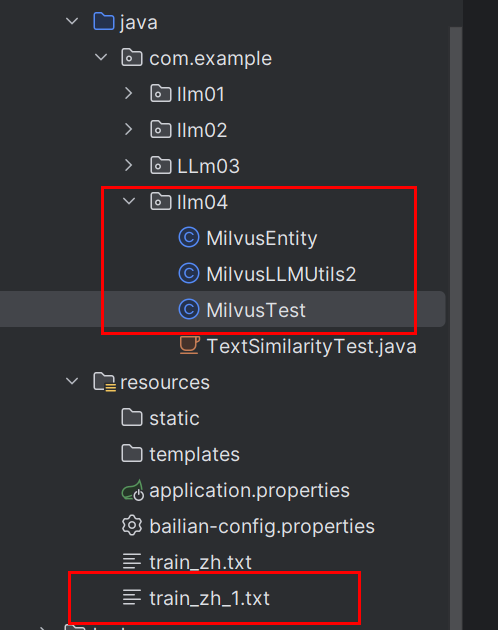
        InputStream inputStream = getClass().getClassLoader().getResourceAsStream("train_zh_1.txt");
        MilvusLLMUtils2 milvusLLMUtils = new MilvusLLMUtils2();


        try (BufferedReader reader = new BufferedReader(
                new InputStreamReader(inputStream, StandardCharsets.UTF_8))) {

            String line;
            int index = 0;
            // 查询的关键字 的向量
            List<Float> vectorParam = null;
            while ((line = reader.readLine()) != null) {
                if (line.trim().isEmpty()) continue;
                // 这里需要提取的是  instruction 的信息,然后向量化
                FaqItem item = objectMapper.readValue(line, FaqItem.class);
                String instruction = item.getInstruction();
                //调用向量生成参见:https://blog.csdn.net/liuc0317/article/details/156311395
                float[] embeddings = EmbeddingUtils.embedding(
                        instruction,
                        "text-embedding-v4"
                );

                // 先将 float[] 转为 Float[],再使用 stream
                Float[] floatObjectArray = new Float[embeddings.length];
                for (int i = 0; i < embeddings.length; i++) {
                    floatObjectArray[i] = embeddings[i]; // 自动装箱
                }

                vectorParam = Arrays.stream(floatObjectArray).collect(Collectors.toList());
                // 把数据存储到Milvus中
                milvusLLMUtils.insertVectoryData(vectorParam, instruction, item.getOutput());

            }
            // 查询
//            SearchResultsWrapper searchResultsWrapper = milvusLLMUtils.search(vectorParam);
//            List<QueryResultsWrapper.RowRecord> rowRecords = searchResultsWrapper.getRowRecords();
//            if (rowRecords != null && !rowRecords.isEmpty()) {
//                System.out.println(rowRecords);
//            }
        }
    }

    /**
     * 加载文件中的数据
     * 转换为对应的向量信息
     * 存储到Milvus中
     * 检索对应的信息
     *
     */
    @Test
    public void milvusQuery() throws Exception {
            // 查询的关键字 的向量
           List<Float> vectorParam = null;
            String instruction ="1前几天体检时医生说我有甲状腺囊肿,我也没有什么感觉啊,为什么会长这个东西啊";
            float[] embeddings = EmbeddingUtils.embedding(
                    instruction,
                    "text-embedding-v4"
            );

            // 先将 float[] 转为 Float[],再使用 stream
            Float[] floatObjectArray = new Float[embeddings.length];
            for (int i = 0; i < embeddings.length; i++) {
                floatObjectArray[i] = embeddings[i]; // 自动装箱
            }

            vectorParam = Arrays.stream(floatObjectArray).collect(Collectors.toList());

            MilvusLLMUtils2 milvusLLMUtils = new MilvusLLMUtils2();
            // 查询
            SearchResultsWrapper searchResultsWrapper = milvusLLMUtils.search(vectorParam);
            List<QueryResultsWrapper.RowRecord> rowRecords = searchResultsWrapper.getRowRecords();
            if (rowRecords != null && !rowRecords.isEmpty()) {
                System.out.println(rowRecords);
            }
        }

}
pom.xml
XML
<?xml version="1.0" encoding="UTF-8"?>
<project xmlns="http://maven.apache.org/POM/4.0.0" xmlns:xsi="http://www.w3.org/2001/XMLSchema-instance"
         xsi:schemaLocation="http://maven.apache.org/POM/4.0.0 https://maven.apache.org/xsd/maven-4.0.0.xsd">
    <modelVersion>4.0.0</modelVersion>
    <parent>
        <groupId>org.springframework.boot</groupId>
        <artifactId>spring-boot-starter-parent</artifactId>
        <version>4.0.1</version>
        <relativePath/> <!-- lookup parent from repository -->
    </parent>
    <groupId>com.example</groupId>
    <artifactId>LLM01</artifactId>
    <version>0.0.1-SNAPSHOT</version>
    <name>LLM01</name>
    <description>LLM01</description>
    <url/>


    <properties>
        <java.version>17</java.version>
    </properties>
    <dependencies>
        <dependency>
            <groupId>org.springframework.boot</groupId>
            <artifactId>spring-boot-starter-webmvc</artifactId>
        </dependency>

        <dependency>
            <groupId>org.springframework.boot</groupId>
            <artifactId>spring-boot-starter-webmvc-test</artifactId>
            <scope>test</scope>
        </dependency>
            <dependency>
                <groupId>com.squareup.okhttp3</groupId>
                <artifactId>okhttp</artifactId>
                <version>3.14.9</version>
            </dependency>
        <dependency>
            <groupId>com.fasterxml.jackson.core</groupId>
            <artifactId>jackson-databind</artifactId>
            <version>2.15.3</version>
        </dependency>
        <dependency>
            <groupId>org.projectlombok</groupId>
            <artifactId>lombok</artifactId>
            <version>1.18.30</version>
            <scope>provided</scope>
        </dependency>
        <dependency>
            <groupId>org.apache.commons</groupId>
            <artifactId>commons-math3</artifactId>
            <version>3.6.1</version>
        </dependency>
        <dependency>
            <groupId>com.theokanning.openai-gpt3-java</groupId>
            <artifactId>service</artifactId>
            <version>0.18.2</version> <!-- 请检查最新版本 -->
        </dependency>
        <dependency>
            <groupId>com.theokanning.openai-gpt3-java</groupId>
            <artifactId>api</artifactId>
            <version>0.18.2</version>
        </dependency>
        <dependency>
            <groupId>org.springframework.ai</groupId>
            <artifactId>spring-ai-openai-spring-boot-starter</artifactId>
            <version>1.0.0-M6</version>
        </dependency>
        <dependency>
            <groupId>com.fasterxml.jackson.core</groupId>
            <artifactId>jackson-databind</artifactId>
            <version>2.15.2</version>
        </dependency>
        <dependency>
            <groupId>redis.clients</groupId>
            <artifactId>jedis</artifactId>
            <version>5.0.0</version>
        </dependency>
        <dependency>
            <groupId>org.springframework</groupId>
            <artifactId>spring-test</artifactId>
            <version>7.0.2</version>
        </dependency>
        <dependency>
            <groupId>junit</groupId>
            <artifactId>junit</artifactId>
        </dependency>
        <dependency>
            <groupId>com.fasterxml.jackson.core</groupId>
            <artifactId>jackson-databind</artifactId>
            <version>2.20.1</version>
        </dependency>


        <dependency>
            <groupId>io.milvus</groupId>
            <artifactId>milvus-sdk-java</artifactId>
            <version>2.3.3</version>
        </dependency>


        <dependency>
            <groupId>com.alibaba</groupId>
            <artifactId>dashscope-sdk-java</artifactId>
            <version>2.14.5</version> <!-- 请使用最新版本 -->
        </dependency>
        <dependency>
            <groupId>com.fasterxml.jackson.core</groupId>
            <artifactId>jackson-databind</artifactId>
            <version>2.15.0</version>
        </dependency>
        <dependency>
            <groupId>org.slf4j</groupId>
            <artifactId>slf4j-api</artifactId>
            <version>2.0.7</version>
        </dependency>

        <dependency>
            <groupId>dev.langchain4j</groupId>
            <artifactId>langchain4j</artifactId>
            <version>1.1.0</version>
        </dependency>
    </dependencies>

    <build>
        <plugins>
            <plugin>
                <groupId>org.springframework.boot</groupId>
                <artifactId>spring-boot-maven-plugin</artifactId>
            </plugin>
        </plugins>
    </build>

</project>