Overview
In this exercise, I built a fully containerised backend system using Docker Compose.
The system consists of a Python API and a MySQL database, running in separate containers but working together as a single application.
The goal was to understand how services are connected, started, and verified in a containerised environment.
Step 1: Build a Simple Python API
I first created a minimal Python API that supports:
-
Adding a product (POST)
-
Fetching all products (GET)
Example API routes:
@app.route("/products", methods=["POST"])
def add_product():
    ...

@app.route("/products", methods=["GET"])
def get_products():
    ...
This API is responsible only for handling HTTP requests and database operations.
Step 2: Containerise the API with Dockerfile
Next, I containerised the API using a Dockerfile.
FROM python:3.10-slim
WORKDIR /app
COPY requirements.txt .
RUN pip install -r requirements.txt
COPY app.py .
CMD ["python", "app.py"]
This defines:
-
The runtime environment
-
The dependencies
-
How the API starts inside a container
Step 3: Prepare Database Initialisation
I created an SQL script that automatically runs when the database container starts for the first time.
CREATE TABLE products (
  id INT AUTO_INCREMENT PRIMARY KEY,
  name VARCHAR(100),
  quantity INT
);
This ensures the database schema is ready without manual setup.
Step 4: Orchestrate Services with Docker Compose
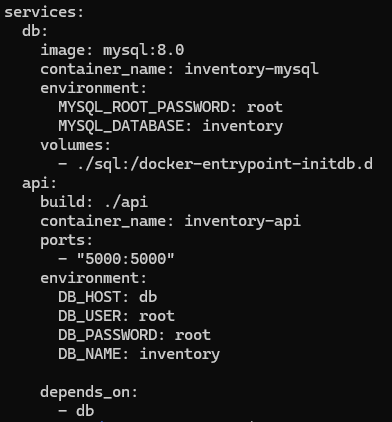
Using Docker Compose, I defined and connected the API and database services.
Docker Compose automatically:
-
Creates a shared network
-
Allows services to communicate using service names
-
Manages startup order
Step 5: Handle Startup Timing Issues
During startup, the API initially failed because the database was not ready.
I solved this by adding a retry mechanism in the API so it waits until the database becomes available.
def get_db_connection():
    while True:
        try:
            return mysql.connector.connect(...)
        except:
            time.sleep(3)
This made the system stable and resilient during startup.
Step 6: Verify the System
Finally, I verified the system by sending HTTP requests directly from the command line.
curl -X POST http://localhost:5000/products \
  -H "Content-Type: application/json" \
  -d '{"name":"Apple","quantity":10}'

curl http://localhost:5000/products
Both data insertion and retrieval worked as expected.
Final Outcome
I successfully built and ran a fully containerised backend system ,
where a Python API and MySQL database communicate through Docker Compose,
and verified that the system works end-to-end.