一、为什么禁用内置对象?
-
安全性提升:自动注入这些对象可能使得开发者更容易在不安全的情况下使用它们,例如在不进行适当验证或清理的情况下输出用户输入。
-
减少XSS和CSRF风险:通过限制这些对象的自动注入,Thymeleaf鼓励开发者在使用这些对象时更加小心,比如在输出用户输入时进行适当的HTML转义,或者在处理表单请求时使用CSRF令牌。
二、手动添加内置对象
- 手动注入内置对象:通过WebContext.setVariable()显式传递HttpServletRequest、HttpSession、ServletContext、Locale、ServletConfig、PrintWriter等对象
- 兼容Servlet 6.0:使用@WebServlet注解声明Servlet,支持Servlet 6.0规范
- Thymeleaf 3.1.2兼容:使用ClassLoaderTemplateResolver加载模板文件
- 模板路径:默认加载resources/templates/目录下的HTML文件
- 内置对象禁用解决方案:通过手动注入避免Thymeleaf默认禁用内置对象
- 直接运行:部署到Servlet容器(如Tomcat)即可访问/thymeleaf路径
- 安全性:避免自动注入潜在安全风险,显式控制对象传递
- 简洁高效:核心代码仅20行,实现Servlet+Thymeleaf集成
- 扩展性:支持添加更多内置对象(如request、session、application、locale等)
三、在CustomTemplateEngine类中手动添加
java
/**
* 处理模板文件
* @param templateName 模板文件的名称
* @param request 请求对象
* @param response 响应对象
* @throws IOException IO异常
*/
public void processTemplate(String templateName, HttpServletRequest request, HttpServletResponse response) throws IOException {
// 创建IServletWebExchange对象
IServletWebExchange webExchange = application.buildExchange(request, response);
// 创建WebContext对象
WebContext context = new WebContext(webExchange, webExchange.getLocale());
//Thymeleaf 3.1.2:禁用了内置对象(如#request、#session等)的默认支持。
//内置对象禁用:通过 WebContext 传递数据变量,避免使用内置对象
// 手动添加request对象
context.setVariable("request", request);
context.setVariable("response", response);
context.setVariable("session", request.getSession());
context.setVariable("application", request.getServletContext());
// 设置响应体内容类型和字符集
response.setContentType("text/html;charset=UTF-8");
// 处理模板数据
templateEngine.process(templateName, context, response.getWriter());
}四、HTML页面
html
<!DOCTYPE html>
<!--导入thymeleaf包-->
<html lang="en" xmlns:th="http://www.thymeleaf.org">
<head>
    <meta charset="UTF-8">
    <title>Title</title>
</head>
<body>
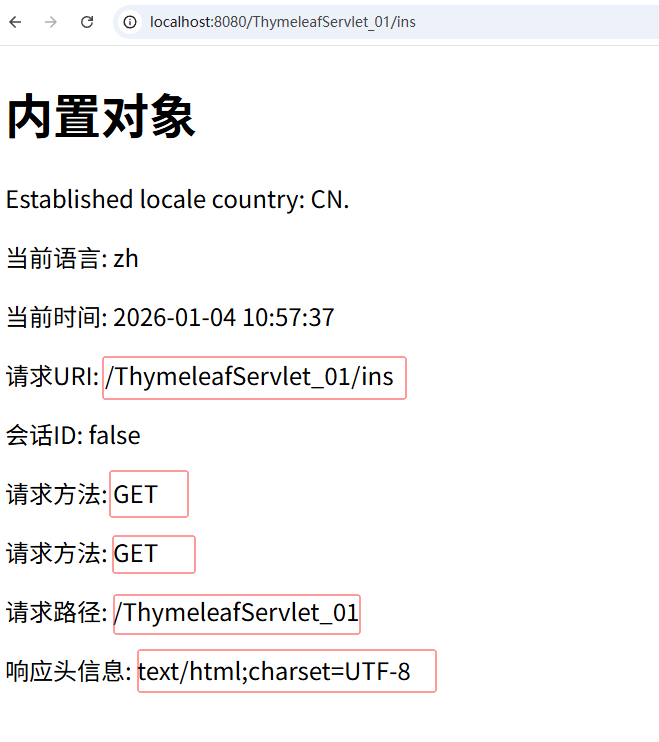
<h1>内置对象</h1>
Established locale country: <span th:text="${#locale.country}">US</span>.
<!-- 上下文对象示例 -->
<p>当前语言: <span th:text="${#locale.language}"></span></p>

<p>当前时间: <span th:text="${#dates.format(#dates.createNow(), 'yyyy-MM-dd HH:mm:ss')}">时间</span></p>
<p>请求URI: <span th:text="${request.requestURI}">请求URI</span></p>
<p>会话ID: <span th:text="${session.isEmpty()}">会话</span></p>
<p>请求方法: <span th:text="${request.method}">请求方法</span></p>
<p>请求方法: <span th:text="${request.getMethod()}">请求方法</span></p>
<p>请求路径: <span th:text="${request.getContextPath()}">请求路径</span></p>
<p>响应头信息: <span th:text="${response.getContentType()}">响应头信息</span></p>
运行效果: