源代码仓库: agent-lightning 源代码仓库
论文链接: Agent Lightning 论文
个人代码仓库: agent-lightning 个人仓库
Tutorial: Tutorial.md
1、项目介绍
这个example其实介绍的是如何用如 自动提示优化 (APO) 算法 ,自动提升一个简单的智能体的性能。
其实早期我们想要去提升 Agent 的性能,更多采取的方式是 Prompt Engineering 或者是 提升(训练) Agent 内部的某个调用模型。这种的最大弊端就是不能实时更新整个 Agent 的性能,也不可以让 Agent 具备自我进化的能力。
而RL强化学习,本质上是基于任务结果反馈 然后不断自动优化模型(不需要你给它更新大量的数据然后再微调),也就是说,RL是可以让模型本身自动进化的。
所以 Agent-lightning 干的事情就是让 Agent 通过借助 RL 来进行训练(不同的是,之前我们是用 RL 来训练 model ;现在我们是用 RL 来训练 Agent),不断优化 Prompt,让 Agent 的结果更准确。
2、案例:The Room Selector Agent
整个代码可以参考:项目代码
主要做的事情就是优化智能体来根据需求预定会议室。
2.1、工作原理
Agent 的工作原理如下:
- Input:接收一个包含具体要求的任务,例如:Find a room for 4 people at 10:00 AM with a whiteboard.
- Action:Agent 通过调用 LLM 来理解 request,还可以调用预先定义好的 tools 来获得更多信息,比如在外部数据库中查询会议室的可用性。
- Output:Agent 最终做出的决定是找到最佳会议室的ID,例如 "A103"。
- Reward:智能体做出选择后,一个独立的 "grader" 函数会根据 0 到 1 的等级对其表现进行评分。这个分数称为奖励。完美的选择得 1.0 分,错误的选择得 0.0 分。
智能体的逻辑是合理的,但它的表现很大程度上取决于其初始提示。措辞不当的提示会使语言学习模型(LLM)感到困惑,从而导致错误的决策。
所以我们就是要用 Agent-lightning 通过 APO 算法自动找到 best prompt。
2.2、代码介绍
2.2.1、Agent 的整体逻辑
LLM除了可以比较无脑的生成文本,还可以调用我们自己编写的函数(tool use | function calling)。
下面这个就是 Agent-lightning 提供的 Agent 逻辑调用:
python
# Pseudo-code for the Room Selector agent

import openai
import json

def room_selector_agent(task, prompt):
    client = openai.OpenAI()
    messages = [{"role": "user", "content": prompt.format(**task)}]
    tools = [ ... ] # Tool definition for the LLM

    # 1. First LLM call to decide if a tool is needed.
    response = client.chat.completions.create(
        model="gpt-5-mini",
        messages=messages,
        tools=tools,
        tool_choice="auto",
    )
    response_message = response.choices[0].message
    tool_calls = response_message.tool_calls

    # 2. Check if the LLM wants to use a tool.
    if tool_calls:
        messages.append(response_message) # Append assistant's reply

        # 3. Execute the tool and get the real-world data.
        for tool_call in tool_calls:
            function_name = tool_call.function.name
            if function_name == "get_rooms_and_availability":
                function_args = json.loads(tool_call.function.arguments)
                # Query the local room database
                function_response = get_rooms_and_availability(
                    date=function_args.get("date"),
                    time_str=function_args.get("time"),
                    duration_min=function_args.get("duration_min"),
                )
                messages.append({
                    "tool_call_id": tool_call.id,
                    "role": "tool",
                    "name": function_name,
                    "content": json.dumps(function_response),
                })

        # 4. Second LLM call with the tool's output to get a final choice.
        second_response = client.chat.completions.create(
            model="gpt-5-mini",
            messages=messages,
        )
        final_choice = second_response.choices[0].message.content
    else:
        final_choice = response_message.content

    # 5. Grade the final choice to get a reward.
    reward = grade_the_choice(final_choice, task["expected_choice"])
    return reward
整体流程是:
bash
用户请求 → LLM决策 → 调用工具查询数据 → LLM做最终选择 → 评分总共分为以下六个阶段:
2.2.1.1、初始化阶段
python
def room_selector_agent(task, prompt):
    client = openai.OpenAI()
    messages = [{"role": "user", "content": prompt.format(**task)}]
    tools = [ ... ] # 工具定义
作用:
bash
task: 包含用户需求的字典(如日期、时间、时长、预期选择等)
prompt: 提示词模板,用 task 的数据填充
messages: 对话历史记录列表
tools: 定义 LLM 可以调用的函数(如查询会议室可用性)

# 示例task:
{
    "date": "2026-01-15",
    "time": "14:00",
    "duration_min": 60,
    "expected_choice": "Room A"
}
2.2.1.2、第一次 LLM 调用 - 决策阶段
python
response = client.chat.completions.create(
    model="gpt-5-mini",
    messages=messages,
    tools=tools,
    tool_choice="auto",  # 让 LLM 自主决定是否使用工具
)
response_message = response.choices[0].message
tool_calls = response_message.tool_calls
LLM的思考过程:
bash
1、分析用户请求:"我需要在1月15日14:00预订1小时的会议室"
2、判断:我需要查询哪些会议室在那个时间可用
3、决定调用 get_rooms_and_availability 工具

# 返回示例:
{
  "tool_calls": [
    {
      "id": "call_abc123",
      "function": {
        "name": "get_rooms_and_availability",
        "arguments": "{\"date\":\"2026-01-15\",\"time\":\"14:00\",\"duration_min\":60}"
      }
    }
  ]
}
2.2.1.3、工具执行阶段
python
if tool_calls:
    messages.append(response_message)  # 保存 LLM 的工具调用决策

    for tool_call in tool_calls:
        function_name = tool_call.function.name
        if function_name == "get_rooms_and_availability":
            function_args = json.loads(tool_call.function.arguments)

            # 实际查询数据库
            function_response = get_rooms_and_availability(
                date=function_args.get("date"),
                time_str=function_args.get("time"),
                duration_min=function_args.get("duration_min"),
            )
这里tools的功能是:
bash
1、解析 LLM 提供的参数
2、调用真实的 Python 函数查询数据库
3、获取实际的会议室可用性数据

# 示例返回数据:
{
    "available_rooms": [
        {"name": "Room A", "capacity": 10, "has_projector": True},
        {"name": "Room B", "capacity": 6, "has_projector": False}
    ]
}
2.2.1.4、将工具结果反馈给 LLM
python
messages.append({
    "tool_call_id": tool_call.id,
    "role": "tool",  # 标识这是工具返回的消息
    "name": function_name,
    "content": json.dumps(function_response),
})
此时此刻,消息历史现在包含了:
bash
1、用户请求
2、LLM 的工具调用决策
3、工具返回的真实数据
2.2.1.5、第二次 LLM 调用 - 最终决策
python
second_response = client.chat.completions.create(
    model="gpt-5-mini",
    messages=messages,  # 包含所有上下文
)
final_choice = second_response.choices[0].message.content
LLM 现在可以:
bash
1、看到可用的会议室列表
2、根据用户需求(容量、设备等)做出推荐
3、生成自然语言回复

# 输出示例:
"我推荐 Room A,它有10人容量和投影仪,完全满足您的需求。"
2.2.1.6、评分阶段
python
reward = grade_the_choice(final_choice, task["expected_choice"])
return reward
评分逻辑是:
bash
1、比较 LLM 的选择与预期选择
2、用于强化学习或模型评估
3、返回奖励值(如 1.0 表示完全正确,0.0 表示错误)
所以整体我们会发现,Tool use 或者说 Function calling可以让我们实时访问数据,可以查询数据库、API等最新消息;同时让LLM只是负责决策,而执行则有我们设计好的tools来做;最关键一点的是,它可扩展性比较强,随时我们都可以添加新的tools来完成新的功能。
整个对话流如下:
bash
[User] 我需要明天下午2点开1小时会
   ↓
[LLM] 我需要查询可用会议室 → 调用工具
   ↓
[Tool] 返回:Room A (可用), Room B (可用)
   ↓
[LLM] 基于数据推荐:Room A 更合适
   ↓
[System] 评分:正确 ✓
2.2.2、Agent-lightning的封装
上面描述的只是一种运行逻辑,我们在实际使用的时候要把它用 '@rollout' 做一下封装,这样 Agent-lightning 的runner 和 trainer 可以管理和调度,而 APO 算法调整的 prompt_template 作为参数传入。
2.2.2.1、@agl.rollout 装饰器
python
@rollout  # 这就是 @agl.rollout
def room_selector(task: RoomSelectionTask, prompt_template: PromptTemplate) -> float:
    # ...
将普通函数转换为可被 Agent-lightning 管理的 rollout 函数。
2.2.2.2、Prompt Template 参数传入
python
def room_selector(task: RoomSelectionTask, prompt_template: PromptTemplate) -> float:
    # ...
    user_message = prompt_template.format(**task["task_input"])  # 第 106 行
prompt_template 作为函数参数传入,在运行时由 APO 算法提供优化后的模板,使用 .format() 方法填充任务数据。
2.2.2.3、基线 Prompt Template
python
def prompt_template_baseline() -> PromptTemplate:  # 第 71 行
    return PromptTemplate(
        template="Find a room on {date} at {time} for {duration_min} minutes, {attendees} attendees. Needs: {needs}. Accessible required: {accessible_required}",
        engine="f-string",
    )
这里提供了初始的提示词模板,也就是APO优化的起点。
2.2.2.4、Reward / Grader 函数
python
def room_selection_grader(client: OpenAI, final_message: Optional[str], expected_choice: str) -> float:
    # ... 第 60 行
    return judge_result_parsed.score  # 返回 0-1 分数
在 rollout 函数末尾调用:
python
return room_selection_grader(client, final_message, task["expected_choice"])2.2.2.5、Runner 运行封装
python
async def debug_room_selector(limit: int = 1):
    runner = LitAgentRunner[RoomSelectionTask](AgentOpsTracer())  # 第 208 行
    store = InMemoryLightningStore()  # 第 209 行
    prompt_template = prompt_template_baseline()  # 第 210 行

    with runner.run_context(agent=room_selector, store=store):  # 第 212 行
        for task in tasks:
            # 运行 agent,传入 prompt_template
            rollout = await runner.step(task, resources={"main_prompt": prompt_template})  # 第 215 行
其中:
- LitAgentRunner:管理 agent 的执行;
- InMemoryLightningStore:存储 traces/spans
- runner.step() :执行单次 rollout ,传入 prompt_template 作为资源。
所以完整的工作流程如下:
python
# 1. 定义 rollout 函数(封装 agent 逻辑)
@rollout
def room_selector(task, prompt_template):
    # Agent 逻辑...
    return reward

# 2. 准备基线 prompt
prompt_template = prompt_template_baseline()

# 3. 使用 Runner 执行
runner = LitAgentRunner(tracer)
with runner.run_context(agent=room_selector, store=store):
    rollout = await runner.step(
        task,
        resources={"main_prompt": prompt_template}  # ← 这里传入 prompt
    )

# 4. APO 算法会自动调整 prompt_template 并重新运行
整体上来看:
1、@rollout 装饰器让 Agent-lightning 可以:
- 追踪执行过程(traces / spans);
- 注入不同的 prompt_template;
- 收集 rewards 用于优化;
2、prompt_template 参数是 APO 算法的优化目标:
- 初始值:prompt_template_baseline();
- 训练过程中会不断调整;
- 目标是最大化 reward。
2.3、核心概念
2.3.1、Task(任务)
任务是分配给智能体的特定输入或问题陈述。它定义了智能体需要完成的任务。
bash
如果智能体是一位厨师,那么任务就是食谱请求:"烤一个巧克力蛋糕。"2.3.2、Rollout(执行)
执行是指智能体尝试解决给定任务的一次完整执行。**它包含了从接收任务到产生最终结果并获得奖励的整个过程。**执行记录了智能体执行的完整轨迹。
bash
执行就像厨师尝试烤巧克力蛋糕的一次完整尝试,从收集食材到最终品尝。2.3.3、Span(跨度)
跨度代表执行中的一个工作单元或操作。跨度是轨迹的构建基石。它们具有开始时间和结束时间,并包含有关特定操作的详细信息,例如 LLM 调用、工具执行或奖励计算。有关更精确的定义,请参阅 OpenTelemetry 文档。
bash
如果部署过程是"烘焙蛋糕",那么一个跨度可以是"预热烤箱"、"混合面粉和糖"或"添加糖霜"。每个跨度都是一个独立的步骤或工作单元。2.3.4、Prompt Template
提示模板是代理的可重用指令,通常包含占位符,这些占位符可以填充任务的具体细节。这是算法会随着时间推移不断学习和改进的关键"资源"。
bash
如果任务是菜谱请求,那么提示模板就是厨师遵循的主菜谱卡。算法的任务是编辑这张菜谱卡,使说明更清晰,最终菜肴更美味。2.4、Agent 和 Algorithm 相互作用
整个的交互可以参考下原repo的这幅图:
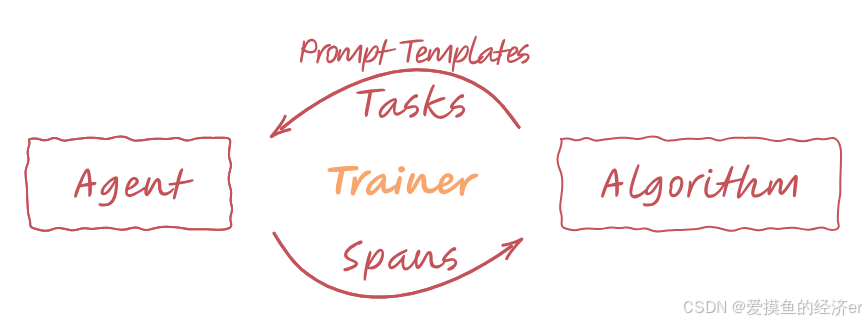
- Algorithm to Agent(via Trainer):算法 创建一个改进的 prompt 并且选择了 task,然后 Trainer 将这两样发送给 Agent。
- Agent to Algorithm(via Trainer):对于接收到的每个 Task ,Agent 使用提供的 Prompt 执行一次部署(rollout),执行其逻辑并可能使用到的 tools。在部署过程中,运行 Agent 的 Trainer 会捕获详细描述每个步骤的跨度(Span)。Agent 还会计算其在任务上的表现奖励(Reward)。这些 Span 和 Reward 随后通过 Trainer 发送回算法。
- Algorithm Learning:算法随后分析这些 Span 和 Reward,以学习如何改进 Agent 的 Action。例如,通过生成更好的 Prompt ,然后,这个改进的 Prompt 将用于下一次任务的迭代。
循环不断重复,Agent 就会不断更新。
2.4.1、The Algorithm(算法)
这里以 APO 为例,主要完成:
1、评估:算法首先请求使用当前提示模板运行测试,以评估其性能。
2、评价:然后,它分析这些测试的详细跨度。使用强大的 LLM(gpt-5-mini),它生成"textual gradient",即对提示的自然语言评价。例如:"提示对于如何处理同样优秀的房间的平局决胜问题含糊不清。"
3、重写:最后,它将评价和原始提示交给另一个 LLM(gpt-4.1-mini),并请求其应用修改,从而生成一个新的、改进的提示模板。
此循环不断重复,每一轮都会生成一个略微改进的提示。要使用它,只需使用所需的超参数初始化 APO 类即可。
python
# In the main training script: run_apo.py
from openai import AsyncOpenAI

openai = AsyncOpenAI()
algo = agl.APO(openai)
2.4.2、The Trainer(训练器)
Trainer 是需要将与之交互的核心组件。它连接所有组件,并通过运行上述循环来管理整个工作流程。我们需要配置训练器,提供算法、并行运行器的数量以及初始提示。
只需调用一次 `trainer.fit()` 即可启动整个过程。
python
# 1. Configure the Trainer with the algorithm and initial prompt
trainer = agl.Trainer(
    algorithm=algo,
    n_runners=8, # Run 8 agents in parallel to try out the prompts
    initial_resources={
        # The initial prompt template to be tuned
        "prompt_template": prompt_template_baseline()
    },
    # This is used to convert the span data into a message format consumable by APO algorithm
    adapter=agl.TraceToMessages(),
)

# 2. Load datasets: They can be list of task objects consumable by `room_selector`.
dataset_train, dataset_val = ...

# 3. Start the training process!
trainer.fit(
    agent=room_selector,
    train_dataset=dataset_train,
    val_dataset=dataset_val
)
3、代码解读
还是以 apo 算法为例,我们先进入:
bash
cd ./examples/apo主要用到:room_selector_apo.py 和 room_selector.py 这两个文件。
3.1、room_selector_apo.py - APO训练主程序
这个文件是APO算法的主入口,用于训练和优化提示词模板。
3.1.1、核心组件
python
def load_train_val_dataset() -> Tuple[Dataset[RoomSelectionTask], Dataset[RoomSelectionTask]]:
    dataset_full = load_room_tasks()
    train_split = len(dataset_full) // 2
    # 将数据集分为训练集和验证集(各占一半)
    dataset_train = [dataset_full[i] for i in range(train_split)]
    dataset_val = [dataset_full[i] for i in range(train_split, len(dataset_full))]
    return cast(Dataset[RoomSelectionTask], dataset_train), cast(Dataset[RoomSelectionTask], dataset_val)
3.1.2、APO算法配置
python
algo = APO[RoomSelectionTask](
    openai_client,
    val_batch_size=10,        # 验证批次大小
    gradient_batch_size=4,    # 梯度计算批次大小
    beam_width=2,             # 束搜索宽度
    branch_factor=2,          # 分支因子
    beam_rounds=2,            # 束搜索轮数
    _poml_trace=True,         # 启用跟踪
)
3.1.3、Trainer设置
python
trainer = Trainer(
    algorithm=algo,
    n_runners=8,              # 并行运行器数量
    initial_resources={
        "prompt_template": prompt_template_baseline()  # 初始提示词模板
    },
    adapter=TraceToMessages(), # 将执行轨迹转换为消息的适配器
)
3.2、room_selector.py - 会议室选择代理
这个文件实现了会议室选择的核心逻辑。
3.2.1、数据结构定义
python
class Room(TypedDict):
    id: str                    # 房间ID
    capacity: int             # 容量
    equipment: List[str]      # 设备列表
    accessible: bool          # 是否无障碍
    distance_m: int          # 距离(米)
    booked: List[Tuple[str, str, int]]  # 预订时间段

class RoomRequirement(TypedDict):
    date: str                 # 日期
    time: str                # 时间
    duration_min: int        # 持续时间(分钟)
    attendees: int           # 参会人数
    needs: List[str]         # 所需设备
    accessible_required: bool # 是否需要无障碍
3.2.2、核心函数解析
3.2.2.1、提示词模板
python
def prompt_template_baseline() -> PromptTemplate:
    return PromptTemplate(
        template="Find a room on {date} at {time} for {duration_min} minutes, {attendees} attendees. Needs: {needs}. Accessible required: {accessible_required}",
        engine="f-string",
    )
3.2.2.2、房间选择代理
python
@rollout
def room_selector(task: RoomSelectionTask, prompt_template: PromptTemplate) -> float:
函数的执行流程是:
- 构建消息:使用提示词模板格式化用户需求
- 调用LLM:使用GPT-4.1-nano模型,配置了工具调用
- 工具调用处理 :如果LLM决定调用工具,执行
get_rooms_and_availability - 获取最终回复:处理工具调用结果,获得最终房间选择
- 评分:使用评分函数评估结果质量
3.2.2.3、工具定义
python
TOOL_DEFINITIONS: List[ChatCompletionToolParam] = [
    {
        "type": "function",
        "function": {
            "name": "get_rooms_and_availability",
            "description": "Return meeting rooms with capacity, equipment, accessibility, distance, and booked time slots.",
            # ... 参数定义
        },
    },
]
3.2.2.4、房间可用性检查
python
def get_rooms_and_availability(date: str, time_str: str, duration_min: int) -> AvailableRooms:
    # 检查每个房间在指定时间段是否可用
    # 通过overlaps函数判断时间冲突
3.2.2.5、评分函数
python
def room_selection_grader(client: OpenAI, final_message: Optional[str], expected_choice: str) -> float:
    # 使用另一个LLM作为评判员
    # 比较代理的选择与期望答案
    # 返回0-1之间的分数
3.3、数据解析
代码中定义了7个会议室:
- Orion: 4人,有TV和白板,无障碍,距离12米
- Lyra: 10人,有投影仪、白板、会议电话,无障碍,距离30米
- Vega: 6人,有TV,非无障碍,距离22米
- Nova: 12人,有LED墙、白板、会议电话,无障碍,距离45米
- Quark: 8人,有投影仪、白板,非无障碍,距离18米
- Atlas: 6人,有投影仪、白板,无障碍,距离10米
- Pulse: 8人,有TV、白板、会议电话,无障碍,距离8米
3.4、工作流程
-
APO训练:
- 加载训练数据(room_tasks.jsonl中的56个任务)
- 使用基础提示词模板开始
- APO算法通过多轮迭代优化提示词
- 每次迭代评估不同提示词变体的性能
-
代理执行:
- 接收房间需求
- 使用当前提示词模板格式化请求
- LLM分析需求并调用工具获取房间信息
- 基于约束条件选择最佳房间
- 返回选择结果和评分
-
评估:
- 比较代理选择与期望答案
- 使用评分LLM给出0-1分数
- 反馈用于APO算法的下一轮优化
4、代码复现
这里我没有采用openai的方式调用,而是用的Qwen的兼容格式。
运行:
bash
python room_selector_apo.py最终结果如下:
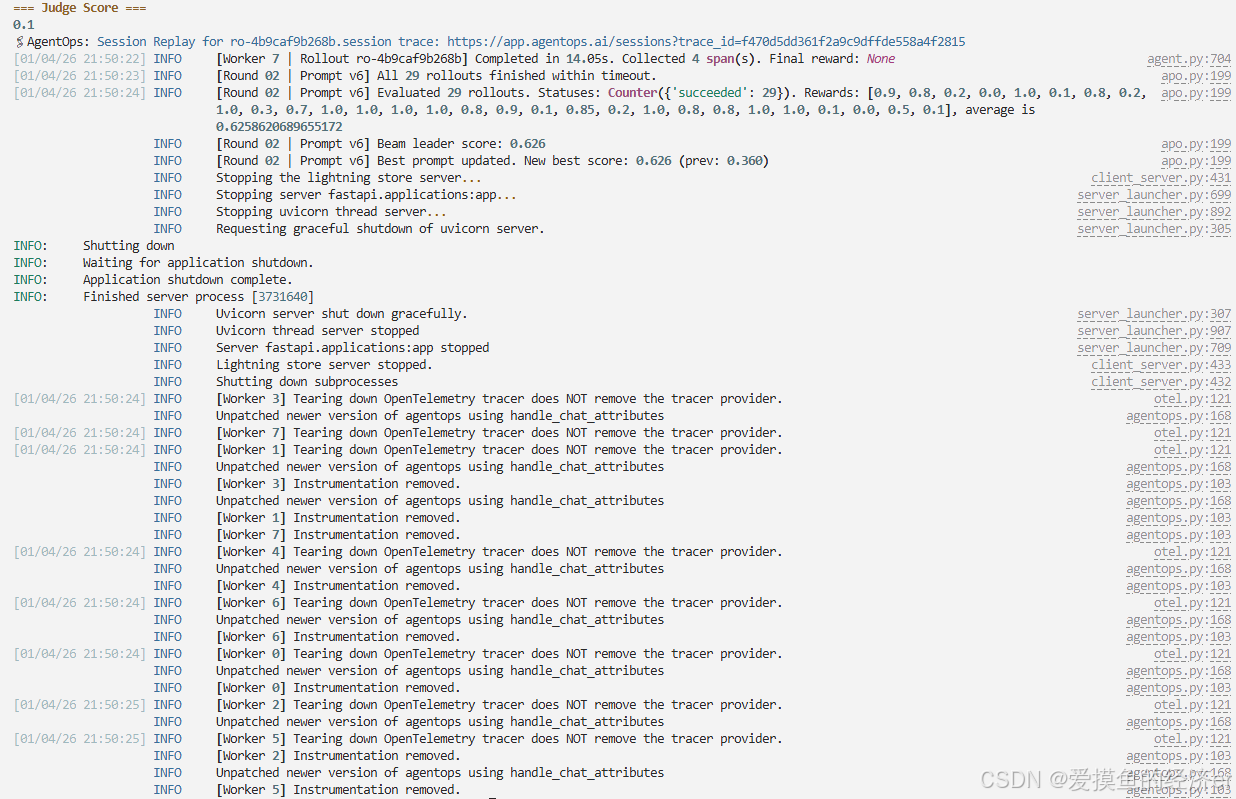
可以看到,因为 beam_rounds=2,所以只是训练了两轮。
同时性能也得到了显著的提升。
原始种子提示词得分是 0.360%(36%),原始提示词为:
bash
Find a room on {date} at {time} for {duration_min} minutes, {attendees} attendees. Needs: {needs}. Accessible required: {accessible_required}在 round1 中,生成了v0-v4共5个候选提示词,效果提升不显著。
在 round2 中,Prompt v6在验证集上获得了最高的 0.655,在完整验证集上得到了 0.626。
提示词为:
bash
Searching for a room on {date} at {time} for {duration_min} minutes, {attendees} attendees, needs: {needs}, accessible: {accessible_required}.所以,从结果可以证明 APO 算法的有效性。算法自动发现了结构化输出、明确约束验证等最佳实践,通过梯度反馈不断改进提示词,同时也避免了过于复杂的解决方案。