为了解决docker内 Vulkan 无法识别 GPU
vulkaninfo 显示 llvmpipe ,只支持cpu渲染的问题

参考:
一、第一篇issues
https://github.com/NVIDIA/nvidia-container-toolkit/issues/1472 中
nvidia-ctk cdi generate 2>nvidia-ctk_cdi_generate.log > nvidia.yaml二、第二篇issues
https://github.com/NVIDIA/nvidia-container-toolkit/issues/191#issuecomment-2022154630中
I recently was encountering similar problems (see my reply to issue 16 where I list details of my environment) for a headless (i.e. no wayland, no x11) vulkan application running in my organization's internal (openstack powered) cloud. Based on the snippets above, I assume some of you, like me, are not using a GUI either. Here is what I learned:
--runtime=nvidiashould be combined with--gpus allin order for the vulkan ICDs to be mounted from the host with recent versions of the nvidia-container-toolkit. Without it, you can see fromdocker inspect -f '{``{ .HostConfig.Runtime }}'thatruncis being used instead of thenvidiaruntime. For some reason, this isn't needed fornvidia-smito work, possibly due to hooks(?)- For headless, we should use EGL instead of GLX implementation since there is no X11
- The stack deployed by the
vulkan-toolspackage in Ubuntu 22.04 only recognizes the deprecated VK_ICD_FILENAMES environment variable when setting paths to an ICD- The path to the needed ICD (
/usr/share/glvnd/egl_vendor.d/10_nvidia.json) isn't automatically found by this version's vulkan loaderXDG_RUNTIME_DIRandDISPLAYerrors can be ignored because we are not using X11- The non-default graphics capability is needed
- You do not need the cuda or the (abandoned?) vulkan nvidia container images. You can get this functionality out of the base Ubuntu 22.04 docker image (and likely others) by installing the (equivalent)
vulkan-toolspackage and setting environment variables at container launch needed by nvidia-container-toolkit (NVIDIA_DRIVER_CAPABILITIES) and the vulkan loader (VK_ICD_FILENAMES).Example Dockerfile using a headless, third-party sample program that will render a ppm file on the gpu using vulkan as a non-root, limited user (luser). The use of a non-root user is a preference; not required. If you are quick, you can see
/home/luser/bin/renderheadlessrunning on the gpu vianvidia-smion the host:
$ cat Dockerfile
FROM ubuntu:22.04 AS vulkan-sample-dev

ARG DEBIAN_FRONTEND=noninteractive
RUN apt-get update && apt-get install -y gcc g++ make cmake libvulkan-dev libglm-dev curl unzip && apt-get clean

RUN useradd luser
USER luser
WORKDIR /home/luser
RUN curl -L -o master.zip https://github.com/SaschaWillems/Vulkan/archive/refs/heads/master.zip && unzip master.zip && rm master.zip
RUN cmake -DUSE_HEADLESS=ON Vulkan-master && \
    make renderheadless

FROM ubuntu:22.04 AS vulkan-sample-run

ARG DEBIAN_FRONTEND=noninteractive
RUN apt-get update && apt-get install -y vulkan-tools && apt-get clean

ENV VK_ICD_FILENAMES=/usr/share/glvnd/egl_vendor.d/10_nvidia.json
ENV NVIDIA_DRIVER_CAPABILITIES=graphics

RUN useradd luser
COPY --chown=luser:luser --from=vulkan-sample-dev /home/luser/bin/renderheadless /home/luser/bin/renderheadless
COPY --chown=luser:luser --from=vulkan-sample-dev /home/luser/Vulkan-master/shaders/glsl/renderheadless/ /home/luser/Vulkan-master/shaders/glsl/renderheadless/
USER luser
WORKDIR /home/luser
CMD [ "/home/luser/bin/renderheadless" ]

$ docker build --target vulkan-sample-run -t localhost:vulkan-sample-run .
...
$ docker run --runtime=nvidia --gpus all --name vulkan localhost:vulkan-sample-run
Running headless rendering example
GPU: NVIDIA GeForce GTX 1650 with Max-Q Design
Framebuffer image saved to headless.ppm
Finished. Press enter to terminate...
...
$ docker cp vulkan:/home/luser/headless.ppm .
...
$ eog headless.ppm
...
$ docker run --runtime=nvidia --gpus all --rm localhost:vulkan-sample-run vulkaninfo --summary | grep deviceName
...
	deviceName         = NVIDIA GeForce GTX 1650 with Max-Q Design
三、cuda镜像
参考:
https://blog.csdn.net/FL1623863129/article/details/132275060
四、运行命令
1、宿主机执行
生成 NVIDIA Container Device Interface (CDI) 配置文件
nvidia-ctk cdi generate 2>nvidia-ctk_cdi_generate.log > nvidia.yaml2、拉取镜像
docker pull nvcr.io/nvidia/cuda:12.4.0-runtime-ubuntu22.043、启动容器
只有一个gpu则改为gpus all,然后删掉所有--device
docker run --name=airsim-env \
      --hostname=airsim-env \
      --mac-address=1g:ad:9e:c5:a2:b8 \
      --network=bridge \
      --runtime=nvidia \
      --shm-size=200g \
      --gpus '"device=3"' \
      --device /dev/nvidia3 \
      --device /dev/nvidiactl \
      --device /dev/nvidia-uvm \
      --device /dev/nvidia-uvm-tools \
      --ipc=host \
      --pid=host \
      --privileged \
      -e NVIDIA_DRIVER_CAPABILITIES=compute,utility,graphics,display \
      -e VK_ICD_FILENAMES=/usr/share/glvnd/egl_vendor.d/10_nvidia.json \
      -e XDG_RUNTIME_DIR=/tmp \
      -t \
      nvcr.io/nvidia/cuda:12.4.0-runtime-ubuntu22.04 \
      bash
解释:
--gpus all与--runtime=nvidia同时使用以支持挂载vulkan ICD
-e NVIDIA_DRIVER_CAPABILITIES=compute,utility,graphics,display 以启用图形能力
-e VK_ICD_FILENAMES=/usr/share/glvnd/egl_vendor.d/10_nvidia.json 指定Vulkan ICD
-e XDG_RUNTIME_DIR=/tmp 设置运行时目录
4、进入容器
docker exec -it airsim-env bash5、安装依赖
安装 Vulkan 和图形依赖
apt update
  apt install -y \
      vulkan-tools \
      libgl1-mesa-glx \
      libgl1-mesa-dri \
      libegl1 \
      libxext6 \
      xvfb
6、验证
验证 Vulkan 是否识别 GPU
vulkaninfo --summary | grep -E "(deviceName|driverName)"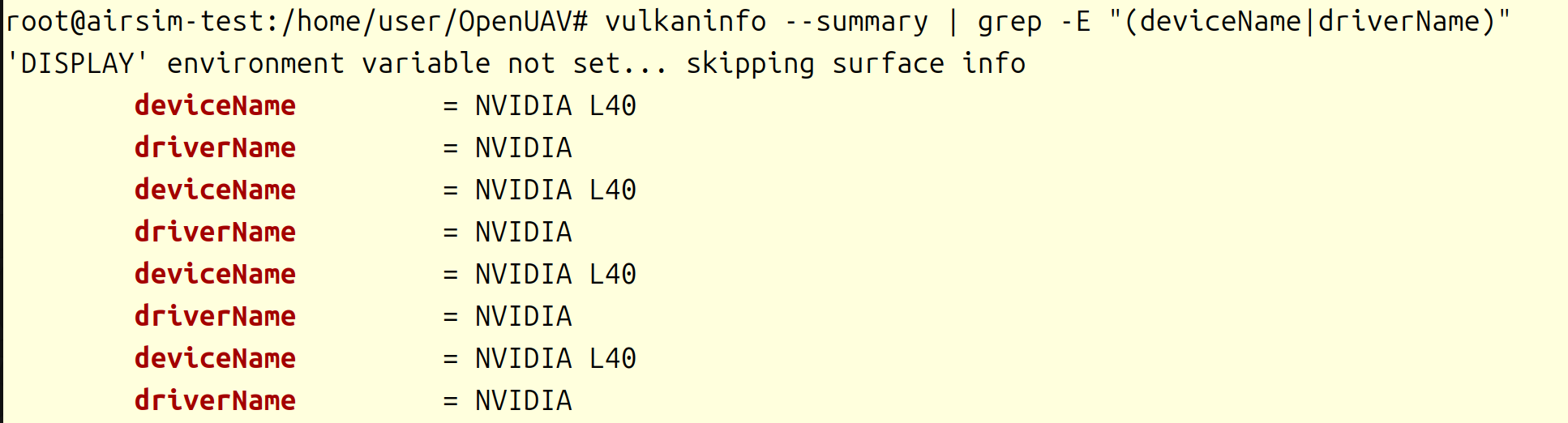
成功识别到GPU