系统批量运维管理器 paramiko
paramiko 是基于Python 实现的SSH2远程安全连接,支持认证及密钥方式。可以实现远程命令执行、 文件传输、中间 SSH代理等功能,相对于Pexpect,封装的层次更高,更贴近SSH协议的功能。
1:paramiko 的安装
Linux系统部署Python3环境
bash
#安装依赖包
yum install -y openssl-devel bzip2-devel expat-devel gdbm-devel readline-devel sqlite-devel libffi-devel gcc gcc-c++

tar zxvf Python-3.13.2.tgz

cd Python-3.13.2/

## 配置安装路径
./configure --prefix=/usr/local/python3

make && make install

ln -s /usr/local/python3/bin/python3 /usr/bin/python3

ln -s /usr/local/python3/bin/pip3 /usr/bin/pip

## 验证安装
python3 --version
pip国内镜像源配置
bash
cat > /root/.config/pip/pip.conf << 'EOF'
[global]
timeout=40
index-url=http://mirrors.aliyun.com/pypi/simple/
extra-index-url = https://pypi.tuna.tsinghua.edu.cn/simple/ http://pypi.douban.com/simple/ http://pypi.mirrors.ustc.edu.cn/simple/
[install]
trusted-host = pypi.tuna.tsinghua.edu.cn mirrors.aliyun.com pypi.douban.com pypi.mirrors.ustc.edu.cn
EOF
安装paramiko模块
bash
pip install paramiko二、paramiko 核心组件
paramiko 包含两个核心组件,分别对应不同的运维场景:
| 组件 | 作用 | 核心功能 |
|---|---|---|
| SSHClient 类 | 封装 SSH 会话,用于远程命令执行 | 建立 SSH 连接、执行远程命令、设置主机密钥策略 |
| SFTPClient 类 | 基于 SSH 传输协议的 SFTP 客户端 | 远程文件上传、下载、目录操作(创建 / 删除 / 重命名)、文件属性查询 |
三、paramiko 运维代码示例
(一)基础场景:单台远程执行命令(在客户端创建文件abc.txt)
bash
import paramiko
def pwd(filename):
    with open(filename,'r') as f:
        a = f.read()
        return a
#四要素
host = '192.168.108.128'
port = 22
username = 'root'
password = pwd('password.txt')
#日志文件
paramiko.util.log_to_file('syslogin.log')
#创建一个ssh客户端对象
ssh_client = paramiko.SSHClient()
#设置主动接受未知主机密钥策略
ssh_client.set_missing_host_key_policy(paramiko.AutoAddPolicy())
#连接服务器
ssh_client.connect(hostname=host,port=port,username=username,password=password,allow_agent=False)
#执行指令,获取信息
stdin,stdout,stderr = ssh_client.exec_command('touch /abc.txt')
for line in stdout:
    print(line)
#关闭输入
stdin.close()
#关闭客户端
ssh_client.close()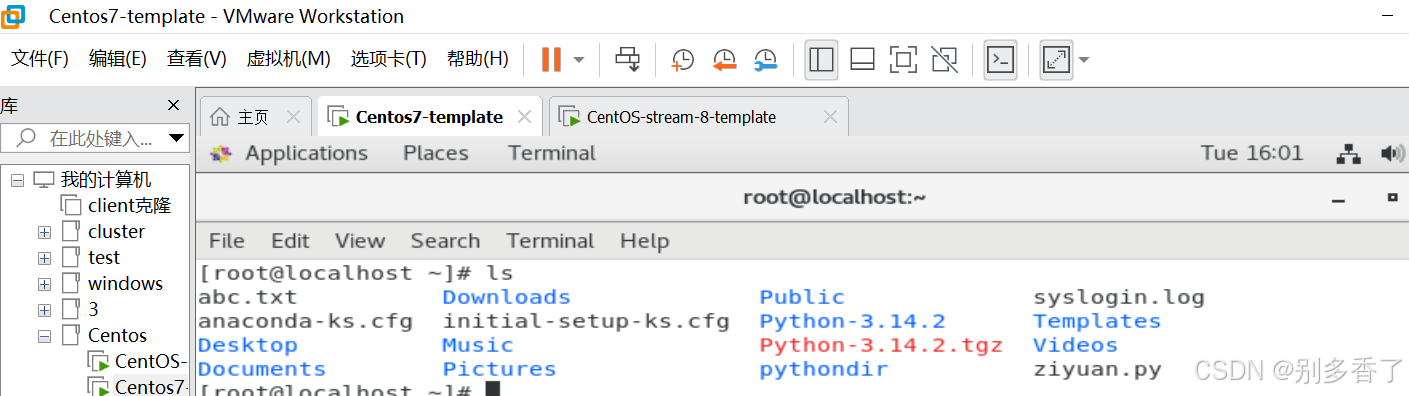
(二)批量运维场景:多服务器内存信息采集与排序
bash
#需求:巡检2台服务器,获取内存信息,把free状态的容量进行排序统计,并生成到sort.txt文件中
import paramiko
def pwd(filename):
    with open(filename) as f:
        a = f.read().strip()
        return a

hosts = ['192.168.108.128','192.168.108.162']
port = 22
username = 'root'
password = pwd('password.txt')
paramiko.util.log_to_file('log.txt')
mem_info = []
for host in hosts:
    try:
        ssh_client = paramiko.SSHClient()
        ssh_client.set_missing_host_key_policy(paramiko.AutoAddPolicy())
        ssh_client.connect(hostname=host, port=port, username=username, password=password)
        cmd = "free -m | grep Mem | awk '{print $4}'"
        stdin, stdout, stderr = ssh_client.exec_command(cmd)
        get_info = stdout.readlines()
        if get_info:
            free_mem = int(get_info[0].strip())
            mem_info.append((host,free_mem))
            print(f'主机:{host}的空闲内存是{free_mem}')
    except Exception as e:
        print(f'主机{host}连接失败')
    ssh_client.close()
mem_info.sort(key=lambda x: x[1])
with open("sort.txt","w") as s:
    s.write('服务器IP   空闲内存\n')
    for host,free_mem in mem_info:
        s.write(f'{host}   {free_mem}\n')
print('\n排序后的结果:',mem_info)
print('结果保存在sort.txt文件中')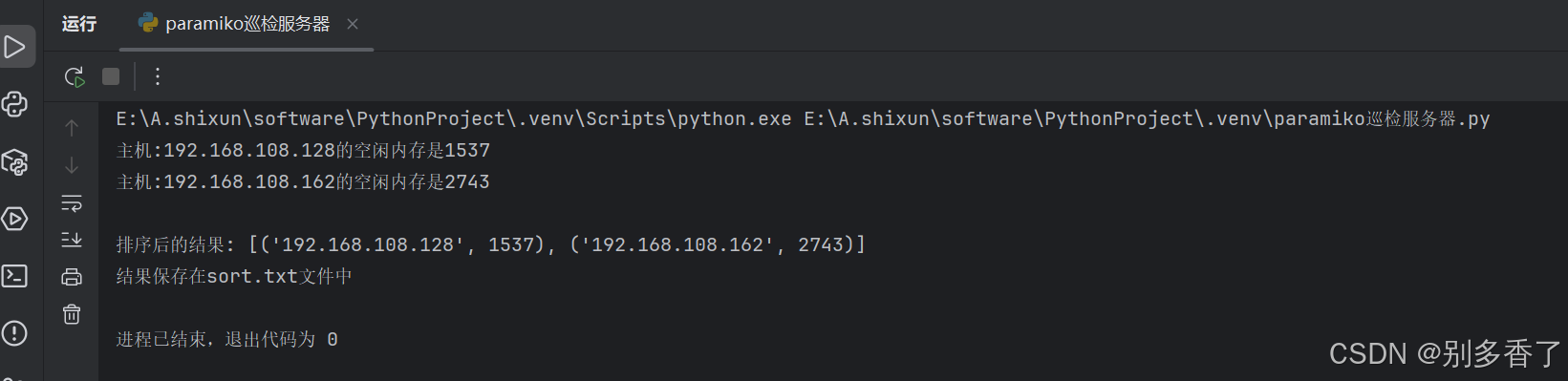
(三)堡垒机模式下的远程命令执行
bash
import paramiko
import os, sys, time

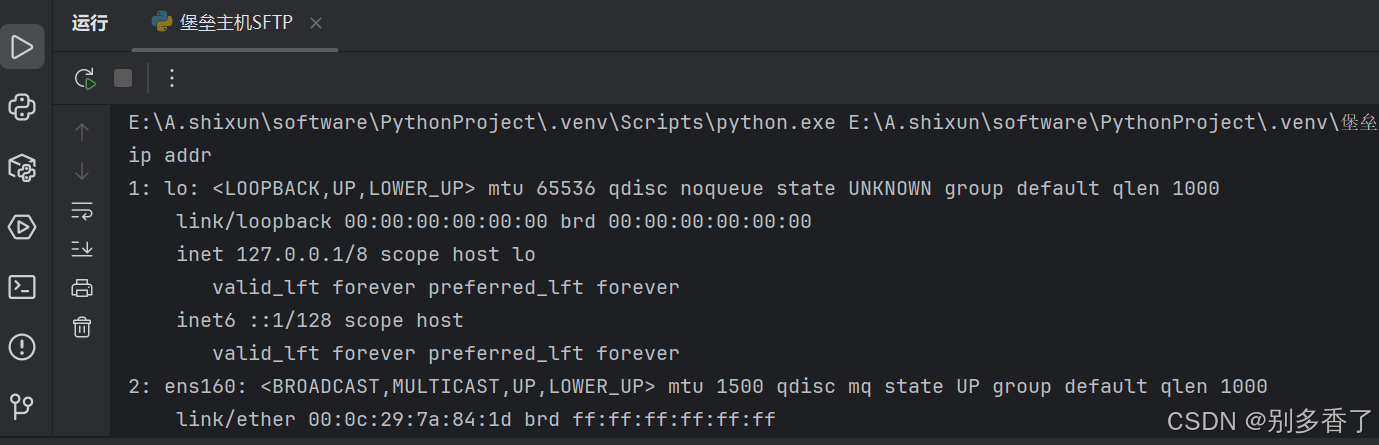
blip = '192.168.108.128'
bluser = 'root'
blpasswd = '123'

hostname = '192.168.108.162'
username = 'root'
password = '123'
port = 22

passinfo = 'password: '
paramiko.util.log_to_file('python.log')

ssh = paramiko.SSHClient()
ssh.set_missing_host_key_policy(paramiko.AutoAddPolicy())
ssh.connect(hostname=blip, username=bluser, password=blpasswd)

channel = ssh.invoke_shell()
channel.settimeout(30)

buff = ''
resp = ''
channel.send(' ssh ' + username + '@' + hostname + '\n')
#优化循环条件,增加时间判断防止无限循环
start_time = time.time()
while not buff.endswith(passinfo):
    try:
        # 非阻塞接收,每次只收1024字节,避免单次接收过大导致阻塞
        resp = channel.recv(1024).decode('utf-8', errors='ignore')
    except Exception as e:
        # 超时异常不直接退出,短暂等待后重试
        if 'timeout' in str(e):
            # 超过30秒再退出
            if time.time() - start_time > 30:
                print('Error info:' + str(e) + ' connection time out.')
                channel.close()
                ssh.close()
                sys.exit()
            time.sleep(0.5)
            continue
        else:
            print('Error info:' + str(e) + ' connection error.')
            channel.close()
            ssh.close()
            sys.exit()

    buff += resp
    # 清空resp,避免重复累加
    resp = ''

    if not buff.find('yes/no') == -1:
        channel.send('yes\n')
        buff = ''
        # 发送yes后等待一下,让服务器响应
        time.sleep(1)

# 发送密码后增加短暂等待
channel.send(password + '\n')
time.sleep(1)
buff = ''
# 优化提示符匹配,不只匹配#,增加$等常见提示符
start_time = time.time()
while not any(char in buff for char in ['#', '$', '%']):
    try:
        resp = channel.recv(1024).decode('utf-8', errors='ignore')
    except Exception as e:
        if 'timeout' in str(e):
            if time.time() - start_time > 30:
                print('Error info:' + str(e) + ' auth time out.')
                channel.close()
                ssh.close()
                sys.exit()
            time.sleep(0.5)
            continue
        else:
            print('Error info:' + str(e))
            channel.close()
            ssh.close()
            sys.exit()

    if not resp.find(passinfo) == -1:
        print('Error info: Authentication failed.')
        channel.close()
        ssh.close()
        sys.exit()
    buff += resp
    resp = ''

# 执行命令前清空缓冲区,执行后增加等待
channel.send('ip addr\n')
# 给命令执行留时间
time.sleep(2)
buff = ''
try:
    start_time = time.time()
    # 同时判断超时和提示符
    while buff.find('#') == -1 and time.time() - start_time < 30:
        try:
            resp = channel.recv(1024).decode('utf-8', errors='ignore')
            if resp:
                buff += resp
            else:
                time.sleep(0.5)
        except:
            time.sleep(0.5)
            continue
except Exception as e:
    print('error info:' + str(e))
print(buff)
channel.close()
ssh.close()