本文目录
前言
在跨境电商竞争激烈的当下,掌握先机尤为关键。每年感恩节,作为美国购物季的开端,亚马逊平台汇聚海量商品与商机。然而,平台限制与复杂的数据抓取机制,使得直接获取数据困难重重。如何在感恩节前4-6周精准捕捉潜力商品,优化选品、定价、促销策略?本文将利用破局利器"海外NetNut网络代理",让数据抓取难题迎刃而解,助力商家在感恩节黄金战场中抢占先机,脱颖而出。
爬取亚马逊商品数据的困难
由于亚马逊有很多反爬机制所以直接爬取会遇到很多困难。例如亚马逊会对IP访问频率进行监控,如果我的爬虫短时间内频繁发送请求,IP很可能会被封禁。这就好比一条高速公路突然变得异常拥堵,车辆被检查站逐一拦下。解决方法看似简单:降低请求评率,但这显然会严重影响抓取效率。即便解决了IP封禁问题,亚马逊的动态加载机制也是一大难关。我们可能会发现即使爬虫成功访问了网页,也只抓到一个"骨架",而商品的具体信息却无法获取。这是因为亚马逊的大部分数据依赖Java Script动态生成,爬虫需要模拟浏览器行为,才能完整呈现页面内容。这就要求爬虫工具能够处理复杂脚本,而普通爬虫脚本往往无能为力。当然最棘手的,还是亚马逊的CAPTCHA验证码。一旦触发,我们的爬虫便会瞬间中断,因为验证码的设计初衷就是为了区分"人"和"机器"。这些叠加的障碍,让直接抓取亚马逊数据变成了一场高难度的挑战。
解决上述困难的方法很多,但最高效省力的方法还是海外代理。海外代理IP难以被识别为爬虫,匿名性与稳定性更好,并且支持动态切换IP。下面给大家推荐一个我经常使用的海外代理IP平台,NetNut。
NetNut代理简介与套餐
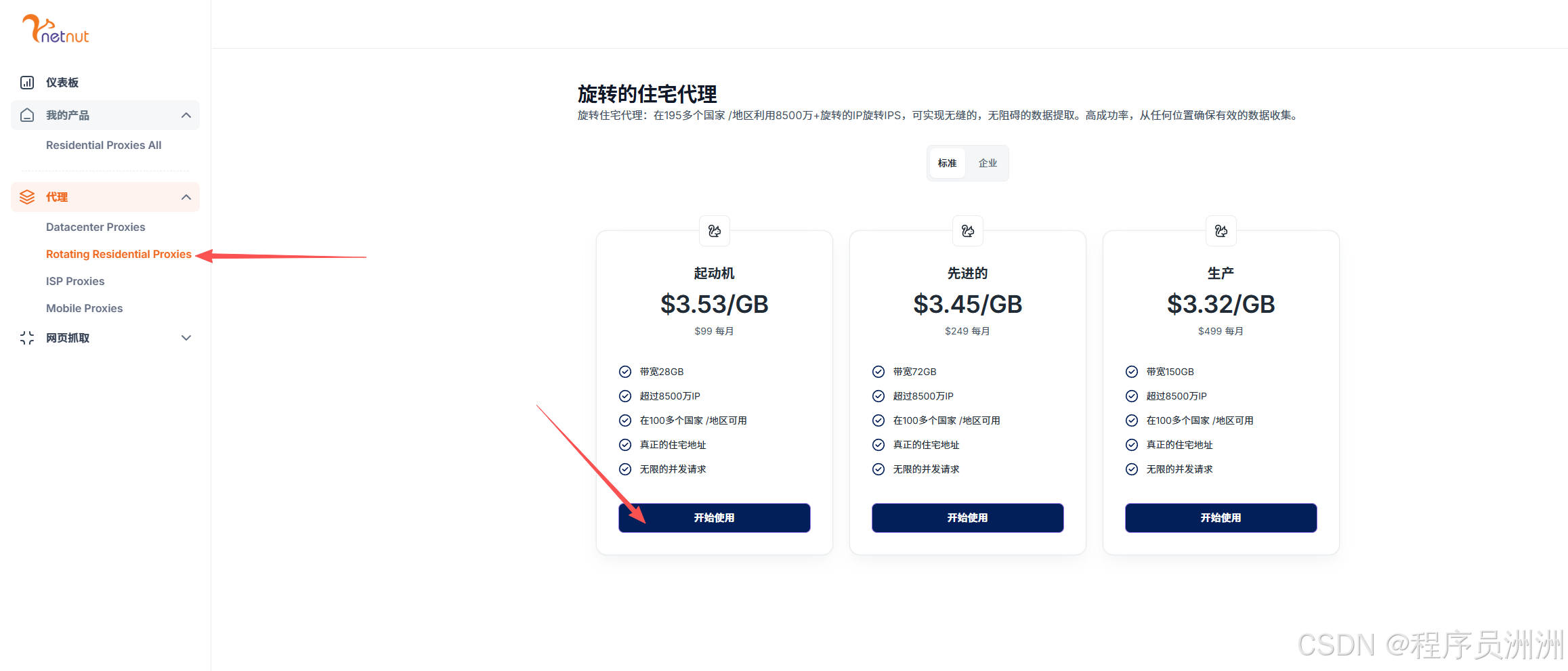
NetNut是一家专注于提供全球代理IP服务的供应商(www.netnut.cn),其核心产品包括动态住宅代理、静态ISP代理、移动代理和数据中心代理,覆盖195个国家,拥有超过8500万住宅IP资源。以下是其代理服务的主要特点与套餐信息:
核心产品类型
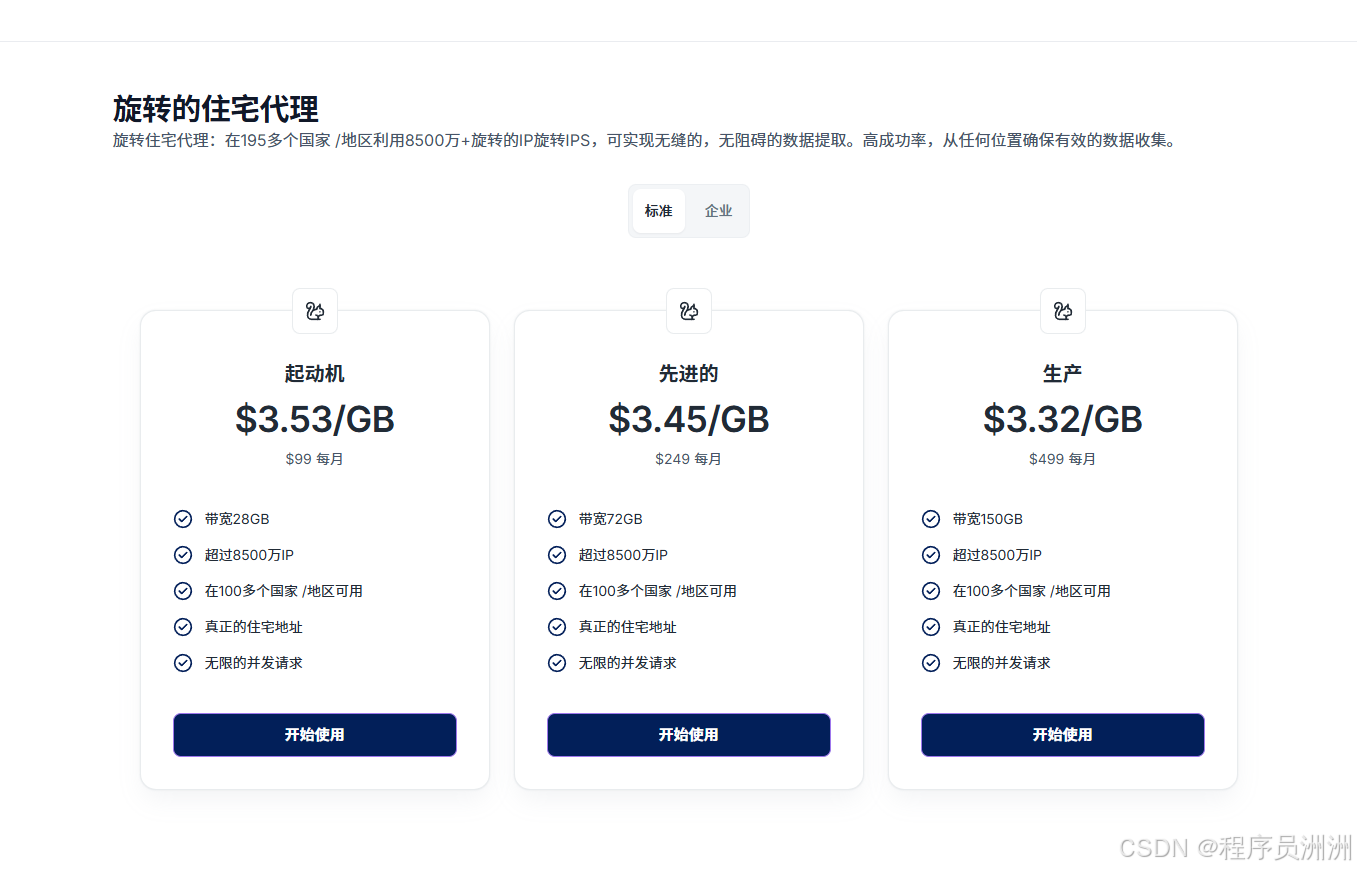
- 动态住宅代理
- 覆盖195个国家,支持HTTP/S和SOCKS5协议,IP自动轮换,适合大规模数据抓取和SEO监控。
- 最低套餐价格:99美元/月。
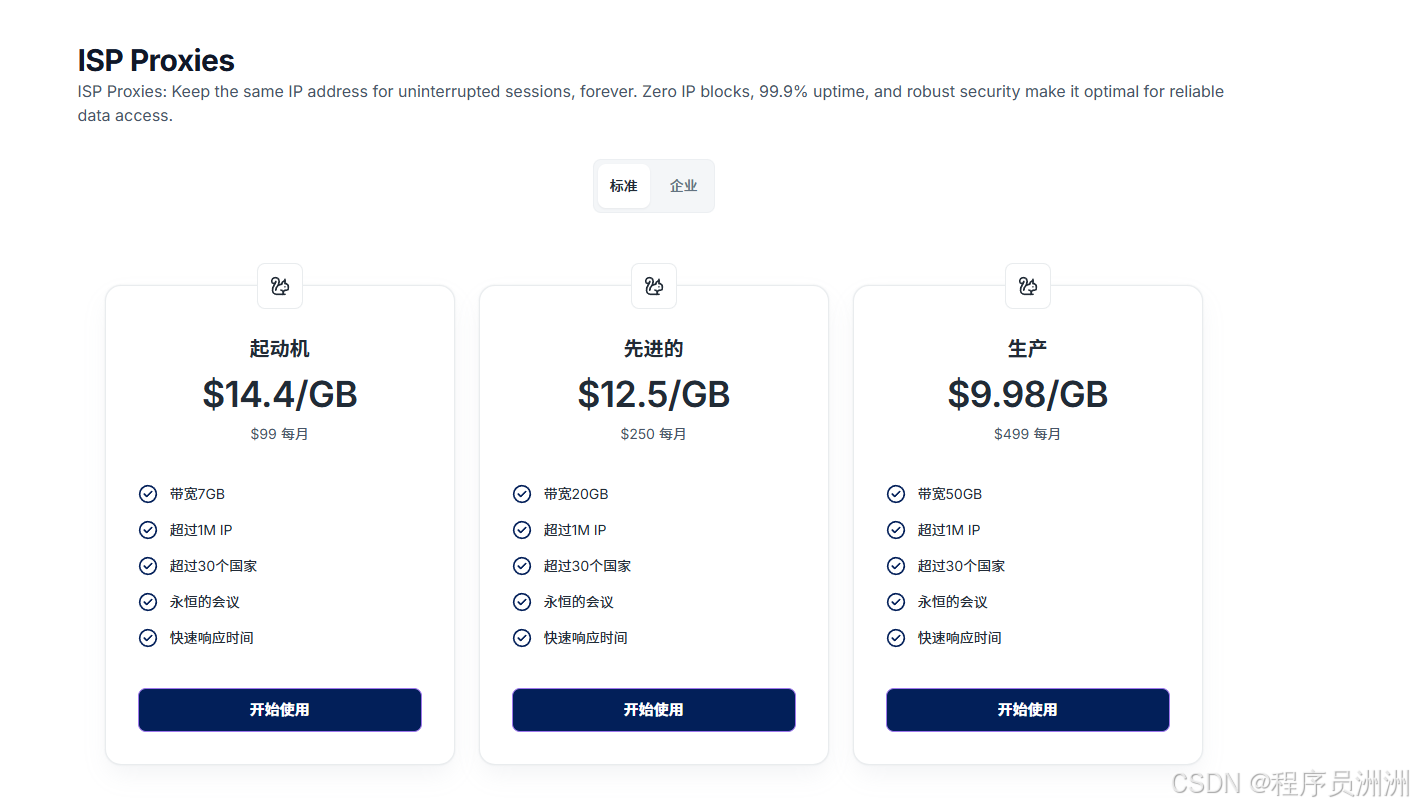
- 静态ISP代理
- 提供超过100万静态住宅IP,稳定性高,支持长期会话保持,适合账号管理和广告验证。
- 最低套餐价格:99美元/月。
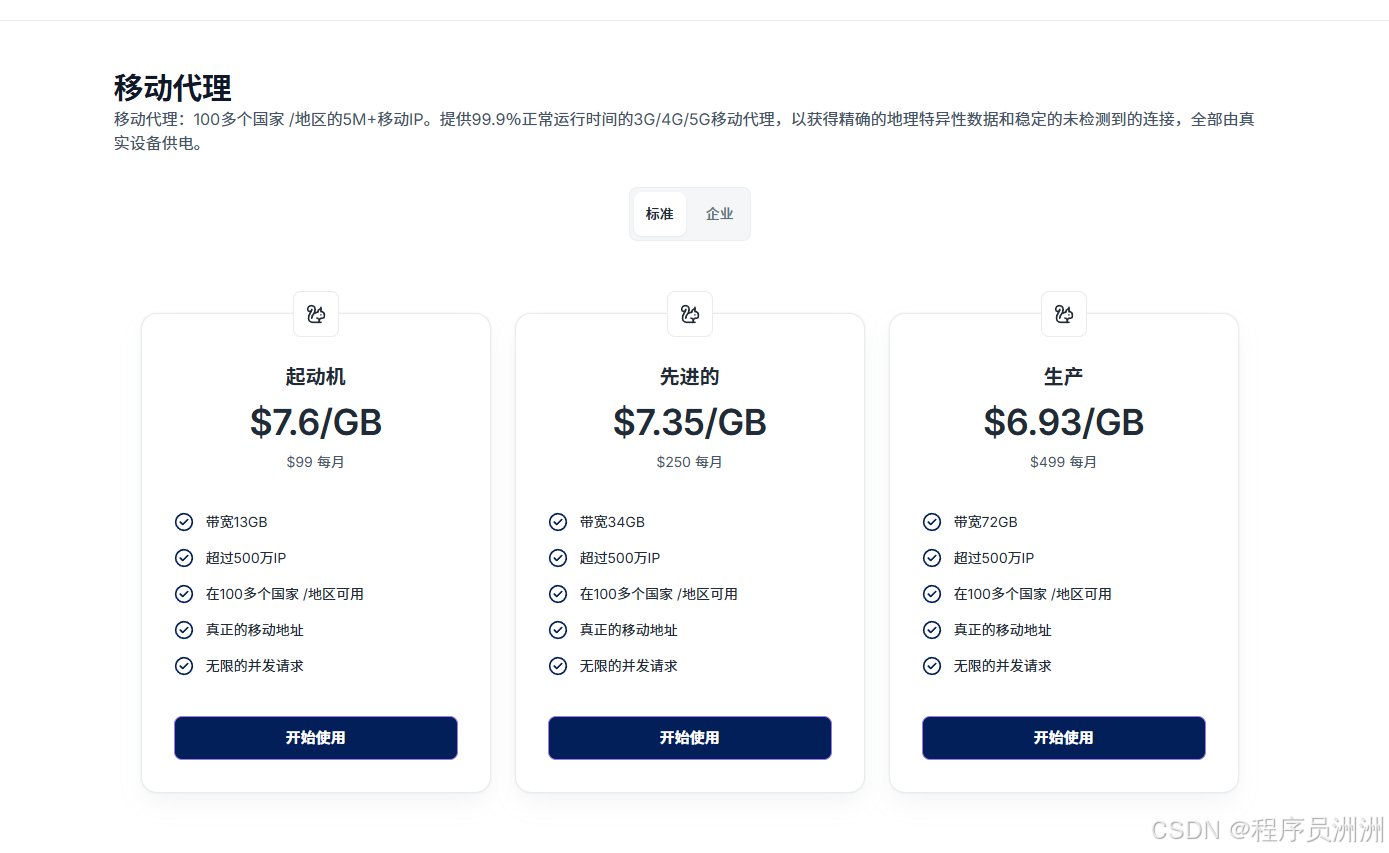
- 移动代理
- 基于真实移动设备IP(3G/4G/5G),可绕过地理位置限制,成功率高达99.9%。
- 最低套餐价格:99美元/月。
-
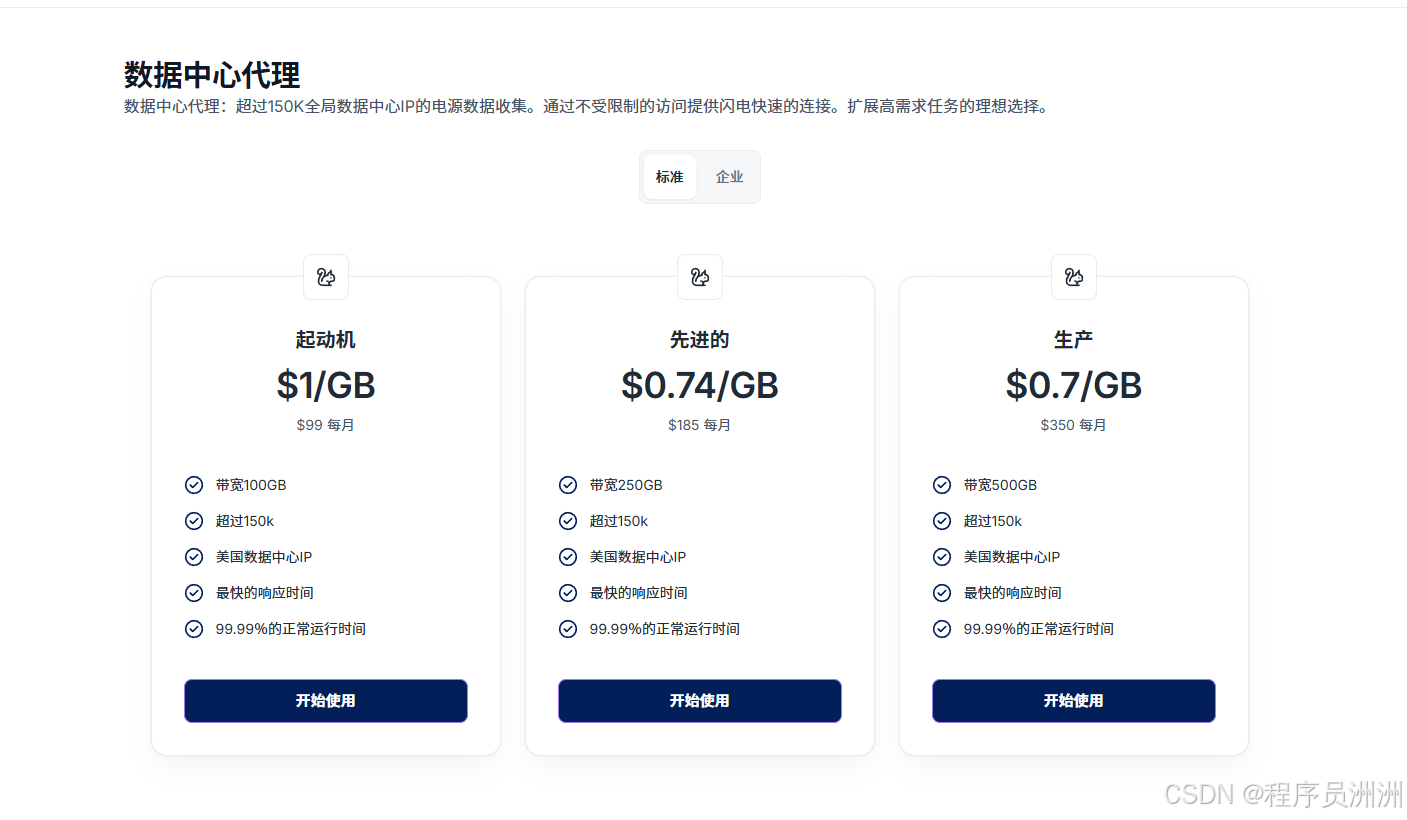
数据中心代理
- 提供高速稳定的数据中心IP,适合高并发场景,价格最低0.5美元/GB(限制1TB)。
- 最低套餐价格:99美元/月。
-
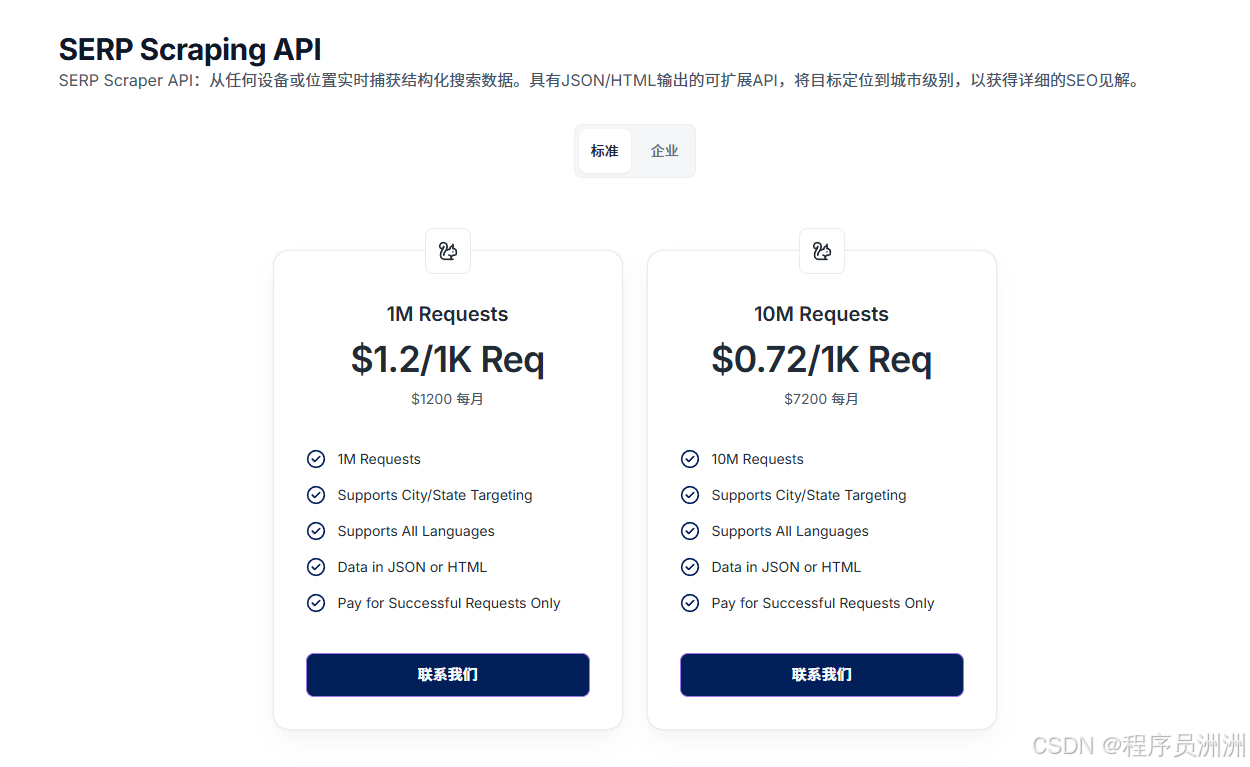
SERP Scraping API
- 自动化获取和分析SERP 数据,用于 SEO 优化和市场调研
- 支持细化到城市/州级别和所有语言的精细定位
- 通过 API 以 JSON 或 HTML 形式提供结构化数据
- 请求不成功不收费,确保具有成本效益的抓取
技术优势
- ISP直连架构:业内唯一提供动态与静态混合代理网络的服务商,延迟降低30%-50%。
- 全球分布式节点:支持精准选择目标区域IP,减少跨洋延迟。
- 按时间计费选项:提供分钟级计费的私密隧道代理,适合低频长连接任务
实战:爬取亚马逊中"感恩节"相关商品的数据
1、找到动态代理,选择一个适合自己的开始使用。这里我选择的是基础版。
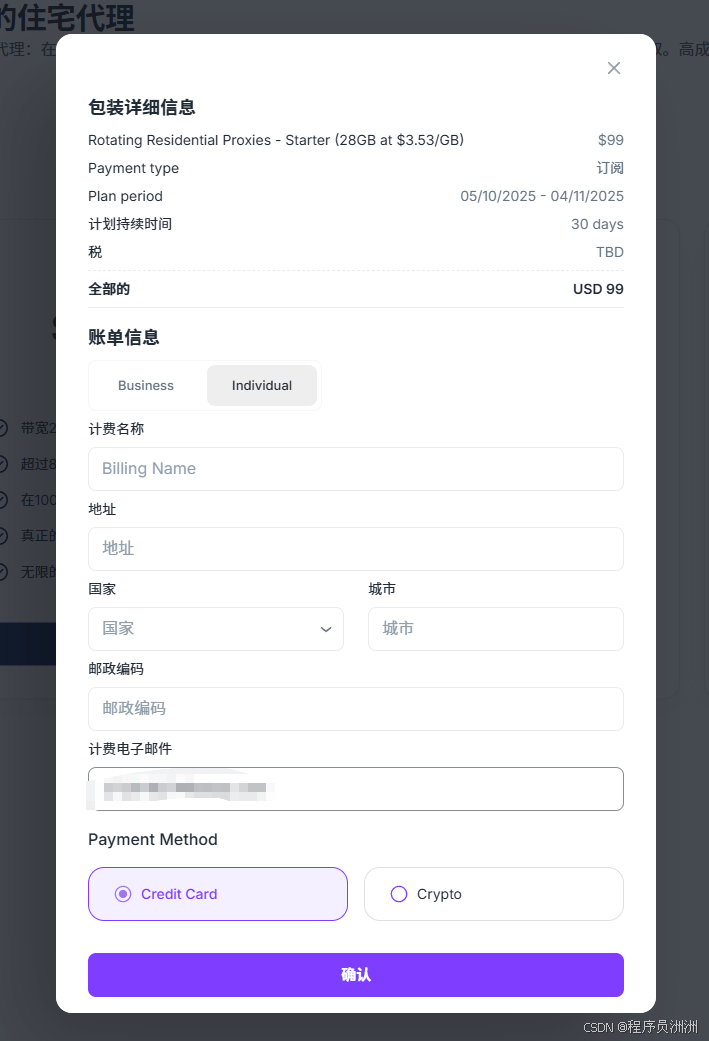
2、填写信息付款
3、选择集成示例,勾选一下协议和会话类型,输入目标网址,选择想要的代码。
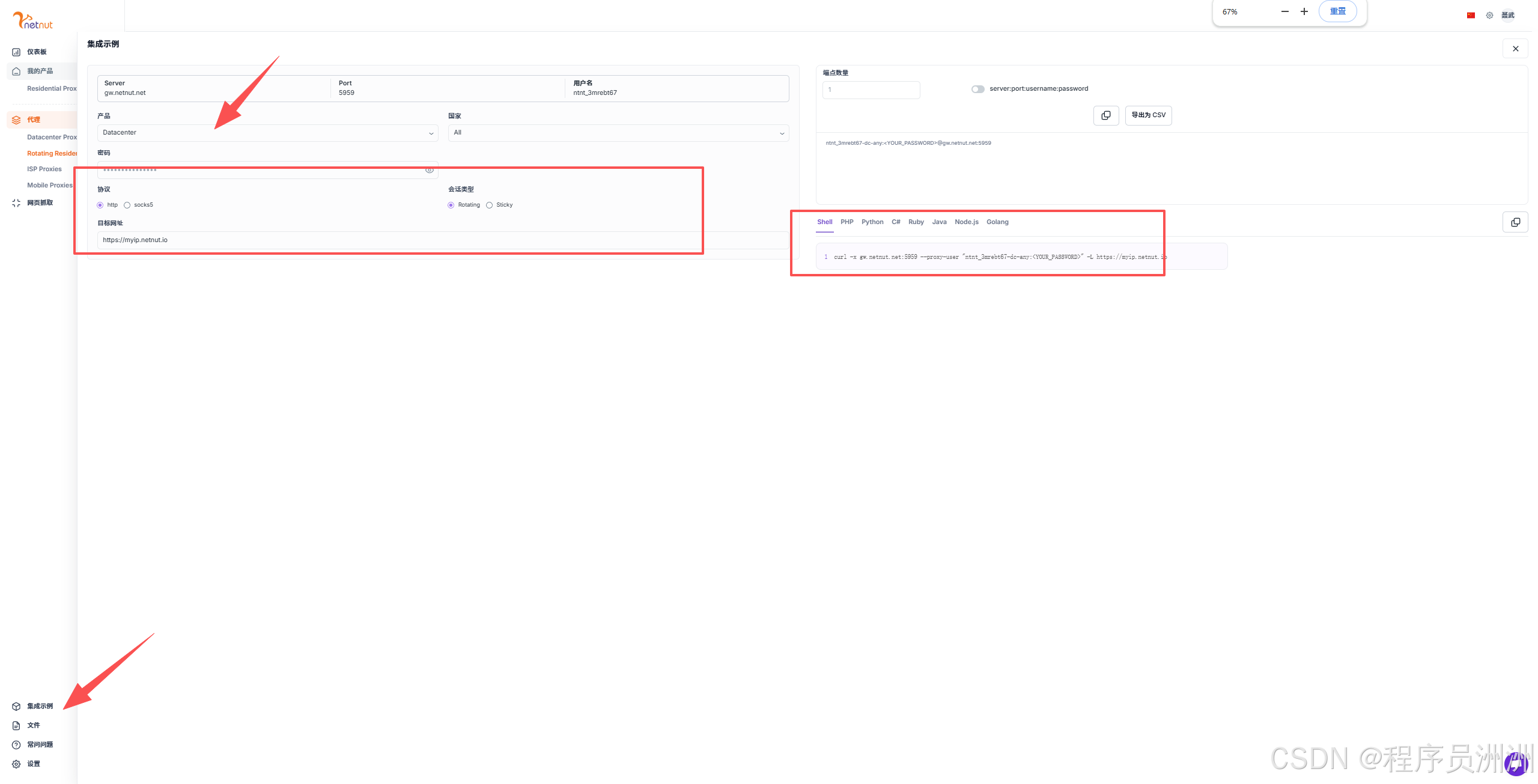
4、此时我们得到的是一个代码示例,只能返回目标网址的页面。详细的脚本代码如下:
plaintext
import requests
from bs4 import BeautifulSoup
import re
import json
from urllib.parse import quote

# 代理设置
username = 'ntnt_3mrebt67-dc-any'
password = '<YOUR_PASSWORD>'
server = 'gw.netnut.net'
port = '5959'
proxy = {
  'http': f'http://{username}:{password}@{server}:{port}',
  'https': f'http://{username}:{password}@{server}:{port}',
}

def get_amazon_product_info(keyword):
    # 构建搜索URL(使用加拿大亚马逊站点)
    search_url = f"https://www.amazon.ca/s?k={quote(keyword)}&ref=nb_sb_noss"

    try:
        # 发送请求获取搜索结果页面
        response = requests.get(search_url, proxies=proxy, timeout=30)
        response.raise_for_status()

        # 解析HTML内容
        soup = BeautifulSoup(response.text, 'html.parser')

        # 查找商品列表
        product_results = soup.select('div[data-component-type="s-search-result"]')

        # 存储所有商品信息
        all_products = []

        # 遍历商品列表,提取每个商品的信息
        for i, result in enumerate(product_results[:5]):  # 限制获取前5个商品以避免过多请求
            try:
                # 提取商品链接
                product_link = result.select_one('a.a-link-normal.s-underline-text.s-underline-link-text.s-link-style.a-text-normal')
                if not product_link:
                    continue

                product_url = "https://www.amazon.ca" + product_link['href']

                # 提取ASIN
                asin_match = re.search(r'/dp/([A-Z0-9]+)', product_url)
                asin = asin_match.group(1) if asin_match else None

                # 跳转到商品详情页获取更多信息
                product_response = requests.get(product_url, proxies=proxy, timeout=30)
                product_response.raise_for_status()
                product_soup = BeautifulSoup(product_response.text, 'html.parser')

                # 提取各种商品信息
                title = product_soup.select_one('#productTitle')
                title = title.get_text(strip=True) if title else ""

                # 提取卖家信息
                seller_name = "******"  # 卖家名称设为******以符合示例格式

                # 提取品牌信息
                brand = product_soup.select_one('a#bylineInfo')
                if brand:
                    brand_text = brand.get_text(strip=True)
                    brand_match = re.search(r'Brand: (.+)', brand_text)
                    brand = brand_match.group(1) if brand_match else brand_text
                else:
                    brand = ""

                # 提取描述信息
                description_section = product_soup.select_one('#productDescription')
                description = description_section.get_text(strip=True) if description_section else ""

                # 提取价格信息
                price_whole = product_soup.select_one('span.a-price-whole')
                price_fraction = product_soup.select_one('span.a-price-fraction')
                if price_whole and price_fraction:
                    final_price = float(f"{price_whole.get_text(strip=True).replace(',', '')}.{price_fraction.get_text(strip=True)}")
                else:
                    final_price = None

                currency = "CAD"  # 默认使用加拿大元

                # 提取库存信息
                availability = product_soup.select_one('#availability')
                availability = availability.get_text(strip=True) if availability else ""

                # 提取评论信息
                reviews_count_elem = product_soup.select_one('span#acrCustomerReviewText')
                if reviews_count_elem:
                    reviews_count_text = reviews_count_elem.get_text(strip=True)
                    reviews_count_match = re.search(r'([0-9,]+)', reviews_count_text)
                    reviews_count = int(reviews_count_match.group(1).replace(',', '')) if reviews_count_match else 0
                else:
                    reviews_count = 0

                # 提取评分信息
                rating_elem = product_soup.select_one('span.a-icon-alt')
                if rating_elem:
                    rating_text = rating_elem.get_text(strip=True)
                    rating_match = re.search(r'([0-9.]+)', rating_text)
                    rating = float(rating_match.group(1)) if rating_match else 0
                else:
                    rating = 0

                # 提取类别信息
                categories = []
                category_elements = product_soup.select('div#wayfinding-breadcrumbs_feature_div a')
                for category in category_elements:
                    category_text = category.get_text(strip=True)
                    if category_text:
                        categories.append(category_text)

                # 提取图片信息
                image_urls = []
                image_elems = product_soup.select('div.imgTagWrapper img')
                for img in image_elems:
                    if 'src' in img.attrs:
                        image_urls.append(img['src'])

                # 提取商品详情
                product_details = []
                details_elems = product_soup.select('table#productDetails_detailBullets_sections1 tr')
                for tr in details_elems:
                    th = tr.select_one('th')
                    td = tr.select_one('td')
                    if th and td:
                        detail_type = th.get_text(strip=True).replace(':', '')
                        detail_value = td.get_text(strip=True)
                        product_details.append({
                            "type": detail_type,
                            "value": detail_value
                        })

                # 提取特性列表
                features = []
                feature_elems = product_soup.select('div#feature-bullets ul li span.a-list-item')
                for feature in feature_elems:
                    feature_text = feature.get_text(strip=True)
                    if feature_text:
                        features.append(feature_text)

                # 构建商品信息字典
                product_info = {
                    "title": title,
                    "seller_name": seller_name,
                    "brand": brand,
                    "description": description,
                    "initial_price": final_price,
                    "currency": currency,
                    "availability": availability,
                    "reviews_count": reviews_count,
                    "categories": categories,
                    "parent_asin": asin,
                    "asin": asin,
                    "buybox_seller": "",  # 简化处理,实际可能需要更复杂的提取逻辑
                    "number_of_sellers": 1,  # 简化处理
                    "root_bs_rank": None,
                    "answered_questions": 0,  # 简化处理
                    "domain": "https://www.amazon.ca/",
                    "images_count": len(image_urls),
                    "url": product_url,
                    "video_count": 0,  # 简化处理
                    "image_url": image_urls[0] if image_urls else None,
                    "item_weight": None,
                    "rating": rating,
                    "product_dimensions": None,
                    "seller_id": "",  # 简化处理
                    "date_first_available": None,
                    "discount": None,
                    "model_number": None,
                    "manufacturer": brand,
                    "department": categories[0] if categories else "",
                    "plus_content": False,
                    "upc": None,
                    "video": False,
                    "top_review": None,
                    "final_price_high": None,
                    "final_price": final_price,
                    "variations": [],  # 简化处理,实际可能需要更复杂的提取逻辑
                    "delivery": [],  # 简化处理
                    "features": features,
                    "format": None,
                    "buybox_prices": {
                        "final_price": final_price,
                        "unit_price": None
                    },
                    "input_asin": None,
                    "ingredients": None,
                    "origin_url": None,
                    "bought_past_month": None,
                    "is_available": availability.lower().find('in stock') != -1,
                    "root_bs_category": None,
                    "bs_category": None,
                    "bs_rank": None,
                    "badge": None,
                    "subcategory_rank": None,
                    "amazon_choice": False,
                    "images": image_urls,
                    "product_details": product_details,
                    "prices_breakdown": {
                        "deal_type": None,
                        "list_price": None,
                        "typical_price": None
                    },
                    "country_of_origin": None,
                    "from_the_brand": None,
                    "product_description": None,
                    "seller_url": "",  # 简化处理
                    "sustainability_features": None,
                    "climate_pledge_friendly": False,
                    "videos": None,
                    "other_sellers_prices": None,
                    "downloadable_videos": None,
                    "editorial_reviews": None,
                    "about_the_author": None
                }

                all_products.append(product_info)
                print(f"已获取商品 {i+1}/{min(5, len(product_results))}: {title}")

            except Exception as e:
                print(f"处理商品时出错: {str(e)}")
                continue

        return all_products

    except Exception as e:
        print(f"获取商品信息时出错: {str(e)}")
        return []

# 主程序
if __name__ == "__main__":
    print("亚马逊商品信息爬虫")
    print("输入商品关键词进行搜索 (输入'exit'退出):")

    while True:
        keyword = input("关键词: ")
        if keyword.lower() == 'exit':
            print("程序已退出")
            break

        print(f"正在搜索 '{keyword}' 的商品信息...")
        products = get_amazon_product_info(keyword)

        if products:
            print(f"找到 {len(products)} 个商品")

            # 输出为JSON格式
            print("\n商品信息 (JSON格式):")
            print(json.dumps(products, ensure_ascii=False, indent=2))

            # 也可以保存到文件
            with open(f"amazon_products_{keyword.replace(' ', '_')}.json", 'w', encoding='utf-8') as f:
                json.dump(products, f, ensure_ascii=False, indent=2)
            print(f"\n商品信息已保存到 amazon_products_{keyword.replace(' ', '_')}.json")
        else:
            print("未找到相关商品")

        print("\n---\n")
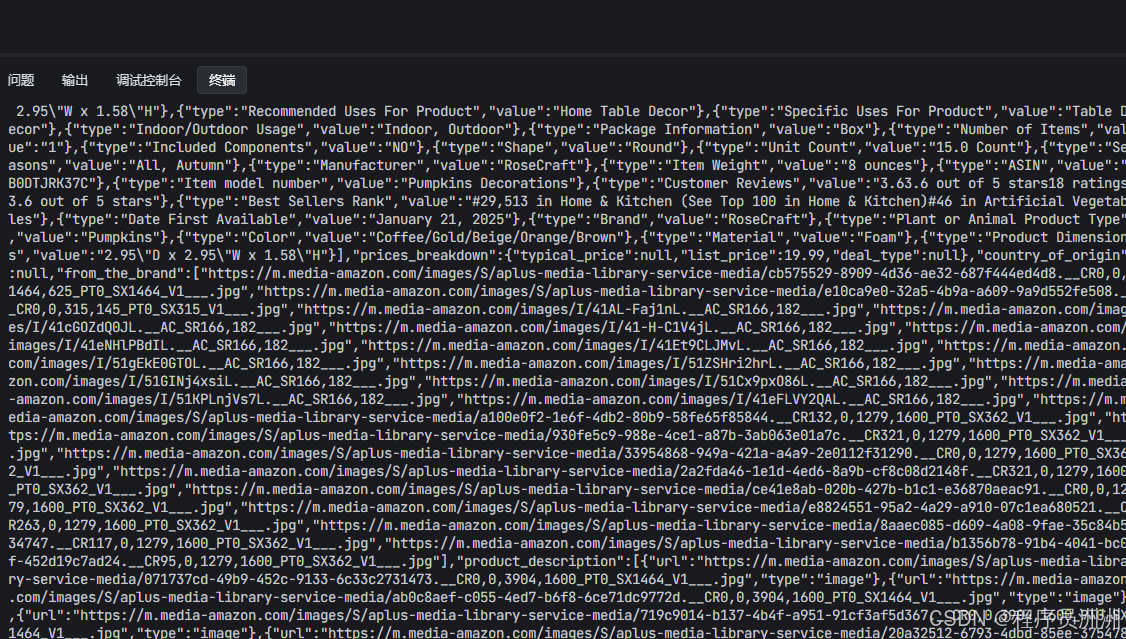
5、这次我爬取了Thanksgiving decorations、Fall wreaths、Pumpkin centerpieces、Thanksgiving T-shirts四个关键词,获取到的数据如下:
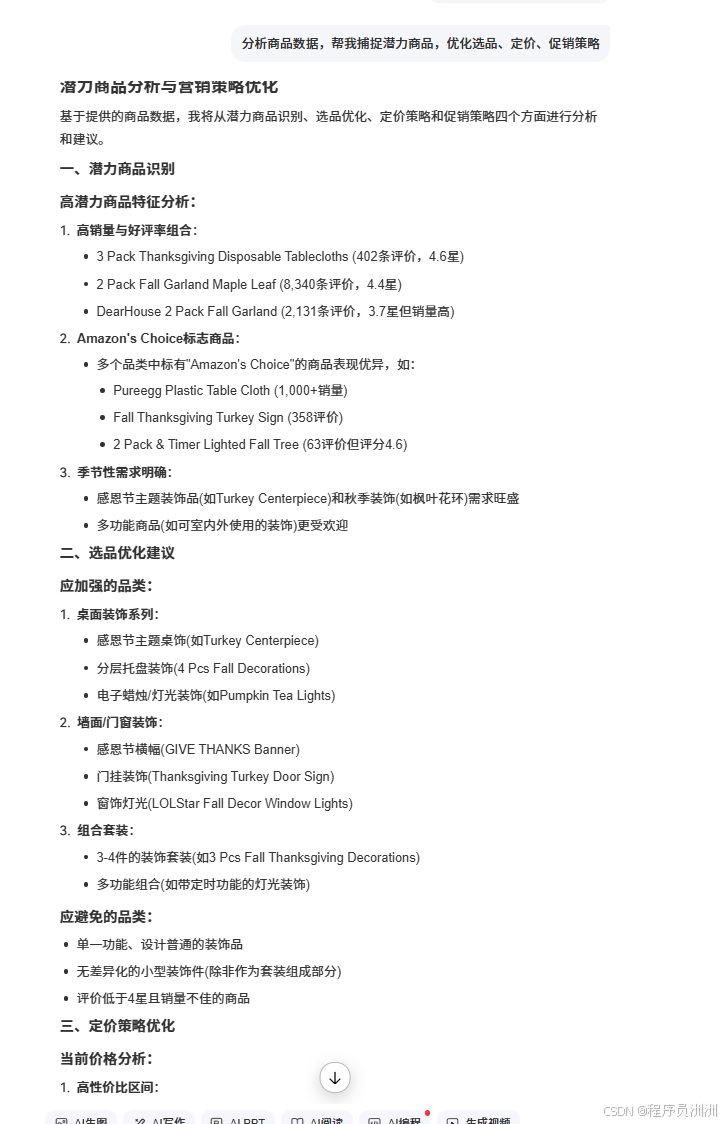
6、利用AI分析商品数据,帮我捕捉潜力商品,优化选品、定价、促销策略
总结
在本次项目中,我通过使用NetNut代理,成功突破了亚马逊的反爬机制,精准抓取了感恩节相关商品的详细数据。随后,借助AI分析技术,从海量数据中筛选出潜力商品,并为商家提供了针对性的选品、定价和促销策略优化建议。这一过程不仅验证了NetNut代理在跨境电商数据抓取中的高效性,也展示了技术组合在解决复杂问题中的关键作用。未来,我们可继续探索此类技术方案,以应对更多挑战。
感兴趣的朋友可以体验使用~:https://www.netnut.cn