作者介绍:简历上没有一个精通的运维工程师。请点击上方的蓝色《运维小路》关注我,下面的思维导图也是预计更新的内容和当前进度(不定时更新)。
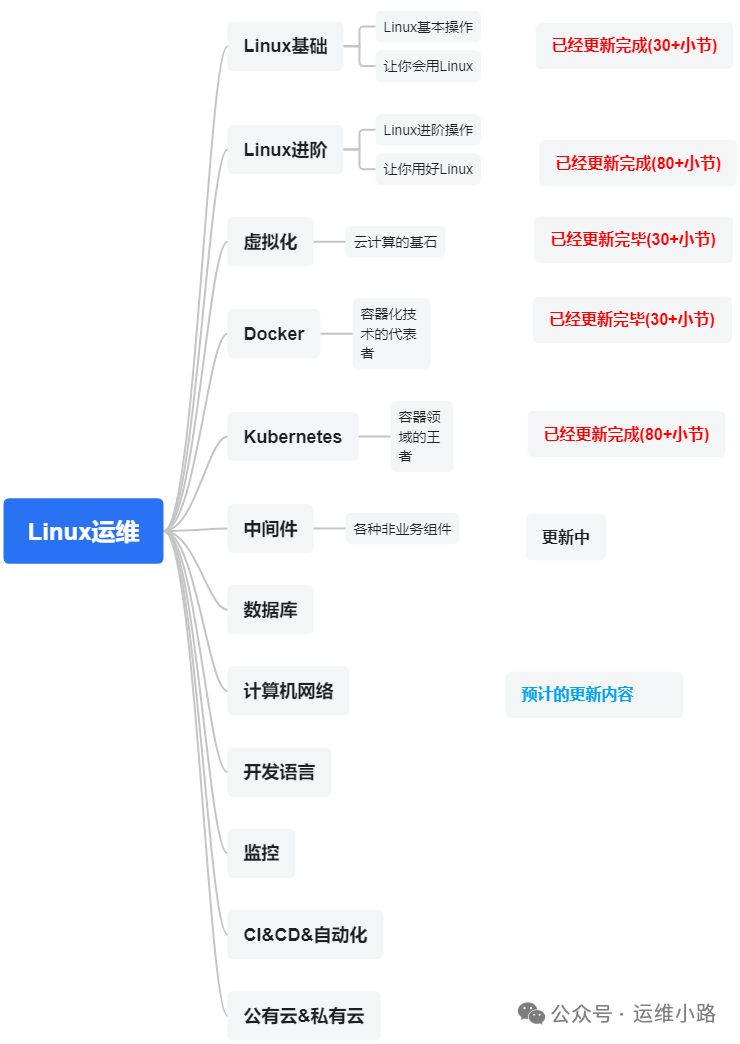
中间件,我给它的定义就是为了实现某系业务功能依赖的软件,包括如下部分:
Web服务器
代理服务器
ZooKeeper
Kafka
RabbitMQ
Hadoop HDFS
Elasticsearch ES (本章节)
本文章源自我2019年写过的一篇文章:es备份,经过阿里公有云和腾讯私有云的验证,都是可用的,但是经过多年,部分信息已经发生改变,所以基于这个步骤重做步骤,已经验证成功。
Elasticsearch(ES)本身是存储大数据的,一般的情况是没有备份需求的,但是ES还是给我们提供了备份接口和方法。
这里的备份是可以备份到本地,也可以备份到对象存储里面,我这里直接以使用对象存储来作为存储后端。我在历史文章里面使用的是单机的备份,集群的备份也差不多(其实主要我也忘记了)。
这里的备份都是需要插件支持,如果你本地集群则需要自己安装,如果你用的云ES则一般都会自带。
1.插件安装
所有节点都需要安装,我还是以历史记录三节点集群作为演示。
bash
[es@localhost elasticsearch-7.17.29]$ ./bin/elasticsearch-plugin install repository-s3
-> Installing repository-s3
-> Downloading repository-s3 from elastic
[=================================================] 100%
@@@@@@@@@@@@@@@@@@@@@@@@@@@@@@@@@@@@@@@@@@@@@@@@@@@@@@@@@@@
@     WARNING: plugin requires additional permissions     @
@@@@@@@@@@@@@@@@@@@@@@@@@@@@@@@@@@@@@@@@@@@@@@@@@@@@@@@@@@@
* java.lang.RuntimePermission accessDeclaredMembers
* java.lang.RuntimePermission getClassLoader
* java.lang.reflect.ReflectPermission suppressAccessChecks
* java.net.SocketPermission * connect,resolve
* java.util.PropertyPermission es.allow_insecure_settings read,write
See https://docs.oracle.com/javase/8/docs/technotes/guides/security/permissions.html
for descriptions of what these permissions allow and the associated risks.

Continue with installation? [y/N]y
-> Installed repository-s3
-> Please restart Elasticsearch to activate any plugins installed
[es@localhost elasticsearch-7.17.29]$ ll plugins/
total 4
drwxr-xr-x 2 es es 4096 Sep  1 23:53 repository-s3
[es@localhost elasticsearch-7.17.29]$ 2.修改配置文件
bash
#这里需要填写oss的ak和sk等信息,修改完成以后启动es
s3.client.default.access_key: xxxxx
s3.client.default.secret_key: xxxx
s3.client.default.endpoint: https://oss-cn-chengdu.aliyuncs.com
s3.client.default.protocol: https
s3.client.default.path_style_access: true3.配置ak和sk
bash
#这个步骤可能不需要,因为我调试的 先做的这个步骤,后做的上面的第二步
#这里需要对应的ak和sk
bin/elasticsearch-keystore add s3.client.default.access_key
bin/elasticsearch-keystore add s3.client.default.secret_key
4.创建备份仓库
这里只是创建仓库,并不会真正备份,只需要执行一次即可。es_backup是仓库的名字,可以根据自己需要自己定义。
bash
[es@localhost elasticsearch-7.17.29]$ curl -X PUT 'http://192.168.31.172:9200/_snapshot/es_backup?verify=true' \
> -H 'Content-Type: application/json' \
> -d '{
>     "type": "s3",
>     "settings": {
>         "bucket": "es-bucket123",
>         "endpoint": "oss-cn-chengdu.aliyuncs.com",
>         "protocol": "https",
>         "path_style_access": false,
>         "server_side_encryption": false,
>         "compress": true
>     }
> }'
{"acknowledged":true}[es@localhost elasticsearch-7.17.29]$ 5.查看仓库
bash
[es@localhost elasticsearch-7.17.29]$ curl -X GET 'http://192.168.31.172:9200/_snapshot/es_backup?pretty'
{
  "es_backup" : {
    "type" : "s3",
    "settings" : {
      "bucket" : "es-bucket123",
      "path_style_access" : "false",
      "endpoint" : "oss-cn-chengdu.aliyuncs.com",
      "protocol" : "https",
      "server_side_encryption" : "false",
      "compress" : "true"
    }
  }
}
[es@localhost elasticsearch-7.17.29]$
6.执行备份
es_backup:前面创建的快照仓库名称。
snapshot_20250902:快照名称(建议用日期命名)。
wait_for_completion=true:同步等待,直到备份完成才返回(适合小数据量)如果不加 wait_for_completion,则是异步执行
bash
[es@localhost elasticsearch-7.17.29]$ curl -X PUT "http://192.168.31.172:9200/_snapshot/es_backup/snapshot_20250902?wait_for_completion=true"
{"snapshot":{"snapshot":"snapshot_20250902","uuid":"IcIiVPtmSnW6gYnGohfihw","repository":"es_backup","version_id":7172999,"version":"7.17.29","indices":["minute-metrics",".ds-.logs-deprecation.elasticsearch-default-2025.08.01-000001","raw_data-2025.08.16","minute_avg","raw-metrics-2025.08.15-01",".ds-ilm-history-5-2025.08.01-000001",".geoip_databases",".ds-.logs-deprecation.elasticsearch-default-2025.09.01-000002","minute-metrics-2025.08.15",".ds-ilm-history-5-2025.09.01-000002",".kibana-event-log-7.17.29-000001","hour-metrics-2025.08.15","hour-metrics"],"data_streams":["ilm-history-5",".logs-deprecation.elasticsearch-default"],"include_global_state":true,"state":"SUCCESS","start_time":"2025-09-01T17:53:28.868Z","start_time_in_millis":1756749208868,"end_time":"2025-09-01T17:53:39.684Z","end_time_in_millis":1756749219684,"duration_in_millis":10816,"failures":[],"shards":{"total":13,"failed":0,"successful":13},"feature_states":[{"feature_name":"geoip","indices":[".geoip_databases"]}]}}[es@localhost elasticsearch-7.17.29]$
上面是部分全部索引,我们也可以只备份指定索引,如下面。
bash
curl -X PUT "http://192.168.31.172:9200/_snapshot/es_backup/snapshot_20250902?wait_for_completion=true" \
-H 'Content-Type: application/json' \
-d '{
  "indices": "index-2025*,log-nginx",
  "ignore_unavailable": true,
  "include_global_state": false
}'
7.查看备份结果
bash
[es@localhost elasticsearch-7.17.29]$ curl -X GET "http://192.168.31.172:9200/_snapshot/es_backup/_all?pretty"
{
  "snapshots" : [
    {
      "snapshot" : "snapshot_20250902",
      "uuid" : "IcIiVPtmSnW6gYnGohfihw",
      "repository" : "es_backup",
      "version_id" : 7172999,
      "version" : "7.17.29",
      "indices" : [
        "minute-metrics",
        ".ds-.logs-deprecation.elasticsearch-default-2025.08.01-000001",
        "raw_data-2025.08.16",
        "minute_avg",
        "raw-metrics-2025.08.15-01",
        ".ds-ilm-history-5-2025.08.01-000001",
        ".geoip_databases",
        ".ds-.logs-deprecation.elasticsearch-default-2025.09.01-000002",
        "minute-metrics-2025.08.15",
        ".ds-ilm-history-5-2025.09.01-000002",
        ".kibana-event-log-7.17.29-000001",
        "hour-metrics-2025.08.15",
        "hour-metrics"
      ],
      "data_streams" : [
        "ilm-history-5",
        ".logs-deprecation.elasticsearch-default"
      ],
      "include_global_state" : true,
      "state" : "SUCCESS",
      "start_time" : "2025-09-01T17:53:28.868Z",
      "start_time_in_millis" : 1756749208868,
      "end_time" : "2025-09-01T17:53:39.684Z",
      "end_time_in_millis" : 1756749219684,
      "duration_in_millis" : 10816,
      "failures" : [ ],
      "shards" : {
        "total" : 13,
        "failed" : 0,
        "successful" : 13
      },
      "feature_states" : [
        {
          "feature_name" : "geoip",
          "indices" : [
            ".geoip_databases"
          ]
        }
      ]
    }
  ],
  "total" : 1,
  "remaining" : 0
}
[es@localhost elasticsearch-7.17.29]$
8.查看oss里面的数据

9.还原
除了备份哪个操作换成下面的还原命令,其他都是一样的。
curl -XPOST 192.168.2.23:9200/_snapshot/es_backup/es_bak1/_restore?wait_for_completion=true运维小路
一个不会开发的运维!一个要学开发的运维!一个学不会开发的运维!欢迎大家骚扰的运维!
关注微信公众号《运维小路》获取更多内容。