这是一个基于 Qt 框架实现的连击动画组件,该组件封装完整,使用方便,适用于游戏中的连击提示(如格斗游戏、音乐游戏),动态计数器动画展示(如点赞数、得分动画),需要视觉反馈的计数场景等。
1、实现效果如下:
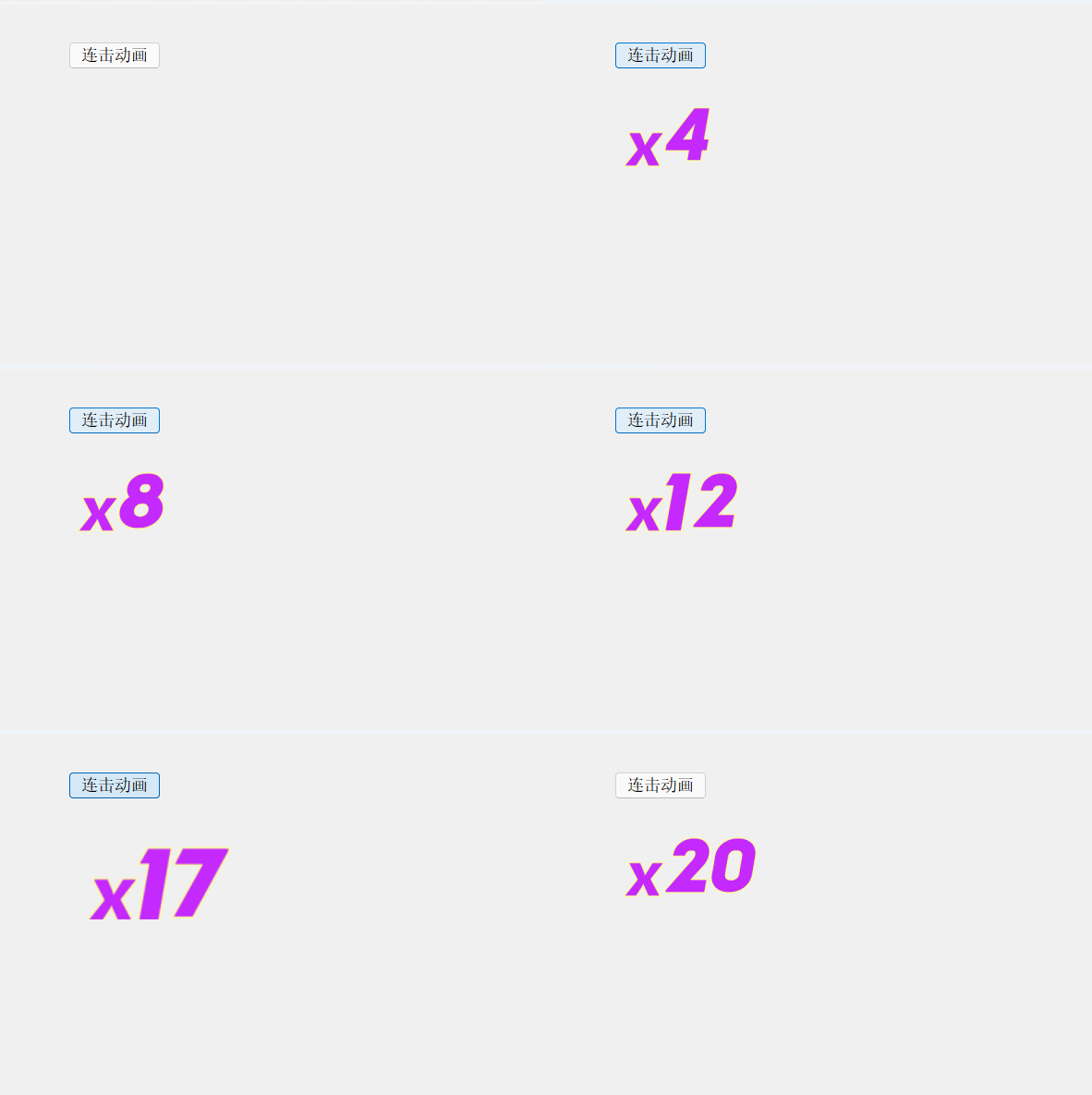
2、实现的核心功能:
- 连击计数与显示:
-
显示连击数(如 "x10"),由 "x" 图标 + 数字图片组合而成。
-
数字图片支持 0~9,可自定义图片路径。
- 缩放动画效果
-
每次触发连击时,数字会有一个"放大后缩回"的动画效果。
-
动画支持可调的持续时间、缩放因子、缓动曲线
3、核心代码:
cpp
#ifndef QMYCOMBOANIMATION_H
#define QMYCOMBOANIMATION_H

#include <QWidget>
#include <QEasingCurve>

class QPropertyAnimation;

namespace Ui {
class QMyComboAnimation;
}

class QMyComboAnimation : public QWidget
{
    Q_OBJECT

public:
    explicit QMyComboAnimation(QWidget *parent = nullptr);
    ~QMyComboAnimation();

    // 基本功能
    void startComBoAnimation();
    void resetCombo();  // 新增:重置连击数

    // 动画参数设置
    void setAnimationDuration(int msec);
    void setAnimationScaleFactor(qreal scaleFactor);
    void setAnimationEasingCurve(QEasingCurve::Type curveType);

    // 数字图片设置
    void setNumberImages(const QStringList &imagePaths);
    void setXImage(const QString &imagePath);

    // 获取当前状态
    int currentCombo() const;
    int animationDuration() const;
    qreal animationScaleFactor() const;
    QEasingCurve::Type animationEasingCurve() const;

    // 新增:直接设置连击数
    void setCombo(int combo);

signals:
    void animationFinished();
    void comboChanged(int newCombo);
    void comboAnimationTriggered(int combo);  // 新增:触发动画时的信号

private:
    Ui::QMyComboAnimation *ui;

    QPropertyAnimation *pAnimation;
    QStringList pNumList;
    QString xImagePath;  // 新增:x图片路径
    int nCurrent;

    // 动画参数
    int animationDurationMs;
    qreal scaleFactor;
    QEasingCurve::Type easingCurveType;
};

#endif // QMYCOMBOANIMATION_H
cpp
#include "QMyComboAnimation.h"
#include "ui_QMyComboAnimation.h"
#include <QPropertyAnimation>
#include <QPainter>
#include <QPixmap>
#include <QEasingCurve>

QMyComboAnimation::QMyComboAnimation(QWidget *parent)
    : QWidget(parent)
    , ui(new Ui::QMyComboAnimation)
    , pAnimation(nullptr)
    , nCurrent(0)
    , animationDurationMs(200)      // 默认动画时长
    , scaleFactor(0.3)              // 默认缩放因子30%
    , easingCurveType(QEasingCurve::OutBack)  // 默认缓动曲线
{
    ui->setupUi(this);

    // 默认数字图片路径
    pNumList << ":/images/num/0.png" << ":/images/num/1.png" << ":/images/num/2.png"
             << ":/images/num/3.png" << ":/images/num/4.png" << ":/images/num/5.png"
             << ":/images/num/6.png" << ":/images/num/7.png" << ":/images/num/8.png"
             << ":/images/num/9.png";

    xImagePath = ":/images/num/x.png";

    // 初始化动画
    pAnimation = new QPropertyAnimation(ui->labelCombo, "geometry", this);
    if (pAnimation) {
        pAnimation->setDuration(animationDurationMs);
        pAnimation->setEasingCurve(QEasingCurve(easingCurveType));

        // 连接动画完成信号
        connect(pAnimation, &QPropertyAnimation::finished, this, &QMyComboAnimation::animationFinished);
    }
}

QMyComboAnimation::~QMyComboAnimation()
{
    delete ui;
}

void QMyComboAnimation::startComBoAnimation()
{
    nCurrent++;
    emit comboChanged(nCurrent);  // 发送连击数变化信号
    emit comboAnimationTriggered(nCurrent);  // 发送动画触发信号

    auto combo = QString::number(nCurrent);

    // 计算总宽度
    int totalWidth = 44;  // x图片宽度
    for (auto s : combo) {
        if (s == '1') {
            totalWidth += 30;
        }
        else {
            totalWidth += 50;
        }
    }

    // 绘制组合图片
    QPixmap temp(totalWidth, 100);
    temp.fill(Qt::transparent);

    int currentX = 0;
    int y = 10;
    QPainter painter(&temp);

    // 绘制x图标
    QPixmap xPixmap(xImagePath);
    if (!xPixmap.isNull()) {
        painter.drawPixmap(currentX, y - 2, xPixmap.scaled(44, 100, Qt::KeepAspectRatio, Qt::SmoothTransformation));
    }
    currentX += 44;

    // 绘制数字
    for (auto s : combo) {
        int num = s.digitValue();
        if (num >= 0 && num < pNumList.size()) {
            QPixmap numPixmap(pNumList.at(num));
            if (!numPixmap.isNull()) {
                int width = (s == '1') ? 30 : 50;
                painter.drawPixmap(currentX, y, numPixmap.scaled(width, 100, Qt::KeepAspectRatio, Qt::SmoothTransformation));
                currentX += width;
            }
        }
    }
    painter.end();

    // 设置标签
    ui->labelCombo->resize(temp.size());
    ui->labelCombo->setPixmap(temp);
    ui->labelCombo->setScaledContents(true);

    // 配置并启动动画
    if (pAnimation) {
        int startWidth = ui->labelCombo->width() + ui->labelCombo->width() * scaleFactor;
        int startHeight = ui->labelCombo->height() + ui->labelCombo->height() * scaleFactor;
        int startX = (ui->labelCombo->width() * scaleFactor) / 2;
        int startY = (ui->labelCombo->height() * scaleFactor) / 2;

        pAnimation->setStartValue(QRect(startX, startY, startWidth, startHeight));
        pAnimation->setEndValue(ui->labelCombo->geometry());
        pAnimation->start();
    }
}

void QMyComboAnimation::setCombo(int combo)
{
    if (combo >= 0) {
        nCurrent = combo;
        emit comboChanged(nCurrent);
    }
}

void QMyComboAnimation::resetCombo()
{
    nCurrent = 0;
    emit comboChanged(nCurrent);
}

void QMyComboAnimation::setAnimationDuration(int msec)
{
    if (msec > 0 && msec <= 5000) {  // 限制范围:1ms-5000ms
        animationDurationMs = msec;
        if (pAnimation) {
            pAnimation->setDuration(animationDurationMs);
        }
    }
}

void QMyComboAnimation::setAnimationScaleFactor(qreal factor)
{
    if (factor >= 0.1 && factor <= 2.0) {  // 限制范围:10%-200%
        scaleFactor = factor;
    }
}

void QMyComboAnimation::setAnimationEasingCurve(QEasingCurve::Type curveType)
{
    easingCurveType = curveType;
    if (pAnimation) {
        pAnimation->setEasingCurve(QEasingCurve(curveType));
    }
}

void QMyComboAnimation::setNumberImages(const QStringList &imagePaths)
{
    if (imagePaths.size() == 10) {  // 必须提供10个数字图片
        pNumList = imagePaths;
    }
}

void QMyComboAnimation::setXImage(const QString &imagePath)
{
    if (!imagePath.isEmpty()) {
        xImagePath = imagePath;
    }
}

int QMyComboAnimation::currentCombo() const
{
    return nCurrent;
}

int QMyComboAnimation::animationDuration() const
{
    return animationDurationMs;
}

qreal QMyComboAnimation::animationScaleFactor() const
{
    return scaleFactor;
}

QEasingCurve::Type QMyComboAnimation::animationEasingCurve() const
{
    return easingCurveType;
}