在使用kubectl命令运行pod时,pod的状态始终为:Pending,如下所示:
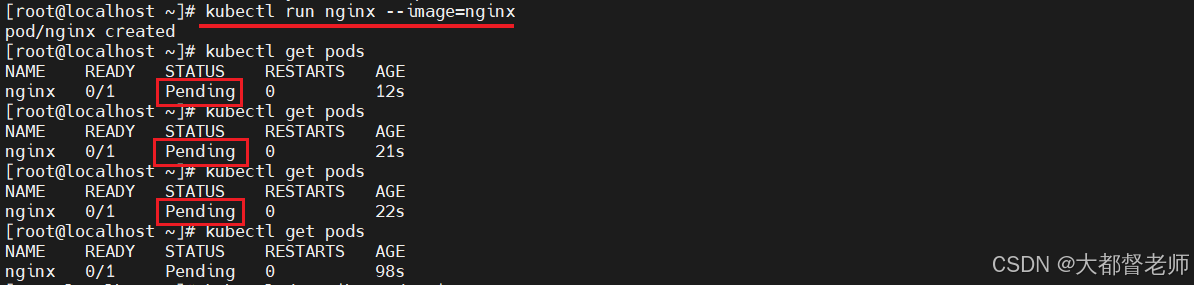
获取详细描述信息如下:
sh
[root@localhost ~]# kubectl describe pod nginx
Name:         nginx
Namespace:    default
Priority:     0
Node:         <none>
Labels:       run=nginx
Annotations:  <none>
Status:       Pending
IP:
IPs:          <none>
Containers:
  nginx:
    Image:        nginx
    Port:         <none>
    Host Port:    <none>
    Environment:  <none>
    Mounts:
      /var/run/secrets/kubernetes.io/serviceaccount from kube-api-access-jnnd2 (ro)
Conditions:
  Type           Status
  PodScheduled   False
Volumes:
  kube-api-access-jnnd2:
    Type:                    Projected (a volume that contains injected data from multiple sources)
    TokenExpirationSeconds:  3607
    ConfigMapName:           kube-root-ca.crt
    ConfigMapOptional:       <nil>
    DownwardAPI:             true
QoS Class:                   BestEffort
Node-Selectors:              <none>
Tolerations:                 node.kubernetes.io/not-ready:NoExecute op=Exists for 300s
                             node.kubernetes.io/unreachable:NoExecute op=Exists for 300s
Events:
  Type     Reason            Age   From               Message
  ----     ------            ----  ----               -------
  Warning  FailedScheduling  100s  default-scheduler  0/1 nodes are available: 1 node(s) had taint {node-role.kubernetes.io/master: }, that the pod didn't tolerate.
  Warning  FailedScheduling  30s   default-scheduler  0/1 nodes are available: 1 node(s) had taint {node-role.kubernetes.io/master: }, that the pod didn't tolerate.
可以执行以下命令解决:
sh
[root@localhost ~]# kubectl taint nodes localhost.localdomain node-role.kubernetes.io/master-
node/localhost.localdomain untainted再次查看pod状态,最终停留在:ImagePullBackOff
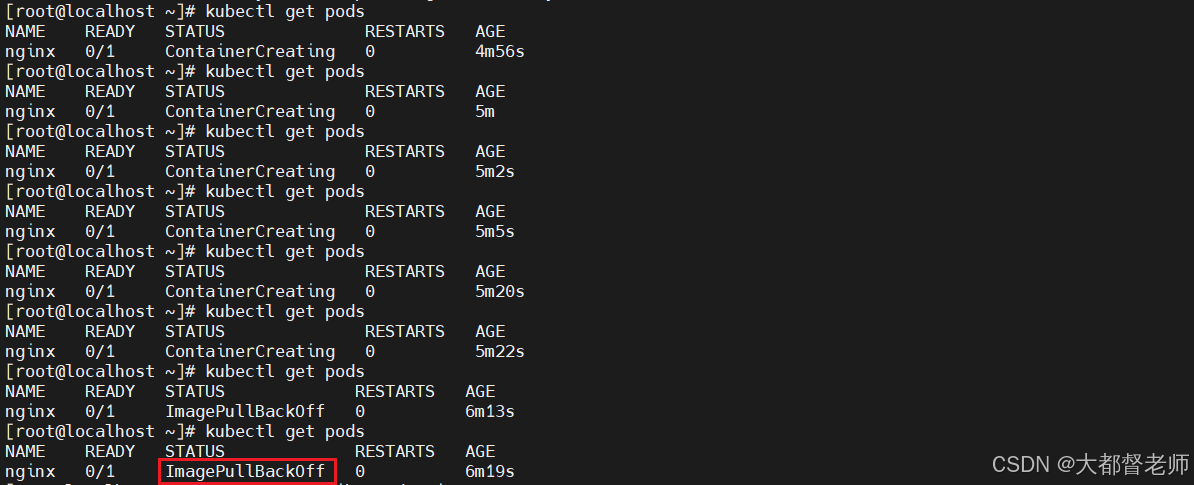
执行如下命令查看详细信息:
sh
[root@localhost ~]# kubectl describe pod nginx
Name:         nginx
Namespace:    default
Priority:     0
Node:         localhost.localdomain/192.168.6.6
Start Time:   Wed, 07 Jan 2026 16:10:08 +0800
Labels:       run=nginx
Annotations:  <none>
Status:       Pending
IP:           10.244.0.9
IPs:
  IP:  10.244.0.9
Containers:
  nginx:
    Container ID:
    Image:          nginx
    Image ID:
    Port:           <none>
    Host Port:      <none>
    State:          Waiting
      Reason:       ImagePullBackOff
    Ready:          False
    Restart Count:  0
    Environment:    <none>
    Mounts:
      /var/run/secrets/kubernetes.io/serviceaccount from kube-api-access-jnnd2 (ro)
Conditions:
  Type              Status
  Initialized       True
  Ready             False
  ContainersReady   False
  PodScheduled      True
Volumes:
  kube-api-access-jnnd2:
    Type:                    Projected (a volume that contains injected data from multiple sources)
    TokenExpirationSeconds:  3607
    ConfigMapName:           kube-root-ca.crt
    ConfigMapOptional:       <nil>
    DownwardAPI:             true
QoS Class:                   BestEffort
Node-Selectors:              <none>
Tolerations:                 node.kubernetes.io/not-ready:NoExecute op=Exists for 300s
                             node.kubernetes.io/unreachable:NoExecute op=Exists for 300s
Events:
  Type     Reason            Age                 From               Message
  ----     ------            ----                ----               -------
  Warning  FailedScheduling  6m21s               default-scheduler  0/1 nodes are available: 1 node(s) had taint {node-role.kubernetes.io/master: }, that the pod didn't tolerate.
  Warning  FailedScheduling  5m11s               default-scheduler  0/1 nodes are available: 1 node(s) had taint {node-role.kubernetes.io/master: }, that the pod didn't tolerate.
  Normal   Scheduled         104s                default-scheduler  Successfully assigned default/nginx to localhost.localdomain
  Warning  Failed            41s                 kubelet            Failed to pull image "nginx": rpc error: code = Unknown desc = Get "https://registry-1.docker.io/v2/": dial tcp 199.59.149.235:443: i/o timeout
  Warning  Failed            41s                 kubelet            Error: ErrImagePull
  Normal   SandboxChanged    40s                 kubelet            Pod sandbox changed, it will be killed and re-created.
  Normal   BackOff           38s (x3 over 39s)   kubelet            Back-off pulling image "nginx"
  Warning  Failed            38s (x3 over 39s)   kubelet            Error: ImagePullBackOff
  Normal   Pulling           25s (x2 over 104s)  kubelet            Pulling image "nginx"
仔细阅读日志后,发现问题是:无法在 https://registry-1.docker.io/v2/ 镜像仓库获取nginx镜像问题。
你可能首先想到的是docker镜像加速器的配置未生效,查看/etc/docker/daemon.json文件,并访问镜像仓库地址,地址有效。
sh
[root@localhost ~]# cat /etc/docker/daemon.json
{
  "exec-opts": ["native.cgroupdriver=systemd"],
  "registry-mirrors": ["https://docker.1ms.run","https://docker-0.unsee.tech"]
}
从而排除了docker镜像加速器的问题,那么我们可以用docker命令拉取nginx的镜像,解决上述问题,即:执行如下命令拉取镜像:
sh
[root@localhost ~]# docker pull nginx
Using default tag: latest
latest: Pulling from library/nginx
02d7611c4eae: Pull complete
dcea87ab9c4a: Pull complete
35df28ad1026: Pull complete
99ae2d6d05ef: Pull complete
a2b008488679: Pull complete
d03ca78f31fe: Pull complete
d6799cf0ce70: Pull complete
Digest: sha256:ca871a86d45a3ec6864dc45f014b11fe626145569ef0e74deaffc95a3b15b430
Status: Downloaded newer image for nginx:latest
docker.io/library/nginx:latest再次查看pod状态时,如下:Running
sh
[root@localhost ~]# kubectl get pods
NAME    READY   STATUS    RESTARTS   AGE
nginx 1/1 Running 0 9m39s但我们不可能每次用kubectl创建pod前都提前用docker命令拉取镜像。我们要知道原来,从根本上解决问题,原来kubectl并不是用docker拉取镜像,而是用containerd,接下来就是修改containerd的配置文件,并重启containerd即可。
执行如下命令,生成默认配置:
sh
[root@localhost ~]# containerd config default | sudo tee /etc/containerd/config.toml修改 /etc/containerd/config.toml配置文件,
sh
[root@localhost ~]# vim /etc/containerd/config.toml
version = 2

[plugins."io.containerd.grpc.v1.cri"]
  root = "/var/lib/containerd"
  state = "/run/containerd"

  [plugins."io.containerd.grpc.v1.cri".cgroup]
    path = ""

  [plugins."io.containerd.grpc.v1.cri".registry]
    [plugins."io.containerd.grpc.v1.cri".registry.mirrors]
      [plugins."io.containerd.grpc.v1.cri".registry.mirrors."docker.io"]
        endpoint = ["https://docker.1ms.run", "https://docker-0.unsee.tech"]

[plugins."io.containerd.runtime.v1.linux"]
  shim = "containerd-shim"
  runtime = "runc"
  runtime_root = ""
  no_shim = false

[plugins."io.containerd.runtime.v2.task"]
  platforms = ["linux/amd64"]

[plugins."io.containerd.metadata.v1.bolt"]
  content_sharing_policy = "shared"

[plugins."io.containerd.monitor.v1.cgroups"]
  no_prometheus = false

[plugins."io.containerd.services.v1.diff-service"]
  default = ["walking"]

[plugins."io.containerd.services.v1.tasks-service"]
  rdt_config = ""

[plugins."io.containerd.internal.v1.opt"]
  path = "/opt/containerd"

[plugins."io.containerd.grpc.v1.cri".containerd]
  default_runtime_name = "runc"

[plugins."io.containerd.grpc.v1.cri".containerd.runtimes]
  [plugins."io.containerd.grpc.v1.cri".containerd.runtimes.runc]
    runtime_type = "io.containerd.runc.v2"
    [plugins."io.containerd.grpc.v1.cri".containerd.runtimes.runc.options]
      SystemdCgroup = true
重要的是在 插件:plugins."io.containerd.grpc.v1.cri".registry下配置国内可用的镜像仓库地址。
配置好后,执行如下命令重启:
sh
[root@localhost containerd]# sudo systemctl restart containerd
[root@localhost containerd]# sudo systemctl status containerd
● containerd.service - containerd container runtime
   Loaded: loaded (/usr/lib/systemd/system/containerd.service; disabled; vendor preset: disabled)
   Active: active (running) since 三 2026-01-07 16:46:56 CST; 5s ago
     Docs: https://containerd.io
  Process: 31055 ExecStartPre=/sbin/modprobe overlay (code=exited, status=0/SUCCESS)
 Main PID: 31057 (containerd)
    Tasks: 26
   Memory: 79.5M
   CGroup: /system.slice/containerd.service
           ├─30923 /usr/bin/containerd-shim-runc-v2 -namespace moby -id fd134a39b8c89bfc1d4e75208caa408b550e17c0c0991ba365ab6f0ac3797d34 -address /run/containerd/containerd.sock
           └─31057 /usr/bin/containerd

1月 07 16:46:56 localhost.localdomain containerd[31057]: time="2026-01-07T16:46:56.946650931+08:00" level=info msg="cleaning up dead shim"
1月 07 16:46:56 localhost.localdomain containerd[31057]: time="2026-01-07T16:46:56.947582481+08:00" level=info msg="shim disconnected" id=276015b5ac8790ee8365124f8329813e...9b88f534e1
1月 07 16:46:56 localhost.localdomain containerd[31057]: time="2026-01-07T16:46:56.947627231+08:00" level=warning msg="cleaning up after shim disconnected" id=276015b5ac8...space=moby
1月 07 16:46:56 localhost.localdomain containerd[31057]: time="2026-01-07T16:46:56.947637541+08:00" level=info msg="cleaning up dead shim"
1月 07 16:46:56 localhost.localdomain containerd[31057]: time="2026-01-07T16:46:56.952195629+08:00" level=info msg="shim disconnected" id=1acac0843625f364ce147cafa53db25f...e63c669782
1月 07 16:46:56 localhost.localdomain containerd[31057]: time="2026-01-07T16:46:56.952218296+08:00" level=warning msg="cleaning up after shim disconnected" id=1acac084362...space=moby
1月 07 16:46:56 localhost.localdomain containerd[31057]: time="2026-01-07T16:46:56.952225288+08:00" level=info msg="cleaning up dead shim"
1月 07 16:46:56 localhost.localdomain containerd[31057]: time="2026-01-07T16:46:56.957392274+08:00" level=warning msg="cleanup warnings time=\"2026-01-07T16:46:56+08:00\"...runc.v2\n"
1月 07 16:46:56 localhost.localdomain containerd[31057]: time="2026-01-07T16:46:56.959818577+08:00" level=warning msg="cleanup warnings time=\"2026-01-07T16:46:56+08:00\"...runc.v2\n"
1月 07 16:46:56 localhost.localdomain containerd[31057]: time="2026-01-07T16:46:56.961956775+08:00" level=warning msg="cleanup warnings time=\"2026-01-07T16:46:56+08:00\"...runc.v2\n"
Hint: Some lines were ellipsized, use -l to show in full.
检查配置是否生效:
sh
[root@localhost containerd]# sudo containerd config dump | grep -A5 -B5 "docker.io"

      [plugins."io.containerd.grpc.v1.cri".registry.headers]

      [plugins."io.containerd.grpc.v1.cri".registry.mirrors]

        [plugins."io.containerd.grpc.v1.cri".registry.mirrors."docker.io"]
          endpoint = ["https://docker.1ms.run", "https://docker-0.unsee.tech"]

    [plugins."io.containerd.grpc.v1.cri".x509_key_pair_streaming]
      tls_cert_file = ""
tls_key_file = ""删除之前创建的pod,并重新创建,获取状态为:Running,并查看详细 Events日志,如下:
sh
[root@localhost containerd]# kubectl delete pod nginx
pod "nginx" deleted
[root@localhost containerd]# kubectl run nginx --image=nginx
pod/nginx created
[root@localhost containerd]# kubectl get pods
NAME    READY   STATUS    RESTARTS   AGE
nginx   1/1     Running   0          13s
[root@localhost containerd]# kubectl describe pod nginx
Name:         nginx
Namespace:    default
Priority:     0
Node:         localhost.localdomain/192.168.6.6
Start Time:   Wed, 07 Jan 2026 16:48:23 +0800
Labels:       run=nginx
Annotations:  <none>
Status:       Running
IP:           10.244.0.13
IPs:
  IP:  10.244.0.13
Containers:
  nginx:
    Container ID:   docker://1cbf2667dcc5a5c0fabfd1ef07240af56007c5d831646caae0c7ea1b9b456563
    Image:          nginx
    Image ID:       docker-pullable://nginx@sha256:ca871a86d45a3ec6864dc45f014b11fe626145569ef0e74deaffc95a3b15b430
    Port:           <none>
    Host Port:      <none>
    State:          Running
      Started:      Wed, 07 Jan 2026 16:48:28 +0800
    Ready:          True
    Restart Count:  0
    Environment:    <none>
    Mounts:
      /var/run/secrets/kubernetes.io/serviceaccount from kube-api-access-s5qhs (ro)
Conditions:
  Type              Status
  Initialized       True
  Ready             True
  ContainersReady   True
  PodScheduled      True
Volumes:
  kube-api-access-s5qhs:
    Type:                    Projected (a volume that contains injected data from multiple sources)
    TokenExpirationSeconds:  3607
    ConfigMapName:           kube-root-ca.crt
    ConfigMapOptional:       <nil>
    DownwardAPI:             true
QoS Class:                   BestEffort
Node-Selectors:              <none>
Tolerations:                 node.kubernetes.io/not-ready:NoExecute op=Exists for 300s
                             node.kubernetes.io/unreachable:NoExecute op=Exists for 300s
Events:
  Type    Reason     Age   From               Message
  ----    ------     ----  ----               -------
  Normal  Scheduled  27s   default-scheduler  Successfully assigned default/nginx to localhost.localdomain
  Normal  Pulling    26s   kubelet            Pulling image "nginx"
  Normal  Pulled     23s   kubelet            Successfully pulled image "nginx" in 3.841364308s
  Normal  Created    23s   kubelet            Created container nginx
  Normal  Started    22s   kubelet            Started container nginx
开放随机端口号,以便宿主机访问:
sh
[root@localhost flannel]# kubectl expose pod nginx --port=80 --type=NodePort --name=nginx-service
service/nginx-service exposed
[root@localhost flannel]# kubectl get svc
NAME            TYPE        CLUSTER-IP      EXTERNAL-IP   PORT(S)        AGE
kubernetes      ClusterIP   10.96.0.1       <none>        443/TCP        25h
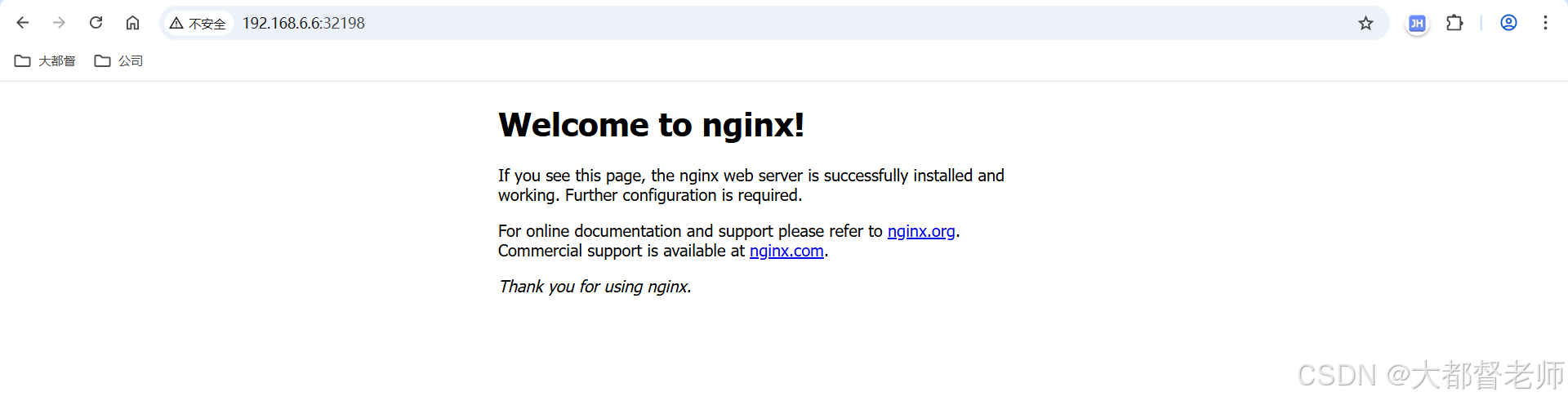
nginx-service NodePort 10.106.171.86 <none> 80:32198/TCP 8s打开浏览器,访问地址:http://192.168.6.6:32198/