Linux/Debian系统时间校准方法简记
在linux系统时间有误差时,需要校准时间。
时区修正
前提时区要一致,不一致进行修改
1.查看当前时区:timedatectl
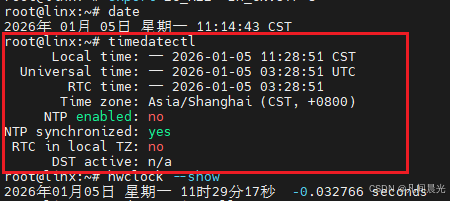
2.时区不一致时候时区改为亚洲上海:timedatectl set-timezone Asia/Shanghai
一、非联网时,手动进行时间校准
查看硬件时间是否与系统时间一致,再和正确的时间对比。
hwclock --show && date
方式一:将系统时间同步到硬件时间
1、查看当前时间:date
2、手动设置系统时间:date -s "20251121 14:38:09"
3、将系统时间同步到硬件时间:hwclock -w或hwclock --systohc
方式二:将硬件时间同步到系统时间
1、查看硬件时间:hwclock --show
2、修改硬件时间:hwclock --set --date '20251121 14:38:09'
3、硬件时间和系统时间相互同步:hwclock -s
二、联网时,通过NTP服务进行时间校准
1.Debian系统
1.查看ntp服务版本信息:ntpq -c version
2.若未安装ntp服务,执行命令安装:apt-get install ntp ntpdate
3.查看ntp服务状态:systemctl status ntp或netstat -tlunp | grep ntp
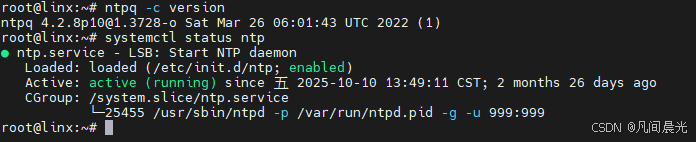
4.启动ntp服务:service ntp start(停止ntp服务命令:service ntp stop或lsof -i:123 + kill -9 PID)
5.执行/usr/sbin/ntpdate 时钟服务器ip或域名或ntpdate 时钟服务器ip或域名
时钟服务器ip或域名例如:192.168.100.2,ntp.neu.edu.cn,ntp.aliyun.com,ntp.ntsc.ac.cn
2.Linux系统
1、安装NTP服务:sudo yum install ntp
2、启动并设置NTP服务开机自启:sudo systemctl enable ntpd && sudo systemctl start ntpd
3、验证时间同步状态:ntpd -p
4、修改NTP配置文件:sudo vim /etc/ntp.conf或者手动同步时间:sudo ntpd ntp.aliyun.com
5、系统时间同步到硬件时间:hwclock --systohc
6、查看硬件时间是否与系统时间一致:hwclock --show && date
或者直接编写执行以下脚本文件
xml
vi ntp.sh
xml
#!/bin/bash

timedatectl set-timezone Asia/Shanghai &&
yum -y install ntp ntpdate > /dev/null &&
sed -i 's/server 0.centos.pool.ntp.org iburst/#server 0.centos.pool.ntp.org iburst/g' /etc/ntp.conf &&
sed -i 's/server 1.centos.pool.ntp.org iburst/#server 0.centos.pool.ntp.org iburst/g' /etc/ntp.conf &&
sed -i 's/server 2.centos.pool.ntp.org iburst/#server 0.centos.pool.ntp.org iburst/g' /etc/ntp.conf &&
sed -i 's/server 3.centos.pool.ntp.org iburst/#server 0.centos.pool.ntp.org iburst/g' /etc/ntp.conf &&
echo "server ntp.aliyun.com iburst" | tee -a /etc/ntp.conf > /dev/null &&
systemctl start ntpd &&
systemctl enable ntpd &&
systemctl status ntpd &&
ntpdate ntp.aliyun.com && hwclock --systohc &&
ntpq -p
三、定时校准Linux服务器时间
上面的命令是可以校准,但是每天都要执行(发现测试机每天2秒多的误差),怎么可以一劳永逸的解决问题?
可以使用/etc/crontab实现定时校准时间,这个文件是linux的系统定时调度文件,在系统启动后会加载这个文件。
输入vi /etc/crontab编辑该文件,在这个文件最后加入0 16 * * * root ntpdate ntp1.aliyun.com,就可以每天16:00准时以root用户权限,执行ntpdate ntp1.aliyun.com命令。
xml
命令格式:`* * * * * user-name command to be executed`
命令说明:
第一个`*`表示:分钟
第二个`*`表示:小时
第三个`*`表示:一个月的哪一天
第四个`*`表示:月份
第五个`*`表示:一周的哪一天
`user-name`表示:要执行命令的用户
其中要表示任何一个都可以就直接用\*表示。前面五个位置以后就表示要执行的命令和参数。