
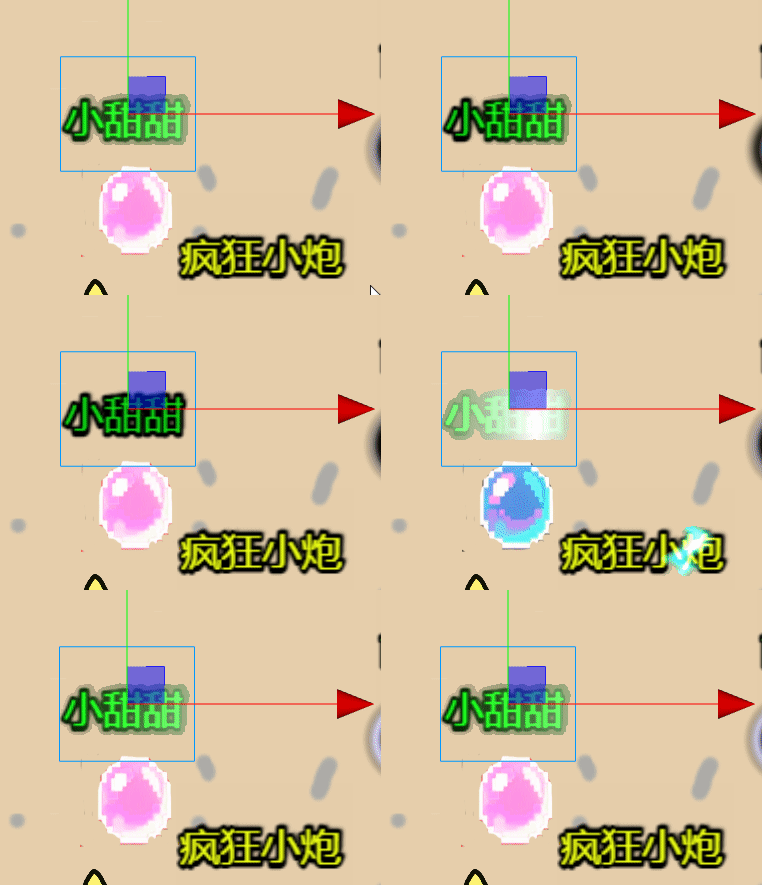
更直观的视频演示在我的B站更直观的视频演示在我的B站
自动从左到右是用了#include <builtin/uniforms/cc-local> time
为了显示字但是不显示背景
// 如果完全透明,直接返回
if (o.a < 0.01) {
return o;
}用//if(o.a>0.0){ 有时会显示错
这两个条件语句的区别在于处理透明区域的方式不同。让我解释一下:
问题原因分析:
-
if (o.a > 0.0) { 的情况:
GLSL
if (o.a > 0.0) {
// 意思:如果像素有透明度(包括半透明和完全不透明)
float strength = 1.0 - dist / glow;
vec3 glowEffect = mix(vec3(1.0), glowColor.rgb, dist / glow);
// ⚠️ 问题在这里:修改了所有有透明度像素的颜色
o.rgb = original.rgb + glowEffect * strength;
o.a = max(original.a, strength); // ⚠️ 修改了透明度!
}
// 完全透明的像素(o.a == 0)不会执行上面代码
// 完全透明的像素返回 o(完全透明)
问题:半透明区域(如图片边缘羽化部分)的o.a被max(original.a, strength)提高了,变得更不透明,导致背景色泄露。
- if (o.a < 0.01) { 的情况:
GLSL
if (o.a < 0.01) {
// 意思:如果像素几乎完全透明(alpha阈值0.01)
return o; // 直接返回原像素,不做任何处理
}
// 只有不透明和半透明像素继续执行发光逻辑
float strength = 1.0 - dist / glow;
vec3 glowEffect = mix(vec3(1.0), glowColor.rgb, dist / glow);
// 这里会修改所有非完全透明像素
o.rgb = original.rgb + glowEffect * strength;
o.a = max(original.a, strength); // 还是会修改透明度!
go
// Copyright (c) 2017-2020 Xiamen Yaji Software Co., Ltd.
// Copyright (c) 2017-2020 Xiamen Yaji Software Co., Ltd.
// Copyright (c) 2017-2020 Xiamen Yaji Software Co., Ltd.
// Copyright (c) 2017-2020 Xiamen Yaji Software Co., Ltd.
// Effect Syntax Guide: https://docs.cocos.com/creator/manual/zh/shader/index.html

// Copyright (c) 2017-2020 Xiamen Yaji Software Co., Ltd.
// Effect Syntax Guide: https://docs.cocos.com/creator/manual/zh/shader/index.html

// Copyright (c) 2017-2020 Xiamen Yaji Software Co., Ltd.
// 最简兼容版光柱Shader

/** glow-simple.effect **/


CCEffect %{
  techniques:
  - name: glow
    passes:

    - vert: vs:vert

      frag: fs:frag
      blendState:

        targets:
        - blend: true

          blendSrc: src_alpha

          blendDst: one_minus_src_alpha
      depthStencilState:
          depthTest: false
          depthWrite: false
      rasterizerState:
        cullMode: none
      properties:
        glowColor:  { value: [1.0, 0.8, 0.3, 1.0], editor: { type: color } }
        glowSpread: { value: 0.04, editor: { range: [0.0, 4, 0.005] } }


        glow: { value: 0.03, editor: { range: [0.01,7,0.01] } }
        glowIntensity: { value: 0.04, editor: { range: [0.0, 4, 0.005] } }
}%

CCProgram vs %{
  precision highp float;
#include <cc-global>
#if USE_LOCAL


  #include <builtin/uniforms/cc-local>
#endif
in vec3 a_position;

in vec2 a_texCoord;
out vec2 uv;

#if USE_LOCAL
  in vec4 a_color;

  out vec4 v_color;
#endif


vec4 vert() {

  vec4 pos = vec4(a_position, 1);

  #if USE_LOCAL
    pos = cc_matWorld * pos;

    v_color = a_color;
  #endif

  pos = cc_matViewProj * pos;
  uv = a_texCoord;

  return  pos;
}

}%

CCProgram fs %{
  precision highp float;
  #include <sprite-texture>
  #include <cc-global> // 添加cc_time支持
  in vec2 uv;

  uniform UBO {
    vec4  glowColor;    // 发光颜色
    float glowSpread;   // 发光最大半径(基于 UV 坐标体系)
    float glowIntensity;
    float glow;

  };

  vec4 frag () {
    vec4 o =  texture(cc_spriteTexture,uv);
    vec4 original=o;

     // 固定光柱宽度和移动速度
    float beamPos = mod(cc_time.x -0.3, 3.0) ;
    float dist = abs(uv.x - beamPos);

    if(dist < glow) { // 固定光柱宽度为0.1

    //if(o.a>0.0){


// 计算光柱强度 (中心最强,边缘最弱)
// 如果完全透明,直接返回
      if (o.a < 0.01) {
          return o;

      }
        float strength = 1.0 - dist / glow;

        // 从白色渐变到 glowColor

        vec3 glowEffect = mix(vec3(1.0), glowColor.rgb, dist / glow);

        // 应用发光效果

        o.rgb = original.rgb + glowEffect * strength;
        o.a = max(original.a, strength);

    }


    //}

    return o;

  }
}%