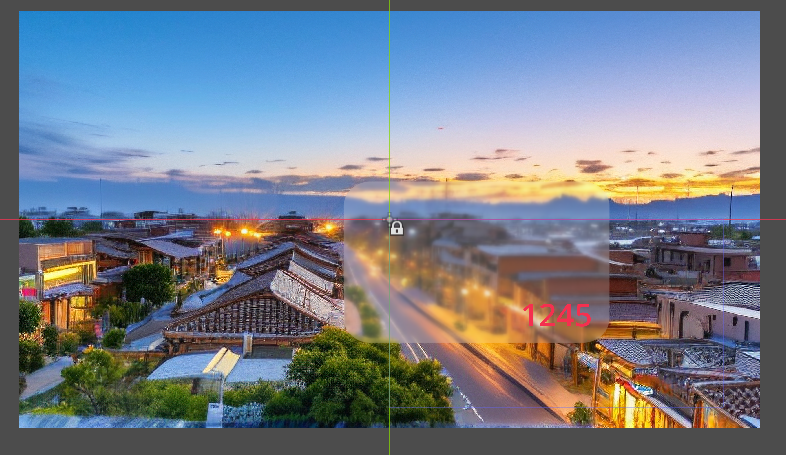
frosted-glass-shader-rounded-rect-outline-shadow/
源代码 :
java
shader_type canvas_item;

// Screen texture for frosted glass effect
uniform sampler2D screen_texture : hint_screen_texture, filter_linear_mipmap;

// === Shape Settings (Pixel Units) ===
// Shape type: 0=Circle, 1=Rounded Rectangle
uniform int shape_type : hint_range(0, 1) = 1;
// Rectangle size (pixels)
uniform vec2 rect_size = vec2(300.0, 200.0);
// Corner radii for each corner (pixels)
uniform float corner_radius_top_left = 20.0;
uniform float corner_radius_top_right = 20.0;
uniform float corner_radius_bottom_left = 20.0;
uniform float corner_radius_bottom_right = 20.0;
// Circle radius (pixels, used when shape_type=0)
uniform float circle_radius = 100.0;

// === Outline Settings ===
uniform bool outline_enabled = true;
uniform float outline_width = 2.0; // pixels
uniform vec4 outline_color : source_color = vec4(1.0, 1.0, 1.0, 0.8);

// === Shadow Settings ===
uniform bool shadow_enabled = true;
uniform vec4 shadow_color : source_color = vec4(0.0, 0.0, 0.0, 0.5);
uniform vec2 shadow_offset = vec2(10.0, 10.0); // pixel offset
uniform float shadow_blur = 15.0; // shadow blur radius

// === Edge Settings ===
uniform float edge_softness : hint_range(0.0, 5.0) = 1.0; // Edge antialiasing width (pixels)

// === Color Settings ===
uniform vec3 shape_color : source_color = vec3(0.3, 0.5, 0.9);
uniform float color_gradient_y : hint_range(0.0, 3.0) = 1.5;
uniform float color_gradient_x : hint_range(-2.0, 2.0) = -0.8;
uniform float color_multiplier : hint_range(0.1, 2.0) = 0.9;

// === Screen Blur Settings (Frosted Glass) ===
uniform bool enable_screen_blur = true;
uniform float blur_amount : hint_range(0.0, 10.0) = 3.0;
uniform int blur_samples : hint_range(1, 8) = 4;
// Glass opacity/tint strength (smaller value = more transparent/clear, larger value = more solid color)
uniform float glass_opacity : hint_range(0.0, 1.0) = 0.2;

// Node size (used for correct UV calculation, set via script)
uniform vec2 node_size = vec2(400.0, 400.0);

// Rounded Rectangle SDF
float rounded_rect_sdf(vec2 p, vec2 size, vec4 radii) {
    // radii: x=top-left, y=top-right, z=bottom-right, w=bottom-left
    vec2 r;
    if (p.x > 0.0) {
        r = (p.y > 0.0) ? radii.zw : radii.yz;
    } else {
        r = (p.y > 0.0) ? radii.xw : radii.xy;
    }
    float radius = (p.x > 0.0) ? r.x : r.y;

    vec2 q = abs(p) - size + radius;
    return min(max(q.x, q.y), 0.0) + length(max(q, 0.0)) - radius;
}

// Circle SDF
float circle_sdf(vec2 p, float r) {
    return length(p) - r;
}

// Gaussian Blur Sampling
vec3 blur_screen(vec2 screen_uv, vec2 pixel_size) {
    vec3 color = vec3(0.0);
    float total_weight = 0.0;

    for (int x = -blur_samples; x <= blur_samples; x++) {
        for (int y = -blur_samples; y <= blur_samples; y++) {
            vec2 offset = vec2(float(x), float(y)) * pixel_size * blur_amount;
            float weight = 1.0 / (1.0 + float(x * x + y * y));
            color += texture(screen_texture, screen_uv + offset).rgb * weight;
            total_weight += weight;
        }
    }

    return color / total_weight;
}

// Get SDF distance for the shape (Pixel Units)
float get_shape_sdf(vec2 p) {
    float dist;
    if (shape_type == 0) {
        // Circle
        dist = circle_sdf(p, circle_radius);
    } else {
        // Rounded Rectangle
        vec2 half_size = rect_size * 0.5;

        // Limit corner radius to half the side length
        float min_dim = min(half_size.x, half_size.y);
        vec4 radii = vec4(
            min(corner_radius_top_left, min_dim),
            min(corner_radius_top_right, min_dim),
            min(corner_radius_bottom_right, min_dim),
            min(corner_radius_bottom_left, min_dim)
        );

        dist = rounded_rect_sdf(p, half_size, radii);
    }
    return dist;
}

void fragment() {
    // Convert UV to pixel coordinates, center at (0,0)
    vec2 p = (UV - 0.5) * node_size;

    // 1. Draw Shadow (Behind Glass)
    vec4 final_color = vec4(0.0);

    if (shadow_enabled) {
        float s_dist = get_shape_sdf(p - shadow_offset);
        // Shadow mask: 1 inside, fades out outwards
        float s_mask = 1.0 - smoothstep(-shadow_blur, 0.0, s_dist);
        // Mix shadow
        final_color = mix(final_color, shadow_color, s_mask * shadow_color.a);
    }

    // 2. Draw Main Glass Shape
    float dist = get_shape_sdf(p);
    // Shape mask (1px antialiasing)
    float shape_alpha = 1.0 - smoothstep(0.0, edge_softness, dist);

    // Calculate gradient color (using normalized UV)
    vec2 uv_norm = UV - 0.5;
    // Correct UV aspect ratio for gradient calculation to keep visual consistency
    float aspect = node_size.x / node_size.y;
    uv_norm.x *= aspect;

    vec3 dynamic_color = vec3(
        shape_color.r + uv_norm.y * color_gradient_y,
        shape_color.g + uv_norm.x * color_gradient_x,
        shape_color.b
    ) * color_multiplier;

    vec3 glass_col = dynamic_color;

    // Apply Screen Blur (Frosted Glass Effect)
    if (enable_screen_blur) {
        vec2 screen_uv = SCREEN_UV;
        vec2 pixel_size = SCREEN_PIXEL_SIZE;
        vec3 blurred_bg = blur_screen(screen_uv, pixel_size);

        // Mix effect color with blurred background
        glass_col = mix(blurred_bg, glass_col, glass_opacity);
    }

    // Mix glass layer onto final color
    final_color = mix(final_color, vec4(glass_col, 1.0), shape_alpha);

    // 3. Draw Outline (Above Glass)
    if (outline_enabled) {
        // Outline mask: generated at edge, width is outline_width
        // abs(dist) < width/2 means outline centered on edge
        float outline_mask = 1.0 - smoothstep(outline_width * 0.5 - 0.5, outline_width * 0.5 + 0.5, abs(dist));

        // Use Alpha Compositing formula instead of simple mix to prevent gray edges
        vec4 src_color = outline_color;
        float src_alpha = outline_mask * outline_color.a;
        vec4 dst_color = final_color;

        // Final Alpha = SrcAlpha + DstAlpha * (1 - SrcAlpha)
        float out_alpha = src_alpha + dst_color.a * (1.0 - src_alpha);

        vec3 out_rgb = vec3(0.0);
        if (out_alpha > 0.0) {
            // Final RGB = (SrcRGB * SrcAlpha + DstRGB * DstAlpha * (1 - SrcAlpha)) / FinalAlpha
            out_rgb = (src_color.rgb * src_alpha + dst_color.rgb * dst_color.a * (1.0 - src_alpha)) / out_alpha;
        }

        final_color = vec4(out_rgb, out_alpha);
    }

    COLOR = final_color;
}
效果 :
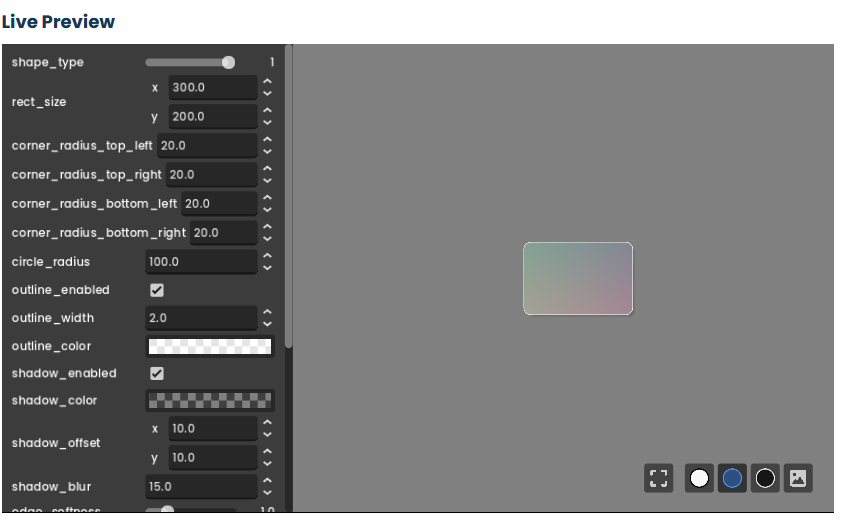
改为无渐变色的毛玻璃 :
Control (根节点,如 Panel 或 Node2D)
├── ColorRect (毛玻璃背景,尺寸略大于文字)
└── Label (文字,位于背景上方)
默认着色器中的渐变色,改为纯毛玻璃效果(无渐变色干扰)。以下是详细的修改步骤,确保最终效果是纯净的半透明磨砂玻璃,无多余颜色渐变:
核心问题分析
原着色器中通过 color_gradient_x 和 color_gradient_y 生成了渐变色,导致玻璃有杂色。要改为纯毛玻璃,需要移除渐变逻辑 ,并确保 shape_color 为纯白色(或透明),让模糊背景成为主要视觉效果。
🔧 具体修改步骤
Step 1:修改着色器代码(移除渐变)
打开你的 .gdshader 文件,找到 fragment() 函数中的动态颜色计算部分,将其替换为纯透明或白色:
java
// 原渐变代码(需要删除或注释)
vec2 uv_norm = UV - 0.5;
float aspect = node_size.x / node_size.y;
uv_norm.x *= aspect;
vec3 dynamic_color = vec3(
shape_color.r + uv_norm.y * color_gradient_y,
shape_color.g + uv_norm.x * color_gradient_x,
shape_color.b
) * color_multiplier;

// 替换为纯透明/白色(修改后)
vec3 dynamic_color = vec3(1.0, 1.0, 1.0);// 纯白色,无渐变
// 或完全透明(让模糊背景100%显示):vec3 dynamic_color = vec3(0.0, 0.0, 0.0);
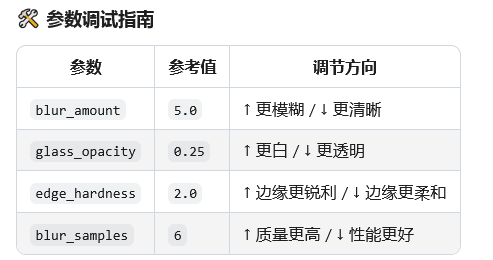
Step 2:调整关键参数(材质面板)
在材质(.tres 文件)或代码中设置以下参数,确保毛玻璃纯净透明:
| 参数名 | 值 | 作用 |
|---|---|---|
shape_color |
(1.0, 1.0, 1.0) |
纯白色底(无杂色) |
color_gradient_x |
0.0 |
禁用X轴渐变 |
color_gradient_y |
0.0 |
禁用Y轴渐变 |
color_multiplier |
1.0 |
颜色不叠加,保持纯白 |
glass_opacity |
0.1 ~ 0.3 |
控制透明度(值越小越透明) |
enable_screen_blur |
true |
必须启用,否则无模糊效果 |
Step 3:完整修改后的 Shader 代码(片段)
以下是修改后的 fragment() 函数核心部分,仅保留毛玻璃模糊逻辑:
java
shader_type canvas_item;

// 屏幕纹理(毛玻璃效果依赖)
uniform sampler2D screen_texture : hint_screen_texture, filter_linear_mipmap;

// === 形状设置 ===
// 形状类型:0=圆形,1=圆角矩形
uniform int shape_type : hint_range(0, 1) = 1;
// 矩形尺寸(像素)
uniform vec2 rect_size = vec2(300.0, 100.0);  // 文字背景推荐尺寸
// 圆角半径(四个角统一设置,像素)
uniform float corner_radius : hint_range(0.0, 100.0) = 30.0;  // 统一圆角,简化参数
// 圆形半径(像素,仅 shape_type=0 时生效)
uniform float circle_radius = 50.0;

// === 边框设置 ===
uniform bool outline_enabled = false;  // 默认关闭边框(按需开启)
uniform float outline_width = 1.0;
uniform vec4 outline_color : source_color = vec4(1.0, 1.0, 1.0, 0.5);  // 半透明白色边框

// === 阴影设置 ===
uniform bool shadow_enabled = false;  // 默认关闭阴影(按需开启)
uniform vec4 shadow_color : source_color = vec4(0.0, 0.0, 0.0, 0.2);
uniform vec2 shadow_offset = vec2(2.0, 2.0);
uniform float shadow_blur = 5.0;

// === 边缘抗锯齿 ===
uniform float edge_softness : hint_range(0.0, 5.0) = 1.5;  // 增强边缘平滑度

// === 毛玻璃核心参数 ===
uniform bool enable_screen_blur = true;  // 必须启用
uniform float blur_amount : hint_range(0.0, 10.0) = 4.0;  // 模糊强度(适中)
uniform int blur_samples : hint_range(1, 8) = 4;  // 采样次数(平衡性能)
uniform float glass_opacity : hint_range(0.0, 1.0) = 0.2;  // 透明度(0.2=高透明)

// 节点尺寸(必须与载体节点 size 一致,通过代码设置)
uniform vec2 node_size = vec2(300.0, 100.0);


// 圆角矩形SDF(简化版,统一圆角)
float rounded_rect_sdf(vec2 p, vec2 size, float radius) {
    vec2 half_size = size * 0.5;
    radius = min(radius, min(half_size.x, half_size.y));  // 限制最大圆角
    vec2 q = abs(p) - half_size + radius;
    return min(max(q.x, q.y), 0.0) + length(max(q, 0.0)) - radius;
}

// 圆形SDF
float circle_sdf(vec2 p, float r) {
    return length(p) - r;
}

// 高斯模糊采样(优化性能)
vec3 blur_screen(vec2 screen_uv, vec2 pixel_size) {
    vec3 color = vec3(0.0);
    float total_weight = 0.0;

    // 优化采样范围,避免过度模糊
    for (int x = -blur_samples; x <= blur_samples; x++) {
        for (int y = -blur_samples; y <= blur_samples; y++) {
            vec2 offset = vec2(float(x), float(y)) * pixel_size * blur_amount;
            float weight = exp(-(float(x*x + y*y)) / (2.0 * float(blur_samples*blur_samples)));  // 高斯权重
            color += texture(screen_texture, screen_uv + offset).rgb * weight;
            total_weight += weight;
        }
    }

    return color / total_weight;
}

// 获取形状SDF距离(统一圆角版本)
float get_shape_sdf(vec2 p) {
    float dist;
    if (shape_type == 0) {
        dist = circle_sdf(p, circle_radius);  // 圆形
    } else {
        dist = rounded_rect_sdf(p, rect_size, corner_radius);  // 圆角矩形(统一圆角)
    }
    return dist;
}

void fragment() {
    // 将UV转换为像素坐标(中心原点)
    vec2 p = (UV - 0.5) * node_size;

    // 1. 初始化最终颜色
    vec4 final_color = vec4(0.0);

    // 2. 绘制阴影(如需开启,将 shadow_enabled 设为 true)
    if (shadow_enabled) {
        float s_dist = get_shape_sdf(p - shadow_offset);
        float s_mask = 1.0 - smoothstep(-shadow_blur, 0.0, s_dist);
        final_color = mix(final_color, shadow_color, s_mask * shadow_color.a);
    }

    // 3. 绘制毛玻璃主体(核心效果)
    float dist = get_shape_sdf(p);
    float shape_alpha = 1.0 - smoothstep(0.0, edge_softness, dist);  // 边缘抗锯齿

    // 纯毛玻璃颜色(无渐变,纯白色底)
    vec3 glass_col = vec3(1.0, 1.0, 1.0);  // 纯白色,确保无杂色

    // 应用屏幕模糊(毛玻璃核心)
    if (enable_screen_blur) {
        vec3 blurred_bg = blur_screen(SCREEN_UV, SCREEN_PIXEL_SIZE);
        // 混合模糊背景和白色底(glass_opacity 控制通透度)
        glass_col = mix(blurred_bg, glass_col, glass_opacity);
    }

    // 混合玻璃层到最终颜色
    final_color = mix(final_color, vec4(glass_col, 1.0), shape_alpha);

    // 4. 绘制边框(如需开启,将 outline_enabled 设为 true)
    if (outline_enabled) {
        float outline_mask = 1.0 - smoothstep(outline_width * 0.5 - 0.5, outline_width * 0.5 + 0.5, abs(dist));
        vec4 src_color = outline_color;
        float src_alpha = outline_mask * outline_color.a;
        float out_alpha = src_alpha + final_color.a * (1.0 - src_alpha);
        vec3 out_rgb = (src_color.rgb * src_alpha + final_color.rgb * final_color.a * (1.0 - src_alpha)) / out_alpha;
        final_color = vec4(out_rgb, out_alpha);
    }

    COLOR = final_color;
}
去掉边框
java
shader_type canvas_item;

// 屏幕纹理(毛玻璃必备)
uniform sampler2D screen_texture : hint_screen_texture, filter_linear_mipmap;

// === 形状设置 ===
uniform int shape_type : hint_range(0, 1) = 1;      // 0=圆形, 1=圆角矩形
uniform vec2 rect_size = vec2(300.0, 100.0);        // 矩形尺寸
uniform float corner_radius : hint_range(0.0, 100.0) = 30.0; // 统一圆角
uniform float circle_radius = 50.0;                 // 圆形半径
uniform vec2 node_size = vec2(300.0, 100.0);        // 必须与节点尺寸一致

// === 毛玻璃核心参数 ===
uniform bool enable_screen_blur = true;             // 新增:控制模糊开关
uniform float blur_amount : hint_range(0.0, 10.0) = 5.0;
uniform int blur_samples : hint_range(1, 8) = 4;
uniform float glass_opacity : hint_range(0.0, 1.0) = 0.2;
uniform float edge_softness : hint_range(0.0, 5.0) = 1.5;

// === SDF 形状函数 ===
float rounded_rect_sdf(vec2 p, vec2 size, float radius) {
    vec2 half_size = size * 0.5;
    radius = min(radius, min(half_size.x, half_size.y));
    vec2 q = abs(p) - half_size + radius;
    return min(max(q.x, q.y), 0.0) + length(max(q, 0.0)) - radius;
}

float circle_sdf(vec2 p, float r) {
    return length(p) - r;
}

float get_shape_sdf(vec2 p) {
    if (shape_type == 0) {
        return circle_sdf(p, circle_radius); // 圆形
    } else {
        return rounded_rect_sdf(p, rect_size, corner_radius); // 圆角矩形
    }
}

// === 模糊效果 ===
vec3 blur_screen(vec2 screen_uv, vec2 pixel_size) {
    vec3 color = vec3(0.0);
    float total_weight = 0.0;
    for (int x = -blur_samples; x <= blur_samples; x++) {
        for (int y = -blur_samples; y <= blur_samples; y++) {
            vec2 offset = vec2(float(x), float(y)) * pixel_size * blur_amount;
            float weight = 1.0 / (1.0 + float(x*x + y*y)); // 高斯权重简化版
            color += texture(screen_texture, screen_uv + offset).rgb * weight;
            total_weight += weight;
        }
    }
    return color / total_weight;
}

// === 主渲染逻辑 ===
void fragment() {
    // 坐标转换(中心为原点)
    vec2 p = (UV - 0.5) * node_size;

    // 1. 计算形状距离
    float dist = get_shape_sdf(p);

    // 2. 边缘遮罩(抗锯齿)
    float shape_alpha = 1.0 - smoothstep(0.0, edge_softness, dist);

    // 3. 毛玻璃模糊(通过 enable_screen_blur 控制)
    vec3 glass_col = vec3(1.0); // 纯白底色
    if (enable_screen_blur) {
        vec3 blurred_bg = blur_screen(SCREEN_UV, SCREEN_PIXEL_SIZE);
        glass_col = mix(blurred_bg, glass_col, glass_opacity);
    }

    // 4. 输出最终颜色
    COLOR = vec4(glass_col, shape_alpha);
}
效果:
带边框:
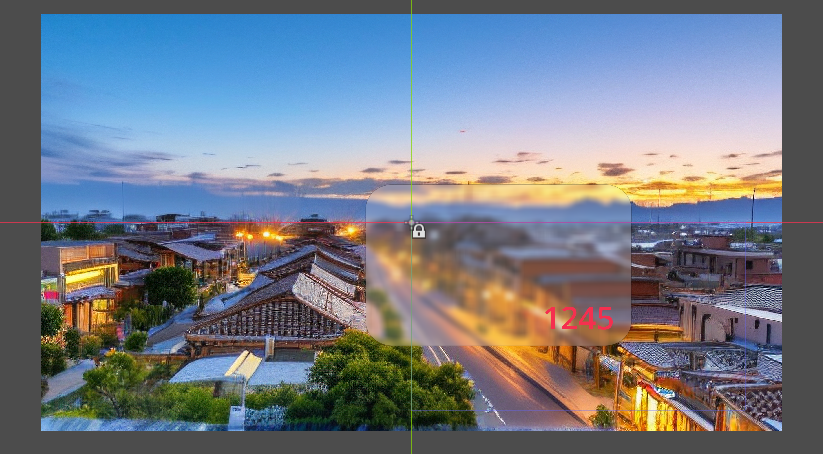
不带边框 :