我们认识ES,认识到什么程度,会用到什么程度才算真正的认识呢。
我想我们可以从这几个角度去认识es
1.部署的角度
2.dsl,创建json格式,创建mapping,映射
3.springboot兼容es,使用java操作es
4.实际项目中es的具体接口。
1.部署的角度
我们这里要部署三个东西,es,kibana,还有ik分词器。
我这里简单解释一下,讲一下思路,具体的部署步骤,就不说了。
es就是也是一个数据库。就像mysql一样,不过mysql是存表,es是存很多的json。我们使用docker部署一下,让他运行,然后在他的文件夹的插件位置,装一个ik分词器的插件,让这个可以听的懂中文,对中文词组分词。
然后在安装一个kibana,这个就是,相当于mysql的navicat,不然,操作es只能在linux下的命令行沟通。
2.对于索引库和文档的认识
这个就相当于sql语句和mysql的关系
其实我觉得这个认识不是很准确。
我们知道一个json数据,他可以固定下来,当做mysql的表。然后在使用固定的格式,对这个json做一定的限制,可以让json的一些字段,被检索到。
我们看一个简单的demo;
说得对!咱们从零开始,一步一步来。我先纠正一个关键概念:
核心概念纠正
你说"索引库是针对文档(JSON)去处理的" → 不完全对!
更准确的说法:
- 索引库 (Index) = 数据库的表(Table)
- 文档 (Document) = 表中的一行记录(Row)
- Mapping = 表的字段结构定义(Schema)
完整关系:
索引库(products)
    ├── Mapping(定义结构)
    │     ├── 字段1:name(类型:text)
    │     ├── 字段2:price(类型:float)
    │     └── ...
    └── 文档(具体数据)
          ├── 文档1:{"name":"华为手机", "price":6999}
          ├── 文档2:{"name":"iPhone", "price":8999}
          └── ...
分步教学:从零创建索引库
第1步:理解你要存什么数据
假设我们要存商品数据:
json
{
  "id": "P1001",
  "name": "华为Mate 60 Pro",
  "price": 6999.99,
  "stock": 100,
  "is_online": true,
  "create_time": "2024-01-15"
}
第2步:设计Mapping(字段类型)
思考每个字段应该用什么类型:
id:字符串,要精确匹配 → keywordname:字符串,要能搜"华为"、"手机" → text(并用IK分词)price:小数 → floatstock:整数 → integeris_online:是/否 → booleancreate_time:日期 → date
第3步:创建索引库(在Kibana中操作)
打开 Kibana → 左侧菜单 → Dev Tools,输入:
json
// 创建名为 "products" 的索引库
PUT /products
{
  "mappings": {
    "properties": {
      "id": {
        "type": "keyword"
      },
      "name": {
        "type": "text",
        "analyzer": "ik_max_word"
      },
      "price": {
        "type": "float"
      },
      "stock": {
        "type": "integer"
      },
      "is_online": {
        "type": "boolean"
      },
      "create_time": {
        "type": "date",
        "format": "yyyy-MM-dd"
      }
    }
  }
}点击右边的三角形执行按钮,看到返回:
json
{
  "acknowledged" : true,
  "shards_acknowledged" : true,
  "index" : "products"
}
✅ 表示创建成功!
第4步:查看刚创建的索引库
json
// 查看索引库结构
GET /products/_mapping
返回结果就是你刚才定义的mapping。
第5步:插入第一条数据
json
// 插入一个商品
POST /products/_doc/1  // _doc表示文档,1是文档ID
{
  "id": "P1001",
  "name": "华为Mate 60 Pro 智能手机",
  "price": 6999.99,
  "stock": 100,
  "is_online": true,
  "create_time": "2024-01-15"
}
返回:
json
{
  "_index" : "products",  // 存入哪个索引库
  "_id" : "1",           // 文档ID
  "result" : "created"   // 创建成功
}
第6步:再插入几条数据
json
POST /products/_doc/2
{
  "id": "P1002",
  "name": "Apple iPhone 15 Pro",
  "price": 8999,
  "stock": 50,
  "is_online": true,
  "create_time": "2024-01-10"
}

POST /products/_doc/3
{
  "id": "P1003",
  "name": "小米电视 75英寸",
  "price": 3999,
  "stock": 30,
  "is_online": false,
  "create_time": "2024-01-05"
}
第7步:查询数据
简单查询所有:
json
GET /products/_search
{
  "query": {
    "match_all": {}
  }
}
按名称搜索:
json
GET /products/_search
{
  "query": {
    "match": {
      "name": "华为手机"  // IK会自动分成"华为"和"手机"
    }
  }
}
条件过滤:
json
GET /products/_search
{
  "query": {
    "bool": {
      "must": [
        { "match": { "name": "电视" } }
      ],
      "filter": [
        { "range": { "price": { "lte": 5000 } } },  // 价格<=5000
        { "term": { "is_online": true } }  // 已上架
      ]
    }
  }
}
我们进阶一下,创建索引库要有的完善的知识体系:
一、创建索引库的关键字全解
基本结构关键字
json
PUT /索引名
{
  "settings": {    // 索引设置(可选)
    "number_of_shards": 3,     // 分片数
    "number_of_replicas": 1    // 副本数
  },
  "mappings": {    // 映射定义(核心)
    "properties": {  // 字段定义开始
      "字段名": {
        "type": "字段类型",  // 最重要的属性
        // 其他参数...
      }
    }
  }
}
二、字段类型大全(最常用14种)
1. 字符串类型
| 类型 | 用途 | 示例 |
|---|---|---|
keyword |
精确匹配(不分词) 用于:ID、状态码、标签 | "status": "published" |
text |
全文搜索(要分词) 用于:文章内容、商品描述 | "content": "这是一篇文章..." |
text + fields |
同时支持分词和精确匹配 | 见下面示例 |
json
// text 和 keyword 的区别示例
"name": {
  "type": "text",          // 可以搜"华为"、"手机"
  "analyzer": "ik_max_word",
  "fields": {
    "keyword": {           // 可以精确匹配"华为Mate 60 Pro"
      "type": "keyword",
      "ignore_above": 256  // 超过256字符不索引
    }
  }
}
2. 数字类型
| 类型 | 范围 | 用途 |
|---|---|---|
long |
-2⁶³ 到 2⁶³-1 | 大整数:ID、数量 |
integer |
-2³¹ 到 2³¹-1 | 整数:年龄、库存 |
short |
-32768 到 32767 | 小整数:年份、状态码 |
byte |
-128 到 127 | 微小整数:性别(0/1) |
double |
双精度浮点 | 高精度小数:科学计算 |
float |
单精度浮点 | 普通小数:价格、评分 |
half_float |
半精度 | 节省空间:0-1的评分 |
scaled_float |
缩放浮点 | 货币:存储123.45存为12345 |
json
"price": {
  "type": "float"        // 价格用float足够
},
"population": {
  "type": "long"         // 人口数量用long
},
"rating": {
  "type": "half_float"   // 评分4.5,节省空间
},
"salary": {
  "type": "scaled_float",
  "scaling_factor": 100  // 存123.45实际存12345
}
3. 日期类型
json
"create_time": {
  "type": "date",
  "format": "yyyy-MM-dd HH:mm:ss||yyyy-MM-dd||epoch_millis"
  // 支持多种格式,自动识别
}
常用格式:
"yyyy-MM-dd"→"2024-01-15""yyyy-MM-dd HH:mm:ss"→"2024-01-15 14:30:00""epoch_millis"→ 时间戳1705300200000
4. 布尔类型
json
"is_online": {
  "type": "boolean"
}
// 可接受值:true, false, "true", "false", "on", "off", "yes", "no"
5. 二进制类型
json
"file_data": {
  "type": "binary"
}
// 存Base64编码的二进制:图片、文件
6. 范围类型
json
"age_range": {
  "type": "integer_range"  // 还有float_range, date_range等
}
// 数据:{"gte": 18, "lte": 60}
7. 对象类型
json
// 简单对象
"user": {
  "type": "object",
  "properties": {
    "first_name": {"type": "text"},
    "last_name": {"type": "text"},
    "age": {"type": "integer"}
  }
}
// 数据:{"user": {"first_name": "张", "last_name": "三", "age": 25}}
8. 嵌套类型(重要!)
json
"comments": {
  "type": "nested",  // 保持数组内对象的独立性
  "properties": {
    "author": {"type": "keyword"},
    "content": {"type": "text"},
    "time": {"type": "date"}
  }
}
为什么用nested?
json
// 没有nested时(错误):
"comments": [
  {"author": "张三", "content": "好"},
  {"author": "李四", "content": "不好"}
]
// 搜"author:张三 AND content:不好" 会错误匹配!

// 用nested时:每个评论对象独立,不会交叉匹配
9. 地理类型
json
"location": {
  "type": "geo_point"  // 经纬度
}
// 数据:{"lat": 39.9042, "lon": 116.4074}
// 或: "39.9042,116.4074"
10. IP类型
json
"ip_address": {
  "type": "ip"  // IPv4或IPv6
}
// 数据:"192.168.1.1"
11. 数组类型
ES没有专门的array类型! 任何字段都可以包含多个值:
json
"tags": {
  "type": "keyword"  // 但可以存数组
}
// 数据:["手机", "旗舰", "5G"]
12. 自动补全类型
json
"suggest": {
  "type": "completion"  // 搜索建议
}
13. 分词计数类型
json
"word_count": {
  "type": "token_count",  // 统计分词数量
  "analyzer": "standard"
}
// 统计"hello world" = 2个词
14. 附件类型(需要插件)
json
"attachment": {
  "type": "attachment"  // 需要ingest-attachment插件
}
// 可以提取PDF、Word内容
三、完整的创建索引库示例
json
PUT /my_complete_index
{
  "settings": {
    "number_of_shards": 3,
    "number_of_replicas": 1,
    "analysis": {
      "analyzer": {
        "my_ik": {
          "type": "custom",
          "tokenizer": "ik_max_word"
        }
      }
    }
  },
  "mappings": {
    "properties": {
      // 字符串类
      "id": {"type": "keyword"},
      "title": {
        "type": "text",
        "analyzer": "my_ik",
        "fields": {"raw": {"type": "keyword"}}
      },

      // 数字类
      "price": {"type": "float"},
      "stock": {"type": "integer"},
      "rating": {"type": "half_float"},

      // 日期类
      "create_time": {
        "type": "date",
        "format": "yyyy-MM-dd HH:mm:ss"
      },

      // 布尔类
      "is_online": {"type": "boolean"},

      // 对象类
      "author": {
        "type": "object",
        "properties": {
          "name": {"type": "keyword"},
          "age": {"type": "byte"}
        }
      },

      // 嵌套类
      "comments": {
        "type": "nested",
        "properties": {
          "user": {"type": "keyword"},
          "content": {"type": "text"}
        }
      },

      // 地理类
      "location": {"type": "geo_point"},

      // IP类
      "ip": {"type": "ip"},

      // 数组(用keyword存数组)
      "tags": {"type": "keyword"},

      // 范围类
      "age_range": {"type": "integer_range"},

      // 补全建议
      "suggest": {"type": "completion"}
    }
  }
}
四、类型选择的黄金法则
| 场景 | 应该用 | 不要用 |
|---|---|---|
| 用户ID、状态码 | keyword |
text |
| 搜索文章内容 | text + 分词器 |
keyword |
| 价格、评分 | float |
text |
| 库存、年龄 | integer |
float |
| 创建时间 | date |
text |
| 是/否开关 | boolean |
integer |
| 商品规格数组 | nested |
object |
| 用户位置 | geo_point |
text |
| IP地址 | ip |
keyword |
五、查询不同字段类型的示例
json
// 1. keyword精确匹配
GET /index/_search
{
  "query": {
    "term": {"status": "published"}  // 完全匹配"published"
  }
}

// 2. text全文搜索
GET /index/_search
{
  "query": {
    "match": {"content": "华为手机"}  // 搜"华为"或"手机"
  }
}

// 3. 数字范围查询
GET /index/_search
{
  "query": {
    "range": {
      "price": {"gte": 100, "lte": 1000}
    }
  }
}

// 4. 日期范围查询
GET /index/_search
{
  "query": {
    "range": {
      "create_time": {
        "gte": "2024-01-01",
        "lte": "2024-01-31"
      }
    }
  }
}

// 5. 嵌套对象查询
GET /index/_search
{
  "query": {
    "nested": {
      "path": "comments",
      "query": {
        "bool": {
          "must": [
            {"term": {"comments.user": "张三"}},
            {"match": {"comments.content": "好评"}}
          ]
        }
      }
    }
  }
}
六、快速参考表
| 类别 | 常用类型 | 关键参数 |
|---|---|---|
| 字符串 | text, keyword |
analyzer, ignore_above |
| 数字 | integer, float |
- |
| 日期 | date |
format |
| 布尔 | boolean |
- |
| 对象 | object, nested |
properties |
| 地理 | geo_point |
- |
| IP | ip |
- |
| 数组 | 任何类型都可以 | - |
| 补全 | completion |
- |
实战练习
在 Kibana 中创建这个索引库:
json
PUT /practice_index
{
  "mappings": {
    "properties": {
      "student_id": {"type": "keyword"},
      "name": {"type": "text", "analyzer": "ik_max_word"},
      "age": {"type": "integer"},
      "score": {"type": "float"},
      "is_graduated": {"type": "boolean"},
      "birthday": {"type": "date", "format": "yyyy-MM-dd"},
      "courses": {
        "type": "nested",
        "properties": {
          "course_name": {"type": "keyword"},
          "grade": {"type": "float"}
        }
      },
      "hobbies": {"type": "keyword"}
    }
  }
}
然后插入数据、查询试试看!
记住:90%的场景只用前6种类型(text、keyword、integer、float、date、boolean),先掌握这些就够了!
对于es索引的操作,除了创建,还有:
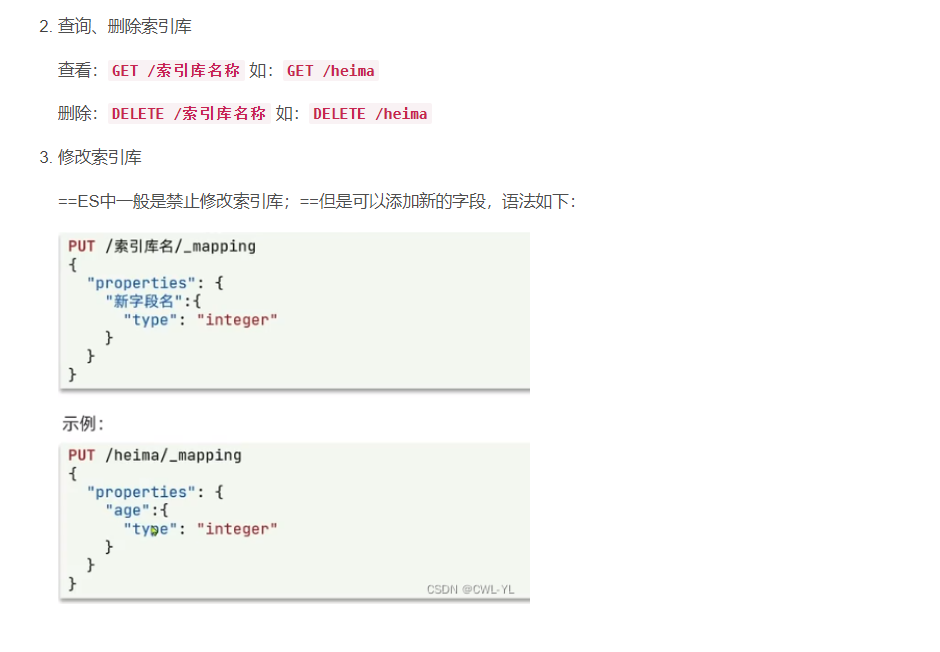
以及有写入粒度,数据的认识:
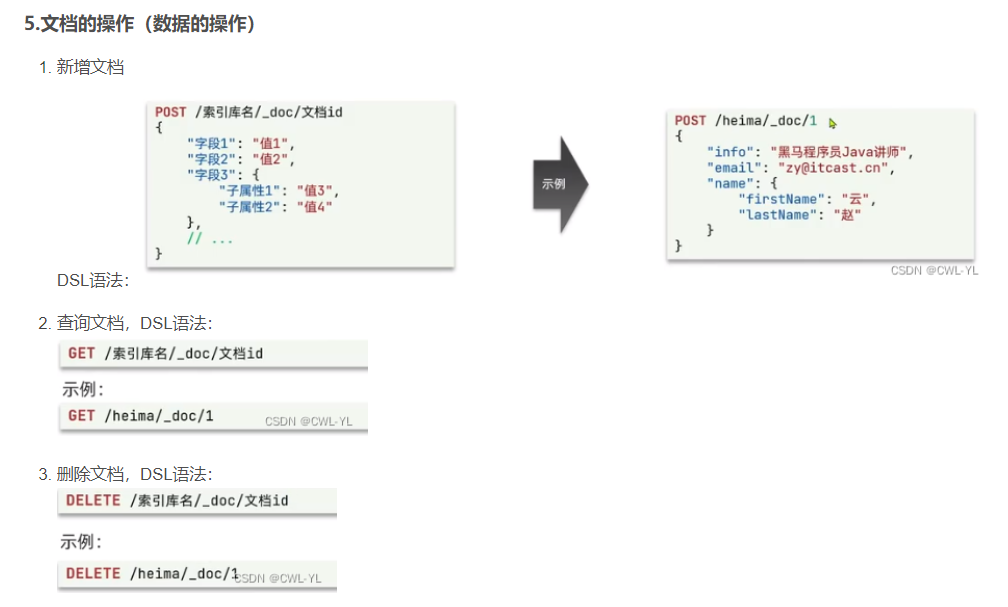
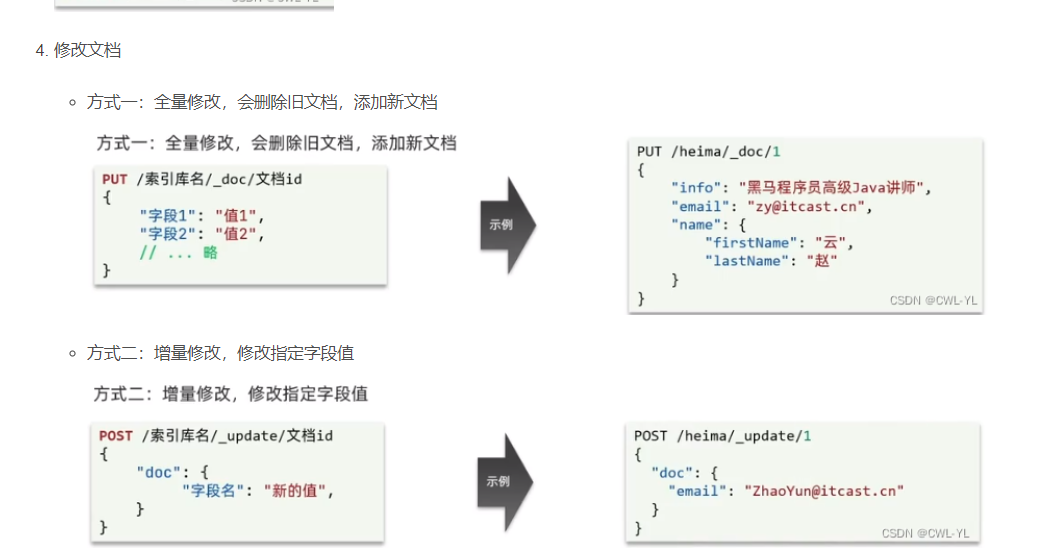
好的,那么对于基本的部署es
以及操作es我们就有简单的认识和概念了。
感谢博主:https://blog.csdn.net/weixin_39932783/article/details/1390969727的分享