android
ry:/ # ethtool eth0
Settings for eth0:
Supported ports: TP MII
Supported link modes: 100baseT/Full
1000baseT/Full
Supported pause frame use: Symmetric Receive-only
Supports auto-negotiation: No
Supported FEC modes: Not reported
Advertised link modes: 100baseT/Full
1000baseT/Full
Advertised pause frame use: Symmetric Receive-only
Advertised auto-negotiation: No
Advertised FEC modes: Not reported
Speed: 100Mb/s
Duplex: Full
Port: MII
PHYAD: 7
Transceiver: internal
Auto-negotiation: off
Supports Wake-on: d
Wake-on: d
Current message level: 0x0000003f (63)
drv probe link timer ifdown ifup
Link detected: no
断依据如下:
- 输出中包含明确的物理链路参数 :比如
Supported ports: [ TP MII ](支持的物理端口类型)、PHYAD: 7(PHY 芯片地址)、Transceiver: internal(内置收发器),这些都是实网卡独有的硬件关联信息,虚网卡不会有这类参数。 - 显示了链路速率、双工模式等物理层配置:
Speed: 100Mb/s、Duplex: Full,这是物理网卡与外部设备(如 switch、ADCC)协商的物理链路属性,虚网卡无独立物理层,无法输出这类信息。
补充说明:输出里的 Link detected: no 只是表示当前该实网卡没有检测到物理链路连接(比如没接网线、对端设备未上电、端口未启用),不影响它是实网卡的属性。
ifconfig
eth0 Link encap:Ethernet HWaddr aa:aa:aa:aa:aa:b1 Driver virtio_net
inet addr:192.168.1.103 Bcast:192.168.1.255 Mask:255.255.255.0
inet6 addr: fe80::c8b6:916a:1715:b3a6/64 Scope: Link
UP BROADCAST RUNNING MULTICAST MTU:1500 Metric:1
RX packets:42151 errors:0 dropped:0 overruns:0 frame:0
TX packets:43228 errors:0 dropped:0 overruns:0 carrier:0
collisions:0 txqueuelen:1000
RX bytes:15148445 TX bytes:8899801
eth2 Link encap:Ethernet HWaddr 42:41:49:43:00:20 Driver qcom-ethqos
inet addr:192.168.7.3 Bcast:192.168.7.255 Mask:255.255.255.0
inet6 addr: fe80::c092:dc9a:52fb:90e7/64 Scope: Link
UP BROADCAST RUNNING MULTICAST MTU:1500 Metric:1
RX packets:635 errors:0 dropped:0 overruns:0 frame:0
TX packets:1184 errors:0 dropped:0 overruns:0 carrier:0
collisions:0 txqueuelen:1000
RX bytes:71534 TX bytes:189278
Interrupt:18
eth2.2 Link encap:Ethernet HWaddr 42:41:49:43:00:20
inet addr:192.168.2.6 Bcast:192.168.2.255 Mask:255.255.255.0
inet6 addr: fe80::953b:cb63:24f0:d98a/64 Scope: Link
UP BROADCAST RUNNING MULTICAST MTU:1500 Metric:1
RX packets:0 errors:0 dropped:0 overruns:0 frame:0
TX packets:204 errors:0 dropped:0 overruns:0 carrier:0
collisions:0 txqueuelen:1000
RX bytes:0 TX bytes:35910
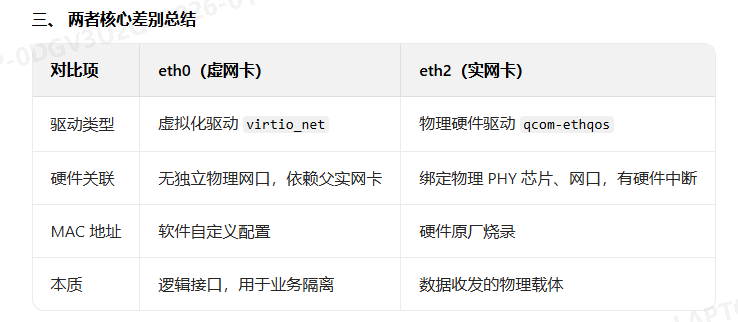
eth2 网卡:物理网卡(实网卡)
核心判定点 :qcom-ethqos 是高通(Qualcomm)的物理以太网驱动,适配高通系列芯片(包括 8155)的硬件网口,直接绑定物理 PHY 芯片和网口
Interrupt:18 中断号为 18物理网卡独有:硬件设备需通过中断号与 CPU 通信,虚拟网卡无硬件中断
ic:/ # ethtool eth2
Settings for eth2:
Supported ports: MII
Supported link modes: 1000baseT/Full
Supported pause frame use: Symmetric Receive-only
Supports auto-negotiation: Yes
Supported FEC modes: Not reported
Advertised link modes: 1000baseT/Full
Advertised pause frame use: Symmetric Receive-only
Advertised auto-negotiation: Yes
Advertised FEC modes: Not reported
Link partner advertised link modes: 1000baseT/Full
Link partner advertised pause frame use: No
Link partner advertised auto-negotiation: No
Link partner advertised FEC modes: Not reported
Speed: 1000Mb/s
Duplex: Full
Port: MII
PHYAD: 0
Transceiver: internal
Auto-negotiation: on
Supports Wake-on: d
Wake-on: d
Current message level: 0x0000003f (63)
drv probe link timer ifdown ifup
Link detected: yes
qnx
emac0: flags=8943<UP,BROADCAST,RUNNING,PROMISC,SIMPLEX,MULTICAST> metric 0 mtu 1500
options=64039b<RXCSUM,TXCSUM,VLAN_MTU,VLAN_HWTAGGING,VLAN_HWCSUM,TSO4,TSO6,VLAN_HWTSO,RXCSUM_IPV6,TXCSUM_IPV6>
ether 42:41:49:43:00:21
inet6 fe80::4041:49ff:fe43:21%emac0 prefixlen 64 scopeid 0x5
media: Ethernet autoselect (1000baseT <full-duplex>)
status: active
nd6 options=21<PERFORMNUD,AUTO_LINKLOCAL>
lan0: flags=8943<UP,BROADCAST,RUNNING,PROMISC,SIMPLEX,MULTICAST> metric 0 mtu 1500
options=200301<RXCSUM,TSO4,TSO6,RXCSUM_IPV6>
ether 42:41:49:43:00:21
inet6 fe80::4041:49ff:fe43:21%lan0 prefixlen 64 scopeid 0x6
inet 192.168.1.101 netmask 0xffffff00 broadcast 192.168.1.255
vlan: 7 vlanproto: 802.1q vlanpcp: 0 parent interface: emac0
media: Ethernet autoselect (1000baseT <full-duplex>)
status: active
groups: vlan
nd6 options=21<PERFORMNUD,AUTO_LINKLOCAL>
确区分:emac0 是实网卡,lan0 是基于 emac0 创建的虚网卡。
-
emac0:实网卡(物理网卡)- 名称特征 :
emac是 QNX 系统中对 物理以太网控制器 的标准命名(对应硬件 MAC 控制器),直接关联物理网口和 PHY 芯片。 - 硬件能力参数 :
options里包含VLAN_HWTAGGING(硬件 VLAN 打标签)、VLAN_HWCSUM(硬件校验和计算)等物理网卡独有的硬件加速功能,虚拟网卡不具备这类硬件级能力。 - 无父接口关联:输出中没有标注 "基于其他网卡创建",是独立的物理接口。
- 状态属性 :
media: Ethernet autoselect (1000baseT <full-duplex>)直接显示物理链路的协商速率和双工模式,是物理网卡的典型特征。
- 名称特征 :
-
lan0:虚网卡(VLAN 虚拟