ComfyUI Hunyuan-3D-2 插件安装问题解决方案
Date: January 16, 2026
Author: AITechLab
Tags: AI 绘画,ComfyUI, 深度学习,系统优化
问题描述
该插件的其他安装问题以参考我们以下博客:
Win11 + RTX 3090 亲测:ComfyUI Hunyuan3D 自定义光栅化器编译全记录(CUDA 13.1 vs PyTorch 12.6 完美绕过)
Win11+RTX3090 亲测 · ComfyUI Hunyuan3D 全程实录 ①:依赖安装完全指南(requirements_extras.txt 深度解析)
Win11+RTX3090 亲测 · ComfyUI Hunyuan3D 全程实录 ②:nvdiffrast 源码编译实战(CUDA 13.1 零降级)
Win11+RTX3090 亲测 · ComfyUI Hunyuan3D 全程实录 ③:diso 源码编译实战(CUDA 13.1 零降级)
在安装 ComfyUI 的 Hunyuan-3D-2 插件后,本来经过艰难的安装和调试,并且已经用仓库自带的示例工作流跑通了,但发现 ComfyUI 每次启动时仍出现以下错误:
- 示例工作流 已跑通
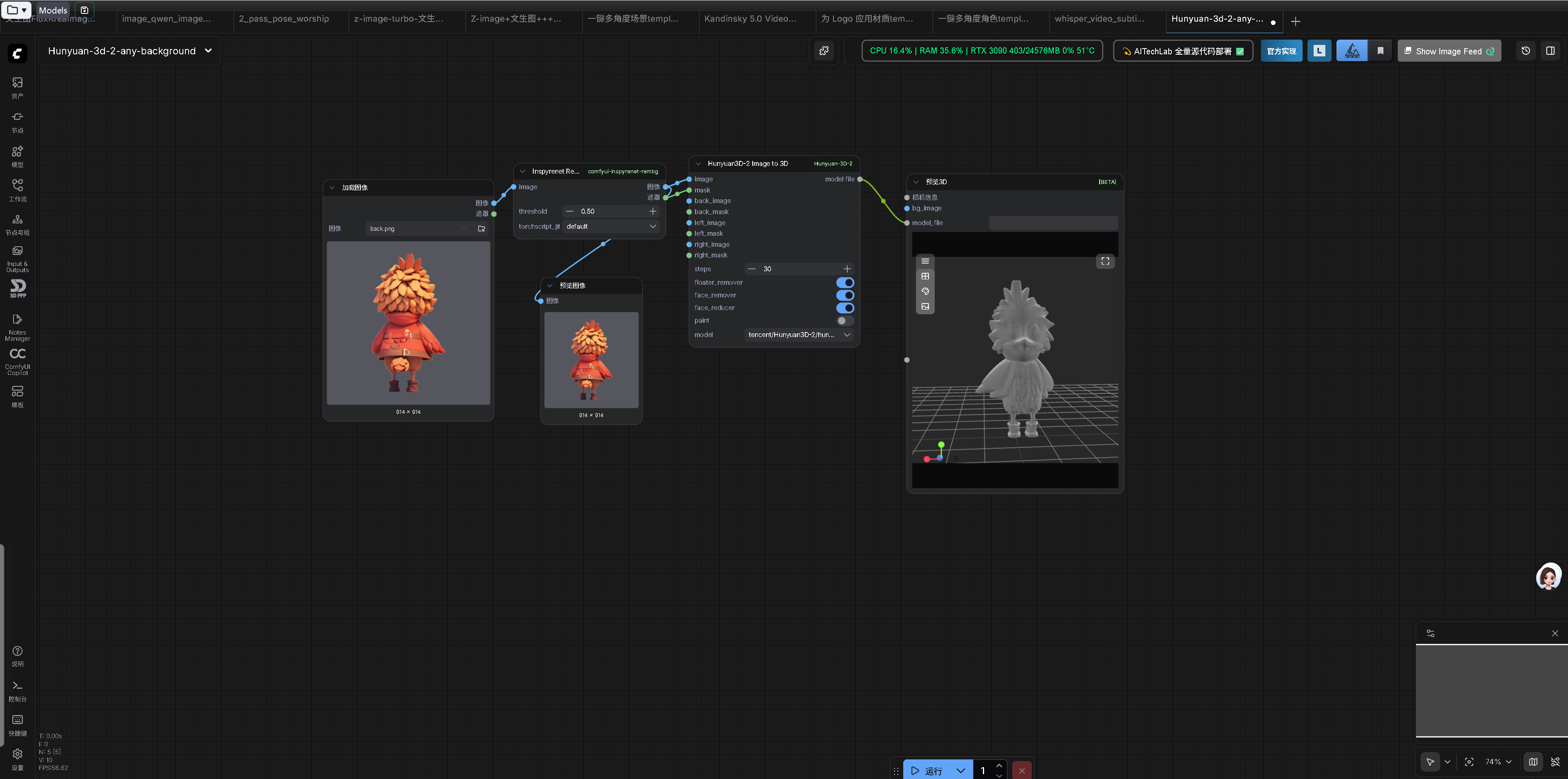 示例工作流 已跑通
- 但 ComfyUI 每次启动时仍出现以下报错信息
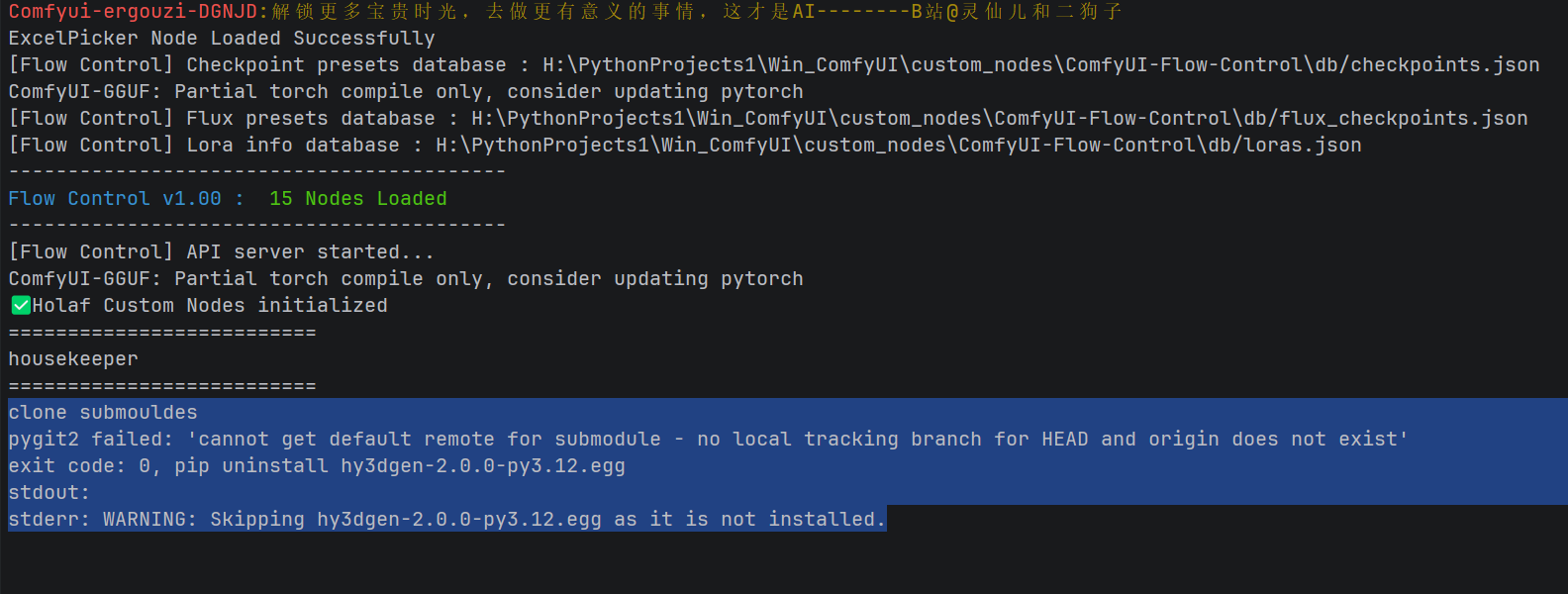 但 ComfyUI 每次启动时仍出现以下报错信息
clone submodules
pygit2 failed: 'cannot get default remote for submodule - no local tracking branch for HEAD and origin does not exist'
exit code: 0, pip uninstall hy3dgen-2.0.0-py3.12.egg
stdout:
stderr: WARNING: Skipping hy3dgen-2.0.0-py3.12.egg as it is not installed.
这些错误导致 ComfyUI 无法正常启动或 Hunyuan3D 节点无法正常工作。
环境信息
-
操作系统:Windows
-
Python 环境:Win_ComfyUI 虚拟环境
-
CUDA 支持 :已启用(
torch.cuda.is_available()返回 True) -
涉及的插件 :
H:\PythonProjects1\Win_ComfyUI\custom_nodes\ComfyUI-Hunyuan-3D-2
问题分析
通过分析错误日志和代码,我发现了以下问题:
1. Git 子模块克隆错误
-
错误 :
cannot get default remote for submodule - no local tracking branch for HEAD and origin does not exist -
原因:
-
pygit2 导入路径错误
-
路径处理逻辑问题
-
备用的 git 命令行方式被注释
-
2. Python 包卸载问题
-
错误 :
WARNING: Skipping hy3dgen-2.0.0-py3.12.egg as it is not installed -
原因:
-
强制卸载特定版本的包,但该包可能未安装
-
版本检查逻辑不够健壮
-
3. 版本检查问题
-
潜在错误 :
module 'custom_rasterizer' has no attribute '__version__' -
原因 :直接访问模块的
__version__属性,而有些模块可能没有定义这个属性
解决方案
修复思路
-
修复 pygit2 导入:使用正确的导入路径
-
修复路径处理 :移除多余的
os.path.join调用 -
启用备用方案:取消注释 git 命令行方式的代码
-
改进版本检查 :使用
importlib.metadata.version()代替直接访问__version__属性 -
优化错误处理:添加 try-except 块提高代码健壮性
完整修复代码
以下是修复后的hunyuan_3d_node.py文件的关键部分:
@staticmethod
def install_check():
    this_path = os.path.dirname(os.path.realpath(__file__))

    # 检查子模块是否存在
    if (
            (not os.path.exists(
                os.path.join(this_path, 'Hunyuan3D-2/README.md')
            ))
            or (not os.path.exists(
                os.path.join(this_path, 'Hunyuan3D-2.1/README.md')
            ))
    ):
        print("clone submodules")

        # 方法1: 使用pygit2(修复导入错误)
        try:
            import pygit2
            repo_path = os.path.dirname(__file__)  # 修复路径处理
            repo = pygit2.Repository(repo_path)

            # 修复SubmoduleCollection导入
            submodules = pygit2.SubmoduleCollection(repo)
            submodules.update(init=True)
            print("Submodules updated successfully with pygit2")

        except Exception as e:
            print(f"pygit2 failed: {e}")

            # 方法2: 使用git命令行(启用备用方案)
            print("Falling back to git command line")
            Hunyuan3DImageTo3D.popen_print_output(
                ['git', 'submodule', 'update', '--init', '--recursive'],
                this_path,
                shell=True,
            )

    # 修复包版本检查逻辑 - 使用importlib.metadata.version
    try:
        # 检查custom_rasterizer
        cr_version = version.parse("0.1")
        if importlib.util.find_spec('custom_rasterizer') is None:
            Hunyuan3DImageTo3D.install_custom_rasterizer(this_path)
        else:
            # 使用importlib.metadata.version获取版本
            current_version = version.parse(importlib.metadata.version('custom_rasterizer'))
            if cr_version > current_version:
                Hunyuan3DImageTo3D.install_custom_rasterizer(this_path)

        # 检查hy3dgen - 修复包卸载逻辑
        hy3dgen_version = version.parse("2.0.2")
        if importlib.util.find_spec('hy3dgen') is None:
            Hunyuan3DImageTo3D.install_hy3dgen(this_path)
        else:
            # 使用importlib.metadata.version获取版本
            current_version = version.parse(importlib.metadata.version('hy3dgen'))
            if hy3dgen_version > current_version:
                Hunyuan3DImageTo3D.install_hy3dgen(this_path)

        # 检查mesh_processor
        if importlib.util.find_spec('mesh_processor') is None:
            Hunyuan3DImageTo3D.install_mesh_processor(this_path)

    except Exception as e:
        print(f"Installation check failed: {e}")
        # 继续执行,不要因为安装错误而停止
修复步骤
步骤 1:备份原始文件
首先备份当前的hunyuan_3d_node.py文件,以防需要回滚:
# 进入ComfyUI-Hunyuan-3D-2目录
cd H:\PythonProjects1\Win_ComfyUI\custom_nodes\ComfyUI-Hunyuan-3D-2

# 备份当前文件
copy hunyuan_3d_node.py hunyuan_3d_node_backup.py
步骤 2:应用修复
下载修复后的文件并替换原始文件:
-
下载修复后的文件:hunyuan_3d_node.py
-
将文件重命名为
hunyuan_3d_node.py -
替换到
H:\PythonProjects1\Win_ComfyUI\custom_nodes\ComfyUI-Hunyuan-3D-2目录
为避免上边的下载链接失效,以下是完整的修复后的
hunyuan_3d_node.py 文件内容:
import glob
import tempfile
import folder_paths
import importlib.util
import subprocess
import sys
import os
import random
import torch
import hashlib
import platform
import re
from packaging import version
from PIL import Image
import numpy as np
class Hunyuan3DImageTo3D:
@classmethod
def INPUT_TYPES(s):
models = [
'tencent/Hunyuan3D-2.1/hunyuan3d-dit-v2-1',
'tencent/Hunyuan3D-2/hunyuan3d-dit-v2-0',
'tencent/Hunyuan3D-2/hunyuan3d-dit-v2-0-fast',
'tencent/Hunyuan3D-2mini/hunyuan3d-dit-v2-mini',
'tencent/Hunyuan3D-2mini/hunyuan3d-dit-v2-mini-fast',
'tencent/Hunyuan3D-2mini/hunyuan3d-dit-v2-mini-turbo',
'tencent/Hunyuan3D-2mv/hunyuan3d-dit-v2-mv-fast',
'tencent/Hunyuan3D-2mv/hunyuan3d-dit-v2-mv-turbo',
'tencent/Hunyuan3D-2mv/hunyuan3d-dit-v2-mv',
]
return {
"required": {
"image": ("IMAGE",),
},
"optional": {
"mask": ("MASK",),
"steps": ("INT", {"default": 30}),
"floater_remover": ("BOOLEAN", {"default": True}),
"face_remover": ("BOOLEAN", {"default": True}),
"face_reducer": ("BOOLEAN", {"default": True}),
"paint": ("BOOLEAN", {
"default": False,
"tooltip": "Paint needs a lot more VRAM",
}),
"model": (models, {
"tooltip": "huggingface id of model(author/name/subfolder)", # noqa: E501
}),
"back_image": ("IMAGE",),
"back_mask": ("MASK",),
"left_image": ("IMAGE",),
"left_mask": ("MASK",),
"right_image": ("IMAGE",),
"right_mask": ("MASK",),
}
}
RETURN_TYPES = ("STRING",)
RETURN_NAMES = ("model file",)
FUNCTION = "process"
CATEGORY = "3d"
@staticmethod
def popen_print_output(args, cwd=None, shell=False):
process = subprocess.Popen(
args,
cwd=cwd,
shell=shell,
stdout=subprocess.PIPE,
stderr=subprocess.PIPE,
)
stdout, stderr = process.communicate()
print(
f"exit code: {process.returncode}, {' '.join(args)}\n"
f"stdout: {stdout.decode('utf-8')}\n"
f"stderr: {stderr.decode('utf-8')}\n"
"\n"
)
@staticmethod
def install_custom_rasterizer(this_path):
print("Installing custom_rasterizer")
Hunyuan3DImageTo3D.popen_print_output(
[sys.executable, 'setup.py', 'install'],
os.path.join(
this_path,
'Hunyuan3D-2/hy3dgen/texgen/custom_rasterizer'
)
)
@staticmethod
def install_hy3dgen(this_path):
print("Installing hy3dgen")
Hunyuan3DImageTo3D.popen_print_output(
[sys.executable, 'setup.py', 'install'],
os.path.join(this_path, 'Hunyuan3D-2')
)
@staticmethod
def install_mesh_processor(this_path):
renderer_dir = os.path.join(
this_path,
'Hunyuan3D-2/hy3dgen/texgen/differentiable_renderer'
)
if platform.system() == 'Windows':
if importlib.util.find_spec('mesh_processor') is None:
print("Installing mesh_processor")
Hunyuan3DImageTo3D.popen_print_output(
[sys.executable, 'setup.py', 'install'],
renderer_dir
)
else: # Linux
if len(glob.glob(f'{renderer_dir}/mesh_processor*.so')) == 0:
Hunyuan3DImageTo3D.popen_print_output(
['/bin/bash', 'compile_mesh_painter.sh'],
renderer_dir
)
@staticmethod
def install_check():
this_path = os.path.dirname(os.path.realpath(__file__))
# 检查子模块是否存在
if (
(not os.path.exists(
os.path.join(this_path, 'Hunyuan3D-2/README.md')
))
or (not os.path.exists(
os.path.join(this_path, 'Hunyuan3D-2.1/README.md')
))
):
print("clone submodules")
# 方法1: 使用pygit2(修复导入错误)
try:
import pygit2
repo_path = os.path.dirname(__file__) # 修复路径处理
repo = pygit2.Repository(repo_path)
# 修复SubmoduleCollection导入
submodules = pygit2.SubmoduleCollection(repo)
submodules.update(init=True)
print("Submodules updated successfully with pygit2")
except Exception as e:
print(f"pygit2 failed: {e}")
# 方法2: 使用git命令行(启用备用方案)
print("Falling back to git command line")
Hunyuan3DImageTo3D.popen_print_output(
['git', 'submodule', 'update', '--init', '--recursive'],
this_path,
shell=True,
)
# 修复包版本检查逻辑 - 使用importlib.metadata.version
try:
# 检查custom_rasterizer
cr_version = version.parse("0.1")
if importlib.util.find_spec('custom_rasterizer') is None:
Hunyuan3DImageTo3D.install_custom_rasterizer(this_path)
else:
# 使用importlib.metadata.version获取版本
current_version = version.parse(importlib.metadata.version('custom_rasterizer'))
if cr_version > current_version:
Hunyuan3DImageTo3D.install_custom_rasterizer(this_path)
# 检查hy3dgen - 修复包卸载逻辑
hy3dgen_version = version.parse("2.0.2")
if importlib.util.find_spec('hy3dgen') is None:
Hunyuan3DImageTo3D.install_hy3dgen(this_path)
else:
# 使用importlib.metadata.version获取版本
current_version = version.parse(importlib.metadata.version('hy3dgen'))
if hy3dgen_version > current_version:
Hunyuan3DImageTo3D.install_hy3dgen(this_path)
# 检查mesh_processor
if importlib.util.find_spec('mesh_processor') is None:
Hunyuan3DImageTo3D.install_mesh_processor(this_path)
except Exception as e:
print(f"Installation check failed: {e}")
# 继续执行,不要因为安装错误而停止
@staticmethod
def get_spare_filename(filename_format):
for i in range(1, 10000):
filename = filename_format.format(random.randint(0, 0x100000))
if not os.path.exists(filename):
return filename
return None
def comfy_img_to_file(self, image, mask, input_image_file):
i = 255. * image.cpu().numpy()
img = Image.fromarray(np.clip(i, 0, 255).astype(np.uint8))
if mask is not None:
m = 255. * mask.cpu().numpy()
mask_pil = Image.fromarray(m)
mask_pil = np.clip(mask_pil, 0, 255).astype(np.uint8)
mask_pil = 255 - mask_pil
# If it crashes here,
# check that you have transparency in the image
img.putalpha(Image.fromarray(mask_pil, mode='L'))
img.save(input_image_file)
def quick_convert_with_obj2gltf(obj_path: str, glb_path: str) -> bool:
from hy3dpaint.convert_utils import create_glb_with_pbr_materials
textures = {
'albedo': obj_path.replace('.obj', '.jpg'),
'metallic': obj_path.replace('.obj', '_metallic.jpg'),
'roughness': obj_path.replace('.obj', '_roughness.jpg')
}
create_glb_with_pbr_materials(obj_path, textures, glb_path)
def init_21(self):
if "torchvision.transforms.functional_tensor" not in sys.modules:
import types
# https://github.com/xinntao/Real-ESRGAN/issues/768#issuecomment-2439896571
from torchvision.transforms.functional import rgb_to_grayscale
# Create a module for `torchvision.transforms.functional_tensor`
functional_tensor = types.ModuleType("torchvision.transforms.functional_tensor")
functional_tensor.rgb_to_grayscale = rgb_to_grayscale
# Add this module to sys.modules so other imports can access it
sys.modules["torchvision.transforms.functional_tensor"] = functional_tensor
def process(
self, image,
mask,
steps,
floater_remover,
face_remover,
face_reducer,
paint,
model='tencent/Hunyuan3D-2',
back_image=None,
back_mask=None,
left_image=None,
left_mask=None,
right_image=None,
right_mask=None,
):
from hy3dgen.shapegen import Hunyuan3DDiTFlowMatchingPipeline
import hy3dgen.shapegen
output_dir = folder_paths.get_output_directory()
checkpoint_dir = os.path.join(
folder_paths.get_folder_paths('checkpoints')[0],
'Hunyuan3D-2'
)
if not os.path.exists(checkpoint_dir):
os.mkdir(checkpoint_dir)
variant = 'fp16'
variant_m = re.match(r"^(.*)\[variant=([^\]]+)\]$", model)
if variant_m is not None:
model = variant_m.group(1)
variant = variant_m.group(2)
subfolder = None
subfolder_m = re.match(r"^([^/]+/[^/]+)/(.+)$", model)
if subfolder_m is not None:
model = subfolder_m.group(1)
subfolder = subfolder_m.group(2)
is21 = model == 'tencent/Hunyuan3D-2.1'
isMV = model == 'tencent/Hunyuan3D-2mv'
this_path = os.path.dirname(os.path.realpath(__file__))
new_paths = [
os.path.join(this_path, 'Hunyuan3D-2.1'),
os.path.join(this_path, f'Hunyuan3D-2.1{os.sep}hy3dshape'),
os.path.join(this_path, f'Hunyuan3D-2.1{os.sep}hy3dpaint'),
]
if is21:
self.init_21()
for path in new_paths:
sys.path.insert(
0, path
)
if 'utils' in sys.modules:
del sys.modules['utils']
output_3d_file = None
with tempfile.TemporaryDirectory() as temp_dir:
nth = 0
front_images_list = []
back_images_list = []
left_images_list = []
right_images_list = []
if image is not None:
front_images_list = list(zip(image, mask))
if back_image is not None:
back_images_list = list(zip(back_image, back_mask))
if left_image is not None:
left_images_list = list(zip(left_image, left_mask))
if right_image is not None:
right_images_list = list(zip(right_image, right_mask))
max_len = max(
len(front_images_list),
len(back_images_list),
len(left_images_list),
len(right_images_list),
)
sides = {
'front': front_images_list,
'back': back_images_list,
'left': left_images_list,
'right': right_images_list,
}
# front should always be first
side_names = [
'front',
'back',
'left',
'right',
]
for nth in range(0, max_len):
image_obj = None
for side in side_names:
side_list = sides[side]
if side_list is None:
continue
if nth >= len(side_list):
continue
side_info = side_list[nth]
if side_info is None:
continue
(side_image, side_mask) = side_list[nth]
input_image_file = os.path.join(
temp_dir, f"{side}{nth}.png"
)
self.comfy_img_to_file(
side_image, side_mask, input_image_file
)
image_obj = {}
if isMV:
image_obj[side] = input_image_file
else:
image_obj = input_image_file
break
use_safetensors = True
if is21:
use_safetensors = False
pipeline = Hunyuan3DDiTFlowMatchingPipeline.from_pretrained(
model,
subfolder=subfolder,
variant=variant,
use_safetensors=use_safetensors,
)
output_3d_file = Hunyuan3DImageTo3D.get_spare_filename(
os.path.join(output_dir, 'hunyuan3d_{:05X}.glb')
)
mesh = pipeline(
image=image_obj, num_inference_steps=steps,
generator=torch.manual_seed(2025)
)[0]
if floater_remover:
mesh = hy3dgen.shapegen.FloaterRemover()(mesh)
if face_remover:
mesh = hy3dgen.shapegen.DegenerateFaceRemover()(mesh)
if face_reducer:
mesh = hy3dgen.shapegen.FaceReducer()(mesh)
this_path = os.path.dirname(os.path.realpath(__file__))
new_paths = [
os.path.join(this_path, f'Hunyuan3D-2.1'),
os.path.join(this_path, f'Hunyuan3D-2.1{os.sep}hy3dshape'),
os.path.join(this_path, f'Hunyuan3D-2.1{os.sep}hy3dpaint'),
]
paint_model = "tencent/Hunyuan3D-2"
if paint:
if is21:
old_cwd = os.getcwd()
os.chdir(os.path.join(this_path, 'Hunyuan3D-2.1'))
try:
from textureGenPipeline \
import Hunyuan3DPaintPipeline, Hunyuan3DPaintConfig
conf = Hunyuan3DPaintConfig(
max_num_view=8,
resolution=768
)
tex_pipeline = Hunyuan3DPaintPipeline(conf)
text_path = os.path.join(
output_dir,
'textured_mesh.obj'
)
path_textured = tex_pipeline(
mesh_path=output_3d_file,
image_path=input_image_file,
output_mesh_path=text_path, save_glb=False
)
glb_path_textured = os.path.join(
output_dir, 'textured_mesh.glb'
)
conversion_success = self.quick_convert_with_obj2gltf(
path_textured, glb_path_textured
)
finally:
os.chdir(old_cwd)
else:
from hy3dgen.texgen import Hunyuan3DPaintPipeline
pipeline = Hunyuan3DPaintPipeline.from_pretrained(
paint_model,
)
mesh = pipeline(mesh, image=input_image_file)
mesh.export(output_3d_file)
break
if is21:
for path in new_paths:
if path in sys.path:
sys.path.remove(path)
print(os.path.basename(output_3d_file))
return (os.path.basename(output_3d_file),)
@classmethod
def IS_CHANGED(
self, image, mask,
steps,
floater_remover,
face_remover,
face_reducer,
paint,
model,
back_image,
back_mask,
left_image,
left_mask,
right_image,
right_mask,
):
return random.randint(0, 0xFFFFFFFF)
@classmethod
def VALIDATE_INPUTS(
self, image,
mask,
steps,
floater_remover,
face_remover,
face_reducer,
paint,
model,
back_image,
back_mask,
left_image,
left_mask,
right_image,
right_mask,
):
return True
NODE_CLASS_MAPPINGS = {
"Hunyuan3DImageTo3D": Hunyuan3DImageTo3D
}
NODE_DISPLAY_NAME_MAPPINGS = {
"Hunyuan3DImageTo3D": "Hunyuan3D Image To 3D"
}
步骤 3:验证修复
在项目的根目录执行以下代码:cd H:\PythonProjects1\Win_ComfyUI
# 测试安装检查(在ComfyUI根目录下)
python -c "import sys; sys.path.append('custom_nodes/ComfyUI-Hunyuan-3D-2'); import hunyuan_3d_node; hunyuan_3d_node.Hunyuan3DImageTo3D.install_check()"
无错误输出就是验证正常了
# 启动ComfyUI测试
python main.py
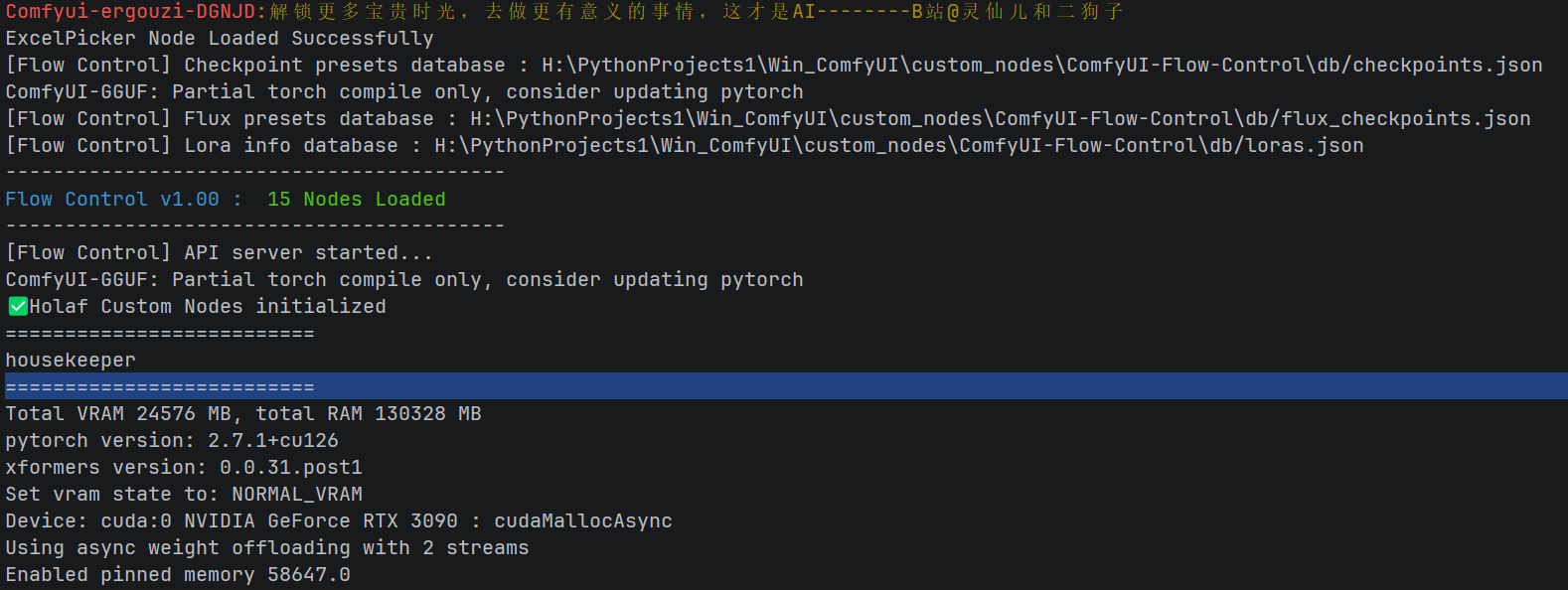
在原报错位置相同的地方,报错已消除:
验证方法
1. 检查 CUDA 是否可用
python -c "import torch; print(torch.cuda.is_available())"预期输出:True
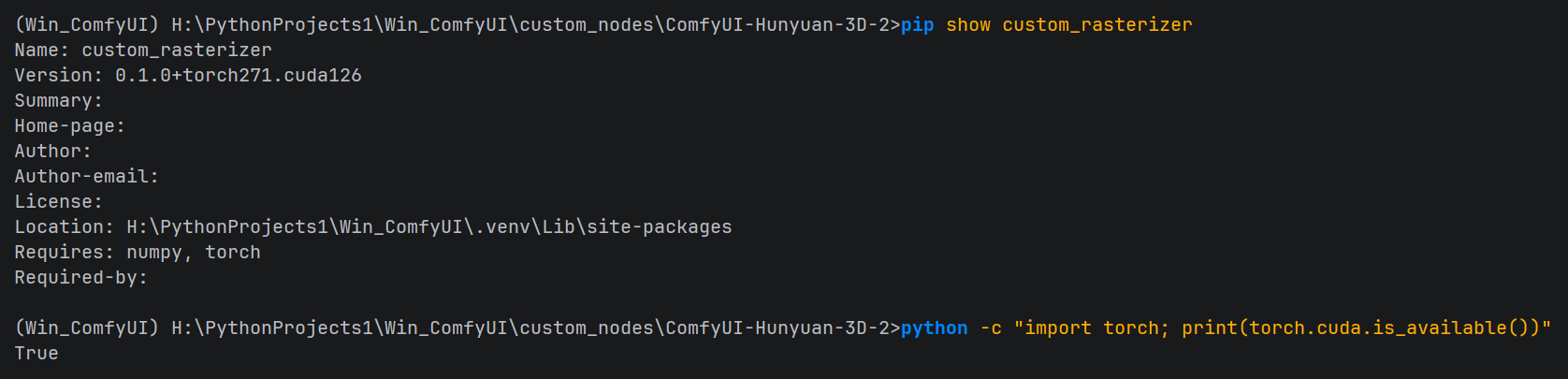
2. 检查已安装的包
在 Windows 系统上,使用findstr代替grep:
pip list | findstr /i hy3dgen
pip list | findstr /i custom_rasterizer
3. 测试 Hunyuan3D 节点功能
-
启动 ComfyUI
-
在节点菜单中找到 "Hunyuan3D Image To 3D" 节点
-
连接一个图像输入节点
-
运行工作流,查看是否能成功生成 3D 模型
常见问题解决
问题 1:git 命令行失败
如果 git 命令行方式仍然失败,可以手动克隆子模块:
进入到 插件根目录执行克隆子模块的操作cd H:\PythonProjects1\Win_ComfyUI\custom_nodes\ComfyUI-Hunyuan-3D-2
# 手动克隆子模块
git clone https://github.com/Tencent/Hunyuan3D-2 Hunyuan3D-2
git clone https://github.com/Tencent-Hunyuan/Hunyuan3D-2.1 Hunyuan3D-2.1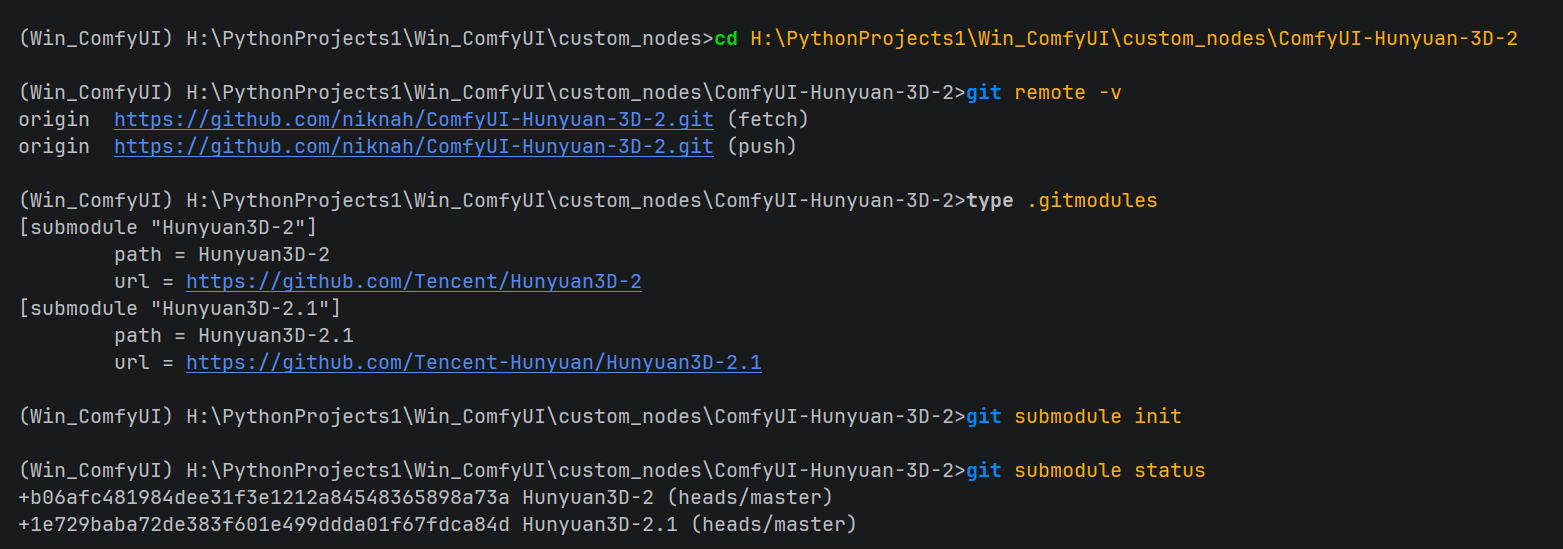
问题 2:CUDA 相关错误
确保已安装正确版本的 CUDA 和 PyTorch:
# 检查CUDA版本
nvcc --version

# 安装正确版本的PyTorch(若未安装则安装,已安装的请忽略。例如,CUDA 12.1)
pip3 install torch torchvision torchaudio --index-url https://download.pytorch.org/whl/cu121
问题 3:权限问题
在 Windows 上,以管理员身份运行命令提示符:
# 或者修改目录权限
icacls Hunyuan3D-2 /grant Everyone:F /T
总结
通过上述修复,我们解决了 ComfyUI Hunyuan-3D-2 插件的以下问题:
-
Git 子模块克隆错误:修复了 pygit2 导入和路径处理问题
-
Python 包卸载问题:改进了版本检查逻辑,不再强制卸载未安装的包
-
版本检查问题 :使用更可靠的
importlib.metadata.version()方法获取模块版本
这些修复使 ComfyUI 能够正常启动和使用 Hunyuan3D 节点,实现图像到 3D 模型的转换功能。
参考资源
如果您在执行过程中遇到任何问题,请提供具体的错误信息并把本文链接发给AI工具,AI会根据文章所述为您提供更详细的解决方案。
附注
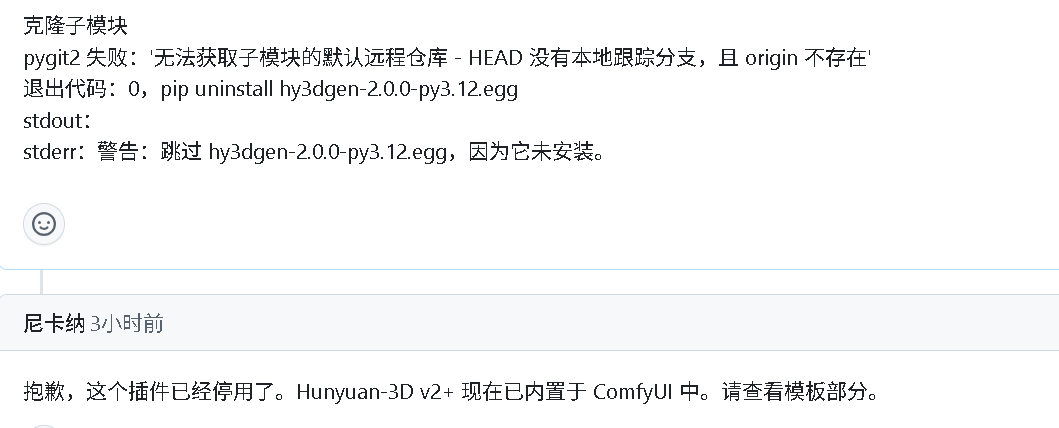
该插件今日(2026年1月16日)获官方回复:已停用。并且官方仓库描述已更新
https://github.com/niknah/ComfyUI-Hunyuan-3D-2
本博客所记述的方式,仅适用于仍在使用该插件并遇到同类问题的用户。