使用开源没多久的Yolo26模型进行推理测试,无需NMS操作
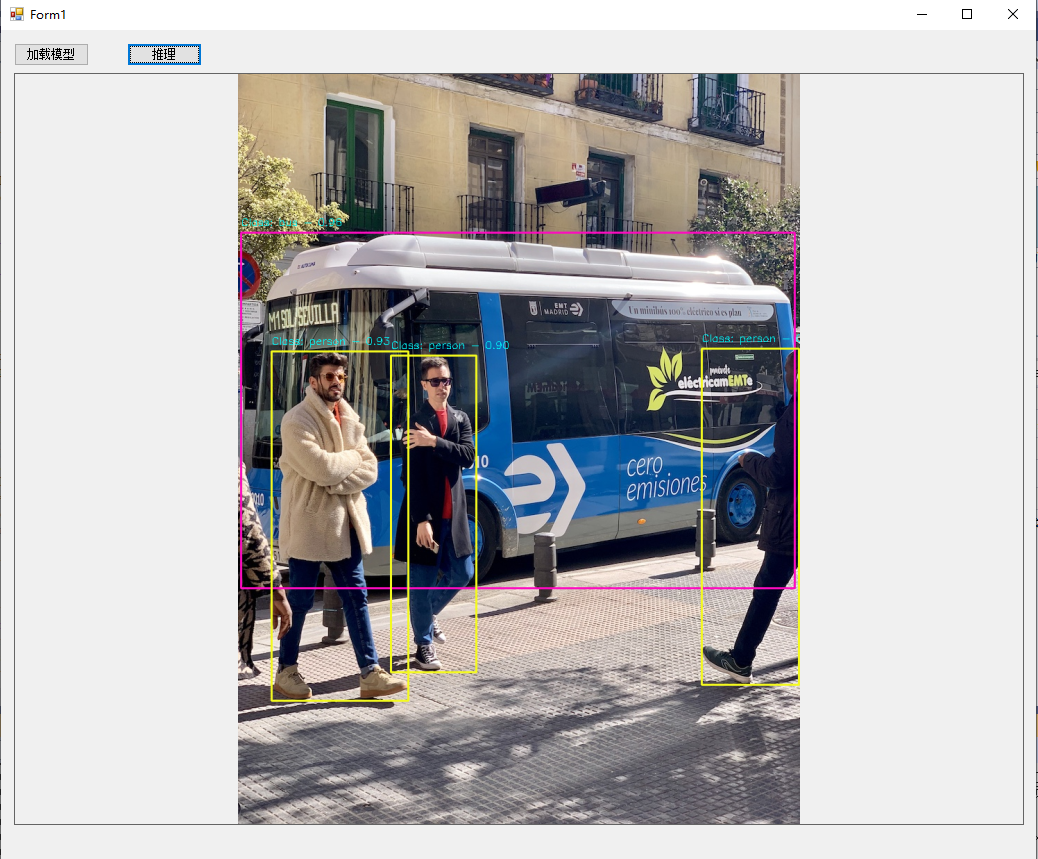
效果如下:
模型信息:
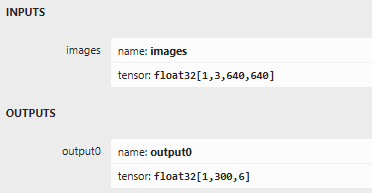
输出格式说明→ 1,300,6 6: x1 y1 x2 y2 score classeId(左上角 右下角 置信度 类别ID)
代码如下:
using OpenCvSharp;
using OpenCvSharp.Extensions;
using OpenVinoSharp;
using OpenVinoSharp.Extensions.process;
using System;
using System.Collections.Generic;
using System.Data;
using System.IO;
using System.Linq;
using System.Windows.Forms;
namespace OPENVINOSHARP_NEW
{
public partial class Form1 : Form
{
public Form1()
{
InitializeComponent();
}
Core core;
CompiledModel compiledModel;
InferRequest inferRequest;
//分配随机颜色
private static readonly Scalar\[\] Colors = Enumerable.Repeat(false, 80).Select(x => Scalar.RandomColor()).ToArray();
//coco names
private static readonly string\[\] Labels = File.ReadAllLines("D:\\ultralytics-main\\classes.txt");
private void button1_Click(object sender, EventArgs e)
{
core = new Core();
compiledModel = core.compile_model("C:\\yolo26s.onnx", "CPU");
inferRequest = compiledModel.create_infer_request();
}
private void button2_Click(object sender, EventArgs e)
{
Mat image = new Mat("D:\\ultralytics-main\\bus.jpg");
Mat rgbMat = image.CvtColor(ColorConversionCodes.BGR2RGB);
rgbMat = OpenVinoSharp.Extensions.process.Resize.letterbox_img(rgbMat, 640, out var scales);
Mat normalizedMat = new Mat();
rgbMat.ConvertTo(normalizedMat, MatType.CV_32FC3, 1.0 / 255.0f); ;
float\[\] data = Permute.run(normalizedMat);
Tensor inputTensor = inferRequest.get_input_tensor();
inputTensor.set_data(data);
inferRequest.infer();
var outputTensor = inferRequest.get_output_tensor();
var output = outputTensor.get_data<float>((int)outputTensor.get_size()); //1,300,6 6: x y w h score classe
var proposals = (int)outputTensor.get_shape()1;
var nums = (int)outputTensor.get_shape()2;
List<DetResult> results = new List<DetResult>();
for (int i = 0; i < proposals; i++)
{
float score = outputi \* nums + 4;
if (score > 0.5)
{
int x1 = (int)(outputi \* nums + 0 * scales);
int y1 = (int)(outputi \* nums + 1 * scales);
int x2 = (int)(outputi \* nums + 2 * scales);
int y2 = (int)(outputi \* nums + 3 * scales);
Rect rect = new Rect(x1, y1, x2-x1, y2-y1);
int classId = (int)outputi \* nums + 5;
DetResult detResult = new DetResult
{
box = rect,
score = score,
label = classId
};
results.Add(detResult);
}
}
// 绘制边界框
foreach (DetResult detResult in results)
{
Cv2.Rectangle(image, detResult.box, ColorsdetResult.label, 2);
// 添加标签和置信度
string label = $"Class: {LabelsdetResult.label} - {detResult.score:F2}";
Cv2.PutText(image, label,new Point(detResult.box.X, detResult.box.Y - 10),HersheyFonts.HersheySimplex, 0.5, new Scalar(255, 255, 0), 1);
}
pictureBox1.Image = image.ToBitmap();
rgbMat.Dispose();
normalizedMat.Dispose();
image.Dispose();
}
}
public class DetResult
{
public Rect box;
public float score;
public int label;
}
}