运行自带的wordcount
运行的命令
[root@node1 ~]# cd /opt/hadoop-3.1.3/share/hadoop/mapreduce/
[root@node1 mapreduce]# ll *examples*
-rw-r--r-- 1 nginx nginx 316382 9月  12 2019 hadoop-mapreduce-examples-3.1.3.jar

lib-examples:
总用量 1484
-rw-r--r-- 1 nginx nginx 1515894 9月  12 2019 hsqldb-2.3.4.jar
# 需要使用的是hadoop-mapreduce-examples-3.1.3.jar这个包
[root@node1 mapreduce]# cd
[root@node1 ~]# vim wc.txt
hello tom
andy joy
hello rose
hello joy
mark andy
hello tom
andy rose
hello joy
[root@node1 ~]# hdfs dfs -mkdir -p /wordcount/input
[root@node1 ~]# hdfs dfs -put wc.txt /wordcount/input
[root@node1 ~]# hdfs dfs -ls /wordcount/input
Found 1 items
-rw-r--r--   3 root supergroup         80 2026-01-15 08:56 /wordcount/input/wc.txt
[root@node1 ~]# cd -
[root@node1 mapreduce]# hadoop jar hadoop-mapreduce-examples-3.1.3.jar wordcount /wordcount/input /wordcount/output
# 出现如下bug
org.apache.hadoop.ipc.RemoteException(org.apache.hadoop.yarn.exceptions.InvalidResourceRequestException): Invalid resource request, requested resource type=[memory-mb] < 0 or greater than maximum allowed allocation. Requested resource=<memory:1536, vCores:1>, maximum allowed allocation=<memory:1024, vCores:4>, please note that maximum allowed allocation is calculated by scheduler based on maximum resource of registered NodeManagers, which might be less than configured maximum allocation=<memory:1024, vCores:4>
默认情况下AM的请求1.5G的内存,降低am的资源请求配置项到分配的物理内存限制以内。
修改配置mapred-site.xml ,加入新内容(四台上都要修改,修改路径:/opt/hadoop-3.1.3/etc/hadoop/mapred-site.xml),修改后重启hadoop集群,重启再执行:
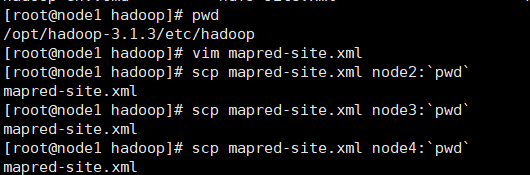
配置信息
XML
<property>
     <name>yarn.app.mapreduce.am.resource.mb</name>
     <value>256</value>
</property>
 <!-- 默认对mapred的内存请求都是1G,也降低和合适的值。-->
 <property>
     <name>mapreduce.map.memory.mb</name>
     <value>256</value>
</property>
<property>
    <name>mapreduce.reduce.memory.mb</name>
    <value>256</value>
</property>
但如果太低也会出现OOM的问题。ERROR main org.apache.hadoop.mapred.YarnChild: Error running child : java.lang.OutOfMemoryError: Java heap space
配置完成之后重新执行命令
bash
[root@node1 mapreduce]# hadoop jar hadoop-mapreduce-examples-3.1.3.jar wordcount /wordcount/input /wordcount/output输出目录内容
bash
[root@node1 mapreduce]# hdfs dfs -ls /wordcount/output
Found 2 items
-rw-r--r--   3 root supergroup          0 2026-01-15 09:15 /wordcount/output/_SUCCESS
-rw-r--r--   3 root supergroup         41 2026-01-15 09:15 /wordcount/output/part-r-00000
[root@node1 mapreduce]# hdfs dfs -cat /wordcount/output/part-r-00000
2026-01-15 09:16:23,349 INFO sasl.SaslDataTransferClient: SASL encryption trust check: localHostTrusted = false, remoteHostTrusted = false
andy	3
hello	5
joy	3
mark	1
rose	2
tom	2
/_SUCCESS:是信号/标志文件
/part-r-00000:是reduce输出的数据文件
r:reduce的意思,00000是对应的reduce编号,多个reduce会有多个数据文件
自带的wordcount源码分析
首先将hadoop-mapreduce-examples-3.1.3.jar下载到本地,解压
bash
[root@node1 mapreduce]# sz hadoop-mapreduce-examples-3.1.3.jar
#如果命令不可以运行,需安装相关包:yum install -y lrzsz
使用反编译软件jd-gui(本文附有相关程序)打开:"C:\Data\Code\hadoop-mapreduce-examples-3.1.3\org\apache\hadoop\examples\WordCount.class",这里附有源代码:
java
package org.apache.hadoop.examples;

import java.io.IOException;
import java.io.PrintStream;
import java.util.StringTokenizer;
import org.apache.hadoop.conf.Configuration;
import org.apache.hadoop.fs.Path;
import org.apache.hadoop.io.IntWritable;
import org.apache.hadoop.io.Text;
import org.apache.hadoop.mapreduce.Job;
import org.apache.hadoop.mapreduce.Mapper;
import org.apache.hadoop.mapreduce.Mapper.Context;
import org.apache.hadoop.mapreduce.Reducer;
import org.apache.hadoop.mapreduce.Reducer.Context;
import org.apache.hadoop.mapreduce.lib.input.FileInputFormat;
import org.apache.hadoop.mapreduce.lib.output.FileOutputFormat;
import org.apache.hadoop.util.GenericOptionsParser;

public class WordCount
{
  public static void main(String[] args)
    throws Exception
  {
    Configuration conf = new Configuration();
    String[] otherArgs = new GenericOptionsParser(conf, args).getRemainingArgs();
    if (otherArgs.length < 2) {
      System.err.println("Usage: wordcount <in> [<in>...] <out>");
      System.exit(2);
    }
    Job job = Job.getInstance(conf, "word count");
    job.setJarByClass(WordCount.class);
    job.setMapperClass(TokenizerMapper.class);
    job.setCombinerClass(IntSumReducer.class);
    job.setReducerClass(IntSumReducer.class);
    job.setOutputKeyClass(Text.class);
    job.setOutputValueClass(IntWritable.class);
    for (int i = 0; i < otherArgs.length - 1; i++) {
      FileInputFormat.addInputPath(job, new Path(otherArgs[i]));
    }
    FileOutputFormat.setOutputPath(job, new Path(otherArgs[(otherArgs.length - 1)]));

    System.exit(job.waitForCompletion(true) ? 0 : 1);
  }

  public static class IntSumReducer extends Reducer<Text, IntWritable, Text, IntWritable>
  {
    private IntWritable result = new IntWritable();

    public void reduce(Text key, Iterable<IntWritable> values, Reducer<Text, IntWritable, Text, IntWritable>.Context context)
      throws IOException, InterruptedException
    {
      int sum = 0;
      for (IntWritable val : values) {
        sum += val.get();
      }
      this.result.set(sum);
      context.write(key, this.result);
    }
  }

  public static class TokenizerMapper extends Mapper<Object, Text, Text, IntWritable>
  {
    private static final IntWritable one = new IntWritable(1);
    private Text word = new Text();

    public void map(Object key, Text value, Mapper<Object, Text, Text, IntWritable>.Context context) throws IOException, InterruptedException
    {
      StringTokenizer itr = new StringTokenizer(value.toString());
      while (itr.hasMoreTokens()) {
        this.word.set(itr.nextToken());
        context.write(this.word, one);
      }
    }
  }
}
手写wordcount
对给定的文件,统计每一个单词出现的总次数。
环境准备
1.创建maven项目:wordcount
2.修改pom.xml文件,添加如下依赖:
XML
<properties>
    <project.build.sourceEncoding>UTF-8</project.build.sourceEncoding>
    <maven.compiler.source>1.8</maven.compiler.source>
    <maven.compiler.target>1.8</maven.compiler.target>
</properties>
<dependencies>
    <dependency>
        <groupId>junit</groupId>
        <artifactId>junit</artifactId>
        <version>4.13</version>
    </dependency>
    <dependency>
        <groupId>org.apache.hadoop</groupId>
        <artifactId>hadoop-client</artifactId>
        <version>3.1.3</version>
    </dependency>
    <dependency>
        <groupId>org.apache.logging.log4j</groupId>
        <artifactId>log4j-slf4j-impl</artifactId>
        <version>2.12.0</version>
    </dependency>
</dependencies>
3.在项目的src/main/resources目录下,新建一个文件,名为"log4j2.xml"
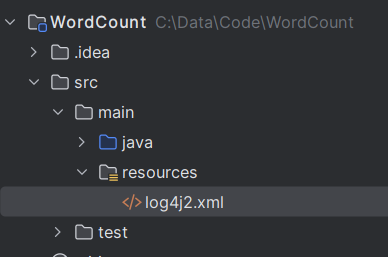
在文件中填入以下内容:
XML
<?xml version="1.0" encoding="UTF-8"?>
<Configuration status="error" strict="true" name="XMLConfig">
    <Appenders>
        <!-- 类型名为Console,名称为必须属性,在Logger配置中会使用到 -->
        <Appender type="Console" name="STDOUT">
            <!-- 布局为PatternLayout的方式,
           输出样式为[INFO] [2021-10-18 11:29:12][org.test.Console]hadoop api code show -->
            <Layout type="PatternLayout"
                    pattern="[%p] [%d{yyyy-MM-dd HH:mm:ss}][%c{10}]%m%n" />
        </Appender>
    </Appenders>

    <Loggers>
        <!-- 可加性为false -->
        <Logger name="test" level="info" additivity="false">
            <AppenderRef ref="STDOUT" />
        </Logger>
        <!-- root logger Config设置 -->
        <Root level="info">
            <AppenderRef ref="STDOUT" />
        </Root>
    </Loggers>
</Configuration>
4.从集群拷贝这四个文件到当前项目的src/main/resources目录下
core-site.xml
hdfs-site.xml
mapred-site.xml
yarn-site.xml
XML
[root@node1 hadoop]# sz core-site.xml hdfs-site.xml mapred-site.xml yarn-site.xml 5.本地hosts文件配置
检查本地的hosts文件是否配置了地址的映射C:\Windows\System32\drivers\etc\hosts
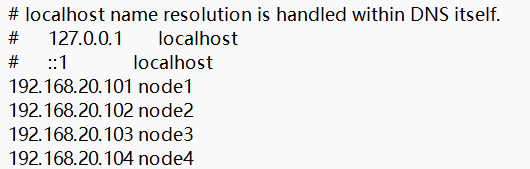
编写WCMapper类
java
package com.wusen.hadoop;

import org.apache.hadoop.io.IntWritable;
import org.apache.hadoop.io.LongWritable;
import org.apache.hadoop.io.Text;
import org.apache.hadoop.mapreduce.Mapper;

import java.io.IOException;

/**一、输入数据:
 * KEYIN:输入数据的key的类型,默认的key是文本的偏移量
 * VALUEIN:输入数据的value的类型, 这行文本的内容  hello tom
 * 二、输出数据
 * KEYOUT:处理后输出的key的类型
 * VALUEOUT:处理后输出的value的类型   1
 */
public class WCMapper extends Mapper<LongWritable, Text, Text, IntWritable> {
    //定义输出的value的对象
    private static final IntWritable valueOut = new IntWritable(1);
    //定义输出的key的对象
    private Text keyOut = new Text();
    //文本的每一行内容调用一次map方法
    @Override
    protected void map(LongWritable key, Text value, Mapper<LongWritable, Text, Text, IntWritable>.Context context) throws IOException, InterruptedException {
        if(value!=null){
            //value就是读取到的当前行中的内容,并将之转换为字符串
            String lineContent = value.toString();
            //将字符串进行处理:先去掉两端的空格,然后在按照空格进行切分
            String[] words = lineContent.trim().split(" ");
            //遍历数组,逐一进行输出
            for (String word:words){
                //将word内容封装到keyOut中
                keyOut.set(word);
                //将kv对输出
                context.write(keyOut,valueOut);
            }
        }
    }
}
编写WCReducer
java
package com.wusen.hadoop;

import org.apache.hadoop.io.IntWritable;
import org.apache.hadoop.io.Text;
import org.apache.hadoop.mapreduce.Reducer;

import java.io.IOException;

/**输入的kv对的类型:KEYIN, VALUEIN, (分别和Mapper输出的kv对的类型保持一致)
 * 输出的kv对的类型:KEYOUT, VALUEOUT
 */
public class WCReducer extends Reducer<Text, IntWritable, Text, IntWritable> {
    private  int sum;
    private  IntWritable valOut = new IntWritable();
    //相同的key为一组,调用一次reduce方法
    @Override
    protected void reduce(Text key, Iterable<IntWritable> values, Reducer<Text, IntWritable, Text, IntWritable>.Context context) throws IOException, InterruptedException {
        //hello 1
        //hello 1
        //hello 1
        //key:hello   values: 1,1,1
        //首先将sum重置为0,避免上一组数据计算参数干扰
        sum = 0;
        //遍历values,累加求和
        for(IntWritable value:values){
            sum += value.get();

        }
        //将计算后的结果sum封装到valOut中
        valOut.set(sum);
        //输出
        context.write(key,valOut);
    }
}
编写WCDriver
java
package com.wusen.hadoop;

import org.apache.hadoop.conf.Configuration;
import org.apache.hadoop.fs.Path;
import org.apache.hadoop.io.IntWritable;
import org.apache.hadoop.io.Text;
import org.apache.hadoop.mapreduce.Job;
import org.apache.hadoop.mapreduce.lib.input.FileInputFormat;
import org.apache.hadoop.mapreduce.lib.output.FileOutputFormat;

import java.io.IOException;

public class WCDriver {
    public static void main(String[] args) throws IOException, InterruptedException, ClassNotFoundException {
        //0.校验输入参数
        if(args==null||args.length<2){
            System.out.println("Usage:hadoop jar xxx.jar com.wusen.WCDriver <inpath> <outpath>");
            System.exit(0);
        }
        //1.创建配置文件对象
        Configuration conf = new Configuration();
        //2.设置本地运行
        conf.set("mapreduce.framework.name","local");
        //3.创建job对象
        Job job = Job.getInstance(conf);
        //4.设置关联Driver类
        job.setJarByClass(WCDriver.class);
        //5.设置Mapper相关信息:Mapper类,kv的类型
        job.setMapperClass(WCMapper.class);
        job.setMapOutputKeyClass(Text.class);
        job.setMapOutputValueClass(IntWritable.class);
        //6.设置reducer相关信息:Reducer类和kv的类型
        job.setReducerClass(WCReducer.class);
        job.setOutputKeyClass(Text.class);
        job.setMapOutputValueClass(IntWritable.class);
        //7.设置输入路径
        FileInputFormat.addInputPath(job, new Path(args[0]));
        //8.设置输出路径
        FileOutputFormat.setOutputPath(job,new Path(args[1]));
        //9.提交作业
        boolean result = job.waitForCompletion(true);
        //10.根据返回结果结束程序
        System.exit(result?0:1);

    }
}
运行测试
本地测试
直接在WCDriver类中右键->Run,出现如下错误提示:
java
Usage:hadoop jar xxx.jar com.wusen.WCDriver <inpath> <outpath>原因是我们在运行前没有设置输入和输出路径。
检查输出路径是否存在,如果存在,则删除
java
[root@node1 hadoop]# hdfs dfs -ls /wordcount
Found 2 items
drwxr-xr-x   - root supergroup          0 2026-01-15 08:56 /wordcount/input
drwxr-xr-x   - root supergroup          0 2026-01-15 09:15 /wordcount/output
[root@node1 hadoop]#  hdfs dfs -rm -r /wordcount/output
Deleted /wordcount/output
设置输入输出路径
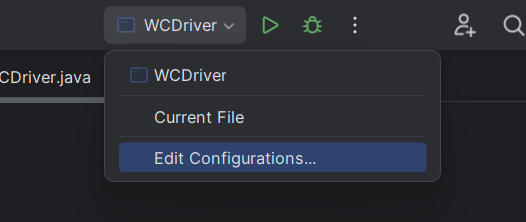
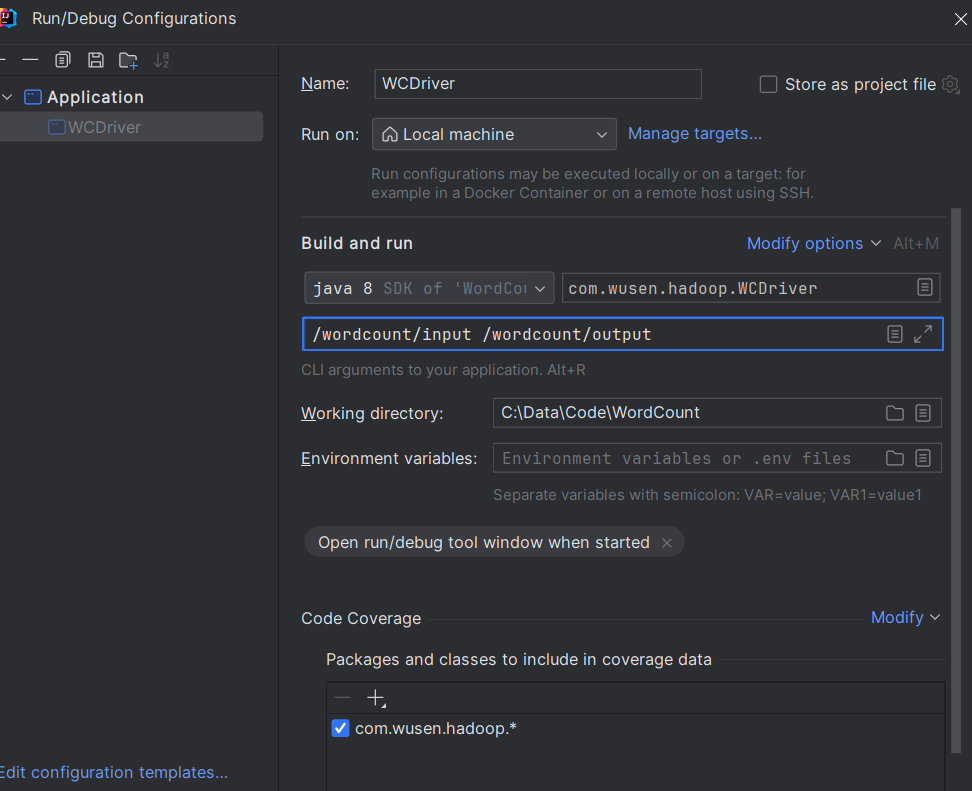
IDEA中运行WCDriver:直接在WCDriver类中右键->Run
查看运行结果:
bash
[root@node1 hadoop]# hdfs dfs -ls /wordcount/output
Found 2 items
-rw-r--r--   3 root supergroup          0 2026-01-15 13:46 /wordcount/output/_SUCCESS
-rw-r--r--   3 root supergroup         41 2026-01-15 13:46 /wordcount/output/part-r-00000
[root@node1 hadoop]# hdfs dfs -cat /wordcount/output/part-r-00000
2026-01-15 13:47:15,100 INFO sasl.SaslDataTransferClient: SASL encryption trust check: localHostTrusted = false, remoteHostTrusted = false
andy	3
hello	5
joy	3
mark	1
rose	2
tom	2
集群中测试
1.先注释掉WCDriver类中://conf.set("mapreduce.framework.name","local");
2.用maven打jar包,然后拷贝到Hadoop集群中node1的/root目录下。 步骤详情:maven->clean-> install。等待编译完成就会在项目的target文件夹中生成jar包。如果看不到。在项目上右键->Refresh,即可看到。修改不带依赖的jar包名称为wc.jar,并拷贝该jar包到Hadoop集群。 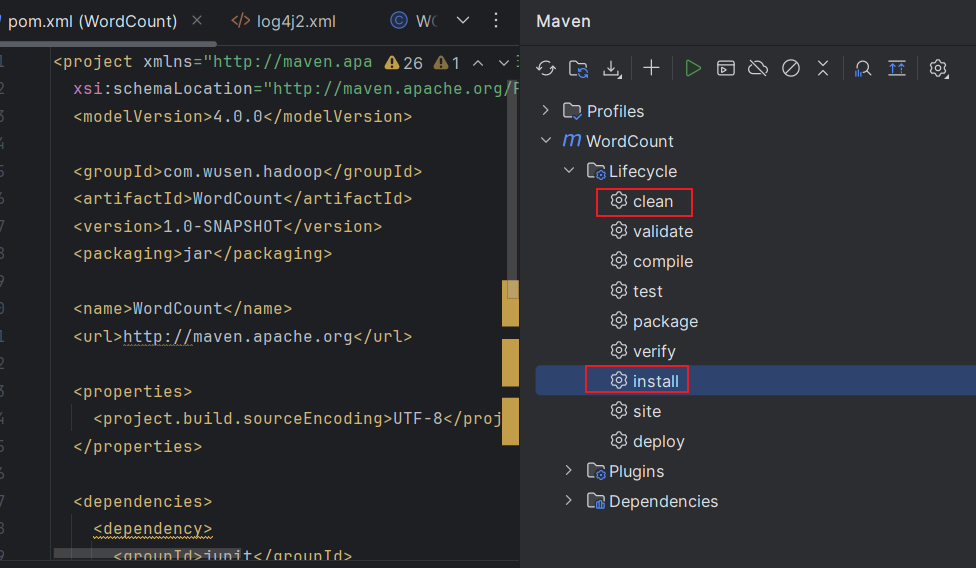
3.执行WordCount程序
bash
[root@node1 ~]#yarn jar wc.jar com.wusen.hadoop.WCDriver /wordcount/input /wordcount/output24.查看结果
bash
[root@node1 ~]# hdfs dfs -cat /wordcount/output2/part-r-00000
2026-01-15 14:02:18,520 INFO sasl.SaslDataTransferClient: SASL encryption trust check: localHostTrusted = false, remoteHostTrusted = false
andy	3
hello	5
joy	3
mark	1
rose	2
tom	2