通过网盘分享的文件:game_flutter_openharmony.zip
链接: https://pan.baidu.com/s/1ryUS1A0zcvXGrDaStu530w 提取码: tqip
前言
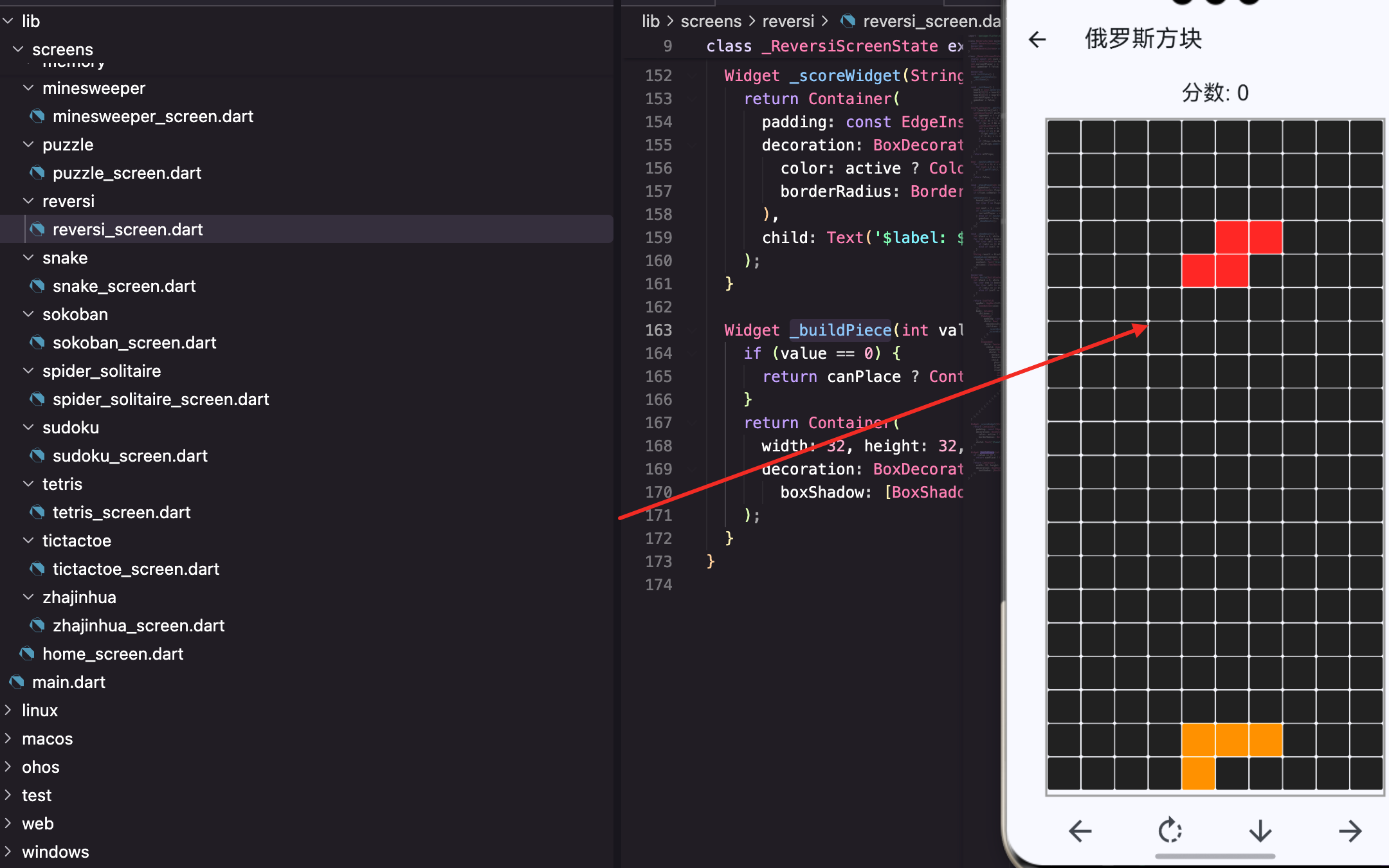
俄罗斯方块有七种经典形状:I、O、T、L、J、S、Z。每种形状有不同的颜色,从顶部落下,玩家控制旋转和移动。
这篇来聊聊这七种形状的数据结构和渲染。形状的表示方式决定了后续旋转、碰撞检测等逻辑的复杂度,选对数据结构很重要。
状态变量
dart
static const int rows = 20, cols = 10;
late List<List<Color?>> board;
late List<List<int>> currentPiece;
late Color currentColor;
int pieceX = 0, pieceY = 0;
int score = 0;
bool gameOver = false;
Timer? timer;
这些变量定义了游戏的完整状态:
- rows, cols: 棋盘大小,20行10列
- board: 已落下的方块,存储颜色
- currentPiece: 当前下落的方块形状
- currentColor: 当前方块的颜色
- pieceX, pieceY: 当前方块的位置
- score: 当前分数
- gameOver: 游戏是否结束
- timer: 定时器,控制自动下落
形状定义
dart
final List<List<List<int>>> pieces = [
  [[1,1,1,1]], [[1,1],[1,1]], [[1,1,1],[0,1,0]], [[1,1,1],[1,0,0]],
  [[1,1,1],[0,0,1]], [[1,1,0],[0,1,1]], [[0,1,1],[1,1,0]],
];
用三维数组表示形状:
- 第一维:7种形状
- 第二维:形状的行
- 第三维:形状的列,1表示有方块,0表示空
这种表示方式很直观,可以直接"看出"形状的样子。
I形
dart
[[1,1,1,1]]一行四列,长条形。这是唯一能一次消4行的形状。
████O形
dart
[[1,1],[1,1]]两行两列,正方形。旋转后形状不变。
██
██
T形
dart
[[1,1,1],[0,1,0]]第一行三个,第二行中间一个。像字母T。
███
 █
L形
dart
[[1,1,1],[1,0,0]]第一行三个,第二行左边一个。像字母L。
███
█
J形
dart
[[1,1,1],[0,0,1]]第一行三个,第二行右边一个。L的镜像,像字母J。
███
  █
S形
dart
[[1,1,0],[0,1,1]]S形,像楼梯。
██
 ██
Z形
dart
[[0,1,1],[1,1,0]]Z形,S的镜像。
 ██
██
颜色定义
dart
final List<Color> colors = [Colors.cyan, Colors.yellow, Colors.purple, Colors.orange, Colors.blue, Colors.green, Colors.red];每种形状对应一种颜色:
- I: 青色(cyan)
- O: 黄色(yellow)
- T: 紫色(purple)
- L: 橙色(orange)
- J: 蓝色(blue)
- S: 绿色(green)
- Z: 红色(red)
这是俄罗斯方块的标准配色,来自官方的Tetris Guideline。颜色和形状一一对应,玩家看到颜色就知道是什么形状。
生成新方块
dart
void _spawnPiece() {
  int idx = Random().nextInt(pieces.length);
  currentPiece = pieces[idx].map((r) => List<int>.from(r)).toList();
  currentColor = colors[idx];
  pieceX = cols ~/ 2 - currentPiece[0].length ~/ 2;
  pieceY = 0;
这个方法在游戏开始和每次方块落地后调用,生成一个新的下落方块。
随机选择
dart
int idx = Random().nextInt(pieces.length);随机选一个形状,0-6。pieces.length是7,所以nextInt返回0到6的随机整数。
深拷贝
dart
currentPiece = pieces[idx].map((r) => List<int>.from(r)).toList();必须深拷贝,不然旋转会修改原始数据。
List<int>.from(r)复制每一行,map(...).toList()复制整个二维数组。
如果不深拷贝,旋转I形后,pieces0也会变成旋转后的形状,下次生成I形就不对了。
对应颜色
dart
currentColor = colors[idx];用同样的索引取颜色,形状和颜色一一对应。
初始位置
dart
pieceX = cols ~/ 2 - currentPiece[0].length ~/ 2;
pieceY = 0;
水平居中,垂直在顶部。
cols ~/ 2是棋盘中间,currentPiece[0].length ~/ 2是形状宽度的一半。两者相减得到左边界的x坐标。
~/是Dart的整除运算符,结果是整数。
渲染当前方块
dart
itemBuilder: (_, i) {
  int x = i % cols, y = i ~/ cols;
  Color? color = board[y][x];
  // Check if current piece occupies this cell
  for (int py = 0; py < currentPiece.length; py++) {
    for (int px = 0; px < currentPiece[py].length; px++) {
      if (currentPiece[py][px] == 1 && pieceX + px == x && pieceY + py == y) {
        color = currentColor;
      }
    }
  }
这段代码在GridView.builder的itemBuilder里,为每个格子确定颜色。
坐标转换
dart
int x = i % cols, y = i ~/ cols;一维索引i转换成二维坐标(x, y)。
先取棋盘颜色
dart
Color? color = board[y][x];已经落下的方块存在board里,先取这个颜色。如果是null,说明这个格子是空的。
叠加当前方块
dart
for (int py = 0; py < currentPiece.length; py++) {
  for (int px = 0; px < currentPiece[py].length; px++) {
    if (currentPiece[py][px] == 1 && pieceX + px == x && pieceY + py == y) {
      color = currentColor;
    }
  }
}
遍历当前方块的每个格子,如果是1且位置匹配,就用当前颜色覆盖。
pieceX + px和pieceY + py是方块格子在棋盘上的实际坐标。
这样当前下落的方块会显示在已落下的方块之上。
渲染格子
dart
return Container(
  margin: const EdgeInsets.all(0.5),
  decoration: BoxDecoration(color: color ?? Colors.grey[900], borderRadius: BorderRadius.circular(2)),
);
有颜色就显示颜色,没有就显示深灰色背景。
color ?? Colors.grey[900]是空合并运算符,如果color是null就用后面的值。
0.5像素的margin让每个格子之间有间隙,看起来更清晰。
旋转
dart
void _rotate() {
  List<List<int>> rotated = List.generate(currentPiece[0].length, (x) =>
    List.generate(currentPiece.length, (y) => currentPiece[currentPiece.length - 1 - y][x]));
  if (_canMove(0, 0, rotated)) setState(() => currentPiece = rotated);
}
旋转是俄罗斯方块的核心操作之一,让玩家可以调整方块的朝向来填充空隙。
旋转算法
dart
currentPiece[currentPiece.length - 1 - y][x]顺时针旋转90度的公式:新位置(x, y)的值 = 原位置(height-1-y, x)的值。
这个公式可以这样理解:
- 原来的第一列变成新的第一行
- 原来的最后一行变成新的第一列
尺寸变化
dart
List.generate(currentPiece[0].length, (x) =>
  List.generate(currentPiece.length, (y) => ...));
旋转后行列互换:
- 新的行数 = 原来的列数(currentPiece0.length)
- 新的列数 = 原来的行数(currentPiece.length)
比如I形\[1,1,1,1]旋转后变成\[1,1,1,1],从1行4列变成4行1列。
碰撞检测
dart
if (_canMove(0, 0, rotated))旋转后检查是否合法(不出界、不重叠),合法才应用。
如果旋转后会出界或和已有方块重叠,就不旋转。这是俄罗斯方块的标准行为。
O形特殊
O形(正方形)旋转后形状不变,但代码不需要特殊处理,因为旋转后还是\[1,1,1,1]。
碰撞检测
dart
bool _canMove(int dx, int dy, [List<List<int>>? piece]) {
  piece ??= currentPiece;
  for (int y = 0; y < piece.length; y++) {
    for (int x = 0; x < piece[y].length; x++) {
      if (piece[y][x] == 1) {
        int nx = pieceX + x + dx, ny = pieceY + y + dy;
        if (nx < 0 || nx >= cols || ny >= rows) return false;
        if (ny >= 0 && board[ny][nx] != null) return false;
      }
    }
  }
  return true;
}
碰撞检测是俄罗斯方块的核心逻辑,决定方块能否移动或旋转。
参数
- dx, dy: 移动的偏移量
- piece: 可选,要检测的形状,默认是currentPiece
piece参数用于旋转检测,传入旋转后的形状。
空合并赋值
dart
piece ??= currentPiece;如果piece是null,就用currentPiece。??=是空合并赋值运算符。
遍历形状
dart
for (int y = 0; y < piece.length; y++) {
  for (int x = 0; x < piece[y].length; x++) {
    if (piece[y][x] == 1) {
只检查值为1的格子(有方块的位置)。0的位置是空的,不需要检查。
计算实际坐标
dart
int nx = pieceX + x + dx, ny = pieceY + y + dy;方块格子在棋盘上的实际坐标 = 方块位置 + 格子在方块内的位置 + 移动偏移。
边界检查
dart
if (nx < 0 || nx >= cols || ny >= rows) return false;不能超出左右边界和底部。
顶部可以超出(ny < 0),因为方块从顶部进入。新生成的方块可能有一部分在棋盘上方。
重叠检查
dart
if (ny >= 0 && board[ny][nx] != null) return false;不能和已落下的方块重叠。
ny >= 0确保只检查棋盘内的位置,棋盘上方不检查。
锁定方块
dart
void _lockPiece() {
  for (int y = 0; y < currentPiece.length; y++) {
    for (int x = 0; x < currentPiece[y].length; x++) {
      if (currentPiece[y][x] == 1 && pieceY + y >= 0) {
        board[pieceY + y][pieceX + x] = currentColor;
      }
    }
  }
}
方块落到底部后,把颜色写入board,变成固定的方块。
遍历方块
dart
for (int y = 0; y < currentPiece.length; y++) {
  for (int x = 0; x < currentPiece[y].length; x++) {
    if (currentPiece[y][x] == 1 && pieceY + y >= 0) {
只处理值为1的格子,且在棋盘范围内(pieceY + y >= 0)。
写入颜色
dart
board[pieceY + y][pieceX + x] = currentColor;把当前方块的颜色写入board对应位置。之后这个位置就有颜色了,会显示出来。
移动控制
dart
void _moveLeft() {
  if (_canMove(-1, 0)) setState(() => pieceX--);
}

void _moveRight() {
  if (_canMove(1, 0)) setState(() => pieceX++);
}

void _moveDown() {
  if (_canMove(0, 1)) {
    setState(() => pieceY++);
  } else {
    _lockPiece();
    _clearLines();
    _spawnPiece();
  }
}
左右移动很简单,检查能否移动,能就移动。
下移比较特殊:如果不能下移,说明到底了,需要锁定方块、消行、生成新方块。
小结
这篇讲了俄罗斯方块的七种形状,核心知识点:
- 三维数组: 存储7种形状的二维结构,直观易懂
- 1和0: 表示有方块和空,简单有效
- 颜色对应: 形状和颜色用同样的索引,一一对应
- 深拷贝: 避免修改原始数据,map和List.from组合使用
- 旋转算法: 行列互换,坐标变换公式
- 碰撞检测: 遍历形状的每个格子检查边界和重叠
- 锁定方块: 颜色写入board,变成固定方块
- 空合并运算符: ??和??=简化空值处理
七种形状是俄罗斯方块的基础,理解了形状的表示和操作,游戏就完成一大半了。
欢迎加入开源鸿蒙跨平台社区:https://openharmonycrossplatform.csdn.net