引言:DSL让代码像说话一样自然
还记得第一次看到Gradle的构建脚本时的感觉吗?
kotlin
dependencies {
    implementation("org.jetbrains.kotlin:kotlin-stdlib:1.9.0")
    testImplementation("junit:junit:4.13.2")
}这不像是在写代码,更像是在用英语描述依赖关系。这就是DSL(Domain-Specific Language,领域特定语言)的魅力------让代码表达更接近问题域,而不是纠缠于技术细节。
什么是DSL?
DSL是为解决特定领域问题而设计的专用语言。与通用编程语言(如Java、Python)不同,DSL专注于某个特定领域,提供更简洁、更易读的表达方式。
分类:
- 外部DSL:独立的语言,需要专门的解析器(如SQL、正则表达式)
- 内部DSL:嵌入在宿主语言中,利用宿主语言的语法特性(如Kotlin DSL)
Kotlin凭借其强大的语言特性(扩展函数、Lambda接收者、中缀函数、操作符重载等),成为构建内部DSL的理想选择。
为什么需要DSL?
| 优势 | 说明 | 示例 |
|---|---|---|
| 表达力强 | 代码更贴近业务逻辑 | route("/users") { get { ... } } |
| 易读易写 | 接近自然语言的表达 | assert(user.age isGreaterThan 18) |
| 类型安全 | 编译期检查错误 | IDE自动补全、类型推断 |
| 领域聚焦 | 屏蔽技术细节 | SQL Builder vs 手写SQL字符串 |
💡 提示
Kotlin标准库中就有很多DSL案例:
buildString { }、sequence { }、with(obj) { }等,学习DSL设计能让你更好地理解和使用这些API。
本文将带你从零开始构建类型安全的Kotlin DSL,涵盖:
- DSL核心概念与实现原理
- Lambda接收者与作用域控制
- 类型安全Builder模式
- 实战案例:HTML DSL、SQL DSL、配置DSL
- DSL设计最佳实践
- 性能优化与陷阱规避
DSL实现基础
Lambda接收者(Lambda with Receiver)
Lambda接收者是Kotlin DSL的核心特性,它允许在Lambda内部直接访问接收者对象的成员。
函数类型对比
kotlin
// 普通函数类型:() -> Unit
val normalLambda: () -> Unit = {
    println("Normal lambda")
}

// 扩展函数类型:StringBuilder.() -> Unit
val receiverLambda: StringBuilder.() -> Unit = {
    // 在这里,this指向StringBuilder实例
    append("Hello ")
    append("World")  // 可以直接调用StringBuilder的方法
}

// 使用
val sb = StringBuilder()
sb.receiverLambda()  // 将sb作为接收者
println(sb.toString())  // 输出: Hello World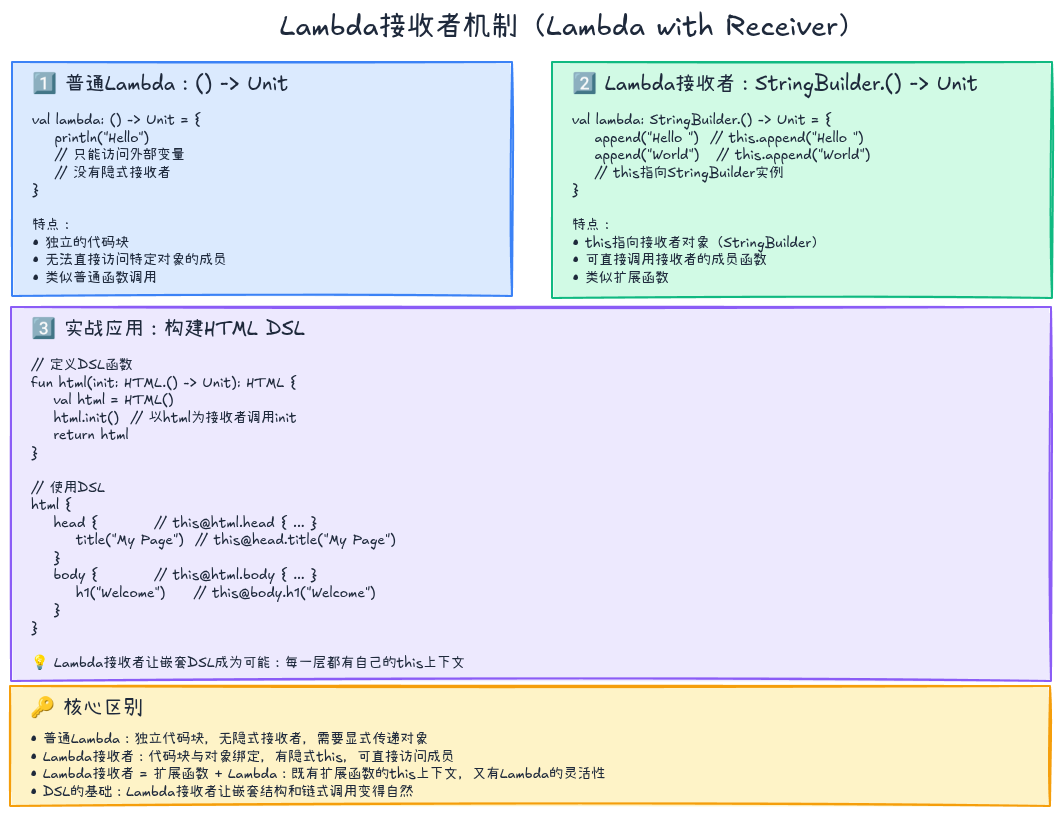
实战示例:构建HTML
kotlin
// 定义HTML标签类
class HTML {
    private val content = StringBuilder()

    fun head(init: Head.() -> Unit) {
        val head = Head()
        head.init()  // 以head为接收者调用init
        content.append("<head>${head.render()}</head>")
    }

    fun body(init: Body.() -> Unit) {
        val body = Body()
        body.init()
        content.append("<body>${body.render()}</body>")
    }

    fun render() = "<html>$content</html>"
}

class Head {
    private val content = StringBuilder()

    fun title(text: String) {
        content.append("<title>$text</title>")
    }

    fun render() = content.toString()
}

class Body {
    private val content = StringBuilder()

    fun h1(text: String) {
        content.append("<h1>$text</h1>")
    }

    fun p(text: String) {
        content.append("<p>$text</p>")
    }

    fun render() = content.toString()
}

// DSL使用
fun html(init: HTML.() -> Unit): HTML {
    val html = HTML()
    html.init()
    return html
}

// 优雅的HTML构建
val page = html {
    head {
        title("My Page")
    }
    body {
        h1("Welcome")
        p("This is a paragraph")
    }
}

println(page.render())
// 输出: <html><head><title>My Page</title></head><body><h1>Welcome</h1><p>This is a paragraph</p></body></html>
💡 工作原理
当你写
html { head { ... } }时:
html函数接收一个HTML.() -> Unit类型的Lambda- 在Lambda内部,
this指向HTML实例- 因此可以直接调用
head、body方法- 嵌套的
head { }同样使用Lambda接收者机制
作用域控制:@DslMarker
在复杂的嵌套DSL中,可能会出现作用域混淆问题:
kotlin
html {
    body {
        // 这里能访问html的方法吗?
        head {  // ❌ 逻辑错误!head应该在html层级,不应该在body内
            title("Wrong Place")
        }
    }
}
Kotlin提供了 @DslMarker 注解来限制作用域:
kotlin
@DslMarker
annotation class HtmlDsl

@HtmlDsl
class HTML {
    fun head(init: Head.() -> Unit) { /*...*/ }
    fun body(init: Body.() -> Unit) { /*...*/ }
}

@HtmlDsl
class Head {
    fun title(text: String) { /*...*/ }
}

@HtmlDsl
class Body {
    fun h1(text: String) { /*...*/ }
    fun p(text: String) { /*...*/ }
}
现在,如果在 body 内调用 head,IDE会报错:
kotlin
html {
    body {
        head { }  // ❌ 编译错误:外层作用域的成员不可访问
        h1("Title")  // ✅ 正确
    }
}
⚠️ 注意
@DslMarker限制的是外层 接收者的隐式访问,如果需要访问外层接收者,必须显式使用this@HTML。
类型安全Builder模式
Builder模式回顾
传统的Java Builder模式:
java
User user = new User.Builder()
    .name("Alice")
    .age(30)
    .email("alice@example.com")
    .build();
Kotlin DSL可以让Builder更优雅:
kotlin
val user = user {
    name = "Alice"
    age = 30
    email = "alice@example.com"
}
实现类型安全Builder
基础版本
kotlin
class User private constructor(
    val name: String,
    val age: Int,
    val email: String?
) {
    class Builder {
        var name: String = ""
        var age: Int = 0
        var email: String? = null

        fun build(): User {
            require(name.isNotBlank()) { "Name is required" }
            require(age > 0) { "Age must be positive" }
            return User(name, age, email)
        }
    }
}

fun user(init: User.Builder.() -> Unit): User {
    val builder = User.Builder()
    builder.init()
    return builder.build()
}

// 使用
val user = user {
    name = "Alice"
    age = 30
    email = "alice@example.com"
}
类型安全增强:必填字段编译期检查
上面的实现有个问题:忘记设置 name 或 age 只能在运行时报错。我们可以用类型系统在编译期强制检查:
kotlin
// 使用密封类表示构建状态
sealed class BuilderState

object Initial : BuilderState()
data class NameSet(val name: String) : BuilderState()
data class AgeSet(val name: String, val age: Int) : BuilderState()

class TypedUserBuilder<S : BuilderState>(
    private val state: S
) {
    var email: String? = null

    // 只有在Initial状态才能设置name
    fun name(value: String): TypedUserBuilder<NameSet> where S : Initial {
        return TypedUserBuilder(NameSet(value))
    }

    // 只有在NameSet状态才能设置age
    fun age(value: Int): TypedUserBuilder<AgeSet> where S : NameSet {
        return TypedUserBuilder(AgeSet((state as NameSet).name, value))
    }

    // 只有在AgeSet状态才能build
    fun build(): User where S : AgeSet {
        val s = state as AgeSet
        return User(s.name, s.age, email)
    }
}

fun user(init: TypedUserBuilder<Initial>.() -> TypedUserBuilder<AgeSet>): User {
    val builder = TypedUserBuilder<Initial>(Initial())
    return builder.init().build()
}

// 使用:必须按顺序设置name -> age
val user = user {
    name("Alice")
        .age(30)
        .apply { email = "alice@example.com" }
}

// ❌ 编译错误:缺少age
// val user = user { name("Alice") }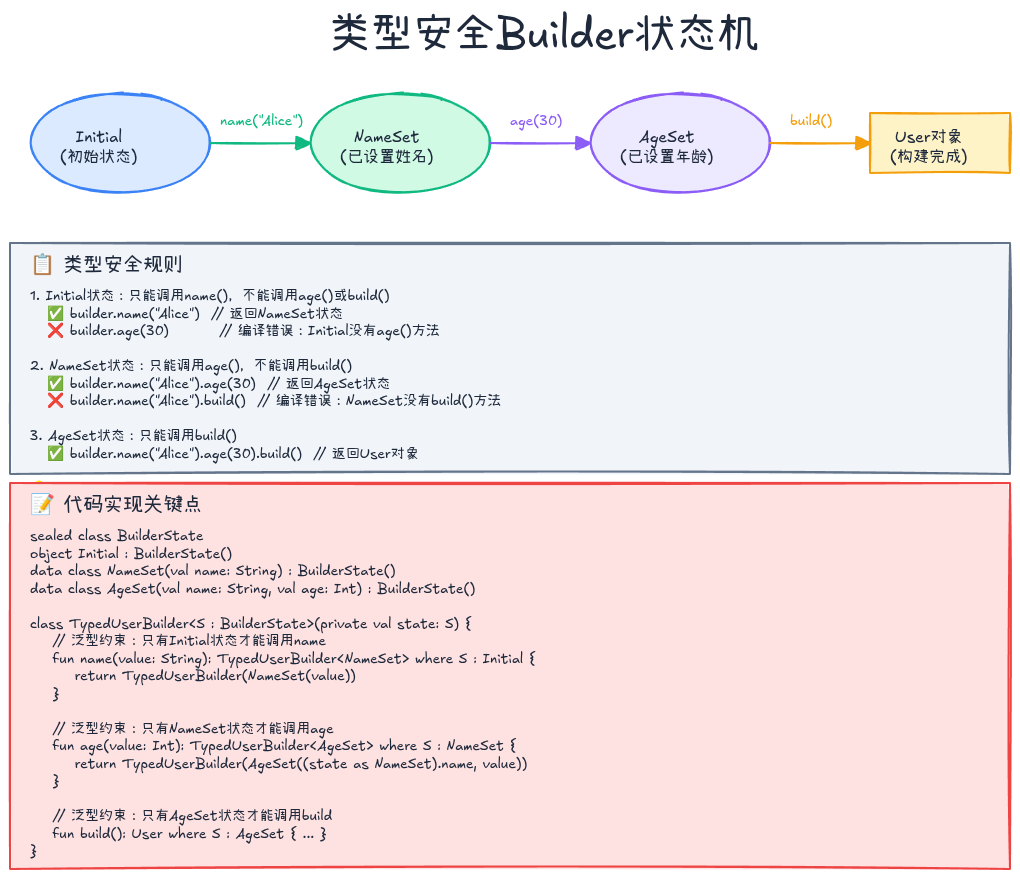
💡 提示
这种类型安全Builder在某些场景下非常有用(如构建复杂的配置对象),但也会增加代码复杂度。权衡利弊后使用。
实战案例
案例1:SQL DSL
手写SQL字符串容易出错且不安全:
kotlin
// ❌ 不安全的SQL拼接
val sql = "SELECT * FROM users WHERE age > $age AND name = '$name'"
我们可以构建一个类型安全的SQL DSL:
kotlin
// DSL定义
class Query {
    private val conditions = mutableListOf<String>()
    private var tableName: String = ""
    private val columns = mutableListOf<String>()

    fun from(table: String) {
        tableName = table
    }

    fun select(vararg cols: String) {
        columns.addAll(cols)
    }

    fun where(init: WhereClause.() -> Unit) {
        val clause = WhereClause()
        clause.init()
        conditions.addAll(clause.build())
    }

    fun build(): String {
        val selectPart = if (columns.isEmpty()) "*" else columns.joinToString(", ")
        val wherePart = if (conditions.isEmpty()) "" else " WHERE ${conditions.joinToString(" AND ")}"
        return "SELECT $selectPart FROM $tableName$wherePart"
    }
}

class WhereClause {
    private val conditions = mutableListOf<String>()

    infix fun String.eq(value: Any) {
        conditions.add("$this = ${quote(value)}")
    }

    infix fun String.gt(value: Number) {
        conditions.add("$this > $value")
    }

    infix fun String.lt(value: Number) {
        conditions.add("$this < $value")
    }

    infix fun String.like(pattern: String) {
        conditions.add("$this LIKE '${pattern.replace("'", "''")}'")
    }

    private fun quote(value: Any): String = when (value) {
        is String -> "'${value.replace("'", "''")}'"
        else -> value.toString()
    }

    fun build() = conditions
}

fun query(init: Query.() -> Unit): Query {
    val query = Query()
    query.init()
    return query
}

// 使用DSL
val sql = query {
    select("name", "age", "email")
    from("users")
    where {
        "age" gt 18
        "name" like "%Alice%"
        "email" eq "test@example.com"
    }
}.build()

println(sql)
// 输出: SELECT name, age, email FROM users WHERE age > 18 AND name LIKE '%Alice%' AND email = 'test@example.com'
✅ 优势
- 类型安全:列名和操作符在IDE中有自动补全
- 防SQL注入:自动处理字符串转义
- 易读易写:代码结构清晰
案例2:配置DSL
使用DSL管理应用配置:
kotlin
// DSL定义
class AppConfig {
    var port: Int = 8080
    var host: String = "localhost"

    private val databases = mutableListOf<DatabaseConfig>()

    fun database(name: String, init: DatabaseConfig.() -> Unit) {
        val config = DatabaseConfig(name)
        config.init()
        databases.add(config)
    }

    fun getDatabases() = databases.toList()
}

class DatabaseConfig(val name: String) {
    var url: String = ""
    var username: String = ""
    var password: String = ""
    var maxConnections: Int = 10

    private val properties = mutableMapOf<String, String>()

    fun property(key: String, value: String) {
        properties[key] = value
    }

    fun getProperties() = properties.toMap()
}

fun config(init: AppConfig.() -> Unit): AppConfig {
    val config = AppConfig()
    config.init()
    return config
}

// 使用DSL
val appConfig = config {
    host = "0.0.0.0"
    port = 9090

    database("primary") {
        url = "jdbc:mysql://localhost:3306/mydb"
        username = "root"
        password = "secret"
        maxConnections = 20
        property("useSSL", "false")
        property("characterEncoding", "UTF-8")
    }

    database("cache") {
        url = "redis://localhost:6379"
        username = "default"
        password = "redis_pass"
    }
}

// 访问配置
println("Server: ${appConfig.host}:${appConfig.port}")
appConfig.getDatabases().forEach { db ->
    println("Database: ${db.name} at ${db.url}")
}
案例3:测试断言DSL
让测试代码更具表达力:
kotlin
// DSL定义
class Assertion<T>(private val actual: T) {
    infix fun shouldBe(expected: T) {
        if (actual != expected) {
            throw AssertionError("Expected $expected but was $actual")
        }
    }

    infix fun shouldNotBe(expected: T) {
        if (actual == expected) {
            throw AssertionError("Expected not $expected")
        }
    }

    fun shouldBeNull() {
        if (actual != null) {
            throw AssertionError("Expected null but was $actual")
        }
    }

    fun shouldNotBeNull() {
        if (actual == null) {
            throw AssertionError("Expected not null")
        }
    }
}

class NumberAssertion<T : Number>(private val actual: T) {
    infix fun shouldBeGreaterThan(expected: T) {
        if (actual.toDouble() <= expected.toDouble()) {
            throw AssertionError("Expected $actual > $expected")
        }
    }

    infix fun shouldBeLessThan(expected: T) {
        if (actual.toDouble() >= expected.toDouble()) {
            throw AssertionError("Expected $actual < $expected")
        }
    }

    fun shouldBePositive() {
        if (actual.toDouble() <= 0) {
            throw AssertionError("Expected positive but was $actual")
        }
    }
}

class StringAssertion(private val actual: String) {
    infix fun shouldContain(substring: String) {
        if (!actual.contains(substring)) {
            throw AssertionError("Expected '$actual' to contain '$substring'")
        }
    }

    infix fun shouldStartWith(prefix: String) {
        if (!actual.startsWith(prefix)) {
            throw AssertionError("Expected '$actual' to start with '$prefix'")
        }
    }

    fun shouldBeEmpty() {
        if (actual.isNotEmpty()) {
            throw AssertionError("Expected empty string but was '$actual'")
        }
    }
}

// 扩展函数
fun <T> T.should(): Assertion<T> = Assertion(this)
fun <T : Number> T.should(): NumberAssertion<T> = NumberAssertion(this)
fun String.should(): StringAssertion = StringAssertion(this)

// 使用DSL
fun testUser() {
    val user = User("Alice", 30, "alice@example.com")

    user.name.should() shouldBe "Alice"
    user.age.should() shouldBeGreaterThan 18
    user.email.should() shouldContain "@"
    user.email.should() shouldStartWith "alice"
}
DSL设计最佳实践
1. 遵循领域术语
DSL的目标是让代码贴近领域,因此应该使用领域内的标准术语。
❌ 不好的设计:
kotlin
html {
    addHead {
        addTitle("My Page")
    }
    addBody {
        addH1("Welcome")
    }
}
✅ 好的设计:
kotlin
html {
    head {
        title("My Page")
    }
    body {
        h1("Welcome")
    }
}
2. 保持一致的命名风格
| 场景 | 命名风格 | 示例 |
|---|---|---|
| 添加子元素 | 名词函数 | body { }, div { } |
| 设置属性 | 属性赋值 | id = "main", width = 100 |
| 配置行为 | 动词函数 | onClick { }, validate { } |
| 条件逻辑 | when函数 | whenUserLoggedIn { } |
3. 提供类型安全
尽可能在编译期捕获错误:
kotlin
// ✅ 使用枚举而非字符串
enum class HttpMethod { GET, POST, PUT, DELETE }

route("/users") {
    method = HttpMethod.GET  // IDE自动补全
    // method = "GET"  // ❌ 避免字符串,容易拼写错误
}

// ✅ 使用泛型约束
fun <T : Number> max(a: T, b: T): T { /*...*/ }
4. 合理使用操作符重载
操作符重载能让DSL更简洁,但不要滥用:
✅ 合适的场景:
kotlin
// 日期运算
val tomorrow = today + 1.days
val nextWeek = today + 1.weeks

// 集合运算
val all = listA + listB
❌ 不合适的场景:
kotlin
// ❌ 语义不明确
user1 + user2  // 这是什么意思?合并用户?
5. 文档和示例
DSL的学习曲线可能比普通API高,提供充分的文档和示例至关重要:
kotlin
/**
 * 创建一个HTTP路由。
 *
 * 示例:
 * ```
 * route("/users") {
 *     get { respondJson(users) }
 *     post { createUser(request.body) }
 * }
 * ```
 *
 * @param path 路由路径
 * @param init 路由配置Lambda
 */
fun route(path: String, init: Route.() -> Unit) { /*...*/ }
6. 提供逃生舱
当DSL无法表达某些复杂逻辑时,提供"逃生舱"让用户可以使用底层API:
kotlin
html {
    body {
        // 使用DSL
        h1("Title")
        p("Paragraph")

        // 逃生舱:直接添加原始HTML
        raw("<div class='custom'>Custom Content</div>")
    }
}
性能优化
1. 避免不必要的对象创建
❌ 每次调用都创建新对象:
kotlin
fun div(init: Div.() -> Unit) {
    val div = Div()  // 每次调用创建新对象
    div.init()
    children.add(div)
}
✅ 复用对象池(适用于频繁调用的场景):
kotlin
private val divPool = mutableListOf<Div>()

fun div(init: Div.() -> Unit) {
    val div = divPool.removeLastOrNull() ?: Div()
    div.reset()
    div.init()
    children.add(div)
}

fun release(div: Div) {
    divPool.add(div)
}
2. 使用内联函数
标记DSL入口函数为 inline,减少Lambda调用开销:
kotlin
inline fun html(init: HTML.() -> Unit): HTML {
    val html = HTML()
    html.init()
    return html
}
3. 延迟构建
对于大型DSL,延迟实际的构建操作:
kotlin
class LazyHTML {
    private val operations = mutableListOf<HTML.() -> Unit>()

    fun head(init: Head.() -> Unit) {
        operations.add { head(init) }
    }

    fun build(): HTML {
        val html = HTML()
        operations.forEach { it(html) }
        return html
    }
}
常见陷阱
1. 作用域泄漏
问题:内层作用域意外访问外层接收者
kotlin
html {
    body {
        head { }  // ❌ 错误!head应该在html层级
    }
}
解决 :使用 @DslMarker
kotlin
@DslMarker
annotation class HtmlDsl

@HtmlDsl
class HTML { /*...*/ }

@HtmlDsl
class Body { /*...*/ }
2. 可变状态共享
问题:多个Lambda共享可变状态导致意外结果
kotlin
var counter = 0
html {
    body {
        repeat(3) {
            p("Count: ${counter++}")  // ❌ 副作用
        }
    }
}解决:避免在DSL中使用外部可变状态
kotlin
html {
    body {
        repeat(3) { index ->
            p("Count: $index")  // ✅ 使用不可变参数
        }
    }
}
3. 过度嵌套
问题:DSL嵌套过深难以阅读
kotlin
html {
    body {
        div {
            div {
                div {
                    p("Deep nested")  // ❌ 嵌套太深
                }
            }
        }
    }
}解决:提取子DSL或使用辅助函数
kotlin
fun Body.contentSection() {
    div {
        div {
            div {
                p("Deep nested")
            }
        }
    }
}

html {
    body {
        contentSection()  // ✅ 清晰
    }
}
实战:完整的HTML DSL实现
让我们整合所有知识点,实现一个功能完整的HTML DSL:
kotlin
@DslMarker
annotation class HtmlDsl

@HtmlDsl
open class Tag(val name: String) {
    private val children = mutableListOf<Tag>()
    private val attributes = mutableMapOf<String, String>()
    private var textContent: String? = null

    protected fun <T : Tag> initTag(tag: T, init: T.() -> Unit): T {
        tag.init()
        children.add(tag)
        return tag
    }

    fun attribute(name: String, value: String) {
        attributes[name] = value
    }

    fun text(content: String) {
        textContent = content
    }

    fun render(): String {
        val attrs = attributes.entries.joinToString(" ") { "${it.key}=\"${it.value}\"" }
        val attrString = if (attrs.isNotEmpty()) " $attrs" else ""

        return if (children.isEmpty() && textContent == null) {
            "<$name$attrString/>"
        } else {
            val content = textContent ?: children.joinToString("") { it.render() }
            "<$name$attrString>$content</$name>"
        }
    }
}

@HtmlDsl
class HTML : Tag("html") {
    fun head(init: Head.() -> Unit) = initTag(Head(), init)
    fun body(init: Body.() -> Unit) = initTag(Body(), init)
}

@HtmlDsl
class Head : Tag("head") {
    fun title(text: String) {
        initTag(Title(), {}).text(text)
    }

    fun meta(charset: String) {
        initTag(Meta(), {}).attribute("charset", charset)
    }
}

@HtmlDsl
class Title : Tag("title")

@HtmlDsl
class Meta : Tag("meta")

@HtmlDsl
class Body : Tag("body") {
    fun h1(init: H1.() -> Unit) = initTag(H1(), init)
    fun h1(text: String) = initTag(H1(), {}).apply { text(text) }

    fun p(init: P.() -> Unit) = initTag(P(), init)
    fun p(text: String) = initTag(P(), {}).apply { text(text) }

    fun div(init: Div.() -> Unit) = initTag(Div(), init)
    fun ul(init: UL.() -> Unit) = initTag(UL(), init)
}

@HtmlDsl
class H1 : Tag("h1")

@HtmlDsl
class P : Tag("p")

@HtmlDsl
class Div : Tag("div") {
    var id: String
        get() = ""
        set(value) = attribute("id", value)

    var cssClass: String
        get() = ""
        set(value) = attribute("class", value)

    fun p(text: String) = initTag(P(), {}).apply { text(text) }
}

@HtmlDsl
class UL : Tag("ul") {
    fun li(init: LI.() -> Unit) = initTag(LI(), init)
    fun li(text: String) = initTag(LI(), {}).apply { text(text) }
}

@HtmlDsl
class LI : Tag("li")

fun html(init: HTML.() -> Unit): HTML {
    val html = HTML()
    html.init()
    return html
}

// 使用完整DSL
fun main() {
    val page = html {
        head {
            title("Kotlin DSL Demo")
            meta("UTF-8")
        }
        body {
            h1("Welcome to Kotlin DSL")

            div {
                id = "main-content"
                cssClass = "container"

                p("This is a paragraph in a div.")
                p {
                    text("This is another paragraph with ")
                    // 可以嵌套更多内容
                }
            }

            ul {
                li("Item 1")
                li("Item 2")
                li {
                    text("Item 3 with custom content")
                }
            }
        }
    }

    println(page.render())
}输出:
html
<html><head><title>Kotlin DSL Demo</title><meta charset="UTF-8"/></head><body><h1>Welcome to Kotlin DSL</h1><div id="main-content" class="container"><p>This is a paragraph in a div.</p><p>This is another paragraph with </p></div><ul><li>Item 1</li><li>Item 2</li><li>Item 3 with custom content</li></ul></body></html>💡 这个实现展示了
@DslMarker防止作用域泄漏- Lambda接收者实现嵌套结构
- 属性赋值(
id = "...")与函数调用(title("..."))混合使用- 灵活的API:既支持
p("text"),也支持p { text("text") }
总结
DSL设计的关键要素
| 要素 | 技术手段 | 作用 |
|---|---|---|
| Lambda接收者 | Type.() -> Unit |
实现嵌套结构 |
| 作用域控制 | @DslMarker |
防止隐式访问外层 |
| 类型安全 | 泛型、枚举、密封类 | 编译期错误检查 |
| 操作符重载 | operator fun |
简化表达 |
| 扩展函数 | fun Type.method() |
扩展现有类型 |
| 中缀函数 | infix fun |
类自然语言表达 |
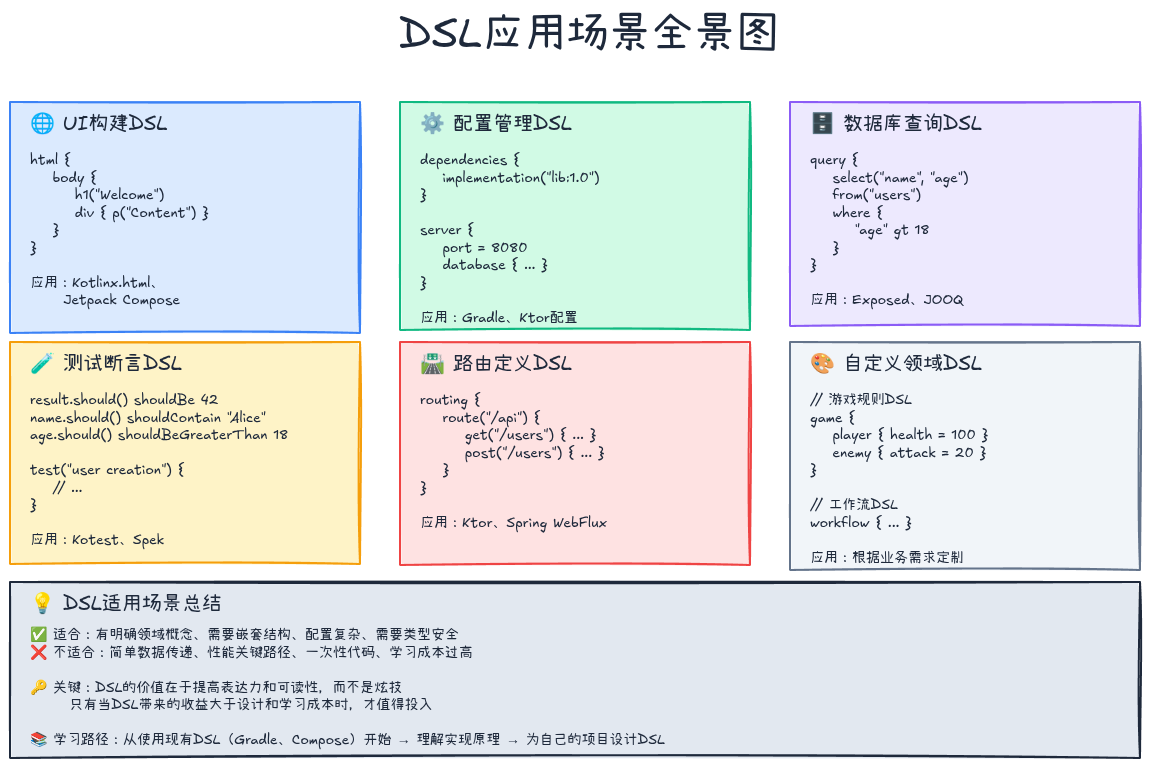
何时使用DSL
✅ 适合使用DSL的场景:
- 配置管理(Gradle、Spring配置)
- UI构建(Jetpack Compose、HTML生成)
- 测试断言(Kotest、AssertJ)
- SQL查询构建(Exposed、JOOQ)
- 路由定义(Ktor、Spring WebFlux)
❌ 不适合使用DSL的场景:
- 简单的数据传递(用数据类即可)
- 性能敏感的热点代码(DSL有Lambda开销)
- 一次性使用的代码(DSL设计成本高)
进阶学习资源
- Kotlin官方文档 :Type-safe builders
- Kotlinx.html:官方HTML DSL实现,学习最佳实践
- Exposed:类型安全的SQL DSL库
- Ktor:Web框架的路由DSL
系列文章导航:
如果这篇文章对你有帮助,欢迎点赞、收藏、分享!有任何问题或建议,欢迎在评论区留言讨论。让我们一起学习,一起成长!
也欢迎访问我的个人主页发现更多宝藏资源