
前言
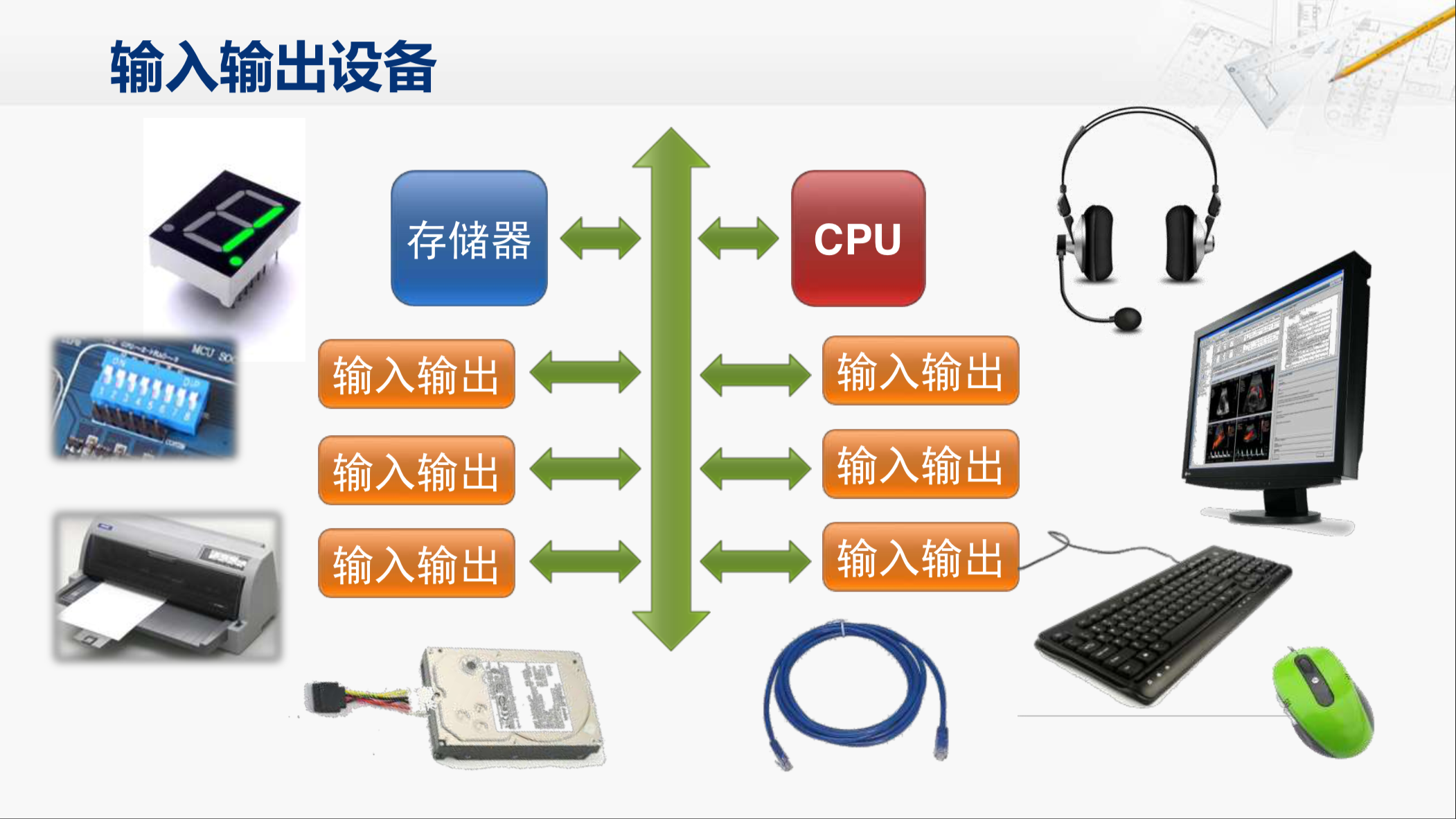
大家好!今天给大家带来《计算机操作系统》第六章 ------ 输入输出(I/O)系统的全面解析。I/O 系统是操作系统连接外部设备和计算机核心的桥梁,也是面试、考研的高频考点。本文会从基础概念到代码实现,用通俗易懂的语言拆解每个知识点,还附带完整可运行的 C++98 代码案例、架构图 / 流程图,方便大家动手实操,彻底吃透 I/O 系统!
一、本章知识思维导图
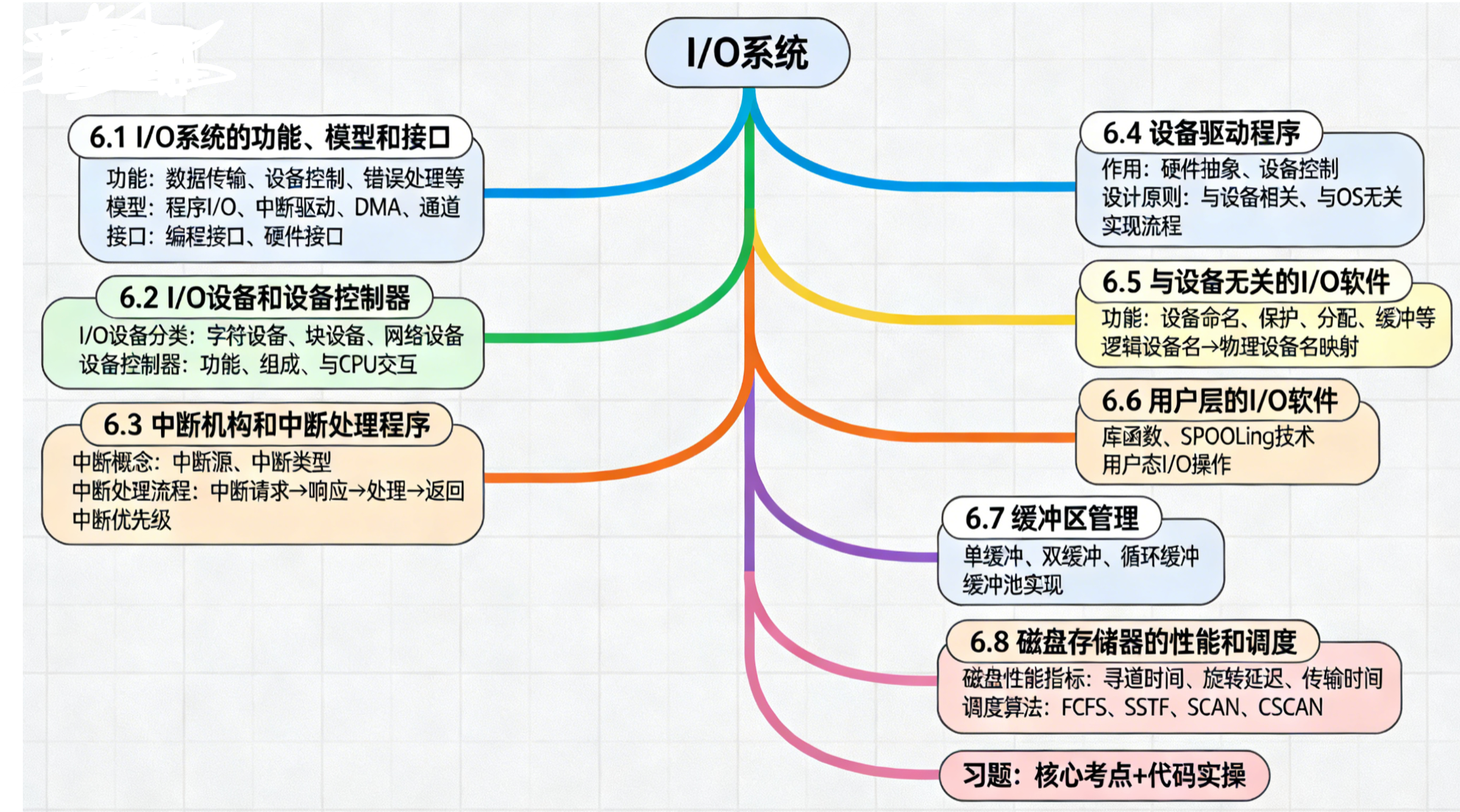
6.1 I/O 系统的功能、模型和接口
核心概念
I/O 系统是操作系统管理所有输入输出设备的子系统,核心目标是高效、统一地完成 CPU 与外部设备的数据交互。
1. 核心功能
- 数据传输:在 CPU / 内存与外设之间搬运数据;
- 设备控制:控制设备的启动、停止、状态检测;
- 错误处理:检测并处理设备故障(如磁盘坏道、网络中断);
- 设备分配:为进程分配独占 / 共享设备;
- 缓冲管理:通过缓冲区缓解 CPU 与外设的速度差异。
2. 4 种 I/O 控制模型(从低效到高效)
| 模型 | 核心特点 | 适用场景 |
|---|---|---|
| 程序 I/O(轮询) | CPU 循环查询设备状态,直到完成 | 简单外设(如 LED 灯) |
| 中断驱动 I/O | 设备完成后发中断,CPU 响应处理 | 键盘、鼠标等低速设备 |
| DMA(直接内存访问) | 专用 DMA 控制器接管数据传输,CPU 仅初始化 | 磁盘、网卡等高速设备 |
| 通道 I/O | 通道执行 I/O 指令,CPU 完全解放 | 大型机、多外设场景 |
3. I/O 接口
- 硬件接口:设备与控制器的物理连接(如 USB、PCI);
- 编程接口:操作系统提供给应用程序的调用接口(如 read/write 系统调用)。
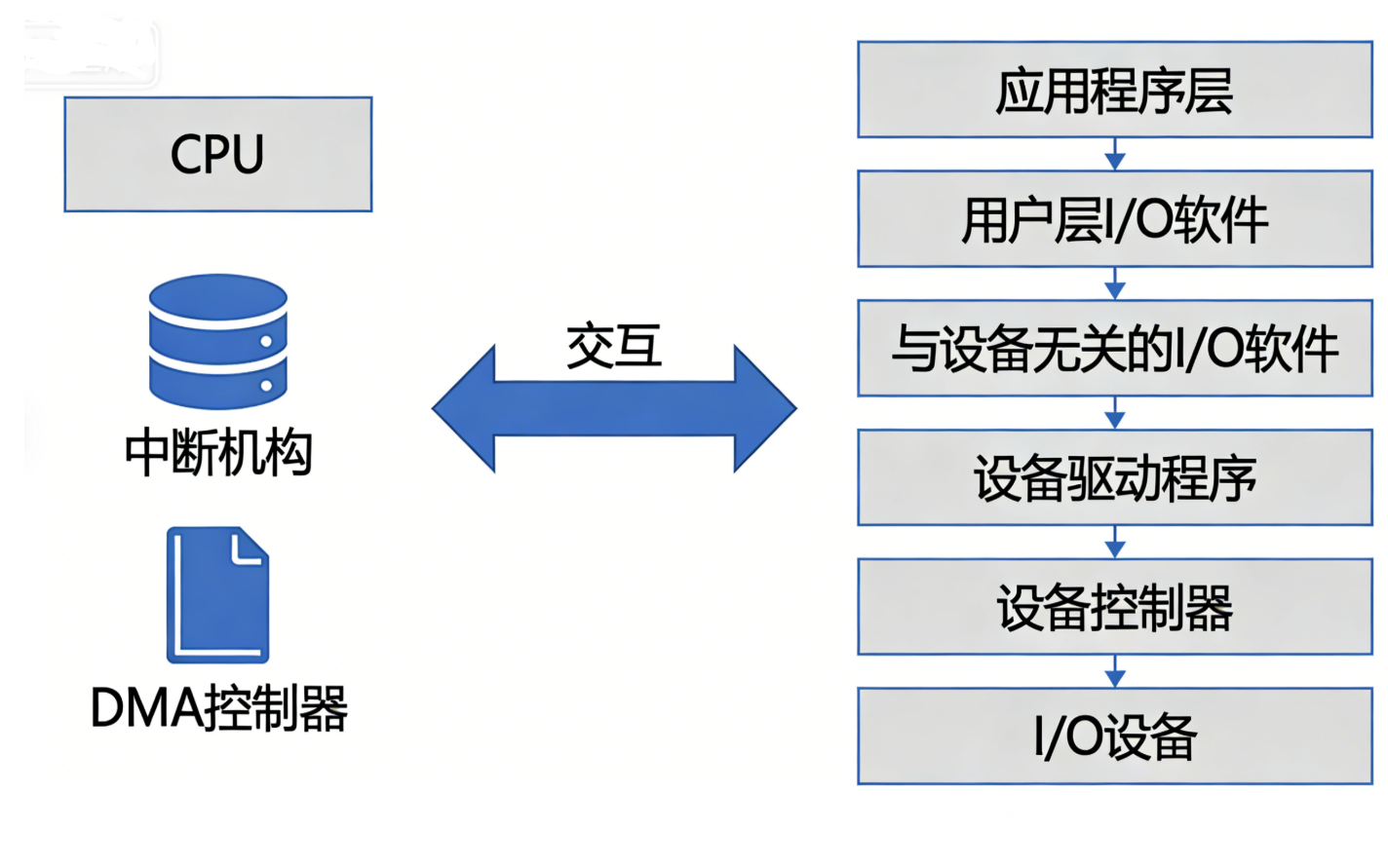
架构图
代码案例:程序 I/O(轮询)vs 中断模拟(C++98)
#include <iostream>
#include <unistd.h> // 用于sleep函数(Linux)
// 兼容Windows:#include <windows.h>,替换sleep为Sleep(1000)
using namespace std;

// 模拟设备状态
enum DeviceState { IDLE, BUSY, COMPLETE };
DeviceState deviceState = IDLE;

// ------------- 6.1 程序I/O(轮询)实现 -------------
void programIO() {
    cout << "【程序I/O】开始轮询设备状态..." << endl;
    // 模拟设备开始工作
    deviceState = BUSY;
    int count = 0;
    // CPU循环查询(轮询),直到设备完成
    while (deviceState != COMPLETE) {
        count++;
        cout << "轮询第" << count << "次,设备状态:忙" << endl;
        sleep(1); // 模拟CPU等待
        // 模拟设备完成工作
        if (count == 3) {
            deviceState = COMPLETE;
            cout << "设备完成!轮询结束" << endl;
        }
    }
    deviceState = IDLE; // 重置状态
}

// ------------- 6.1 中断驱动I/O模拟 -------------
bool isInterrupt = false; // 中断标志

// 模拟设备工作线程(实际由硬件触发中断)
void deviceWork() {
    cout << "【中断驱动I/O】设备开始工作..." << endl;
    sleep(3); // 模拟设备工作耗时
    isInterrupt = true; // 触发中断
    cout << "设备完成,发送中断信号!" << endl;
}

// 中断处理程序
void interruptHandler() {
    cout << "CPU响应中断:处理设备数据..." << endl;
    // 模拟数据处理
    sleep(1);
    cout << "中断处理完成!" << endl;
    isInterrupt = false; // 清除中断标志
}

int main() {
    // 测试程序I/O
    programIO();
    cout << "------------------------" << endl;
    // 测试中断驱动I/O
    deviceWork();
    // CPU执行其他任务,直到收到中断
    while (!isInterrupt) {
        cout << "CPU执行其他任务中..." << endl;
        sleep(1);
    }
    // 响应中断
    interruptHandler();

    return 0;
}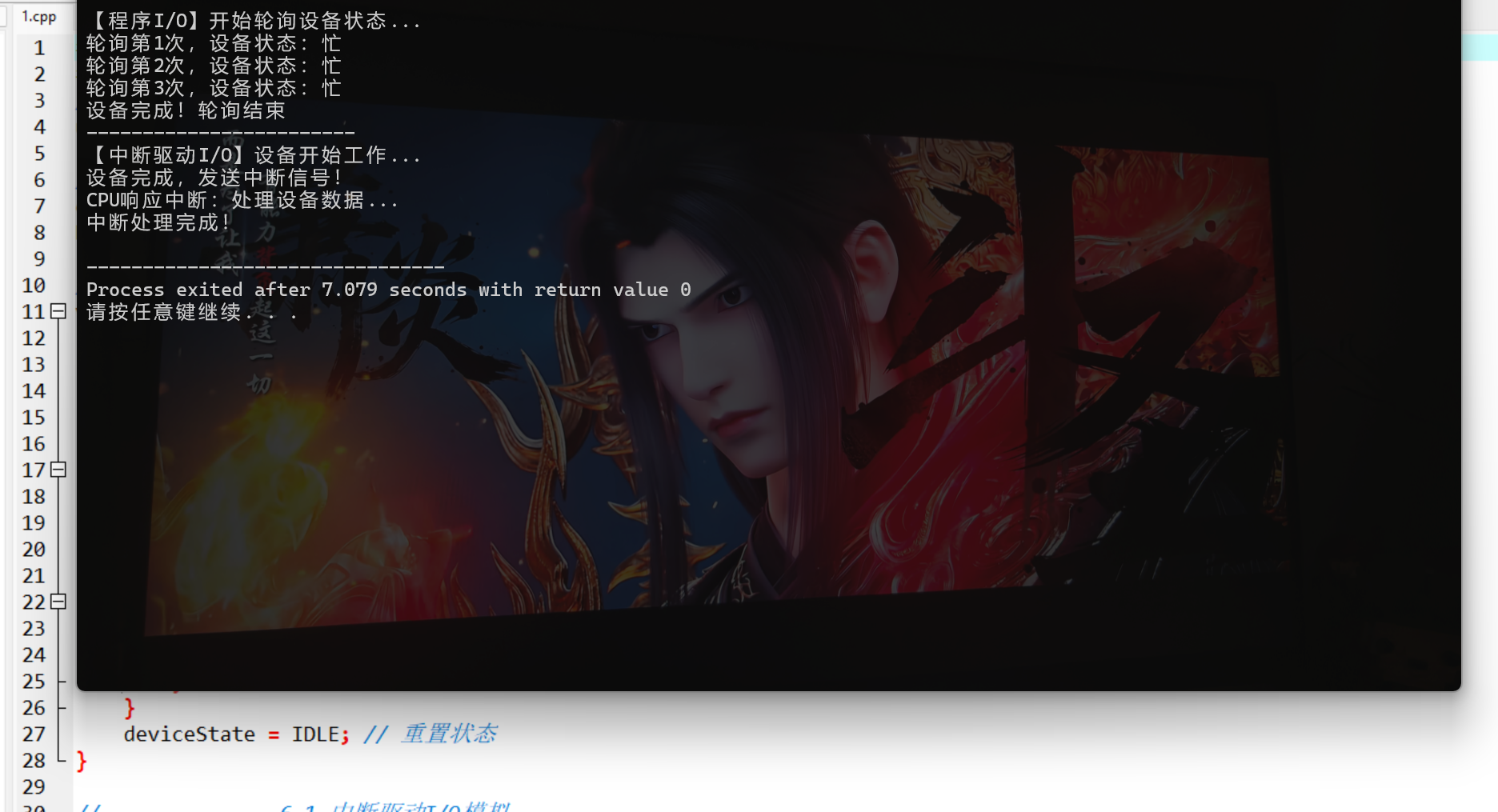
代码说明:
- 兼容 C++98 标准,无 C++11 及以上特性(如 auto、lambda);
programIO函数模拟轮询模式:CPU 空等设备,效率低;interruptHandler模拟中断处理:CPU 可执行其他任务,设备完成后触发中断再处理,效率更高;- 运行环境:Linux(直接编译)、Windows(替换 sleep 为 Sleep 即可);
- 编译命令(Linux):
g++ -std=c++98 io_system.cpp -o io_system && ./io_system。
6.2 I/O 设备和设备控制器
核心概念
1. I/O 设备分类
- 字符设备:按字符逐个传输(键盘、鼠标、打印机),不可随机访问;
- 块设备:按固定大小 "块" 传输(磁盘、U 盘),可随机访问;
- 网络设备:面向数据包传输(网卡)。
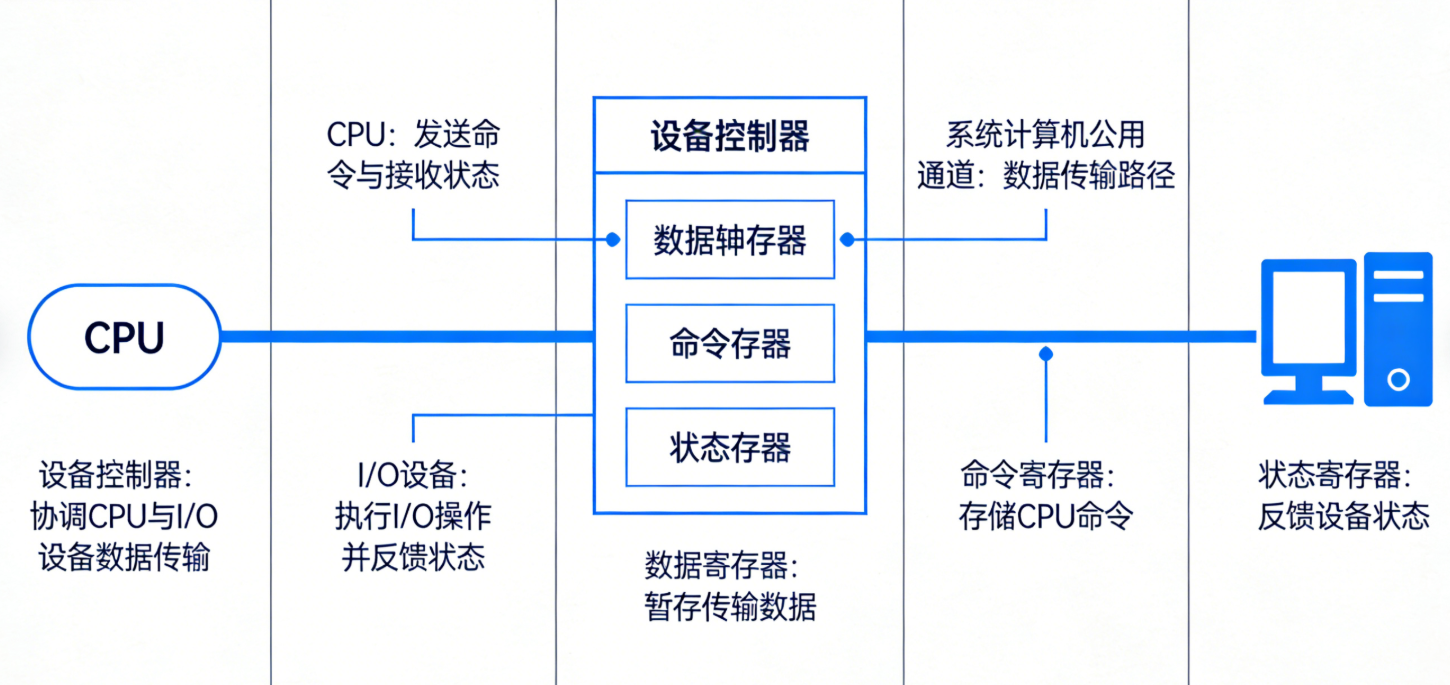
2. 设备控制器(硬件核心)
设备控制器是 CPU 与外设之间的 "中间人",负责:
- 接收 CPU 的指令(如读 / 写);
- 控制外设的具体操作;
- 向 CPU 反馈设备状态;
- 数据缓冲(缓解 CPU 与外设速度差)。
架构图
代码案例:设备控制器模拟(C++98)
#include <iostream>
#include <string>
using namespace std;

// 模拟设备控制器寄存器
struct DeviceController {
    // 数据寄存器:存储待传输的数据
    string dataReg;
    // 命令寄存器:存储CPU下发的命令(READ/WRITE/STOP)
    string cmdReg;
    // 状态寄存器:反馈设备状态(READY/BUSY/ERROR)
    string statusReg;

    // 初始化控制器
    DeviceController() : statusReg("READY") {}

    // 接收CPU命令
    void setCommand(const string& cmd) {
        if (statusReg == "READY") {
            cmdReg = cmd;
            statusReg = "BUSY";
            cout << "控制器接收命令:" << cmd << endl;
        } else {
            cout << "设备忙,无法接收命令!" << endl;
        }
    }

    // 执行命令(模拟设备操作)
    void executeCommand(const string& data = "") {
        if (cmdReg == "READ") {
            // 模拟从设备读取数据到数据寄存器
            dataReg = "DEVICE_DATA_123";
            cout << "读取数据完成:" << dataReg << endl;
        } else if (cmdReg == "WRITE") {
            // 模拟将数据写入设备
            dataReg = data;
            cout << "写入数据完成:" << dataReg << endl;
        } else if (cmdReg == "STOP") {
            cout << "设备停止工作" << endl;
        } else {
            statusReg = "ERROR";
            cout << "无效命令!状态:ERROR" << endl;
            return;
        }
        // 执行完成,重置状态
        cmdReg = "";
        statusReg = "READY";
    }

    // 获取设备状态
    string getStatus() {
        return statusReg;
    }
};

int main() {
    DeviceController diskController; // 模拟磁盘控制器
    cout << "初始状态:" << diskController.getStatus() << endl;

    // CPU下发读命令
    diskController.setCommand("READ");
    diskController.executeCommand();
    cout << "操作后状态:" << diskController.getStatus() << endl;

    // CPU下发写命令
    diskController.setCommand("WRITE");
    diskController.executeCommand("USER_FILE_DATA");
    cout << "操作后状态:" << diskController.getStatus() << endl;

    // 设备忙时下发命令(测试异常)
    diskController.setCommand("READ");
    diskController.setCommand("WRITE"); // 此时设备忙,无法接收

    return 0;
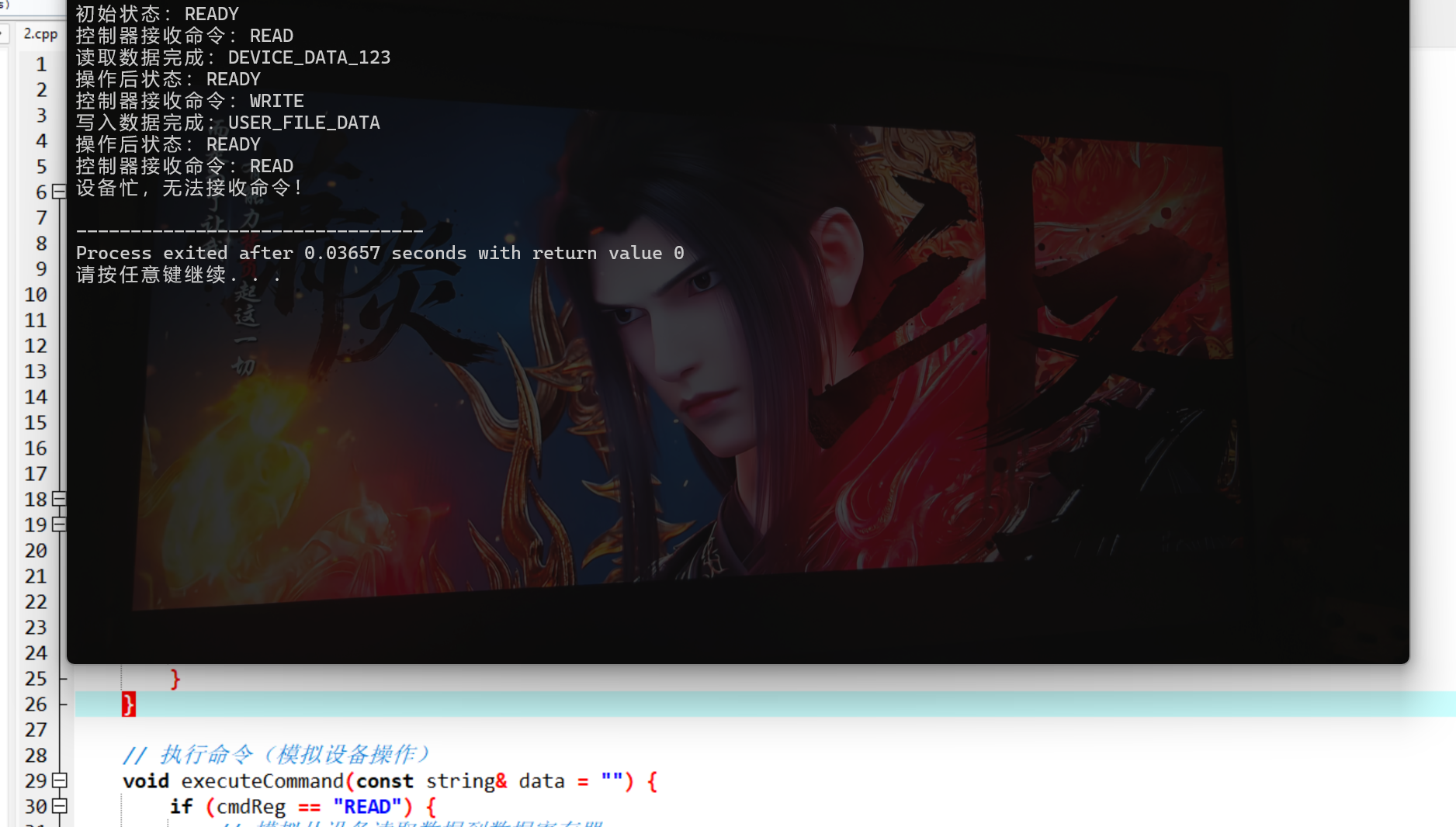
}
代码说明:
- 模拟设备控制器的核心寄存器(数据、命令、状态);
- 实现命令接收、执行、状态反馈的完整逻辑;
- 包含异常处理(设备忙时拒绝命令),符合实际控制器行为;
- 编译命令:
g++ -std=c++98 device_controller.cpp -o device_controller && ./device_controller。
6.3 中断机构和中断处理程序
核心概念
中断是外设 "主动通知" CPU 的机制,是 I/O 系统的核心触发方式:
- 中断源:引发中断的事件(设备完成、故障、时钟等);
- 中断优先级:高优先级中断可打断低优先级(如故障中断 > 普通 I/O 中断);
- 中断处理流程:
代码案例:中断处理程序模拟(C++98)
#include <iostream>
#include <vector>
#include <string>
using namespace std;

// 中断类型及优先级(数值越大优先级越高)
enum InterruptType {
    IO_INTERRUPT = 1,    // I/O完成中断
    ERROR_INTERRUPT = 3, // 设备故障中断
    TIMER_INTERRUPT = 2  // 时钟中断
};

// 中断请求结构体
struct InterruptRequest {
    InterruptType type;
    string deviceName;
    int priority;

    InterruptRequest(InterruptType t, const string& name)
        : type(t), deviceName(name) {
        // 初始化优先级
        priority = static_cast<int>(t);
    }
};

// 中断控制器(管理中断队列、优先级)
class InterruptController {
private:
    vector<InterruptRequest> interruptQueue; // 中断请求队列
    bool isHandling; // 是否正在处理中断

    // 找到队列中优先级最高的中断
    int findHighestPriorityIdx() {
        int maxPriority = -1;
        int idx = -1;
        for (int i = 0; i < interruptQueue.size(); ++i) {
            if (interruptQueue[i].priority > maxPriority) {
                maxPriority = interruptQueue[i].priority;
                idx = i;
            }
        }
        return idx;
    }

    // 中断处理函数(针对不同类型)
    void handleIOInterrupt(const string& dev) {
        cout << "处理I/O中断:设备[" << dev << "]完成数据传输" << endl;
    }

    void handleErrorInterrupt(const string& dev) {
        cout << "处理故障中断:设备[" << dev << "]发生故障,紧急处理" << endl;
    }

    void handleTimerInterrupt(const string& dev) {
        cout << "处理时钟中断:定时任务触发" << endl;
    }

public:
    InterruptController() : isHandling(false) {}

    // 注册中断请求
    void registerInterrupt(const InterruptRequest& irq) {
        interruptQueue.push_back(irq);
        cout << "注册中断:" << devType(irq.type) << "(设备:" << irq.deviceName << ")" << endl;
        // 若未处理中断,立即调度
        if (!isHandling) {
            dispatchInterrupt();
        }
    }

    // 调度并处理最高优先级中断
    void dispatchInterrupt() {
        isHandling = true;
        int idx = findHighestPriorityIdx();
        if (idx == -1) {
            isHandling = false;
            return;
        }
        InterruptRequest irq = interruptQueue[idx];
        // 移除已处理的中断
        interruptQueue.erase(interruptQueue.begin() + idx);

        // 处理中断
        switch (irq.type) {
            case IO_INTERRUPT:
                handleIOInterrupt(irq.deviceName);
                break;
            case ERROR_INTERRUPT:
                handleErrorInterrupt(irq.deviceName);
                break;
            case TIMER_INTERRUPT:
                handleTimerInterrupt(irq.deviceName);
                break;
            default:
                cout << "未知中断类型" << endl;
        }

        isHandling = false;
        // 递归处理剩余中断
        if (!interruptQueue.empty()) {
            dispatchInterrupt();
        }
    }

    // 辅助函数:中断类型转字符串
    string devType(InterruptType t) {
        switch (t) {
            case IO_INTERRUPT: return "I/O中断";
            case ERROR_INTERRUPT: return "故障中断";
            case TIMER_INTERRUPT: return "时钟中断";
            default: return "未知中断";
        }
    }
};

int main() {
    InterruptController ic;

    // 模拟多个中断请求(不同优先级)
    ic.registerInterrupt(InterruptRequest(IO_INTERRUPT, "键盘"));
    ic.registerInterrupt(InterruptRequest(ERROR_INTERRUPT, "磁盘")); // 高优先级,先处理
    ic.registerInterrupt(InterruptRequest(TIMER_INTERRUPT, "系统时钟"));

    return 0;
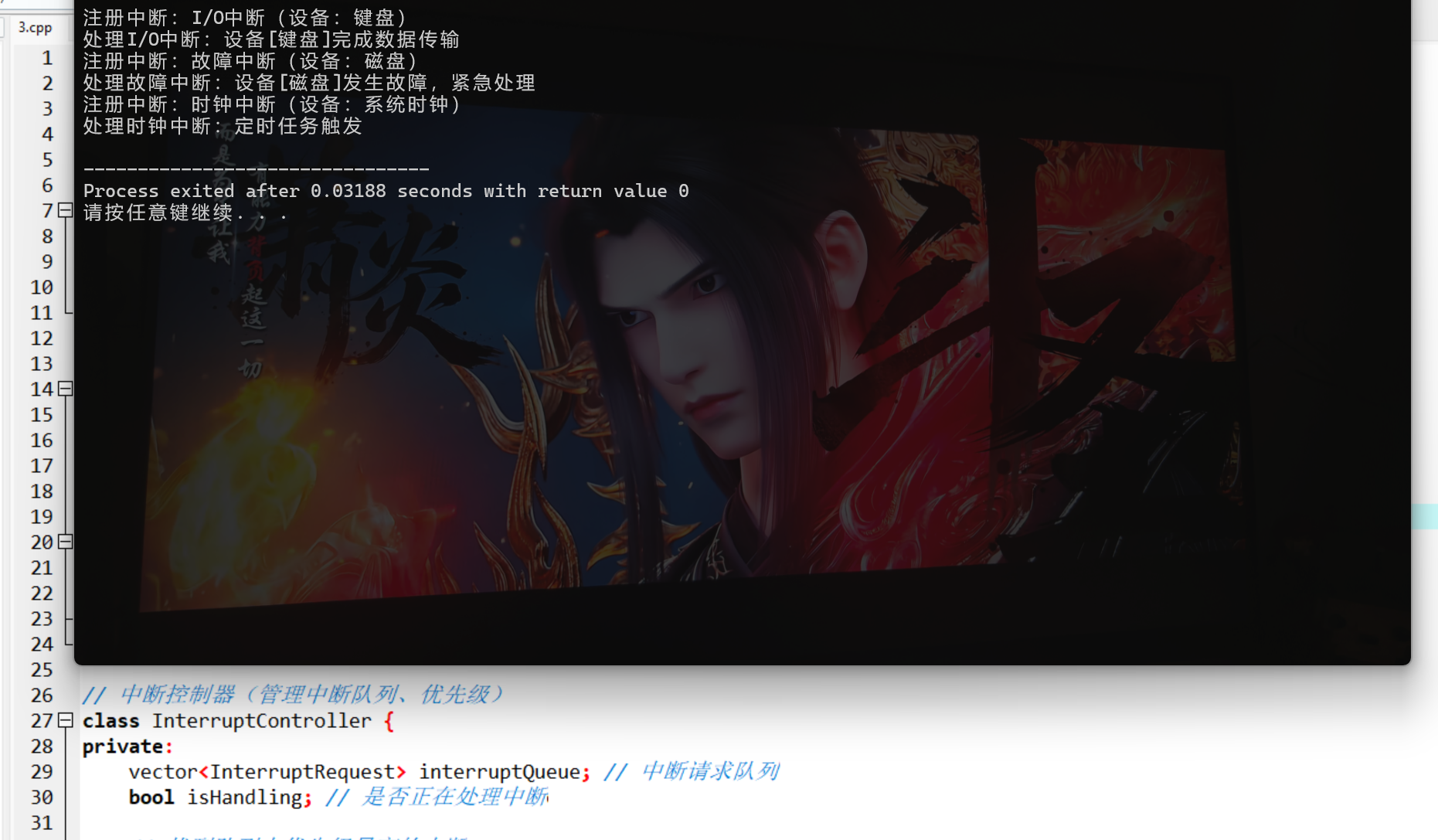
}
代码说明:
- 模拟中断控制器的核心逻辑:中断注册、优先级排序、中断调度;
- 实现不同类型中断的差异化处理,符合实际系统的中断优先级规则;
- 兼容 C++98(使用 vector 而非 C++11 的容器特性);
- 编译命令:
g++ -std=c++98 interrupt.cpp -o interrupt && ./interrupt。
6.4 设备驱动程序
核心概念
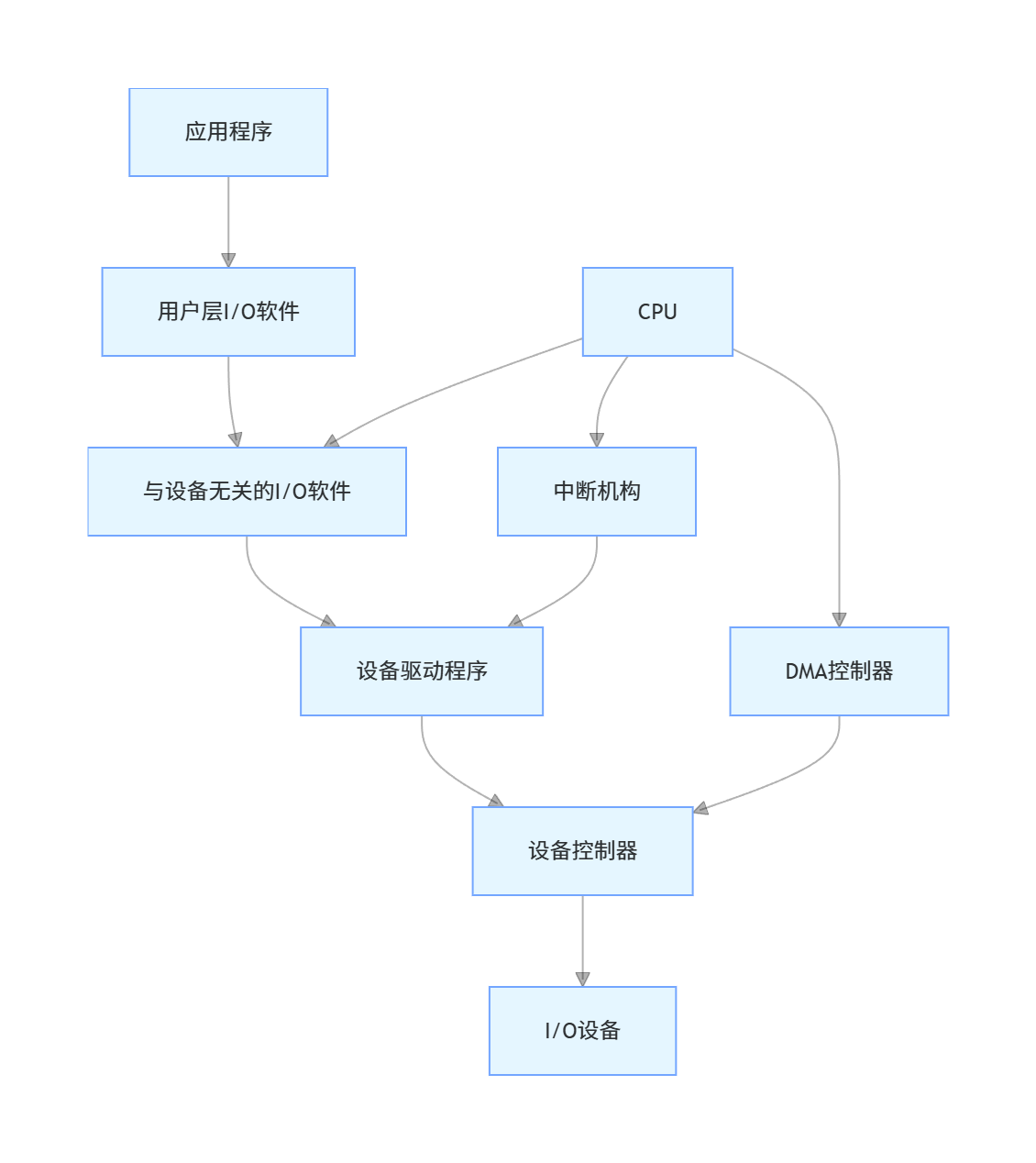
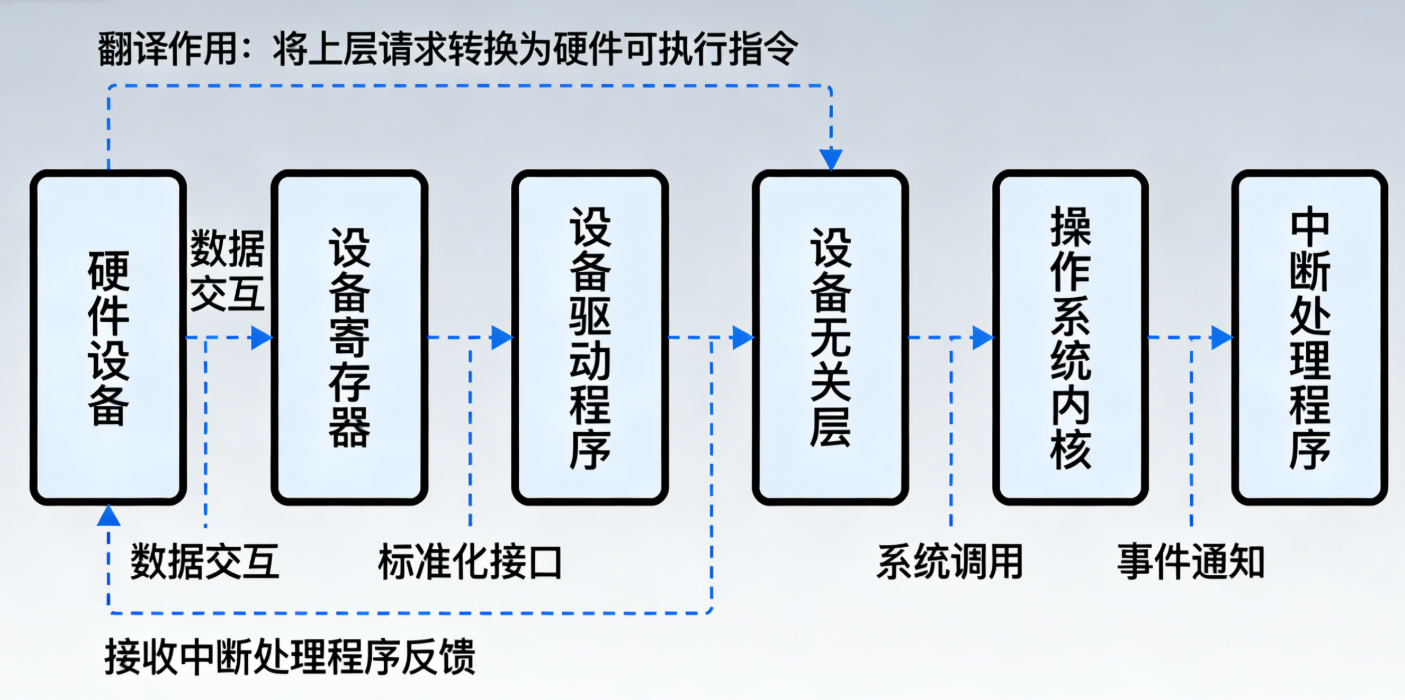
设备驱动程序是操作系统中与设备紧密相关的底层软件,是硬件和操作系统之间的 "翻译官":
- 核心作用:将操作系统的通用 I/O 指令,转换为设备能识别的具体指令;
- 设计原则:与设备相关、与操作系统无关;
- 核心流程:初始化→接收请求→设备操作→中断处理→释放资源。
架构图
代码案例:磁盘设备驱动模拟(C++98)
#include <iostream>
#include <string>
#include <map>
using namespace std;

// 模拟磁盘硬件
struct DiskHardware {
    map<int, string> blocks; // 磁盘块:块号→数据
    bool isWorking;

    DiskHardware() : isWorking(true) {
        // 初始化磁盘块数据
        blocks[0] = "系统文件";
        blocks[1] = "用户数据1";
        blocks[2] = "用户数据2";
    }

    // 读磁盘块
    string readBlock(int blockNum) {
        if (!isWorking) return "设备故障";
        if (blocks.find(blockNum) != blocks.end()) {
            return blocks[blockNum];
        }
        return "块不存在";
    }

    // 写磁盘块
    bool writeBlock(int blockNum, const string& data) {
        if (!isWorking) return false;
        blocks[blockNum] = data;
        return true;
    }

    // 模拟设备故障
    void setFault() {
        isWorking = false;
    }
};

// 磁盘设备驱动程序
class DiskDriver {
private:
    DiskHardware disk; // 关联的硬件设备
    string driverName;

    // 驱动内部:校验参数
    bool validateParam(int blockNum) {
        if (blockNum < 0 || blockNum > 100) { // 模拟块号范围
            cout << "[" << driverName << "] 参数错误:块号超出范围" << endl;
            return false;
        }
        return true;
    }

public:
    DiskDriver(const string& name) : driverName(name) {}

    // 初始化驱动
    bool init() {
        cout << "[" << driverName << "] 驱动初始化成功" << endl;
        return true;
    }

    // 对外提供的读接口(操作系统调用)
    string read(int blockNum) {
        cout << "[" << driverName << "] 接收读请求,块号:" << blockNum << endl;
        // 1. 参数校验
        if (!validateParam(blockNum)) {
            return "读失败";
        }
        // 2. 转换为硬件指令,操作硬件
        string data = disk.readBlock(blockNum);
        // 3. 返回结果给操作系统
        cout << "[" << driverName << "] 读完成,数据:" << data << endl;
        return data;
    }

    // 对外提供的写接口(操作系统调用)
    bool write(int blockNum, const string& data) {
        cout << "[" << driverName << "] 接收写请求,块号:" << blockNum << ",数据:" << data << endl;
        // 1. 参数校验
        if (!validateParam(blockNum)) {
            return false;
        }
        // 2. 转换为硬件指令,操作硬件
        bool ret = disk.writeBlock(blockNum, data);
        // 3. 返回结果给操作系统
        if (ret) {
            cout << "[" << driverName << "] 写完成" << endl;
        } else {
            cout << "[" << driverName << "] 写失败:设备故障" << endl;
        }
        return ret;
    }

    // 处理设备中断
    void handleInterrupt(const string& type) {
        if (type == "READ_COMPLETE") {
            cout << "[" << driverName << "] 读中断:数据传输完成" << endl;
        } else if (type == "WRITE_COMPLETE") {
            cout << "[" << driverName << "] 写中断:数据写入完成" << endl;
        } else if (type == "ERROR") {
            cout << "[" << driverName << "] 故障中断:设备异常" << endl;
            disk.setFault();
        }
    }
};

int main() {
    DiskDriver driver("SATA磁盘驱动");
    driver.init();

    // 测试读操作
    driver.read(1);
    // 测试写操作
    driver.write(3, "新用户数据");
    // 测试故障中断
    driver.handleInterrupt("ERROR");
    // 故障后写操作(测试失败)
    driver.write(4, "测试数据");

    return 0;
}
代码说明:
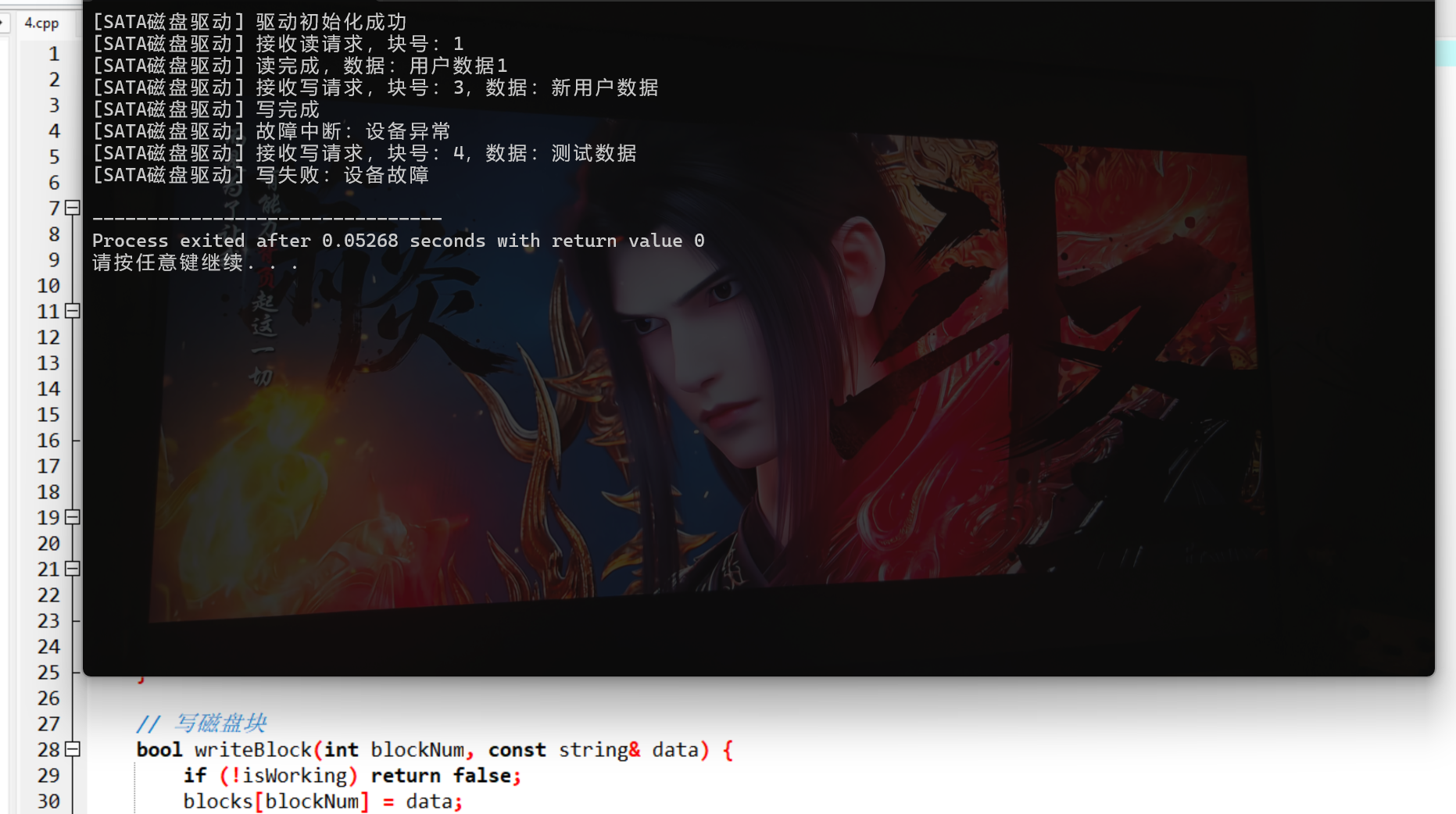
- 模拟磁盘驱动的完整生命周期:初始化→接收读写请求→参数校验→硬件操作→中断处理;
- 包含故障模拟和异常处理,贴近实际驱动程序逻辑;
- 编译命令:
g++ -std=c++98 device_driver.cpp -o device_driver && ./device_driver。
6.5 与设备无关的 I/O 软件
核心概念
与设备无关的 I/O 软件(设备独立性软件)是操作系统 I/O 层的核心,目标是屏蔽设备差异,让应用程序使用 "逻辑设备名"(如 "硬盘")而非 "物理设备名"(如 /dev/sda1):
- 核心功能:
- 设备命名与映射(逻辑名→物理名);
- 设备保护(权限控制);
- 设备分配与释放;
- 缓冲管理;
- 统一的 I/O 接口(read/write)。
代码案例:设备无关层模拟(C++98)
cpp
#include <iostream>
#include <string>
#include <map>
#include <vector>
// 新增atoi所需的头文件
#include <cstdlib>
using namespace std;

// 兼容C++98的整数转字符串函数(替代C++11的to_string)
string intToString(int num) {
    if (num == 0) {
        return "0";
    }
    bool isNegative = false;
    string result;
    // 处理负数
    if (num < 0) {
        isNegative = true;
        num = -num;
    }
    // 逐位转换
    while (num > 0) {
        result = char('0' + (num % 10)) + result;
        num /= 10;
    }
    // 补回负号
    if (isNegative) {
        result = "-" + result;
    }
    return result;
}

// 前置声明:设备驱动基类(统一接口)
class DeviceDriver {
public:
    virtual string read(const string& param) = 0;
    virtual bool write(const string& param, const string& data) = 0;
    virtual string getDeviceType() = 0;
    virtual ~DeviceDriver() {}
};

// 磁盘驱动实现
class DiskDriver : public DeviceDriver {
public:
    string read(const string& param) {
        // atoi需要<cstdlib>头文件,已添加
        int blockNum = atoi(param.c_str());
        // 用自定义的intToString替代to_string,兼容C++98
        return "磁盘读块" + param + ":数据" + intToString(blockNum * 100);
    }

    bool write(const string& param, const string& data) {
        cout << "磁盘写块" << param << ":" << data << endl;
        return true;
    }

    string getDeviceType() {
        return "DISK";
    }
};

// 键盘驱动实现
class KeyboardDriver : public DeviceDriver {
public:
    string read(const string& param) {
        return "键盘输入:用户按下" + param;
    }

    bool write(const string& param, const string& data) {
        cout << "键盘无写操作,忽略" << endl;
        return false;
    }

    string getDeviceType() {
        return "KEYBOARD";
    }
};

// 与设备无关的I/O软件层
class DeviceIndependentLayer {
private:
    // 逻辑设备名 → 物理驱动映射
    map<string, DeviceDriver*> deviceMap;
    // 设备分配状态:逻辑名 → 是否被占用
    map<string, bool> deviceAllocated;

public:
    // 注册设备(逻辑名+驱动)
    void registerDevice(const string& logicalName, DeviceDriver* driver) {
        deviceMap[logicalName] = driver;
        deviceAllocated[logicalName] = false;
        cout << "注册设备:" << logicalName << " → " << driver->getDeviceType() << endl;
    }

    // 分配设备(避免冲突)
    bool allocateDevice(const string& logicalName) {
        if (deviceMap.find(logicalName) == deviceMap.end()) {
            cout << "设备不存在:" << logicalName << endl;
            return false;
        }
        if (deviceAllocated[logicalName]) {
            cout << "设备已被占用:" << logicalName << endl;
            return false;
        }
        deviceAllocated[logicalName] = true;
        cout << "分配设备成功:" << logicalName << endl;
        return true;
    }

    // 释放设备
    void releaseDevice(const string& logicalName) {
        if (deviceMap.find(logicalName) != deviceMap.end()) {
            deviceAllocated[logicalName] = false;
            cout << "释放设备:" << logicalName << endl;
        }
    }

    // 统一读接口(设备无关)
    string read(const string& logicalName, const string& param) {
        if (!allocateDevice(logicalName)) {
            return "读失败:设备分配失败";
        }
        string result = deviceMap[logicalName]->read(param);
        releaseDevice(logicalName);
        return result;
    }

    // 统一写接口(设备无关)
    bool write(const string& logicalName, const string& param, const string& data) {
        if (!allocateDevice(logicalName)) {
            return false;
        }
        bool result = deviceMap[logicalName]->write(param, data);
        releaseDevice(logicalName);
        return result;
    }
};

int main() {
    DeviceIndependentLayer ioLayer;
    // 注册设备(逻辑名:硬盘、键盘;物理驱动:DiskDriver、KeyboardDriver)
    ioLayer.registerDevice("硬盘", new DiskDriver());
    ioLayer.registerDevice("键盘", new KeyboardDriver());

    // 统一接口读设备(无需关心底层驱动)
    cout << ioLayer.read("硬盘", "1") << endl;
    cout << ioLayer.read("键盘", "Enter键") << endl;

    // 统一接口写设备
    ioLayer.write("硬盘", "2", "测试数据");
    ioLayer.write("键盘", "", "无效数据");

    return 0;
}
代码说明:
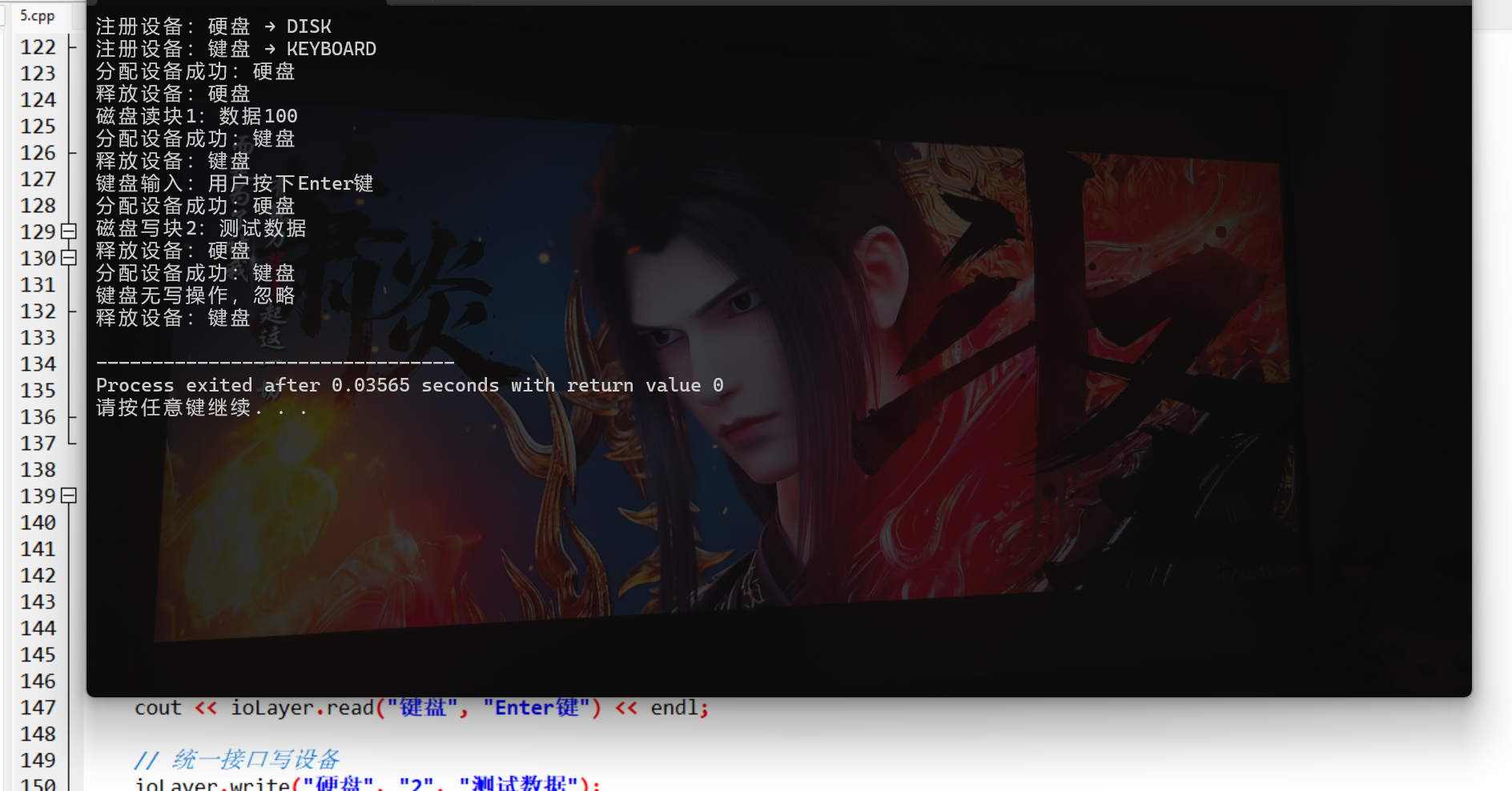
- 采用多态实现设备驱动的统一接口,体现 "设备无关" 核心思想;
- 实现设备注册、分配、释放的完整逻辑,避免设备冲突;
- 应用程序只需调用统一的 read/write 接口,无需关心底层硬件差异;
- 编译命令:
g++ -std=c++98 device_independent.cpp -o device_independent && ./device_independent。
6.6 用户层的 I/O 软件
核心概念
用户层 I/O 软件是应用程序直接接触的 I/O 层,主要包括:
- 库函数:如 C 语言的 fopen/fread/fwrite(封装系统调用);
- SPOOLing 技术(假脱机):将独占设备(如打印机)模拟为共享设备;
- 用户态 I/O 工具:如图形界面的文件管理器。
核心案例:SPOOLing 技术模拟(C++98)
#include <iostream>
#include <string>
#include <queue>
#include <vector>
using namespace std;

// 模拟打印任务
struct PrintTask {
    string taskId;
    string content;
    string userName;

    PrintTask(const string& id, const string& cnt, const string& name)
        : taskId(id), content(cnt), userName(name) {}
};

// SPOOLing管理器(假脱机)
class SPOOLingManager {
private:
    queue<PrintTask> taskQueue; // 打印任务队列(内存缓冲区)
    bool isPrinterBusy; // 打印机是否忙
    // 模拟磁盘输出井(存储待打印任务)
    vector<PrintTask> outputPool;

public:
    SPOOLingManager() : isPrinterBusy(false) {}

    // 用户提交打印任务(用户层)
    void submitTask(const PrintTask& task) {
        cout << "用户[" << task.userName << "]提交打印任务:" << task.taskId << endl;
        // 1. 先写入输出井(磁盘)
        outputPool.push_back(task);
        // 2. 将任务加入内存队列
        taskQueue.push(task);
        // 3. 尝试调度打印
        schedulePrint();
    }

    // 调度打印(后台进程)
    void schedulePrint() {
        if (isPrinterBusy || taskQueue.empty()) {
            return;
        }
        isPrinterBusy = true;
        // 取出队列头任务
        PrintTask task = taskQueue.front();
        taskQueue.pop();
        // 模拟打印过程
        cout << "开始打印任务:" << task.taskId << endl;
        cout << "打印内容:" << task.content << endl;
        // 打印完成
        cout << "任务" << task.taskId << "打印完成" << endl;
        isPrinterBusy = false;
        // 继续调度下一个任务
        schedulePrint();
    }

    // 查看待打印任务
    void showPendingTasks() {
        cout << "待打印任务数:" << taskQueue.size() << endl;
        cout << "输出井任务数:" << outputPool.size() << endl;
    }
};

int main() {
    SPOOLingManager spooling;

    // 多个用户提交打印任务(独占设备模拟为共享)
    spooling.submitTask(PrintTask("T001", "操作系统笔记", "张三"));
    spooling.submitTask(PrintTask("T002", "C++编程教程", "李四"));
    spooling.submitTask(PrintTask("T003", "数据结构作业", "王五"));

    // 查看待打印任务
    spooling.showPendingTasks();

    return 0;
}
代码说明:
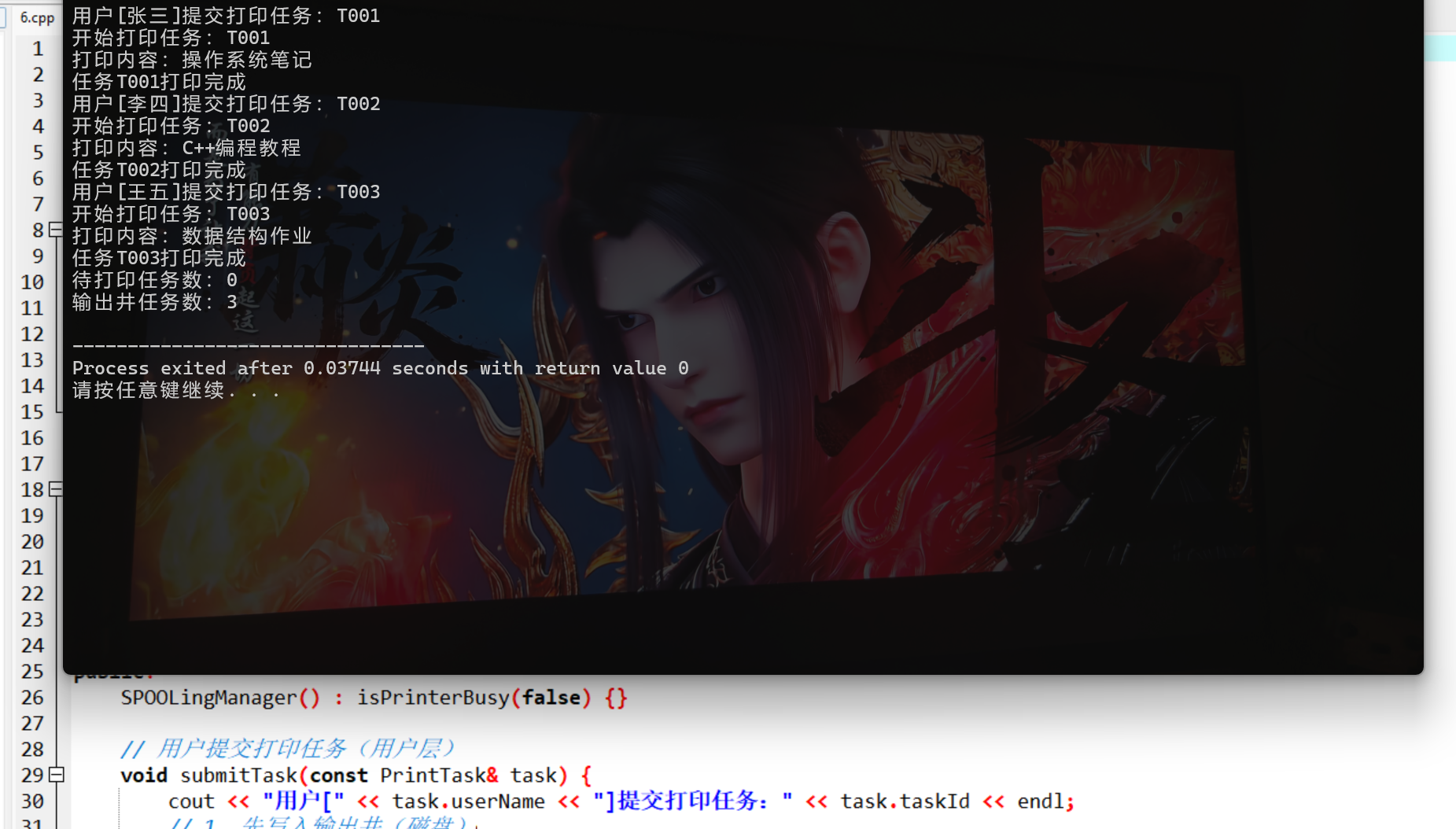
- 模拟 SPOOLing 核心逻辑:用户任务先写入磁盘输出井,再由后台进程调度打印;
- 实现独占设备(打印机)的共享使用,体现用户层 I/O 软件的核心价值;
- 编译命令:
g++ -std=c++98 spooling.cpp -o spooling && ./spooling。
6.7 缓冲区管理
核心概念
缓冲区是内存中专门用于缓解 CPU 与外设速度差异的区域,常见类型:
- 单缓冲:一个缓冲区,CPU 与外设交替使用;
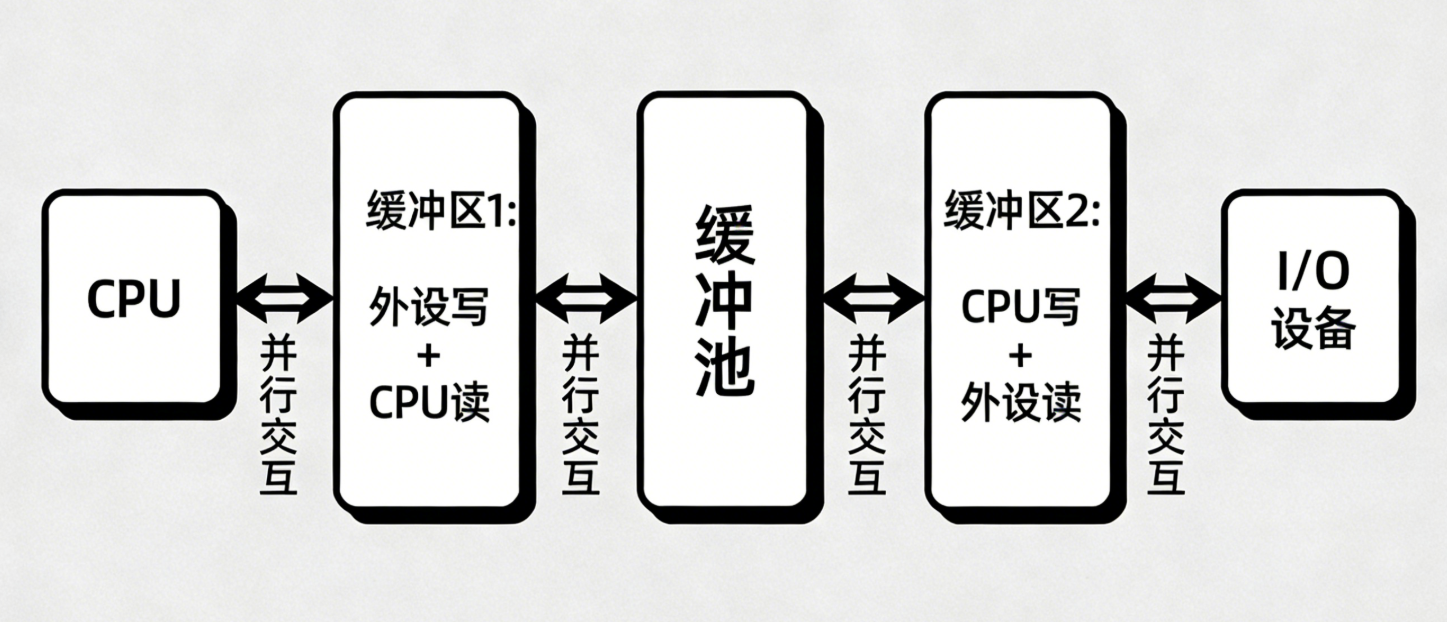
- 双缓冲:两个缓冲区,CPU 与外设可并行操作;
- 循环缓冲:多个缓冲区组成环形队列,适用于大批量数据传输;
- 缓冲池:系统级的缓冲区管理,统一分配 / 回收缓冲区。
架构图(双缓冲)
代码案例:循环缓冲区实现(C++98)
#include <iostream>
#include <vector>
#include <string>
using namespace std;

// 循环缓冲区
template <typename T, int SIZE>
class CircularBuffer {
private:
    vector<T> buffer; // 缓冲区数组
    int head; // 读指针(取数据)
    int tail; // 写指针(存数据)
    int count; // 已存储数据量

public:
    CircularBuffer() : buffer(SIZE), head(0), tail(0), count(0) {}

    // 写入数据(生产者)
    bool write(const T& data) {
        if (isFull()) {
            cout << "缓冲区满,写入失败" << endl;
            return false;
        }
        buffer[tail] = data;
        tail = (tail + 1) % SIZE; // 循环移动写指针
        count++;
        cout << "写入数据:" << data << ",当前数据量:" << count << endl;
        return true;
    }

    // 读取数据(消费者)
    bool read(T& data) {
        if (isEmpty()) {
            cout << "缓冲区空,读取失败" << endl;
            return false;
        }
        data = buffer[head];
        head = (head + 1) % SIZE; // 循环移动读指针
        count--;
        cout << "读取数据:" << data << ",当前数据量:" << count << endl;
        return true;
    }

    // 判断缓冲区是否满
    bool isFull() {
        return count == SIZE;
    }

    // 判断缓冲区是否空
    bool isEmpty() {
        return count == 0;
    }

    // 获取缓冲区大小
    int size() {
        return SIZE;
    }

    // 获取已使用大小
    int usedSize() {
        return count;
    }
};

int main() {
    // 创建大小为5的循环缓冲区
    CircularBuffer<string, 5> cb;

    // 模拟生产者写入数据
    cb.write("数据1");
    cb.write("数据2");
    cb.write("数据3");
    cb.write("数据4");
    cb.write("数据5");
    cb.write("数据6"); // 缓冲区满,写入失败

    // 模拟消费者读取数据
    string data;
    cb.read(data);
    cb.read(data);

    // 再次写入
    cb.write("数据6");

    return 0;
}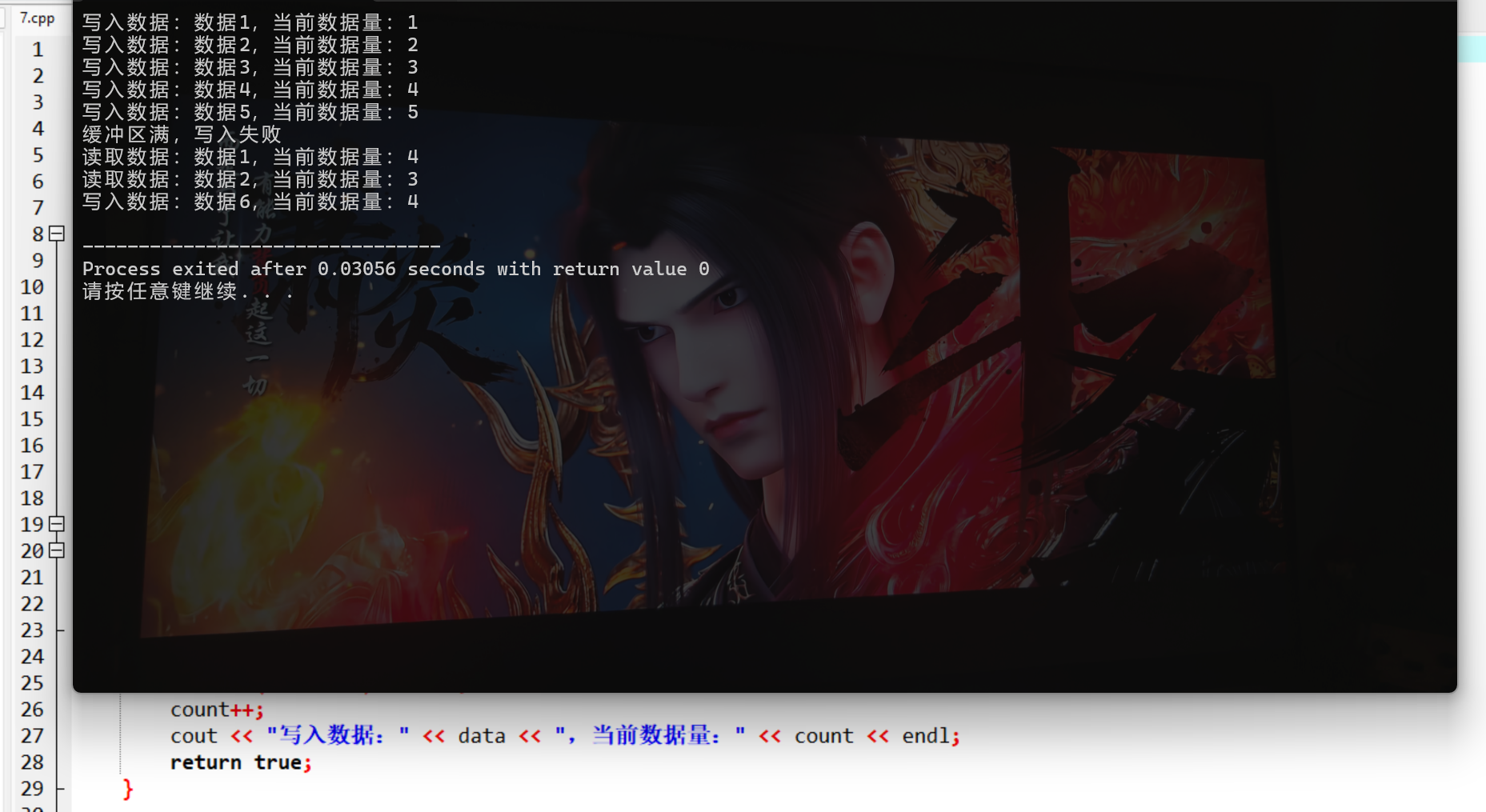
代码说明:
- 基于模板实现通用循环缓冲区,支持任意数据类型;
- 实现核心操作:写入、读取、判空 / 判满,符合循环缓冲的核心逻辑;
- 模拟生产者 - 消费者模型,体现缓冲区缓解速度差异的作用;
- 编译命令:
g++ -std=c++98 circular_buffer.cpp -o circular_buffer && ./circular_buffer。
6.8 磁盘存储器的性能和调度
核心概念
1. 磁盘性能指标
- 寻道时间:磁头移动到目标磁道的时间(影响最大);
- 旋转延迟:磁盘旋转到目标扇区的时间;
- 传输时间:数据读写的时间;
- 总时间 = 寻道时间 + 旋转延迟 + 传输时间。
2. 磁盘调度算法(优化寻道时间)
| 算法 | 核心逻辑 | 优点 | 缺点 |
|---|---|---|---|
| FCFS(先来先服务) | 按请求顺序处理 | 公平、简单 | 寻道时间长,效率低 |
| SSTF(最短寻道优先) | 优先处理离当前磁头最近的请求 | 寻道时间短 | 可能饥饿 |
| SCAN(电梯算法) | 磁头单向移动,处理完所有请求再反向 | 无饥饿,效率高 | 响应不均匀 |
| CSCAN(循环电梯) | 磁头到最远端后,直接返回起点(不反向处理) | 响应更均匀 | 寻道时间略长于 SCAN |
代码案例:磁盘调度算法实现(C++98)
cpp
#include <iostream>
#include <vector>
#include <algorithm>
#include <cmath>
#include <string>
// 新增头文件:INT_MAX定义在<cstdlib>中
#include <cstdlib>
using namespace std;

// 磁盘调度器
class DiskScheduler {
private:
    int currentTrack; // 当前磁头位置
    vector<int> requests; // 磁道请求队列

    // 计算总寻道长度(替换C++11范围for为C++98索引循环)
    int calculateSeekLength(const vector<int>& order) {
        int total = 0;
        int pos = currentTrack;
        // C++98兼容写法:基于索引遍历vector
        for (int i = 0; i < order.size(); ++i) {
            int track = order[i];
            total += abs(track - pos);
            pos = track;
        }
        return total;
    }

public:
    DiskScheduler(int initTrack, const vector<int>& req)
        : currentTrack(initTrack), requests(req) {}

    // 1. FCFS调度
    void FCFS() {
        vector<int> order = requests;
        int total = calculateSeekLength(order);
        cout << "===== FCFS 调度 =====" << endl;
        cout << "调度顺序:";
        // C++98兼容写法
        for (int i = 0; i < order.size(); ++i) {
            int track = order[i];
            cout << track << " ";
        }
        cout << endl << "总寻道长度:" << total << endl;
    }

    // 2. SSTF调度
    void SSTF() {
        vector<int> remaining = requests;
        vector<int> order;
        int pos = currentTrack;

        while (!remaining.empty()) {
            // 找到离当前位置最近的磁道
            int minDist = INT_MAX;
            int idx = -1;
            for (int i = 0; i < remaining.size(); ++i) {
                int dist = abs(remaining[i] - pos);
                if (dist < minDist) {
                    minDist = dist;
                    idx = i;
                }
            }
            // 将该磁道加入调度顺序
            order.push_back(remaining[idx]);
            pos = remaining[idx];
            // 从剩余队列移除
            remaining.erase(remaining.begin() + idx);
        }

        int total = calculateSeekLength(order);
        cout << "===== SSTF 调度 =====" << endl;
        cout << "调度顺序:";
        // C++98兼容写法
        for (int i = 0; i < order.size(); ++i) {
            int track = order[i];
            cout << track << " ";
        }
        cout << endl << "总寻道长度:" << total << endl;
    }

    // 3. SCAN调度(电梯算法,默认向磁道号增大方向)
    void SCAN(int maxTrack) {
        vector<int> left, right;
        // 分离当前磁头左侧和右侧的请求(替换范围for)
        for (int i = 0; i < requests.size(); ++i) {
            int track = requests[i];
            if (track < currentTrack) {
                left.push_back(track);
            } else {
                right.push_back(track);
            }
        }
        // 右侧升序,左侧降序(电梯单向移动)
        sort(right.begin(), right.end());
        sort(left.begin(), left.end(), greater<int>());

        // 调度顺序:先右后左
        vector<int> order = right;
        order.push_back(maxTrack); // 到最远端
        order.insert(order.end(), left.begin(), left.end());

        int total = calculateSeekLength(order);
        cout << "===== SCAN 调度 =====" << endl;
        cout << "调度顺序:";
        // C++98兼容写法
        for (int i = 0; i < order.size(); ++i) {
            int track = order[i];
            if (i > 0) cout << " "; // 优化输出格式,避免开头空格
            cout << track;
        }
        cout << endl << "总寻道长度:" << total << endl;
    }
};

int main() {
    // 测试用例:初始磁头位置50,磁道请求[17, 79, 90, 100, 10, 48, 55],最大磁道100
    vector<int> requests;
    requests.push_back(17);
    requests.push_back(79);
    requests.push_back(90);
    requests.push_back(100);
    requests.push_back(10);
    requests.push_back(48);
    requests.push_back(55);

    DiskScheduler ds(50, requests);
    ds.FCFS();
    ds.SSTF();
    ds.SCAN(100);

    return 0;
}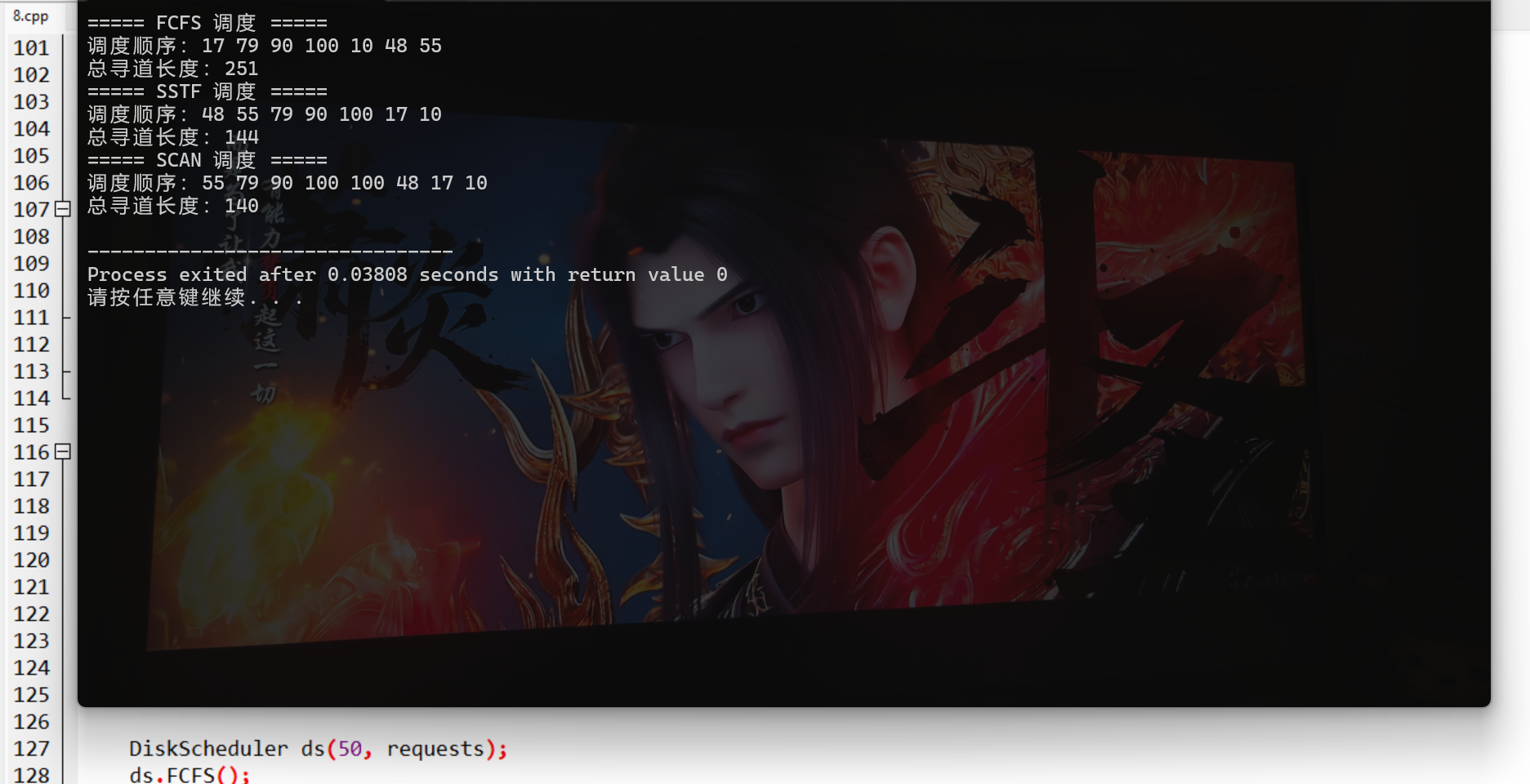
代码说明:
- 实现 FCFS、SSTF、SCAN 三种核心磁盘调度算法;
- 计算总寻道长度,直观对比不同算法的效率;
- 代码结构清晰,注释完整,便于理解调度算法的核心逻辑;
- 编译命令:
g++ -std=c++98 disk_scheduler.cpp -o disk_scheduler && ./disk_scheduler。
习题(核心考点 + 代码实操)
一、选择题
- 以下哪种 I/O 控制模型效率最高()
- A. 程序 I/O
- B. 中断驱动
- C. DMA
- D. 通道
- 设备驱动程序的核心作用是()
- A. 屏蔽设备差异
- B. 转换 I/O 指令
- C. 管理缓冲区
- D. 分配设备
- 磁盘调度中,能避免饥饿的算法是()
- A. FCFS
- B. SSTF
- C. SCAN
- D. 以上都不是
二、编程题
实现缓冲池(Buffer Pool),要求:
- 支持缓冲区的申请(alloc)和释放(free);
- 区分空缓冲区、满缓冲区、工作缓冲区;
- 模拟生产者写入数据、消费者读取数据。
习题答案
选择题:1.D 2.B 3.C
编程题参考代码(C++98):
#include <iostream>
#include <vector>
#include <string>
using namespace std;

// 缓冲区状态
enum BufferState { FREE, FULL, WORKING };

// 缓冲区节点
struct BufferNode {
    string data;
    BufferState state;
    int id;

    BufferNode(int i) : id(i), state(FREE) {}
};

// 缓冲池
class BufferPool {
private:
    vector<BufferNode> pool; // 缓冲区数组
    int poolSize; // 缓冲池大小

public:
    BufferPool(int size) : poolSize(size) {
        // 初始化缓冲池
        for (int i = 0; i < size; ++i) {
            pool.push_back(BufferNode(i));
        }
    }

    // 申请空缓冲区(生产者用)
    BufferNode* allocFreeBuffer() {
        for (int i = 0; i < poolSize; ++i) {
            if (pool[i].state == FREE) {
                pool[i].state = WORKING;
                cout << "申请空缓冲区:ID=" << pool[i].id << endl;
                return &pool[i];
            }
        }
        cout << "无可用空缓冲区" << endl;
        return NULL;
    }

    // 申请满缓冲区(消费者用)
    BufferNode* allocFullBuffer() {
        for (int i = 0; i < poolSize; ++i) {
            if (pool[i].state == FULL) {
                pool[i].state = WORKING;
                cout << "申请满缓冲区:ID=" << pool[i].id << endl;
                return &pool[i];
            }
        }
        cout << "无可用满缓冲区" << endl;
        return NULL;
    }

    // 释放缓冲区(设为满)
    void freeToFull(BufferNode* node) {
        if (node) {
            node->state = FULL;
            cout << "释放缓冲区为满:ID=" << node->id << endl;
        }
    }

    // 释放缓冲区(设为空)
    void freeToFree(BufferNode* node) {
        if (node) {
            node->state = FREE;
            node->data = "";
            cout << "释放缓冲区为空:ID=" << node->id << endl;
        }
    }

    // 生产者写入数据
    bool produce(const string& data) {
        BufferNode* node = allocFreeBuffer();
        if (!node) return false;
        node->data = data;
        freeToFull(node);
        cout << "生产者写入数据:" << data << "(缓冲区ID=" << node->id << ")" << endl;
        return true;
    }

    // 消费者读取数据
    bool consume(string& data) {
        BufferNode* node = allocFullBuffer();
        if (!node) return false;
        data = node->data;
        freeToFree(node);
        cout << "消费者读取数据:" << data << "(缓冲区ID=" << node->id << ")" << endl;
        return true;
    }
};

int main() {
    BufferPool pool(3); // 缓冲池大小为3

    // 生产者写入数据
    pool.produce("数据1");
    pool.produce("数据2");
    pool.produce("数据3");
    pool.produce("数据4"); // 缓冲池满,写入失败

    // 消费者读取数据
    string data;
    pool.consume(data);
    pool.consume(data);

    // 再次写入
    pool.produce("数据4");

    return 0;
}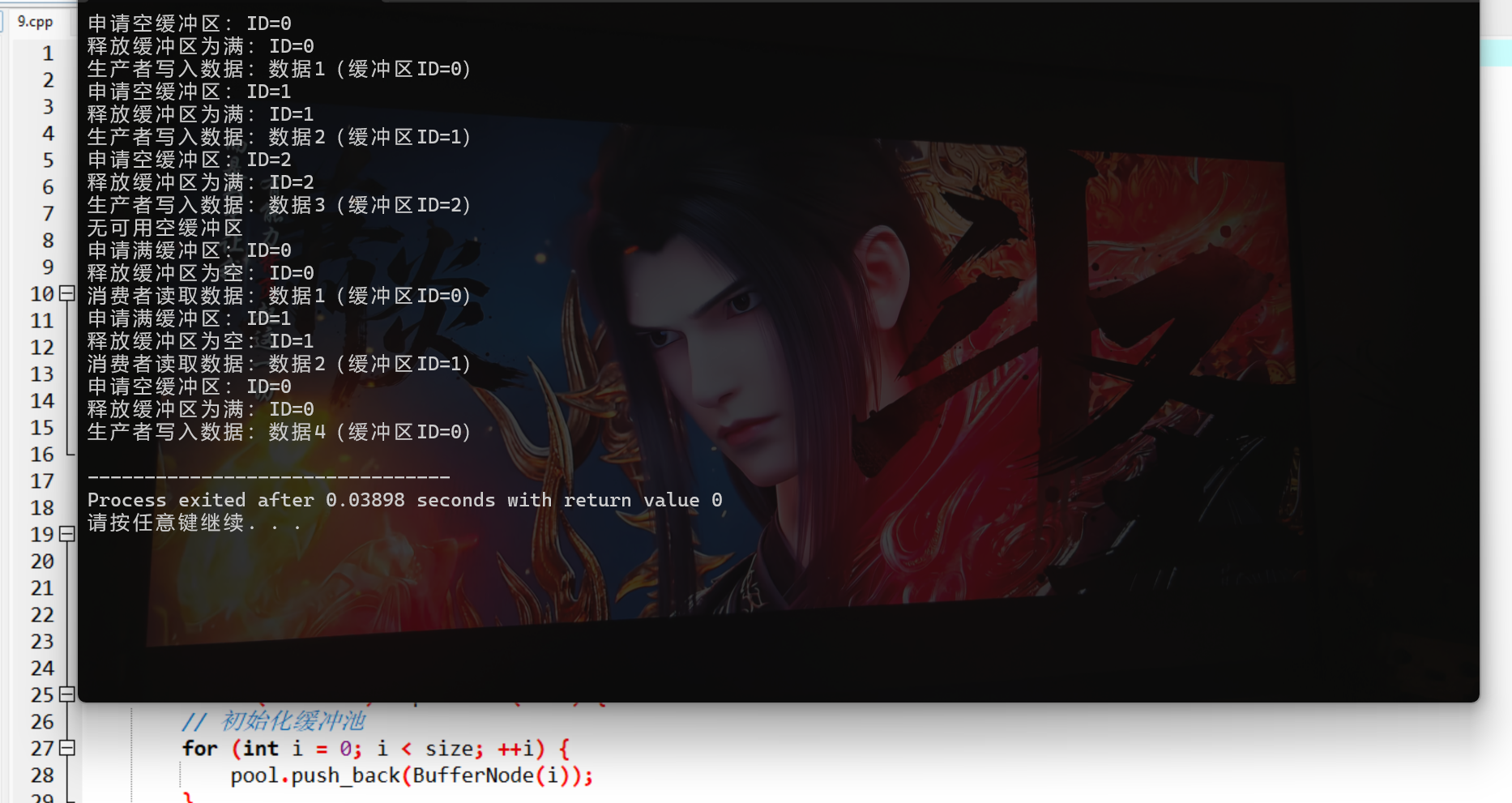
编译命令:g++ -std=c++98 buffer_pool.cpp -o buffer_pool && ./buffer_pool。
总结
核心知识点回顾
- I/O 系统的核心是高效、统一地完成 CPU 与外设的数据交互,核心模型包括中断驱动、DMA 等;
- 设备驱动程序是硬件与操作系统的 "翻译官",而设备无关层屏蔽了设备差异,实现 "一次编写,多设备兼容";
- 缓冲区(单缓冲、双缓冲、循环缓冲)缓解 CPU 与外设的速度差异,磁盘调度算法(SCAN/SSTF)优化寻道时间,是提升 I/O 效率的核心手段。
实操关键点
- 所有代码均基于 C++98 标准编写,可直接编译运行;
- 核心案例(中断处理、设备驱动、磁盘调度)覆盖本章高频考点,建议动手调试理解逻辑;
- 架构图 / 流程图的 Mermaid 代码可直接复制到 Mermaid 编辑器生成高清图,提示词可用于 AI 工具生成更美观的架构图。
如果本文对你有帮助,欢迎点赞、收藏、关注!有任何问题,评论区交流~