以配置非自定义bean来演示bean的实例化方式
一、以实例化非自定义bean--Date来演示bean的实例化--工厂实例化(非静态)
1.1原理
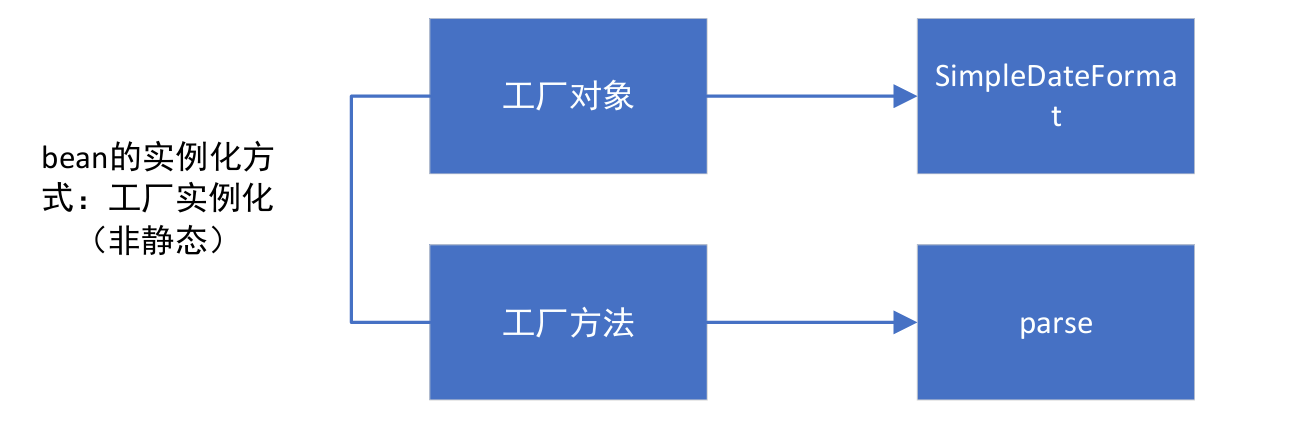
1.2具体步骤
applicationContext.xml:
java
<!--    先是建立工厂-->
    <bean class="java.text.SimpleDateFormat" id="simpleDateFormat">
        <constructor-arg name="pattern" value="yyyy-MM-dd HH:mm:ss"/>
    </bean>
<!--    然后使用工厂进行实例化,调用工厂,和工厂方法实例化-->
    <bean class="java.util.Date" id="date" factory-bean="simpleDateFormat" factory-method="parse">
        <constructor-arg name="source" value="2020-05-05 09:09:09"/>
    </bean>
测试:
java
package com.itheima.test;

import com.alibaba.druid.pool.DruidDataSource;
import com.itheima.dao.impl.UserDaoImpl;
import com.itheima.service.UserService;
import com.mysql.jdbc.Connection;
import org.springframework.beans.factory.support.DefaultListableBeanFactory;
import org.springframework.beans.factory.xml.XmlBeanDefinitionReader;
import org.springframework.context.ApplicationContext;
import org.springframework.context.support.ClassPathXmlApplicationContext;

import javax.xml.bind.annotation.XmlAccessOrder;
import java.sql.DriverManager;

public class BeanFactoryTest {
    public static void main(String[] args) {
//        直接使用ApplicationContex来进行加载
        ApplicationContext applicationContext = new ClassPathXmlApplicationContext("applicationContext_beanfac.xml");


//        先定义一个类,这类似于创建工厂
//        SimpleDateFormat simpleDateFormat = new SimpleDateFormat("yyyy-MM--dd HH:mm:ss");
////        然后是使用
//        Date date =simpleDateFormat.parse("2020-05-05 09:09:09");
        Object date = applicationContext.getBean("date");
        System.out.println(date);

    }
}
结果:

二、以实例化非自定义bean--SqlSessionFactory来演示bean的几种实例化方式
先降维吧,先不配置xml文件:
java
//先加载xml文件
//        以输入流来接收(这实际上是相当于静态方法)
        InputStream in = Resources.getResourceAsStream("mybatis-cofig.xml");
////        再是创建构造器,无参构造
        SqlSessionFactoryBuilder builder = new SqlSessionFactoryBuilder();
////        再是创建工厂
SqlSessionFactory sqlSessionFactory = builder.build(in);实际上配置bean大体上可以分为:构造函数配置和工厂方法,具体有可以分为有参和无参、静态工厂方法和非静态工厂方法,可以看我的另一篇博文,已经进行详细总结:https://blog.csdn.net/2301_80749359/article/details/155668108?fromshare=blogdetail&sharetype=blogdetail&sharerId=155668108&sharerefer=PC&sharesource=2301_80749359&sharefrom=from_link,下面直接上手:
2.1先做好实验准备
去mabatis官网下载官方文档,配好它的配置文件,然后自己写好相关信息即可。
jade
<?xml version="1.0" encoding="UTF-8" ?>
<!DOCTYPE configuration
  PUBLIC "-//mybatis.org//DTD Config 3.0//EN"
  "https://mybatis.org/dtd/mybatis-3-config.dtd">
<configuration>
  <environments default="development">
    <environment id="development">
      <transactionManager type="JDBC"/>
      <dataSource type="POOLED">
        <property name="driver" value="${driver}"/>
        <property name="url" value="${url}"/>
        <property name="username" value="${username}"/>
        <property name="password" value="${password}"/>
      </dataSource>
    </environment>
  </environments>
  <mappers>
    <mapper resource="org/mybatis/example/BlogMapper.xml"/>
  </mappers>
</configuration>
2.2具体步骤:
applicationContext.xml:
java
<!--    工厂方式实例化:静态工厂方法-->
<!--    指定工厂、工厂方法-->
    <bean class="org.apache.ibatis.io.Resources" factory-method="getResourceAsStream" id="in">
<!--        需要参数-->
        <constructor-arg name="resource" value="mybatis-cofig.xml"/>
    </bean>
<!--构造方法实例化:无参构造-->
    <bean class="org.apache.ibatis.session.SqlSessionFactoryBuilder" id="builder"></bean>

<!--    工厂方式实例化:实例化工厂方法-->
<!--    指定工厂和工厂方法-->
    <bean id="sqlSessionFactory" class="org.apache.ibatis.session.SqlSessionFactory" factory-bean="builder" factory-method="build">
        <constructor-arg name="inputStream" ref="in"/>
    </bean>
测试:
java
//获取bean:sqlSessionFactory
      SqlSessionFactory sqlSessionFactory = (SqlSessionFactory) applicationContext.getBean("sqlSessionFactory");
//      获取SqlSession
      SqlSession sqlSession = sqlSessionFactory.openSession();
      System.out.println(sqlSession);
结果:
