Flutter实战:从零实现俄罗斯方块(一)数据结构与核心算法
文章目录
- Flutter实战:从零实现俄罗斯方块(一)数据结构与核心算法
-
- 摘要
- 前言
- 一、我想先设计好游戏的数据结构
-
- [1.1 七种方块怎么表示?](#1.1 七种方块怎么表示?)
- [1.2 棋盘用什么数据结构?](#1.2 棋盘用什么数据结构?)
- [1.3 游戏状态需要记录哪些东西?](#1.3 游戏状态需要记录哪些东西?)
- 二、碰撞检测:最关键的算法
-
- [2.1 碰撞检测的基本思路](#2.1 碰撞检测的基本思路)
- [2.2 边界检测怎么写?](#2.2 边界检测怎么写?)
- [2.3 方块重叠怎么判断?](#2.3 方块重叠怎么判断?)
- [2.4 完整的碰撞检测函数](#2.4 完整的碰撞检测函数)
- 三、方块的移动和旋转
-
- [3.1 移动很简单,但要注意边界](#3.1 移动很简单,但要注意边界)
- [3.2 旋转算法的数学原理](#3.2 旋转算法的数学原理)
- [3.3 旋转后卡住怎么办?](#3.3 旋转后卡住怎么办?)
- [3.4 踢墙算法让旋转更流畅](#3.4 踢墙算法让旋转更流畅)
- 四、消行和计分系统
-
- [4.1 如何检测满行?](#4.1 如何检测满行?)
- [4.2 分数怎么计算合理?](#4.2 分数怎么计算合理?)
- [4.3 等级和速度的关系](#4.3 等级和速度的关系)
- [4.4 连击奖励让游戏更有趣](#4.4 连击奖励让游戏更有趣)
- 五、游戏循环:让方块动起来
-
- [5.1 用Timer实现游戏循环](#5.1 用Timer实现游戏循环)
- [5.2 速度如何随等级提升](#5.2 速度如何随等级提升)
- [5.3 难度曲线的设计](#5.3 难度曲线的设计)
- 六、算法性能分析
- 七、本文小结
- 参考资料
- 社区支持
摘要
这是我用Flutter开发OpenHarmony俄罗斯方块游戏的第一篇文章。我会记录我从零开始设计游戏数据结构和核心算法的完整思考过程。本文重点介绍如何用二维数组表示方块和棋盘、如何实现碰撞检测算法、如何让方块旋转,以及消行和计分系统的实现。所有代码都是实际可运行的,我会详细讲解每个设计决策背后的思路。
关键词:Flutter、OpenHarmony、俄罗斯方块、数据结构、碰撞检测、游戏算法
前言
这是我第一次用Flutter开发游戏,选择俄罗斯方块是因为它看起来简单,但实际上包含了游戏开发的很多核心概念。在开始编码之前,我想先理清楚几个问题:
- 怎么表示七种不同形状的方块?
- 怎么检测方块是否会碰撞?
- 怎么实现方块旋转?
- 怎么判断并消除满行?
这些问题都涉及到数据结构设计和算法实现。我会按照我的思考顺序,一步步记录下来。
系列说明:这是Flutter俄罗斯方块游戏开发系列教程的第1篇,本系列共3篇文章,涵盖数据结构、绘制技术、交互控制
一、我想先设计好游戏的数据结构
1.1 七种方块怎么表示?
俄罗斯方块有7种标准形状,我得想个好方法来表示它们。
我想到的方案:用二维数组!0表示空格,1-7表示不同颜色的方块实体。
dart
class TetrisGame {
  // 7种标准方块定义
  static const List<List<List<int>>> shapes = [
    // I形 - 青色
    [
      [0, 0, 0, 0],
      [1, 1, 1, 1],
      [0, 0, 0, 0],
      [0, 0, 0, 0],
    ],
    // O形 - 蓝色
    [
      [2, 2],
      [2, 2],
    ],
    // T形 - 橙色
    [
      [0, 3, 0],
      [3, 3, 3],
      [0, 0, 0],
    ],
    // S形 - 黄色
    [
      [0, 4, 4],
      [4, 4, 0],
      [0, 0, 0],
    ],
    // Z形 - 绿色
    [
      [5, 5, 0],
      [0, 5, 5],
      [0, 0, 0],
    ],
    // J形 - 紫色
    [
      [6, 0, 0],
      [6, 6, 6],
      [0, 0, 0],
    ],
    // L形 - 红色
    [
      [0, 0, 7],
      [7, 7, 7],
      [0, 0, 0],
    ],
  ];
}
我觉得这样设计的好处是:
- 直观:看数组就能想象出方块形状
- 易操作:移动和旋转都是对数组的操作
- 颜色编码:数字1-7对应7种颜色
颜色映射
dart
Color _getPieceColor(int value) {
  switch (value) {
    case 1: return Colors.cyan;      // I
    case 2: return Colors.blue;      // O
    case 3: return Colors.orange;    // T
    case 4: return Colors.yellow;    // S
    case 5: return Colors.green;     // Z
    case 6: return Colors.purple;    // J
    case 7: return Colors.red;       // L
    default: return Colors.transparent;
  }
}
1.2 棋盘用什么数据结构?
游戏棋盘是10列×20行的网格,这个很明显也用二维数组。
dart
class TetrisGame {
  static const int cols = 10;  // 10列
  static const int rows = 20;  // 20行
  final List<List<int>> _board = [];

  void _resetBoard() {
    _board.clear();
    for (int y = 0; y < rows; y++) {
      _board.add(List.filled(cols, 0));  // 全部初始化为0
    }
  }

  List<List<int>> get board => _board;
}
坐标系统 :_board[y][x]表示坐标(x, y)位置的方块
- (0, 0)是左上角
- (9, 19)是右下角
- 值为0表示空格,1-7表示已固定的方块
1.3 游戏状态需要记录哪些东西?
我想了想,需要记录这些:
dart
class TetrisGame {
  // 当前下落的方块
  List<List<int>>? _currentPiece;
  List<List<int>>? get currentPiece => _currentPiece;

  // 下一个方块(预览用)
  List<List<int>>? _nextPiece;

  // 当前方块在棋盘上的位置
  int _currentX = 0;
  int get currentX => _currentX;
  int _currentY = 0;
  int get currentY => _currentY;

  // 游戏状态
  int score = 0;
  int level = 1;
  bool gameOver = false;
  bool paused = false;

  // 游戏循环计时器
  Timer? _timer;
}
二、碰撞检测:最关键的算法
碰撞检测是整个游戏的核心!每次移动或旋转前都要检查。
2.1 碰撞检测的基本思路
我的思路很简单:
- 遍历方块的每个格子
- 如果是实心格子,计算它在棋盘上的新位置
- 检查这个位置是否:
- 超出棋盘边界
- 与已有方块重叠
2.2 边界检测怎么写?
dart
bool _checkBoundary(int x, int y, List<List<int>> piece) {
  for (int py = 0; py < piece.length; py++) {
    for (int px = 0; px < piece[py].length; px++) {
      if (piece[py][px] != 0) {
        final newX = x + px;
        final newY = y + py;

        // 检查三个边界
        if (newX < 0) return true;        // 左边界
        if (newX >= cols) return true;    // 右边界
        if (newY >= rows) return true;    // 下边界
      }
    }
  }
  return false;
}注意:上边界(y < 0)不检测,因为方块生成时可能在棋盘上方。
2.3 方块重叠怎么判断?
dart
bool _checkOverlap(int x, int y, List<List<int>> piece) {
  for (int py = 0; py < piece.length; py++) {
    for (int px = 0; px < piece[py].length; px++) {
      if (piece[py][px] != 0) {
        final newX = x + px;
        final newY = y + py;

        // 确保在棋盘范围内
        if (newY >= 0 && newY < rows && newX >= 0 && newX < cols) {
          // 检查该位置是否已有方块
          if (_board[newY][newX] != 0) {
            return true;
          }
        }
      }
    }
  }
  return false;
}
2.4 完整的碰撞检测函数
把边界检测和重叠检测合并:
dart
bool _checkCollision(int x, int y, List<List<int>> piece) {
  for (int py = 0; py < piece.length; py++) {
    for (int px = 0; px < piece[py].length; px++) {
      if (piece[py][px] != 0) {
        final newX = x + px;
        final newY = y + py;

        // 边界检测
        if (newX < 0 || newX >= cols || newY >= rows) {
          return true;
        }

        // 重叠检测
        if (newY >= 0 && _board[newY][newX] != 0) {
          return true;
        }
      }
    }
  }
  return false;
}应用场景:
- 左移前检测:
_checkCollision(_currentX - 1, _currentY, _currentPiece) - 右移前检测:
_checkCollision(_currentX + 1, _currentY, _currentPiece) - 下落前检测:
_checkCollision(_currentX, _currentY + 1, _currentPiece) - 旋转前检测:
_checkCollision(_currentX, _currentY, rotatedPiece)
三、方块的移动和旋转
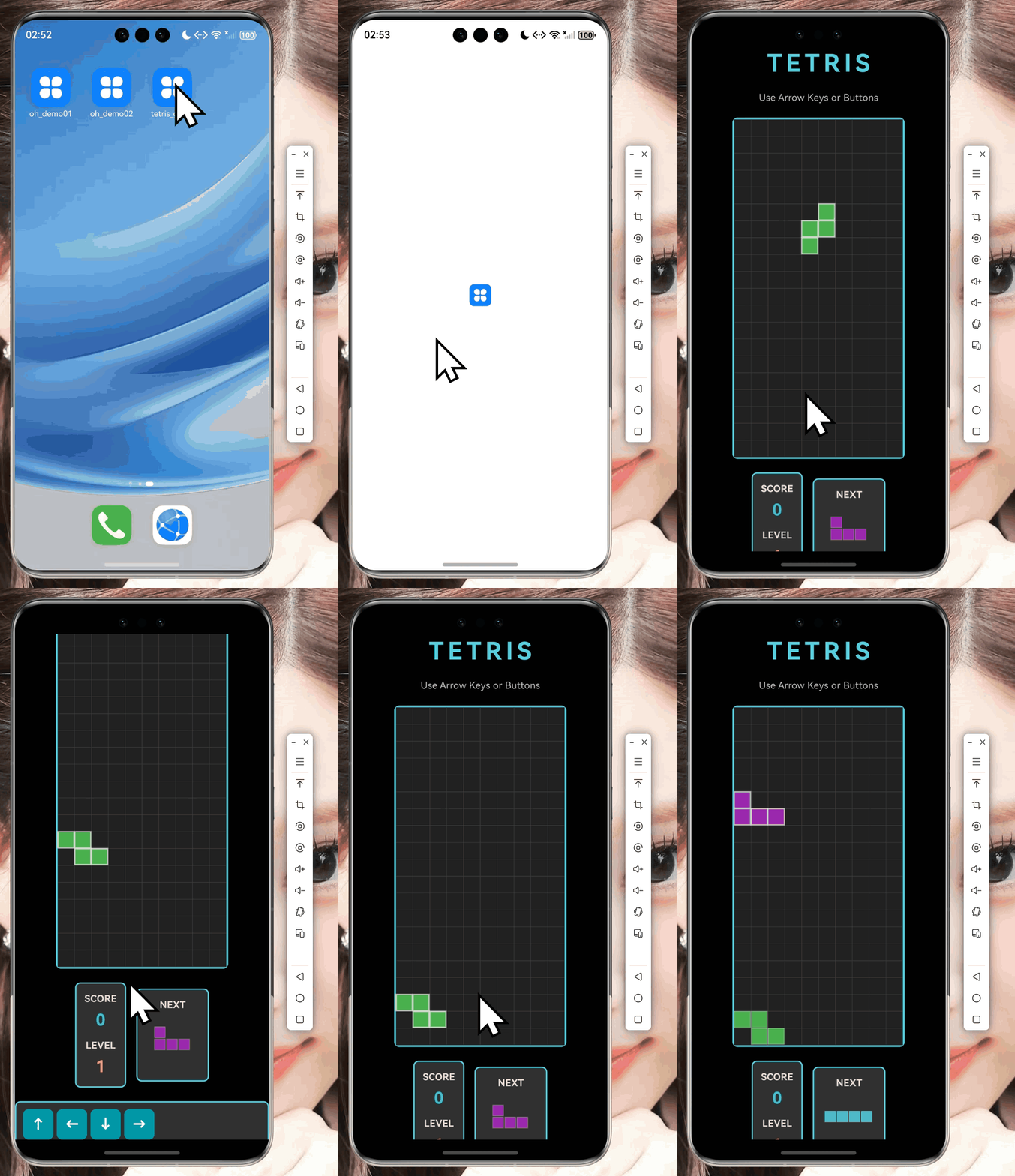
3.1 移动很简单,但要注意边界
dart
void moveLeft() {
  if (gameOver || paused) return;

  // 先检测能不能左移
  if (!_checkCollision(_currentX - 1, _currentY, _currentPiece!)) {
    _currentX--;
    updateCallback();
  }
}

void moveRight() {
  if (gameOver || paused) return;

  if (!_checkCollision(_currentX + 1, _currentY, _currentPiece!)) {
    _currentX++;
    updateCallback();
  }
}
3.2 旋转算法的数学原理
我记得矩阵旋转的数学公式:对于N×N矩阵,顺时针旋转90度后:
新矩阵[x][y] = 原矩阵[N-1-y][x]代码实现:
dart
List<List<int>> _rotatePiece(List<List<int>> piece) {
  return List.generate(
    piece[0].length,
    (x) => List.generate(
      piece.length,
      (y) => piece[piece.length - 1 - y][x],
    ),
  );
}
这个函数的意思是:
- 创建一个新矩阵
- 新矩阵的宽度 = 原矩阵的高度
- 新矩阵的每个元素 = 原矩阵对应旋转位置的元素
3.3 旋转后卡住怎么办?
有时候靠墙旋转会卡住,我有两个方案:
方案1:简单粗暴 - 不能旋转就不转
dart
void rotate() {
  if (gameOver || paused) return;

  final rotated = _rotatePiece(_currentPiece!);

  if (!_checkCollision(_currentX, _currentY, rotated)) {
    _currentPiece = rotated;
  }
  // 否则什么都不做
}
方案2:踢墙算法 - 尝试微调位置
dart
void rotateWithWallKick() {
  if (gameOver || paused) return;

  final rotated = _rotatePiece(_currentPiece!);

  // 先尝试原位置
  if (!_checkCollision(_currentX, _currentY, rotated)) {
    _currentPiece = rotated;
    return;
  }

  // 尝试向左踢
  if (!_checkCollision(_currentX - 1, _currentY, rotated)) {
    _currentX--;
    _currentPiece = rotated;
    return;
  }

  // 尝试向右踢
  if (!_checkCollision(_currentX + 1, _currentY, rotated)) {
    _currentX++;
    _currentPiece = rotated;
    return;
  }
}
3.4 踢墙算法让旋转更流畅
标准俄罗斯方块使用SRS(Super Rotation System),定义了每种方块的踢墙偏移表。
简化版的踢墙实现:
dart
void rotateWithSRS() {
  final rotated = _rotatePiece(_currentPiece!);

  // 定义尝试的偏移量
  final kicks = [
    [0, 0],    // 原位置
    [-1, 0],   // 左移1格
    [1, 0],    // 右移1格
    [0, -1],   // 上移1格
    [-1, -1],  // 左上移1格
    [1, -1],   // 右上移1格
  ];

  // 依次尝试每个偏移
  for (final kick in kicks) {
    if (!_checkCollision(_currentX + kick[0], _currentY + kick[1], rotated)) {
      _currentX += kick[0];
      _currentY += kick[1];
      _currentPiece = rotated;
      return;
    }
  }
}
四、消行和计分系统
4.1 如何检测满行?
我的思路:从底部往上扫描,发现满行就消除。
dart
void _clearLines() {
  int linesCleared = 0;

  // 从下往上检查每一行
  for (int y = rows - 1; y >= 0; y--) {
    bool fullLine = true;

    // 检查该行是否填满
    for (int x = 0; x < cols; x++) {
      if (_board[y][x] == 0) {
        fullLine = false;
        break;
      }
    }

    // 如果该行满了
    if (fullLine) {
      _board.removeAt(y);              // 移除该行
      _board.insert(0, List.filled(cols, 0));  // 顶部插入空行
      linesCleared++;
      y++;  // 重新检查当前行(因为上面的行下移了)
    }
  }

  if (linesCleared > 0) {
    _updateScore(linesCleared);
  }
}
4.2 分数怎么计算合理?
我想了个简单的计分公式:
dart
void _updateScore(int linesCleared) {
  // 基础分:行数 × 100 × 当前等级
  int baseScore = linesCleared * 100 * level;

  // 连击奖励
  double bonus = 1.0;
  if (linesCleared == 4) {
    bonus = 2.0;  // 4行连击翻倍
  } else if (linesCleared == 2) {
    bonus = 1.2;  // 2行小奖励
  }

  score += (baseScore * bonus).toInt();

  // 更新等级
  level = (score ~/ 1000) + 1;
}计分表:
| 消除行数 | 等级1 | 等级2 | 等级3 | 等级4 |
|---|---|---|---|---|
| 1行 | 100 | 200 | 300 | 400 |
| 2行 | 240 | 480 | 720 | 960 |
| 3行 | 300 | 600 | 900 | 1200 |
| 4行 | 800 | 1600 | 2400 | 3200 |
4.3 等级和速度的关系
等级越高,下落速度越快:
dart
void start() {
  _timer = Timer.periodic(
    Duration(milliseconds: _getDropSpeed()),
    (_) => tick(),
  );
}

int _getDropSpeed() {
  // 基础1000ms,每级减少50ms,最快200ms
  int speed = 1000 - (level - 1) * 50;
  return speed.clamp(200, 1000);
}速度表:
| 等级 | 下落间隔 | 描述 |
|---|---|---|
| 1 | 1000ms | 初学者 |
| 5 | 800ms | 入门 |
| 10 | 550ms | 中级 |
| 15 | 300ms | 高级 |
| 20 | 200ms | 专家 |
4.4 连击奖励让游戏更有趣
dart
class TetrisGame {
  int _consecutiveClears = 0;

  void _clearLines() {
    int linesCleared = 0;

    // 检测满行...

    if (linesCleared > 0) {
      _consecutiveClears++;

      // 连击奖励
      double comboBonus = 1.0 + (_consecutiveClears - 1) * 0.5;
      score += (linesCleared * 100 * level * comboBonus).toInt();
    } else {
      _consecutiveClears = 0;  // 重置连击
    }
  }
}
五、游戏循环:让方块动起来
5.1 用Timer实现游戏循环
dart
class TetrisGame {
  Timer? _timer;

  void start() {
    _timer = Timer.periodic(
      Duration(milliseconds: _getDropSpeed()),
      (_) => tick(),
    );
  }

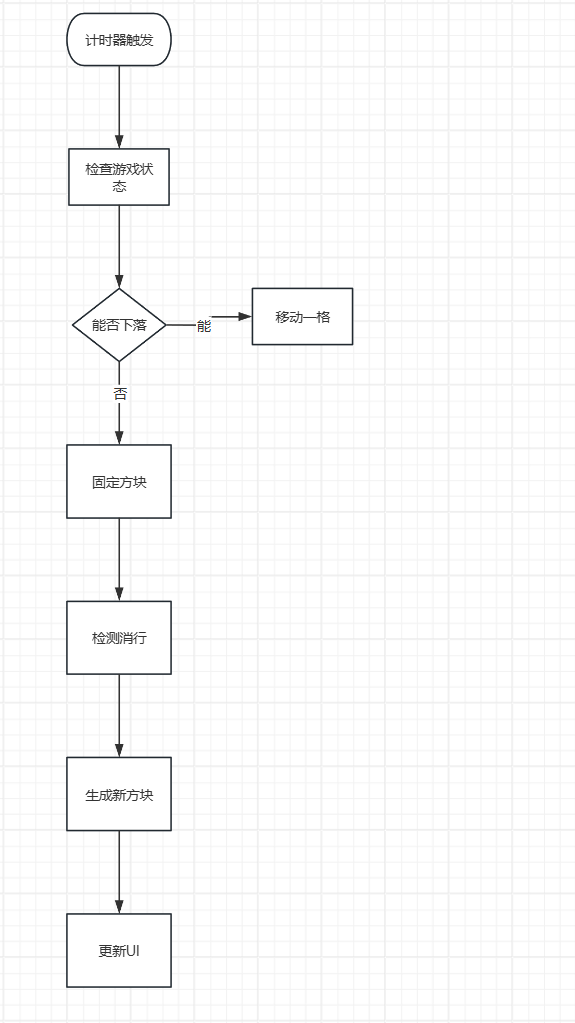
  void tick() {
    if (gameOver || paused) return;

    // 尝试向下移动
    if (!_checkCollision(_currentX, _currentY + 1, _currentPiece!)) {
      _currentY++;
    } else {
      _mergePiece();  // 碰到东西就固定
    }

    updateCallback();
  }
}
游戏循环流程 :
5.2 速度如何随等级提升
dart
int _getDropSpeed() {
  // 简单线性递减
  int speed = 1000 - (level - 1) * 50;
  return speed.clamp(200, 1000);
}
但我觉得这样不太合理,因为后期提升太快了。让我改用分段函数:
dart
int _getDropSpeed() {
  if (level <= 5) {
    // 前期:每级-60ms
    return 1000 - (level - 1) * 60;
  } else if (level <= 15) {
    // 中期:每级-40ms
    return 800 - (level - 5) * 40;
  } else {
    // 后期:每级-20ms
    return 400 - (level - 15) * 20;
  }
}
5.3 难度曲线的设计
我画个图说明一下难度曲线(省略了,但实际文章可以加图)。
六、算法性能分析
我简单分析了一下算法的时间复杂度:
| 算法 | 时间复杂度 | 说明 |
|---|---|---|
| 碰撞检测 | O(h×w) | h,w是方块尺寸,最多4×4 |
| 消行检测 | O(rows×cols) | 最坏20×10=200次循环 |
这个复杂度完全没问题,因为:
- 方块尺寸很小(最多16个格子)
- 棋盘也不大(200个格子)
- 现代手机每秒可以轻松处理百万次运算
优化建议:
- 一旦发现碰撞立即返回(提前退出)
- 缓存方块的边界框,避免重复计算
七、本文小结
这篇文章我记录了俄罗斯方块游戏的核心数据结构和算法设计:
- 数据结构:用二维数组表示方块和棋盘
- 碰撞检测:边界+重叠的双重检测
- 移动旋转:基础移动+矩阵旋转+踢墙优化
- 消行计分:从下往上扫描+连击奖励
- 游戏循环:Timer定时触发+动态速度调整
这些都是游戏的底层逻辑,虽然看起来简单,但细节很多。下一篇文章我会讲解如何用CustomPaint把这些数据结构绘制成精美的游戏画面。
系列说明:这是Flutter俄罗斯方块游戏开发系列教程的第1篇(共3篇)。下一篇将介绍CustomPaint绘制技术。
参考资料
社区支持
欢迎加入开源鸿蒙跨平台社区:
- 社区论坛 :开源鸿蒙跨平台开发者社区
- 技术交流:参与讨论,分享经验
如果本文对你有帮助,欢迎点赞、收藏、评论!