0. 引言
很久没有写点东西,最近投入工程实践的时间更多一些,涉及一些框架设计和工程研发,有很多实操的工作,其中涉及不少模型使用工具的场景,也趁此机会把模型调用工具的一些方法系统梳理下,方便在落地实践中权衡方法利弊,做好决策。
本文主要参考OpenAI和Anthropic官网的文档、API、示例梳理工具调用的主要三种方式:Plugin 、**Function Call **和 MCP
首先我们看看模型调用工具发展的时间线,如图1所示:
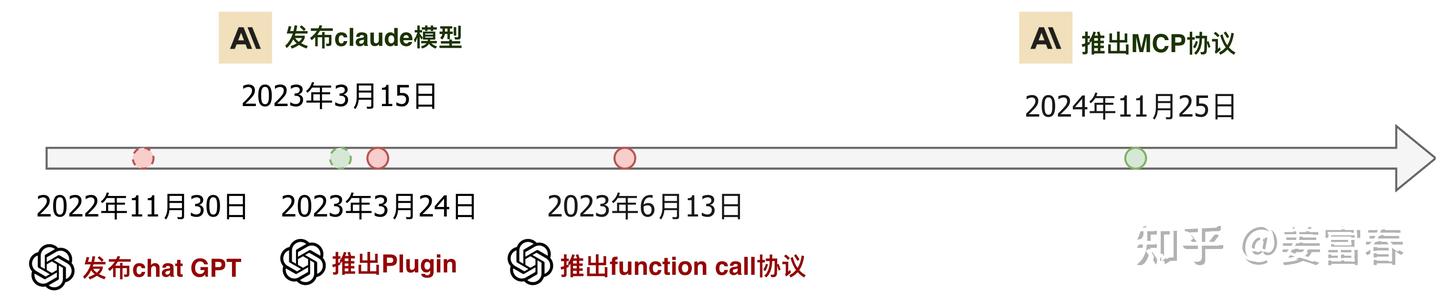
图1、模型调用工具发展时间线
时间线
- 2023年3月24日,Open AI 推出plugin协议,支持应用级插件协议接入模型
- 2023年6月13日,Open AI 推出function call协议,支持原子化函数接入模型 (模型版本gpt-3.5-turbo-0613)
- 2024年11月25日,Anthropic推出 MCP协议,进一步标准化了function call的协议,同时扩展了模型多上下文协议
接下来,我们分别来详细了解下这三种协议~
1. plugin - 应用级工具调用协议
2023年3月份,OpenAI正式发布插件功能:ChatGPT Plugins。ChatGPT实现了对插件的支持,补齐数据时效性的短板,拥有了联网访问最新信息,进行数学计算、代码运行或直接调用第三方API服务等一系列能力。从最初官方发布的11款插件,到最终1000多个,用户已经可以实现在ChatGPT上进行食谱热量计算、在线订购食材、机票等等。ChatGPT Plugins应用市场上的一些插件示例,如下图2所示。
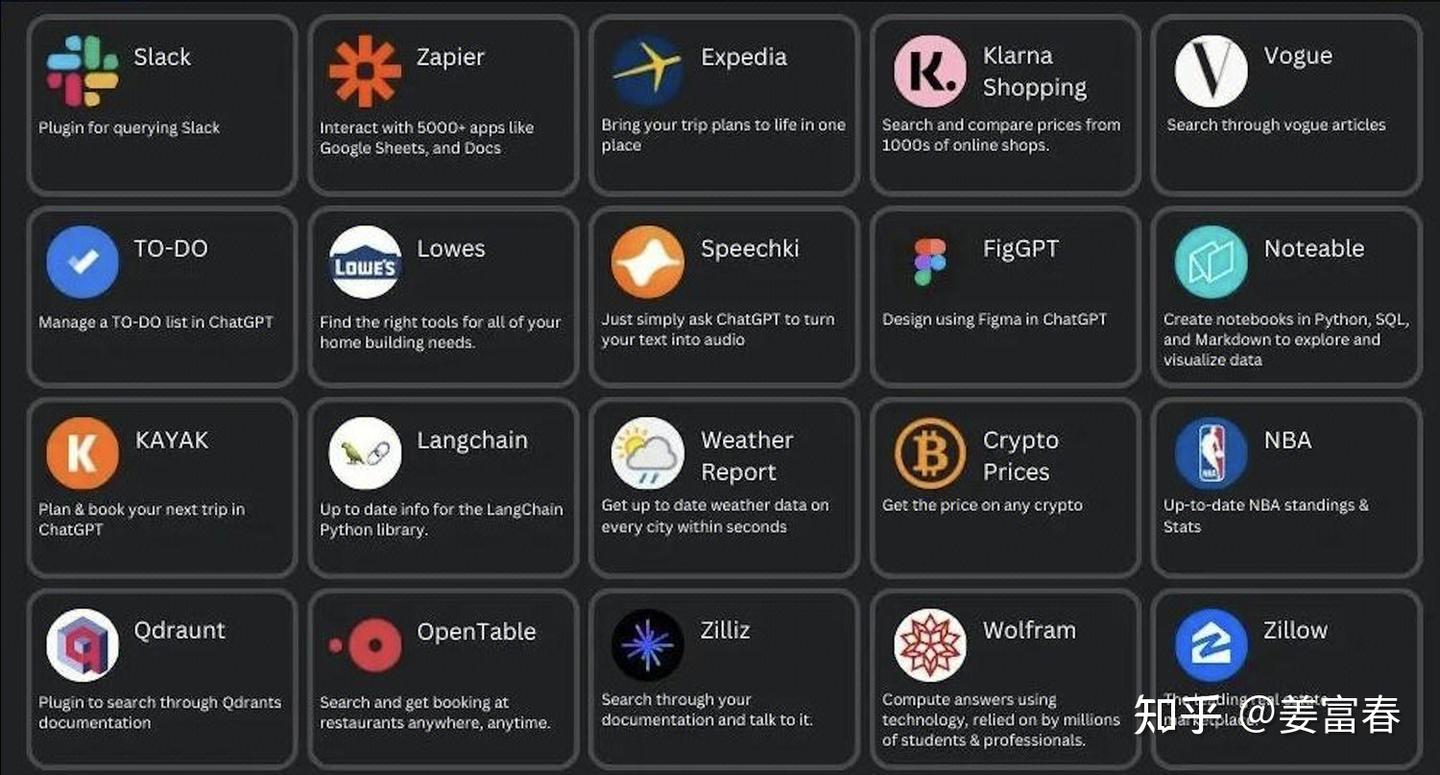
图2、OpenAI Plugins
plugin定位本身是应用级工具,是比function更大粒度的工具,只能在OpenAI得应用市场是开发。要显示注册到模型中。
插件开发人员通过编写**manifest **文件和 OpenAPI工具描述文件,指定一个或多个开放的 API Endpoint。这些文件定义了插件的功能,允许 ChatGPT读取这些文件,并调用开发人员定义的 API Server。
1.1. plugin实现三要素
- manifest.json:plugin的声明文件,描述plugin的一些meta信息,包括:描述,访问URL,logo等
- plugin server:plugin server实现,开放对外可访问的接口
- openapi.yaml: 设置和定义 OpenAPI 规范以匹配本地或远程服务器,即plugin server的接口描述文件
1.2. plugin例子: 待办事项列表Plugin
下面我们以官网的一个示例,来看看plugin开发的细节。示例是开发一个备忘录插件,实现一个对备忘条目增,删,查的功能。
1)manifest.json
json
{
  "schema_version": "v1",
  "name_for_human": "TODO Plugin (no auth)",
  "name_for_model": "todo",
  "description_for_human": "Plugin for managing a TODO list, you can add, remove and view your TODOs.",
  "description_for_model": "Plugin for managing a TODO list, you can add, remove and view your TODOs.",
  "auth": {
    "type": "none"
  },
  "api": {
    "type": "openapi",
    "url": "PLUGIN_HOSTNAME/openapi.yaml",
    "is_user_authenticated": false
  },
  "logo_url": "PLUGIN_HOSTNAME/logo.png",
  "contact_email": "dummy@email.com",
  "legal_info_url": "http://www.example.com/legal"
}
2)plugin server实现
python
import json

import quart
import quart_cors
from quart import request

app = quart_cors.cors(quart.Quart(__name__), allow_origin="https://chat.openai.com")

_TODOS = {}


@app.post("/todos/<string:username>")
async def add_todo(username):
    request = await quart.request.get_json(force=True)
    if username not in _TODOS:
        _TODOS[username] = []
    _TODOS[username].append(request["todo"])
    return quart.Response(response='OK', status=200)


@app.get("/todos/<string:username>")
async def get_todos(username):
    return quart.Response(response=json.dumps(_TODOS.get(username, [])), status=200)


@app.delete("/todos/<string:username>")
async def delete_todo(username):
    request = await quart.request.get_json(force=True)
    todo_idx = request["todo_idx"]
    # fail silently, it's a simple plugin
    if 0 <= todo_idx < len(_TODOS[username]):
        _TODOS[username].pop(todo_idx)
    return quart.Response(response='OK', status=200)


@app.get("/logo.png")
async def plugin_logo():
    filename = 'logo.png'
    return await quart.send_file(filename, mimetype='image/png')


@app.get("/.well-known/ai-plugin.json")
async def plugin_manifest():
    host = request.headers['Host']
    with open("manifest.json") as f:
        text = f.read()
        text = text.replace("PLUGIN_HOSTNAME", f"https://{host}")
        return quart.Response(text, mimetype="text/json")


@app.get("/openapi.yaml")
async def openapi_spec():
    host = request.headers['Host']
    with open("openapi.yaml") as f:
        text = f.read()
        text = text.replace("PLUGIN_HOSTNAME", f"https://{host}")
        return quart.Response(text, mimetype="text/yaml")


def main():
    app.run(debug=True, host="0.0.0.0", port=5002)


if __name__ == "__main__":
    main()
3)openapi.yaml
yaml
openapi: 3.0.1
info:
  title: TODO Plugin
  description: A plugin that allows the user to create and manage a TODO list using ChatGPT. If you do not know the user's username, ask them first before making queries to the plugin. Otherwise, use the username "global".
  version: 'v1'
servers:
  - url: PLUGIN_HOSTNAME
paths:
  /todos/{username}:
    get:
      operationId: getTodos
      summary: Get the list of todos
      parameters:
      - in: path
        name: username
        schema:
            type: string
        required: true
        description: The name of the user.
      responses:
        "200":
          description: OK
          content:
            application/json:
              schema:
                $ref: '#/components/schemas/getTodosResponse'
    post:
      operationId: addTodo
      summary: Add a todo to the list
      parameters:
      - in: path
        name: username
        schema:
            type: string
        required: true
        description: The name of the user.
      requestBody:
        required: true
        content:
          application/json:
            schema:
              $ref: '#/components/schemas/addTodoRequest'
      responses:
        "200":
          description: OK
    delete:
      operationId: deleteTodo
      summary: Delete a todo from the list
      parameters:
      - in: path
        name: username
        schema:
            type: string
        required: true
        description: The name of the user.
      requestBody:
        required: true
        content:
          application/json:
            schema:
              $ref: '#/components/schemas/deleteTodoRequest'
      responses:
        "200":
          description: OK

components:
  schemas:
    getTodosResponse:
      type: object
      properties:
        todos:
          type: array
          items:
            type: string
          description: The list of todos.
    addTodoRequest:
      type: object
      required:
      - todo
      properties:
        todo:
          type: string
          description: The todo to add to the list.
          required: true
    deleteTodoRequest:
      type: object
      required:
      - todo_idx
      properties:
        todo_idx:
          type: integer
          description: The index of the todo to delete.
          required: true
插件开发好后,要在OpenAI的平台上发布插件,然后用户选择插件或模型自动调度来使用插件。如下图是ChatGPT里调用插件的效果视图。在回答问题前,会有弹出个插件使用的Bar,展开后可看到一些插件的返回内容。
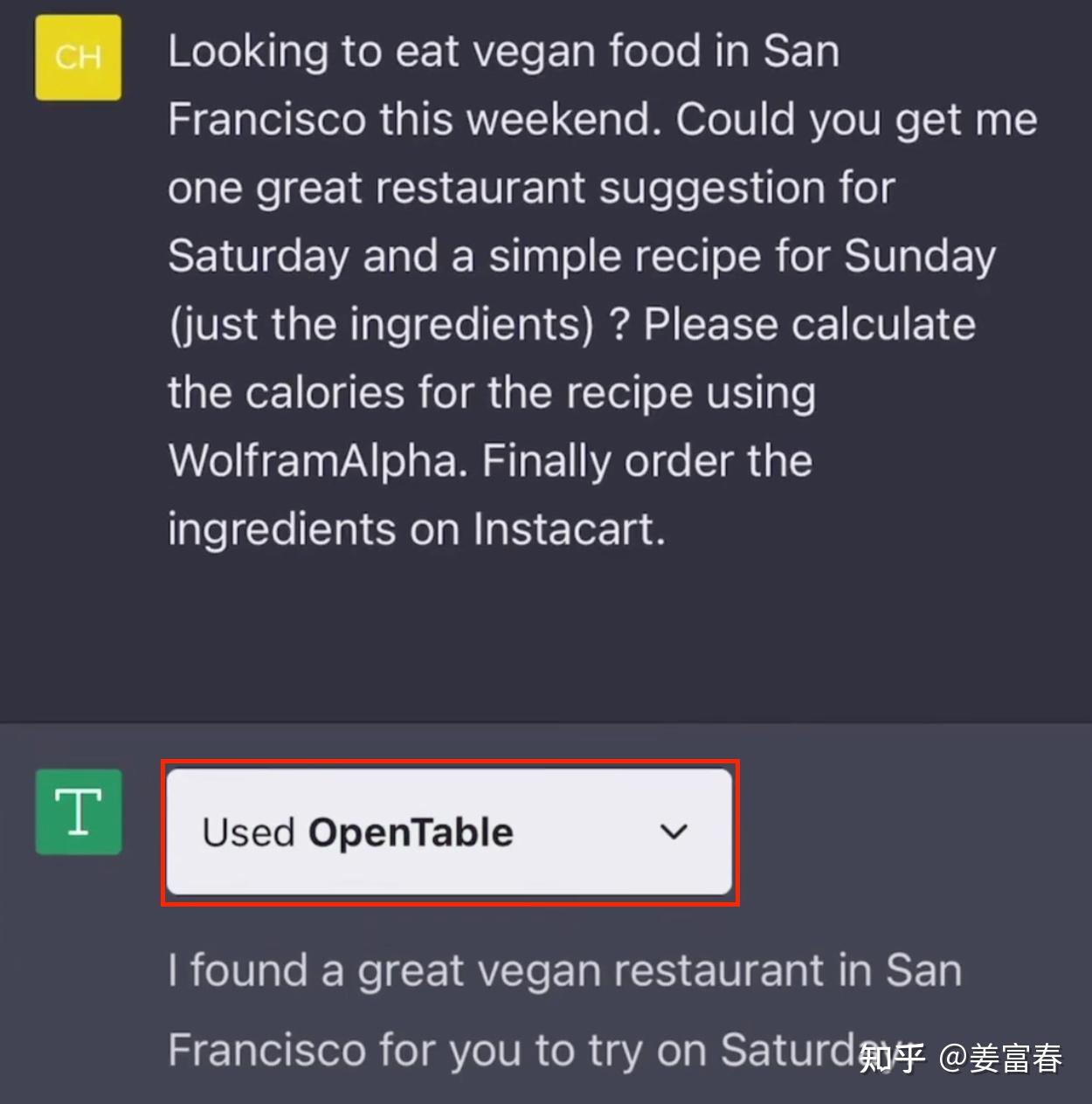
图3、ChatGPT调用OpenTable插件视图
1.3. plugin 总结
plugin本身实现的是应用级工具,类似于手机上APP store的应用程序。一个插件可以包含很多原子操作。
优势:plugin是个应用内聚的工具,集成了应用的多个算子函数提供给模型使用,有很好的用户交互体验
劣势:plugin一般比较大,模型需要分层理解插件(先理解plugin,再理解plugin内部的算子,模型调度流程较复杂),输入模型的OPEN API的格式信息密度较低。
由于Plugin的设计比较重;Open AI对插件内部与模型交互的协议较黑盒;各大公司也难以复线效果,导致Plugin并没有流行起来。
随着OpenAI内部的一些技术变革,2023年11月6日 在开发者大会上首次公布了GPTs(自定义GPT)的功能,并在2024年1月10日 正式上线。GPTs是一种Agent级的应用,这是一种更灵活、更强大的工具,允许用户根据自己的需求创建定制化的 AI 助手。GPTs 的功能已经全面覆盖了插件的能力,甚至提供了更多创新和个性化的选项。因此,ChatGPT 的 Plugin(插件)功能于 2024 年 3 月 19 日 起正式停止对新对话的支持,并于 2024 年 4 月 9 日 完全终止所有插件的使用,至此Plugin也退出了历史舞台。
2. function call - 原子级工具调用协议
plugin推出三个月之后,Open AI紧接着又推出了function call的协议,这是目前大家主流使用的方式,这种方式也被各大模型公司纷纷follow。
2.1. function call的流程
如下图4所示,function call与模型交互两次。
- 首先,将function描述信息与用户问题输入LLM模型,模型生成function call调用(模型输出function name + 实参)图1,2步
- 然后,执行工具调用,获取工具的返回结果图3步
- 最后,将工具结果再连同用户问题给到LLM模型,模型输出最终结果。图4,5步
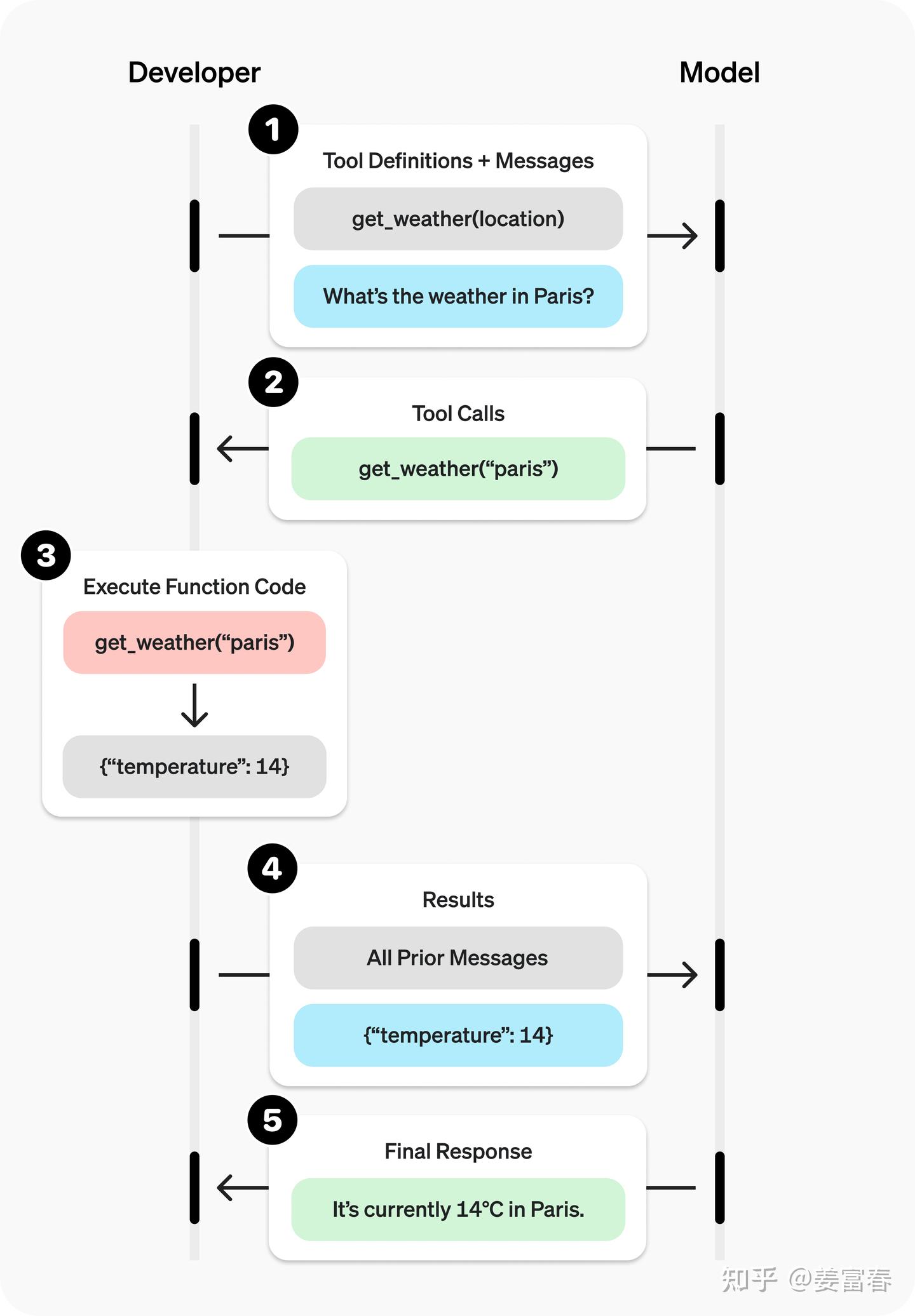
图4、function call执行流程
2.2. 源码实现(OpenAI官网示例)
1)将工具描述和用户输入传给模型
python3
from openai import OpenAI
import json

client = OpenAI()

tools = [{
    "type": "function",
    "name": "get_weather",
    "description": "Get current temperature for provided coordinates in celsius.",
    "parameters": {
        "type": "object",
        "properties": {
            "latitude": {"type": "number"},
            "longitude": {"type": "number"}
        },
        "required": ["latitude", "longitude"],
        "additionalProperties": False
    },
    "strict": True
}]

input_messages = [{"role": "user", "content": "What's the weather like in Paris today?"}]

response = client.responses.create(
    model="gpt-4.1",
    input=input_messages,
    tools=tools,
)
模型返回function call结果,包括函数明和调用函数的实参
json
[{
    "type": "function_call",
    "name": "get_weather",
    "arguments": "{\"latitude\":48.8566,\"longitude\":2.3522}"
}]
2) 执行函数调用
python3
tool_call = response.output[0]
args = json.loads(tool_call.arguments)
result = get_weather(args["latitude"], args["longitude"])
工具执行返回结果
json
# result
{"temparature": "14°C", "humidity": "30", ...... }
3) 把工具返回结果连同之前的上下文一起再给到模型
python3
input_messages.append(tool_call)      # append model's function call message
input_messages.append({               # append result message
    "type": "function_call_output",
    "call_id": tool_call.call_id,
    "output": str(result)
})

response_2 = client.responses.create(
    model="gpt-4.1",
    input=input_messages,
    tools=tools,
)
print(response_2.output_text)
模型输出最终答案(使用工具返回的信息回答)
json
"The current temperature in Paris is 14°C (57.2°F)."从上面的流程图和代码上看,Function Call的协议和使用是非常简洁和容易上手的。Function Call也成为真正流行起来的模型使用工具的协议。各大模型公司也纷纷follow Open AI的协议,国内的开源模型DeepSeek,Qwen都严格对齐OpenAI协议。
但Function Call能有效Work,保证稳定的触发,在工具实现上要注意很多细节,根据本人的实操经验和官网的一些指南,整理了如下工具使用的细则,供参考~
2.3. function call最佳实践细则
1)函数描述:编写清晰、详细的函数名、参数描述和使用说明
- 函数名应明确表达其用途:如 calculate_total_price() ✅ calc()❌。
- 每个参数都应有详细说明,包括:参数的含义,参数的类型,是否为必填项
- 封闭体系的参数,使用枚举类型,刻画数据。如: gender : {"type": "string", "enum": "男", "女"} ✅
- 明确说明函数的输出是什么,以及它的含义。
- 明确函数的边界,枚举示例刻画清楚什么样的请求能处理,什么样的请求不能处理;不能处理的示例特别要关注反复需要纠正的case。
- 函数使用能否通过"实习生测试": 根据函数描述,一个新手是否能看懂,并正确使用这个函数。如果能自助用好才是个好的实现。
工具描述范例:
python3
# 函数名清晰表达功能
  def get_weather(location, time):
    """
    根据用户提供的地点,获取天气查询信息。
    **参数说明**:
    - location: string, required, 只支持省,市,区三级地域。地域输入接收标准/规范地名。good参数:哈尔滨市, bad的参数:哈市
  	- time: string, optional, 时间参数,支持时间点(明天)和时间段(未来7天)输入
    **输出说明**:
    JSON格式输出,包括请求地域的温度、风力、湿度信息
    **边界说明**:
    - 可处理的需求:["北京天气", "黑龙江今天天气"]
    - 不可处理的需求:["天气太冷了如何保暖", "画一幅今天天气的画"]
    """
   # 函数实现
    ...
2)函数定义: 保持原子化设计,做好归一化能力
- 遵循模块化、单一职责设计原则。保持函数简洁、可测试、可复用。
- 做好归一化策略。对同一个参数的不同表述,保证稳定调启。如日期参数: 今天,2025-06-09, 6月9日,6.9, ...
- 可通过逻辑或工程推断的参数,不要暴露给模型。如save_message(user_id, message)根据用户ID存储会话,user_id可通过session会话或全局变量获取,不要让模型来填。
3)模型输入:控制函数数量以提高模型调用准确性
- 函数数量越少,模型越容易理解并正确调用。推荐在任意时刻使用的函数数量不超过20个
- 通过增加Tool Search Service,实现对工具的高召低准的检索,截断Top List减少输入给模型的工具上下文
2.4. function call的机制有哪些不足?
- 开发耦合度高:function必须在服务内实现,与LLM保持同进程使用。
- 工具复用性差:function的实现是语言敏感的,python模型接口,只能调用python工具, go模型接口,只能调用go实现的工具
由于function call本身存在开发耦合度高,复用性差的问题,导致开发人员在做工具和模型上下游联合开发时会有较多的服务级依赖,影响协同的效率和大家对分模块实现的专注度。为了解决function call的不足,Anthropic于24年11月提出了协议MCP的协议,以更统一的、上下游解耦的方式让 LLM 接入本地和远程的工具。
接下来我们来看看MCP的一些细节~
3. MCP - 模型上下文标准化协议
MCP现在太火了,就算不搞大模型的人,也能聊两句MCP。MCP是Antheropic 24年11月提出的协议。现在网上的资料很多,本人也洋洋洒洒看了不少文章和博客。本文也不准备赘述过多的原理和过多实现细节,只是把关键的原理和实操的最小上手代码列清楚。最后还是强烈建议大家看Anthropic的MCP的官方文档,里面有非常全的原理介绍和源码。
起初,我在开始接触MCP的时候,使用上基本都是聚焦在工具调用的场景。那时我只是草草翻阅了下Anthropic的官方文档和博客。当时就有个很Naive的问题(不知道大家是否跟我一样):为什么Anthropic起了一个Model Context Protocol的名字,而不是类似"Standard Funciton Call Protocol"?
最后,我带着疑问从官网上找到了答案。
MCP不仅规范了工具调用协议,而且可提供资源读取、Prompt等多种模型上下文协议支持。提供三种类型的功能如下:
- 工具(Tools):可由大型语言模型(LLM)调用的函数。这些工具扩展了 LLM 的功能,使其能够执行特定的操作或任务,如查询数据库、调用外部服务等。
- 资源(Resources):类似文件的数据,可供客户端读取。这些资源为客户端提供了访问特定数据的接口,使得数据可以在不同系统间共享和利用。
- 提示词模板(Prompts):预先编写的模板,用于帮助用户完成特定任务。这些模板提供了结构化的输入格式,引导用户提供必要的信息,从而更有效地与 LLM 或其他系统进行交互。
下面这张图是网上最流程的一张直观理解MCP的图。MCP为开发者打造了一个超酷的中间协议层"魔法桥梁"。借助它,开发者能以一种高度一致的方式,把五花八门的数据源、实用工具以及强大功能,像拼积木一样轻松连接到 AI 模型上。就好比 USB-C 让不同设备摆脱了接口差异的束缚,能够通过同一个接口实现无缝连接。而 MCP 的雄心壮志,就是要成为 AI 领域的"通用接口标准制定者",让 AI 应用程序的开发和集成变得像搭积木一样简单、统一。
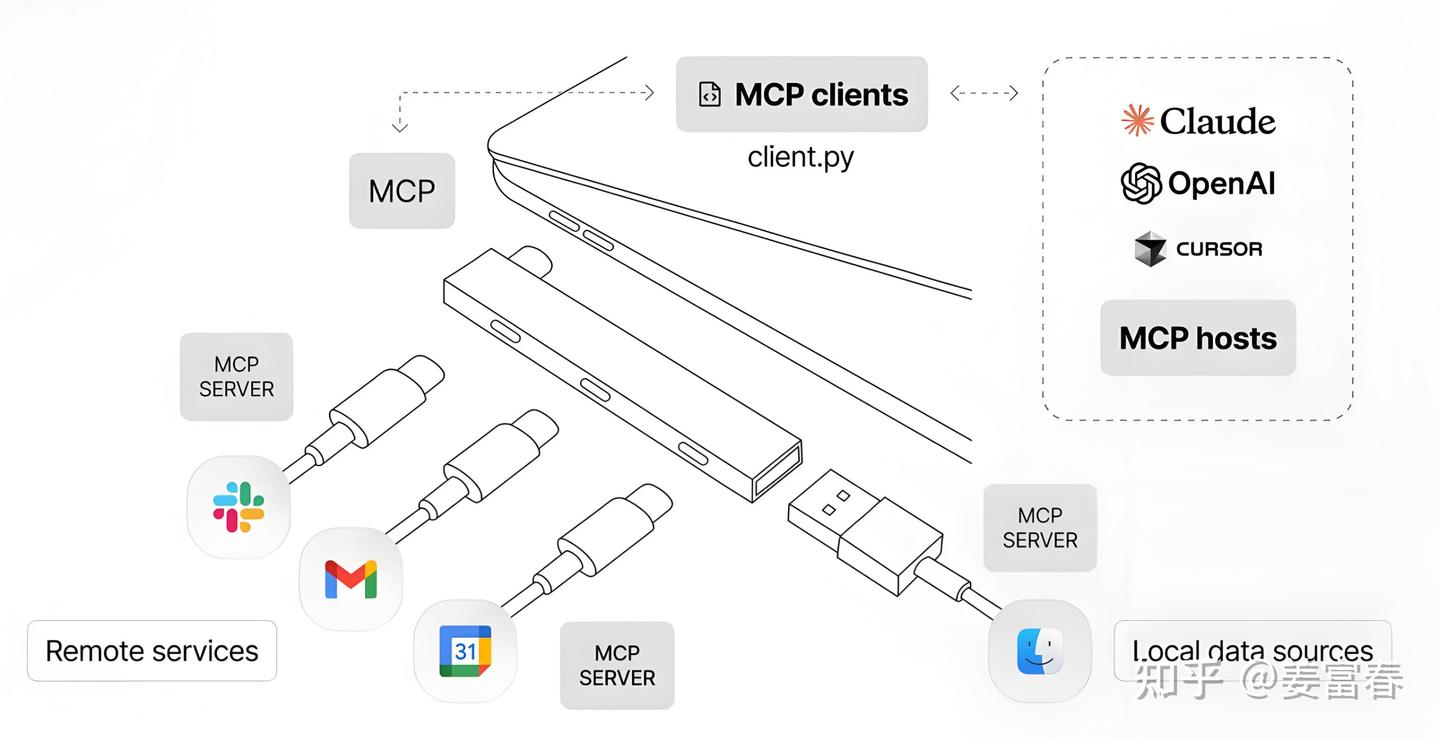
图5、MCP类比USB-C框架图
3.1. MCP组件
从上图中也能看到MCP的关键组件,包括Host,Client, Server等,关于组件的详细介绍如下:
- MCP 宿主(MCP Hosts):指希望借助 MCP 协议访问数据的程序,例如 Claude 桌面应用、集成开发环境(IDEs)或人工智能工具。这些宿主程序通过 MCP 实现与数据源的交互。
- MCP 客户端(MCP Clients):作为协议客户端,负责与服务器建立一对一(1:1)的连接。客户端负责管理通信,确保数据在宿主程序与服务器之间高效传输。
- MCP 服务器(MCP Servers):轻量级程序,通过标准化的模型上下文协议(Model Context Protocol)暴露特定功能。每个服务器专注于提供特定服务或访问特定数据源,确保接口的一致性和可扩展性。
- 本地数据源(Local Data Sources):指存储在您计算机上的文件、数据库和服务。MCP 服务器能够安全地访问这些本地资源,为宿主程序提供所需的数据支持。
- 远程服务(Remote Services):指通过互联网可访问的外部系统(例如通过 API 提供的服务)。MCP 服务器可以连接到这些远程服务,扩展宿主程序的数据访问能力,实现跨平台、跨系统的数据交互。
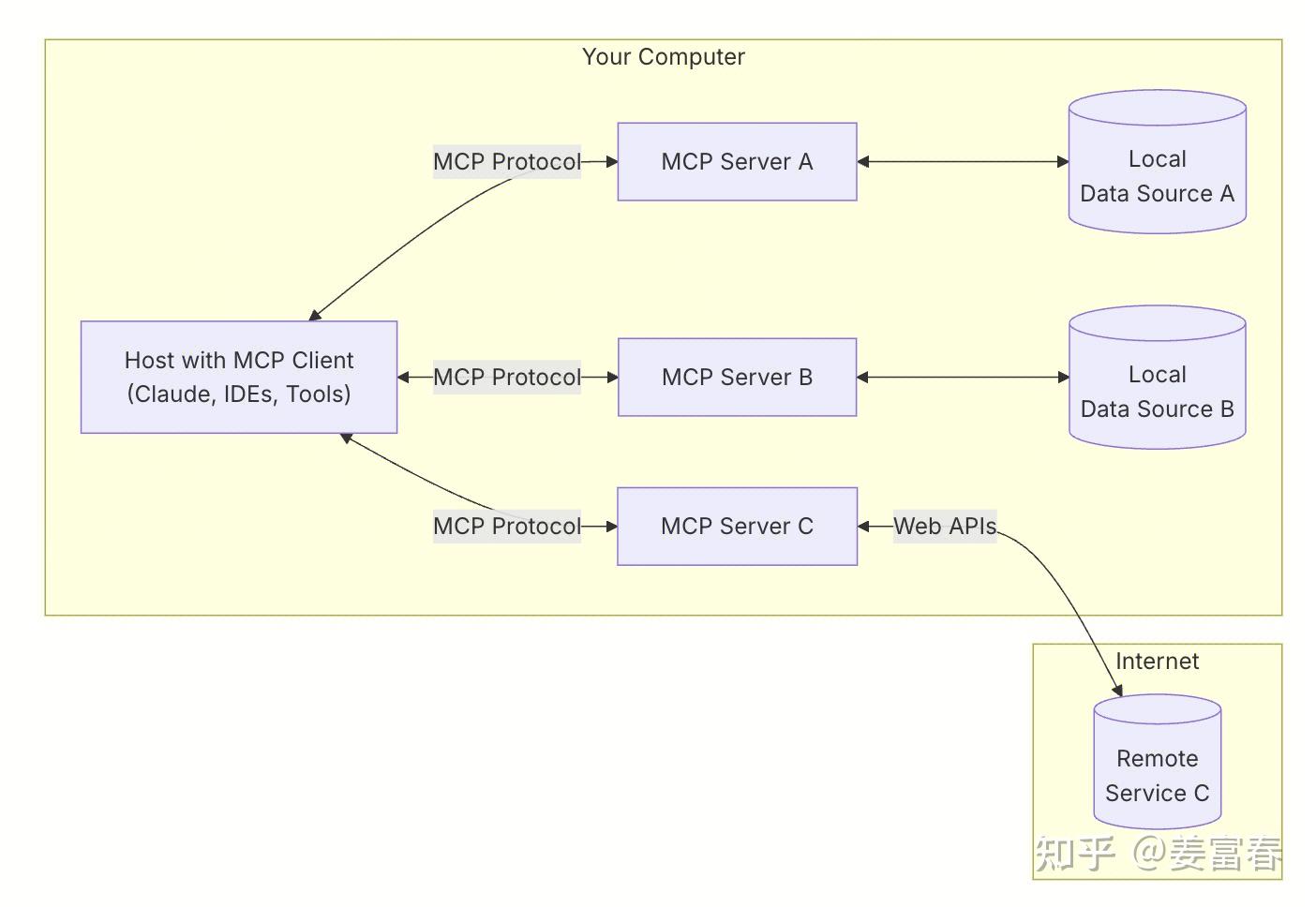
图6、Anthropic MCP官网各组件连接框图
下面我们看一个可运行的具体的例子。实现了一个MCP Server和 Host,并在Host里包括Client和集成Claude来实现工具调用。
3.2. MCP实现示例
Server实现
weather.py 实现两个工具
get_forecast: 获取天气预报信息
get_alerts: 获取天气预警信息
工具用**@mcp.tool()**装饰器来装饰工具,被装饰的工具可被client端连接,来获取工具描述和可执行工具调度
**mcp.run()**用来启动Server
python
from typing import Any
import httpx
from mcp.server.fastmcp import FastMCP

# Initialize FastMCP server
mcp = FastMCP("weather")

# Constants
NWS_API_BASE = "https://api.weather.gov"
USER_AGENT = "weather-app/1.0"

async def make_nws_request(url: str) -> dict[str, Any] | None:
    """Make a request to the NWS API with proper error handling."""
    headers = {
        "User-Agent": USER_AGENT,
        "Accept": "application/geo+json"
    }
    async with httpx.AsyncClient() as client:
        try:
            response = await client.get(url, headers=headers, timeout=30.0)
            response.raise_for_status()
            return response.json()
        except Exception:
            return None

def format_alert(feature: dict) -> str:
    """Format an alert feature into a readable string."""
    props = feature["properties"]
    return f"""
Event: {props.get('event', 'Unknown')}
Area: {props.get('areaDesc', 'Unknown')}
Severity: {props.get('severity', 'Unknown')}
Description: {props.get('description', 'No description available')}
Instructions: {props.get('instruction', 'No specific instructions provided')}
"""

@mcp.tool()
async def get_alerts(state: str) -> str:
    """Get weather alerts for a US state.

    Args:
        state: Two-letter US state code (e.g. CA, NY)
    """
    url = f"{NWS_API_BASE}/alerts/active/area/{state}"
    data = await make_nws_request(url)

    if not data or "features" not in data:
        return "Unable to fetch alerts or no alerts found."

    if not data["features"]:
        return "No active alerts for this state."

    alerts = [format_alert(feature) for feature in data["features"]]
    return "\n---\n".join(alerts)

@mcp.tool()
async def get_forecast(latitude: float, longitude: float) -> str:
    """Get weather forecast for a location.

    Args:
        latitude: Latitude of the location
        longitude: Longitude of the location
    """
    # First get the forecast grid endpoint
    points_url = f"{NWS_API_BASE}/points/{latitude},{longitude}"
    points_data = await make_nws_request(points_url)

    if not points_data:
        return "Unable to fetch forecast data for this location."

    # Get the forecast URL from the points response
    forecast_url = points_data["properties"]["forecast"]
    forecast_data = await make_nws_request(forecast_url)

    if not forecast_data:
        return "Unable to fetch detailed forecast."

    # Format the periods into a readable forecast
    periods = forecast_data["properties"]["periods"]
    forecasts = []
    for period in periods[:5]:  # Only show next 5 periods
        forecast = f"""
{period['name']}:
Temperature: {period['temperature']}°{period['temperatureUnit']}
Wind: {period['windSpeed']} {period['windDirection']}
Forecast: {period['detailedForecast']}
"""
        forecasts.append(forecast)

    return "\n---\n".join(forecasts)

if __name__ == "__main__":
    # Initialize and run the server
    mcp.run(transport='stdio')
Host实现
Host.py 通过mcp.ClientSession与server建立连接,获取工具列表和执行工具调用
mcp.ClientSession连接server
mcp.ClientSession.list_tools() 获取工具描述list
mcp.ClientSession.**call_tool(tool_name, tool_args)**执行工具调用
示例集成使用AWS Claude3.7模型
python
import asyncio
from typing import Optional
from contextlib import AsyncExitStack

from mcp import ClientSession, StdioServerParameters
from mcp.client.stdio import stdio_client
from dotenv import load_dotenv
import boto3
from botocore.exceptions import ClientError
import json

load_dotenv()  # load environment variables from .env
def red_text(text):
    return "\033[31m %s \033[0m" % (text)

class MCPClient:
    def __init__(self):
        # Initialize session and client objects
        self.session: Optional[ClientSession] = None
        self.exit_stack = AsyncExitStack()
        #self.anthropic = Anthropic()
        self.anthropic = boto3.client("bedrock-runtime", region_name="us-east-2")

    async def connect_to_server(self, server_script_path: str):
        """Connect to an MCP server

        Args:
            server_script_path: Path to the server script (.py or .js)
        """
        is_python = server_script_path.endswith('.py')
        is_js = server_script_path.endswith('.js')
        if not (is_python or is_js):
            raise ValueError("Server script must be a .py or .js file")

        command = "python" if is_python else "node"
        server_params = StdioServerParameters(
            command=command,
            args=[server_script_path],
            env=None
        )

        stdio_transport = await self.exit_stack.enter_async_context(stdio_client(server_params))
        self.stdio, self.write = stdio_transport
        self.session = await self.exit_stack.enter_async_context(ClientSession(self.stdio, self.write))

        await self.session.initialize()

        # List available tools
        response = await self.session.list_tools()
        tools = response.tools
        print("\nConnected to server with tools:", [tool.name for tool in tools])

    async def process_query(self, query: str) -> str:
        """Process a query using Claude and available tools"""
        messages = [
            {
                "role": "user",
                "content": [{"text":query}]
            }
        ]

        response = await self.session.list_tools()
        print(red_text("\n\n#### step1 : 通过list_tools方法获取server端的工具list"))
        #print(json.dumps(response.tools, ensure_ascii=False))
        print(response.tools)
        available_tools = [
            {"toolSpec":{
                "name": tool.name,
                "description": tool.description,
                "inputSchema": {
                    "json": tool.inputSchema
                }
            }
        } for tool in response.tools]

        available_tools_obj = {
            "tools": available_tools
        }
        print(red_text("\n#### step2 : 格式化成function call协议"))
        print(json.dumps(available_tools_obj, ensure_ascii=False))
        model_id = "us.anthropic.claude-3-7-sonnet-20250219-v1:0"
        response = self.anthropic.converse(
            modelId = model_id,
            messages=messages,
            toolConfig=available_tools_obj
        )

        tool_results = []
        final_text = []

        print(red_text("\n#### step3 : 模型输出function call"))

        for content in response['output']['message']['content']:
            if 'text' in content:
                final_text.append(content["text"])
            elif 'toolUse' in content:
                print(json.dumps(content["toolUse"], ensure_ascii = False))
                tool_name = content["toolUse"]["name"]
                tool_args = content["toolUse"]["input"]

                # Execute tool call
                result = await self.session.call_tool(tool_name, tool_args)
                tool_results.append({"call": tool_name, "result": result})
                final_text.append(f"[Calling tool {tool_name} with args {tool_args}]")
                if 'text' in content and content['text']:
                    messages.append({
                      "role": "assistant",
                      "content": [{"text": content["text"]}]
                    })
                print(red_text("\n#### step4 : 工具返回结果"))
                #print(json.dumps(result.content, ensure_ascii = False))
                print(result.content[0].text)
                messages.append({
                    "role": "user",
                    "content": [{"text": result.content[0].text}]
                })

                # Get next response from Claude
                response = self.anthropic.converse(
                    modelId = model_id,
                    messages=messages
                )

                final_text.append(response['output']['message']['content'][0]["text"])

        return "\n".join(final_text)

    async def chat_loop(self):
        """Run an interactive chat loop"""
        print("\nMCP Client Started!")
        print("Type your queries or 'quit' to exit.")
        print("demo query:")
        print("1. What's the weather in Sacramento?")
        print("2. What are the active weather alerts in Texas?")

        while True:
            try:
                query = input("\nQuery: ").strip()

                if query.lower() == 'quit':
                    break

                response = await self.process_query(query)
                print(red_text("\n#### step5 : 模型最终输出"))
                print(response)

            except Exception as e:
                print(f"\nError: {str(e)}")

    async def cleanup(self):
        """Clean up resources"""
        await self.exit_stack.aclose()

async def main():
    if len(sys.argv) < 2:
        print("Usage: python client.py <path_to_server_script>")
        sys.exit(1)
    client = MCPClient()
    try:
        await client.connect_to_server(sys.argv[1])
        await client.chat_loop()
    finally:
        await client.cleanup()

if __name__ == "__main__":
    import sys
    asyncio.run(main())
文件目录:
text
mcp_demo
  |__mcp_server
      |__weather.py
  |__mcp_host
      |__host.py
测试:
powershell
## 一个窗口启动server
cd mcp_demo/mcp_server
uv run weather.py

## 另一个窗口启动host
cd mcp_demo/mcp_host
uv run host ../mcp_server/weather.py
host端输入测试query:What's the weather in Sacramento?,host执行详情如下图:
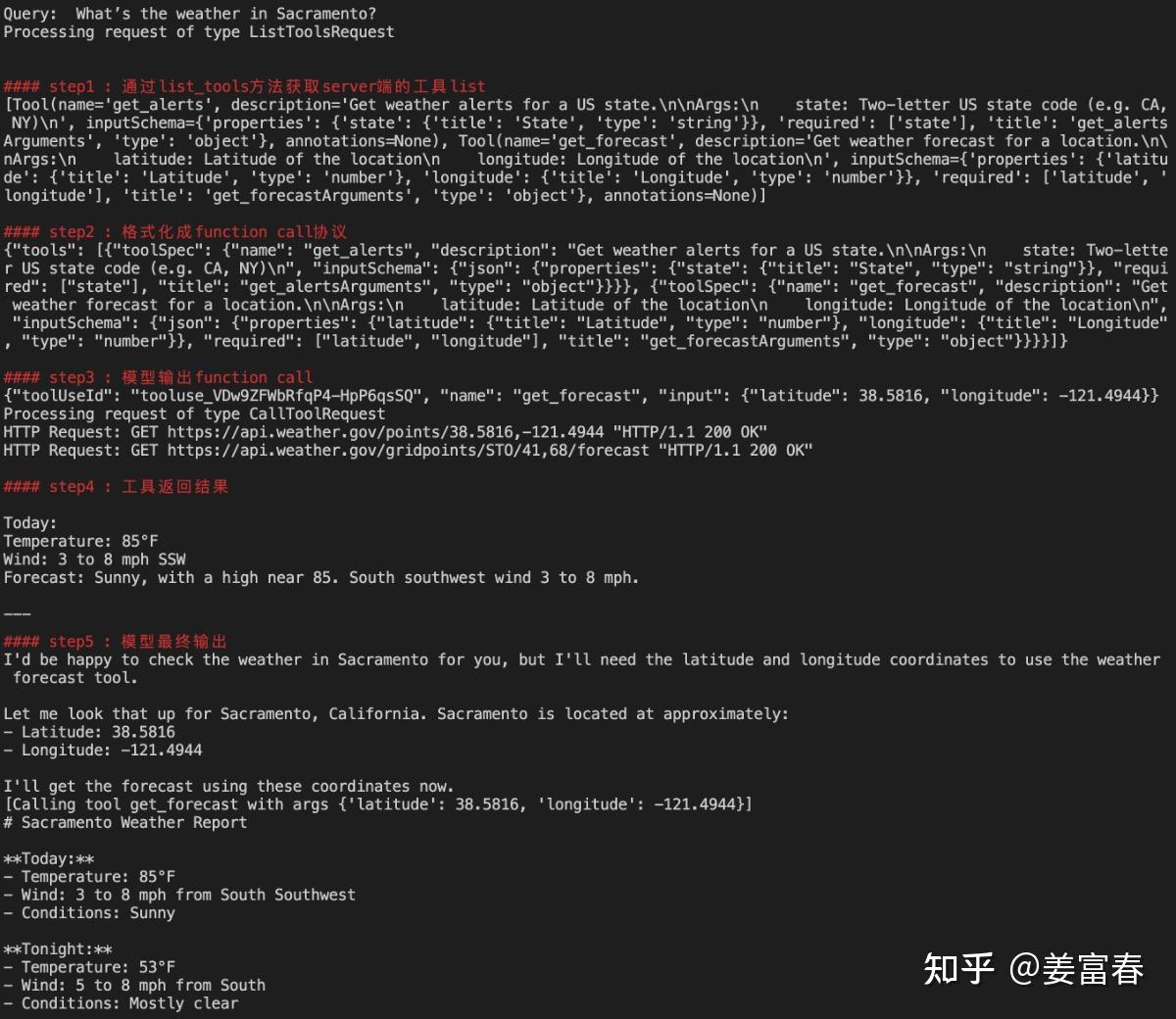
图7、MCP Client- Server执行示例
3.3. MCP Client Server实现简单总结
- server端和client端传输协议:SSE + stdio协议保持server和client双向连接
- server端**@mcp.tool()** 装饰器工具封装,会自动生成工具描述信息
-
- docstring → descreption
- function name → tool name
- function param → tool param
client端通过**list_tools()和call_tool()**来使用工具 - list_tools()获取服务端工具list描述
- call_tool(tool_name, tool_args)执行工具调用
3.4. MCP优势在哪里
- 通过client-server通讯机制使得前后端分离,系统解耦,有利于基于LLM构建复杂的应用,开发人员能专注于自己的模块。
- 支持本地/远程调用:Stdio / SSE / 同进程调用,工具一次实现,多处使用
- 目前已形成了良好的生态,下面一张图描绘了当前MCP在Server,Client等研发、使用各生命周期的蓬勃发展。
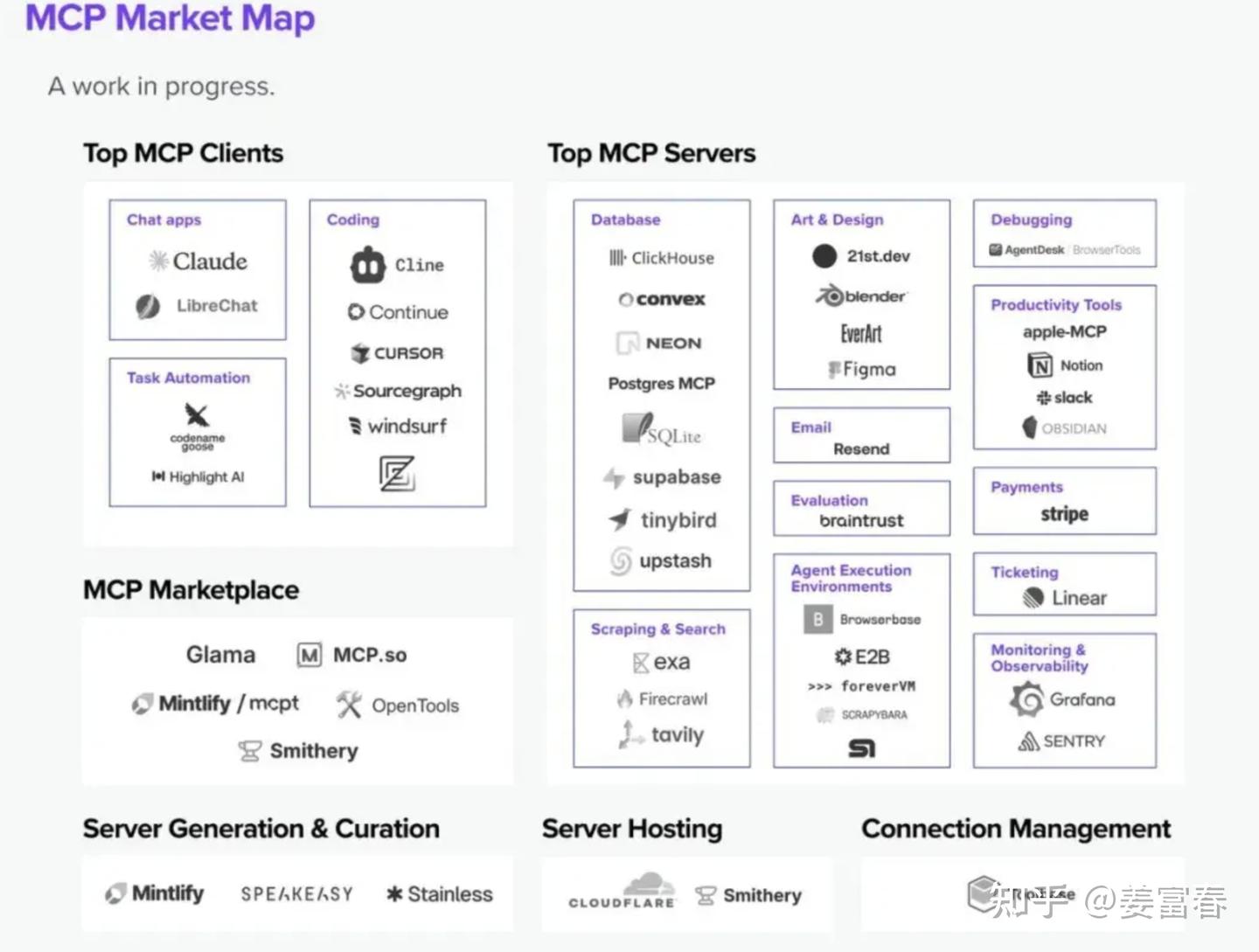
当然,相对于function call, MCP的研发门槛要高一些,如果只是业务内部使用有限的工具集,而且不考虑复用性,function call 仍然是最灵活,高效的选择。所以要考虑实际的业务场景选择合适的工具调用协议。
4. 总结
本文介绍了模型使用工具的发展时间线,包括:Plugin、Function Call和MCP。从实操角度,通过简单的示例来理解三种工具调用的研发和使用流程。MCP不仅是工具调用的协议,而且扩展了多种模型上下文协议(包括资源和Prompt)。MCP协议目前已形成业界广泛的共识,未来模型在使用工具上会进一步标准化和统一化,有利于构建出更复杂应用和Agent。
以上~
个人水平有限,如有错误,欢迎指正
5.参考资料
- Open AI Plugin 官网: https://openai.com/index/chatgpt-plugins/
- Open AI Plugin 示例: https://openai.xiniushu.com/docs/plugins/examples
- Open AI function call https://platform.openai.com/docs/guides/function-calling
- MCP官网文档: https://modelcontextprotocol.io/introduction
- MCP API: https://github.com/modelcontextprotocol/python-sdk