#
前言
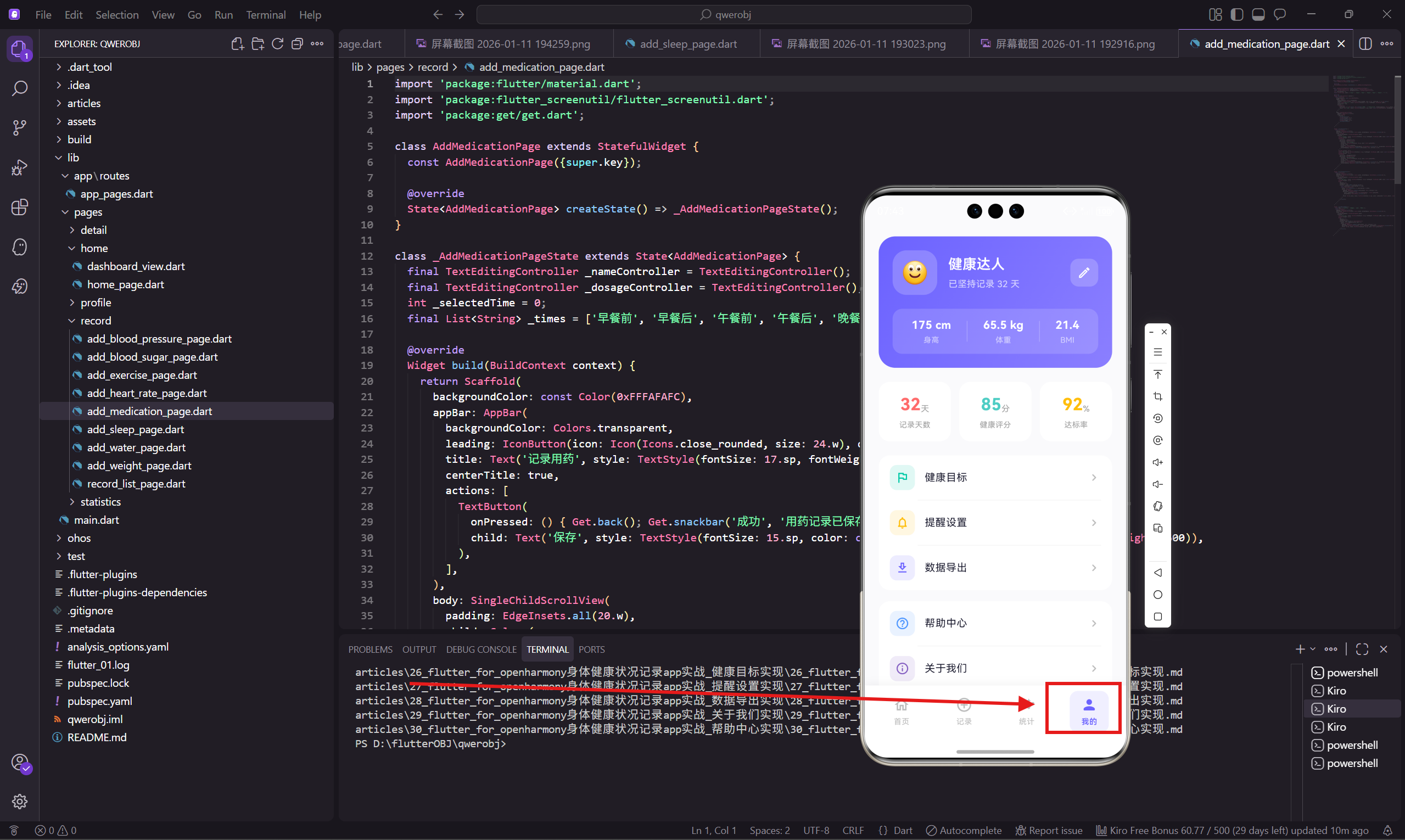
个人中心是用户管理个人信息和App设置的入口。这个页面展示用户的基本信息、健康数据统计,以及各种功能菜单的入口。
页面结构
个人中心分为三个部分:用户信息卡片、数据统计、功能菜单。
dart
class ProfilePage extends StatelessWidget {
  const ProfilePage({super.key});

  @override
  Widget build(BuildContext context) {
    return Scaffold(
      backgroundColor: const Color(0xFFFAFAFC),
      body: SafeArea(
        child: SingleChildScrollView(
          child: Column(
            children: [
              _buildProfileHeader(),
              _buildStatsRow(),
              _buildMenuSection(),
              SizedBox(height: 100.h),
            ],
          ),
        ),
      ),
    );
  }
个人中心作为底部Tab的一个页面,不需要 AppBar,直接用 SafeArea 包裹内容。
用户信息卡片
用渐变背景的卡片展示用户头像、昵称和基本身体数据。
dart
  Widget _buildProfileHeader() {
    return Container(
      margin: EdgeInsets.all(20.w),
      padding: EdgeInsets.all(20.w),
      decoration: BoxDecoration(
        gradient: const LinearGradient(
          begin: Alignment.topLeft,
          end: Alignment.bottomRight,
          colors: [Color(0xFF6C63FF), Color(0xFF8B7FFF)],
        ),
        borderRadius: BorderRadius.circular(24.r),
      ),
      child: Column(
        children: [
          Row(
            children: [
              Container(
                width: 64.w,
                height: 64.w,
                decoration: BoxDecoration(
                  color: Colors.white.withOpacity(0.2),
                  borderRadius: BorderRadius.circular(20.r),
                ),
                child: Center(child: Text('🙂', style: TextStyle(fontSize: 32.sp))),
              ),
              SizedBox(width: 16.w),
              Expanded(
                child: Column(
                  crossAxisAlignment: CrossAxisAlignment.start,
                  children: [
                    Text('健康达人', style: TextStyle(
                      fontSize: 20.sp,
                      fontWeight: FontWeight.w600,
                      color: Colors.white
                    )),
                    SizedBox(height: 4.h),
                    Text('已坚持记录 32 天', style: TextStyle(
                      fontSize: 13.sp,
                      color: Colors.white70
                    )),
                  ],
                ),
              ),
              GestureDetector(
                onTap: () => Get.toNamed('/edit-profile'),
                child: Container(
                  padding: EdgeInsets.all(10.w),
                  decoration: BoxDecoration(
                    color: Colors.white.withOpacity(0.2),
                    borderRadius: BorderRadius.circular(12.r),
                  ),
                  child: Icon(Icons.edit_outlined, size: 20.w, color: Colors.white),
                ),
              ),
            ],
          ),
用 emoji 作为头像占位符,实际项目中可以换成用户上传的图片。"已坚持记录 32 天"这种成就展示能激励用户继续使用。
身体数据展示
在用户信息下方显示身高、体重、BMI。
dart
          SizedBox(height: 20.h),
          Container(
            padding: EdgeInsets.symmetric(horizontal: 16.w, vertical: 12.h),
            decoration: BoxDecoration(
              color: Colors.white.withOpacity(0.15),
              borderRadius: BorderRadius.circular(14.r),
            ),
            child: Row(
              mainAxisAlignment: MainAxisAlignment.spaceAround,
              children: [
                _buildProfileStat('身高', '175 cm'),
                _buildDivider(),
                _buildProfileStat('体重', '65.5 kg'),
                _buildDivider(),
                _buildProfileStat('BMI', '21.4'),
              ],
            ),
          ),
        ],
      ),
    );
  }

  Widget _buildProfileStat(String label, String value) {
    return Column(
      children: [
        Text(value, style: TextStyle(
          fontSize: 16.sp,
          fontWeight: FontWeight.w600,
          color: Colors.white
        )),
        SizedBox(height: 2.h),
        Text(label, style: TextStyle(fontSize: 11.sp, color: Colors.white60)),
      ],
    );
  }

  Widget _buildDivider() {
    return Container(width: 1, height: 30.h, color: Colors.white24);
  }
半透明白色背景的容器在渐变背景上形成层次感。三个数据用竖线分隔,布局清晰。
数据统计卡片
展示记录天数、健康评分、达标率三个关键指标。
dart
  Widget _buildStatsRow() {
    return Padding(
      padding: EdgeInsets.symmetric(horizontal: 20.w),
      child: Row(
        children: [
          _buildStatCard('记录天数', '32', '天', const Color(0xFFFF6B6B)),
          SizedBox(width: 12.w),
          _buildStatCard('健康评分', '85', '分', const Color(0xFF4ECDC4)),
          SizedBox(width: 12.w),
          _buildStatCard('达标率', '92', '%', const Color(0xFFFFBE0B)),
        ],
      ),
    );
  }

  Widget _buildStatCard(String label, String value, String unit, Color color) {
    return Expanded(
      child: Container(
        padding: EdgeInsets.symmetric(vertical: 16.h),
        decoration: BoxDecoration(
          color: Colors.white,
          borderRadius: BorderRadius.circular(16.r),
        ),
        child: Column(
          children: [
            Row(
              mainAxisAlignment: MainAxisAlignment.center,
              crossAxisAlignment: CrossAxisAlignment.end,
              children: [
                Text(value, style: TextStyle(
                  fontSize: 24.sp,
                  fontWeight: FontWeight.w700,
                  color: color
                )),
                Padding(
                  padding: EdgeInsets.only(bottom: 3.h),
                  child: Text(unit, style: TextStyle(
                    fontSize: 12.sp,
                    color: Colors.grey[500]
                  )),
                ),
              ],
            ),
            SizedBox(height: 4.h),
            Text(label, style: TextStyle(
              fontSize: 11.sp,
              color: Colors.grey[500]
            )),
          ],
        ),
      ),
    );
  }
三个卡片用不同的颜色区分,数值用大字号突出显示。这些数据能让用户直观看到自己的健康管理成果。
功能菜单
分组展示各种功能入口。
dart
  Widget _buildMenuSection() {
    final menus = [
      [
        {'icon': Icons.flag_outlined, 'label': '健康目标', 'route': '/health-goal',
         'color': const Color(0xFF00C9A7)},
        {'icon': Icons.notifications_none_rounded, 'label': '提醒设置',
         'route': '/reminder-settings', 'color': const Color(0xFFFFBE0B)},
        {'icon': Icons.download_outlined, 'label': '数据导出', 'route': '/data-export',
         'color': const Color(0xFF6C63FF)},
      ],
      [
        {'icon': Icons.help_outline_rounded, 'label': '帮助中心', 'route': '/help',
         'color': const Color(0xFF4D96FF)},
        {'icon': Icons.info_outline_rounded, 'label': '关于我们', 'route': '/about',
         'color': const Color(0xFF845EC2)},
        {'icon': Icons.settings_outlined, 'label': '设置', 'route': '/settings',
         'color': const Color(0xFF78909C)},
      ],
    ];

    return Padding(
      padding: EdgeInsets.all(20.w),
      child: Column(
        children: menus.map((group) => Container(
          margin: EdgeInsets.only(bottom: 16.h),
          decoration: BoxDecoration(
            color: Colors.white,
            borderRadius: BorderRadius.circular(16.r),
          ),
          child: Column(
            children: group.asMap().entries.map((entry) {
              final index = entry.key;
              final item = entry.value;
              return Column(
                children: [
                  GestureDetector(
                    onTap: () => Get.toNamed(item['route'] as String),
                    child: Container(
                      padding: EdgeInsets.symmetric(horizontal: 16.w, vertical: 14.h),
                      child: Row(
                        children: [
                          Container(
                            padding: EdgeInsets.all(8.w),
                            decoration: BoxDecoration(
                              color: (item['color'] as Color).withOpacity(0.12),
                              borderRadius: BorderRadius.circular(10.r),
                            ),
                            child: Icon(item['icon'] as IconData, size: 20.w,
                              color: item['color'] as Color),
                          ),
                          SizedBox(width: 14.w),
                          Expanded(child: Text(item['label'] as String, style: TextStyle(
                            fontSize: 15.sp,
                            color: const Color(0xFF1A1A2E)
                          ))),
                          Icon(Icons.chevron_right_rounded, size: 20.w,
                            color: Colors.grey[400]),
                        ],
                      ),
                    ),
                  ),
                  if (index < group.length - 1)
                    Divider(height: 1, indent: 56.w, endIndent: 16.w, color: Colors.grey[100]),
                ],
              );
            }).toList(),
          ),
        )).toList(),
      ),
    );
  }
}
菜单分成两组,每组用一个白色卡片包裹。组内的菜单项用分割线分隔,分割线从图标右边开始,不会贯穿整行。
每个菜单项都有自己的主题色图标,右边有箭头提示可以点击。
小结
个人中心页面的特点:
- 渐变卡片展示用户信息
- 三个统计卡片展示健康数据
- 分组菜单提供各种功能入口
- 每个菜单项都有主题色图标
个人中心是用户管理App的主要入口,功能菜单的组织要清晰,让用户能快速找到需要的功能。
欢迎加入开源鸿蒙跨平台社区:https://openharmonycrossplatform.csdn.net