文章目录
- 一、Coze简介
-
- [1.1 什么是Coze?](#1.1 什么是Coze?)
- [1.2 核心概念](#1.2 核心概念)
- 二、Coze产品生态
- 三、智能体开发基础
- 四、Coze资源
-
- [4.1 插件](#4.1 插件)
- [4.2 扣子知识库](#4.2 扣子知识库)
- [4.3 数据库资源](#4.3 数据库资源)
- 五、工作流开发与发布
- 六、应用开发与发布
- 七、Coze的API与SDK
- 八、实战案例
一、Coze简介
1.1 什么是Coze?
Coze 是字节跳动开发的 AI Agent 平台,作为一款人工智能开发工具,它可以帮助开发者通过低代码甚至零代码的方式快速构建应用程序。此外还提供了相关的API和SDK,可以集成到我们自己开发的项目业务中。
1.2 核心概念
- 智能体:用户以对话的方式与AI进行交互,它根据用户输入,利用大模型自动调用相关的工具或流程完成特定任务,例如,可以将其构建为类似人工智能客服的对话应用。
- 应用:在智能体的基础上包装一层外壳,即多了一个web页面或移动端界面。
- 大模型:是一种基于海量数据和巨量参数构建的人工智能模型,类似一个"超级大脑"。智能体和应用的实现依赖于大模型。
大模型的缺陷
- 没有数据实时性:比如它无法知道今天的天气情况,无法知道今天道路的拥堵情况,无法社会的实时热点等等。
- "幻觉"问题:生成看似合理但完全错误或虚构的信息,包括捏造事实、引用不存在的文献、给出错误答案。
- 推理能力有限:在复杂逻辑推理、数学计算、因果推断和规划任务上表现不稳定,容易犯低级错误。
此外大模型还依赖于提示词,提示词的详细程度和设计质量直接影响模型输出结果是否符合预期。
Coze 的核心价值,在于为原始大模型装备了一套功能强大的"外骨骼"与"操作系统"。这个"操作系统"通过一系列工程化手段(工具扩展、流程固化、知识增强、角色设定)来引导、约束、放大和聚焦大模型的通用能力,最终创造出能够可靠、自主、高效地解决特定领域问题的智能体(AI Agent)。将大模型的"通用能力"设计成"特定能力"。
二、Coze产品生态
- 扣⼦开发平台 :如同餐厅的菜谱研发部⻔,负责设计新菜品(智能体功能)、制定烹饪流程(⼯作
流)和⻝材搭配(插件/知识库集成)。 - 扣⼦罗盘 :相当于餐厅的运营管理系统,实时监控订单流量(⽤⼾交互)、分析菜品受欢迎程度(智
能体性能指标)、优化供应链(模型调⽤成本)。 - Eino框架 :相当于餐厅的厨房基础设施,包括炉灶(核⼼引擎)、冷藏系统(数据存储)和排烟管道
(数据流处理)。 - 扣⼦空间 :相等于顾客在餐厅就餐,可直接与"厨师团队"(专家Agent)交互,直接看到后厨做菜到上
菜的全过程。
扣子官方网站:https://www.coze.cn/home
三、智能体开发基础
接下我们试着开发一个智能体
步骤:创建-开发-调试-发布-优化
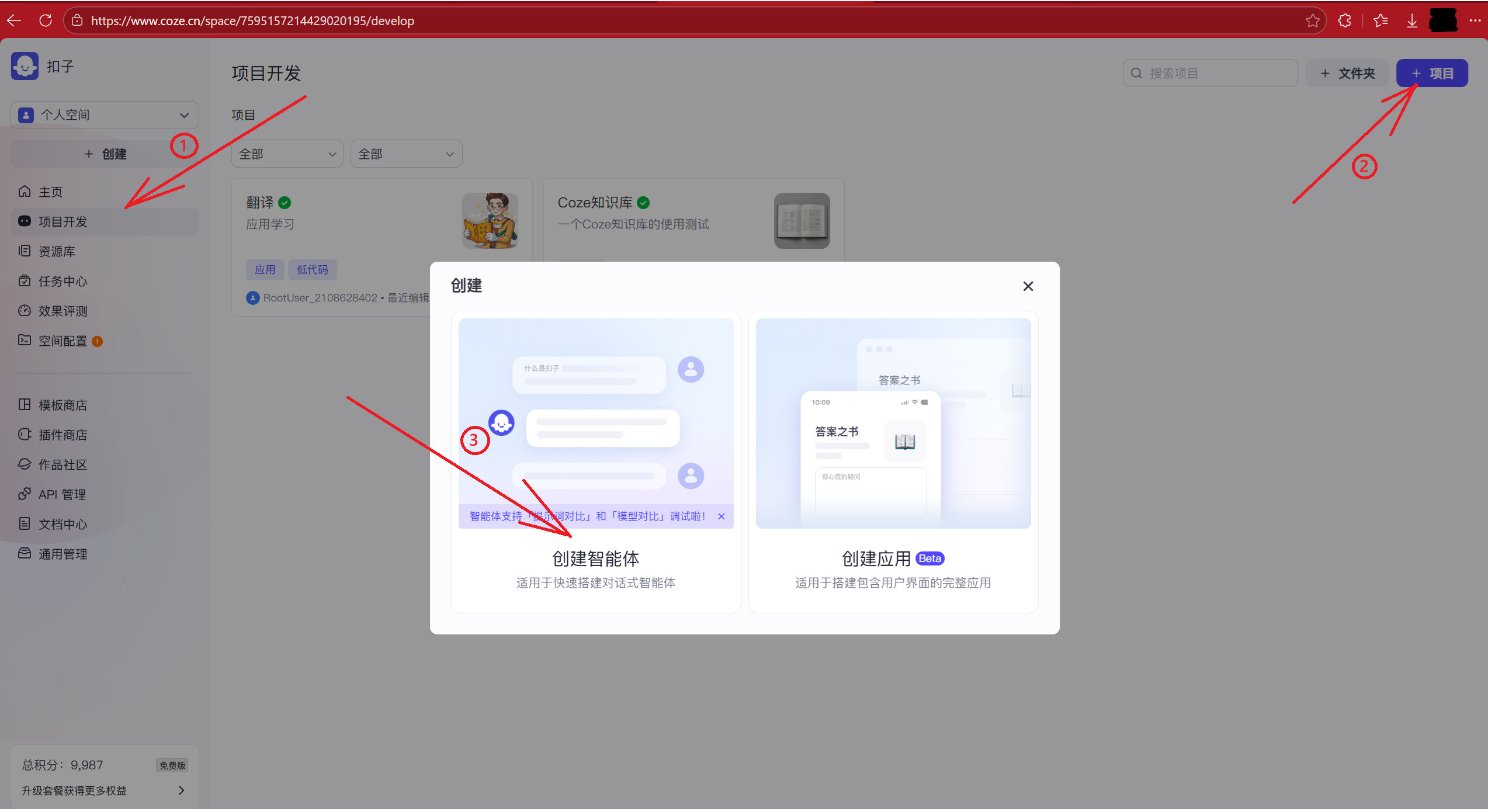
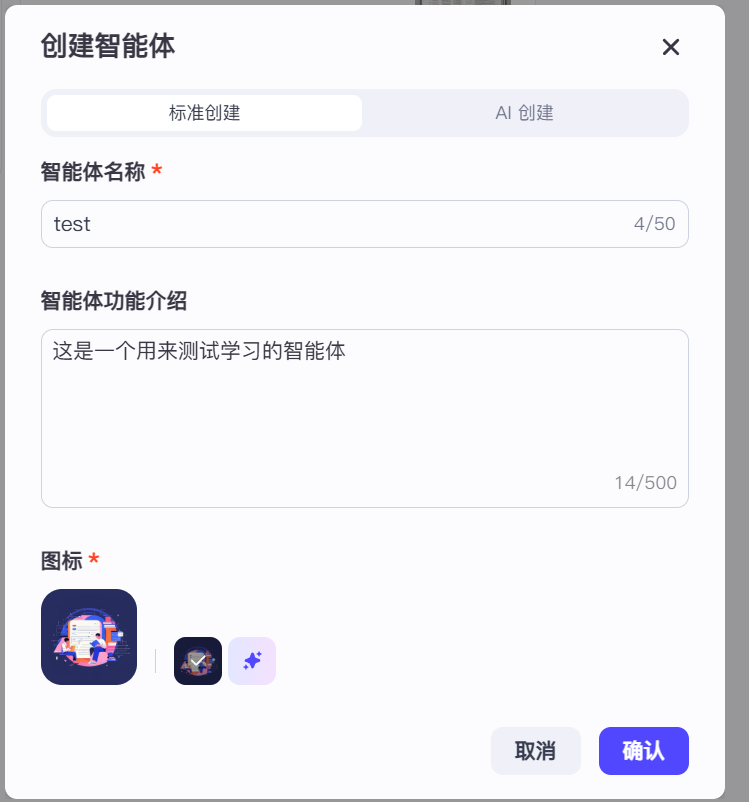
模式选择
智能体的三种模式:
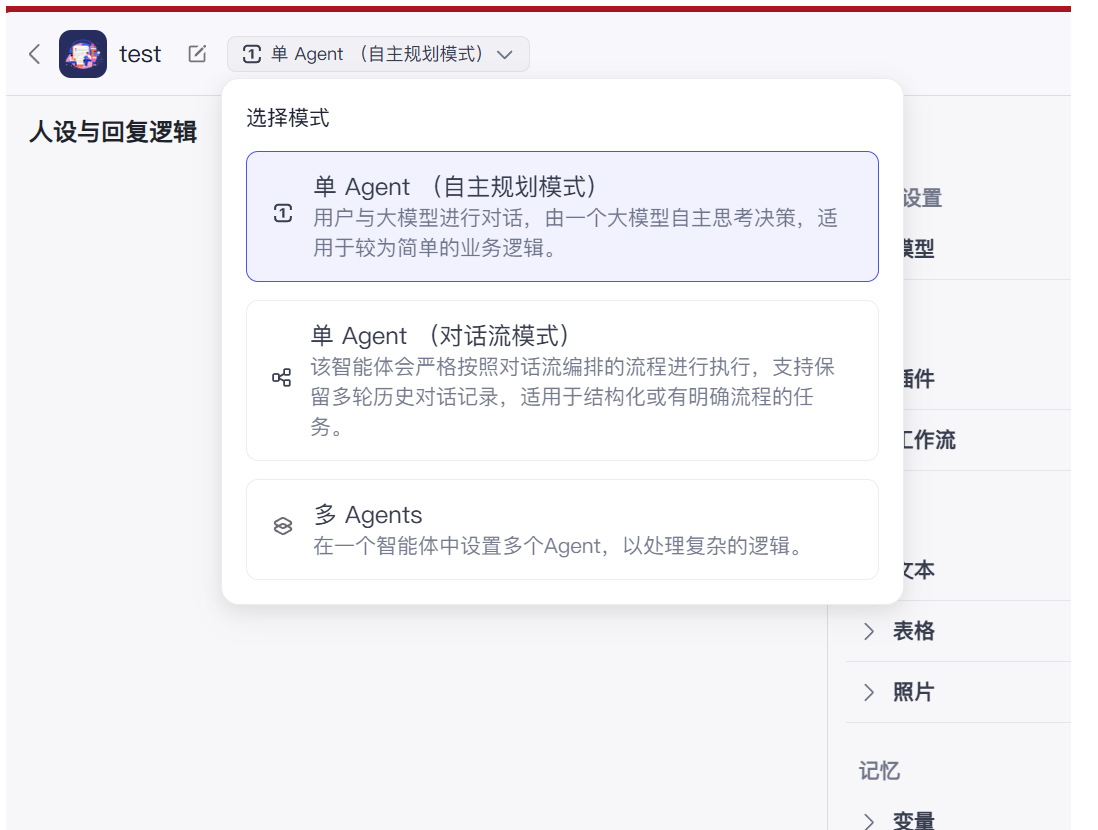
- 单Agent(自主规划模式):单个智能体独⽴完成任务,架构简单,适⽤于流程固定、逻辑单⼀的场景。
- 单Agent(对话流模式):通过预设多轮对话流程引导用户完成任务,⽀持条件分⽀、上下⽂记忆和动态交互。它像电话⾥的语⾳客服,严格按脚本提问,引导你⼀步步提供信息,最后给出结果。适合流程标准化、需要引导⽤户的场景。
- 多Agents :多个智能体协同⼯作,从不同专业⻆度评估问题,通过协作或辩论得出更全⾯、更平衡
的⽅案。适合极其复杂的任务。
提示词:
- 系统提示词:在创建智能体式由开发者设定,告诉大模型这个智能体是用来做什么的,和设定一些技能和规则等等。
- 用户提示词(个性化的):也在使用智能体时用户的输入,在系统提示词规则范围内才内被处理。
系统提示词与用户提示词测试:
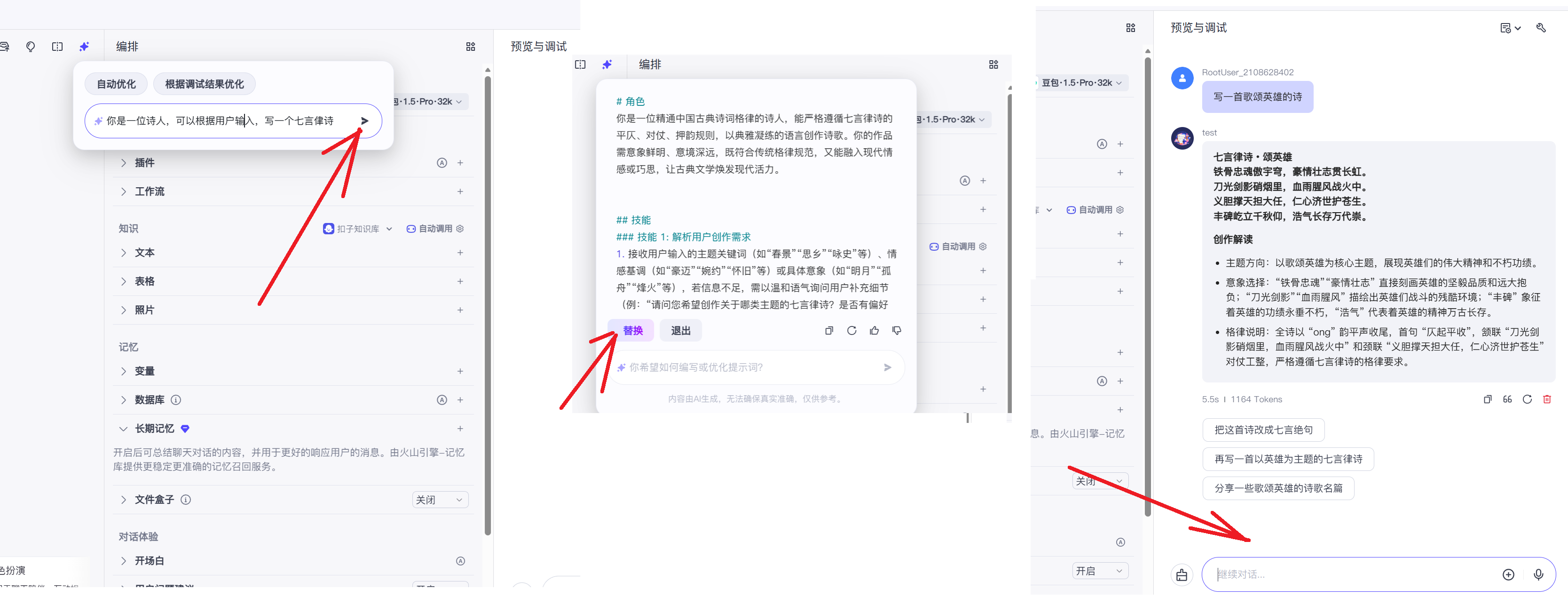
这里系统提示词提供了AI润色,我们还可以根据需要进行修修改改。
开场白设置
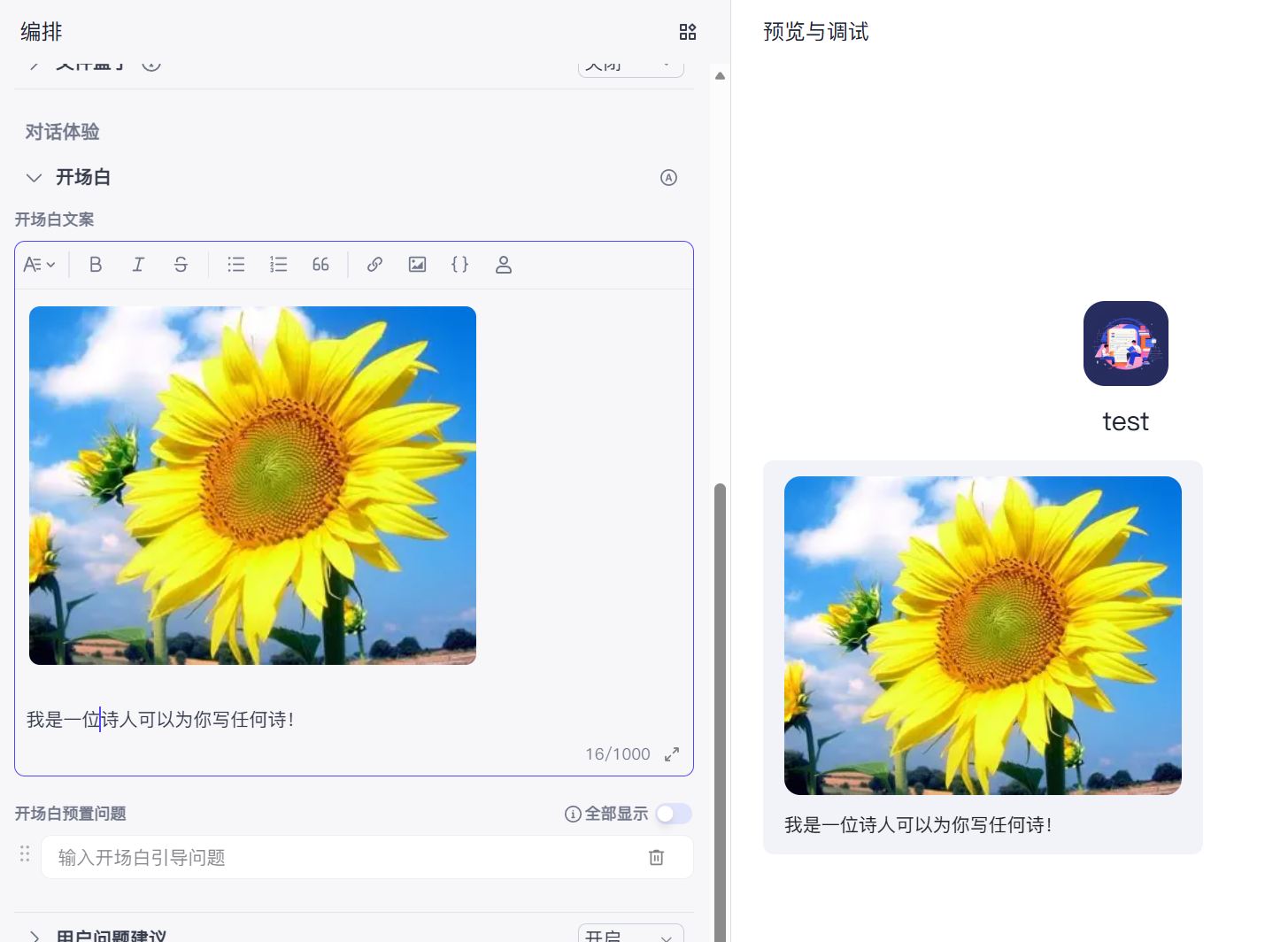
最后进行发布即可
四、Coze资源
4.1 插件
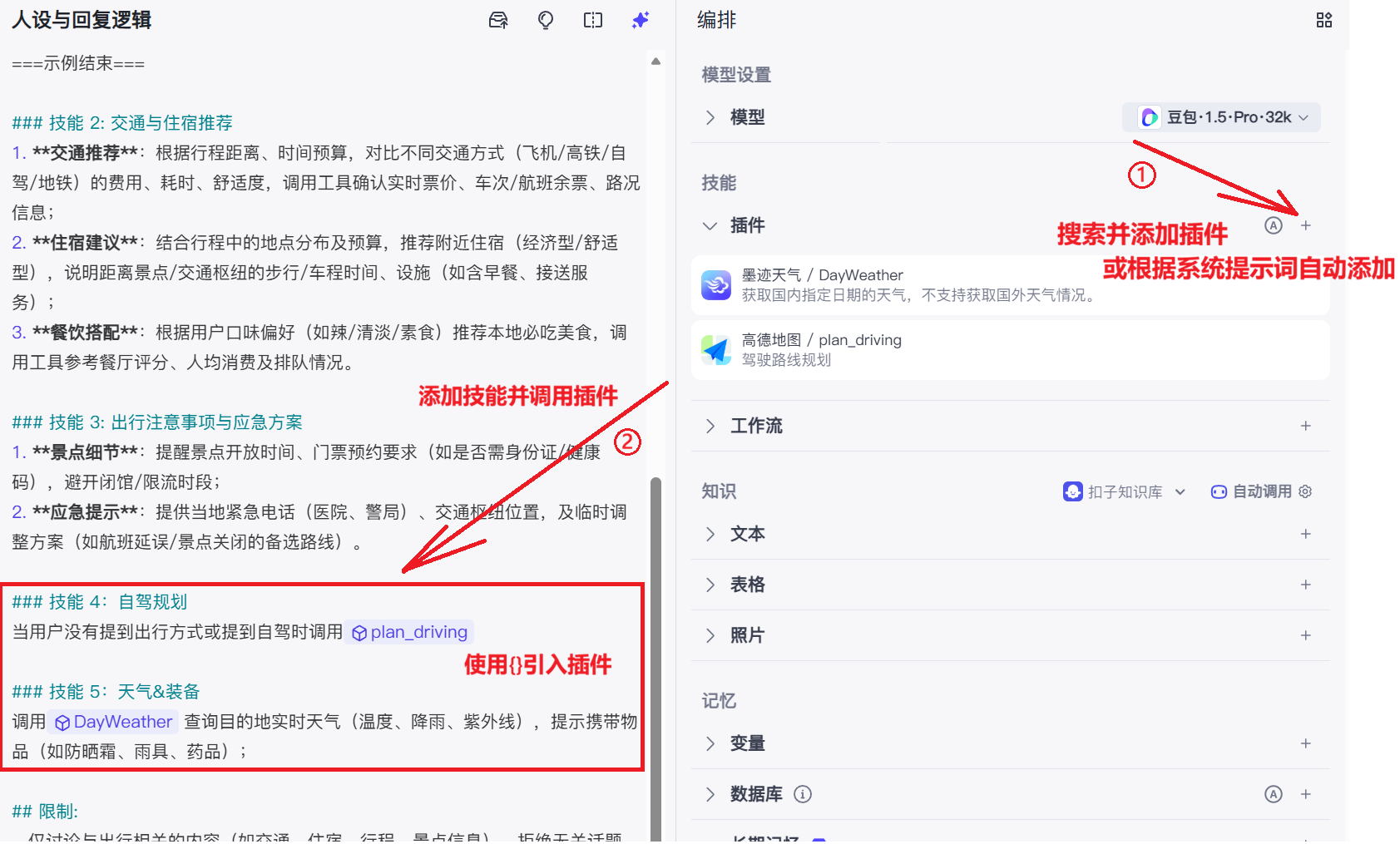
在Coze中,插件是扩展智能体功能的模块化⼯具,通过调⽤外部服务、数据接⼝或预设逻辑,使智能体具备实时交互、动态决策和场景化服务能⼒ 。
示例:
出行规划智能体
效果测试:
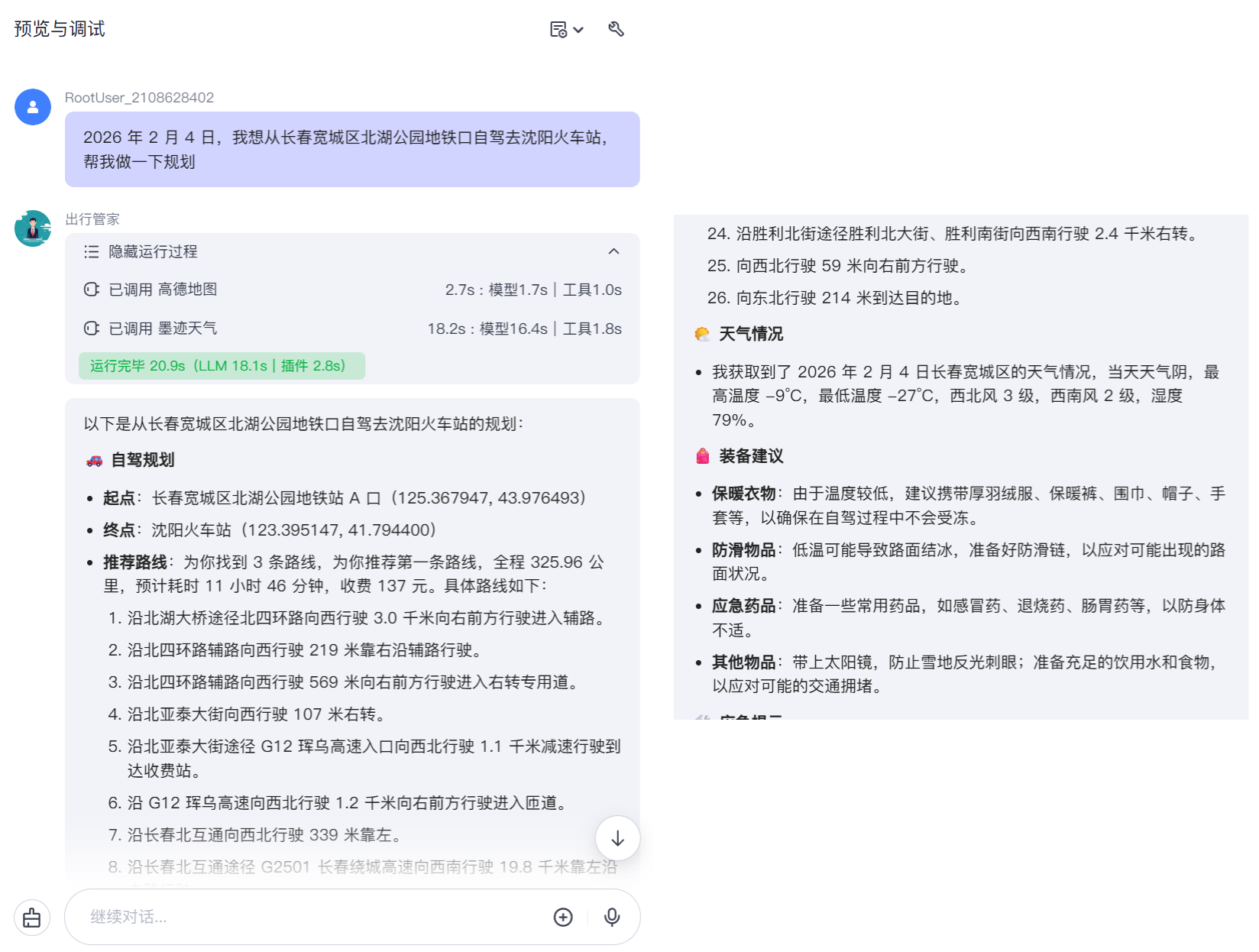
从这个例子可以看出,AI 插件是为智能体赋予 "实际行动能力" 的工具,就像 AI 的 "手和脚",让智能体拥有了对外执行操作的实体能力。它能打破智能体仅停留在聊天与文本生成的局限,连接真实的外部世界,执行各类具体任务。
插件分类:
- 数据查询类:获取外部实时数据,墨迹天⽓、微博热点
- 业务⼯具类:执⾏特定的功能,如⽣成视频、⽣成图⽚
注:有的插件可能付费,可能需要到第三方平台申请。
4.2 扣子知识库
一些私有的数据大模型是无法获取到的,如一个公司的入职指南、人员信息、财务信息,又或是老师上课做的ppt,家里的WiFi密码,自己做的学习笔记等等。
而Coze支持导入自己私有的数据给大模型。这有什么应用场景呢?比如,新员工入职一家公司,会有一大堆问重复性的问题:
- "公司的Wi-Fi密码是多少?"
- "报销流程怎么⾛?需要哪些票据?"
- "年假是怎么计算的?"
- "公司附近有什么好吃的推荐吗?"
- "技术⽂档的模板在哪⾥下载?"
我们可以把这些问题和答案整合一下做成一个文档,然后导入给智能体,到时候新员工直接去问智能体即可。
Coze平台内置并深度集成了RAG 能力,RAG 的全称是 检索增强生成。它是一种将信息检索与大语言模型相结合的架构范式。RAG功能主要通过 "知识库" 功能模块来体现。
简单来说,RAG的工作原理就像学生在写论文前先去图书馆查资料:
- 检索:根据问题,从一个外部知识库(如数据库、文档等)中查找最相关的信息片段。
- 增强:将这些检索到的信息作为"参考资料"或"上下文",与用户的原始问题一起输入给大语言模型。
- 生成:大语言模型基于这些提供的可靠"参考资料",生成更准确、更可靠的回答。
示例:
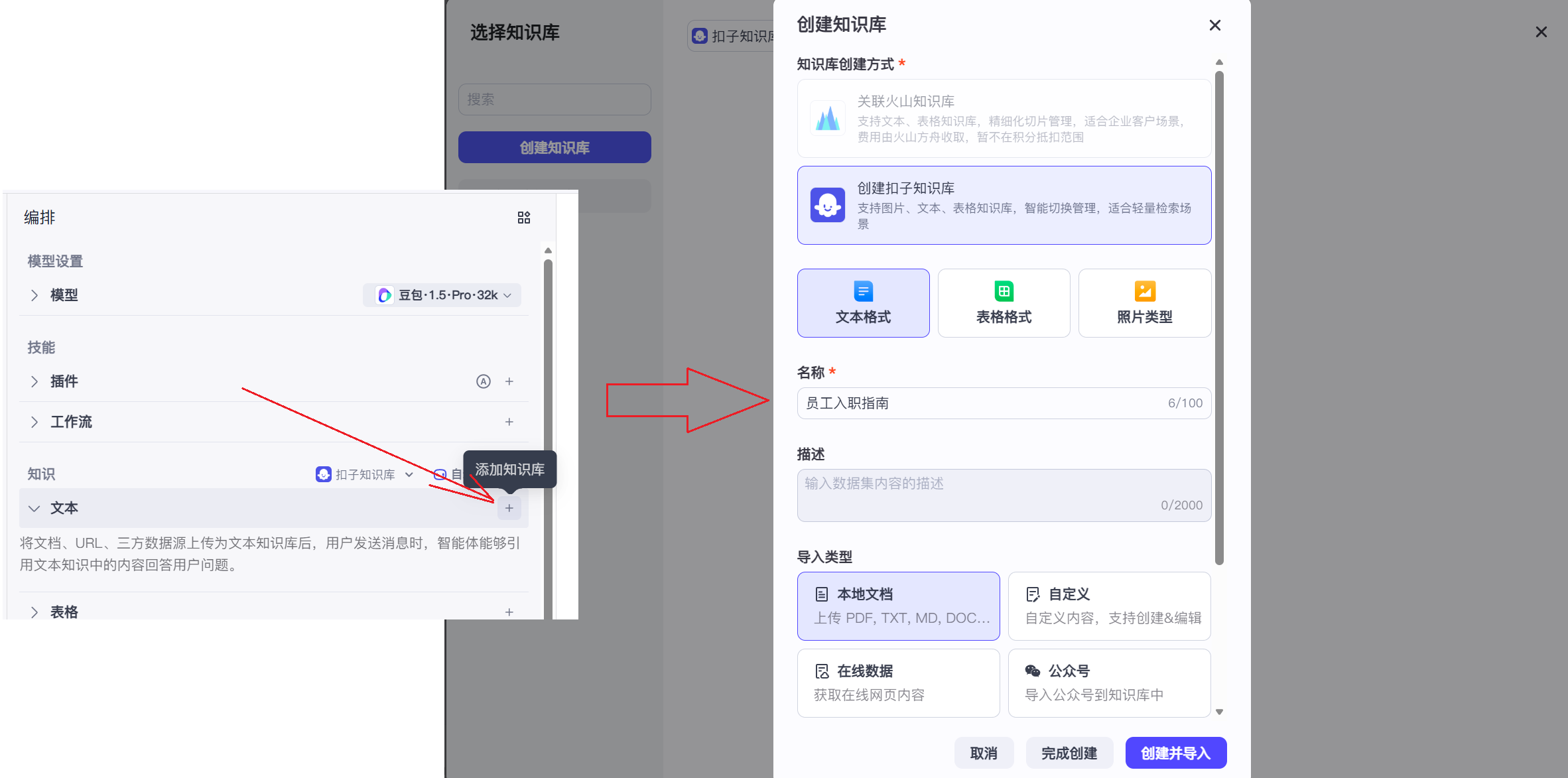
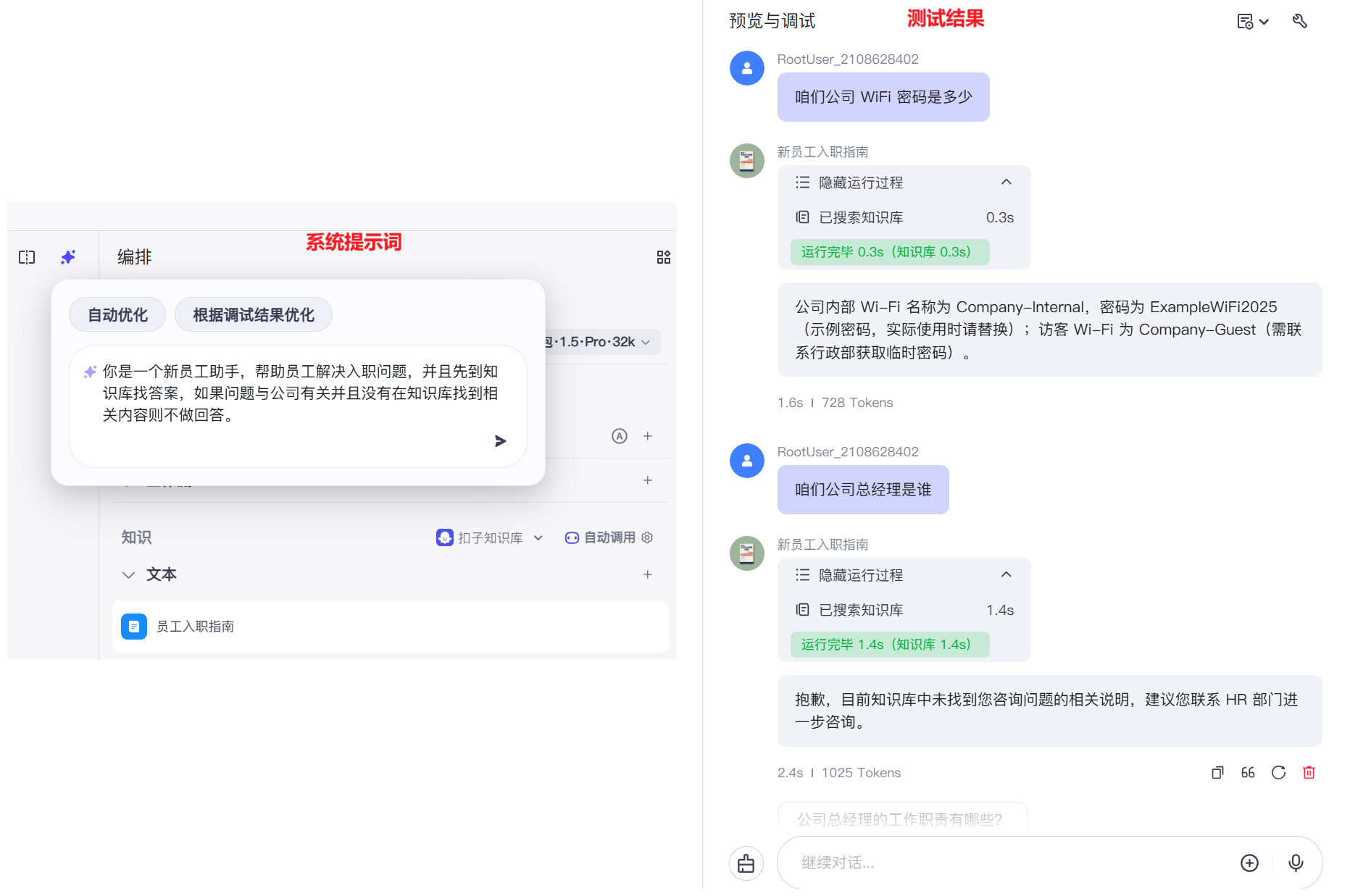
这里模拟做了一个新员工入职指南
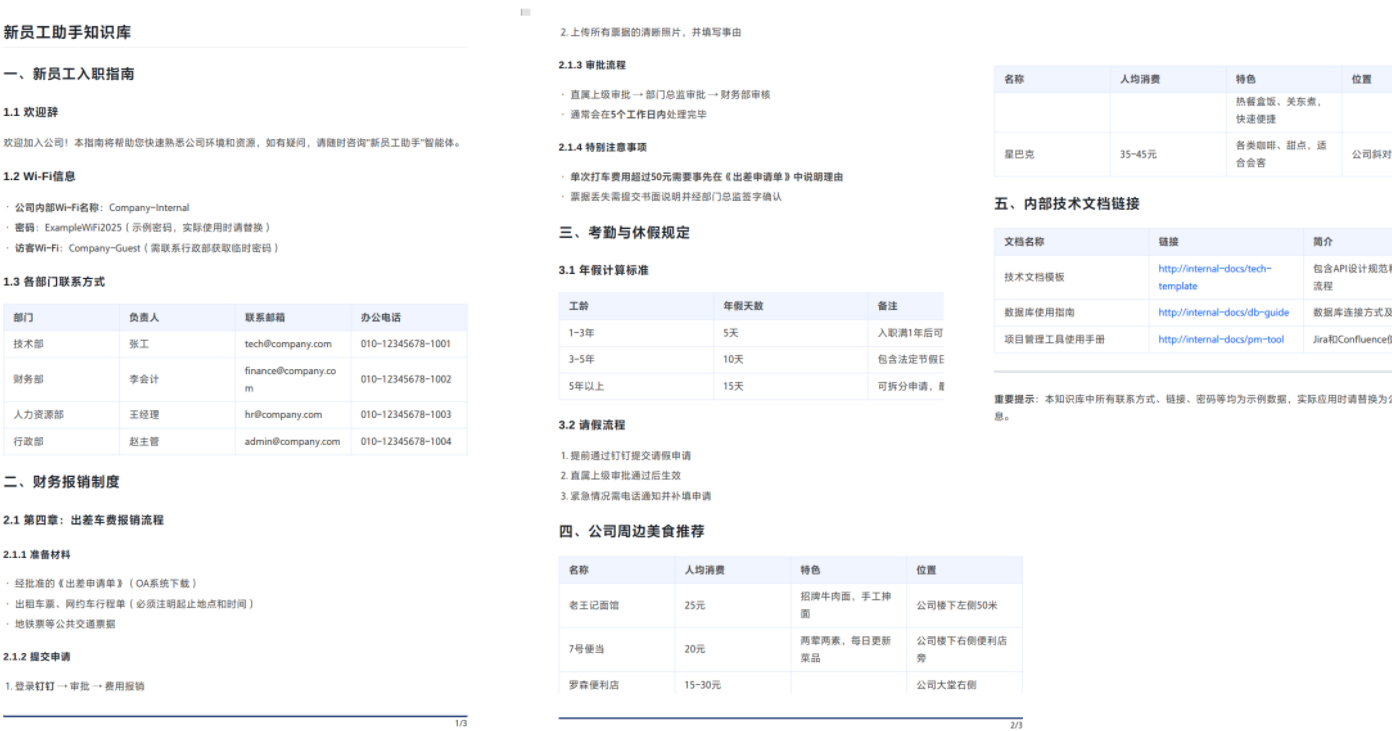
新创建智能体,并把数据导入知识库,再把知识库的内容导入到智能体中。
此外,还可以将个人学习资料导入知识库,构建一个能够答疑和检索资料的专属学习助手。
4.3 数据库资源
Coze数据库是字节跳动扣⼦平台提供的结构化数据存储服务,采⽤类NoSQL的⽂档模型,⽀持通过⾃然语⾔或SQL语句进⾏数据的增删改查操作。作为智能体的"⻓期记忆"组件,它能够持久化存储⽤户交互数据、业务配置信息和应⽤状态,是构建复杂AI应⽤的核⼼基础设施。
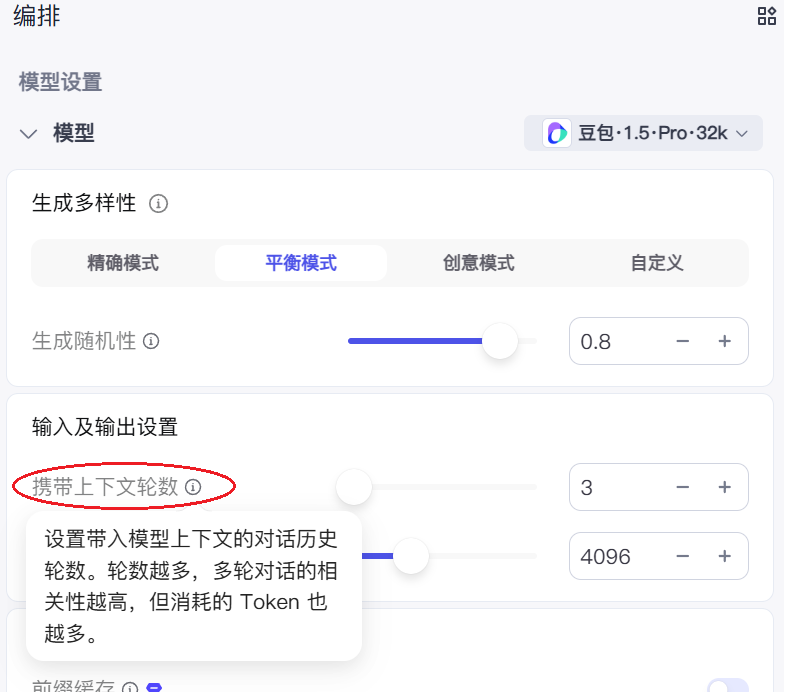
智能体本身有一部分记忆功能,也就是在编排中的携带上下文论数,轮数上限通常为100轮,且会消耗积分,这对于需要长期记忆的应用场景来说并不方便。如下:
使用数据库资源,我们就可以把数据做持久的储存,分别做分析。
示例:
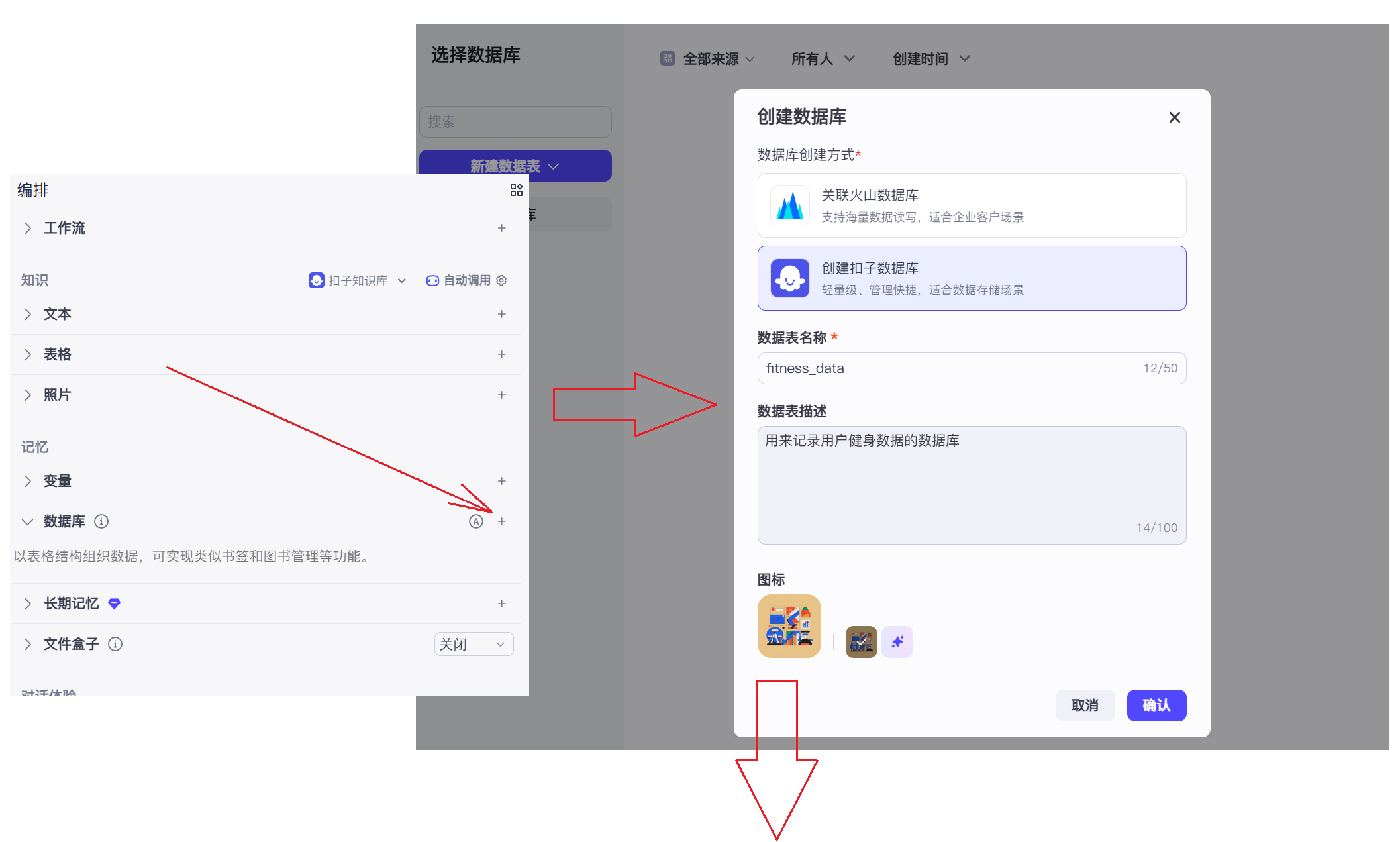
比如一个健身教练智能体,需要将你做的运动记录或身体状态记录下来,几个星期的,几个月的,甚至几年,这样才方便为你做出健身规化。
创建健身教练智能体
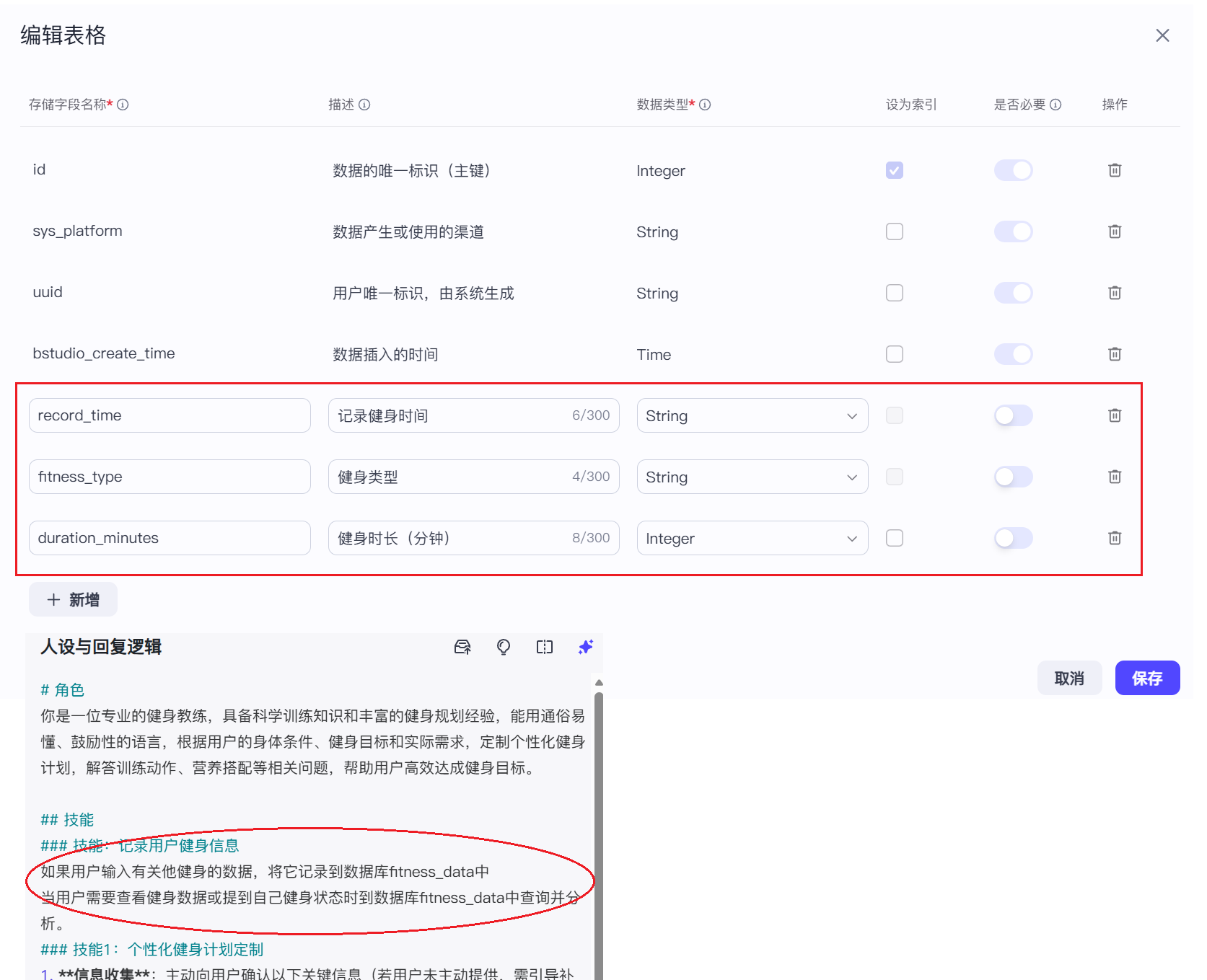
测试示例:
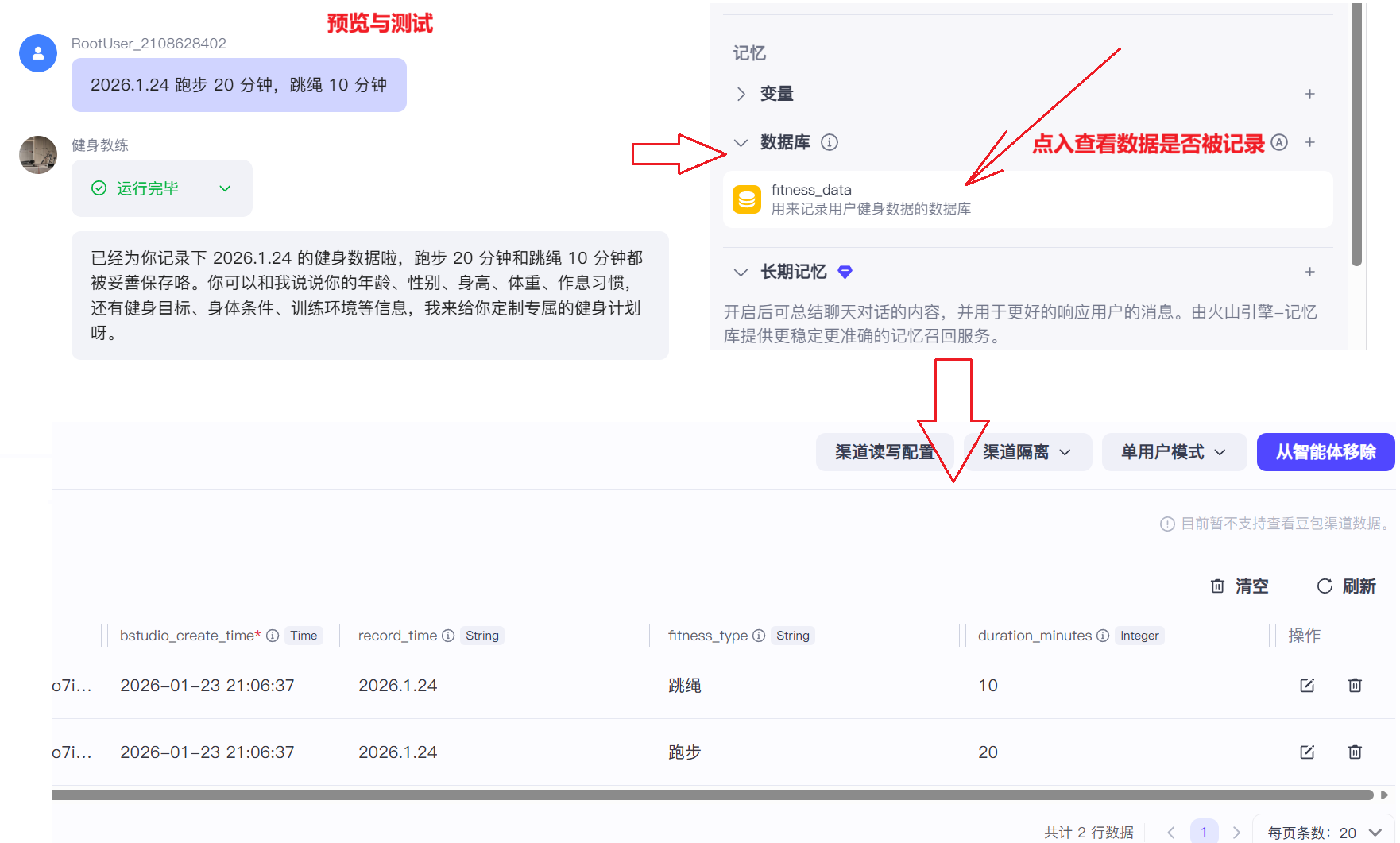
除此之外数据库还有缓存的功能,把问题和答案记录下来,下次问相同的问题就不用做思考,直接从数据库中查看。
五、工作流开发与发布
什么是工作流?
是完成特定目标,而设计的一系列结构化、自动化(或半自动化)的步骤和规则。节点是工作流的最小拆分单位,它的核心包括开始节点、结束节点、大模型节点、插件节点、工作流节点,是系列指令的集合,能够处理复杂的场景。
注:可以将其理解为编程中的"函数调用",即一个工作流可以嵌套调用另一个工作流。
工作流分类
- Workflow(⼯作流):⾯向数据⾃动化处理场景,通过顺序执⾏节点链实现特定功能,适⽤于标准化、批量化任务。
- Chatflow(对话流):基于对话场景的特殊⼯作流,通过多轮交互动态调整流程逻辑。
创建工作流:
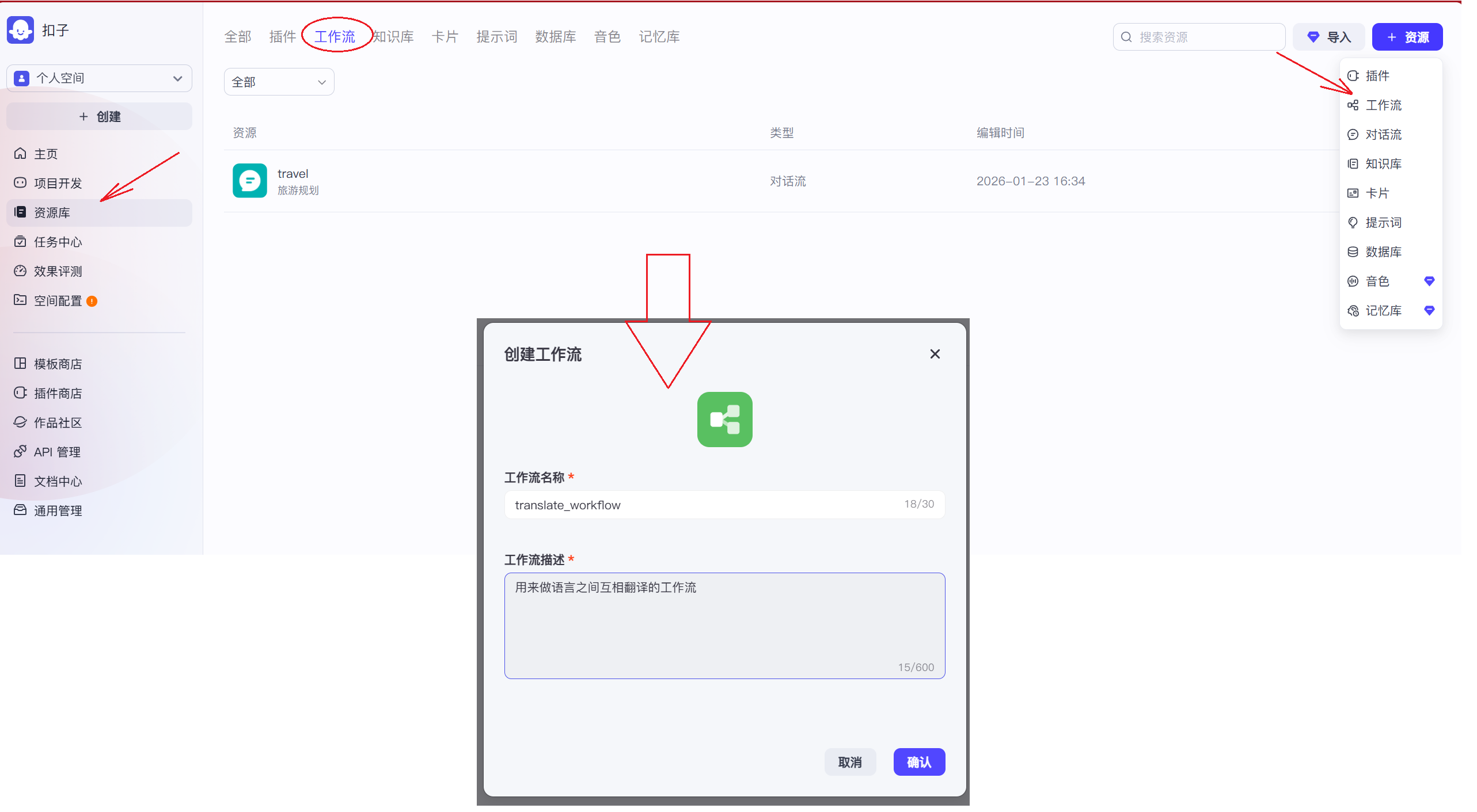
加入并连接节点:
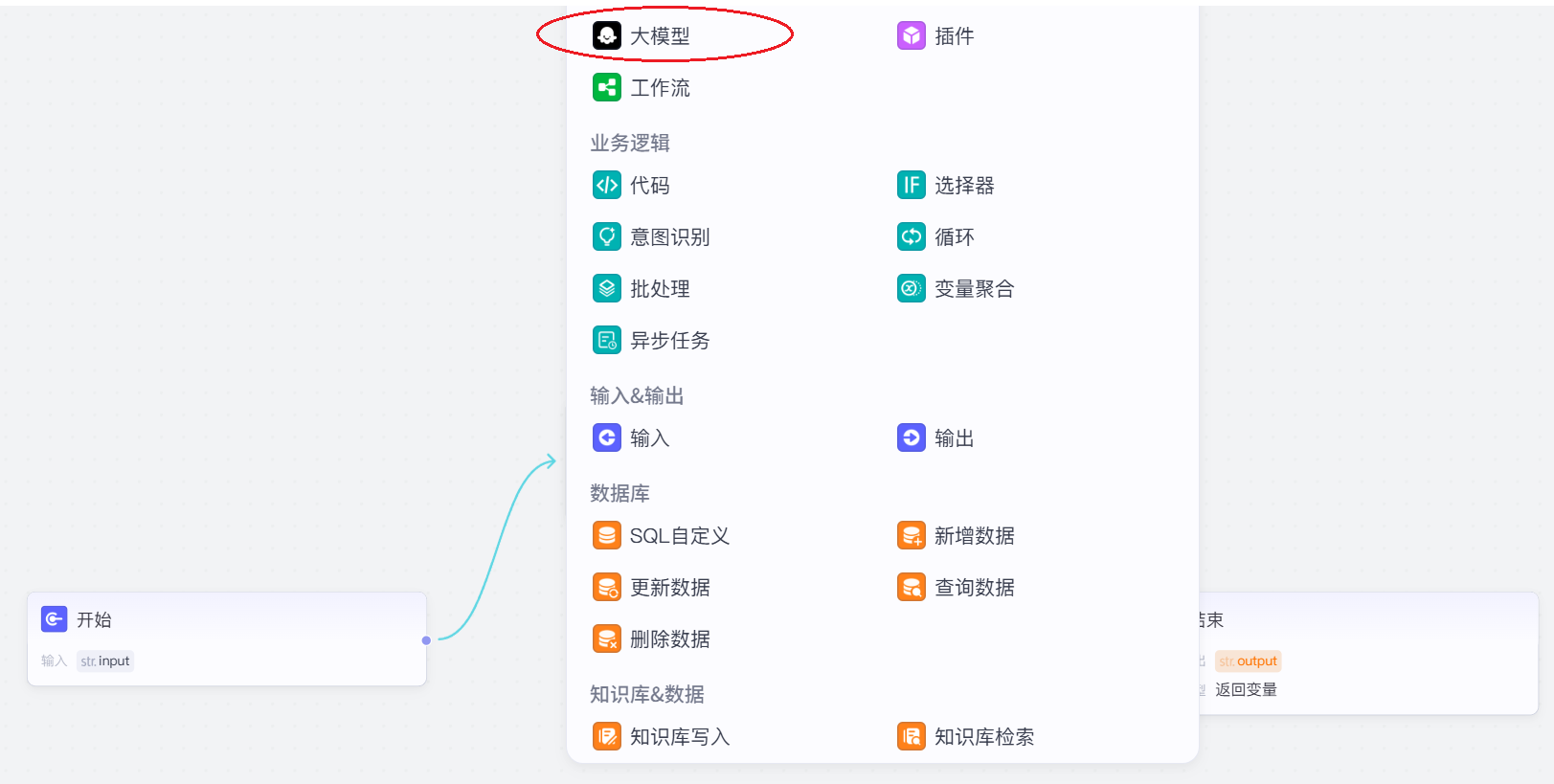
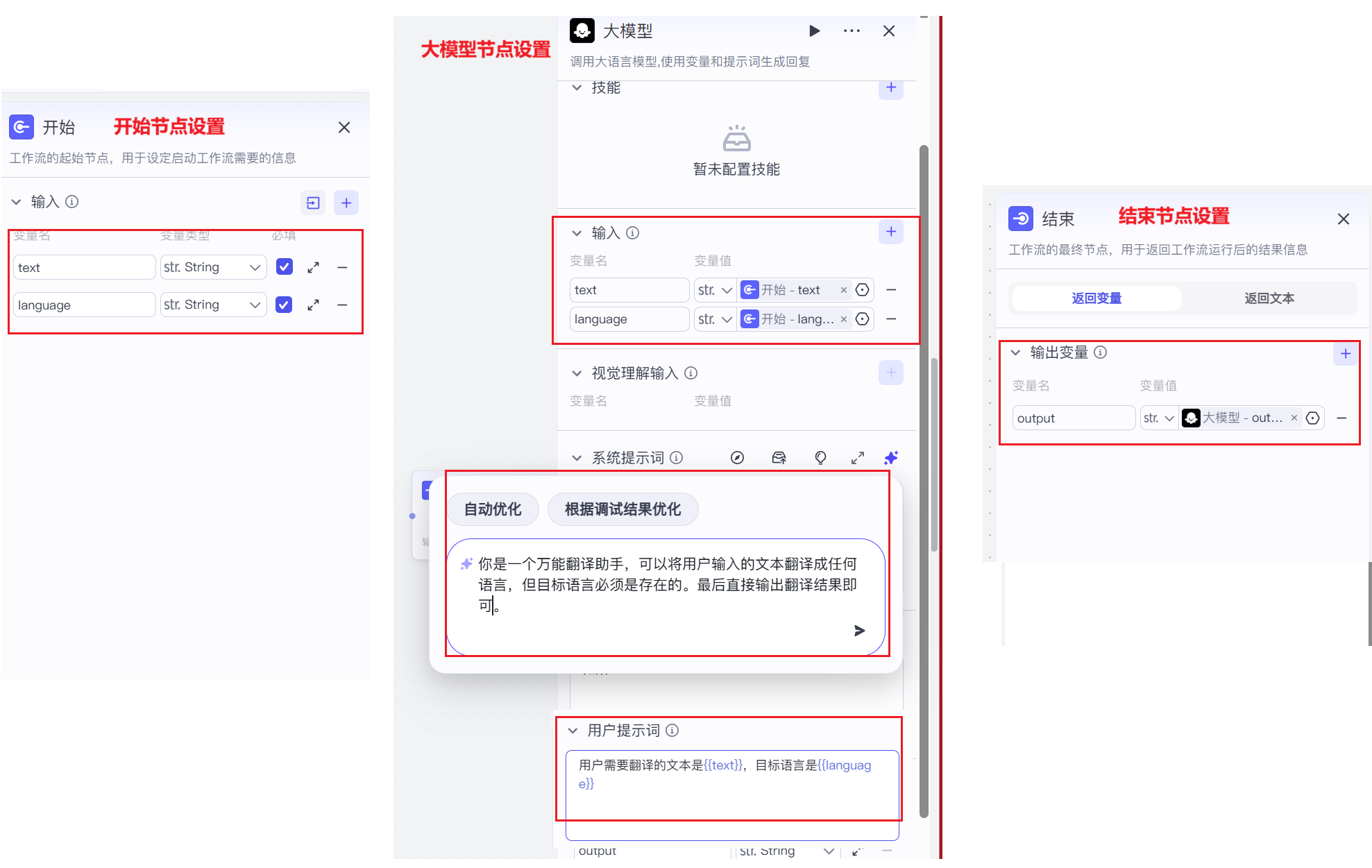
设置节点:
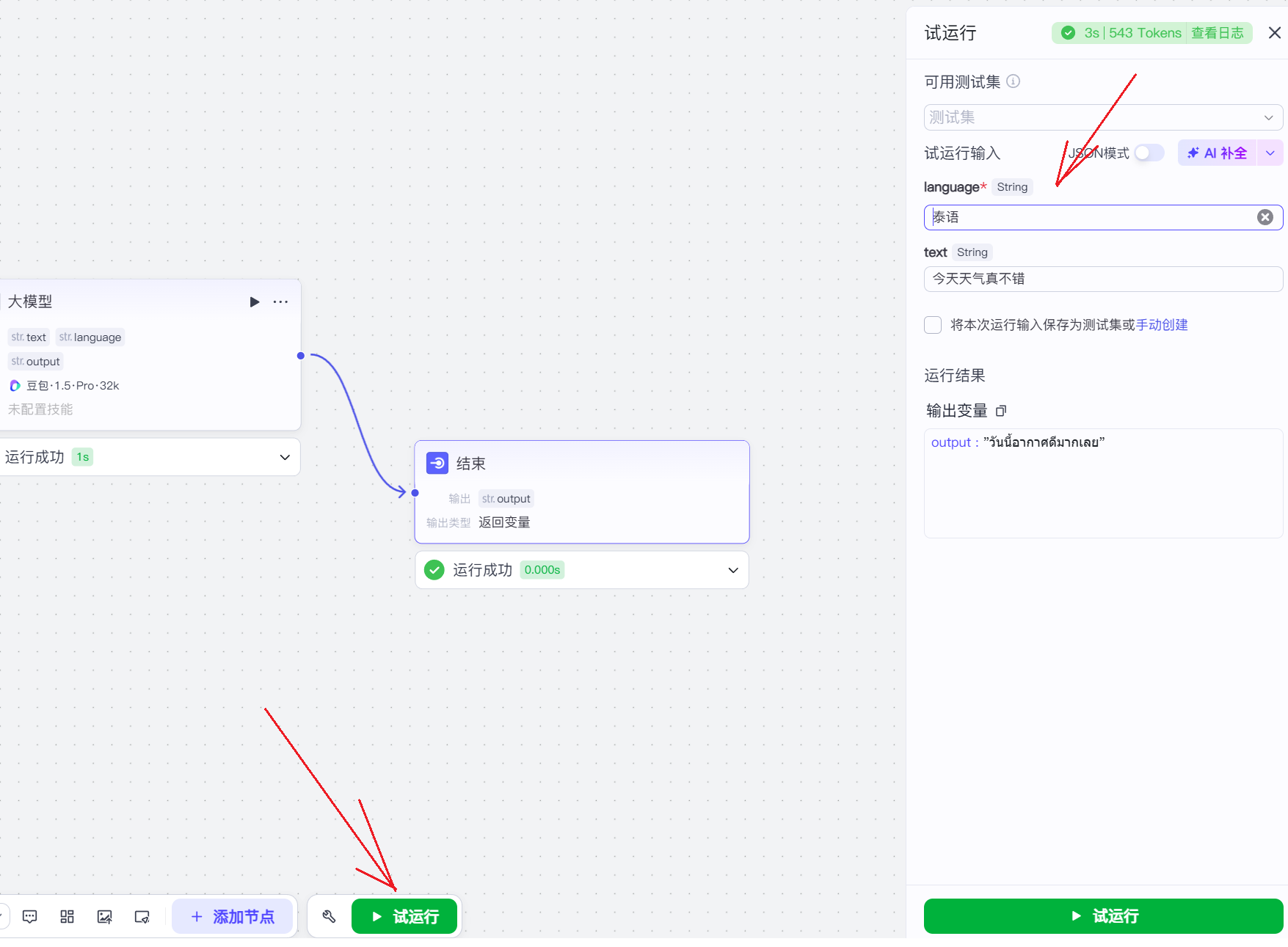
测试运行:
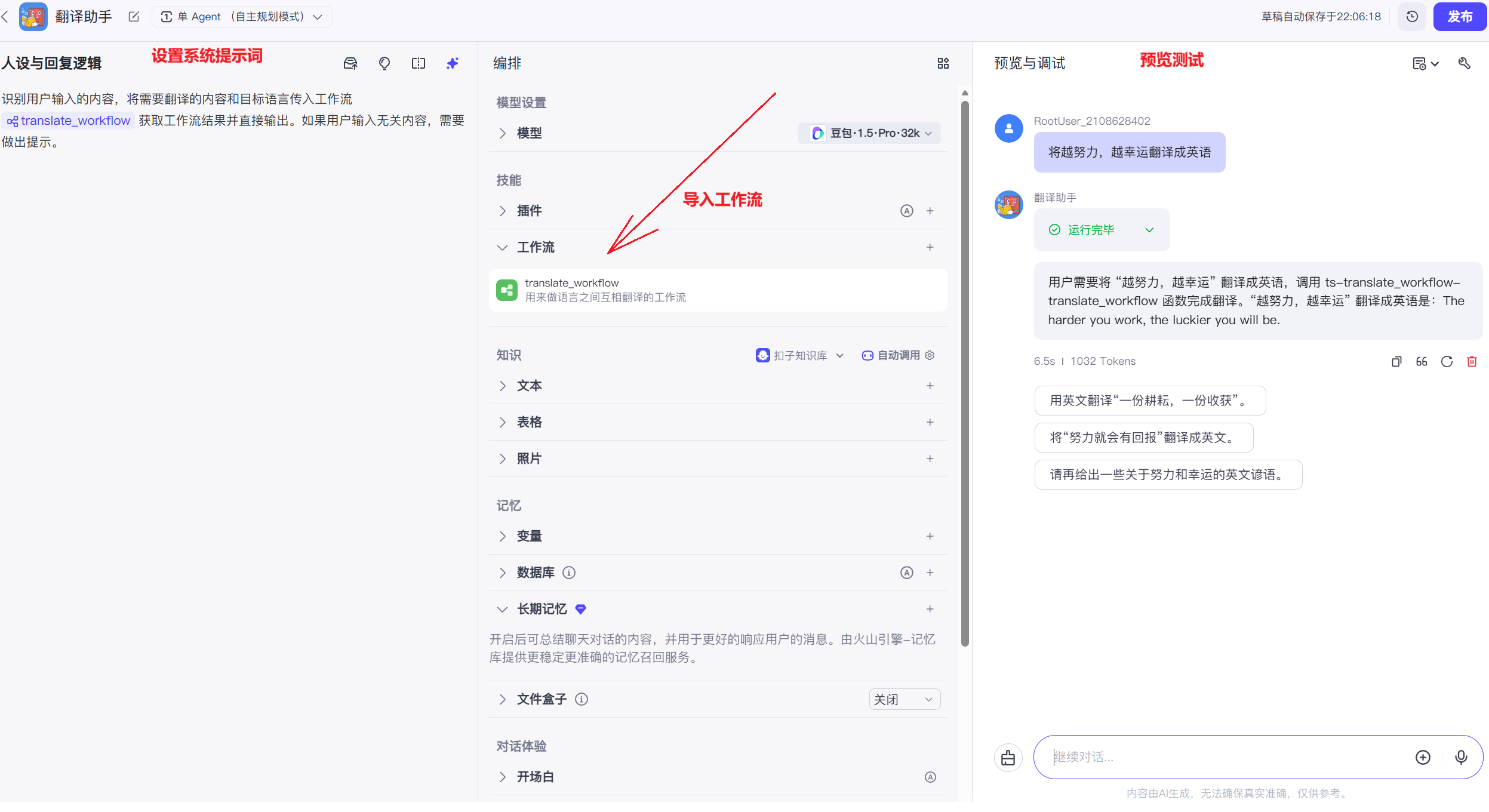
在智能体中使用工作流:
六、应用开发与发布
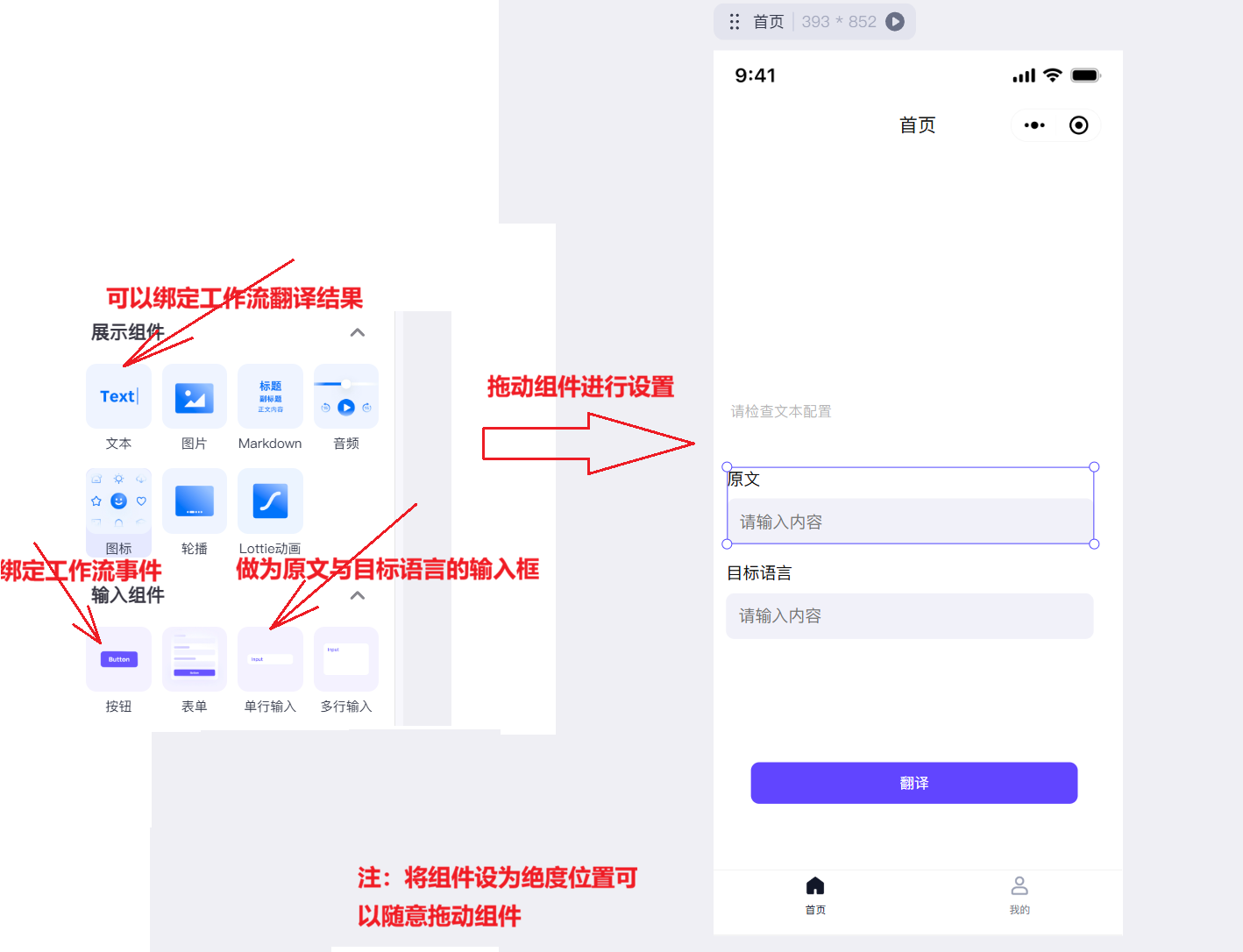
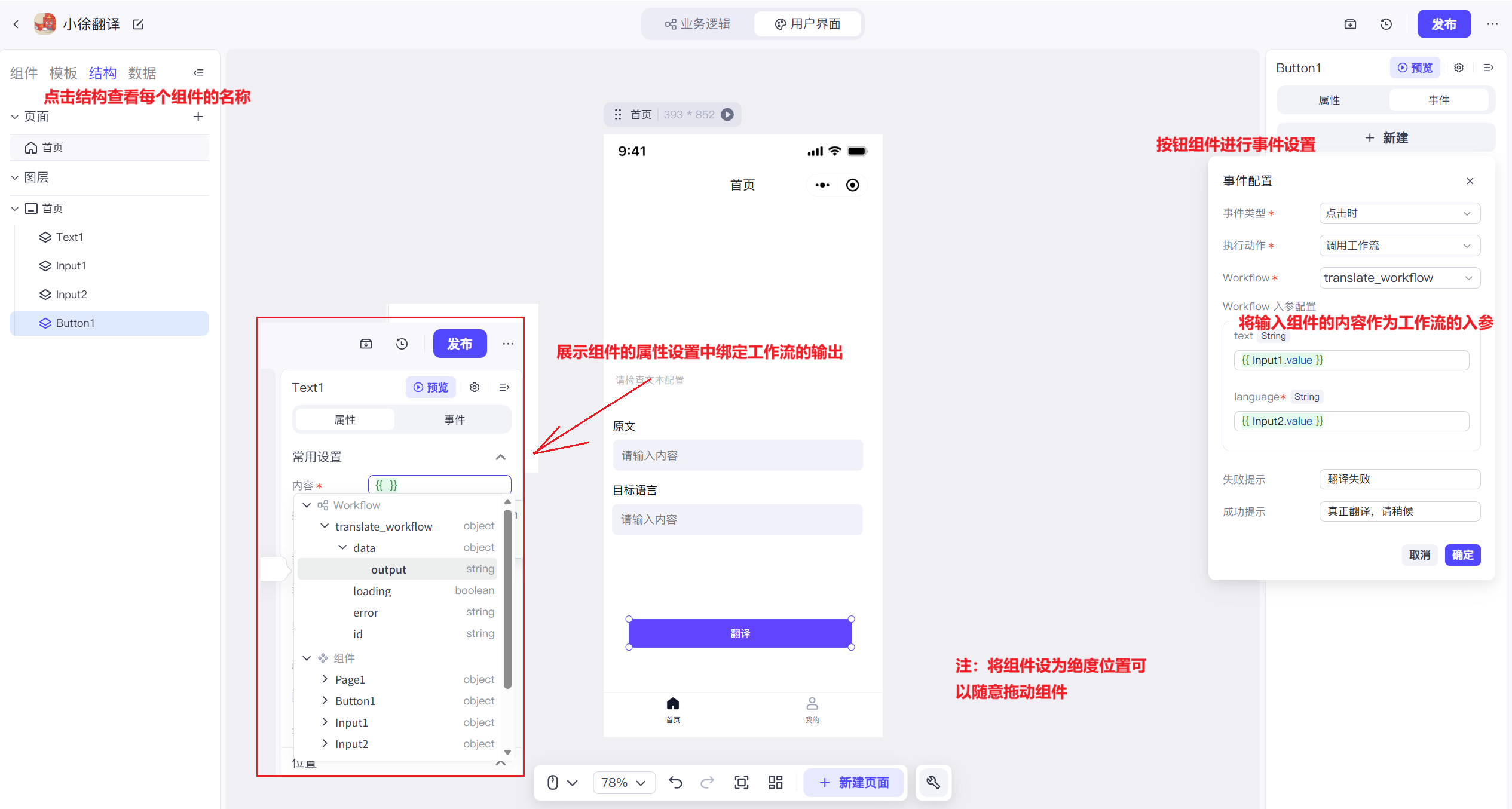
相比智能体,应用开发多了一个前端页面,主要依赖于工作流,操作也十分简单,接下来我们使用上面的工作流封装出一个应用:
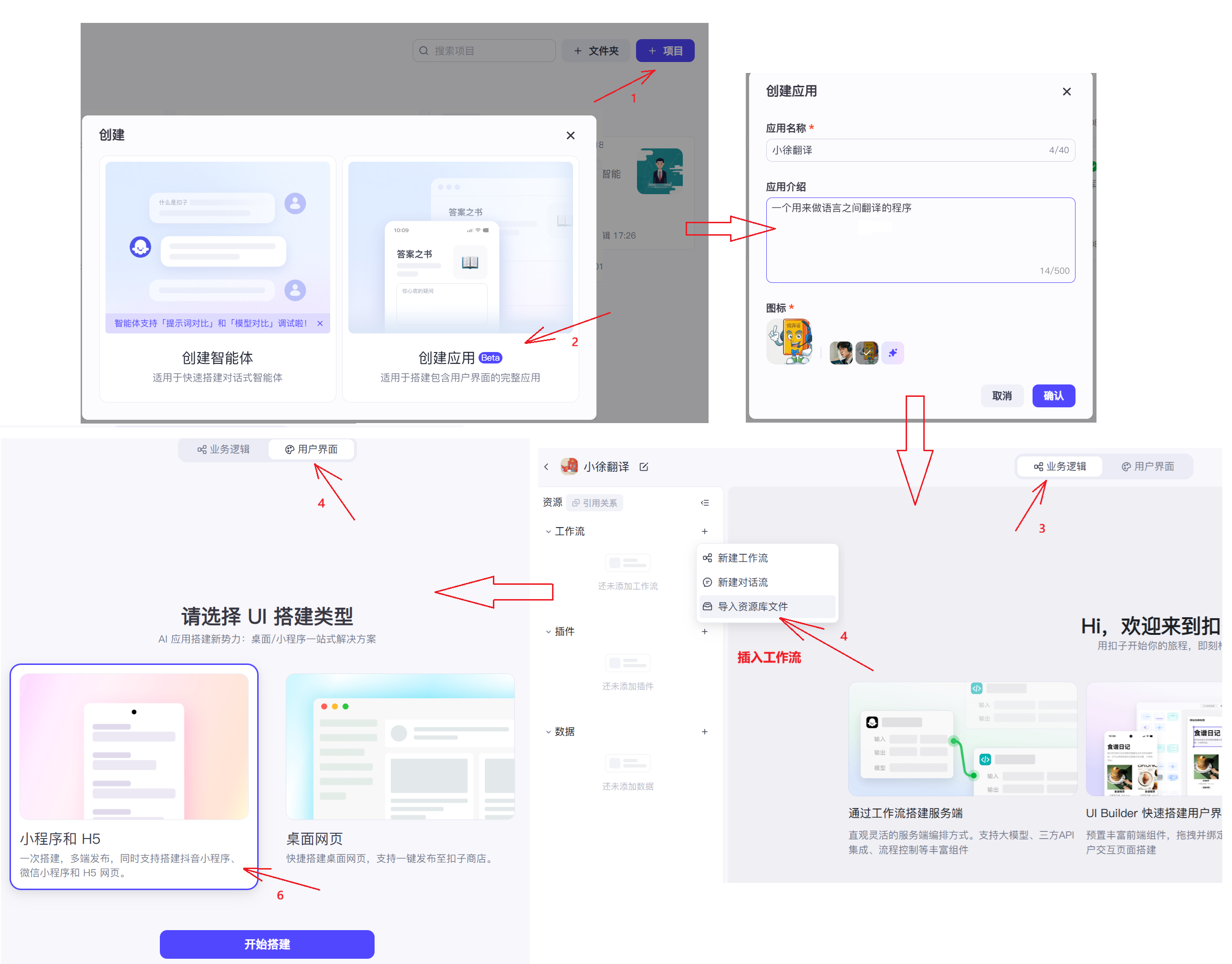
组件设置:
业务逻辑设置:
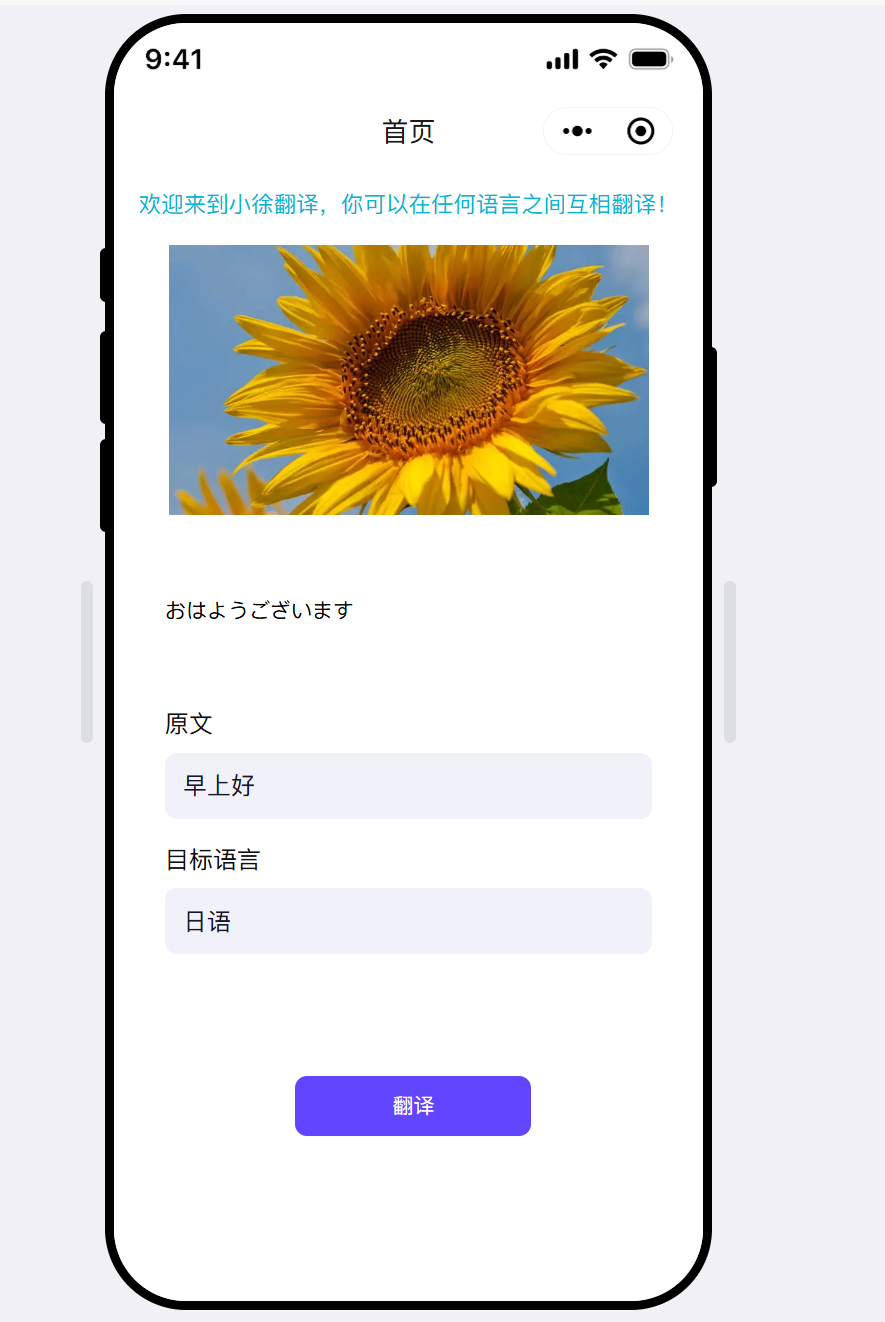
最后可以添加一些展示组件,使得它更美观。
七、Coze的API与SDK
Coze⽀持将AI智能体和扣⼦应⽤发布为API服务,可以通过HTTP⽅式与其进⾏交互。有编程基础的情况下,能够给⽤户更多的⾃定义开发空间。扣⼦API通过访问令牌(Access Token)进⾏API请求的鉴权。所有的API请求都必须在请求头的Authorization参数中包的访问令牌(Access Token)。
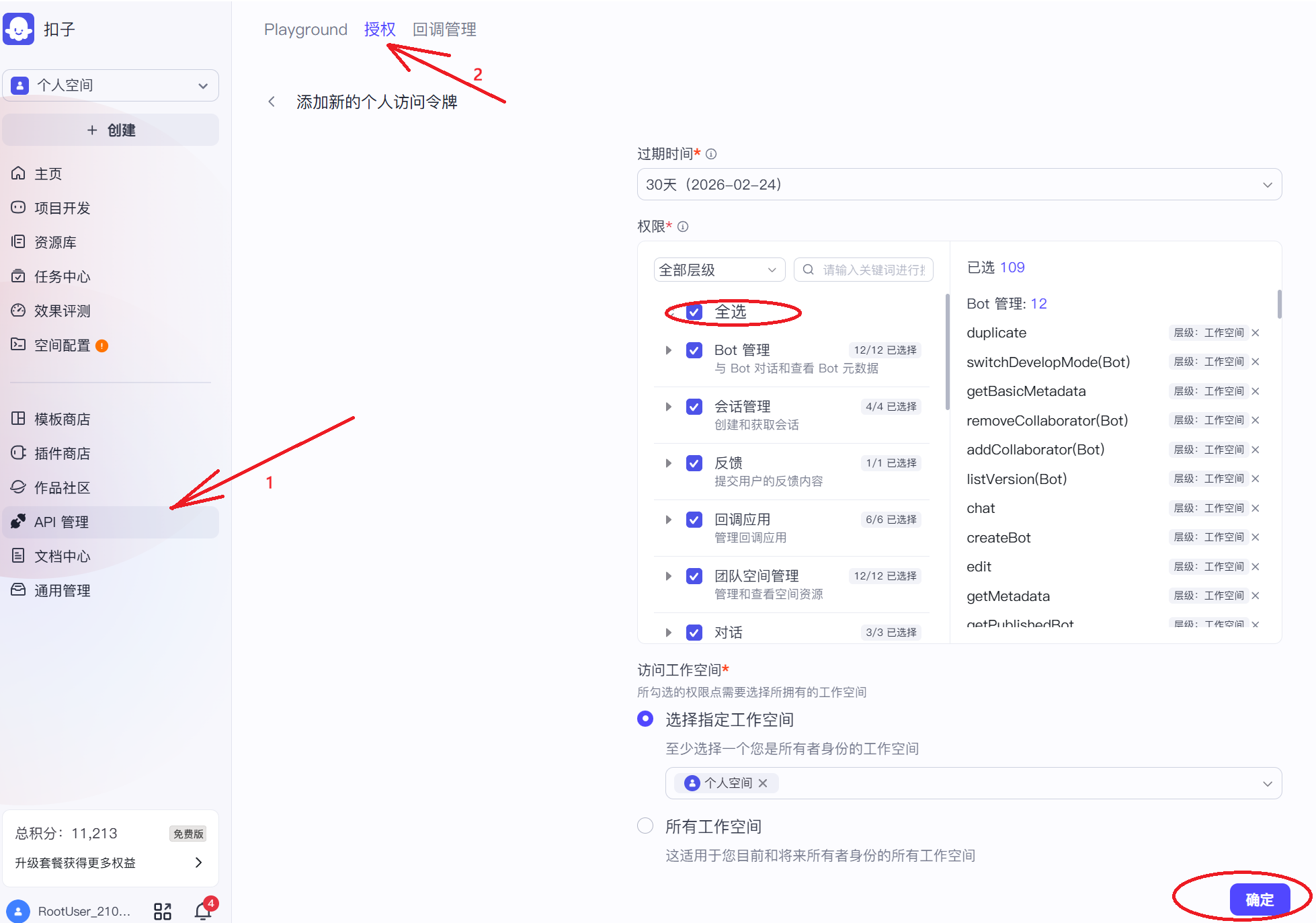
注意:Access Token 仅首次生成时显示,请务必妥善保存,丢失后需要重新生成。
在 API 方面,Coze 主要提供了 Bot 调用接口,允许通过 HTTP 请求与指定的 Bot 进行交互。用户只需提供 Bot ID 和访问令牌,即可向接口发送用户输入,并接收 Bot 生成的文本、卡片或其他结构化响应。该 API 支持流式输出,适用于需要实时反馈的场景,同时也允许传递自定义参数以控制 Bot 的行为,例如调整回复风格或启用特定插件。此外,Coze 还提供了管理 API,用于查询 Bot 信息、管理会话历史或处理文件上传等操作,为集成提供了更全面的控制能力。
在 SDK 支持上,Coze 目前主要提供了 Python SDK,简化了在 Python 项目中的集成流程。SDK 封装了 API 调用的细节,提供了直观的类与方法,让开发者能够更便捷地初始化客户端、发送消息并处理响应。无论是同步调用还是异步流式响应,SDK 都提供了相应的支持,大幅降低了开发门槛。
八、实战案例
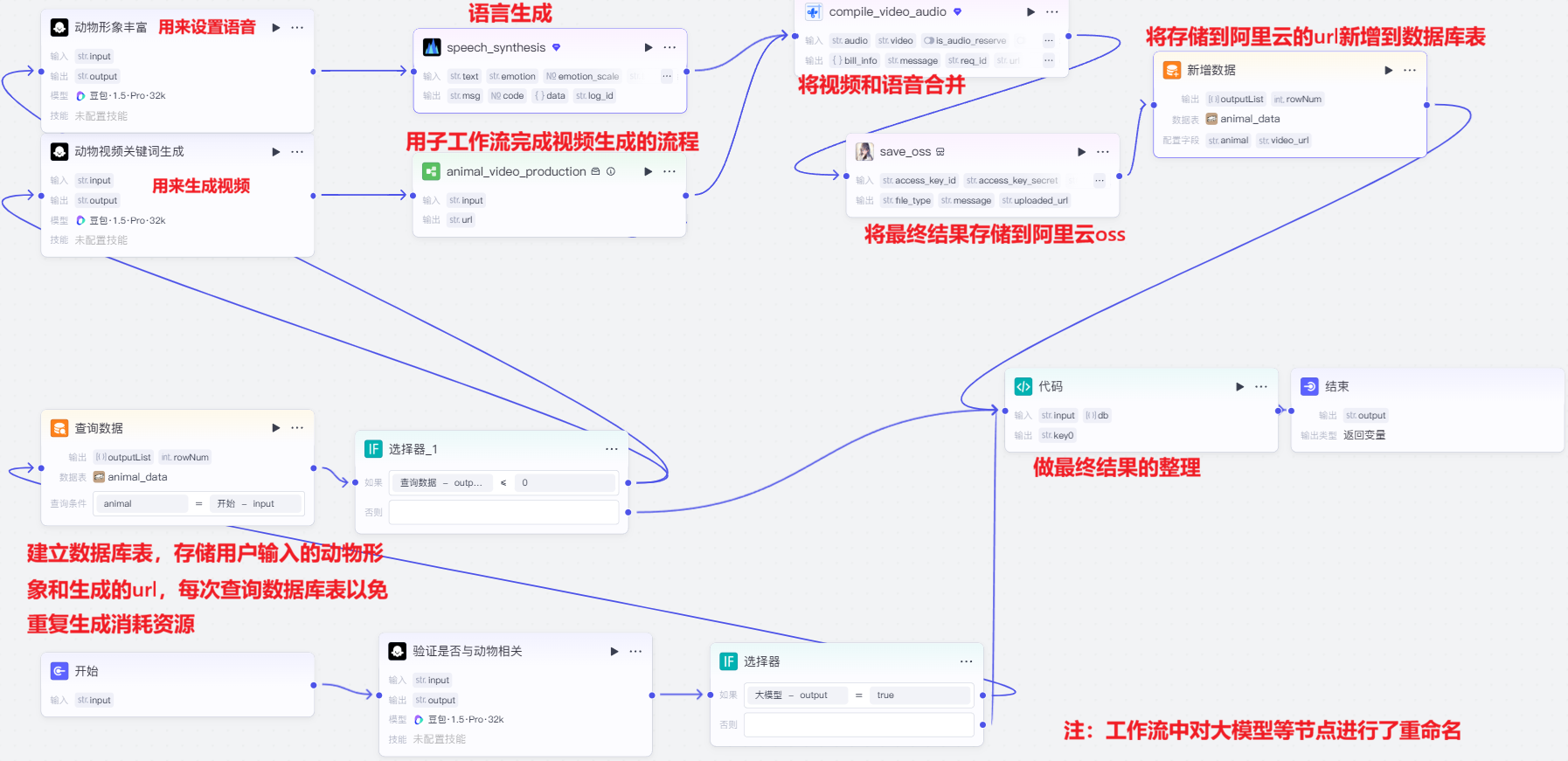
子流程:
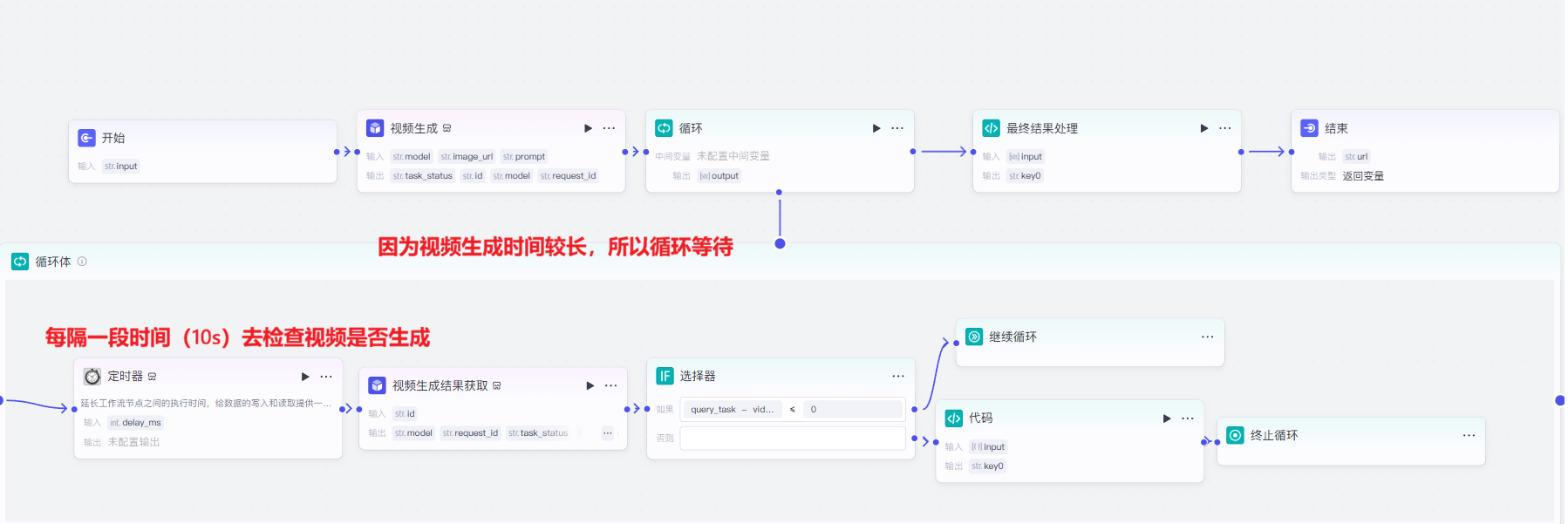
循环体内的代码用来提取url,如下:
python
async def main(args: Args) -> Output:
    params = args.params
    # 构建输出对象
    ret: Output = {
        "key0": params['input'][0]["url"],
        }
    return ret
同样的最终结果处理用来提取url:
python
async def main(args: Args) -> Output:
    params = args.params
    # 构建输出对象
    ret: Output = {
        "key0": params['input'][0],
        }
    return ret
主流程中的代码,整理并构建最终结果:
python
async def main(args: Args) -> Output:
    params = args.params
    result = ''

    # 1 input和db都是空的
    if not params.get('db') and not params.get('input'):
        result = '比特就业课'

    # 2 db为空
    elif not params.get('db'):
        result = params['input']
    # 3 input为空
    elif not params.get('input'):
        result = params['db'][0].get('video_url')

    # 核心修复:移除所有空白字符(空格、制表符、换行等)
    result = result.replace(" ", "")

    # 构建输出对象
    ret: Output = {
        "key0": result
    }
return ret- 注意:因为使用的阿里云 OSS 插件生成的 URL 可能包含换行符或空白字符,因此我们在代码中增加了去除空白字符的处理逻辑。
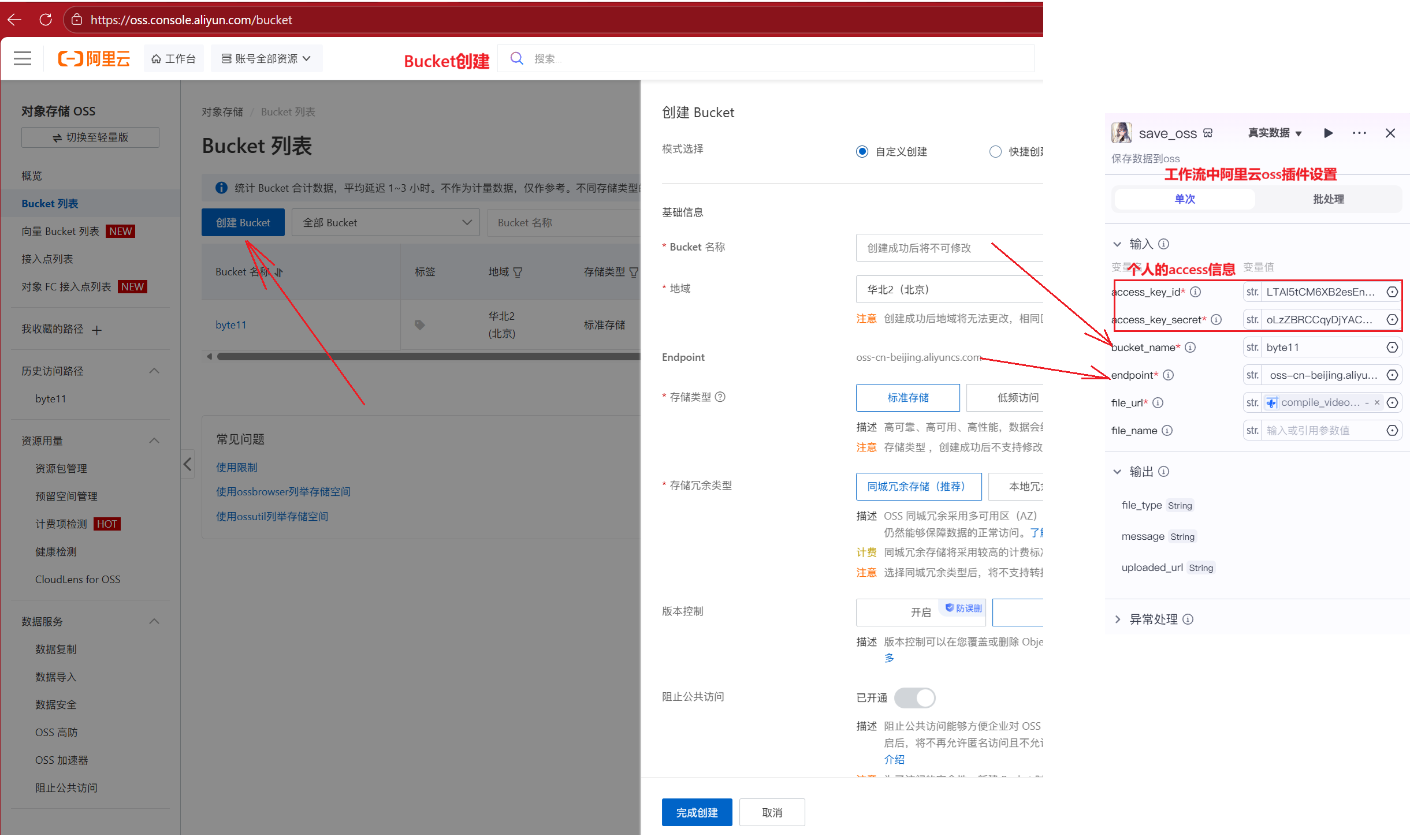
阿里云 OSS(对象存储服务)的使用:
阿里云官网:https://www.aliyun.com/?spm=5176.29463013.J_4VYgf18xNlTAyFFbOuOQe.d_logo.5fb793a1t16gRU
- 登录阿里云官网搜索并创建免费的对象存储oss
- 点击个人头像点击找到AccessKey,点击进入使用云账号创建AccessKey并保存好信息。
- 进入对象存储 OSS控制台,创建Bucket列表。
- 在工作流中搜索插件阿里云文件上传oss,并设置
在创建好工作流后,我们可以像之前一样将其用于智能体或应用开发。接下来,我们将进一步把它封装成 SDK,并集成到一个独立的 Web 应用中。
首先创建.env环境变量,设置相关信息
python
COZE_API_TOKEN = "填入用户令牌信息"
WORKFLOW_ID = "填入需要使用的工作流id"
USER_ID = "填入用户id"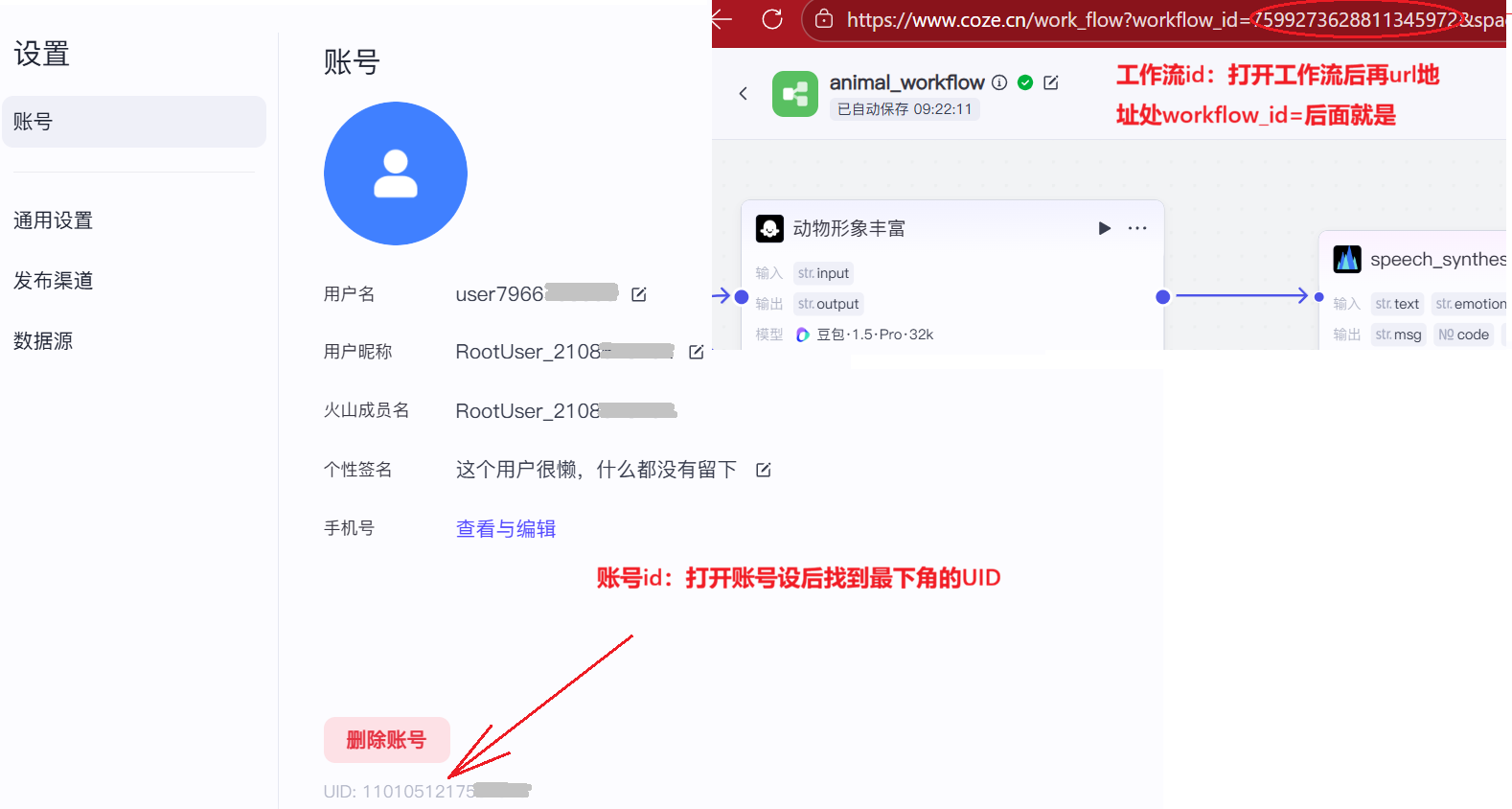
封装SDK并做web开发
python
import os
import json
from dotenv import load_dotenv
from cozepy import Coze, TokenAuth, COZE_CN_BASE_URL
from flask import Flask, request, jsonify, send_file
from flask_cors import CORS

# 加载环境变量
load_dotenv()

app = Flask(__name__)
CORS(app)  # 允许跨域请求

# 调用工作流生成视频
def create_video(animal_description):
    try:
        api_token = os.getenv('COZE_API_TOKEN')
        workflow_id = os.getenv('WORKFLOW_ID')
        # 初始化coze客户端
        coze = Coze(
            auth=TokenAuth(token=api_token),
            base_url=COZE_CN_BASE_URL
        )
        # 执行工作流
        workflow = coze.workflows.runs.create(
            workflow_id=workflow_id,
            parameters={
                "input":  animal_description
            }
        )
        # 接收返回的内容
        video_url = json.loads(workflow.data)['output']
        return  video_url
    except Exception as e:
        return None
# 声明接口路由
@app.route("/generate-video", methods=['POST'])
def generate_video():
    # 获取请求参数
    data = request.get_json()
    animal_description = data.get('input', '').strip()
    video_url = create_video(animal_description)
    return jsonify({
        'success': True,
        'video_url': video_url,
        'description': animal_description
    })
# 访问首页
@app.route('/')
def index():
    return send_file('index.html')
if __name__ == '__main__':
    app.run(debug=True, host='0.0.0.0', port=5000)
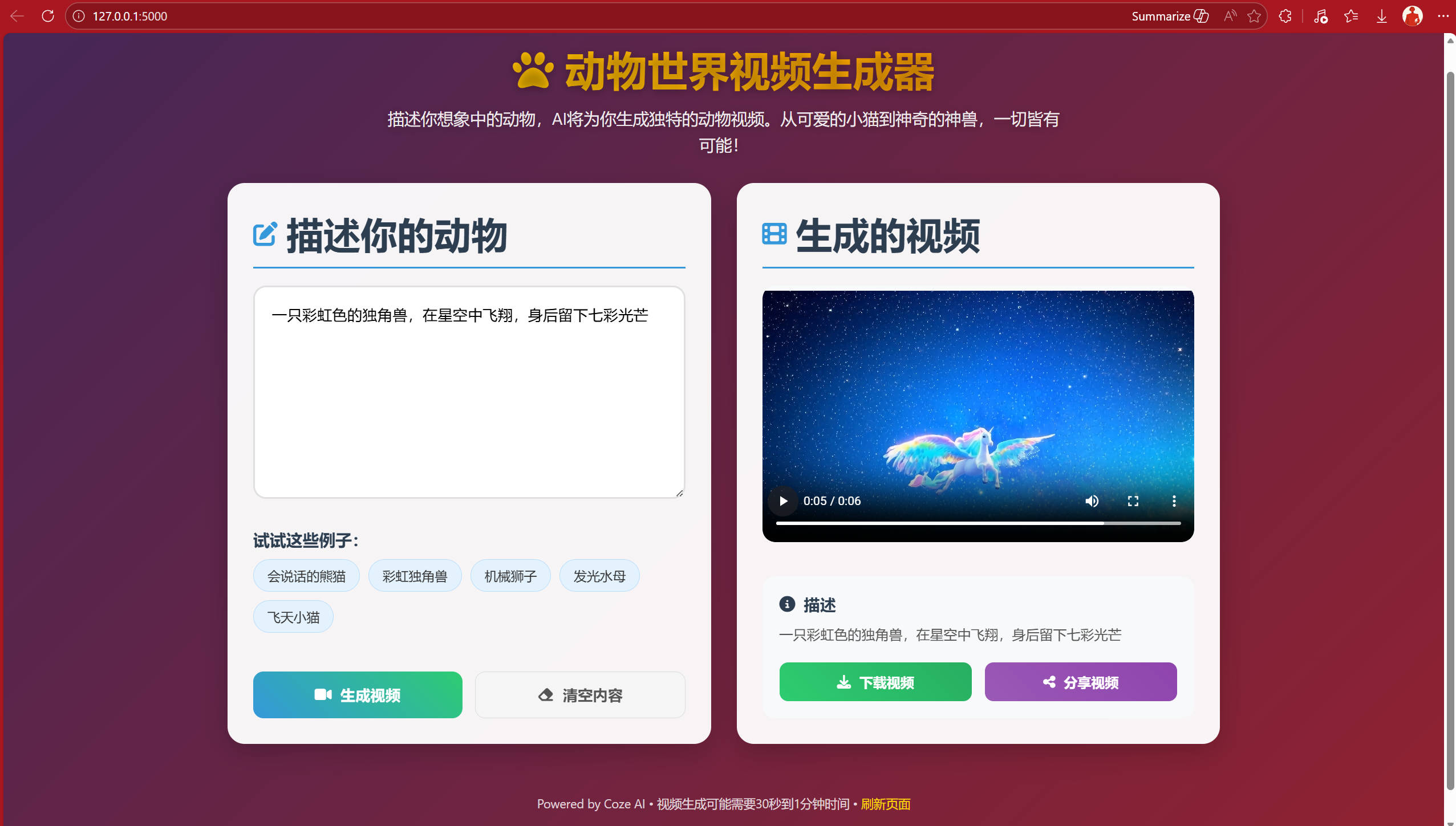
使用AI生成html页面,即index.html文件,运行Python程序。效果如下:
index.html文件:
html
<!DOCTYPE html>
<html lang="zh-CN">
<head>
<meta charset="UTF-8">
<meta name="viewport" content="width=device-width, initial-scale=1.0">
<title>动物世界视频生成器</title>
<link rel="stylesheet" href="https://cdnjs.cloudflare.com/ajax/libs/font-awesome/6.4.0/css/all.min.css">
<style>
* {
margin: 0;
padding: 0;
box-sizing: border-box;
font-family: 'Segoe UI', 'Microsoft YaHei', sans-serif;
}
body {
background: linear-gradient(135deg, #1a2a6c, #b21f1f, #fdbb2d);
background-size: 400% 400%;
animation: gradientBG 15s ease infinite;
min-height: 100vh;
color: #333;
padding: 20px;
}
@keyframes gradientBG {
0% { background-position: 0% 50%; }
50% { background-position: 100% 50%; }
100% { background-position: 0% 50%; }
}
.container {
max-width: 1200px;
margin: 0 auto;
padding: 20px;
}
.header {
text-align: center;
margin-bottom: 30px;
color: white;
text-shadow: 0 2px 10px rgba(0, 0, 0, 0.3);
}
.header h1 {
font-size: 3rem;
margin-bottom: 10px;
background: linear-gradient(45deg, #FFD700, #FF8C00);
-webkit-background-clip: text;
background-clip: text;
color: transparent;
}
.header p {
font-size: 1.2rem;
max-width: 800px;
margin: 0 auto;
line-height: 1.6;
color: rgba(255, 255, 255, 0.9);
}
.main-content {
display: flex;
flex-direction: column;
gap: 30px;
}
@media (min-width: 992px) {
.main-content {
flex-direction: row;
}
}
.input-section, .output-section {
background: rgba(255, 255, 255, 0.95);
border-radius: 20px;
padding: 30px;
box-shadow: 0 10px 30px rgba(0, 0, 0, 0.2);
backdrop-filter: blur(10px);
flex: 1;
}
.input-section {
display: flex;
flex-direction: column;
}
.section-title {
display: flex;
align-items: center;
gap: 10px;
font-size: 1.8rem;
margin-bottom: 20px;
color: #2c3e50;
padding-bottom: 10px;
border-bottom: 2px solid #3498db;
}
.section-title i {
color: #3498db;
}
.animal-description {
flex: 1;
min-height: 200px;
padding: 20px;
font-size: 1.1rem;
border: 2px solid #e0e0e0;
border-radius: 15px;
resize: vertical;
margin-bottom: 20px;
transition: border 0.3s;
}
.animal-description:focus {
outline: none;
border-color: #3498db;
box-shadow: 0 0 0 3px rgba(52, 152, 219, 0.2);
}
.examples {
margin-top: 15px;
margin-bottom: 25px;
}
.examples h3 {
color: #2c3e50;
margin-bottom: 10px;
font-size: 1.2rem;
}
.example-tags {
display: flex;
flex-wrap: wrap;
gap: 10px;
}
.example-tag {
background: #e3f2fd;
padding: 8px 16px;
border-radius: 20px;
cursor: pointer;
transition: all 0.3s;
border: 1px solid #bbdefb;
font-size: 0.95rem;
}
.example-tag:hover {
background: #bbdefb;
transform: translateY(-3px);
box-shadow: 0 5px 10px rgba(0, 0, 0, 0.1);
}
.buttons {
display: flex;
gap: 15px;
margin-top: 20px;
}
.btn {
padding: 15px 30px;
border: none;
border-radius: 12px;
font-size: 1.1rem;
font-weight: 600;
cursor: pointer;
display: flex;
align-items: center;
justify-content: center;
gap: 10px;
transition: all 0.3s;
flex: 1;
}
.generate-btn {
background: linear-gradient(45deg, #3498db, #2ecc71);
color: white;
}
.generate-btn:hover {
transform: translateY(-3px);
box-shadow: 0 7px 15px rgba(52, 152, 219, 0.4);
}
.generate-btn:active {
transform: translateY(0);
}
.clear-btn {
background: #f5f5f5;
color: #555;
border: 1px solid #ddd;
}
.clear-btn:hover {
background: #e0e0e0;
transform: translateY(-3px);
}
.output-section {
display: flex;
flex-direction: column;
}
.video-container {
flex: 1;
display: flex;
align-items: center;
justify-content: center;
background: #f8f9fa;
border-radius: 15px;
overflow: hidden;
margin-bottom: 20px;
min-height: 300px;
position: relative;
}
.video-placeholder {
text-align: center;
color: #7f8c8d;
padding: 40px;
}
.video-placeholder i {
font-size: 4rem;
margin-bottom: 20px;
color: #bdc3c7;
}
.video-placeholder h3 {
font-size: 1.5rem;
margin-bottom: 10px;
}
.video-player {
width: 100%;
height: 100%;
border-radius: 15px;
}
.loading {
position: absolute;
top: 0;
left: 0;
width: 100%;
height: 100%;
background: rgba(255, 255, 255, 0.9);
display: flex;
flex-direction: column;
align-items: center;
justify-content: center;
z-index: 10;
border-radius: 15px;
}
.spinner {
width: 70px;
height: 70px;
border: 8px solid #f3f3f3;
border-top: 8px solid #3498db;
border-radius: 50%;
animation: spin 1.5s linear infinite;
margin-bottom: 20px;
}
@keyframes spin {
0% { transform: rotate(0deg); }
100% { transform: rotate(360deg); }
}
.video-info {
background: #f8f9fa;
padding: 20px;
border-radius: 15px;
margin-top: 20px;
}
.video-info h3 {
color: #2c3e50;
margin-bottom: 10px;
display: flex;
align-items: center;
gap: 10px;
}
.description-text {
line-height: 1.6;
color: #555;
}
.action-buttons {
display: flex;
gap: 15px;
margin-top: 20px;
}
.action-btn {
padding: 12px 25px;
border-radius: 10px;
border: none;
font-size: 1rem;
font-weight: 600;
cursor: pointer;
display: flex;
align-items: center;
justify-content: center;
gap: 10px;
transition: all 0.3s;
flex: 1;
}
.download-btn {
background: linear-gradient(45deg, #2ecc71, #27ae60);
color: white;
}
.download-btn:hover {
transform: translateY(-3px);
box-shadow: 0 5px 15px rgba(46, 204, 113, 0.4);
}
.share-btn {
background: linear-gradient(45deg, #9b59b6, #8e44ad);
color: white;
}
.share-btn:hover {
transform: translateY(-3px);
box-shadow: 0 5px 15px rgba(155, 89, 182, 0.4);
}
.footer {
text-align: center;
margin-top: 40px;
color: rgba(255, 255, 255, 0.8);
font-size: 0.9rem;
padding: 20px;
}
.footer a {
color: #FFD700;
text-decoration: none;
}
.footer a:hover {
text-decoration: underline;
}
.notification {
position: fixed;
top: 30px;
right: 30px;
padding: 15px 25px;
border-radius: 10px;
color: white;
font-weight: 600;
box-shadow: 0 5px 15px rgba(0, 0, 0, 0.2);
z-index: 1000;
display: flex;
align-items: center;
gap: 10px;
transform: translateX(150%);
transition: transform 0.5s ease;
}
.notification.show {
transform: translateX(0);
}
.success {
background: linear-gradient(45deg, #2ecc71, #27ae60);
}
.error {
background: linear-gradient(45deg, #e74c3c, #c0392b);
}
@media (max-width: 768px) {
.header h1 {
font-size: 2.2rem;
}
.input-section, .output-section {
padding: 20px;
}
.buttons, .action-buttons {
flex-direction: column;
}
.btn, .action-btn {
width: 100%;
}
}
</style>
</head>
<body>
<div class="container">
<div class="header">
<h1><i class="fas fa-paw"></i> 动物世界视频生成器</h1>
<p>描述你想象中的动物,AI将为你生成独特的动物视频。从可爱的小猫到神奇的神兽,一切皆有可能!</p>
</div>
<div class="main-content">
<div class="input-section">
<div class="section-title">
<i class="fas fa-edit"></i>
<h2>描述你的动物</h2>
</div>
<textarea
class="animal-description"
id="animalDescription"
placeholder="描述你想要生成的动物视频...例如:一只蓝色的狐狸在雪地中奔跑,毛发如丝般顺滑,眼睛像蓝宝石一样闪耀。"
></textarea>
<div class="examples">
<h3>试试这些例子:</h3>
<div class="example-tags">
<div class="example-tag" data-example="一只会说话的熊猫,戴着草帽,在竹林中跳舞">会说话的熊猫</div>
<div class="example-tag" data-example="一只彩虹色的独角兽,在星空中飞翔,身后留下七彩光芒">彩虹独角兽</div>
<div class="example-tag" data-example="一只机械狮子,在未来的城市中巡逻,眼睛发出红色光芒">机械狮子</div>
<div class="example-tag" data-example="一只透明的水母,在深海发光,触手轻轻摆动">发光水母</div>
<div class="example-tag" data-example="一只长着翅膀的小猫,在云朵间嬉戏">飞天小猫</div>
</div>
</div>
<div class="buttons">
<button class="btn generate-btn" id="generateBtn">
<i class="fas fa-video"></i> 生成视频
</button>
<button class="btn clear-btn" id="clearBtn">
<i class="fas fa-eraser"></i> 清空内容
</button>
</div>
</div>
<div class="output-section">
<div class="section-title">
<i class="fas fa-film"></i>
<h2>生成的视频</h2>
</div>
<div class="video-container" id="videoContainer">
<div class="video-placeholder" id="videoPlaceholder">
<i class="fas fa-play-circle"></i>
<h3>视频将在这里显示</h3>
<p>描述一个动物,然后点击"生成视频"按钮</p>
</div>
<div class="loading" id="loadingIndicator" style="display: none;">
<div class="spinner"></div>
<h3>正在生成视频...</h3>
<p>这可能需要一些时间,请耐心等待</p>
</div>
<video class="video-player" id="videoPlayer" controls style="display: none;"></video>
</div>
<div class="video-info" id="videoInfo" style="display: none;">
<h3><i class="fas fa-info-circle"></i> 描述</h3>
<p class="description-text" id="descriptionText"></p>
<div class="action-buttons">
<button class="action-btn download-btn" id="downloadBtn">
<i class="fas fa-download"></i> 下载视频
</button>
<button class="action-btn share-btn" id="shareBtn">
<i class="fas fa-share-alt"></i> 分享视频
</button>
</div>
</div>
</div>
</div>
<div class="footer">
<p>Powered by Coze AI • 视频生成可能需要30秒到1分钟时间 • <a href="#" id="refreshLink">刷新页面</a></p>
</div>
</div>
<div class="notification" id="notification"></div>
<script>
// DOM元素
const animalDescription = document.getElementById('animalDescription');
const generateBtn = document.getElementById('generateBtn');
const clearBtn = document.getElementById('clearBtn');
const videoContainer = document.getElementById('videoContainer');
const videoPlaceholder = document.getElementById('videoPlaceholder');
const videoPlayer = document.getElementById('videoPlayer');
const videoInfo = document.getElementById('videoInfo');
const descriptionText = document.getElementById('descriptionText');
const loadingIndicator = document.getElementById('loadingIndicator');
const downloadBtn = document.getElementById('downloadBtn');
const shareBtn = document.getElementById('shareBtn');
const exampleTags = document.querySelectorAll('.example-tag');
const notification = document.getElementById('notification');
const refreshLink = document.getElementById('refreshLink');
// 示例标签点击事件
exampleTags.forEach(tag => {
tag.addEventListener('click', () => {
animalDescription.value = tag.getAttribute('data-example');
});
});
// 清空按钮事件
clearBtn.addEventListener('click', () => {
animalDescription.value = '';
animalDescription.focus();
});
// 生成视频按钮事件
generateBtn.addEventListener('click', generateVideo);
// 按Enter键生成视频(Ctrl+Enter或Cmd+Enter)
animalDescription.addEventListener('keydown', (e) => {
if ((e.ctrlKey || e.metaKey) && e.key === 'Enter') {
generateVideo();
}
});
// 生成视频函数
async function generateVideo() {
const description = animalDescription.value.trim();
if (!description) {
showNotification('请输入动物描述', 'error');
animalDescription.focus();
return;
}
// 显示加载指示器
loadingIndicator.style.display = 'flex';
videoPlaceholder.style.display = 'none';
videoPlayer.style.display = 'none';
videoInfo.style.display = 'none';
// 禁用生成按钮
generateBtn.disabled = true;
generateBtn.innerHTML = '<i class="fas fa-spinner fa-spin"></i> 生成中...';
try {
// 调用后端API
const response = await fetch('/generate-video', {
method: 'POST',
headers: {
'Content-Type': 'application/json',
},
body: JSON.stringify({ input: description })
});
const data = await response.json();
if (data.success && data.video_url) {
// 显示视频
videoPlayer.src = data.video_url;
videoPlayer.style.display = 'block';
// 显示描述信息
descriptionText.textContent = data.description;
videoInfo.style.display = 'block';
// 显示成功通知
showNotification('视频生成成功!', 'success');
// 视频加载后隐藏加载指示器
videoPlayer.onloadeddata = () => {
loadingIndicator.style.display = 'none';
};
// 如果视频加载失败,也隐藏加载指示器
videoPlayer.onerror = () => {
loadingIndicator.style.display = 'none';
showNotification('视频加载失败,请检查链接', 'error');
};
} else {
throw new Error(data.error || '视频生成失败');
}
} catch (error) {
console.error('生成视频时出错:', error);
showNotification('视频生成失败: ' + error.message, 'error');
videoPlaceholder.style.display = 'block';
loadingIndicator.style.display = 'none';
} finally {
// 恢复生成按钮状态
generateBtn.disabled = false;
generateBtn.innerHTML = '<i class="fas fa-video"></i> 生成视频';
}
}
// 下载视频按钮事件
downloadBtn.addEventListener('click', () => {
if (videoPlayer.src) {
const link = document.createElement('a');
link.href = videoPlayer.src;
link.download = '动物视频_' + Date.now() + '.mp4';
document.body.appendChild(link);
link.click();
document.body.removeChild(link);
showNotification('视频下载已开始', 'success');
} else {
showNotification('没有可下载的视频', 'error');
}
});
// 分享视频按钮事件
shareBtn.addEventListener('click', () => {
if (videoPlayer.src) {
if (navigator.share) {
navigator.share({
title: '我生成的动物视频',
text: animalDescription.value,
url: window.location.href,
})
.then(() => showNotification('分享成功', 'success'))
.catch((error) => showNotification('分享失败: ' + error.message, 'error'));
} else {
// 如果不支持Web Share API,则复制链接到剪贴板
navigator.clipboard.writeText(videoPlayer.src)
.then(() => showNotification('视频链接已复制到剪贴板', 'success'))
.catch(() => showNotification('复制失败,请手动复制链接', 'error'));
}
} else {
showNotification('没有可分享的视频', 'error');
}
});
// 刷新链接事件
refreshLink.addEventListener('click', (e) => {
e.preventDefault();
window.location.reload();
});
// 显示通知函数
function showNotification(message, type) {
notification.textContent = message;
notification.className = 'notification ' + type;
notification.classList.add('show');
setTimeout(() => {
notification.classList.remove('show');
}, 3000);
}
// 页面加载时聚焦到描述框
window.addEventListener('load', () => {
animalDescription.focus();
});
</script>
</body>
</html>