Task 类设计详解
一、概述
1.1 设计目标
Task 类是 Kilo Code 的核心任务执行引擎,负责协调 AI 模型、工具系统、用户交互和状态管理,实现从用户输入到任务完成的核心流程。
核心职责:
- API 请求循环:管理与 AI 模型的流式通信
- 工具执行编排:协调 20+ 种工具的调用和权限控制
- 上下文管理:智能压缩和优化对话历史
- 状态持久化:保存任务历史和元数据
- 事件驱动:通过事件系统与 UI 和其他模块通信
1.2 核心特性
- 任务引擎核心:实现ReAct Agent核心逻辑
- 智能上下文压缩:自动压缩长对话,节省 Token
- 工具权限管理:支持自动批准和用户确认
- 错误恢复机制:指数退避重试和用户交互式恢复
- 任务嵌套:支持子任务和任务栈管理
- 检查点系统:支持任务状态快照和恢复
- 多模态支持:支持文本、图片等多种输入类型
1.3 调用过程
Task 的执行遵循以下流程:
用户输入 → 消息预处理 → 构建消息 → API 请求 → 流式响应处理 → 工具执行 → 结果反馈 → 继续请求 → 完成二、架构设计
2.1 组件关系
外部依赖
Task 核心组件
Task 实例
ApiHandler
MessageQueueService
AutoApprovalHandler
CheckpointManager
ClineProvider
McpHub
工具系统
持久化层
2.2 类图
Task
-taskId: string
-api: ApiHandler
-apiConversationHistory: ApiMessage\[\]
-clineMessages: ClineMessage\[\]
-workspacePath: string
-diffStrategy: DiffStrategy
-messageQueueService: MessageQueueService
-autoApprovalHandler: AutoApprovalHandler
-toolUsage: ToolUsage
-isWaitingForFirstChunk: boolean
-skipPrevResponseIdOnce: boolean
-lastUsedInstructions: string
+startTask(task, images) : Promise<void>
+handleWebviewAskResponse(type, data) : Promise<void>
+recursivelyMakeApiRequests() : Promise<void>
+attemptApiRequest(retryAttempt) : ApiStream
+presentAssistantMessage() : Promise<void>
+say(type, text, images, partial) : Promise<void>
+ask(type, data) : Promise<AskResponse>
+abortTask() : void
+checkpointSave(force, suppressMessage) : Promise<void>
+checkpointRestore(options) : Promise<void>
+getTokenUsage() : TokenUsage
+recordToolUsage(toolName) : void
+recordToolError(toolName, error) : void
-getSystemPrompt() : Promise<string>
-handleContextWindowExceededError() : Promise<void>
<<interface>>
ApiHandler
+createMessage(systemPrompt, messages, metadata) : ApiStream
+getModel() : ModelInfo
+countTokens(content) : Promise<number>
MessageQueueService
-messages: QueuedMessage\[\]
+enqueue(message) : void
+dequeue() : QueuedMessage
+clear() : void
AutoApprovalHandler
+checkAutoApprovalLimits(state, messages, askFn) : Promise<ApprovalResult>
+shouldAutoApprove(name, params) : boolean
2.3 完整执行流程
持久化层 工具系统 AI API Task 实例 Webview UI 用户 持久化层 工具系统 AI API Task 实例 Webview UI 用户 阶段 1: 任务启动 外层循环:任务级循环 (while !abort) 🔄 核心循环:recursivelyMakeClineRequests() 初始化栈:stack = userContent 内层循环:栈式处理 (while stack.length > 0) API 请求阶段 alt API 错误 流式响应解析阶段 loop 解析每个 chunk 工具执行阶段 alt 需要用户批准 🔁 关键:将工具结果压入栈 触发下一次循环迭代 提示 AI 考虑完成任务 alt 有工具调用 无工具调用 继续处理栈中下一项... loop 处理栈中所有待处理内容 栈为空,返回 didEndLoop 标志 达到最大请求数且用户拒绝重置 AI 未使用工具,准备下一轮 alt didEndLoop = true didEndLoop = false loop 任务持续执行直到完成或中止 任务完成 输入任务请求 1 startTask(text, images) 2 初始化消息历史 3 initiateTaskLoop() 4 初始化检查点服务 5 emit(TaskStarted) 6 recursivelyMakeClineRequests(userContent) 7 pop stack item 8 前置检查(中止、错误限制、子任务) 9 构建完整上下文(系统提示词 + 消息历史) 10 attemptApiRequest() 11 检查速率限制、自动批准限制 12 createMessage() 13 抛出错误 14 处理错误(重试或用户确认) 15 createMessage() (重试) 16 Stream Chunks 17 解析 text/tool_use/thinking 18 say(type, content, partial=true) 19 say(..., partial=false) 20 saveTaskMessages() 21 presentAssistantMessage() 22 检查自动批准配置 23 ask("tool", toolInfo) 24 批准/拒绝 25 approveAsk()/denyAsk() 26 执行工具 27 返回工具结果 28 saveApiMessages() 29 stack.push(toolResults) 30 consecutiveMistakeCount++ 31 stack.push(noToolsUsed) 32 return didEndLoop 33 break 任务循环 34 设置 nextUserContent = noToolsUsed 35 consecutiveMistakeCount++ 36 emit(TaskCompleted) 37 保存所有消息 38 显示完整响应 39
三、核心方法分析
3.1 任务创建
3.1.1 开始任务 - startTask
位置 :src/core/task/Task.ts
职责:启动新任务,初始化消息历史和桥接连接,开始循环
核心逻辑:
- 订阅桥接服务:如果启用桥接,订阅 BridgeOrchestrator 服务实现任务的远程控制和跨平台同步
- 初始化消息历史:清空 clineMessages 和 apiConversationHistory
- 启动任务循环:调用 initiateTaskLoop 开始主循环
关键点:
- 清空历史消息,确保新任务从干净状态开始
- 订阅桥接服务,支持跨平台协作
- 如果有初始输入,立即开始处理
3.1.2 执行任务 - initiateTaskLoop
位置 :src/core/task/Task.ts
职责 :启动任务主循环,管理任务的生命周期和持续对话流程。这是 Task 类的任务循环入口方法,负责启动并维持整个任务的执行循环。
核心逻辑:
typescript
private async initiateTaskLoop(userContent: Anthropic.Messages.ContentBlockParam[]): Promise<void> {
    // 1. 初始化检查点服务(后台异步执行)
    getCheckpointService(this)

    let nextUserContent = userContent
    let includeFileDetails = true

    // 2. 发送任务启动事件
    this.emit(RooCodeEventName.TaskStarted)

    // 3. 进入主循环
    while (!this.abort) {
        // 调用 recursivelyMakeClineRequests 执行单次请求循环
        // 返回值表示是否应该结束整个任务循环
        const didEndLoop = await this.recursivelyMakeClineRequests(nextUserContent, includeFileDetails)

        // 第一次请求后,后续请求不再需要文件详情
        includeFileDetails = false

        // 4. 判断循环是否应该继续
        // 这个 agentic loop 的工作方式是:
        // - AI 被赋予一个任务,然后调用工具来完成
        // - 除非调用 attempt_completion,否则我们持续响应工具结果
        // - 如果 AI 不再使用工具,我们会提示它考虑是否完成任务
        // - 有 MAX_REQUESTS_PER_TASK 限制防止无限请求

        if (didEndLoop) {
            // 任务结束(通常只在达到最大请求数且用户拒绝重置时发生)
            break
        } else {
            // AI 没有使用工具,提示它考虑完成任务
            nextUserContent = [{ type: "text", text: formatResponse.noToolsUsed() }]
            this.consecutiveMistakeCount++
        }
    }
}
关键特性:
- 检查点初始化:后台异步初始化检查点服务,不阻塞主流程
- 事件驱动 :发送
TaskStarted事件,通知其他模块任务已启动 - 持续循环 :通过
while (!this.abort)循环维持任务执行 - 智能提示:当 AI 不使用工具时,自动提示它考虑完成任务
- 错误计数:连续错误计数器递增,用于触发错误恢复机制
- 文件详情优化:只在第一次请求时包含文件详情,后续请求省略以节省 Token
循环停止条件:
- 任务被中止 :
this.abort = true - 循环结束 :
didEndLoop = true(达到最大请求数且用户拒绝重置)
与 recursivelyMakeClineRequests 的关系:
initiateTaskLoop是外层循环,负责管理整个任务的生命周期recursivelyMakeClineRequests是内层循环,负责处理单次 API 请求和工具执行initiateTaskLoop调用recursivelyMakeClineRequests,并根据返回值决定是否继续
3.2 核心任务 ReAct 机制
3.2.1 核心循环机制 - recursivelyMakeClineRequests
职责 :递归执行 API 请求,处理流式响应和工具调用。这是 Task 类的核心循环方法,通过栈结构实现持续对话。
方法签名:
typescript
public async recursivelyMakeClineRequests(
    userContent: Anthropic.Messages.ContentBlockParam[],
    includeFileDetails: boolean = false,
): Promise<boolean>
核心数据结构:
typescript
interface StackItem {
    userContent: Anthropic.Messages.ContentBlockParam[]
    includeFileDetails: boolean
}
核心执行流程:
typescript
public async recursivelyMakeClineRequests(
    userContent: Anthropic.Messages.ContentBlockParam[],
    includeFileDetails: boolean = false,
): Promise<boolean> {
    // 定义栈项接口
    interface StackItem {
        userContent: Anthropic.Messages.ContentBlockParam[]
        includeFileDetails: boolean
    }

    // 初始化栈,将初始用户内容压入栈
    const stack: StackItem[] = [{ userContent, includeFileDetails }]

    // ========== 核心循环:while (stack.length > 0) ==========
    // 使用栈结构管理待处理的用户内容
    while (stack.length > 0) {
        // 1. 从栈中弹出当前任务
        const currentItem = stack.pop()!
        const currentUserContent = currentItem.userContent
        const currentIncludeFileDetails = currentItem.includeFileDetails

        // 2. 前置检查:中止状态、错误限制、子任务等待
        if (this.abort) {
            throw new Error(`[KiloCode#recursivelyMakeClineRequests] task aborted`)
        }

        // 检查连续错误限制
        if (this.consecutiveMistakeLimit > 0 && this.consecutiveMistakeCount >= this.consecutiveMistakeLimit) {
            const { response, text, images } = await this.ask("mistake_limit_reached", {
                consecutiveMistakeCount: this.consecutiveMistakeCount,
                consecutiveMistakeLimit: this.consecutiveMistakeLimit
            })

            if (response === "resetAndContinue") {
                this.consecutiveMistakeCount = 0
                continue
            } else {
                throw new Error("Consecutive mistake limit reached")
            }
        }

        // 检查是否需要等待子任务完成
        if (this.isPaused && provider) {
            await this.waitForSubtask()

            // 处理模式切换逻辑
            const state = await provider.getState()
            if (state.mode !== this.currentMode) {
                this.currentMode = state.mode
                await this.updateSystemPrompt()
            }
        }

        // 3. 构建 API 请求上下文
        // 发送加载状态消息
        await this.say("api_req_started", JSON.stringify({
            request: currentUserContent.map(block =>
                block.type === "text" ? block.text : `[${block.type}]`
            ).join("\n\n") + "\n\nLoading...",
            apiProtocol: this.api.getModel().id,
        }))

        // 处理用户内容中的提及(@符号引用)
        const [parsedUserContent, needsRulesFileCheck] = await processKiloUserContentMentions({
            userContent: currentUserContent,
            cwd: this.cwd,
            providerRef: this.providerRef
        })

        // 获取环境详情并构建最终用户内容
        const environmentDetails = await getEnvironmentDetails(this, currentIncludeFileDetails)
        const finalUserContent = [...parsedUserContent, { type: "text", text: environmentDetails }]

        // 添加到 API 对话历史
        await this.addToApiConversationHistory({ role: "user", content: finalUserContent })

        // ========== API 请求和流式响应处理 ==========
        try {
            // 初始化流式状态和变量
            let inputTokens = 0, outputTokens = 0, assistantMessage = "", reasoningMessage = ""
            let lastApiReqIndex = this.clineMessages.length

            // 重置流式状态
            this.currentStreamingContentIndex = 0
            this.assistantMessageContent = []
            this.userMessageContent = []
            this.userMessageContentReady = false
            this.didCompleteReadingStream = false
            this.isWaitingForFirstChunk = false

            // 发起 API 请求
            const stream = this.attemptApiRequest()
            this.isStreaming = true

            // ========== 流式响应处理循环 ==========
            try {
                const iterator = stream[Symbol.asyncIterator]()
                let item = await iterator.next()

                while (!item.done) {
                    const chunk = item.value
                    item = await iterator.next()

                    if (!chunk) continue

                    switch (chunk.type) {
                        case "reasoning":
                            reasoningMessage += chunk.text
                            await this.say("reasoning", reasoningMessage, undefined, true)
                            break
                        case "usage":
                            inputTokens += chunk.inputTokens || 0
                            outputTokens += chunk.outputTokens || 0

                            // 更新 Token 统计
                            this.updateTokenUsage(inputTokens, outputTokens)
                            break
                        case "text": {
                            assistantMessage += chunk.text
                            this.assistantMessageContent = this.assistantMessageParser.processChunk(chunk.text)

                            // 向用户呈现内容(触发工具执行)
                            presentAssistantMessage(this)
                            break
                        }
                    }

                    // 检查中止和工具执行状态
                    if (this.abort || this.didRejectTool || this.didAlreadyUseTool) {
                        break // 中止流或工具执行完成
                    }
                }

                // 后台收集完整的 Token 使用信息
                drainStreamInBackgroundToFindAllUsage(lastApiReqIndex).catch(error => {
                    console.warn("Failed to drain stream for usage info:", error)
                })

            } catch (error) {
                // 处理流式响应错误
                await this.abortTask()
                const cancelReason = error instanceof Error ? error.message : "Stream error"
                const streamingFailedMessage = `Streaming failed: ${cancelReason}`
                await this.say("error", streamingFailedMessage)
                throw error
            } finally {
                this.isStreaming = false
            }

            // 检查是否被中止
            if (this.abort || this.abandoned) {
                throw new Error(`task aborted`)
            }

            // 完成流式响应处理
            this.didCompleteReadingStream = true

            // 处理部分内容块
            if (this.assistantMessageContent.length > 0) {
                const lastBlock = this.assistantMessageContent[this.assistantMessageContent.length - 1]
                if (lastBlock.partial) {
                    lastBlock.partial = false
                    await this.say("text", lastBlock.text || "", undefined, false)
                }
            }

            // 持久化消息
            await this.saveClineMessages()

            // ========== 处理助手响应 ==========
            if (assistantMessage.length > 0) {
                // 添加助手响应到 API 对话历史
                await this.addToApiConversationHistory({
                    role: "assistant",
                    content: [{ type: "text", text: assistantMessage }],
                })

                // ========== 等待用户消息内容准备就绪 ==========
                // 这里会暂停循环,等待工具执行完成或用户反馈
                await pWaitFor(() => this.userMessageContentReady)

                // 检查是否使用了工具
                const didToolUse = this.assistantMessageContent.some((block) => block.type === "tool_use")
                if (!didToolUse) {
                    this.userMessageContent.push({
                        type: "text",
                        text: formatResponse.noToolsUsed()
                    })
                    this.consecutiveMistakeCount++
                }

                // ========== 将新的用户内容压入栈,继续循环 ==========
                // 关键步骤:将工具结果、用户反馈等压入栈,实现持续对话
                if (this.userMessageContent.length > 0) {
                    stack.push({
                        userContent: [...this.userMessageContent],
                        includeFileDetails: false,
                    })
                }

                continue // 回到 while 循环开始,处理栈中的新内容
            } else {
                // 处理无助手响应的错误情况
                await this.say("error", "No assistant messages received")
                throw new Error("Empty assistant response")
            }

            return false
        } catch (error) {
            console.error("API request failed:", error)
            return true // 结束整个任务循环
        }
    }

    // 栈为空,正常退出循环
    return false
}
关键特性:
-
栈结构管理:
- 使用
StackItem接口定义栈项 - 初始化时将用户内容压入栈
- 每次循环从栈中弹出一个任务处理
- 工具执行完成后,工具结果放入
userMessageContent,触发pWaitFor等待用户反馈,然后将新的用户内容(工具内容)压入栈继续循环
- 使用
-
流式响应处理:
- 实时处理 AI 生成的文本、工具调用、推理内容
- 支持中断和取消
- 后台收集 Token 使用信息
-
工具执行编排:
- 自动执行工具调用
- 处理用户批准和拒绝
- 支持单次工具使用限制
-
错误恢复:
- 连续错误限制检查
- 流式响应错误处理
- 任务中止机制
-
状态管理:
- 重置流式状态
- 持久化消息历史
- 更新 UI 状态
-
循环停止机制:
- 栈为空(正常退出) :
stack.length === 0,AI 完成任务调用attempt_completion,返回false - 任务被中止(异常退出) :
this.abort = true,用户点击停止或关闭窗口,抛出异常 - API 错误(异常退出) :API 请求失败且用户不重试,返回
true,结束整个任务循环 - 无助手响应(异常退出) :API 返回空响应或格式错误,返回
false
- 栈为空(正常退出) :
与 initiateTaskLoop 的关系:
initiateTaskLoop是外层循环,管理整个任务的生命周期recursivelyMakeClineRequests是内层循环,使用栈结构处理单次 API 请求和工具执行- 返回值
true表示结束整个任务循环,false表示继续循环 recursivelyMakeClineRequests返回false表示正常完成,返回true表示需要结束任务initiateTaskLoop调用recursivelyMakeClineRequests,并根据返回值决定是否继续
栈结构的作用:
栈结构允许在处理工具调用时,将新的用户内容(工具结果、用户反馈等)压入栈,然后在下一次循环中处理。这种方式实现了:
- 顺序处理:确保工具调用按顺序执行
- 状态保持:保留待处理的用户内容
- 灵活扩展:支持动态添加新的处理任务
- 避免递归深度:使用栈代替递归,避免栈溢出
3.2.2 访问模型 - attemptApiRequest
职责:发起单次 API 请求,处理错误和重试。
typescript
public async *attemptApiRequest(
    retryAttempt: number = 0,
    options: { skipProviderRateLimit?: boolean } = {},
): ApiStream {
    // ========== 第一阶段:配置获取和初始化 ==========

    // 1. 获取当前状态配置
    const state = await this.providerRef.deref()?.getState()
    const {
        apiConfiguration,
        autoApprovalEnabled,
        requestDelaySeconds,
        mode,
        autoCondenseContext = true,
        autoCondenseContextPercent = 100,
        profileThresholds = {},
    } = state ?? {}

    // 2. 获取上下文压缩配置
    const customCondensingPrompt = state?.customCondensingPrompt
    const condensingApiConfigId = state?.condensingApiConfigId
    const listApiConfigMeta = state?.listApiConfigMeta

    // 3. 确定用于压缩的 API 处理器
    let condensingApiHandler: ApiHandler | undefined
    if (condensingApiConfigId && listApiConfigMeta && Array.isArray(listApiConfigMeta)) {
        const matchingConfig = listApiConfigMeta.find((config) => config.id === condensingApiConfigId)
        if (matchingConfig) {
            const profile = await this.providerRef.deref()?.providerSettingsManager.getProfile({
                id: condensingApiConfigId,
            })
            if (profile && profile.apiProvider) {
                condensingApiHandler = buildApiHandler(profile)
            }
        }
    }

    // ========== 第二阶段:速率限制处理 ==========

    // 4. 处理提供商速率限制(除非显式跳过)
    if (!options.skipProviderRateLimit) {
        await this.maybeWaitForProviderRateLimit(retryAttempt)
    }

    // 5. 更新最后一次请求时间
    Task.lastGlobalApiRequestTime = performance.now()

    // ========== 第三阶段:系统提示词和上下文管理 ==========

    // 6. 获取系统提示词
    const systemPrompt = await this.getSystemPrompt()
    const { contextTokens } = this.getTokenUsage()

    // 7. 上下文管理(如果需要)
    if (contextTokens) {
        // KiloCode 特定处理:初始化和调整虚拟配额回退处理器
        if (this.api instanceof VirtualQuotaFallbackHandler) {
            await this.api.initialize()
            await this.api.adjustActiveHandler("Pre-Request Adjustment")
        }

        // 获取模型信息和配置
        const modelInfo = this.api.getModel().info
        const maxTokens = getModelMaxOutputTokens({
            modelId: this.api.getModel().id,
            model: modelInfo,
            settings: this.apiConfiguration,
        })
        const contextWindow = this.api.contextWindow ?? modelInfo.contextWindow
        const currentProfileId = this.getCurrentProfileId(state)
        const useNativeTools = isNativeProtocol(this._taskToolProtocol ?? "xml")

        // 计算最后一消息的令牌数
        const lastMessage = this.apiConversationHistory[this.apiConversationHistory.length - 1]
        const lastMessageContent = lastMessage?.content
        let lastMessageTokens = 0
        if (lastMessageContent) {
            lastMessageTokens = Array.isArray(lastMessageContent)
                ? await this.api.countTokens(lastMessageContent)
                : await this.api.countTokens([{ type: "text", text: lastMessageContent as string }])
        }

        // 检查是否需要进行上下文管理
        const contextManagementWillRun = willManageContext({
            totalTokens: contextTokens,
            contextWindow,
            maxTokens,
            autoCondenseContext,
            autoCondenseContextPercent,
            profileThresholds,
            currentProfileId,
            lastMessageTokens,
        })

        // 如果需要上下文管理,通知前端显示进度指示器
        if (contextManagementWillRun && autoCondenseContext) {
            await this.providerRef
                .deref()
                ?.postMessageToWebview({ type: "condenseTaskContextStarted", text: this.taskId })
        }

        // 执行上下文管理(压缩或截断)
        const truncateResult = await manageContext({
            messages: this.apiConversationHistory,
            totalTokens: contextTokens,
            maxTokens,
            contextWindow,
            apiHandler: this.api,
            autoCondenseContext,
            autoCondenseContextPercent,
            systemPrompt,
            taskId: this.taskId,
            customCondensingPrompt,
            condensingApiHandler,
            profileThresholds,
            currentProfileId,
            useNativeTools,
        })

        // 更新对话历史并发送相关消息
        if (truncateResult.messages !== this.apiConversationHistory) {
            await this.overwriteApiConversationHistory(truncateResult.messages)
        }

        if (truncateResult.error) {
            await this.say("condense_context_error", truncateResult.error)
        } else if (truncateResult.summary) {
            // 上下文压缩成功
            const { summary, cost, prevContextTokens, newContextTokens = 0, condenseId } = truncateResult
            const contextCondense: ContextCondense = {
                summary,
                cost,
                newContextTokens,
                prevContextTokens,
                condenseId,
            }
            await this.say("condense_context", undefined, undefined, false, undefined, undefined,
                { isNonInteractive: true }, contextCondense)
        } else if (truncateResult.truncationId) {
            // 滑动窗口截断(压缩失败或禁用时的备用方案)
            const contextTruncation: ContextTruncation = {
                truncationId: truncateResult.truncationId,
                messagesRemoved: truncateResult.messagesRemoved ?? 0,
                prevContextTokens: truncateResult.prevContextTokens,
                newContextTokens: truncateResult.newContextTokensAfterTruncation ?? 0,
            }
            await this.say("sliding_window_truncation", undefined, undefined, false, undefined, undefined,
                { isNonInteractive: true }, undefined, contextTruncation)
        }

        // 通知前端上下文管理完成
        if (contextManagementWillRun && autoCondenseContext) {
            await this.providerRef
                .deref()
                ?.postMessageToWebview({ type: "condenseTaskContextResponse", text: this.taskId })
        }
    }

    // ========== 第四阶段:构建请求上下文 ==========

    // 8. 获取有效的 API 历史(过滤掉已压缩的消息)
    const effectiveHistory = getEffectiveApiHistory(this.apiConversationHistory)
    const messagesSinceLastSummary = getMessagesSinceLastSummary(effectiveHistory)
    const messagesWithoutImages = maybeRemoveImageBlocks(messagesSinceLastSummary, this.api)
    const cleanConversationHistory = this.buildCleanConversationHistory(messagesWithoutImages as ApiMessage[])

    // 9. KiloCode 特定处理:获取项目配置
    const kiloConfig = this.providerRef.deref()?.getKiloConfig()

    // ========== 第五阶段:自动批准限制检查 ==========

    // 10. 检查自动批准限制
    const approvalResult = await this.autoApprovalHandler.checkAutoApprovalLimits(
        state,
        this.combineMessages(this.clineMessages.slice(1)),
        async (type, data) => this.ask(type, data),
    )

    if (!approvalResult.shouldProceed) {
        throw new Error("Auto-approval limit reached and user did not approve continuation")
    }

    // ========== 第六阶段:工具配置 ==========

    // 11. 确定是否包含原生工具
    const modelInfo = this.api.getModel().info
    const taskProtocol = this._taskToolProtocol ?? "xml"
    const shouldIncludeTools = taskProtocol === TOOL_PROTOCOL.NATIVE && (modelInfo.supportsNativeTools ?? false)

    // 12. 构建工具数组
    let allTools: OpenAI.Chat.ChatCompletionTool[] = []
    let allowedFunctionNames: string[] | undefined
    const supportsAllowedFunctionNames = apiConfiguration?.apiProvider === "gemini"

    if (shouldIncludeTools) {
        const provider = this.providerRef.deref()
        if (!provider) {
            throw new Error("Provider reference lost during tool building")
        }

        const toolsResult = await buildNativeToolsArrayWithRestrictions({
            provider,
            cwd: this.cwd,
            mode,
            customModes: state?.customModes,
            experiments: state?.experiments,
            apiConfiguration,
            maxReadFileLine: state?.maxReadFileLine ?? 500,
            maxConcurrentFileReads: state?.maxConcurrentFileReads ?? 5,
            browserToolEnabled: state?.browserToolEnabled ?? true,
            state,
            modelInfo,
            diffEnabled: this.diffEnabled,
            includeAllToolsWithRestrictions: supportsAllowedFunctionNames,
        })
        allTools = toolsResult.tools
        allowedFunctionNames = toolsResult.allowedFunctionNames
    }

    // ========== 第七阶段:构建元数据和发起请求 ==========

    // 13. 构建请求元数据
    const parallelToolCallsEnabled = false // 并行工具调用目前被禁用
    const metadata: ApiHandlerCreateMessageMetadata = {
        mode: mode,
        taskId: this.taskId,
        suppressPreviousResponseId: this.skipPrevResponseIdOnce,
        ...(shouldIncludeTools
            ? {
                tools: allTools,
                tool_choice: "auto",
                toolProtocol: taskProtocol,
                parallelToolCalls: parallelToolCallsEnabled,
                ...(allowedFunctionNames ? { allowedFunctionNames } : {}),
            }
            : {}),
        projectId: (await kiloConfig)?.project?.id,
    }

    // 14. 创建 AbortController 用于取消请求
    this.currentRequestAbortController = new AbortController()
    const abortSignal = this.currentRequestAbortController.signal
    this.skipPrevResponseIdOnce = false

    // 15. 发起 API 请求
    const stream = this.api.createMessage(
        systemPrompt,
        cleanConversationHistory as unknown as Anthropic.Messages.MessageParam[],
        metadata,
    )
    const iterator = stream[Symbol.asyncIterator]()

    // 16. 设置中止处理
    const abortCleanupListener = () => {
        console.log(`[Task#${this.taskId}.${this.instanceId}] AbortSignal triggered for current request`)
        this.currentRequestAbortController = undefined
    }
    abortSignal.addEventListener("abort", abortCleanupListener)

    // ========== 第八阶段:流式响应处理和错误处理 ==========

    try {
        // 17. 等待第一个 chunk 以检测错误
        this.isWaitingForFirstChunk = true

        const firstChunkPromise = iterator.next()
        const abortPromise = new Promise<never>((_, reject) => {
            if (abortSignal.aborted) {
                reject(new Error("Request cancelled by user"))
            } else {
                const firstChunkAbortListener = () => reject(new Error("Request cancelled by user"))
                abortSignal.addEventListener("abort", firstChunkAbortListener)
            }
        })

        const firstChunk = await Promise.race([firstChunkPromise, abortPromise])
        yield firstChunk.value
        this.isWaitingForFirstChunk = false
    } catch (error) {
        this.isWaitingForFirstChunk = false

        // 18. KiloCode 特定错误处理
        if (apiConfiguration?.apiProvider === "kilocode" && isAnyRecognizedKiloCodeError(error)) {
            const { response } = await (isPaymentRequiredError(error)
                ? this.ask("payment_required_prompt", JSON.stringify({
                    title: error.error?.title ?? t("kilocode:lowCreditWarning.title"),
                    message: error.error?.message ?? t("kilocode:lowCreditWarning.message"),
                    balance: error.error?.balance ?? "0.00",
                    buyCreditsUrl: error.error?.buyCreditsUrl ?? getAppUrl("/profile"),
                }))
                : this.ask("invalid_model", JSON.stringify({
                    modelId: apiConfiguration.kilocodeModel,
                    error: {
                        status: error.status,
                        message: error.message,
                    },
                })))

            this.currentRequestAbortController = undefined

            if (response === "retry_clicked") {
                yield* this.attemptApiRequest(retryAttempt + 1)
            } else {
                throw error
            }
            return
        }

        // 19. 自动重试处理
        if (autoApprovalEnabled) {
            // 应用指数退避和倒计时 UX
            await this.backoffAndAnnounce(retryAttempt, error)

            // 检查任务是否被中止
            if (this.abort) {
                throw new Error(`[Task#attemptApiRequest] task ${this.taskId}.${this.instanceId} aborted during retry`)
            }

            // 递归调用进行重试
            yield* this.attemptApiRequest(retryAttempt + 1)
            return
        } else {
            // 20. 用户确认重试
            const { response } = await this.ask(
                "api_req_failed",
                error.message ?? JSON.stringify(serializeError(error), null, 2),
            )

            if (response !== "yesButtonClicked") {
                throw new Error("API request failed")
            }

            await this.say("api_req_retried")
            yield* this.attemptApiRequest()
            return
        }
    }

    // ========== 第九阶段:流式响应传递和清理 ==========

    // 21. 传递剩余的所有 chunks
    yield* iterator

    // 22. KiloCode 特定处理:更新请求时间
    if (apiConfiguration?.rateLimitAfter) {
        Task.lastGlobalApiRequestTime = performance.now()
    }

    // 23. 清理中止监听器
    abortSignal.removeEventListener("abort", abortCleanupListener)
}
关键特性:
- 速率限制:全局速率限制控制
- 上下文压缩:自动压缩长对话
- 错误处理:支持自动重试和用户确认
- 指数退避:智能重试延迟
3.3 内容处理
3.3.1 内容处理核心 - presentAssistantMessage
位置 :src/core/assistant-message/presentAssistantMessage.ts
职责 :展示助手消息并执行工具调用,这是 KiloCode 中最核心的工具执行调度器。
函数签名:
typescript
export async function presentAssistantMessage(
    cline: Task,
    recursionDepth: number = 0
): Promise<void>核心执行流程:
typescript
export async function presentAssistantMessage(
cline: Task,
recursionDepth: number = 0,
): Promise<void> {
// ========== 第一阶段:前置检查和初始化 ==========
// 1. 防止重入和递归深度检查
if (cline.presentAssistantMessageLocked) {
return // 防止重入调用,确保同一时间只有一个工具在执行
}
if (recursionDepth > 100) {
console.error("presentAssistantMessage recursion depth exceeded")
return // 防止无限递归导致栈溢出
}
// 2. 获取当前处理的内容块索引
const contentIndex = cline.currentStreamingContentIndex
if (contentIndex >= cline.assistantMessageContent.length) {
// 所有内容块已处理完成,设置用户消息内容准备就绪
// 这会触发 recursivelyMakeClineRequests 中的 pWaitFor 继续执行
cline.userMessageContentReady = true
return
}
// 3. 获取当前内容块
const block = cline.assistantMessageContent[contentIndex]
// ========== 第二阶段:内容块类型分发(Switch-Case 结构)==========
// 4. 使用 switch-case 处理不同类型的内容块
switch (block.type) {
case "text": {
// 文本块处理:检查工具拒绝或已使用标志
if (cline.didRejectTool || cline.didAlreadyUseTool) {
break
}
let content = block.content
if (content) {
// 1. 清理 <thinking> 标签(AI 内部推理过程,不显示给用户)
content = content.replace(/<thinking>\s?/g, "")
content = content.replace(/\s?<\/thinking>/g, "")
// 2. 移除内容末尾的不完整 XML 标签(防止流式响应中的标签伪影)
const lastOpenBracketIndex = content.lastIndexOf("<")
if (lastOpenBracketIndex !== -1) {
// ... 省略代码
}
}
// 显示处理后的文本内容到 UI
await cline.say("text", content, undefined, block.partial)
break
}
case "tool_use": {
// ========== 第三阶段:工具使用块处理 ==========
// 获取状态信息(用于工具描述和验证)
const state = await cline.providerRef.deref()?.getState()
const { mode, customModes, experiments: stateExperiments } = state ?? {}
// kilocode_change start
// Fast Apply 兼容性处理:
// - 一些旧的提示词/模型可能仍然使用 Fast Apply 风格的参数调用 `edit_file`
// (target_file/instructions/code_edit)。将这些调用路由到 Fast Apply 工具。
// - 一些旧的别名解析可能已将 `edit_file` 转换为 `apply_diff`。
const fastApplyLooksLike =
block.params.target_file !== undefined ||
block.params.instructions !== undefined ||
block.params.code_edit !== undefined
if (isFastApplyAvailable(state as any)) {
if (block.name === "edit_file" && fastApplyLooksLike) {
block.name = "fast_edit_file"
}
if (block.originalName === "edit_file" && block.name === "apply_diff" && fastApplyLooksLike) {
block.name = "fast_edit_file"
block.originalName = undefined
}
}
// kilocode_change end
// 工具描述函数 - 生成工具调用的描述文本
const toolDescription = (): string => {
switch (block.name) {
case "execute_command":
return `[${block.name} for '${block.params.command}']`
case "read_file":
if (block.nativeArgs) {
return readFileTool.getReadFileToolDescription(block.name, block.nativeArgs)
}
return readFileTool.getReadFileToolDescription(block.name, block.params)
case "write_to_file":
return `[${block.name} for '${block.params.path}']`
case "apply_diff":
// 处理旧格式和新的多文件格式
if (block.params.path) {
return `[${block.name} for '${block.params.path}']`
} else if (block.params.args) {
const match = block.params.args.match(/<file>.*?<path>([^<]+)<\/path>/s)
if (match) {
const firstPath = match[1]
const fileCount = (block.params.args.match(/<file>/g) || []).length
if (fileCount > 1) {
return `[${block.name} for '${firstPath}' and ${fileCount - 1} more file${fileCount > 2 ? "s" : ""}]`
}
return `[${block.name} for '${firstPath}']`
}
}
return `[${block.name}]`
// ... 省略其他 20+ 个工具的描述逻辑
default:
return `[${block.name}]`
}
}
// 处理工具拒绝/已使用状态
if (cline.didRejectTool || cline.didAlreadyUseTool) {
// ... 省略错误消息推送逻辑
break
}
// 确定工具协议(Native 或 XML)
const toolCallId = (block as any).id
const toolProtocol = toolCallId ? TOOL_PROTOCOL.NATIVE : TOOL_PROTOCOL.XML
let hasToolResult = false
// 结果推送回调 - 将工具结果添加到对话历史
const pushToolResult = (content: ToolResponse) => {
if (toolProtocol === TOOL_PROTOCOL.NATIVE) {
// Native 协议:处理文本和图片分离,每个工具调用只允许一个 tool_result
// ... 省略具体实现
hasToolResult = true
} else {
// XML 协议:作为文本块添加
// ... 省略具体实现
}
// 设置工具已使用标志
if (toolProtocol === TOOL_PROTOCOL.XML || !isMultipleNativeToolCallsEnabled) {
cline.didAlreadyUseTool = true
}
}
// 权限确认回调 - 处理工具执行权限
const askApproval = async (
type: ClineAsk,
partialMessage?: string,
progressStatus?: ToolProgressStatus,
isProtected?: boolean,
) => {
// kilocode_change: YOLO 模式与 AI 守门人
// ... 省略 YOLO 模式处理逻辑
const { response, text, images } = await cline.ask(
type,
partialMessage,
false,
progressStatus,
isProtected || false,
)
if (response !== "yesButtonClicked") {
if (text) {
await cline.say("user_feedback", text, images)
pushToolResult(
formatResponse.toolResult(
formatResponse.toolDeniedWithFeedback(text, toolProtocol),
images,
),
)
} else {
pushToolResult(formatResponse.toolDenied(toolProtocol))
}
cline.didRejectTool = true
captureAskApproval(block.name, false)
return false
}
// ... 省略用户批准处理逻辑
return true
}
// 其他辅助回调函数
const askFinishSubTaskApproval = async () => { /* ... */ }
const handleError = async (action: string, error: Error) => { /* ... */ }
const removeClosingTag = (tag: ToolParamName, text?: string): string => { /* ... */ }
// 浏览器会话管理、工具使用统计、工具验证、工具重复检测
// ... 省略浏览器会话管理逻辑
// ... 省略工具使用统计记录逻辑
// ... 省略工具使用验证逻辑
// ... 省略工具重复检测逻辑
// ========== 工具分发执行 - 核心 Switch 语句 ==========
await checkpointSaveAndMark(cline) // kilocode_change: 移到 switch 外部
switch (block.name) {
// 文件操作工具
case "write_to_file":
await writeToFileTool.handle(cline, block as ToolUse<"write_to_file">, {
askApproval,
handleError,
pushToolResult,
removeClosingTag,
toolProtocol,
})
break
case "read_file":
await readFileTool.handle(cline, block as ToolUse<"read_file">, {
askApproval,
handleError,
pushToolResult,
removeClosingTag,
toolProtocol,
})
break
case "apply_diff": {
await checkpointSaveAndMark(cline)
// 根据协议和实验性功能选择不同的实现
if (toolProtocol === TOOL_PROTOCOL.NATIVE) {
await applyDiffToolClass.handle(cline, block as ToolUse<"apply_diff">, {
askApproval,
handleError,
pushToolResult,
removeClosingTag,
toolProtocol,
})
} else {
// ... XML 协议处理逻辑
}
break
}
// ... 省略其他 15+ 个文件操作工具(edit_file、delete_file、list_files 等)
// 搜索工具
case "codebase_search":
await codebaseSearchTool.handle(cline, block as ToolUse<"codebase_search">, {
askApproval,
handleError,
pushToolResult,
removeClosingTag,
toolProtocol,
})
break
// ... 省略其他搜索工具(search_files、search_and_replace 等)
// 命令执行工具
case "execute_command":
await executeCommandTool.handle(cline, block as ToolUse<"execute_command">, {
askApproval,
handleError,
pushToolResult,
removeClosingTag,
toolProtocol,
})
break
// 任务控制工具
case "attempt_completion": {
const completionCallbacks: AttemptCompletionCallbacks = {
askApproval,
handleError,
pushToolResult,
removeClosingTag,
askFinishSubTaskApproval,
toolDescription,
toolProtocol,
}
await attemptCompletionTool.handle(
cline,
block as ToolUse<"attempt_completion">,
completionCallbacks,
)
break
}
// ... 省略其他 10+ 个工具(browser_action、use_mcp_tool、new_task 等)
default: {
// 处理未知工具或自定义工具
if (block.partial) break
const customTool = stateExperiments?.customTools ? customToolRegistry.get(block.name) : undefined
if (customTool) {
// 执行自定义工具
// ... 省略自定义工具执行逻辑
} else {
// 未知工具错误处理
// ... 省略错误处理逻辑
}
break
}
}
break
}
}
// 看到越界是可以的,这意味着下一个工具调用正在构建并准备添加到 assistantMessageContent 以呈现。
// 当你在此期间看到 UI 不活动时,这意味着工具在没有呈现任何 UI 的情况下中断。
// 例如,当 relpath 未定义时,write_to_file 工具会中断,对于无效的 relpath,它从未呈现 UI。
// 这需要放在这里,否则调用下面的 cline.presentAssistantMessage 会失败(有时),因为它被锁定了。
cline.presentAssistantMessageLocked = false
// 工具拒绝时的处理机制:
// 当工具被用户拒绝时,流会暂停并等待 userMessageContentReady 标志
// 此时会跳过后续的执行逻辑,直接将索引移到消息末尾
if (!block.partial || cline.didRejectTool || cline.didAlreadyUseTool) {
// 块已完成流式传输和执行。
if (cline.currentStreamingContentIndex === cline.assistantMessageContent.length - 1) {
// 已处理到最后一个消息块
// 设置用户消息就绪标志,允许等待流程继续
// 即使流还未完全读取完成,这里也可以安全地增加索引
// 因为新内容到达时会自动触发 presentAssistantMessage
cline.userMessageContentReady = true // 将允许 `pWaitFor` 继续。
}
// 如果存在则调用下一个块(如果不存在,则读取流将在准备好时调用它)。
// 无论如何都需要增加,所以当读取流再次调用此函数时,它将流式传输下一个块。
cline.currentStreamingContentIndex++
if (cline.currentStreamingContentIndex < cline.assistantMessageContent.length) {
// 已经有更多内容块要流式传输,所以我们将自己调用此函数。
// kilocode_change start: 防止过度递归
await yieldPromise()
await presentAssistantMessage(cline)
// kilocode_change end
return
} else {
// 索引已越界(所有消息块已处理完)
// 如果流已完全读取完成,设置就绪标志以结束等待
// 这处理了消息列表为空或处理完所有内容的情况
if (cline.didCompleteReadingStream) {
cline.userMessageContentReady = true
}
}
}
// 块是部分的,但读取流可能已完成。
if (cline.presentAssistantMessageHasPendingUpdates) {
// kilocode_change start: 防止过度递归
await yieldPromise()
await presentAssistantMessage(cline)
// kilocode_change end
}
}
/**
* 保存检查点并标记完成在当前流式任务中。
* @param task 要检查点保存和标记的 Task 实例。
* @returns
*/
async function checkpointSaveAndMark(task: Task) {
if (task.currentStreamingDidCheckpoint) {
return
}
try {
// kilocode_change: 更改顺序以防止在仍在等待保存时第二次执行
task.currentStreamingDidCheckpoint = true
await task.checkpointSave(true)
} catch (error) {
console.error(`[Task#presentAssistantMessage] Error saving checkpoint: ${error.message}`, error)
}
}关键特性详解:
-
重入保护机制:
presentAssistantMessageLocked防止并发执行recursionDepth限制防止无限递归(最大 100 层)- 确保工具执行的原子性
-
流式内容处理:
- 通过
currentStreamingContentIndex跟踪处理进度 - 支持增量处理流式响应中的内容块
- 使用
yieldPromise()避免阻塞事件循环 block.partial标志区分完整块和流式中间状态
- 通过
-
工具重复检测:
ToolRepetitionDetector检测连续相同工具调用- 默认限制后询问用户是否继续
- 防止 AI 陷入工具调用循环
- 支持用户反馈和错误记录
-
统一回调接口:
- askApproval:处理权限确认,支持自动批准和手动确认
- askFinishSubTaskApproval:子任务完成确认
- handleError:统一错误处理,记录统计和显示错误
- pushToolResult:结果推送,添加到用户消息内容
- removeClosingTag:处理流式响应中的不完整 XML 标签
-
权限控制机制:
- 集成
AutoApprovalHandler自动批准逻辑 - 支持基于工具类型和配置的权限控制
- 用户可以手动批准或拒绝工具执行
- 支持自动确认模式(autoConfirm)
- 集成
-
错误恢复机制:
- 统一的错误处理和记录
- 连续错误计数器更新(consecutiveMistakeCount)
- 差异视图状态重置
- 错误信息用户友好显示
- 遥测数据收集
-
状态同步机制:
userMessageContentReady标志控制循环继续- 工具结果自动添加到
userMessageContent - 支持工具拒绝(didRejectTool)和重复执行检测(didAlreadyUseTool)
presentAssistantMessageHasPendingUpdates标志处理待处理更新
-
检查点集成:
- 写入操作前自动保存检查点(checkpointSaveAndMark)
- 支持任务状态快照和恢复
- 确保数据安全性
- 防止重复保存(currentStreamingDidCheckpoint)
3.3.2 工具调度机制
工具分发流程:
参考上面代码 presentAssistantMessage 方法分析,核心工具处理
关键点说明:
-
执行顺序:
- 先定义所有回调函数
- 然后进行工具执行前的准备工作(关闭浏览器、记录统计、验证、重复检测)
- 最后通过内层
switch (block.name)分发到具体工具执行函数
-
回调函数的作用:
pushToolResult:将工具结果添加到用户消息内容askApproval:处理用户批准/拒绝工具执行askFinishSubTaskApproval:子任务完成确认handleError:统一错误处理removeClosingTag:处理流式响应中的不完整 XML 标签
3.3.3 具体工具执行函数
位置 :src/core/tools/ 目录下各个工具文件
职责:执行具体的工具调用,每个工具都有独立的实现文件。
通用签名模式:
typescript
async function xxxTool(
    cline: Task,
    block: ToolUse,
    askApproval: (tool: ToolUse, autoConfirm: boolean) => Promise<ApprovalResponse>,
    handleError: (context: string, error: unknown) => Promise<void>,
    pushToolResult: (result: string) => void,
    removeClosingTag: (content: string) => string
): Promise<void>主要工具函数:
writeToFileTool()- 写文件工具readFileTool()- 读文件工具editFileTool()- 编辑文件工具applyDiffTool()- 应用差异工具executeCommandTool()- 执行命令工具codebaseSearchTool()- 代码库搜索工具useMcpToolTool()- MCP 工具调用attemptCompletionTool()- 任务完成工具
执行流程:
- 权限检查:检查是否需要用户批准
- 参数验证:验证工具参数的有效性
- 工具执行:调用具体的工具逻辑
- 结果处理:将结果添加到对话历史
- 错误处理:统一的错误处理机制
useMcpToolTool()- MCP 工具调用attemptCompletionTool()- 任务完成工具
执行流程:
- 权限检查:检查是否需要用户批准
- 参数验证:验证工具参数的有效性
- 工具执行:调用具体的工具逻辑
- 结果处理:将结果添加到对话历史
- 错误处理:统一的错误处理机制
3.4 上下文管理
Task 类通过上下文管理策略,确保对话历史在模型的上下文窗口限制内,同时保留关键信息。
核心策略如下:
系统提示词构建:
- 动态组装系统提示词,包含工作模式、自定义指令、工具配置等
- 根据模型能力和用户配置调整提示词内容
- 支持多语言和自定义模式
上下文压缩:
- 自动检测上下文长度,超出阈值(75%)时触发压缩
- 智能保留关键消息(系统消息、最近消息、工具结果)
- 压缩历史对话,生成摘要替代原始内容
消息历史管理:
- 维护两层消息历史:API 层(发送给模型)和 UI 层(显示给用户)
3.5 持久化
3.5.1 saveTaskMessages
职责:保存任务消息到文件系统。
typescript
private async saveTaskMessages(): Promise<void> {
    await saveTaskMessages({
        messages: this.clineMessages,
        taskId: this.taskId,
        globalStoragePath: this.providerRef.deref()?.context.globalStorageUri.fsPath || "",
    })
}
3.6 检查点系统
检查点系统的作用:
检查点系统是 Kilo Code 中用于保存和恢复任务状态的机制,主要作用包括:
- 状态快照:在任务执行过程中保存当前的工作状态(文件修改、对话历史等)
- 回滚能力:当任务执行出错或用户不满意时,可以快速恢复到之前的检查点
- 差异对比:可以查看不同检查点之间的变化,帮助用户理解任务的演进过程
- 断点续传:支持任务中断后从检查点继续执行,避免重复工作
3.6.1 checkpointSave
职责:保存检查点。
typescript
public async checkpointSave(force: boolean = false, suppressMessage: boolean = false) {
    return checkpointSave(this, force, suppressMessage)
}
3.6.2 checkpointRestore
职责:恢复检查点。
typescript
public async checkpointRestore(options: CheckpointRestoreOptions) {
    return checkpointRestore(this, options)
}
3.6.3 checkpointDiff
职责:比较检查点差异。
typescript
public async checkpointDiff(options: CheckpointDiffOptions) {
    return checkpointDiff(this, options)
}
3.7 指标收集
指标收集系统的作用:
指标收集系统用于跟踪和统计任务执行过程中的各项数据,主要作用包括:
- Token 使用统计:记录 API 调用消耗的 Token 数量,帮助用户了解成本和优化使用
- 工具使用追踪:统计各类工具的调用次数和成功率,用于性能分析和问题诊断
- 错误监控:记录工具执行失败的情况,便于快速定位和修复问题
3.7.1 getTokenUsage
职责:获取 Token 使用统计。
typescript
public getTokenUsage(): TokenUsage {
    return getApiMetrics(this.combineMessages(this.clineMessages.slice(1)))
}
3.7.2 recordToolUsage
职责:记录工具使用。
typescript
public recordToolUsage(toolName: ToolName) {
    if (!this.toolUsage[toolName]) {
        this.toolUsage[toolName] = { attempts: 0, failures: 0 }
    }

    this.toolUsage[toolName].attempts++
}
3.7.3 recordToolError
职责:记录工具错误。
typescript
public recordToolError(toolName: ToolName, error?: string) {
    if (!this.toolUsage[toolName]) {
        this.toolUsage[toolName] = { attempts: 0, failures: 0 }
    }

    this.toolUsage[toolName].failures++

    if (error) {
        this.emit(RooCodeEventName.TaskToolFailed, this.taskId, toolName, error)
    }
}
四、任务的生命周期
4.1 状态定义
任务有四个状态:Running(运行)、Interactive(交互)、Resumable(可恢复)、Idle(空闲)
Task 的状态通过 taskStatus getter 动态计算,基于三个 ask 标志的优先级:
typescript
public get taskStatus(): TaskStatus {
    if (this.interactiveAsk) {
        return TaskStatus.Interactive  // 最高优先级
    }

    if (this.resumableAsk) {
        return TaskStatus.Resumable    // 中等优先级
    }

    if (this.idleAsk) {
        return TaskStatus.Idle         // 最低优先级
    }

    return TaskStatus.Running          // 默认状态
}
状态优先级 :Interactive > Resumable > Idle > Running
4.2 状态转换图
启动任务
需要用户交互
遇到可恢复错误
任务空闲等待
用户批准/拒绝
用户批准/拒绝
用户响应
中止任务
中止任务
中止任务
中止任务
任务完成
Running
正常执行状态
-
发起 API 请求
-
解析流式响应
-
执行工具调用
Interactive
需要立即交互 -
工具执行需要批准
-
危险命令确认
-
浏览器操作请求
-
MCP 服务器使用
触发系统通知
Resumable
可恢复状态
-
API 请求失败
-
工具执行出错
-
达到自动批准限制
-
等待子任务完成
Idle
空闲等待状态 -
任务完成后的建议
-
命令执行完成
-
可选的优化建议
4.3 状态转换详解
7.3.1 Running → Interactive
触发条件:
typescript
if (isInteractiveAsk(type)) {
    setTimeout(() => {
        this.interactiveAsk = message
        this.emit(RooCodeEventName.TaskInteractive, this.taskId)
        provider?.postMessageToWebview({ type: "interactionRequired" })
    }, 2000)
}
Interactive Ask 类型:
tool- 工具执行需要批准command- 命令执行需要批准browser_action_launch- 浏览器操作请求use_mcp_server- MCP 服务器使用请求
典型场景:
-
工具执行确认
typescript// AI 想要删除重要文件 await this.ask("tool", JSON.stringify({ tool: "delete_file", path: "config.json", approvalState: "pending" })) // → 2秒后变为 Interactive 状态 // → UI 显示:需要您的确认 -
危险命令执行
typescript// AI 想要执行 rm -rf 命令 await this.ask("command", JSON.stringify({ command: "rm -rf node_modules", requiresApproval: true })) // → 2秒后变为 Interactive 状态 // → UI 显示:⚠危险命令需要确认
UI 表现:
- 任务状态显示为 需要交互
- 发送
interactionRequired系统通知 - 弹出确认对话框,阻塞任务继续执行
- 任务列表中该任务高亮显示
7.3.2 Running → Resumable
触发条件:
typescript
if (isResumableAsk(type)) {
    setTimeout(() => {
        this.resumableAsk = message
        this.emit(RooCodeEventName.TaskResumable, this.taskId)
    }, 2000)
}
Resumable Ask 类型:
api_req_failed- API 请求失败tool_error- 工具执行出错auto_approval_limit_reached- 达到自动批准限制resume_task- 等待子任务完成mistake_limit_reached- 达到连续错误限制
典型场景:
-
API 请求失败
typescriptcatch (error) { await this.ask("api_req_failed", error.message) // → 2秒后变为 Resumable 状态 // → UI 显示:任务可恢复 // → 显示 [重试] [取消任务] 按钮 } -
工具执行出错
typescripttry { await readFile("non-existent.ts") } catch (error) { await this.ask("tool_error", JSON.stringify({ tool: "read_file", error: "File not found", suggestion: "请检查文件路径" })) // → 2秒后变为 Resumable 状态 } -
自动批准限制
typescriptif (consecutiveAutoApprovals >= 5) { await this.ask("auto_approval_limit_reached", `已连续自动批准 ${consecutiveAutoApprovals} 个操作`) // → 2秒后变为 Resumable 状态 // → UI 显示:自动批准已暂停 }
UI 表现:
- 任务状态显示为 可恢复
- 不发送系统通知(优先级低于 Interactive)
- 显示错误信息和操作按钮
- 用户可以选择重试、修改或取消
7.3.3 Running → Idle
触发条件:
typescript
if (isIdleAsk(type)) {
    setTimeout(() => {
        this.idleAsk = message
        this.emit(RooCodeEventName.TaskIdle, this.taskId)
    }, 2000)
}
Idle Ask 类型:
followup- 后续建议completion_result- 任务完成结果command_output- 命令执行完成- 其他非紧急的用户交互
典型场景:
-
任务完成后的建议
typescriptawait this.say("task_completed", "已成功创建用户登录功能") await this.ask("followup", JSON.stringify({ suggestions: [ "添加单元测试", "添加错误处理", "优化性能" ] })) // → 2秒后变为 Idle 状态 // → UI 显示:💡 后续建议 -
命令执行完成
typescriptawait this.say("command_output", "npm install 执行成功") await this.ask("command_output", JSON.stringify({ command: "npm install", exitCode: 0, output: "added 1234 packages in 45s" })) // → 2秒后变为 Idle 状态 // → UI 显示:命令执行完成
UI 表现:
- 任务状态显示为 已完成(空闲)
- 不发送系统通知
- 显示可选的后续操作
- 不阻塞用户,可以随时关闭
7.3.4 状态恢复 → Running
触发条件:
typescript
async handleWebviewAskResponse(response: string, text?: string, images?: string[]) {
    // 清除所有 ask 状态
    this.interactiveAsk = undefined
    this.resumableAsk = undefined
    this.idleAsk = undefined

    // 调用 askResponse 回调
    if (this.askResponse) {
        this.askResponse({ response, text, images })
    }

    // 任务自动恢复为 Running 状态
}恢复方式:
-
用户批准/拒绝
- 点击 允许 / 拒绝 按钮
- 调用
handleWebviewAskResponse("yesButtonClicked")或handleWebviewAskResponse("noButtonClicked")
-
用户提供反馈
- 输入文本或图片
- 调用
handleWebviewAskResponse("messageResponse", text, images)
-
用户选择操作
- 点击 重试 / 继续 / 取消 等按钮
- 根据按钮类型调用相应的响应
7.3.5 任务终止
中止任务:
typescript
abortTask() {
    this.abort = true
    this.currentRequestAbortController?.abort()
    this.browserSession?.closeBrowser()
    this.didFinishAborting = true
}完成任务:
typescript
async finishTask() {
    await this.checkpointSave(true)
    this.browserSession?.closeBrowser()
    await this.say("task_completed")
    this.emit(RooCodeEventName.TaskCompleted, this.taskId)
}
4.4 状态转换表
| 当前状态 | 触发事件 | 目标状态 | 延迟 | 通知 |
|---|---|---|---|---|
| Running | ask(tool/command/browser_action_launch/use_mcp_server) | Interactive | 2s | interactionRequired |
| Running | ask(api_req_failed/tool_error/auto_approval_limit_reached) | Resumable | 2s | TaskResumable |
| Running | ask(followup/completion_result/command_output) | Idle | 2s | TaskIdle |
| Interactive | handleWebviewAskResponse() | Running | 0s | - |
| Resumable | handleWebviewAskResponse() | Running | 0s | - |
| Idle | handleWebviewAskResponse() | Running | 0s | - |
| Any | abortTask() | Aborted | 0s | - |
| Running | finishTask() | Completed | 0s | TaskCompleted |
五、性能优化
5.1 上下文压缩
策略:智能压缩长对话,节省 Token。(详见上下文压缩文档)
5.2 速率限制
策略:
- 全局速率限制控制
- 跨任务共享速率限制窗口
- 支持自定义延迟
实现:
typescript
if (Task.lastGlobalApiRequestTime) {
    const now = Date.now()
    const timeSinceLastRequest = now - Task.lastGlobalApiRequestTime
    const rateLimit = apiConfiguration?.rateLimitSeconds || 0
    rateLimitDelay = Math.ceil(Math.max(0, rateLimit * 1000 - timeSinceLastRequest) / 1000)
}

Task.lastGlobalApiRequestTime = Date.now()
5.3 流式响应优化
策略:
- 实时显示 AI 生成内容
- 增量更新 UI
- 支持中断和取消
实现:
typescript
for await (const chunk of stream) {
    if (chunk.type === "text") {
        responseText += chunk.text
        await this.say("text", chunk.text, undefined, true) // partial=true
    }
}
5.4 消息批处理
策略:
- 批量保存消息
- 减少文件 I/O
- 使用异步持久化
实现:
typescript
if (!partial) {
    await this.saveTaskMessages()
}
六、安全设计
6.1 工具权限管理
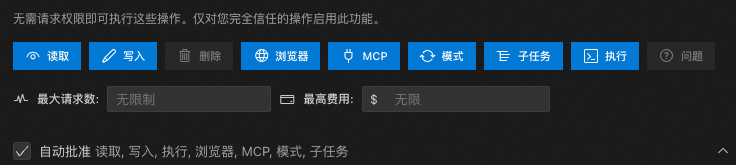
可以设置工具、场景、模式等场景下的权限自动批准
6.2 自动批准限制
策略:
- 限制连续自动批准次数
- 达到限制后要求用户确认
- 支持自定义限制
实现逻辑:
自动批准限制通过 AutoApprovalHandler 类实现,支持两种限制维度:
-
请求次数限制 (
allowedMaxRequests)- 统计自上次重置以来的 API 请求次数
- 超过限制时暂停任务,弹窗提示用户
- 用户确认后重置计数器,继续执行
-
成本限制 (
allowedMaxCost)- 计算自上次重置以来的累计 API 调用成本
- 超过限制时暂停任务,弹窗提示用户
- 用户确认后重置成本统计,继续执行
交互流程:
开始执行任务
    ↓
检查 Yolo 模式
    ↓ 否
检查请求次数
    ↓ 未超限
检查成本限制
    ↓ 未超限
继续执行任务


[超限分支]
    ↓
暂停任务执行
    ↓
弹窗提示用户
┌─────────────────────────┐
│ 自动批准限制已达到    │
│                         │
│ 已自动批准 X 次请求     │
│ (或已花费 $X.XX)        │
│                         │
│ [继续] [取消任务]       │
└─────────────────────────┘
    ↓
用户选择
    ├─ 继续 → 重置计数器 → 继续执行
└─ 取消 → 终止任务核心代码逻辑:
typescript
// 1. 检查限制
const approvalResult = await autoApprovalHandler.checkAutoApprovalLimits(
    state,
    messages,
    async (type, data) => this.ask(type, data)
)

// 2. 根据结果决定是否继续
if (!approvalResult.shouldProceed) {
    throw new Error("Auto-approval limit reached and user denied continuation")
}

// 3. 如果用户批准,计数器已自动重置,继续执行
6.3 敏感信息保护
策略:
- API Key 使用 SecretStorage
- 不记录敏感信息到日志
- 支持自定义忽略规则
七、Task 核心逻辑节点
| 阶段 | 核心逻辑 | 说明 |
|---|---|---|
| 1. 任务初始化 | startTask() → initiateTaskLoop() |
清空历史状态,启动主循环 |
| 2. 循环控制 | while (!this.abort) |
外层循环:持续执行直到任务中止或完成 |
| 3. 栈式处理 | while (stack.length > 0) |
内层循环:栈结构管理待处理内容 |
| 4. 上下文构建 | 系统提示词 + 消息历史 + 环境详情 | 构建完整的 AI 请求上下文 |
| 5. API 请求循环 | attemptApiRequest() |
处理速率限制、重试、错误恢复 |
| 6. 流式响应解析 | for await (chunk of stream) |
解析文本、工具调用、推理内容 |
| 7. 工具执行决策 | presentAssistantMessage() |
权限检查、自动批准、工具调度 |
| 8. 用户交互等待 | pWaitFor(() => this.userMessageContentReady) |
等待工具执行完成或用户反馈 |
| 9. 内容压栈 | stack.push({ userContent, includeFileDetails }) |
将工具结果压入栈,准备下次循环 |
| 10. 循环判断 | didEndLoop 返回值 |
决定是否继续任务循环或结束任务 |