Problem:
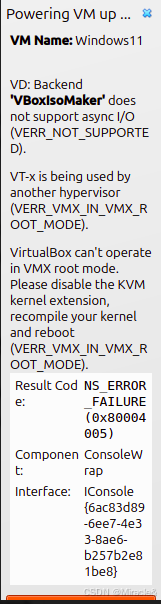
Reason
Encountering a VT-x / AMD-V hardware virtualization conflict in Ubuntu with VirtualBox.
Most Likely Solution:
Ubuntu often has KVM (Kernel-based Virtual Machine) enabled by default, which conflicts with VirtualBox's own virtualization engine.
Steps to fix:
1. Check if KVM is running:
bash
lsmod | grep kvmIf you see kvm_intel or kvm_amd, KVM is active.
2. Disable KVM temporarily for this session:
bash
sudo rmmod kvm_intel
sudo rmmod kvm_amd
sudo rmmod kvm
3. Try starting your VM again.
If that works, make it permanent:
4. Prevent KVM from loading on boot:
bash
sudo sh -c 'echo "blacklist kvm" >> /etc/modprobe.d/blacklist.conf'
sudo sh -c 'echo "blacklist kvm_intel" >> /etc/modprobe.d/blacklist.conf'
sudo sh -c 'echo "blacklist kvm_amd" >> /etc/modprobe.d/blacklist.conf'
5. Update initramfs:
bash
sudo update-initramfs -u6. Reboot:
bash
sudo reboot