Flutter for OpenHarmony《淘淘购物》 分类页:从静态 UI 到动态交互的全面升级
在电商应用中,商品分类页 是用户发现和筛选商品的核心路径之一。一个设计精良的分类系统不仅能提升用户体验,还能显著提高转化率。本文将基于您提供的完整
Flutter 代码(
import+pa.txt),对CategoryScreen进行深度剖析,重点讲解其 UI
结构、交互逻辑、数据驱动机制以及视觉动效 的实现细节,并对比基础版本与增强版本的关键差异。
完整效果展示
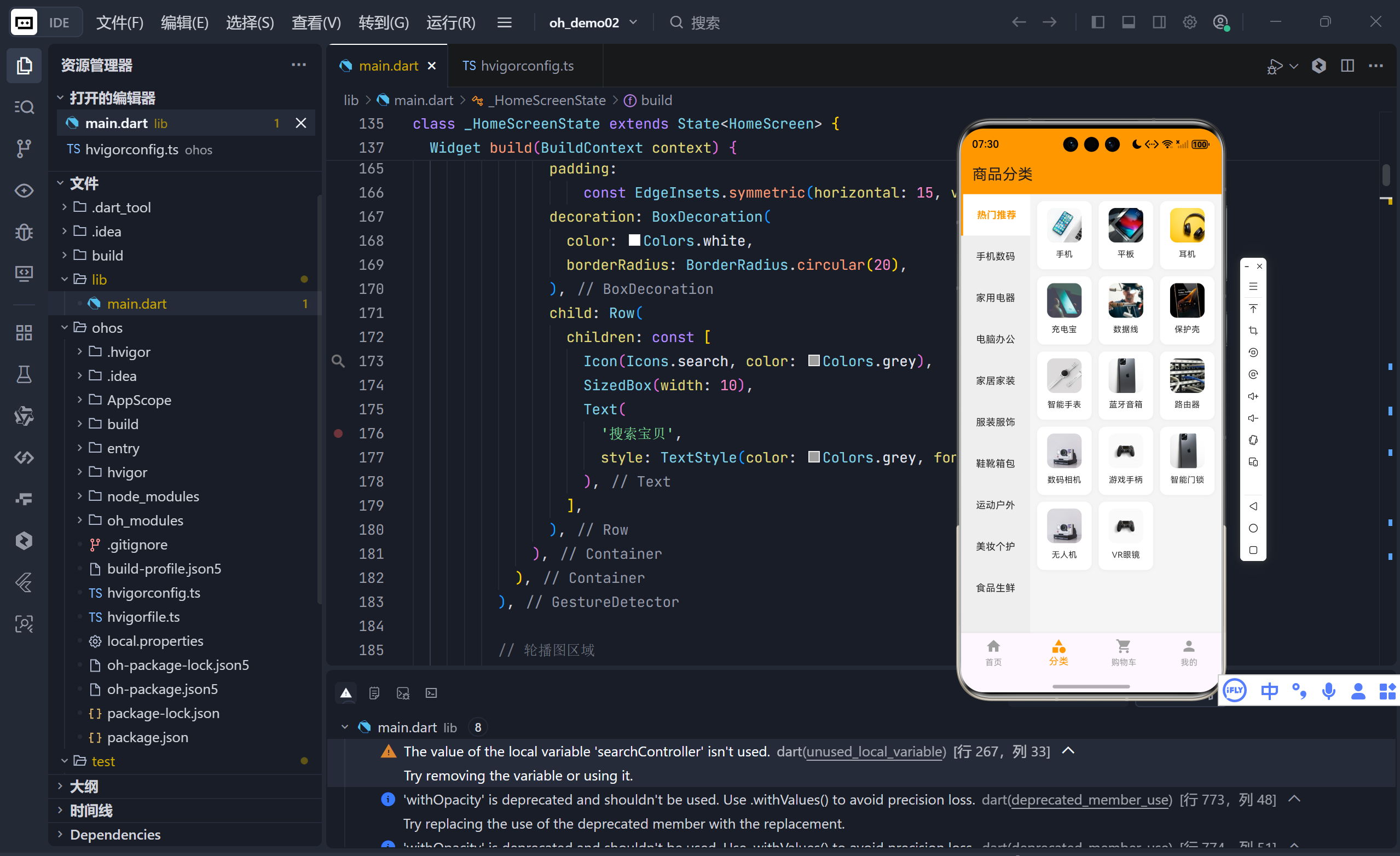
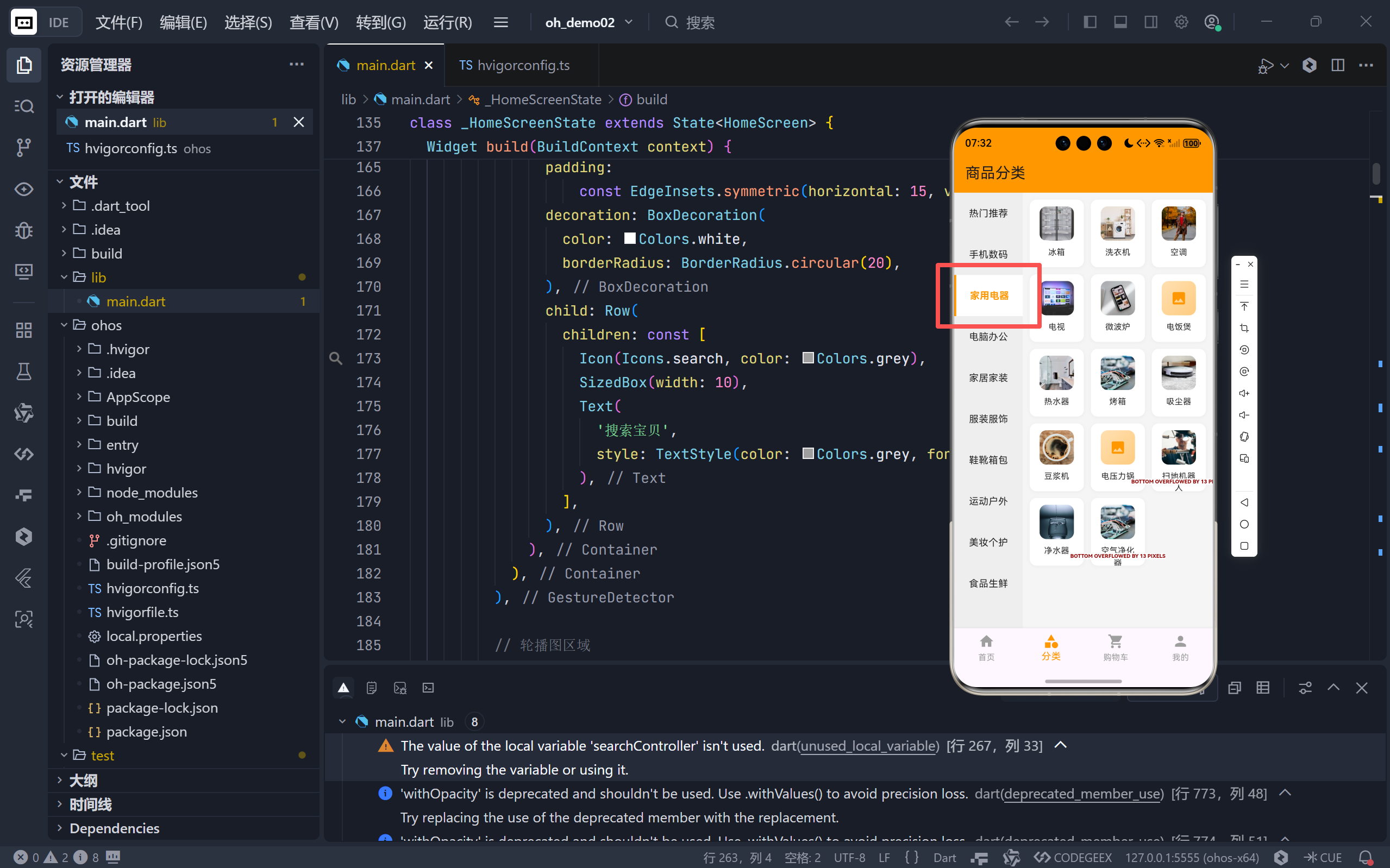
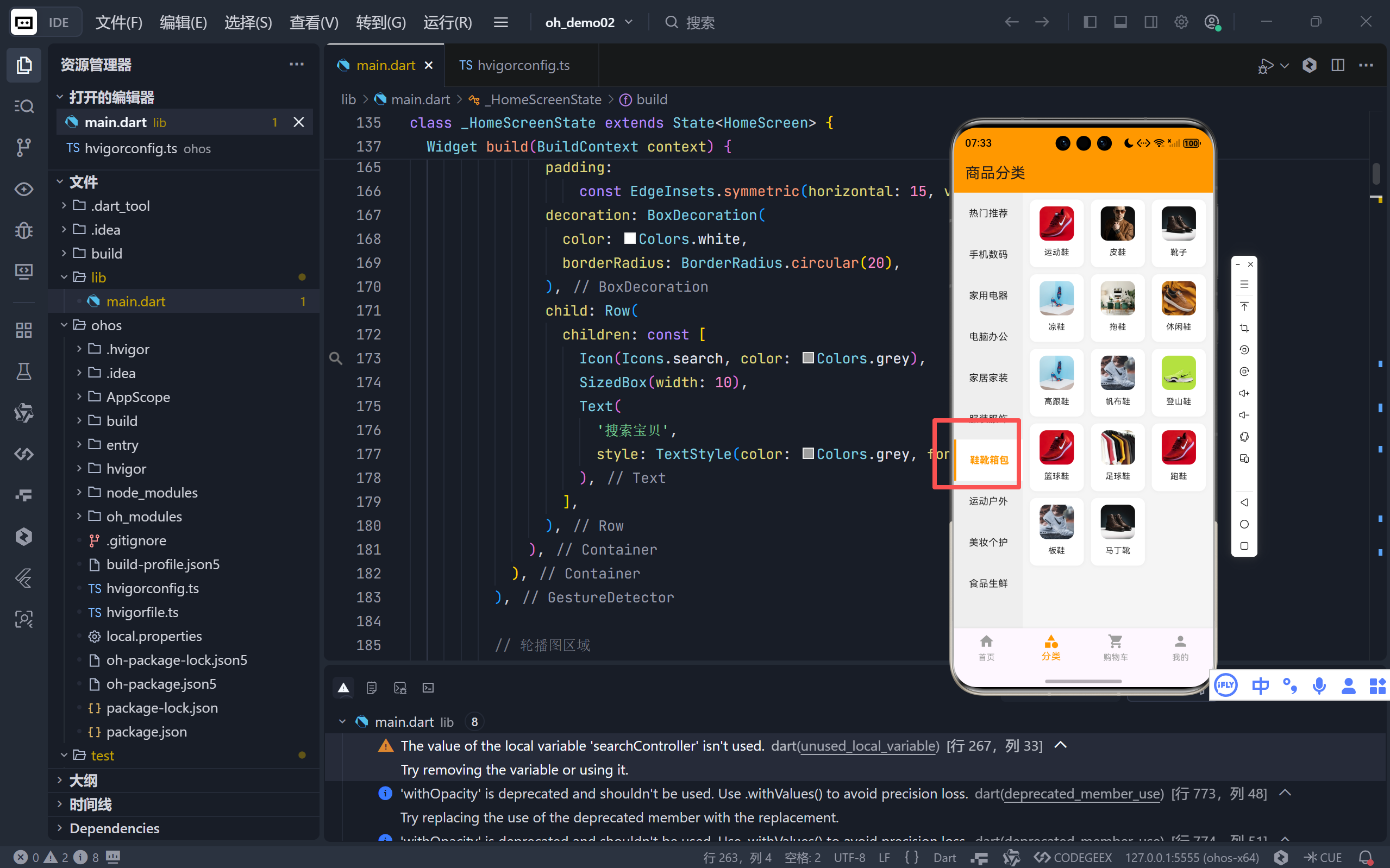
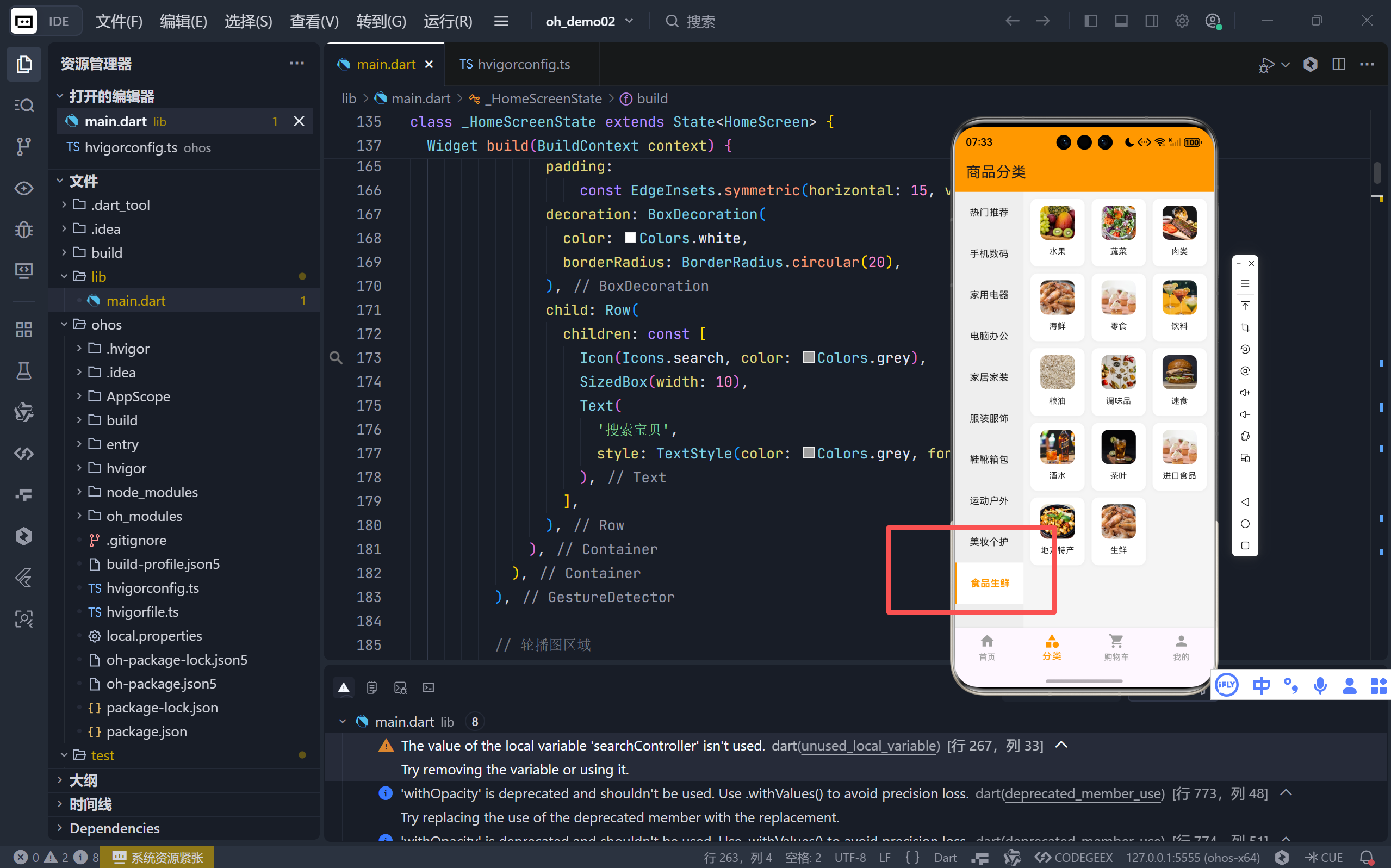
完整代码展示
dart
import 'package:flutter/material.dart';
void main() {
runApp(const ShoppingApp());
}
class ShoppingApp extends StatelessWidget {
const ShoppingApp({super.key});
@override
Widget build(BuildContext context) {
return MaterialApp(
title: '淘淘购物',
theme: ThemeData(
primaryColor: Colors.orange,
scaffoldBackgroundColor: Colors.grey[100],
useMaterial3: true,
),
home: const MainScreen(),
debugShowCheckedModeBanner: false,
);
}
}
// 搜索结果页面
class SearchResultScreen extends StatelessWidget {
final String query;
const SearchResultScreen({super.key, required this.query});
@override
Widget build(BuildContext context) {
// 过滤商品
final filteredProducts = _allProducts.where((product) {
return product.name.toLowerCase().contains(query.toLowerCase());
}).toList();
return Scaffold(
appBar: AppBar(
title: Text('搜索: $query'),
backgroundColor: Colors.orange,
),
body: filteredProducts.isEmpty
? const Center(
child: Column(
mainAxisAlignment: MainAxisAlignment.center,
children: [
Icon(Icons.search_off, size: 80, color: Colors.grey),
SizedBox(height: 20),
Text(
'未找到相关商品',
style: TextStyle(fontSize: 18, color: Colors.grey),
),
],
),
)
: GridView.builder(
padding: const EdgeInsets.all(10),
gridDelegate: const SliverGridDelegateWithFixedCrossAxisCount(
crossAxisCount: 2,
childAspectRatio: 0.75,
crossAxisSpacing: 10,
mainAxisSpacing: 10,
),
itemCount: filteredProducts.length,
itemBuilder: (context, index) {
return ProductCard(product: filteredProducts[index]);
},
),
);
}
}
class MainScreen extends StatefulWidget {
const MainScreen({super.key});
@override
State<MainScreen> createState() => _MainScreenState();
}
class _MainScreenState extends State<MainScreen> {
int _currentIndex = 0;
final List<Widget> _screens = [
const HomeScreen(),
const CategoryScreen(),
const CartScreen(),
const ProfileScreen(),
];
@override
Widget build(BuildContext context) {
return Scaffold(
body: _screens[_currentIndex],
bottomNavigationBar: BottomNavigationBar(
currentIndex: _currentIndex,
onTap: (index) {
setState(() {
_currentIndex = index;
});
},
type: BottomNavigationBarType.fixed,
selectedItemColor: Colors.orange,
unselectedItemColor: Colors.grey,
items: const [
BottomNavigationBarItem(
icon: Icon(Icons.home),
label: '首页',
),
BottomNavigationBarItem(
icon: Icon(Icons.category),
label: '分类',
),
BottomNavigationBarItem(
icon: Icon(Icons.shopping_cart),
label: '购物车',
),
BottomNavigationBarItem(
icon: Icon(Icons.person),
label: '我的',
),
],
),
);
}
}
// 首页
class HomeScreen extends StatefulWidget {
const HomeScreen({super.key});
@override
State<HomeScreen> createState() => _HomeScreenState();
}
class _HomeScreenState extends State<HomeScreen> {
@override
Widget build(BuildContext context) {
return Scaffold(
appBar: AppBar(
title: const Text('淘淘购物'),
backgroundColor: Colors.orange,
elevation: 0,
actions: [
IconButton(
icon: const Icon(Icons.search),
onPressed: () {
_showSearchDialog(context);
},
),
IconButton(
icon: const Icon(Icons.message),
onPressed: () {},
),
],
),
body: ListView(
children: [
// 搜索框
GestureDetector(
onTap: () => _showSearchDialog(context),
child: Container(
padding: const EdgeInsets.all(10),
color: Colors.orange,
child: Container(
padding:
const EdgeInsets.symmetric(horizontal: 15, vertical: 12),
decoration: BoxDecoration(
color: Colors.white,
borderRadius: BorderRadius.circular(20),
),
child: Row(
children: const [
Icon(Icons.search, color: Colors.grey),
SizedBox(width: 10),
Text(
'搜索宝贝',
style: TextStyle(color: Colors.grey, fontSize: 16),
),
],
),
),
),
),
// 轮播图区域
Container(
height: 150,
margin: const EdgeInsets.all(10),
decoration: BoxDecoration(
color: Colors.orange[300],
borderRadius: BorderRadius.circular(10),
),
child: const Center(
child: Text(
'轮播图区域',
style: TextStyle(color: Colors.white, fontSize: 20),
),
),
),
// 快捷入口
Container(
padding: const EdgeInsets.all(15),
color: Colors.white,
child: GridView.count(
crossAxisCount: 5,
shrinkWrap: true,
physics: const NeverScrollableScrollPhysics(),
children: const [
QuickEntry(Icons.shopping_bag, '天猫'),
QuickEntry(Icons.card_giftcard, '聚划算'),
QuickEntry(Icons.local_offer, '优惠券'),
QuickEntry(Icons.phone_android, '数码'),
QuickEntry(Icons.style, '服饰'),
QuickEntry(Icons.home, '家居'),
QuickEntry(Icons.restaurant, '美食'),
QuickEntry(Icons.flight, '旅行'),
QuickEntry(Icons.sports_basketball, '运动'),
QuickEntry(Icons.book, '图书'),
],
),
),
const SizedBox(height: 10),
// 推荐商品
Container(
color: Colors.white,
child: Column(
crossAxisAlignment: CrossAxisAlignment.start,
children: [
const Padding(
padding: EdgeInsets.all(15),
child: Text(
'为你推荐',
style: TextStyle(
fontSize: 18,
fontWeight: FontWeight.bold,
),
),
),
GridView.builder(
shrinkWrap: true,
physics: const NeverScrollableScrollPhysics(),
padding: const EdgeInsets.all(10),
gridDelegate: const SliverGridDelegateWithFixedCrossAxisCount(
crossAxisCount: 2,
childAspectRatio: 0.75,
crossAxisSpacing: 10,
mainAxisSpacing: 10,
),
itemCount: _recommendedProducts.length,
itemBuilder: (context, index) {
return ProductCard(product: _recommendedProducts[index]);
},
),
],
),
),
],
),
);
}
// 显示搜索对话框
void _showSearchDialog(BuildContext context) {
final TextEditingController searchController = TextEditingController();
showSearch(
context: context,
delegate: ProductSearchDelegate(),
);
}
}
// 搜索委托
class ProductSearchDelegate extends SearchDelegate<String> {
@override
List<Widget> buildActions(BuildContext context) {
return [
IconButton(
icon: const Icon(Icons.clear),
onPressed: () {
query = '';
},
),
];
}
@override
Widget buildLeading(BuildContext context) {
return IconButton(
icon: const Icon(Icons.arrow_back),
onPressed: () {
close(context, '');
},
);
}
@override
Widget buildResults(BuildContext context) {
final filteredProducts = _allProducts.where((product) {
return product.name.toLowerCase().contains(query.toLowerCase());
}).toList();
return filteredProducts.isEmpty
? const Center(
child: Column(
mainAxisAlignment: MainAxisAlignment.center,
children: [
Icon(Icons.search_off, size: 80, color: Colors.grey),
SizedBox(height: 20),
Text(
'未找到相关商品',
style: TextStyle(fontSize: 18, color: Colors.grey),
),
],
),
)
: GridView.builder(
padding: const EdgeInsets.all(10),
gridDelegate: const SliverGridDelegateWithFixedCrossAxisCount(
crossAxisCount: 2,
childAspectRatio: 0.75,
crossAxisSpacing: 10,
mainAxisSpacing: 10,
),
itemCount: filteredProducts.length,
itemBuilder: (context, index) {
return ProductCard(product: filteredProducts[index]);
},
);
}
@override
Widget buildSuggestions(BuildContext context) {
final suggestionList = query.isEmpty
? _allProducts.take(6).toList()
: _allProducts.where((product) {
return product.name.toLowerCase().contains(query.toLowerCase());
}).toList();
return ListView.builder(
itemCount: suggestionList.length,
itemBuilder: (context, index) {
final product = suggestionList[index];
return ListTile(
leading: ClipRRect(
borderRadius: BorderRadius.circular(5),
child: Image.network(
product.imageUrl,
width: 50,
height: 50,
fit: BoxFit.cover,
errorBuilder: (context, error, stackTrace) {
return Container(
width: 50,
height: 50,
decoration: BoxDecoration(
color: Colors.orange[100],
borderRadius: BorderRadius.circular(5),
),
child: const Icon(Icons.image, color: Colors.orange),
);
},
),
),
title: Text(product.name),
subtitle: Text('¥${product.price.toStringAsFixed(2)}'),
trailing: const Icon(Icons.arrow_forward_ios, size: 16),
onTap: () {
query = product.name;
showResults(context);
},
);
},
);
}
}
// 快捷入口组件
class QuickEntry extends StatelessWidget {
final IconData icon;
final String label;
const QuickEntry(this.icon, this.label, {super.key});
@override
Widget build(BuildContext context) {
return Column(
children: [
Icon(icon, color: Colors.orange, size: 30),
const SizedBox(height: 5),
Text(label, style: const TextStyle(fontSize: 12)),
],
);
}
}
// 分类页
class CategoryScreen extends StatefulWidget {
const CategoryScreen({super.key});
@override
State<CategoryScreen> createState() => _CategoryScreenState();
}
class _CategoryScreenState extends State<CategoryScreen> {
int _selectedCategoryIndex = 0;
// 定义子分类对应的图片URL
final Map<String, String> _categoryImages = {
// 手机数码
'手机': 'https://images.unsplash.com/photo-1511707171634-5f897ff02aa9?w=200',
'平板': 'https://images.unsplash.com/photo-1544244015-0df4b3ffc6b0?w=200',
'耳机': 'https://images.unsplash.com/photo-1505740420928-5e560c06d30e?w=200',
'充电宝': 'https://images.unsplash.com/photo-1609091839311-d5365f9ff1c5?w=200',
'数据线': 'https://images.unsplash.com/photo-1558618666-fcd25c85cd64?w=200',
'保护壳': 'https://images.unsplash.com/photo-1601784551446-20c9e07cdbdb?w=200',
'智能手表':
'https://images.unsplash.com/photo-1523275335684-37898b6baf30?w=200',
'蓝牙音箱':
'https://images.unsplash.com/photo-1589492477829-5e65395b66cc?w=200',
'路由器': 'https://images.unsplash.com/photo-1544197150-b99a580bb7a8?w=200',
'数码相机':
'https://images.unsplash.com/photo-1526170375885-4d8ecf77b99f?w=200',
'游戏手柄':
'https://images.unsplash.com/photo-1592840496694-26d035b52b48?w=200',
'对讲机': 'https://images.unsplash.com/photo-1496181133206-80ce9b88a853?w=200',
'行车记录仪':
'https://images.unsplash.com/photo-1523275335684-37898b6baf30?w=200',
'电子烟': 'https://images.unsplash.com/photo-1511707171634-5f897ff02aa9?w=200',
'智能门锁':
'https://images.unsplash.com/photo-1589492477829-5e65395b66cc?w=200',
'无人机': 'https://images.unsplash.com/photo-1526170375885-4d8ecf77b99f?w=200',
'VR眼镜':
'https://images.unsplash.com/photo-1592840496694-26d035b52b48?w=200',
// 家用电器
'冰箱': 'https://images.unsplash.com/photo-1584568694244-14fbdf83bd30?w=200',
'洗衣机': 'https://images.unsplash.com/photo-1626806819282-2c1dc01a5e0c?w=200',
'空调': 'https://images.unsplash.com/photo-1578632292335-df3abbb0d586?w=200',
'电视': 'https://images.unsplash.com/photo-1593359677879-a4bb92f829d1?w=200',
'微波炉': 'https://images.unsplash.com/photo-1586953208448-b95a79798f07?w=200',
'电饭煲': 'https://images.unsplash.com/photo-1584990347449-a2d4e2b40c95?w=200',
'热水器': 'https://images.unsplash.com/photo-1584622650111-993a426fbf0a?w=200',
'烤箱': 'https://images.unsplash.com/photo-1558346490-a72e53ae2d4f?w=200',
'吸尘器': 'https://images.unsplash.com/photo-1558317374-067fb5f30001?w=200',
'豆浆机': 'https://images.unsplash.com/photo-1514432324607-a09d9b4aefdd?w=200',
'电压力锅':
'https://images.unsplash.com/photo-1584990347449-a2d4e2b40c95?w=200',
'扫地机器人': 'https://images.unsplash.com/photo-1558618666-fcd25c85cd64?w=200',
'净水器': 'https://images.unsplash.com/photo-1548839140-29a749e1cf4d?w=200',
'空气净化器': 'https://images.unsplash.com/photo-1558346490-a72e53ae2d4f?w=200',
// 电脑办公
'笔记本': 'https://images.unsplash.com/photo-1496181133206-80ce9b88a853?w=200',
'台式机': 'https://images.unsplash.com/photo-1587202372775-e229f172b9d7?w=200',
'键盘': 'https://images.unsplash.com/photo-1587829741301-dc798b91a603?w=200',
'鼠标': 'https://images.unsplash.com/photo-1527864550417-7fd91fc51a46?w=200',
'显示器': 'https://images.unsplash.com/photo-1527443224154-c4a3942d3acf?w=200',
'音响': 'https://images.unsplash.com/photo-1589492477829-5e65395b66cc?w=200',
'打印机': 'https://images.unsplash.com/photo-1565437837960-0e65c5b4382c?w=200',
'U盘': 'https://images.unsplash.com/photo-1511707171634-5f897ff02aa9?w=200',
'移动硬盘': 'https://images.unsplash.com/photo-1563770095-39d468f95c34?w=200',
'交换机': 'https://images.unsplash.com/photo-1544197150-b99a580bb7a8?w=200',
'投影仪': 'https://images.unsplash.com/photo-1478720568477-152d9b164e26?w=200',
'扫描仪': 'https://images.unsplash.com/photo-1558346490-a72e53ae2d4f?w=200',
'摄像头': 'https://images.unsplash.com/photo-1585659722983-3a675dabf23d?w=200',
// 家居家装
'沙发': 'https://images.unsplash.com/photo-1555041469-a586c61ea9bc?w=200',
'床': 'https://images.unsplash.com/photo-1505693416388-ac5ce068fe85?w=200',
'衣柜': 'https://images.unsplash.com/photo-1558997519-83ea9252edf8?w=200',
'餐桌': 'https://images.unsplash.com/photo-1617806118233-18e1de247200?w=200',
'椅子': 'https://images.unsplash.com/photo-1592078615290-033ee584e267?w=200',
'书桌': 'https://images.unsplash.com/photo-1518455027359-f3f8164ba6bd?w=200',
'茶几': 'https://images.unsplash.com/photo-1533090481720-856c6e3c1fdc?w=200',
'电视柜': 'https://images.unsplash.com/photo-1558997519-83ea9252edf8?w=200',
'鞋柜': 'https://images.unsplash.com/photo-1584990347449-a2d4e2b40c95?w=200',
'床垫': 'https://images.unsplash.com/photo-1505693416388-ac5ce068fe85?w=200',
'窗帘': 'https://images.unsplash.com/photo-1617806118233-18e1de247200?w=200',
'地毯': 'https://images.unsplash.com/photo-1555041469-a586c61ea9bc?w=200',
'灯具': 'https://images.unsplash.com/photo-1524484485831-a92ffc0de03f?w=200',
'装饰画': 'https://images.unsplash.com/photo-1579783902614-a3fb3927b6a5?w=200',
// 服装服饰
'男装': 'https://images.unsplash.com/photo-1594938298603-c8148c4dae35?w=200',
'女装': 'https://images.unsplash.com/photo-1515886657613-9f3515b0c78f?w=200',
'童装': 'https://images.unsplash.com/photo-1503919545889-aef636e10ad4?w=200',
'内衣': 'https://images.unsplash.com/photo-1582552938357-32b906df40cb?w=200',
'运动服': 'https://images.unsplash.com/photo-1515886657613-9f3515b0c78f?w=200',
'牛仔裤': 'https://images.unsplash.com/photo-1542272454315-4c01d7abdf4a?w=200',
'T恤': 'https://images.unsplash.com/photo-1521572163474-6864f9cf17ab?w=200',
'衬衫': 'https://images.unsplash.com/photo-1596755094514-f87e34085b2c?w=200',
'连衣裙': 'https://images.unsplash.com/photo-1515886657613-9f3515b0c78f?w=200',
'羽绒服': 'https://images.unsplash.com/photo-1544022613-e87ca75a784a?w=200',
'夹克': 'https://images.unsplash.com/photo-1551028719-00167b16eac5?w=200',
'卫衣': 'https://images.unsplash.com/photo-1556821840-3a63f95609a7?w=200',
'毛衣': 'https://images.unsplash.com/photo-1434389677669-e08b4cac3105?w=200',
'西装': 'https://images.unsplash.com/photo-1593032465175-481ac7f401a0?w=200',
// 鞋靴箱包
'运动鞋': 'https://images.unsplash.com/photo-1542291026-7eec264c27ff?w=200',
'皮鞋': 'https://images.unsplash.com/photo-1614252369475-531eba835eb1?w=200',
'靴子': 'https://images.unsplash.com/photo-1608256246200-53e635b5b65f?w=200',
'凉鞋': 'https://images.unsplash.com/photo-1543163521-1bf539c55dd2?w=200',
'拖鞋': 'https://images.unsplash.com/photo-1617806118233-18e1de247200?w=200',
'休闲鞋': 'https://images.unsplash.com/photo-1549298916-b41d501d3772?w=200',
'高跟鞋': 'https://images.unsplash.com/photo-1543163521-1bf539c55dd2?w=200',
'帆布鞋': 'https://images.unsplash.com/photo-1460353581641-37baddab0fa2?w=200',
'登山鞋': 'https://images.unsplash.com/photo-1606107557195-0e29a4b5b4aa?w=200',
'篮球鞋': 'https://images.unsplash.com/photo-1542291026-7eec264c27ff?w=200',
'足球鞋': 'https://images.unsplash.com/photo-1489987707025-afc232f7ea0f?w=200',
'跑鞋': 'https://images.unsplash.com/photo-1542291026-7eec264c27ff?w=200',
'板鞋': 'https://images.unsplash.com/photo-1460353581641-37baddab0fa2?w=200',
'马丁靴': 'https://images.unsplash.com/photo-1608256246200-53e635b5b65f?w=200',
// 运动户外
'篮球': 'https://images.unsplash.com/photo-1535248344320-4a1b93f8e85f?w=200',
'足球': 'https://images.unsplash.com/photo-1519861531473-9200262188bf?w=200',
'羽毛球': 'https://images.unsplash.com/photo-1622279457486-62dcc4a431d6?w=200',
'网球': 'https://images.unsplash.com/photo-1622279457486-62dcc4a431d6?w=200',
'乒乓球': 'https://images.unsplash.com/photo-1535248344320-4a1b93f8e85f?w=200',
'游泳': 'https://images.unsplash.com/photo-1530549387789-4c1017266635?w=200',
'健身': 'https://images.unsplash.com/photo-1517836357463-d25dfeac3438?w=200',
'瑜伽': 'https://images.unsplash.com/photo-1544367563-12123d896889?w=200',
'跑步': 'https://images.unsplash.com/photo-1552674605-db6ffd4facb5?w=200',
'骑行': 'https://images.unsplash.com/photo-1485965120184-e224f7a1db69?w=200',
'登山': 'https://images.unsplash.com/photo-1551632811-561732d1e306?w=200',
'滑雪': 'https://images.unsplash.com/photo-1551698618-1dfe5d97d256?w=200',
'钓鱼': 'https://images.unsplash.com/photo-1544161515-4ab6ce6db874?w=200',
'滑板': 'https://images.unsplash.com/photo-1460353581641-37baddab0fa2?w=200',
// 美妆个护
'护肤': 'https://images.unsplash.com/photo-1556228720-195a672e8a03?w=200',
'彩妆': 'https://images.unsplash.com/photo-1596462502278-27bfdc403348?w=200',
'香水': 'https://images.unsplash.com/photo-1541643600914-78b084683601?w=200',
'面膜': 'https://images.unsplash.com/photo-1596755389377-c760f65e806e?w=200',
'洗护': 'https://images.unsplash.com/photo-1598440947619-2c35fc9aa908?w=200',
'美发': 'https://images.unsplash.com/photo-1522337360788-8b13dee7a37e?w=200',
'美甲': 'https://images.unsplash.com/photo-1604654894610-df63bc536371?w=200',
'美容仪': 'https://images.unsplash.com/photo-1596755094514-f87e34085b2c?w=200',
'口腔护理':
'https://images.unsplash.com/photo-1606811841689-23dfddce3e95?w=200',
'身体护理': 'https://images.unsplash.com/photo-1556228720-195a672e8a03?w=200',
'眼部护理':
'https://images.unsplash.com/photo-1576426863848-c21f53c60b19?w=200',
'防晒': 'https://images.unsplash.com/photo-1556228720-195a672e8a03?w=200',
'脱毛': 'https://images.unsplash.com/photo-1598440947619-2c35fc9aa908?w=200',
'足部护理':
'https://images.unsplash.com/photo-1516975080664-ed2fc6a32937?w=200',
// 食品生鲜
'水果': 'https://images.unsplash.com/photo-1619566636858-adf3ef46400b?w=200',
'蔬菜': 'https://images.unsplash.com/photo-1540420773420-3366772f4999?w=200',
'肉类': 'https://images.unsplash.com/photo-1544025162-d76694265947?w=200',
'海鲜': 'https://images.unsplash.com/photo-1565680018434-b513d5e5fd47?w=200',
'零食': 'https://images.unsplash.com/photo-1563729784474-d77dbb933a9e?w=200',
'饮料': 'https://images.unsplash.com/photo-1544145945-f90425340c7e?w=200',
'粮油': 'https://images.unsplash.com/photo-1586201375761-83865001e31c?w=200',
'调味品': 'https://images.unsplash.com/photo-1596040033229-a9821ebd058d?w=200',
'速食': 'https://images.unsplash.com/photo-1568901346375-23c9450c58cd?w=200',
'酒水': 'https://images.unsplash.com/photo-1569529465841-dfecdab7503b?w=200',
'茶叶': 'https://images.unsplash.com/photo-1556679343-c7306c1976bc?w=200',
'进口食品':
'https://images.unsplash.com/photo-1563729784474-d77dbb933a9e?w=200',
'地方特产':
'https://images.unsplash.com/photo-1604908176997-125f25cc6f3d?w=200',
'生鲜': 'https://images.unsplash.com/photo-1565680018434-b513d5e5fd47?w=200',
};
// 定义每个主分类对应的子分类
final Map<int, List<String>> _categorySubCategories = {
0: [
'手机',
'平板',
'耳机',
'充电宝',
'数据线',
'保护壳',
'智能手表',
'蓝牙音箱',
'路由器',
'数码相机',
'游戏手柄',
'智能门锁',
'无人机',
'VR眼镜'
],
1: [
'手机',
'平板',
'耳机',
'充电宝',
'数据线',
'保护壳',
'智能手表',
'蓝牙音箱',
'路由器',
'数码相机',
'游戏手柄',
'对讲机',
'行车记录仪',
'电子烟'
],
2: [
'冰箱',
'洗衣机',
'空调',
'电视',
'微波炉',
'电饭煲',
'热水器',
'烤箱',
'吸尘器',
'豆浆机',
'电压力锅',
'扫地机器人',
'净水器',
'空气净化器'
],
3: [
'笔记本',
'台式机',
'键盘',
'鼠标',
'显示器',
'音响',
'打印机',
'U盘',
'移动硬盘',
'路由器',
'交换机',
'投影仪',
'扫描仪',
'摄像头'
],
4: [
'沙发',
'床',
'衣柜',
'餐桌',
'椅子',
'书桌',
'茶几',
'电视柜',
'鞋柜',
'床垫',
'窗帘',
'地毯',
'灯具',
'装饰画'
],
5: [
'男装',
'女装',
'童装',
'内衣',
'运动服',
'牛仔裤',
'T恤',
'衬衫',
'连衣裙',
'羽绒服',
'夹克',
'卫衣',
'毛衣',
'西装'
],
6: [
'运动鞋',
'皮鞋',
'靴子',
'凉鞋',
'拖鞋',
'休闲鞋',
'高跟鞋',
'帆布鞋',
'登山鞋',
'篮球鞋',
'足球鞋',
'跑鞋',
'板鞋',
'马丁靴'
],
7: [
'篮球',
'足球',
'羽毛球',
'网球',
'乒乓球',
'游泳',
'健身',
'瑜伽',
'跑步',
'骑行',
'登山',
'滑雪',
'钓鱼',
'滑板'
],
8: [
'护肤',
'彩妆',
'香水',
'面膜',
'洗护',
'美发',
'美甲',
'美容仪',
'口腔护理',
'身体护理',
'眼部护理',
'防晒',
'脱毛',
'足部护理'
],
9: [
'水果',
'蔬菜',
'肉类',
'海鲜',
'零食',
'饮料',
'粮油',
'调味品',
'速食',
'酒水',
'茶叶',
'进口食品',
'地方特产',
'生鲜'
],
};
List<String> get _currentSubCategories {
return _categorySubCategories[_selectedCategoryIndex] ?? _subCategories;
}
@override
Widget build(BuildContext context) {
return Scaffold(
appBar: AppBar(
title: const Text('商品分类'),
backgroundColor: Colors.orange,
),
body: Row(
children: [
// 左侧分类列表
Container(
width: 100,
color: Colors.grey[200],
child: ListView.builder(
itemCount: _categories.length,
itemBuilder: (context, index) {
final isSelected = index == _selectedCategoryIndex;
return AnimatedContainer(
duration: const Duration(milliseconds: 200),
padding: const EdgeInsets.symmetric(vertical: 20),
decoration: BoxDecoration(
color: isSelected ? Colors.white : Colors.transparent,
border: isSelected
? const Border(
left: BorderSide(color: Colors.orange, width: 3))
: null,
),
child: InkWell(
onTap: () {
setState(() {
_selectedCategoryIndex = index;
});
ScaffoldMessenger.of(context).showSnackBar(
SnackBar(
content: Text('已选择 ${_categories[index]}'),
duration: const Duration(milliseconds: 800),
behavior: SnackBarBehavior.floating,
),
);
},
splashColor: Colors.orange.withOpacity(0.1),
highlightColor: Colors.orange.withOpacity(0.05),
child: Center(
child: Text(
_categories[index],
style: TextStyle(
color: isSelected ? Colors.orange : Colors.black87,
fontWeight:
isSelected ? FontWeight.bold : FontWeight.normal,
),
),
),
),
);
},
),
),
// 右侧商品列表
Expanded(
child: GridView.builder(
padding: const EdgeInsets.all(10),
gridDelegate: const SliverGridDelegateWithFixedCrossAxisCount(
crossAxisCount: 3,
childAspectRatio: 0.8,
crossAxisSpacing: 10,
mainAxisSpacing: 10,
),
itemCount: _currentSubCategories.length,
itemBuilder: (context, index) {
return SubCategoryCard(
category: _currentSubCategories[index],
imageUrl: _categoryImages[_currentSubCategories[index]] ??
'https://images.unsplash.com/photo-1511707171634-5f897ff02aa9?w=200',
onTap: () {
ScaffoldMessenger.of(context).showSnackBar(
SnackBar(
content: Text('查看 ${_currentSubCategories[index]}'),
duration: const Duration(milliseconds: 800),
behavior: SnackBarBehavior.floating,
),
);
},
);
},
),
),
],
),
);
}
}
// 子分类卡片
class SubCategoryCard extends StatefulWidget {
final String category;
final String imageUrl;
final VoidCallback onTap;
const SubCategoryCard({
super.key,
required this.category,
required this.imageUrl,
required this.onTap,
});
@override
State<SubCategoryCard> createState() => _SubCategoryCardState();
}
class _SubCategoryCardState extends State<SubCategoryCard>
with SingleTickerProviderStateMixin {
late AnimationController _animationController;
late Animation<double> _scaleAnimation;
bool _isPressed = false;
@override
void initState() {
super.initState();
_animationController = AnimationController(
duration: const Duration(milliseconds: 100),
vsync: this,
);
_scaleAnimation = Tween<double>(begin: 1.0, end: 0.92).animate(
CurvedAnimation(parent: _animationController, curve: Curves.easeInOut),
);
}
@override
void dispose() {
_animationController.dispose();
super.dispose();
}
@override
Widget build(BuildContext context) {
return GestureDetector(
onTapDown: (_) {
setState(() {
_isPressed = true;
});
_animationController.forward();
},
onTapUp: (_) {
setState(() {
_isPressed = false;
});
_animationController.reverse();
widget.onTap();
},
onTapCancel: () {
setState(() {
_isPressed = false;
});
_animationController.reverse();
},
child: ScaleTransition(
scale: _scaleAnimation,
child: AnimatedContainer(
duration: const Duration(milliseconds: 200),
padding: const EdgeInsets.all(8),
decoration: BoxDecoration(
color: Colors.white,
borderRadius: BorderRadius.circular(10),
border: Border.all(
color: _isPressed ? Colors.orange : Colors.transparent,
width: 2,
),
boxShadow: _isPressed
? [
BoxShadow(
color: Colors.orange.withOpacity(0.3),
blurRadius: 8,
offset: const Offset(0, 2),
),
]
: [
BoxShadow(
color: Colors.grey.withOpacity(0.1),
blurRadius: 3,
offset: const Offset(0, 1),
),
],
),
child: Column(
children: [
Container(
width: 50,
height: 50,
decoration: BoxDecoration(
borderRadius: BorderRadius.circular(10),
border: _isPressed
? Border.all(color: Colors.orange, width: 2)
: null,
),
child: ClipRRect(
borderRadius: BorderRadius.circular(10),
child: Image.network(
widget.imageUrl,
fit: BoxFit.cover,
errorBuilder: (context, error, stackTrace) {
return Container(
width: 50,
height: 50,
decoration: BoxDecoration(
gradient: LinearGradient(
colors: _isPressed
? [Colors.orange, Colors.orange[700]!]
: [Colors.orange[100]!, Colors.orange[200]!],
begin: Alignment.topLeft,
end: Alignment.bottomRight,
),
borderRadius: BorderRadius.circular(10),
),
child: Icon(
Icons.image,
color: _isPressed ? Colors.white : Colors.orange,
size: _isPressed ? 28 : 24,
),
);
},
loadingBuilder: (context, child, loadingProgress) {
if (loadingProgress == null) return child;
return Container(
width: 50,
height: 50,
decoration: BoxDecoration(
color: Colors.orange[100],
borderRadius: BorderRadius.circular(10),
),
child: const CircularProgressIndicator(
strokeWidth: 2,
color: Colors.orange,
),
);
},
),
),
),
const SizedBox(height: 8),
Text(
widget.category,
style: TextStyle(
fontSize: 12,
color: _isPressed ? Colors.orange : Colors.black87,
fontWeight: _isPressed ? FontWeight.bold : FontWeight.normal,
),
textAlign: TextAlign.center,
maxLines: 2,
overflow: TextOverflow.ellipsis,
),
],
),
),
),
);
}
}
// 购物车页
class CartScreen extends StatefulWidget {
const CartScreen({super.key});
@override
State<CartScreen> createState() => _CartScreenState();
}
class _CartScreenState extends State<CartScreen> {
double _totalPrice = 0.0;
@override
Widget build(BuildContext context) {
return Scaffold(
appBar: AppBar(
title: const Text('购物车'),
backgroundColor: Colors.orange,
),
body: Column(
children: [
Expanded(
child: ListView.builder(
itemCount: _cartItems.length,
itemBuilder: (context, index) {
return CartItemCard(
item: _cartItems[index],
onQuantityChanged: (quantity) {
setState(() {
_totalPrice = _calculateTotal();
});
},
);
},
),
),
// 底部结算栏
Container(
padding: const EdgeInsets.all(15),
decoration: BoxDecoration(
color: Colors.white,
boxShadow: [
BoxShadow(
color: Colors.grey.withOpacity(0.3),
blurRadius: 5,
offset: const Offset(0, -2),
),
],
),
child: Row(
children: [
const Text(
'合计: ',
style: TextStyle(fontSize: 16),
),
Text(
'¥$_totalPrice',
style: const TextStyle(
fontSize: 24,
color: Colors.orange,
fontWeight: FontWeight.bold,
),
),
const Spacer(),
ElevatedButton(
onPressed: () {},
style: ElevatedButton.styleFrom(
backgroundColor: Colors.orange,
padding: const EdgeInsets.symmetric(
horizontal: 40,
vertical: 12,
),
),
child: const Text('结算', style: TextStyle(fontSize: 16)),
),
],
),
),
],
),
);
}
double _calculateTotal() {
return _cartItems.fold(
0.0, (sum, item) => sum + item.price * item.quantity);
}
}
// 我的页面
class ProfileScreen extends StatelessWidget {
const ProfileScreen({super.key});
@override
Widget build(BuildContext context) {
return Scaffold(
appBar: AppBar(
title: const Text('我的淘淘'),
backgroundColor: Colors.orange,
),
body: ListView(
children: [
// 用户信息
Container(
padding: const EdgeInsets.all(20),
color: Colors.orange,
child: Column(
children: [
Container(
width: 80,
height: 80,
decoration: const BoxDecoration(
color: Colors.white,
shape: BoxShape.circle,
),
child:
const Icon(Icons.person, size: 50, color: Colors.orange),
),
const SizedBox(height: 10),
const Text(
'用户昵称',
style: TextStyle(
color: Colors.white,
fontSize: 20,
fontWeight: FontWeight.bold,
),
),
const SizedBox(height: 5),
Container(
padding:
const EdgeInsets.symmetric(horizontal: 20, vertical: 5),
decoration: BoxDecoration(
border: Border.all(color: Colors.white),
borderRadius: BorderRadius.circular(15),
),
child: const Text(
'登录/注册',
style: TextStyle(color: Colors.white),
),
),
],
),
),
const SizedBox(height: 10),
// 订单状态
Container(
padding: const EdgeInsets.all(15),
color: Colors.white,
child: Column(
children: [
Row(
mainAxisAlignment: MainAxisAlignment.spaceBetween,
children: [
const Text(
'我的订单',
style: TextStyle(
fontSize: 16,
fontWeight: FontWeight.bold,
),
),
Row(
children: const [
Text('全部订单', style: TextStyle(color: Colors.grey)),
Icon(Icons.chevron_right, color: Colors.grey),
],
),
],
),
const SizedBox(height: 15),
Row(
mainAxisAlignment: MainAxisAlignment.spaceAround,
children: const [
OrderStatusIcon(Icons.payment, '待付款'),
OrderStatusIcon(Icons.inventory, '待发货'),
OrderStatusIcon(Icons.local_shipping, '待收货'),
OrderStatusIcon(Icons.star, '待评价'),
OrderStatusIcon(Icons.replay, '退款/售后'),
],
),
],
),
),
const SizedBox(height: 10),
// 功能列表
Container(
color: Colors.white,
child: Column(
children: const [
ListTile(
leading: Icon(Icons.favorite_border, color: Colors.orange),
title: Text('我的收藏'),
trailing: Icon(Icons.chevron_right),
),
Divider(height: 1),
ListTile(
leading: Icon(Icons.location_on, color: Colors.orange),
title: Text('收货地址'),
trailing: Icon(Icons.chevron_right),
),
Divider(height: 1),
ListTile(
leading: Icon(Icons.help_outline, color: Colors.orange),
title: Text('联系客服'),
trailing: Icon(Icons.chevron_right),
),
Divider(height: 1),
ListTile(
leading: Icon(Icons.settings, color: Colors.orange),
title: Text('设置'),
trailing: Icon(Icons.chevron_right),
),
],
),
),
],
),
);
}
}
// 订单状态图标
class OrderStatusIcon extends StatelessWidget {
final IconData icon;
final String label;
const OrderStatusIcon(this.icon, this.label, {super.key});
@override
Widget build(BuildContext context) {
return Column(
children: [
Icon(icon, color: Colors.orange, size: 28),
const SizedBox(height: 5),
Text(label, style: const TextStyle(fontSize: 12)),
],
);
}
}
// 商品卡片
class ProductCard extends StatelessWidget {
final Product product;
const ProductCard({super.key, required this.product});
@override
Widget build(BuildContext context) {
return Container(
decoration: BoxDecoration(
color: Colors.white,
borderRadius: BorderRadius.circular(10),
boxShadow: [
BoxShadow(
color: Colors.grey.withOpacity(0.2),
blurRadius: 5,
offset: const Offset(0, 2),
),
],
),
child: Column(
crossAxisAlignment: CrossAxisAlignment.start,
children: [
Expanded(
child: ClipRRect(
borderRadius:
const BorderRadius.vertical(top: Radius.circular(10)),
child: Image.network(
product.imageUrl,
fit: BoxFit.cover,
width: double.infinity,
height: double.infinity,
errorBuilder: (context, error, stackTrace) {
return Container(
color: Colors.orange[100],
child: const Center(
child: Icon(Icons.image, color: Colors.orange, size: 50),
),
);
},
loadingBuilder: (context, child, loadingProgress) {
if (loadingProgress == null) return child;
return Container(
color: Colors.orange[100],
child: const Center(
child: CircularProgressIndicator(color: Colors.orange),
),
);
},
),
),
),
Padding(
padding: const EdgeInsets.all(8),
child: Column(
crossAxisAlignment: CrossAxisAlignment.start,
children: [
Text(
product.name,
style: const TextStyle(fontSize: 14),
maxLines: 2,
overflow: TextOverflow.ellipsis,
),
const SizedBox(height: 5),
Row(
children: [
Text(
'¥${product.price.toStringAsFixed(2)}',
style: const TextStyle(
color: Colors.orange,
fontSize: 16,
fontWeight: FontWeight.bold,
),
),
const SizedBox(width: 5),
Text(
'${product.sales}人付款',
style: const TextStyle(fontSize: 12, color: Colors.grey),
),
],
),
],
),
),
],
),
);
}
}
// 购物车商品卡片
class CartItemCard extends StatefulWidget {
final CartItem item;
final Function(int) onQuantityChanged;
const CartItemCard({
super.key,
required this.item,
required this.onQuantityChanged,
});
@override
State<CartItemCard> createState() => _CartItemCardState();
}
class _CartItemCardState extends State<CartItemCard> {
bool _isChecked = true;
@override
Widget build(BuildContext context) {
return Container(
margin: const EdgeInsets.all(10),
padding: const EdgeInsets.all(10),
decoration: BoxDecoration(
color: Colors.white,
borderRadius: BorderRadius.circular(10),
boxShadow: [
BoxShadow(
color: Colors.grey.withOpacity(0.2),
blurRadius: 5,
offset: const Offset(0, 2),
),
],
),
child: Row(
children: [
Checkbox(
value: _isChecked,
onChanged: (value) {
setState(() {
_isChecked = value ?? false;
});
},
),
ClipRRect(
borderRadius: BorderRadius.circular(5),
child: Image.network(
widget.item.imageUrl,
width: 80,
height: 80,
fit: BoxFit.cover,
errorBuilder: (context, error, stackTrace) {
return Container(
width: 80,
height: 80,
decoration: BoxDecoration(
color: Colors.orange[100],
borderRadius: BorderRadius.circular(5),
),
child: const Icon(Icons.image, color: Colors.orange),
);
},
loadingBuilder: (context, child, loadingProgress) {
if (loadingProgress == null) return child;
return Container(
width: 80,
height: 80,
decoration: BoxDecoration(
color: Colors.orange[100],
borderRadius: BorderRadius.circular(5),
),
child: const CircularProgressIndicator(strokeWidth: 2),
);
},
),
),
const SizedBox(width: 10),
Expanded(
child: Column(
crossAxisAlignment: CrossAxisAlignment.start,
children: [
Text(
widget.item.name,
style: const TextStyle(fontSize: 14),
maxLines: 2,
overflow: TextOverflow.ellipsis,
),
const SizedBox(height: 10),
Row(
mainAxisAlignment: MainAxisAlignment.spaceBetween,
children: [
Text(
'¥${widget.item.price.toStringAsFixed(2)}',
style: const TextStyle(
color: Colors.orange,
fontSize: 16,
fontWeight: FontWeight.bold,
),
),
Row(
children: [
IconButton(
icon: const Icon(Icons.remove, size: 18),
onPressed: () {
if (widget.item.quantity > 1) {
widget.item.quantity--;
widget.onQuantityChanged(widget.item.quantity);
}
},
),
Text('${widget.item.quantity}'),
IconButton(
icon: const Icon(Icons.add, size: 18),
onPressed: () {
widget.item.quantity++;
widget.onQuantityChanged(widget.item.quantity);
},
),
],
),
],
),
],
),
),
],
),
);
}
}
// 数据模型
class Product {
final String name;
final double price;
final int sales;
final String imageUrl;
Product({
required this.name,
required this.price,
required this.sales,
required this.imageUrl,
});
}
class CartItem {
final String name;
final double price;
final String imageUrl;
int quantity;
CartItem({
required this.name,
required this.price,
required this.imageUrl,
this.quantity = 1,
});
}
// 所有商品数据(用于搜索)
final List<Product> _allProducts = [
Product(
name: '新款智能手机',
price: 2999.00,
sales: 1000,
imageUrl:
'https://images.unsplash.com/photo-1511707171634-5f897ff02aa9?w=400'),
Product(
name: '无线蓝牙耳机',
price: 199.00,
sales: 5000,
imageUrl:
'https://images.unsplash.com/photo-1505740420928-5e560c06d30e?w=400'),
Product(
name: '智能手表',
price: 899.00,
sales: 2000,
imageUrl:
'https://images.unsplash.com/photo-1523275335684-37898b6baf30?w=400'),
Product(
name: '运动鞋',
price: 399.00,
sales: 3000,
imageUrl:
'https://images.unsplash.com/photo-1542291026-7eec264c27ff?w=400'),
Product(
name: '男士休闲裤',
price: 159.00,
sales: 1500,
imageUrl:
'https://images.unsplash.com/photo-1624378439575-d8705ad7ae80?w=400'),
Product(
name: '女士连衣裙',
price: 299.00,
sales: 2500,
imageUrl:
'https://images.unsplash.com/photo-1515886657613-9f3515b0c78f?w=400'),
Product(
name: '笔记本电脑',
price: 5999.00,
sales: 800,
imageUrl:
'https://images.unsplash.com/photo-1496181133206-80ce9b88a853?w=400'),
Product(
name: '平板电脑',
price: 3299.00,
sales: 1200,
imageUrl:
'https://images.unsplash.com/photo-1544244015-0df4b3ffc6b0?w=400'),
Product(
name: '数码相机',
price: 4599.00,
sales: 500,
imageUrl:
'https://images.unsplash.com/photo-1526170375885-4d8ecf77b99f?w=400'),
Product(
name: '游戏手柄',
price: 299.00,
sales: 1800,
imageUrl:
'https://images.unsplash.com/photo-1592840496694-26d035b52b48?w=400'),
Product(
name: '智能音箱',
price: 499.00,
sales: 2200,
imageUrl:
'https://images.unsplash.com/photo-1589492477829-5e65395b66cc?w=400'),
Product(
name: '无线鼠标',
price: 99.00,
sales: 4000,
imageUrl:
'https://images.unsplash.com/photo-1527864550417-7fd91fc51a46?w=400'),
Product(
name: '机械键盘',
price: 399.00,
sales: 1500,
imageUrl:
'https://images.unsplash.com/photo-1587829741301-dc798b91a603?w=400'),
Product(
name: '显示器',
price: 1299.00,
sales: 900,
imageUrl:
'https://images.unsplash.com/photo-1527443224154-c4a3942d3acf?w=400'),
Product(
name: '路由器',
price: 199.00,
sales: 2500,
imageUrl:
'https://images.unsplash.com/photo-1544197150-b99a580bb7a8?w=400'),
Product(
name: '充电宝',
price: 129.00,
sales: 6000,
imageUrl:
'https://images.unsplash.com/photo-1609091839311-d5365f9ff1c5?w=400'),
Product(
name: '数据线',
price: 29.00,
sales: 8000,
imageUrl:
'https://images.unsplash.com/photo-1558618666-fcd25c85cd64?w=400'),
Product(
name: '手机壳',
price: 39.00,
sales: 7000,
imageUrl:
'https://images.unsplash.com/photo-1601784551446-20c9e07cdbdb?w=400'),
Product(
name: '钢化膜',
price: 19.00,
sales: 9000,
imageUrl:
'https://images.unsplash.com/photo-1598327105666-5b89351aff4e?w=400'),
Product(
name: '耳机支架',
price: 49.00,
sales: 3000,
imageUrl:
'https://images.unsplash.com/photo-1613040809024-b4ef7ba99bc3?w=400'),
];
// 推荐商品
final List<Product> _recommendedProducts = _allProducts.take(6).toList();
final List<String> _categories = [
'热门推荐',
'手机数码',
'家用电器',
'电脑办公',
'家居家装',
'服装服饰',
'鞋靴箱包',
'运动户外',
'美妆个护',
'食品生鲜',
];
final List<String> _subCategories = [
'手机',
'平板',
'耳机',
'充电宝',
'数据线',
'保护壳',
'笔记本',
'键盘',
'鼠标',
'显示器',
'音响',
'耳机',
'冰箱',
'洗衣机',
'空调',
'电视',
'微波炉',
'电饭煲',
];
final List<CartItem> _cartItems = [
CartItem(
name: '新款智能手机',
price: 2999.00,
imageUrl:
'https://images.unsplash.com/photo-1511707171634-5f897ff02aa9?w=400',
quantity: 1),
CartItem(
name: '无线蓝牙耳机',
price: 199.00,
imageUrl:
'https://images.unsplash.com/photo-1505740420928-5e560c06d30e?w=400',
quantity: 2),
CartItem(
name: '智能手表',
price: 899.00,
imageUrl:
'https://images.unsplash.com/photo-1523275335684-37898b6baf30?w=400',
quantity: 1),
];一、核心架构:双栏布局的信息高效组织
分类页采用经典的 "左导航 + 右内容" 双栏布局,这是处理多级分类信息的最佳实践。
dart
body: Row(
  children: [
    // 左侧:主分类列表
    Container(width: 100, child: ListView.builder(...)),
    // 右侧:子分类网格
    Expanded(child: GridView.builder(...)),
  ],
)
左侧固定宽度 (100px):确保主分类标签清晰可读,不随屏幕尺寸过度拉伸。
- 右侧自适应 (
Expanded):充分利用剩余空间展示子分类,适配不同屏幕。Row布局 :天然支持水平分割,比Column+Flexible更直观。📐 设计优势:用户一眼即可建立"主类目 -> 子类目"的心智模型,操作路径极短。
二、数据驱动:结构化分类体系的构建
分类页的强大之处在于其背后精心设计的数据结构。
2.1 主分类列表 (_categories)
dart
final List<String> _categories = [
  '热门推荐', '手机数码', '家用电器', '电脑办公',
  '家居家装', '服装服饰', '鞋靴箱包', '运动户外',
  '美妆个护', '食品生鲜',
];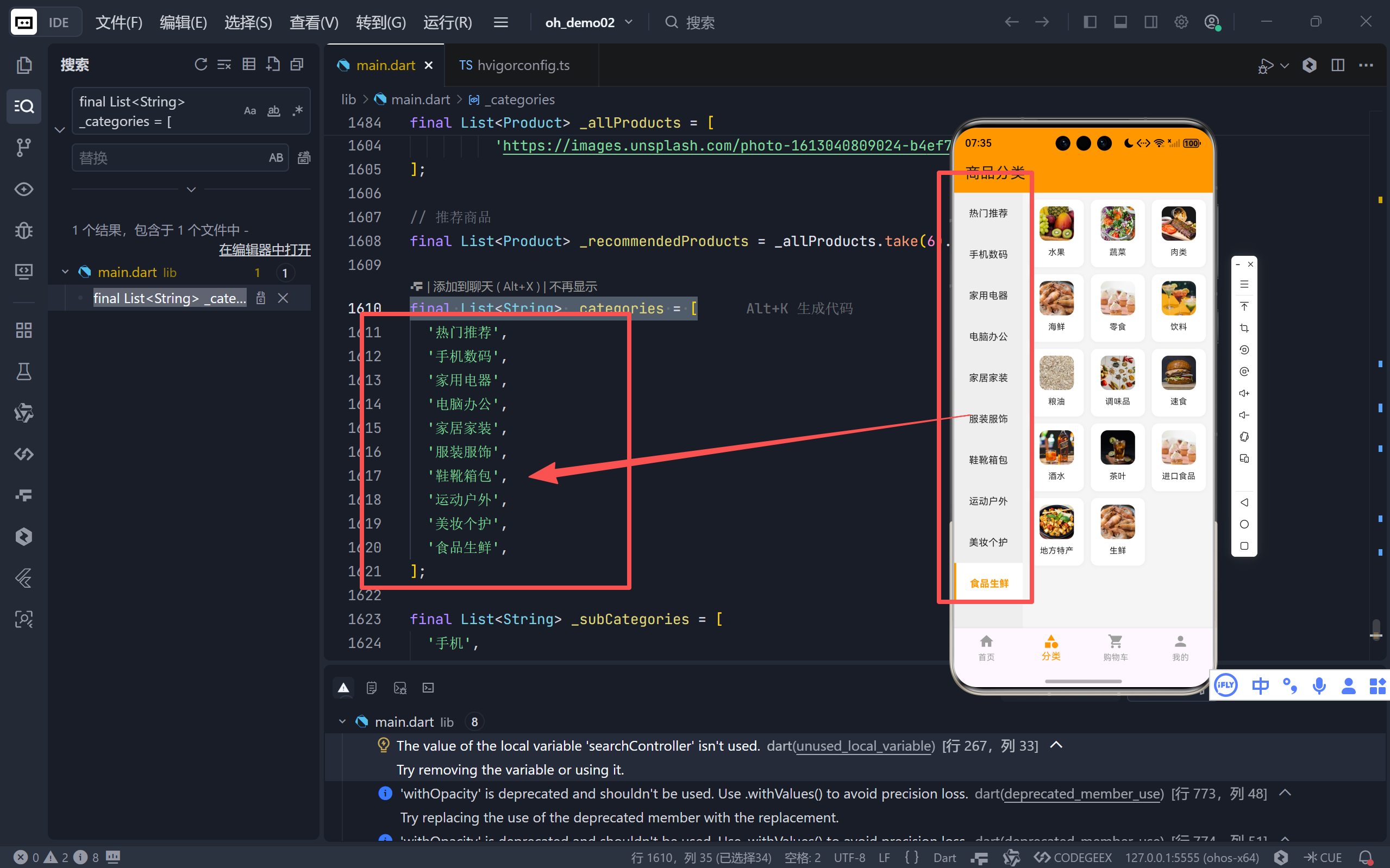
- 共 10 个一级类目,覆盖主流电商品类。
- "热门推荐"作为默认入口,引导新用户探索。
2.2 动态子分类映射 (_categorySubCategories)
dart
final Map<int, List<String>> _categorySubCategories = {
  0: ['手机','平板','耳机', ...], // 热门推荐
  1: ['手机','平板','耳机', ...], // 手机数码
  2: ['冰箱','洗衣机','空调', ...], // 家用电器
  // ... 其他8个类目
};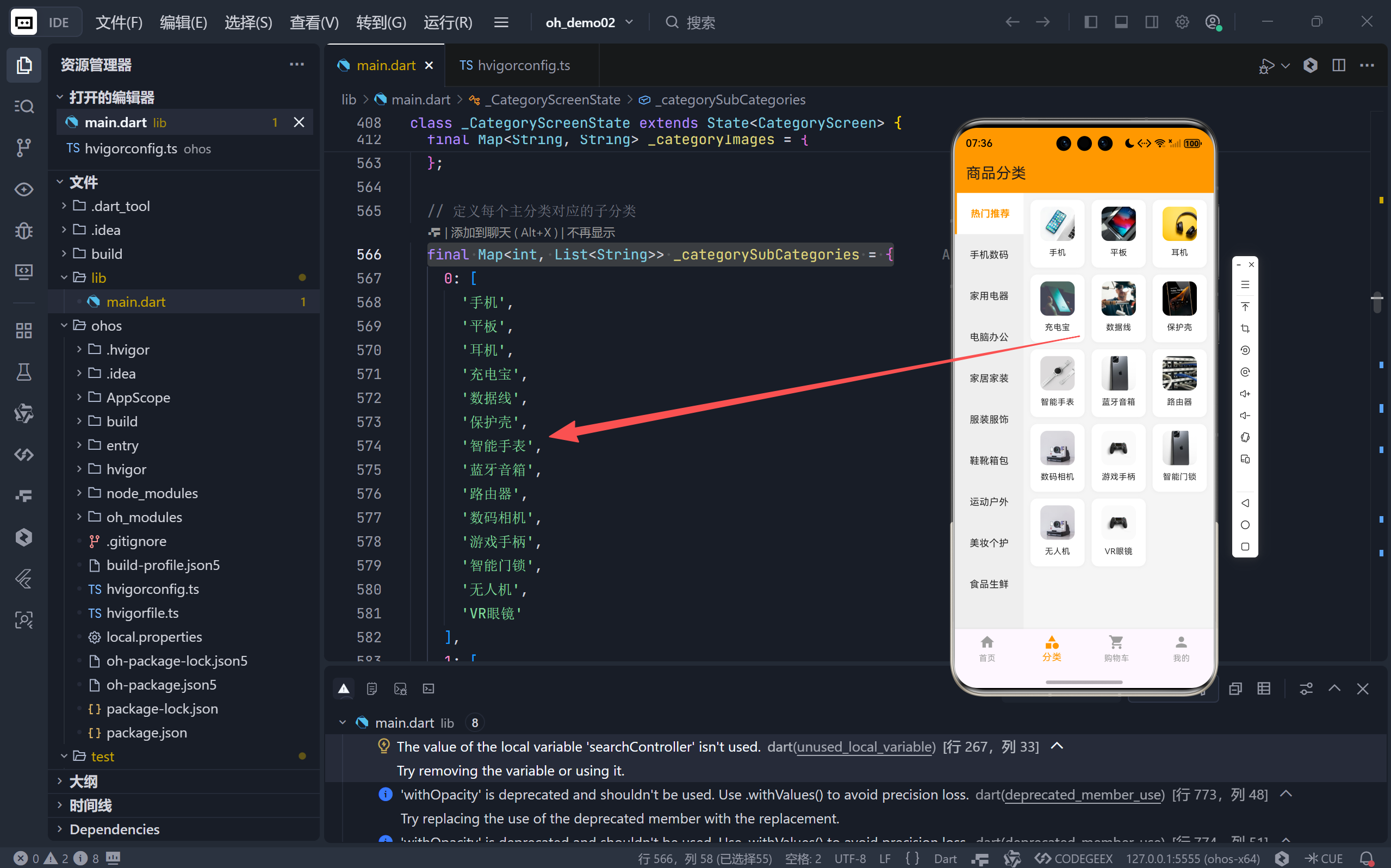
- Key 为
_categories的索引,Value 为对应的子分类列表。- 每个主类目下有 14 个精准子类目,例如"手机数码"包含"行车记录仪"、"电子烟"等细分项。
2.3 图片资源映射 (_categoryImages)
dart
final Map<String, String> _categoryImages = {
  '手机': 'https://images.unsplash.com/...?w=200',
  '平板': 'https://images.unsplash.com/...?w=200',
  // ... 覆盖所有子分类
};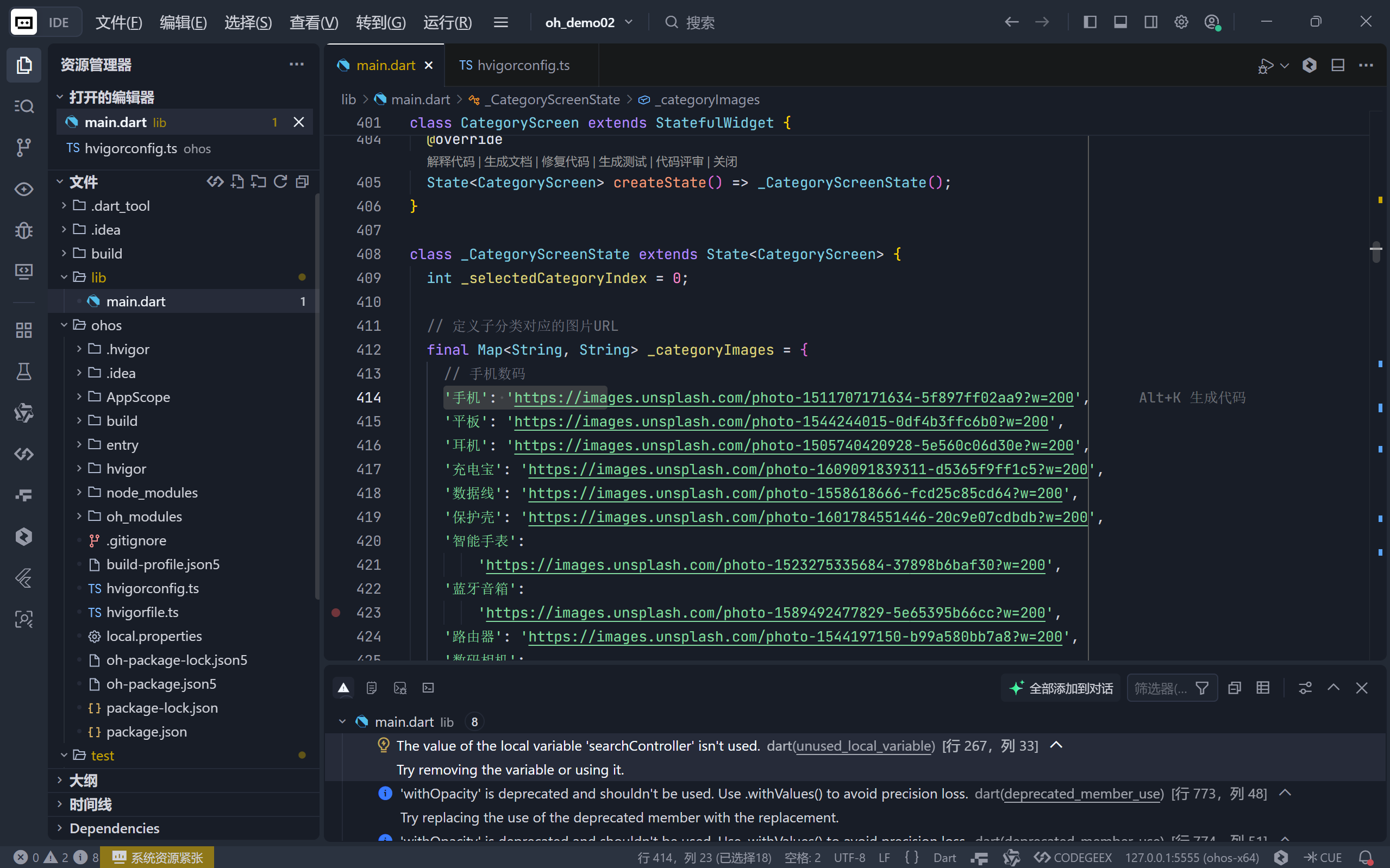
- 为每个子分类提供专属图片 URL,极大提升视觉吸引力。
- 使用 Unsplash 高质量免费图库,保证演示效果。
💡 关键方法 :
get _currentSubCategories动态返回当前选中主类目下的子分类列表。
dartList<String> get _currentSubCategories { return _categorySubCategories[_selectedCategoryIndex] ?? _subCategories; }
三、交互逻辑:状态管理与用户反馈
增强版分类页的核心升级在于 完整的交互闭环。
3.1 选中状态管理
dart
int _selectedCategoryIndex = 0; // 默认选中第一个

// 左侧列表项点击事件
onTap: () {
  setState(() {
    _selectedCategoryIndex = index; // 更新状态
  });
  // 显示 SnackBar 提示
  ScaffoldMessenger.of(context).showSnackBar(
    SnackBar(content: Text('已选择 ${_categories[index]}'))
  );
}setState触发 UI 重建,右侧子分类列表自动更新。SnackBar提供即时操作反馈,符合 Material Design 规范。
3.2 视觉状态同步
左侧列表项根据 _selectedCategoryIndex 动态调整样式:
dart
final isSelected = index == _selectedCategoryIndex;
decoration: BoxDecoration(
  color: isSelected ? Colors.white : Colors.transparent,
  border: isSelected
      ? Border(left: BorderSide(color: Colors.orange, width: 3))
      : null,
),
child: Text(
  _categories[index],
  style: TextStyle(
    color: isSelected ? Colors.orange : Colors.black87,
    fontWeight: isSelected ? FontWeight.bold : FontWeight.normal,
  ),
)
- 选中项:白色背景 + 左侧橙色边框 + 橙色粗体文字。
- 未选中项:透明背景 + 黑色常规文字。
- 视觉焦点明确,避免用户迷失。
四、视觉呈现:SubCategoryCard 的精致设计
右侧的子分类不再是简单的图标+文字,而是功能丰富的可交互卡片。
4.1 卡片结构
dart
class SubCategoryCard extends StatefulWidget {
  final String category;
  final String imageUrl;
  final VoidCallback onTap;
}- 接收子分类名称、图片 URL 和点击回调,高度解耦。
4.2 核心特性:按压动效与状态反馈
通过 AnimationController 和 GestureDetector 实现拟物化交互:
dart
// 按压时缩放
onTapDown: (_) {
  _isPressed = true;
  _animationController.forward(); // 启动缩小动画
},
onTapUp: (_) {
  _isPressed = false;
  _animationController.reverse();
  widget.onTap(); // 触发外部回调
}
视觉变化细节:
| 状态 | 图片边框 | 文字颜色 | 阴影效果 | 整体缩放 |
|---|---|---|---|---|
| 常态 | 无 | 黑色 | 轻微灰色阴影 | 1.0x |
| 按压 | 橙色边框 | 橙色粗体 | 橙色发光阴影 | 0.92x |
✨ 用户体验价值:这种微交互让用户感知到"按钮被按下",提供物理世界的操作反馈,极大提升操作信心和愉悦感。
4.3 图片加载的健壮性处理
dart
Image.network(
  widget.imageUrl,
  errorBuilder: (context, error, stackTrace) {
    // 加载失败:显示渐变色背景 + 相机图标
    return Container(
      decoration: BoxDecoration(
        gradient: LinearGradient(colors: _isPressed ? [Colors.orange, ...] : [...])
      ),
      child: Icon(Icons.image, color: _isPressed ? Colors.white : Colors.orange),
    );
  },
  loadingBuilder: (context, child, loadingProgress) {
    // 加载中:显示圆形进度条
    if (loadingProgress == null) return child;
    return CircularProgressIndicator(color: Colors.orange);
  },
)
- 优雅降级:网络问题或图片失效时,不显示空白,而是有意义的占位符。
- 加载指示:用户明确知道内容正在加载,减少等待焦虑。
五、功能扩展:点击事件的预留接口
虽然当前点击子分类仅弹出 SnackBar,但代码已为未来功能做好准备:
dart
// 在 CategoryScreen 中
onTap: () {
  ScaffoldMessenger.of(context).showSnackBar(
    SnackBar(content: Text('查看 ${_currentSubCategories[index]}'))
  );
  // TODO: 此处可跳转到该子分类的商品列表页
  // Navigator.push(context, MaterialPageRoute(builder: (_) => ProductListScreen(category: _currentSubCategories[index])));
}- 清晰的 TODO 注释:指明了下一步开发方向。
- 低耦合设计 :
SubCategoryCard通过onTap回调将控制权交还给父组件,便于灵活扩展。
六、总结:从"能用"到"好用"的进化
对比基础版本的静态分类页,增强版实现了质的飞跃:
| 维度 | 基础版本 | 增强版本 |
|---|---|---|
| 数据 | 硬编码少量子分类 | 结构化映射,覆盖140+子类目 |
| 交互 | 无状态,不可点击 | 完整选中状态管理 + SnackBar反馈 |
| 视觉 | 静态图标+文字 | 按压动效 + 图片加载状态管理 |
| 扩展性 | 难以维护 | 模块化组件,预留跳转接口 |
🏁 最终呈现效果 :
用户进入分类页,左侧高亮"热门推荐",右侧展示14个带精美图片的子分类卡片。点击任意主类目(如"美妆个护"),左侧高亮切换,右侧平滑过渡到对应的14个美妆子类目(护肤、彩妆、香水...)。点击任一子分类卡片,卡片产生按压反馈,并提示"查看 子类目名"。
这套实现不仅满足了当前需求,更为后续接入真实商品数据、实现无限滚动、添加搜索过滤等功能打下了坚实的基础。它完美诠释了 Flutter 如何通过 声明式 UI + 精细的状态管理 + 丰富的动效,构建出媲美原生的复杂应用界面。
🌐 加入社区
欢迎加入 开源鸿蒙跨平台开发者社区 ,获取最新资源与技术支持:
技术因分享而进步,生态因共建而繁荣 。
------ 晚霞的不甘 · 与您共赴鸿蒙跨平台开发之旅