先说需求:我在同一个场景文件下,使用不同的场景,将场景作为预制体
但是这样有个问题:烘焙的场景没法动态加载出来
于是有这样一个脚本
csharp
using System.Collections.Generic;
using UnityEditor;
using UnityEngine;

[DisallowMultipleComponent]
[ExecuteInEditMode]

//通过将烘焙好的光照贴图,挂到这个预制体上,运行时手动调整光照设置
public class PrefabLightmapsData : MonoBehaviour
{
    [System.Serializable]
    struct RendererInfo
    {
        public Terrain terrain;
        public Renderer renderer;
        public int lightmapIndex;
        public Vector4 lightmapOffsetScale;
    }

    [SerializeField]
    RendererInfo[] m_RendererInfo;
    [SerializeField]
    Texture2D[] m_LightmapsColor;
    [SerializeField]
    Texture2D[] _lightmaps;

    public void Init()
    {
        if (m_RendererInfo == null || m_RendererInfo.Length == 0)
            return;

        var lightmaps = LightmapSettings.lightmaps;
        var combinedLightmaps = new LightmapData[lightmaps.Length + m_LightmapsColor.Length];

        lightmaps.CopyTo(combinedLightmaps, 0);
        for (int i = 0; i < m_LightmapsColor.Length; i++)
        {
            combinedLightmaps[i + lightmaps.Length] = new LightmapData();
            combinedLightmaps[i + lightmaps.Length].lightmapColor = m_LightmapsColor[i];
            combinedLightmaps[i + lightmaps.Length].lightmapDir = _lightmaps[i];

        }

        ApplyRendererInfo(m_RendererInfo, lightmaps.Length);
        LightmapSettings.lightmaps = combinedLightmaps;
    }


    static void ApplyRendererInfo(RendererInfo[] infos, int lightmapOffsetIndex)
    {
        for (int i = 0; i < infos.Length; i++)
        {
            var info = infos[i];
            if (info.renderer != null)
            {
                info.renderer.lightmapIndex = info.lightmapIndex + lightmapOffsetIndex;
                info.renderer.lightmapScaleOffset = info.lightmapOffsetScale;
            }
            else if (info.terrain != null)
            {
                info.terrain.lightmapIndex = info.lightmapIndex + lightmapOffsetIndex;
                info.terrain.lightmapScaleOffset = info.lightmapOffsetScale;
            }
        }
    }


#if UNITY_EDITOR
    [UnityEditor.MenuItem("Tools/Bake Prefab Lightmaps")]
    static void GenerateLightmapInfo()
    {
        if (UnityEditor.Lightmapping.giWorkflowMode != UnityEditor.Lightmapping.GIWorkflowMode.OnDemand)
        {
            Debug.LogError("ExtractLightmapData requires that you have baked you lightmaps and Auto mode is disabled.");
            return;
        }
        UnityEditor.Lightmapping.Bake();

        PrefabLightmapsData[] prefabs = GameObject.FindObjectsOfType<PrefabLightmapsData>();

        foreach (var instance in prefabs)
        {
            var gameObject = instance.gameObject;
            var rendererInfos = new List<RendererInfo>();
            var lightmapsColor = new List<Texture2D>();
            List<Texture2D> lightmapsDir = new List<Texture2D>();

            GenerateLightmapInfo(gameObject, rendererInfos, lightmapsColor, lightmapsDir);

            instance.m_RendererInfo = rendererInfos.ToArray();
            instance.m_LightmapsColor = lightmapsColor.ToArray();
            instance._lightmaps = lightmapsDir.ToArray();


            var targetPrefab = PrefabUtility.GetCorrespondingObjectFromOriginalSource(instance.gameObject) as GameObject;
            if (targetPrefab != null)
            {
                GameObject root = PrefabUtility.GetOutermostPrefabInstanceRoot(instance.gameObject);

                if (root != null)
                {
                    GameObject rootPrefab = PrefabUtility.GetCorrespondingObjectFromSource(instance.gameObject);
                    string rootPath = AssetDatabase.GetAssetPath(rootPrefab);
                    PrefabUtility.UnpackPrefabInstanceAndReturnNewOutermostRoots(root, PrefabUnpackMode.OutermostRoot);
                    try
                    {
                        PrefabUtility.ApplyPrefabInstance(instance.gameObject, InteractionMode.AutomatedAction);
                    }
                    catch { }
                    finally
                    {
                        PrefabUtility.SaveAsPrefabAssetAndConnect(root, rootPath, InteractionMode.AutomatedAction);
                    }
                }
                else
                {
                    PrefabUtility.ApplyPrefabInstance(instance.gameObject, InteractionMode.AutomatedAction);
                }
            }
        }
    }

    static void GenerateLightmapInfo(GameObject root, List<RendererInfo> rendererInfos, List<Texture2D> lightmapsColor, List<Texture2D> lightmapsDir)
    {
        var renderers = root.GetComponentsInChildren<MeshRenderer>();
        foreach (MeshRenderer renderer in renderers)
        {
            if (renderer.lightmapIndex != -1)
            {
                RendererInfo info = new RendererInfo();
                info.renderer = renderer;
                if (renderer.lightmapScaleOffset != Vector4.zero)
                {
                    info.lightmapOffsetScale = renderer.lightmapScaleOffset;
                    Texture2D lightmapColor = LightmapSettings.lightmaps[renderer.lightmapIndex].lightmapColor;
                    Texture2D lightmapDir = LightmapSettings.lightmaps[renderer.lightmapIndex].lightmapDir;

                    info.lightmapIndex = lightmapsColor.IndexOf(lightmapColor);
                    if (info.lightmapIndex == -1)
                    {
                        info.lightmapIndex = lightmapsColor.Count;
                        lightmapsColor.Add(lightmapColor);
                        lightmapsDir.Add(lightmapDir);
                    }

                    rendererInfos.Add(info);
                }
            }
        }

        var Terrainrenderers = root.GetComponentsInChildren<Terrain>();
        foreach (var terrain in Terrainrenderers)
        {
            if (terrain.lightmapIndex != -1)
            {
                RendererInfo info = new RendererInfo();
                info.terrain = terrain;
                if (terrain.lightmapScaleOffset != Vector4.zero)
                {
                    info.lightmapOffsetScale = terrain.lightmapScaleOffset;
                    Texture2D lightmapColor = LightmapSettings.lightmaps[terrain.lightmapIndex].lightmapColor;
                    Texture2D lightmapDir = LightmapSettings.lightmaps[terrain.lightmapIndex].lightmapDir;

                    info.lightmapIndex = lightmapsColor.IndexOf(lightmapColor);
                    if (info.lightmapIndex == -1)
                    {
                        info.lightmapIndex = lightmapsColor.Count;
                        lightmapsColor.Add(lightmapColor);
                        lightmapsDir.Add(lightmapDir);
                    }

                    rendererInfos.Add(info);
                }
            }
        }
    }
#endif
}
把这个脚本挂在场景预制体上,烘焙完成后生成贴图,之后运行时调用Init方法就可以了
这个脚本代码是没问题的,但是实际上打包后,却发现整个场景经常性没有光照!也就是场景纯黑的,只有偶尔情况下才会有光照
经过多次测试,我发现是Lighting Data Asset为None导致的,如图1
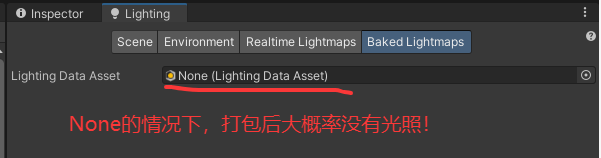
【图1】
即使给预制体挂好了脚本和烘焙信息,也是会出现问题,只有给Lighting Data Asset拖拽上光照数据,才是正常的,如图2
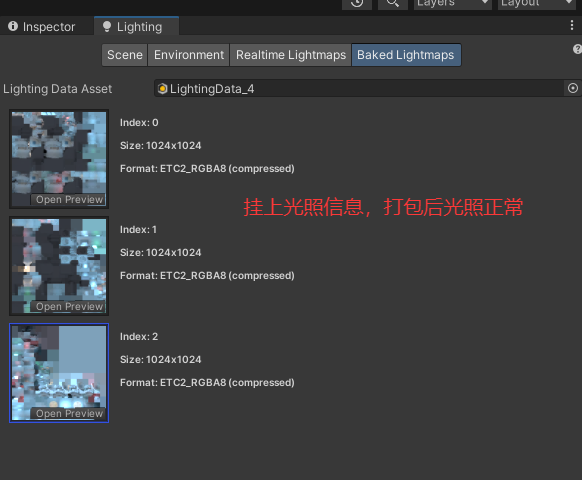
【图2】
这样再打包就正常了