1、Cargo.toml文件
[dependencies]
docx-rs = "0.4"
serde = { version = "1.0", features = ["derive"] }
serde_json = "1.0"
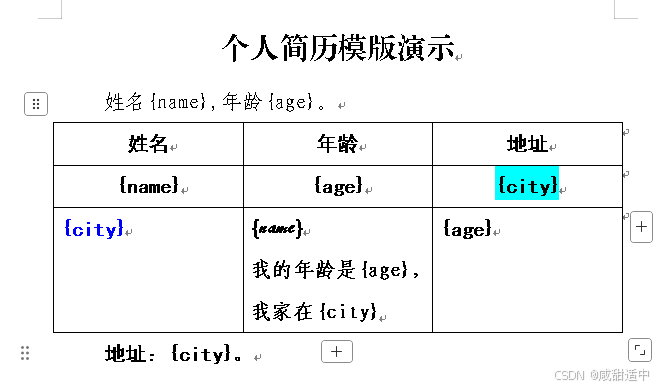
2、docx模版格式样式
我的名字是{name},我的年龄是{age}.....
- 程序会自动替换模版
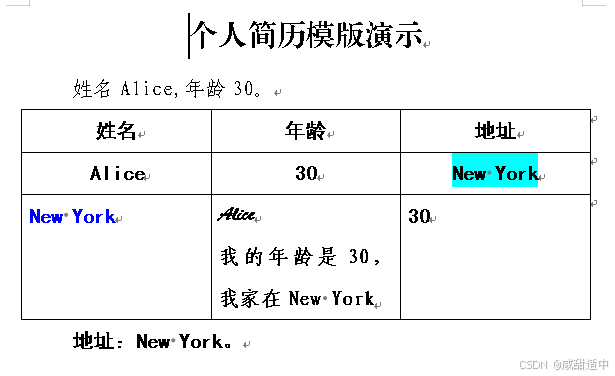
{xxx}中的内容为数据内容,分别生成docx。
{xxxx}可以根据数据内容自定义名称,以大括号包裹。- 模版内的段落、文字等格式不会改变,运行程序前,请自行设置好模版文档格式。
- 表格内,同样可以使用
{xxxx}模版样式
- 本代码批量生成的新
docx文档位于项目目录下,建议添加新建输出目录
2.1 docx模版样式参考
2.2 生成的单个docx文件参考
3、遍历模版中的段落和表格生成新docx文档(完整代码)
use docx_rs::{Docx, read_docx};
use serde::Deserialize;
use std::collections::HashMap;
use std::fs;
use std::path::Path;

/// 人员数据结构
#[derive(Deserialize, Debug)]
struct PersonData {
    name: String,
    age: u8,
    city: String,
}

/// 将字符串中的占位符替换成实际值
fn replace_placeholders(text: &str, data_map: &HashMap<&str, &str>) -> String {
    // 遍历替换数据映射,将占位符替换为实际值
    data_map.iter().fold(text.to_string(), |acc, (key, value)| {
        // 构建占位符字符串
        let placeholder = format!("{{{}}}", key);
        // 替换占位符为实际值
        acc.replace(&placeholder, value)
    })
}

/// 处理单个文档,替换占位符并保存
fn process_document_with_data(
    mut doc: Docx,
    output_path: &Path,
    person: &PersonData,
) -> Result<(), Box<dyn std::error::Error>> {
    // 将年龄转换为字符串
    let age_str = person.age.to_string();
    // 创建替换数据映射
    let data_map: HashMap<&str, &str> = [
        ("name", person.name.as_str()),
        ("age", age_str.as_str()),
        ("city", person.city.as_str()),
    ]
    .into_iter()
    .collect();

    // 遍历文档中的段落、表格,替换占位符
    for child in &mut doc.document.children {
        // 处理段落
        if let docx_rs::DocumentChild::Paragraph(para) = child {
            // 遍历段落中的run,替换文本内容并保留格式
            for para_child in &mut para.children {
                if let docx_rs::ParagraphChild::Run(run) = para_child {
                    // 保存原始run的所有子元素
                    let original_children = std::mem::take(&mut run.children);

                    // 处理每个run子元素
                    for run_child in original_children {
                        match run_child {
                            docx_rs::RunChild::Text(text) => {
                                // 替换文本内容
                                let replaced_text = replace_placeholders(&text.text, &data_map);
                                // 创建新的文本节点并添加到run的children中
                                run.children
                                    .push(docx_rs::RunChild::Text(docx_rs::Text::new(
                                        replaced_text,
                                    )));
                            }
                            other => {
                                // 保留其他类型的子元素(保留格式)
                                run.children.push(other);
                            }
                        }
                    }
                }
            }
        }else if let docx_rs::DocumentChild::Table(table) = child {   // 处理表格
            for table_child in &mut table.rows{
                if let docx_rs::TableChild::TableRow(row) =table_child{
                    for row_child in &mut row.cells{
                        if let docx_rs::TableRowChild::TableCell(cell) = row_child{
                            for cell_content in &mut cell.children{
                                if let docx_rs::TableCellContent::Paragraph(para)=cell_content{
                                    for para_child in &mut para.children{
                                        if let docx_rs::ParagraphChild::Run(run) = para_child {
                                            // 保存原始run的所有子元素
                                            let original_children = std::mem::take(&mut run.children);

                                            // 处理每个run子元素
                                            for run_child in original_children {
                                                match run_child {
                                                    docx_rs::RunChild::Text(text) => {
                                                        // 替换文本内容
                                                        let replaced_text = replace_placeholders(&text.text, &data_map);
                                                        // 创建新的文本节点并添加到run的children中
                                                        run.children
                                                            .push(docx_rs::RunChild::Text(docx_rs::Text::new(
                                                                replaced_text,
                                                            )));
                                                    }
                                                    other => {
                                                        // 保留其他类型的子元素(保留格式)
                                                        run.children.push(other);
                                                    }
                                                }
                                            }
                                        }
                                    }
                                }
                            }
                        }
                    }
                }
            }
            println!("这是表格!");
        }
    }

    // 保存修改后的文档
    let file = fs::File::create(output_path)?;
    let xml_docx = doc.build();
    xml_docx.pack(file)?;

    Ok(())
}

/// 读取模板文档
fn read_template(template_path: &Path) -> Result<Docx, Box<dyn std::error::Error>> {
    let template_content = fs::read(template_path)?;
    let doc = read_docx(&template_content)?;
    Ok(doc)
}

fn main() -> Result<(), Box<dyn std::error::Error>> {
    // 示例人员数据集
    let persons = vec![
        PersonData {
            name: "Alice".to_string(),
            age: 30,
            city: "New York".to_string(),
        },
        PersonData {
            name: "Bob".to_string(),
            age: 25,
            city: "San Francisco".to_string(),
        },
        PersonData {
            name: "Charlie".to_string(),
            age: 35,
            city: "Chicago".to_string(),
        },
    ];
    // 模板文件路径
    let template_path = Path::new("template.docx");

    // 验证模板文件存在
    if !template_path.exists() {
        return Err(format!("模板文件不存在: {:?}", template_path).into());
    }

    // 读取模板文档(只读取一次,提高性能)
    let template_doc = read_template(template_path)?;

    // 循环处理每个人员的数据
    for (i, person) in persons.iter().enumerate() {
        // 为每个人员生成唯一的输出文件名
        let output_filename = format!("output_{}.docx", i + 1);
        // 输出文件路径
        let output_path = Path::new(&output_filename);
        // 克隆模板文档,避免重复读取文件
        let doc = template_doc.clone();

        match process_document_with_data(doc, output_path, person) {
            Ok(_) => println!("✅ 已成功生成 {}", output_filename),
            Err(e) => {
                eprintln!("❌ 处理失败 {}: {:?}", output_filename, e);
                // 继续处理下一个文档,不中断整个流程
            }
        };
    }

    println!("🎉 全部文档均已生成完毕!");
    Ok(())
}
4、提取段落相同代码为函数后(完整代码)
use docx_rs::{Docx, read_docx, Paragraph};
use serde::Deserialize;
use std::collections::HashMap;
use std::fs;
use std::path::Path;

/// 人员数据结构
#[derive(Deserialize, Debug)]
struct PersonData {
    name: String,
    age: u8,
    city: String,
}

/// 将字符串中的占位符替换成实际值
fn replace_placeholders(text: &str, data_map: &HashMap<&str, &str>) -> String {
    // 遍历替换数据映射,将占位符替换为实际值
    data_map.iter().fold(text.to_string(), |acc, (key, value)| {
        // 构建占位符字符串
        let placeholder = format!("{{{}}}", key);
        // 替换占位符为实际值
        acc.replace(&placeholder, value)
    })
}

/// 处理单个文档,替换占位符并保存
fn process_document_with_data(
    mut doc: Docx,
    output_path: &Path,
    person: &PersonData,
) -> Result<(), Box<dyn std::error::Error>> {
    // 将年龄转换为字符串
    let age_str = person.age.to_string();
    // 创建替换数据映射
    let data_map: HashMap<&str, &str> = [
        ("name", person.name.as_str()),
        ("age", age_str.as_str()),
        ("city", person.city.as_str()),
    ]
    .into_iter()
    .collect();

    // 遍历文档中的段落,替换占位符
    for child in &mut doc.document.children {
        if let docx_rs::DocumentChild::Paragraph(para) = child {

            // 遍历段落中的run,替换文本内容并保留格式
            paragraph_replace(para,data_map.clone());

        }else if let docx_rs::DocumentChild::Table(table) = child {
            for table_child in &mut table.rows{
                if let docx_rs::TableChild::TableRow(row) =table_child{
                    for row_child in &mut row.cells{
                        if let docx_rs::TableRowChild::TableCell(cell) = row_child{
                            for cell_content in &mut cell.children{
                                if let docx_rs::TableCellContent::Paragraph(para)=cell_content{
                                    // 遍历段落中的run,替换文本内容并保留格式
                                    paragraph_replace(para,data_map.clone());
                                }
                            }
                        }
                    }
                }
            }
        }
    }

    // 保存修改后的文档
    let file = fs::File::create(output_path)?;
    let xml_docx = doc.build();
    xml_docx.pack(file)?;

    Ok(())
}

/// 替换段落内的模版内容,因段落、表格单独遍历,所以提取内容重复使用
fn paragraph_replace(para: &mut Paragraph,data_map: HashMap<&str, &str>)  {
    // 遍历段落中的run,替换文本内容并保留格式
    for para_child in &mut para.children {
        if let docx_rs::ParagraphChild::Run(run) = para_child {
            // 保存原始run的所有子元素
            let original_children = std::mem::take(&mut run.children);

            // 处理每个run子元素
            for run_child in original_children {
                match run_child {
                    docx_rs::RunChild::Text(text) => {
                        // 替换文本内容
                        let replaced_text = replace_placeholders(&text.text, &data_map);
                        // 创建新的文本节点并添加到run的children中
                        run.children
                            .push(docx_rs::RunChild::Text(docx_rs::Text::new(
                                replaced_text,
                            )));
                    }
                    other => {
                        // 保留其他类型的子元素(保留格式)
                        run.children.push(other);
                    }
                }
            }
        }
    }
}
/// 读取模板文档
fn read_template(template_path: &Path) -> Result<Docx, Box<dyn std::error::Error>> {
    let doc = read_docx(&fs::read(template_path)?)?;

    Ok(doc)
}

fn main() -> Result<(), Box<dyn std::error::Error>> {
    // 示例人员数据集
    let persons = vec![
        PersonData {
            name: "Alice".to_string(),
            age: 30,
            city: "New York".to_string(),
        },
        PersonData {
            name: "Bob".to_string(),
            age: 25,
            city: "San Francisco".to_string(),
        },
        PersonData {
            name: "Charlie".to_string(),
            age: 35,
            city: "Chicago".to_string(),
        },
    ];
    // 模板文件路径
    let template_path = Path::new("template.docx");

    // 验证模板文件存在
    if !template_path.exists() {
        return Err(format!("模板文件不存在: {:?}", template_path).into());
    }

    // 读取模板文档(只读取一次,提高性能)
    let template_doc = read_template(template_path)?;

    // 循环处理每个人员的数据
    for (i, person) in persons.iter().enumerate() {
        // 为每个人员生成唯一的输出文件名
        let output_filename = format!("output_{}.docx", i + 1);
        // 输出文件路径
        let output_path = Path::new(&output_filename);
        // 克隆模板文档,避免重复读取文件
        let doc = template_doc.clone();

        match process_document_with_data(doc, output_path, person) {
            Ok(_) => println!("✅ 已成功生成 {}", output_filename),
            Err(e) => {
                eprintln!("❌ 处理失败 {}: {:?}", output_filename, e);
                // 继续处理下一个文档,不中断整个流程
            }
        };
    }

    println!("🎉 全部文档均已生成完毕!");
    Ok(())
}